1
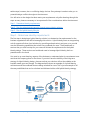
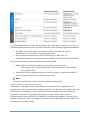
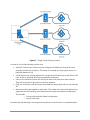
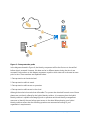
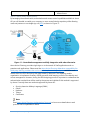
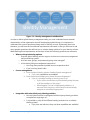
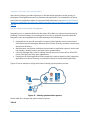
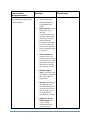
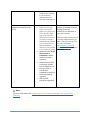
Each interaction in the diagram showed in Figure X represents one access control scenario that can be covered by Azure AD. Below you have a description of each scenario: 1. Conditional Access to applications that are hosted on-premises: You can use registered devices with access policies for applications that are configured to use AD FS with Windows Server 2012 R2. For more information about setting up conditional access for on-premises, see Setting up On-premises Conditional Access using Azure Active Directory Device Registration. 2. Access Control to Azure Management Portal: Azure also has the capability to control access to the Management Portal by using RBAC (Role Based Access Control). This method enables the company to restrict the amount of operations that an individual can do once he has access to Azure Management Portal. By using RBAC to control access to the portal, IT Admins ca delegate access by using the following access management approaches: Group-based role assignment: You can assign access to Azure AD groups that can be synced from your local Active Directory. This enables you to leverage the existing investments that your organization has made in tooling and processes for managing groups. You can also use the delegated group management feature of Azure AD Premium. Leverage built in roles in Azure: You can use three roles — Owner, Contributor, and Reader, to ensure that users and groups have permission to do only the tasks they need to do their jobs. Granular access to resources: You can assign roles to users and groups for a particular subscription, resource group, or an individual Azure resource such as a website or database. In this way, you can ensure that users have access to all the resources they need and no access to resources that they do not need to manage. Note Read Role-based access control in Azure Preview portal to know more details about this capability. For developers that are building applications and want to customize the access control for them, it is also possible to use Azure AD Application Roles for authorization. Review this WebApp-RoleClaims-DotNet example on how to build your app to use this capability. 3. Conditional Access for Office 365 applications with Microsoft Intune: IT admins can provision conditional access device policies to secure corporate resources, while at the same time allowing information workers on compliant devices to access the services. For more information, see Conditional Access Device Policies for Office 365 services. 4. Conditional Access for Saas Apps: This feature allows you to configure per-application multi-factor authentication access rules and the ability to block access for users not on a trusted network. You can apply the multi-factor authentication rules to all users that are assigned to the application, or only for users within specified security groups. Users may be excluded from the 32 Azure Hybrid Identity Design Considerations