1
Transfer NIOX® Values from a NIOX MINO® with a configured Test Card
A configured NIOX MINO Test Card is given a Name and Patient ID. See page 9 on how to configure a Test Card.
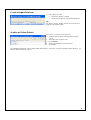
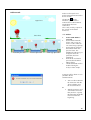
From the Main screen or the Patient Card screen
1. Click Receive. (The IR icon
on the Windows system tool bar
indicates that a connection to NIOX MINO has been established.)
2. Click Yes in the Receive Preview screen to add the NIOX Values to the
Patient.
Note!
NIOX Values from a configured Test Card can only be transferred to the set Patient Card. All new NIOX Values
since last time data was transferred can be received at the same time.
Transfer NIOX Values from a NIOX MINO without a Test Card
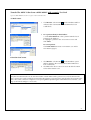
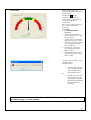
A. Main screen
1. Click Receive. (The IR icon
on the Windows system
tool bar indicates that a connection to NIOX MINO has
been established.)
2.
For a patient already in the database:
a. Click Select Patient to select a patient from the list of
patients in the database.
b. Highlight a patient in the Select Patient screen and
click Select.
For a new patient:
Click New Patient to create a new Patient. (See Add a
New Patient, page 6).
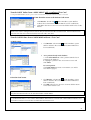
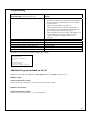
B. Patient Card screen
1. Click Receive. (The IR icon
on the Windows system
tool bar indicates that a connection to NIOX MINO has
been established.)
2. Click OK in the Receive Preview screen to add the NIOX
Value to the Patient Card.
Note!
Only the latest NIOX Value can be transferred from a NIOX MINO.
Caution!
It is recommended to use a Test Card in NIOX MINO. NIOX Values received from a NIOX MINO without a Test
Card can be transferred several times to more than one Patient Card.
8