1
Operating Instructions
Turning on the unit:
To turn on your Sonoma Breeze® locate your power cable and insert the AC power plug
into the wall socket and the power socket component into the plug located at the
back of the unit. Press the power switch located next to the power socket. The Sonoma
Breeze® will perform an initial self-test as indicated by a light sequence and an acoustic
signal at the back of the unit and then the ready light will turn to green.
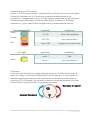
Understanding the Light Display:
Our engineers have designed a multi-functional display coded to tell you how
effectively and efficiently your unit is operating. Two identical light displays can be
located at the back and front of the unit. Follow the table below to understand the
meaning of each light.
Light
Indications
What you should do
Green Ready
Light
Indicates the unit is
functioning optimally
Relax
Yellow Warning
Light
Indicates the fan is not set
in automatic mode
Turn the fan knob
counterclockwise until it
clicks into automatic
Blinking Blue
Service Light
Indicates the MacroParticulate Filter needs to
be replaced
Replace the MacroParticulate Filter
Solid Blue Service
Light
Indicates the PCO-Purifier
Cores and UV lights need
to be replaced
Replace both the PCOPurifier Cores and UVlamps
Beeping red
Alarm Light
Indicates that there is an
internal problem
Contact your distributor
immediately
6|Page