1
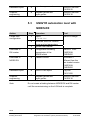
5.4
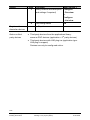
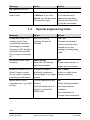
VISONIK automation level with
NIDES.RX
Action
Step
Create RXC project
1
2
3
Define groups
4
General VISONIK
engineering
5
6
Database import
7
Graphics
engineering
8
Note
Procedure
Tool
The following files are created:
“Project data”
"NIOPEN.ASC"
"RxNiBps.COL", containing:
– TSK111.TXT
(project image for BPS)
– TSK110.TXT
(Infolist for NIDES.RX)
Adapt GroupConfig.COL
manually to the project
RXT10
CA110412
Download RX coupling (CFE
application) to the BPS.
Carry out general VISONIK
engineering
DB Import: Import global and
project-specific data
VISOTOOL Editor
CA2Z8339
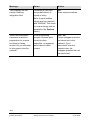
Integrate genies and
super genies
DESIGO INSIGHT
CA1Z9130
VISOTOOL
CA2Z8339
DESIGO INSIGHT
CA1Z9125
Do not create a binding between NIDES.RX and
VISONIK BPS until commissioning on the LON side is
complete.
21/32
Building Technologies
Building Automation
DESIGO RXT10.2 Quick guide
Integration into automation system (standard workflow)
CM110758en
30.09.2005