1
process
Starting work
We read all the documents, reviewed
the prototype Excel tool and talked to
the team.
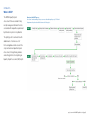
We began with a review of the whole
process to understand how it works.
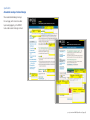
We sketched initial flow diagrams
and made notes to aid discussion and
understanding.
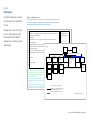
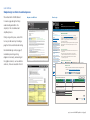
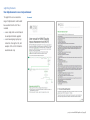
Word docs outlining the process
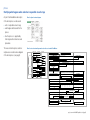
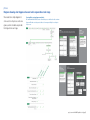
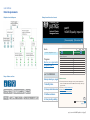
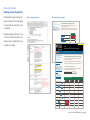
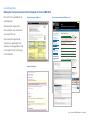
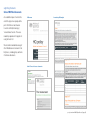
To help clarify how this tool could be used to create Equalities Impact Assessment
reports, we created structure maps and presented our understanding of how the
tool could work in MS Word docs to discuss with our clients.
Identifying Risk Areas
Risk record sheet***
Content from p.7, para 3-8 highlighting areas of risk and the need to group individual risks into areas and
Can be filled in on-line or
get approval from the priority setting team
printed out and filled in by
Links to: Example*
hand***
Content from bottom p.8-10, para 1-2 regarding need for evidence and what to do when no evidence
Links to:
Links to: Lengthy examples*
Back
Introduction to template from p.11 (without risk scoring at bottom) – possibly some re-design as document
Overview
Identifying
risk areas
Home*
could be filled in on-line or printed out and filled in by hand to record risks and evidence**
Link to: Printable risk-record sheet
Search
Home
Help/feedback to
REAG
Summary of risk areas. Simple summary table (which feeds into Priority setting activity (next section))****
Although embedded within the page I think it needs to be accessible directly from the home page.
Additional links to
Home
Setting up EIA process
Identifying Risk Areas
Priority setting
Commissioning an
Identify priority setting
- Group relevant risks
Gathering evidence
EIA
team
Creating prioritised list
Priority setting (next step)
Back
Organisation
Risk record sheet
Risk calculation
registration form
Register with
Summary of risk
Investigating an EIA
- conducting investigation
- holding a consultation
- drawing up an action plan
publishing an EIA
- documenting
- signing off
Reviewing an EIA
Useful documents
Printable process
and priority setting
description and
tools
guidance notes
Area of risk table
REAG
areas
* Here and elsewhere through the text (I haven’t marked them all) there are
links to examples and
more information.
In the current version, clicking on these links takes the user to a highlighted section of the examples sheet (a long list
Teamthe
membership
of all the examples) with a back button. Do we want to follow this? What are
alternatives? What would give us a
nice lead into a web-based version
form
Check
with Dorian
we think these
this would
be also
useful.
problems
aboutfrom
presenting
it at page
this point?
* **
I have
a query
about– whether
should
be Any
accessible
directly
the home
i.e. whether the
home
page is a directory
to to
the‘Save
whole
moment,
it probably
*** Presumably
need option
as’toolkit
for use(at
at the
different
timesI think
e.g. Save
as recordshould
of risk be)
areas for meeting date
xx,/xx/20xx
Additional
query for Dorian on whether user should be able to proceed with other tasks if the tasks on this
Draft map of EIA tool kit (080709) 5
page are not completed
****This is the ‘Areas of Risk Already Identified Table’ – doesn’t appear to be in the NEAT v5.0 . Note it has option for
* Home
links could
to all pages
and they link
publishing but I wonder if that is relevant at this point. It doesn’t have any date stamping
which
be important
if back to home
it is to be printed out for reference in Priority setting meetings
These tables are currently embedded in their parent page
but could be pulled out and accessed by links
These ‘pages’ may need to be combined into one
Draft map of EIA tool kit (080709) 2
project overview: NOMS Equalities tool [page 3]