1
Test Locking System
Programming A Personal Passcode
programming a personal passcode
Testing the Passcode
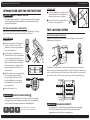
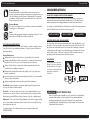
1 With the safe door open and the Live Bolts engaged, you can now
test the Electronic Locking System using the pre-set three digit
factory code. Locate the digital keypad on the front of the safe
and open up the protective cover to expose the keypad.
2
3
When the cover is opened, the keypad is activated and the
keypad backlight will turn on and remain on for approximately
five (5) seconds. The keypad is still active even when the
backlight turns off. It will turn on again when any key is pressed.
1
4
7
2
5
8
0
3
6
9
#
1
5
9
#
After properly entering the entire sequence, the green light will turn on and the
lock will click. You now have five (5) seconds to open the safe by turning the safe
door handle upward to the right.
Important
6
If handle will not turn
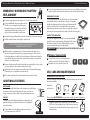
For added security, the safe will automatically lock out
entry for 15 minutes after three (3) attempts to open with
an invalid passcode.
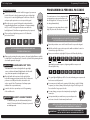
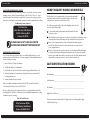
Open the protective cover on the front of the safe to expose the keypad.
2
With the safe in the open position, press the small reset button located on
the inside top edge of the door.
3
Enter your new three to eight digit (3-8) passcode followed by the # key.
P
A
S
S
C
O
D
E
#
Minimum 3 Digits
P
Leave the safe door open and proceed to Programming
a Personal Passcode.
security lockout periods
1
Immediately repeat the sequence, beginning with the new passcode
followed by the # key.
If the handle will not turn to the right after the green light
comes on, first turn the handle slightly back to the left until it
stops, then turn upwards to the right again to open.
Once the handle has been turned to the right, the live
bolts will disengage and retract into the door. At this point
you have successfully unlocked the safe and the door
can be opened. Note: This waterproof safe may require
additional force upon initial entry.
Important
Reset Button
NOTE: After pressing the reset button, the red and green lights
on the keypad will flash to indicate the programming
is authorized and you have 10 seconds to begin.
Note: All entries are accompanied by a beep and
the green light will flash.
5
To program your own unique three to eight
digit (3-8) passcode, follow these steps:
The pre-set three digit factory passcode is 159. Enter this
passcode as follows:
*
4
For security reasons, it is very important that
you program your own personal passcode
into the digital lock. The factory code should
be changed immediately.
15
MINUTES
A
S
S
C
O
D
E
#
4
The green light will light up solid for 5 seconds, indicating your new passcode
has been successfully entered.
5
Your new passcode will now be comprised of the three to eight (3-8) digit
sequence you selected, always followed by the # sign. The factory pre-set
Passcode will no longer open the safe.
6
You may change your passcode at any time by repeating the
same steps.
7
It is important that you write down your personal passcode
and secure it in a safe location away from the safe.
!
NOTE: If you forget your personal Passcode, access to the
safe can be made using the Emergency Override key.
Once your personal passcode is programmed, the
Important factory pre-set code will no longer open the safe.
5
6