1
CONTENTS
fi-5650C Image Scanner Operator's Guide
Introduction
1 NAMES AND FUNCTIONS OF PARTS
2 BASIC SCANNER OPERATION
3 SCANNING VARIOUS TYPES OF DOCUMENTS
4 DAILY CARE
5 REPLACING CONSUMABLES
6 TROUBLESHOOTING
7 ONLINE SETUP
8 DOCUMENT SPECIFICATION OF ADF
9 OPTIONS
10 SCANNER SPECIFICATIONS
Appendix
All Rights Reserved, Copyright (C) PFU LIMITED 2004
P3PC-E957-01EN
CONTENTS
Introduction
Introduction
Regulatory Information
Trademarks
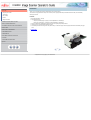
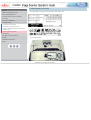
Thank you for purchasing the fi-5650C fi-5650C duplex color scanner product.
The fi-5650C is a high-performance duplex color scanner product, equipped with ADF (Automatic Document Feeder) for automatically
scanning documents.
Note, Liability
Preface
Features:
●
Safety Precautions
●
1 NAMES AND FUNCTIONS OF PARTS
2 BASIC SCANNER OPERATION
3 SCANNING VARIOUS TYPES OF DOCUMENTS
4 DAILY CARE
5 REPLACING CONSUMABLES
●
●
●
Basic High Resolution: 600 dpi.
High Speed Scanning:
Simplex (One-sided page): 55 pages per minute (Standard A4, 200/300 dpi)
Duplex (Two-sided page): 110 pages per minute (Standard A4, 200/300 dpi)
Scanner automatically reads images just with the touch of the [Scan] and [Send] to buttons.
Ultrasonic sensor can detect double feeding of pages.
Automatically switches the background color (black / white), corrects the images of skewed pages, and detects automatically the page
sizes.
→ Contents Map
6 TROUBLESHOOTING
7 ONLINE SETUP
8 DOCUMENT SPECIFICATION OF ADF
9 OPTIONS
10 SCANNER SPECIFICATIONS
Appendix
1|2
All Rights Reserved, Copyright (C) PFU LIMITED 2004
CONTENTS MAP
Introduction
Regulatory Information
Trademarks
Note, Liability
Preface
Safety Precautions
1 NAMES AND FUNCTIONS OF PARTS
1.1 Names and functions of parts
1.2 Functions of the operator
panel
2 BASIC SCANNER OPERATION
2.1 Turning the scanner ON/OFF
2.2 Loading documents onto the
2.3 Scanning documents
ADF
2.4 How to use the Scanner
Driver
3 SCANNING VARIOUS TYPES OF DOCUMENTS
3.1 Scanning double sided documents
3.2 Scanning documents with
different widths
3.3 Scanning document longer 3.4 Saving scanned images
3.5 Selecting a color to drop out
than A3 size
in PDF format
3.6 Skipping blank pages
3.7 Detecting double-feeds
3.8 Correcting skewed
documents
4 DAILY CARE
4.1 Cleaning materials and locations requiring
cleaning
4.2 Cleaning the ADF
5 REPLACING CONSUMABLES
5.1 Consumable and replacement cycle
5.2 Replacing the brake roller
5.3 Replacing the pick roller
set
6 TROUBLESHOOTING
6.3 Items to check before
6.2 Indications of operator panel
contacting the dealer where
for errors
you bought the scanner
6.4 Checking labels on the
scanner
7.1 Online setup
7.2 Double-feed detection
7.3 Setting edge erasing
7.4 Setting dropout color
7.6 Resetting the consumable counters
7.7 Adjusting the offset
7.8 Adjusting the scan scale
7.9 Power saving
8.1 Document size
8.2 Document quality
8.3 Maximum ADF capacity
8.4 Area not to be
perforated
8.6 Background Color Areas
8.7 Job Separation Sheet
6.1 Removing jammed documents
7 ONLINE SETUP
7.5 Setting of pre-pick mode
8 DOCUMENT SPECIFICATION OF ADF
9 OPTIONS
9.1 Extended memory board
10 SCANNER SPECIFICATIONS
10.1 Basic Specification
10.2 Installation specification
10.3 External dimensions
Appendix 2 Glossary
Items to check
Appendix
Appendix 1 "Scan" button and "Send to" button
1|2
All Rights Reserved, Copyright (C) PFU LIMITED 2004
Trouble Shooting
8.5 Double feed detection
conditions
CONTENTS
Regulatory Information
Introduction
Regulatory Information
FCC declaration
Trademarks
This equipment has been tested and found to comply with the limits for a Class B digital device, pursuant to Part 15 of the FCC Rules. These
limits are designed to provide reasonable protection against harmful interference in a residential installation. This equipment generates, uses,
and can radiate radio frequency energy and, if not installed and used in accordance with the instruction manual, may cause harmful
interference to radio communications. However, there is no guarantee that interference will not occur in a particular installation. If this
equipment does cause harmful interference to radio or television reception, which can be determined by turning the equipment off and on, the
user is encouraged to try to correct the interference by one or more of the following measures:
Note, Liability
Preface
Safety Precautions
1 NAMES AND FUNCTIONS OF PARTS
●
●
2 BASIC SCANNER OPERATION
●
●
3 SCANNING VARIOUS TYPES OF DOCUMENTS
4 DAILY CARE
FCC warning: Changes or modifications not expressly approved by the party responsible for compliance could void the user's authority to
operate the equipment.
ATTENTION
5 REPLACING CONSUMABLES
6 TROUBLESHOOTING
Reorient or relocate the receiving antenna.
Increase the separation between the equipment and receiver.
Connect the equipment into an outlet on a circuit different from that to which the receiver is located.
Consult your dealer or an experienced radio/TV technician.
●
●
The use of a shielded interface cable is required to comply with the Class B limits of Part 15 of FCC rules.
The length of the AC cable must be 3 meters (10 feet) or less.
7 ONLINE SETUP
1|2|3|4
8 DOCUMENT SPECIFICATION OF ADF
9 OPTIONS
10 SCANNER SPECIFICATIONS
Appendix
All Rights Reserved, Copyright (C) PFU LIMITED 2004
CONTENTS
Regulatory Information (Continued from the previous page)
Introduction
Regulatory Information
Canadian DOC Regulations
Trademarks
This digital apparatus does not exceed the Class B limit for radio noise emission from digital apparatus set out in the Radio interference
Regulations of the Canadian Department of Communications.
This Class B digital apparatus complies with Canadian ICES-003.
Le pésent appareil numérique n'ément pas de bruits radioélectriques dépaassant les limites applicables aux appareils numériques de la
classe B prescridtes dans le Réglesment sur le brouillage radioélectrique dicté par le ministere des Communications du Canada.
Cet appareil numérique de la classe B est conformme á la norme NMB-003 du Canada.
Note, Liability
Preface
Safety Precautions
1 NAMES AND FUNCTIONS OF PARTS
Bescheinigung des Herstellers / Importeurs
2 BASIC SCANNER OPERATION
Hiermit wird bescheinigt, daß der/die/das
fi-5650C
In Übereinsstimmung mit den Bestimmungen der EN45014(CE) funkentstört ist.
Laut Maschinenlärminformationsverordnung 3. GS GV, 18.01.1991:Der höchste Schalldruckpegel beträgt 70 dB (A) oder weniger gemäß
ISO/7779.
3 SCANNING VARIOUS TYPES OF DOCUMENTS
4 DAILY CARE
5 REPLACING CONSUMABLES
1|2|3|4
6 TROUBLESHOOTING
7 ONLINE SETUP
8 DOCUMENT SPECIFICATION OF ADF
9 OPTIONS
10 SCANNER SPECIFICATIONS
Appendix
All Rights Reserved, Copyright (C) PFU LIMITED 2004
CONTENTS
Regulatory Information (Continued from the previous page)
Introduction
Regulatory Information
International ENERGY STAR® Program
Trademarks
As an ENERGY STAR® Partner, PFU LIMITED has determined that this product meets the ENERGY STAR® guidelines for energy
efficiency.
Note, Liability
Preface
Safety Precautions
1 NAMES AND FUNCTIONS OF PARTS
2 BASIC SCANNER OPERATION
3 SCANNING VARIOUS TYPES OF DOCUMENTS
The International ENERGY STAR® Office Equipment Program is an international program that promotes energy saving through the
penetration of energy efficient computers and other office equipment. The program backs the development and dissemination of products
with functions that effectively reduce energy consumption. It is an open system in which business proprietors can participate voluntarily. The
targeted products are office equipment such as computers, monitors, printers, facsimiles, copiers, scanners, and multifunction devices. Their
standards and logos are uniform among participating nations.
4 DAILY CARE
1|2|3|4
5 REPLACING CONSUMABLES
6 TROUBLESHOOTING
7 ONLINE SETUP
8 DOCUMENT SPECIFICATION OF ADF
9 OPTIONS
10 SCANNER SPECIFICATIONS
Appendix
All Rights Reserved, Copyright (C) PFU LIMITED 2004
CONTENTS
Regulatory Information (Continued from the previous page)
Introduction
Regulatory Information
Use in High-safety Applications
Trademarks
1 NAMES AND FUNCTIONS OF PARTS
This product has been designed and manufactured on the assumption that it will be used in office, personal, domestic, regular industrial, and
general-purpose applications. It has not been designed and manufactured for use in applications (simply called "high-safety applications"
from here on) that directly involve danger to life and health when a high degree of safety is required, for example, in the control of nuclear
reactions at nuclear power facilities, automatic flight control of aircraft, air traffic control, operation control in mass-transport systems, medical
equipment for sustaining life, and missile firing control in weapons systems, and when provisionally the safety in question is not ensured. The
user should use this product with adopting measures for ensuring safety in such high-safety applications. PFU LIMITED assumes no liability
whatsoever for damages arising from use of this product by the user in high-safety applications, and for any claims or compensation for
damages by the user or a third party.
2 BASIC SCANNER OPERATION
About the use of mercury
Note, Liability
Preface
Safety Precautions
3 SCANNING VARIOUS TYPES OF DOCUMENTS
4 DAILY CARE
Lamp(s) inside this product contain mercury and
must be recycled or disposed of according to
local, state, or federal laws.
5 REPLACING CONSUMABLES
6 TROUBLESHOOTING
7 ONLINE SETUP
8 DOCUMENT SPECIFICATION OF ADF
To avoid unexpected injury, read the following carefully.
Doing the following actions may result in serious personal injuries:
●
9 OPTIONS
●
●
10 SCANNER SPECIFICATIONS
Do not put the substance in the lamp in your mouth as it contains mercury.
Do not incinerate, crush, or shred the scanner.
Do not breathe the chemical liquid contained in the scanner parts.
1|2|3|4
Appendix
All Rights Reserved, Copyright (C) PFU LIMITED 2004
CONTENTS
Trademarks
Introduction
Regulatory Information
Use in High-safety Applications
Trademarks
Microsoft, Windows, and Windows NT are registered trademarks of Microsoft Corporation in the United States and/or other countries.
Adobe, the Adobe logo, and Acrobat are either registered trademarks of Adobe Systems Incorporated in the United States and/or other
countries.
ISIS, QuickScan and their respective logos are trademarks or registered trade marks of Pixel Translations, a division of Captiva Software
Corporations in the United States.
Other product names are the trademarks or registered trademarks of the respective companies.
Note, Liability
Preface
Safety Precautions
1 NAMES AND FUNCTIONS OF PARTS
How Trademarks Are Indicated In This Manual
2 BASIC SCANNER OPERATION
References to operating systems (OS) are indicated as follows:
3 SCANNING VARIOUS TYPES OF DOCUMENTS
4 DAILY CARE
5 REPLACING CONSUMABLES
6 TROUBLESHOOTING
7 ONLINE SETUP
8 DOCUMENT SPECIFICATION OF ADF
Windows® 95:
Windows® 98:
Windows® Me:
WindowsNT® 4.0:
Windows® 2000:
Windows® XP:
Microsoft® Windows® 95 operating system.
Microsoft® Windows® 98 operating system.
Microsoft® Windows® Millennium Edition operating system.
Microsoft® WindowsNT® 4.0 Server operating system,
Microsoft® WindowsNT® 4.0 Workstation operating system.
Microsoft® Windows® 2000 Professional operating system.
Microsoft® Windows® XP Professional operating system,
Microsoft® Windows® XP Home Edition operating system.
Where there is no distinction between the different versions of the above operating system, the general term "Windows " is used.
1|2
9 OPTIONS
10 SCANNER SPECIFICATIONS
Appendix
All Rights Reserved, Copyright (C) PFU LIMITED 2004
CONTENTS
Trademarks (Continued from the previous page)
Introduction
Regulatory Information
Manufacturer
Trademarks
PFU LIMITED
Note, Liability
International Sales Dept., Imaging Business Division, Products Group
Preface
Solid Square East Tower, 580 Horikawa-cho, Saiwai-ku, Kawasaki-shi Kanagawa 212-8563, Japan
Safety Precautions
Phone : (81) 44-540-4538
1 NAMES AND FUNCTIONS OF PARTS
All Rights Reserved, Copyright© PFU LIMITED 2004
2 BASIC SCANNER OPERATION
1|2
3 SCANNING VARIOUS TYPES OF DOCUMENTS
4 DAILY CARE
5 REPLACING CONSUMABLES
6 TROUBLESHOOTING
7 ONLINE SETUP
8 DOCUMENT SPECIFICATION OF ADF
9 OPTIONS
10 SCANNER SPECIFICATIONS
Appendix
All Rights Reserved, Copyright (C) PFU LIMITED 2004
CONTENTS
Note, Liability
Introduction
Regulatory Information
READ ALL OF THIS MANUAL CAREFULLY BEFORE USING THIS PRODUCT. IF THIS PRODUCT IS NOT USED CORRECTLY,
UNEXPECTED INJURY MAY BE CAUSED TO USERS OR BYSTANDERS.
Trademarks
Note, Liability
Preface
Safety Precautions
While all efforts have been made to ensure the accuracy of all information in this manual, PFU assumes no liability to any party for any
damage caused by errors or omissions or by statements of any kind in this manual, its updates or supplements, whether such errors are
omissions or statements resulting from negligence, accidents, or any other cause. PFU further assumes no liability arising from the
application or use of any product or system described herein; nor any liability for incidental or consequential damages arising from the use of
this manual. PFU disclaims all warranties regarding the information contained herein, whether expressed, implied, or statutory.
1 NAMES AND FUNCTIONS OF PARTS
2 BASIC SCANNER OPERATION
3 SCANNING VARIOUS TYPES OF DOCUMENTS
4 DAILY CARE
5 REPLACING CONSUMABLES
6 TROUBLESHOOTING
7 ONLINE SETUP
8 DOCUMENT SPECIFICATION OF ADF
9 OPTIONS
10 SCANNER SPECIFICATIONS
Appendix
All Rights Reserved, Copyright (C) PFU LIMITED 2004
CONTENTS
Preface
Introduction
Regulatory Information
Safety Precautions
Trademarks
Note, Liability
This manual describes important details for ensuring the safe and correct use of this product. Thoroughly read this manual before you start to
use this product. In particular, be sure to read and fully understand the Safety Precautions described in this manual before you use this
product.
Preface
Also, store this manual in a safe place so that it can be easily referred to during use of this product.
Safety Precautions
1 NAMES AND FUNCTIONS OF PARTS
2 BASIC SCANNER OPERATION
3 SCANNING VARIOUS TYPES OF DOCUMENTS
4 DAILY CARE
Warning Indications Used In This Manual
This manual uses the following indications to ensure safe and correct use of this product, and to prevent possible danger and injury to the
operator and other persons.
WARNING
This indication alerts operators to an operation that, if not strictly observed, may result in severe injury or death.
5 REPLACING CONSUMABLES
CAUTION
6 TROUBLESHOOTING
7 ONLINE SETUP
This indication alerts operators to an operation that, if not strictly observed, may result in safety hazards to personnel or damage to
equipment.
8 DOCUMENT SPECIFICATION OF ADF
1|2|3
9 OPTIONS
10 SCANNER SPECIFICATIONS
Appendix
All Rights Reserved, Copyright (C) PFU LIMITED 2004
CONTENTS
Preface (Continued from the previous page)
Introduction
Regulatory Information
Symbols Used In This Manual
Trademarks
This manual uses the following symbols in explanations in addition to warning indications.
Note, Liability
ATTENTION
Preface
This symbol alerts operators to particularly important information. Be sure to read this information.
Safety Precautions
HINT
1 NAMES AND FUNCTIONS OF PARTS
This symbol alerts operators to helpful advice regarding operation.
2 BASIC SCANNER OPERATION
A TRIANGLE symbol indicates that special care and attention is required. The drawing inside the triangle shows the specific caution.
3 SCANNING VARIOUS TYPES OF DOCUMENTS
4 DAILY CARE
A CIRCLE with a diagonal line inside shows action which users may not perform. The drawing inside or under the circle shows the
specific action that is not allowed.
5 REPLACING CONSUMABLES
6 TROUBLESHOOTING
Outline characters on a colored background show instructions users should follow. It may also include the drawing that shows the
specific instruction.
7 ONLINE SETUP
8 DOCUMENT SPECIFICATION OF ADF
9 OPTIONS
Clicking in this icon will play a movie.
1|2|3
10 SCANNER SPECIFICATIONS
Appendix
All Rights Reserved, Copyright (C) PFU LIMITED 2004
CONTENTS
Preface (Continued from the previous page)
Introduction
Regulatory Information
Screen Examples In This Manual
Trademarks
The screen examples in this manual are subject to change without notice in the interest of product improvement.
Note, Liability
If the actual displayed screen differs from the screen examples in this manual, operate by following the actual displayed screen while
referring to the User's Manual of the scanner application you are using.
Preface
Safety Precautions
1 NAMES AND FUNCTIONS OF PARTS
Warning Label
The following picture shows the warning label used in this scanner.
2 BASIC SCANNER OPERATION
3 SCANNING VARIOUS TYPES OF DOCUMENTS
High
Temperature
4 DAILY CARE
The
surrounding
area where
this warning
label is
affixed can
become very
hot.
Please take
serious
caution as
the heat can
cause burns.
5 REPLACING CONSUMABLES
6 TROUBLESHOOTING
7 ONLINE SETUP
8 DOCUMENT SPECIFICATION OF ADF
9 OPTIONS
10 SCANNER SPECIFICATIONS
Appendix
Do NOT remove from the scanner, stain or scratch the warning labels.
About Maintenance
The user must not perform repairs on this scanner.
Contact the store where you purchased the scanner or an authorized FUJITSU Image Scanner service provider to make repairs to this
product.
1|2|3
All Rights Reserved, Copyright (C) PFU LIMITED 2004
CONTENTS
Safety Precautions
Introduction
Regulatory Information
WARNING
Trademarks
The following describes important warnings described in this manual.
Note, Liability
Preface
Safety Precautions
1 NAMES AND FUNCTIONS OF PARTS
Do not touch the AC cable with wet hands.
Do not touch the power plug with wet hands. Doing so might cause electric shock.
Do not damage the AC cable.
2 BASIC SCANNER OPERATION
3 SCANNING VARIOUS TYPES OF DOCUMENTS
4 DAILY CARE
A damaged AC cable may cause fire or electric shock. Do not place heavy objects on AC cables, or pull, bend, twist, heat, damage or modify
AC cables. Also, do not use damaged AC cables or power plugs, and AC cables or power plugs when the wall socket is loose.
Use only specified AC cables and connector cables
5 REPLACING CONSUMABLES
Use only specified AC cables and connector cables. Failure to use the correct cables might cause electric shock and equipment failure.
6 TROUBLESHOOTING
7 ONLINE SETUP
8 DOCUMENT SPECIFICATION OF ADF
Use this scanner only at the indicated power voltage. Do not connect to multiple-power strips
Use this scanner only at the indicated power voltage and current. Improper power voltage and current might cause fire or electric shock. Also,
do not connect to multiple-power strips.
9 OPTIONS
Wipe any dust from the power plug.
10 SCANNER SPECIFICATIONS
Appendix
Wipe off any dust from metal parts on the power plug or metal fittings with a soft, dry cloth. Accumulated dust might cause fire or electric
shock. Do not install in locations subject to oil smoke, steam, humidity, and dust.
1|2|3|4|5
All Rights Reserved, Copyright (C) PFU LIMITED 2004
CONTENTS
Safety Precautions (Continued from the previous page)
Introduction
Regulatory Information
WARNING
Trademarks
The following describes important warnings described in this manual.
Note, Liability
Preface
Safety Precautions
1 NAMES AND FUNCTIONS OF PARTS
Do not install the scanner in locations subject to oil smoke, steam, humidity, and dust.
Doing so might cause a fire or electric shock.
Do not use the scanner if you smell strange odor.
2 BASIC SCANNER OPERATION
3 SCANNING VARIOUS TYPES OF DOCUMENTS
If you detect heat coming from the device or detect other problems such as smoke, strange smells or noises, immediately turn off the scanner
and then disconnect its power plug. Make sure that the smoking has stopped, and then contact the store where you bought the scanner or an
authorized FUJITSU scanner service provider.
4 DAILY CARE
5 REPLACING CONSUMABLES
6 TROUBLESHOOTING
7 ONLINE SETUP
8 DOCUMENT SPECIFICATION OF ADF
9 OPTIONS
10 SCANNER SPECIFICATIONS
Appendix
Turn the scanner OFF if it is damaged.
If the scanner is damaged for any reason, turn off the scanner and unplug the power cable before contacting the store where you purchased
the scanner.Do not put liquids inside the scanner.Do not insert or drop metal objects in to the scanner.Do not scan wet documents or
documents with paper clips or staples.Do not splash or allow the scanner to get wet.If foreign objects (water, small metal objects, liquids,
etc.) get inside the scanner, immediately turn off the scanner and disconnect the power plug from the power outlet, then contact the store
where you bought the scanner or the maintenance Service Center. Pay particular attention to this warning in households where there are
small children.
Do not touch the inside of the scanner unless necessary.
Do not take apart or modify the scanner. The inside of the scanner contains high-voltage components. Touching these components might
cause fire or electric shock.
1|2|3|4|5
All Rights Reserved, Copyright (C) PFU LIMITED 2004
CONTENTS
Safety Precautions (Continued from the previous page)
Introduction
Regulatory Information
CAUTION
Trademarks
The following describes important cautions described in this manual.
Note, Liability
Preface
Safety Precautions
1 NAMES AND FUNCTIONS OF PARTS
Do not install the scanner on unstable surfaces.
Install the scanner on a desk so that none of its parts protrude outside of the desktop. Also, make sure that the scanner is installed on a flat,
level surface. Do not install the scanner on unstable surfaces. Install the scanner on a level surface that is free of vibration to prevent it from
falling.Install the scanner on a strong surface that will support the weight of the scanner and other devices.
2 BASIC SCANNER OPERATION
Firmly insert the power plug.
3 SCANNING VARIOUS TYPES OF DOCUMENTS
Firmly insert the power plug into the power outlet as far it can go.
4 DAILY CARE
5 REPLACING CONSUMABLES
6 TROUBLESHOOTING
7 ONLINE SETUP
Do not block the ventilation ports.
Do not block the ventilation ports.Blocking the ventilation ports generates heat inside of scanner, which may results in fire or scanner failure.
Do not place heavy objects or climb on top of the scanner.
8 DOCUMENT SPECIFICATION OF ADF
9 OPTIONS
10 SCANNER SPECIFICATIONS
Do not place heavy objects on the scanner or use the scanner's top surface for performing other work. Improper installation might cause
injuries.
Before moving the scanner, disconnect the power plug from the power outlet.
Appendix
Do not move the scanner with the power and interface cables connected as this might damage the cables, causing fire, electric shock or
injuries.Before moving the scanner, be sure to disconnect the power plug from the power outlet, and disconnect data cables. Also, make sure
that the floor is free of obstructions.
1|2|3|4|5
All Rights Reserved, Copyright (C) PFU LIMITED 2004
CONTENTS
Safety Precautions (Continued from the previous page)
Introduction
Regulatory Information
CAUTION
Trademarks
The following describes important cautions described in this manual.
Note, Liability
Preface
Safety Precautions
1 NAMES AND FUNCTIONS OF PARTS
2 BASIC SCANNER OPERATION
3 SCANNING VARIOUS TYPES OF DOCUMENTS
4 DAILY CARE
Protect the scanner from static electricity.
Install the scanner away from strong magnetic fields and other sources of electronic noise. Also, protect the scanner from static electricity as
this might cause the scanner to malfunction. Do not use aerosol sprays near the scanner.
Do not use aerosol sprays to clean the scanner.
Aerosol sprays cause dirt and dust to enter the scanner, resulting scanner failure and malfunction.
Avoid any contact when scanner is in use.
5 REPLACING CONSUMABLES
Avoid touching any scanner mechanism when scanning as this may cause injuries.
6 TROUBLESHOOTING
7 ONLINE SETUP
8 DOCUMENT SPECIFICATION OF ADF
9 OPTIONS
Disconnect the power plug from the power outlet when the scanner is not used for a long period of time.
When the scanner is not used for a long period of time, be sure to disconnect the power plug from the power outlet for safety.
Do not install the scanner in the direct sunlight.
10 SCANNER SPECIFICATIONS
Appendix
Do not install the scanner in the direct sunlight or near heating apparatus.Doing so might cause excessive heat to build up inside the
scanner, causing fire or scanner trouble. Install the scanner in a well-ventilated location.
1|2|3|4|5
All Rights Reserved, Copyright (C) PFU LIMITED 2004
CONTENTS
Safety Precautions (Continued from the previous page)
Introduction
Regulatory Information
CAUTION
Trademarks
The following describes important cautions described in this manual.
Note, Liability
Preface
Safety Precautions
Do not try to move or lift the scanner alone.
This scanner is heavy (43.5 lbs / 20kg). When you carry the scanner, ensure that additional personnel are used.
1 NAMES AND FUNCTIONS OF PARTS
1|2|3|4|5
2 BASIC SCANNER OPERATION
3 SCANNING VARIOUS TYPES OF DOCUMENTS
4 DAILY CARE
5 REPLACING CONSUMABLES
6 TROUBLESHOOTING
7 ONLINE SETUP
8 DOCUMENT SPECIFICATION OF ADF
9 OPTIONS
10 SCANNER SPECIFICATIONS
Appendix
All Rights Reserved, Copyright (C) PFU LIMITED 2004
CONTENTS
Chapter 1 NAMES AND FUNCTIONS OF PARTS
Introduction
1 NAMES AND FUNCTIONS OF PARTS
This chapter describes names and functions of parts.
1.1 Names and functions of parts
1.2 Functions of the operator panel
2 BASIC SCANNER OPERATION
3 SCANNING VARIOUS TYPES OF DOCUMENTS
4 DAILY CARE
5 REPLACING CONSUMABLES
6 TROUBLESHOOTING
7 ONLINE SETUP
8 DOCUMENT SPECIFICATION OF ADF
9 OPTIONS
10 SCANNER SPECIFICATIONS
Appendix
All Rights Reserved, Copyright (C) PFU LIMITED 2004
CONTENTS
1.1 Names and functions of parts (Continued from the previous page)
Introduction
1 NAMES AND FUNCTIONS OF PARTS
1.1 Names and functions of parts
1.2 Functions of the operator panel
2 BASIC SCANNER OPERATION
3 SCANNING VARIOUS TYPES OF DOCUMENTS
4 DAILY CARE
5 REPLACING CONSUMABLES
6 TROUBLESHOOTING
7 ONLINE SETUP
8 DOCUMENT SPECIFICATION OF ADF
9 OPTIONS
10 SCANNER SPECIFICATIONS
Appendix
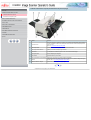
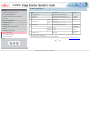
No.
Name
Function
1
Operator Panel
This panel consists of a Function No. display, four operating push buttons and a LED. Operation
can be conducted from either of two sides of the scanner. Can be closed and compactly stored
when not in use.
(Refer to 1.2 Functions of the operator panel)
2
ADF Paper Chute
Holds in place the document pages / sheets that feed into the ADF.
3
ADF Paper Chute Extension
Please pull out when scanning a long size sheet.
4
Side Guide
It is adjusted to the width of the paper in order not to scanned skewed pages.
5
Side guide button
Used for adjusting the side guides.
6
ADF buttons
Press this button to open the ADF.
7
ADF (Automatic Document Feeder)
It transports a document to the reading position automatically.
8
Stacker
Scanned documents are ejected from the ADF onto this tray. It is possible to change the height.
(Please refer to "2.2 Loading documents onto the ADF" )
9
Stacker Extension / Stopper
Pull out and set the stopper to the paper length.
1|2|3
All Rights Reserved, Copyright (C) PFU LIMITED 2004
CONTENTS
1.1 Names and functions of parts (Continued from the previous page)
Introduction
1 NAMES AND FUNCTIONS OF PARTS
1.1 Names and functions of parts
1.2 Functions of the operator panel
2 BASIC SCANNER OPERATION
3 SCANNING VARIOUS TYPES OF DOCUMENTS
4 DAILY CARE
5 REPLACING CONSUMABLES
6 TROUBLESHOOTING
7 ONLINE SETUP
8 DOCUMENT SPECIFICATION OF ADF
9 OPTIONS
10 SCANNER SPECIFICATIONS
Appendix
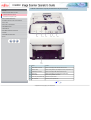
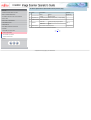
No.
Name
Function
10
SCSI interface connector
Used for connecting a SCSI interface cable from a PC.
11
SCSI ID switch
Used for setting SCSI ID (The setting at the factory shipment is ID=5).
12
USB interface connector
Used for connecting a USB interface cable from a PC.
13
Power inlet
Used for connecting a power cable from the power outlet..
14
Power switch
Used for turning ON/OFF the scanner.
15
Third Party Slot (Optional Slot)
The slot for an option board.
16
EXT connector
Connector port for optional units.
1|2|3
All Rights Reserved, Copyright (C) PFU LIMITED 2004
CONTENTS
1.1 Names and functions of parts (Continued from the previous page)
Introduction
1 NAMES AND FUNCTIONS OF PARTS
1.1 Names and functions of parts
1.2 Functions of the operator panel
2 BASIC SCANNER OPERATION
3 SCANNING VARIOUS TYPES OF DOCUMENTS
4 DAILY CARE
5 REPLACING CONSUMABLES
6 TROUBLESHOOTING
7 ONLINE SETUP
8 DOCUMENT SPECIFICATION OF ADF
9 OPTIONS
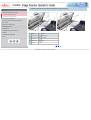
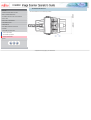
No.
Name
No.
Name
17
Chute Roller
22
Plastic Roller
18
Pick Roller Set
23
Feed Roller
19
Sheet Guide
24
Ultra Sonic Sensor (Multi feed detection)
20
Brake Roller
25
Glass
21
Pick Arm
10 SCANNER SPECIFICATIONS
Appendix
1|2|3
All Rights Reserved, Copyright (C) PFU LIMITED 2004
CONTENTS
1.2 Functions of the operator panel
Introduction
1 NAMES AND FUNCTIONS OF PARTS
1.1 Names and functions of parts
1.2 Functions of the operator panel
2 BASIC SCANNER OPERATION
3 SCANNING VARIOUS TYPES OF DOCUMENTS
4 DAILY CARE
5 REPLACING CONSUMABLES
6 TROUBLESHOOTING
7 ONLINE SETUP
8 DOCUMENT SPECIFICATION OF ADF
9 OPTIONS
10 SCANNER SPECIFICATIONS
Appendix
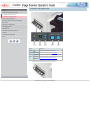
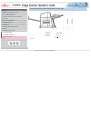
Name
Function
(1) LED
Lights when the scanner is turned ON.
(2) Function No. display
(3) Function
Buttons
Indicates the function No. and error status.
Changes the Function activated by the Send to button.
(4) Send to
Launches the linked application software.
(5) Scan
For the use of the Operator panel, open it as shown below.
•
•
All Rights Reserved, Copyright (C) PFU LIMITED 2004
CONTENTS
Chapter 2 BASIC SCANNER OPERATION
Introduction
1 NAMES AND FUNCTIONS OF PARTS
This chapter describes how to scan various types of documents.
2 BASIC SCANNER OPERATION
2.1 Turning the scanner ON/OFF
2.2 Loading documents onto the ADF
2.3 Scanning documents
2.4 How to use the Scanner Driver
3 SCANNING VARIOUS TYPES OF DOCUMENTS
4 DAILY CARE
5 REPLACING CONSUMABLES
6 TROUBLESHOOTING
7 ONLINE SETUP
8 DOCUMENT SPECIFICATION OF ADF
9 OPTIONS
10 SCANNER SPECIFICATIONS
Appendix
All Rights Reserved, Copyright (C) PFU LIMITED 2004
CONTENTS
2.1 Turning the scanner ON/OFF
Introduction
1 NAMES AND FUNCTIONS OF PARTS
2 BASIC SCANNER OPERATION
2.1 Turning the scanner ON/OFF
When "|" of the power switch is pressed, the scanner is turned ON, and the green LED on the operator panel lights. During the initialization,
the indication of the Function No. display changes as follows:
"8" → "P" → "0" → "1"
The indication "1" means that the operator panel is in the ready status. When turning off the scanner, press the "0" side of the power switch.
2.2 Loading documents onto the ADF
2.3 Scanning documents
2.4 How to use the Scanner Driver
3 SCANNING VARIOUS TYPES OF DOCUMENTS
4 DAILY CARE
5 REPLACING CONSUMABLES
6 TROUBLESHOOTING
7 ONLINE SETUP
8 DOCUMENT SPECIFICATION OF ADF
9 OPTIONS
10 SCANNER SPECIFICATIONS
The photograph shows an example of "Turning ON".
Appendix
1|2
All Rights Reserved, Copyright (C) PFU LIMITED 2004
CONTENTS
2.1 Turning the scanner ON/OFF (Continued from the previous page)
Introduction
1 NAMES AND FUNCTIONS OF PARTS
Power Save Mode
2 BASIC SCANNER OPERATION
The Power Saving Mode is designed to reduce the scanner's power consumption when not in use while switched on.
The scanner will switch automatically to power saving mode at preset intervals if idle and remain in a state of low power.
2.1 Turning the scanner ON/OFF
Power saving mode is factory preset to automatically execute at 15 minutes intervals of idle time. Please refer to 7.9 Power saving to adjust
2.2 Loading documents onto the ADF
the preset execution time.
2.3 Scanning documents
In the Power Save mode, the indication of the Function No. display on the operator panel goes out, while the green LED is kept lit.
2.4 How to use the Scanner Driver
To return the scanner from the Power Save mode, perform one of the following operations:
3 SCANNING VARIOUS TYPES OF DOCUMENTS
●
●
4 DAILY CARE
●
Load documents on the ADF paper chute.
Press any button on the operator panel.
Execute a command from the scanner driver.
5 REPLACING CONSUMABLES
1|2
6 TROUBLESHOOTING
7 ONLINE SETUP
8 DOCUMENT SPECIFICATION OF ADF
9 OPTIONS
10 SCANNER SPECIFICATIONS
Appendix
All Rights Reserved, Copyright (C) PFU LIMITED 2004
CONTENTS
2.2 Loading documents onto the ADF
Introduction
1 NAMES AND FUNCTIONS OF PARTS
2 BASIC SCANNER OPERATION
2.1 Turning the scanner ON/OFF
1. Confirm the following items before loading documents
❍ All the documents have the same width
❍ Check the number of sheets in the document stack.
The standard of number of sheets that can be loaded on the scanner is as follows:
2.2 Loading documents onto the ADF
A4-size paper or smaller:
20 mm or less.
2.3 Scanning documents
Note: 200 sheets at in 80g/m2.
2.4 How to use the Scanner Driver
Over A4-size paper:
10 mm or less.
3 SCANNING VARIOUS TYPES OF DOCUMENTS
Note: 100 sheets at 80g/m2.
4 DAILY CARE
5 REPLACING CONSUMABLES
6 TROUBLESHOOTING
For details on loading documents sheets, refer to Chapter 8 DOCUMENT SPECIFICATION OF ADF.
1|2|3|4|5|6
7 ONLINE SETUP
8 DOCUMENT SPECIFICATION OF ADF
9 OPTIONS
10 SCANNER SPECIFICATIONS
Appendix
All Rights Reserved, Copyright (C) PFU LIMITED 2004
CONTENTS
2.2 Loading documents onto the ADF (Continued from the previous page)
Introduction
1 NAMES AND FUNCTIONS OF PARTS
2. Fan the documents
2 BASIC SCANNER OPERATION
2.1 Turning the scanner ON/OFF
2.2 Loading documents onto the ADF
2.3 Scanning documents
2.4 How to use the Scanner Driver
3 SCANNING VARIOUS TYPES OF DOCUMENTS
4 DAILY CARE
5 REPLACING CONSUMABLES
6 TROUBLESHOOTING
7 ONLINE SETUP
8 DOCUMENT SPECIFICATION OF ADF
9 OPTIONS
10 SCANNER SPECIFICATIONS
❍
❍
Appendix
❍
❍
Lightly grip both ends of the document, then bend and fan it.
Repeat this operation a couple of times.
Rotate the document 90 degrees, then bend and fan it again.
Align the edges of the documents.
1|2|3|4|5|6
All Rights Reserved, Copyright (C) PFU LIMITED 2004
CONTENTS
2.2 Loading documents onto the ADF (Continued from the previous page)
Introduction
1 NAMES AND FUNCTIONS OF PARTS
3. Load the documents onto the ADF paper chute.
Pull out the ADF paper chute extension according to the length of the document.
2 BASIC SCANNER OPERATION
2.1 Turning the scanner ON/OFF
2.2 Loading documents onto the ADF
2.3 Scanning documents
2.4 How to use the Scanner Driver
3 SCANNING VARIOUS TYPES OF DOCUMENTS
4 DAILY CARE
5 REPLACING CONSUMABLES
6 TROUBLESHOOTING
7 ONLINE SETUP
8 DOCUMENT SPECIFICATION OF ADF
9 OPTIONS
10 SCANNER SPECIFICATIONS
Appendix
For details on loading documents, refer to Chapter "8. DOCUMENT SPECIFICATION OF ADF".
1|2|3|4|5|6
All Rights Reserved, Copyright (C) PFU LIMITED 2004
CONTENTS
2.2 Loading documents onto the ADF (Continued from the previous page)
Introduction
1 NAMES AND FUNCTIONS OF PARTS
2 BASIC SCANNER OPERATION
4. Adjust the side guides to the width of the documents.
Move the side guides so that they contact both sides of the documents. If there is any space between the side guides and the edges
of documents, the scanned image may be skewed.
Set the documents face-down onto the ADF paper chute (so that the side to be scanned faces towards the ADF paper chute).
2.1 Turning the scanner ON/OFF
2.2 Loading documents onto the ADF
2.3 Scanning documents
2.4 How to use the Scanner Driver
3 SCANNING VARIOUS TYPES OF DOCUMENTS
4 DAILY CARE
5 REPLACING CONSUMABLES
6 TROUBLESHOOTING
7 ONLINE SETUP
8 DOCUMENT SPECIFICATION OF ADF
9 OPTIONS
10 SCANNER SPECIFICATIONS
Appendix
(1) Document, (2) Side Guide, (3) Side Guide button (both sides), (4) ADF Paper Chute
ATTENTION
●
●
Please remove clips and staples from the document. When double-feeds or miss picking occurred, reduce the quantity of document.
When loading small documents onto the ADF paper chute, be careful not to touch the Chute roller cover for it may open while scanning
operation and your fingers may get caught.
1|2|3|4|5|6
All Rights Reserved, Copyright (C) PFU LIMITED 2004
CONTENTS
2.2 Loading documents onto the ADF (Continued from the previous page)
Introduction
1 NAMES AND FUNCTIONS OF PARTS
5. Adjust the stacker extension according to the document size and raise the stopper.
2 BASIC SCANNER OPERATION
2.1 Turning the scanner ON/OFF
2.2 Loading documents onto the ADF
2.3 Scanning documents
2.4 How to use the Scanner Driver
3 SCANNING VARIOUS TYPES OF DOCUMENTS
4 DAILY CARE
5 REPLACING CONSUMABLES
6 TROUBLESHOOTING
7 ONLINE SETUP
8 DOCUMENT SPECIFICATION OF ADF
9 OPTIONS
10 SCANNER SPECIFICATIONS
Appendix
6. Adjust the stacker level.
The level of the stacker can be changed according to the type and amount of paper. Place the stacker on the lower level in a slant
position for paper of regular thickness. However, lightweight or thin paper or for paper that is slightly curled, bring the stacker to its
upper horizontal position.
Upper position (Thin paper)
Lower position (Regular paper)
ATTENTION
When the stacker is mounted on the upper position, the stacking capacity decreases (Around 100 sheets at 80g/m2 (21lb)).
1|2|3|4|5|6
All Rights Reserved, Copyright (C) PFU LIMITED 2004
CONTENTS
2.2 Loading documents onto the ADF (Continued from the previous page)
Introduction
1 NAMES AND FUNCTIONS OF PARTS
♦With the movie below, review how to load the document onto the ADF:
2 BASIC SCANNER OPERATION
2.1 Turning the scanner ON/OFF
2.2 Loading documents onto the ADF
2.3 Scanning documents
2.4 How to use the Scanner Driver
3 SCANNING VARIOUS TYPES OF DOCUMENTS
4 DAILY CARE
5 REPLACING CONSUMABLES
6 TROUBLESHOOTING
7 ONLINE SETUP
8 DOCUMENT SPECIFICATION OF ADF
9 OPTIONS
10 SCANNER SPECIFICATIONS
Appendix
1|2|3|4|5|6
All Rights Reserved, Copyright (C) PFU LIMITED 2004
CONTENTS
2.3 Scanning documents
Introduction
1 NAMES AND FUNCTIONS OF PARTS
2 BASIC SCANNER OPERATION
2.1 Turning the scanner ON/OFF
2.2 Loading documents onto the ADF
2.3 Scanning documents
2.4 How to use the Scanner Driver
1. Load documents onto the ADF paper chute.
Pull out the ADF paper chute extension according to the length of the document. For details on how to load documents, refer to "2.2
Loading documents onto the ADF".
2. Start ScandAll 21.
Select [ Start ] - [ Program ] - [Scanner Utility for Microsoft Windows] and click [ScandAll 21].
→ This starts up ScandAll 21.
3. Select [Select Source] from the [Scan] menu.
3 SCANNING VARIOUS TYPES OF DOCUMENTS
4 DAILY CARE
5 REPLACING CONSUMABLES
6 TROUBLESHOOTING
7 ONLINE SETUP
8 DOCUMENT SPECIFICATION OF ADF
9 OPTIONS
10 SCANNER SPECIFICATIONS
Appendix
→ The [Select Source] dialog box appears.
4. Select"FUJITSU fi-5650Cdj"(for Windows 95 and WindowsNT 4.0, select "FUJITSU TWAIN 32") and click the [Select] button.
HINT
❍
The scanning procedure described in this section were explained by using the scanner driver application software, Fujitsu
TWAIN, provided with this product.
❍
You can scan using other applications software that complies with the TWAIN standard.
❍
Scanning can also be performed by installing the Fujitsu ISIS Scanner Driver.
1|2|3
All Rights Reserved, Copyright (C) PFU LIMITED 2004
CONTENTS
2.3 Scanning documents (Continued from the previous page)
Introduction
1 NAMES AND FUNCTIONS OF PARTS
5. Click the [Scan To View] button on the tool bar.
2 BASIC SCANNER OPERATION
2.1 Turning the scanner ON/OFF
2.2 Loading documents onto the ADF
2.3 Scanning documents
→ The [TWAIN Driver] dialog box (for setting the scan conditions) appears.
2.4 How to use the Scanner Driver
3 SCANNING VARIOUS TYPES OF DOCUMENTS
6. Set the scan resolution, paper size, etc., and click the [Scan] button.
For details on settings in the [TWAIN Driver] dialog box, refer to "2.4 How to use the Scanner Driver".
4 DAILY CARE
5 REPLACING CONSUMABLES
6 TROUBLESHOOTING
7 ONLINE SETUP
8 DOCUMENT SPECIFICATION OF ADF
9 OPTIONS
10 SCANNER SPECIFICATIONS
Appendix
1|2|3
All Rights Reserved, Copyright (C) PFU LIMITED 2004
CONTENTS
2.3 Scanning documents (Continued from the previous page)
Introduction
1 NAMES AND FUNCTIONS OF PARTS
The images of scanned documents are displayed on the [ScandAll 21] window.
2 BASIC SCANNER OPERATION
2.1 Turning the scanner ON/OFF
2.2 Loading documents onto the ADF
2.3 Scanning documents
2.4 How to use the Scanner Driver
3 SCANNING VARIOUS TYPES OF DOCUMENTS
4 DAILY CARE
5 REPLACING CONSUMABLES
6 TROUBLESHOOTING
7 ONLINE SETUP
8 DOCUMENT SPECIFICATION OF ADF
9 OPTIONS
10 SCANNER SPECIFICATIONS
Appendix
For details on different types of scanning, refer to "3 SCANNING VARIOUS TYPES OF DOCUMENTS".
For details on functions and operations of ScandAll 21, refer to "ScandAll 21 Help".
ATTENTION
When the documents do not pile up on the Stacker tidily, set the Stacker to the Upper position. For details refer to 2.2 Loading
documents onto the ADF.
1|2|3
All Rights Reserved, Copyright (C) PFU LIMITED 2004
•
CONTENTS
2.4 How to use the Scanner Driver
Introduction
1 NAMES AND FUNCTIONS OF PARTS
2.4.1 FUJITSU TWAIN32 Scanner Driver
2 BASIC SCANNER OPERATION
FUJITSU TWAIN32 Scanner Driver is designed for scanning documents with FUJITSU image scanner fi series by using application software
that complies with the TWAIN standard.
2.1 Turning the scanner ON/OFF
The following describes the procedure with examples of ScandAll 21 for ordinary scanning by using this driver software.
2.2 Loading documents onto the ADF
1 | 2 | 3 | 4 | 5 | 6 | 7 | 8 | 9 | 10 | 11···29
2.3 Scanning documents
2.4 How to use the Scanner Driver
3 SCANNING VARIOUS TYPES OF DOCUMENTS
4 DAILY CARE
5 REPLACING CONSUMABLES
6 TROUBLESHOOTING
7 ONLINE SETUP
8 DOCUMENT SPECIFICATION OF ADF
9 OPTIONS
10 SCANNER SPECIFICATIONS
Appendix
All Rights Reserved, Copyright (C) PFU LIMITED 2004
•
CONTENTS
2.4 How to use the Scanner Driver (Continued from the previous page)
Introduction
1 NAMES AND FUNCTIONS OF PARTS
2 BASIC SCANNER OPERATION
2.1 Turning the scanner ON/OFF
Procedure for Basic Scanning Operation
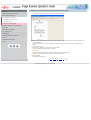
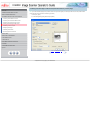
1. Start up the application.
From the [Start] menu, select [Programs]-[Scanner Utility for Microsoft Window] and click [ScandAll 21].
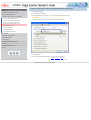
2. Select [Select Source] from the [Scan] menu.
2.2 Loading documents onto the ADF
2.3 Scanning documents
2.4 How to use the Scanner Driver
3 SCANNING VARIOUS TYPES OF DOCUMENTS
4 DAILY CARE
5 REPLACING CONSUMABLES
6 TROUBLESHOOTING
7 ONLINE SETUP
8 DOCUMENT SPECIFICATION OF ADF
9 OPTIONS
10 SCANNER SPECIFICATIONS
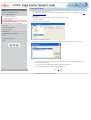
→ The [Select Source] dialog box appears.
1 | 2 | 3 | 4 | 5 | 6 | 7 | 8 | 9 | 10 | 11···29
Appendix
All Rights Reserved, Copyright (C) PFU LIMITED 2004
•
CONTENTS
2.4 How to use the Scanner Driver (Continued from the previous page)
Introduction
1 NAMES AND FUNCTIONS OF PARTS
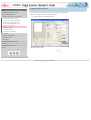
3. Select the scanner to use.
2 BASIC SCANNER OPERATION
2.1 Turning the scanner ON/OFF
2.2 Loading documents onto the ADF
2.3 Scanning documents
2.4 How to use the Scanner Driver
3 SCANNING VARIOUS TYPES OF DOCUMENTS
4 DAILY CARE
5 REPLACING CONSUMABLES
6 TROUBLESHOOTING
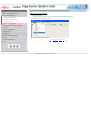
Select
7 ONLINE SETUP
❍
8 DOCUMENT SPECIFICATION OF ADF
❍
9 OPTIONS
10 SCANNER SPECIFICATIONS
[FUJITSU fi-5650C] for FUJITSU TWAIN32 V9
or
[FUJITSU TWAIN32] for FUJITSU TWAIN32 V8
then click the [Select] button.
1 | 2 | 3 | 4 | 5 | 6 | 7 | 8 | 9 | 10 | 11···29
Appendix
All Rights Reserved, Copyright (C) PFU LIMITED 2004
•
CONTENTS
2.4 How to use the Scanner Driver (Continued from the previous page)
Introduction
4. Load the documents on the scanner.
For details on loading documents, refer to "2.2 Loading documents onto the ADF".
1 NAMES AND FUNCTIONS OF PARTS
2 BASIC SCANNER OPERATION
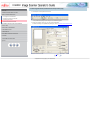
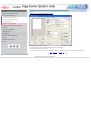
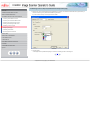
5. Open the TWAIN Driver window.
Select [Scan To View] from the [Scan] menu.
2.1 Turning the scanner ON/OFF
2.2 Loading documents onto the ADF
→ [TWAIN Driver] dialog box appears.
2.3 Scanning documents
2.4 How to use the Scanner Driver
3 SCANNING VARIOUS TYPES OF DOCUMENTS
4 DAILY CARE
5 REPLACING CONSUMABLES
6 TROUBLESHOOTING
7 ONLINE SETUP
8 DOCUMENT SPECIFICATION OF ADF
9 OPTIONS
10 SCANNER SPECIFICATIONS
Appendix
HINT
ScandAll 21 provide scanning methods as follows:
●
●
●
●
●
●
[To View...] :Displays scanned images on the window.
[To File...:] :Saves scanned images as files (*.BMP, *.TIF, *.JPG).
[To FTP...:] :Transfers scanned images to a FTP server.
[To Adobe PDF...:] :Saves scanned images as PDF files.
(*Adobe Acrobat must be installed beforehand.)
[To Microsoft SharePoint Portal Server...] :Transfers scanned images to Microsoft Share Point Portal Server.
[To Mail...] :Launches mailer software and attaches scanned images to email.
For details, refer to "ScandAll 21 Help".
1 | 2 | 3 | 4 | 5 | 6 | 7 | 8 | 9 | 10 | 11···29
All Rights Reserved, Copyright (C) PFU LIMITED 2004
•
CONTENTS
2.4 How to use the Scanner Driver (Continued from the previous page)
Introduction
1 NAMES AND FUNCTIONS OF PARTS
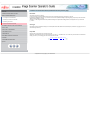
6. Configure settings for scanning and click the [Scan] button.
2 BASIC SCANNER OPERATION
2.1 Turning the scanner ON/OFF
2.2 Loading documents onto the ADF
2.3 Scanning documents
2.4 How to use the Scanner Driver
3 SCANNING VARIOUS TYPES OF DOCUMENTS
4 DAILY CARE
5 REPLACING CONSUMABLES
6 TROUBLESHOOTING
7 ONLINE SETUP
8 DOCUMENT SPECIFICATION OF ADF
9 OPTIONS
10 SCANNER SPECIFICATIONS
Appendix
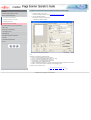
For details about the settings on this window, refer to "Setting Window for FUJITSU TWAIN32 Scanner Driver".
1 | 2 | 3 | 4 | 5 | 6 | 7 | 8 | 9 | 10 | 11···29
All Rights Reserved, Copyright (C) PFU LIMITED 2004
•
CONTENTS
2.4 How to use the Scanner Driver (Continued from the previous page)
Introduction
1 NAMES AND FUNCTIONS OF PARTS
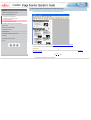
→ The images of scanned documents are displayed on the [ScandAll 21] window.
2 BASIC SCANNER OPERATION
2.1 Turning the scanner ON/OFF
2.2 Loading documents onto the ADF
2.3 Scanning documents
2.4 How to use the Scanner Driver
3 SCANNING VARIOUS TYPES OF DOCUMENTS
4 DAILY CARE
5 REPLACING CONSUMABLES
6 TROUBLESHOOTING
7 ONLINE SETUP
8 DOCUMENT SPECIFICATION OF ADF
9 OPTIONS
10 SCANNER SPECIFICATIONS
Appendix
Depending on the settings of the application software, images may not be displayed. For details, refer to the documentation or Help
file of your application.
e.x.) When you select [To File...] from the [Scan] menu of ScandAll 21, images of scanned documents are not displayed on the
window.
7. Save the scanned images.
Select [Save As...] from the [File] menu to save the scanned images.
If you wish to start another scanning, return to procedure 4.
ATTENTION
File saving format and saving procedure may vary depending on the application software used.
For details, refer to the application's documentation or to the application Help file.
8. End the application.
Select [Exit] from the [File] menu.
1 | 2 | 3 | 4 | 5 | 6 | 7 | 8 | 9 | 10 | 11···29
All Rights Reserved, Copyright (C) PFU LIMITED 2004
•
CONTENTS
2.4 How to use the Scanner Driver (Continued from the previous page)
Introduction
1 NAMES AND FUNCTIONS OF PARTS
Setting Window for FUJITSU TWAIN32 Scanner Driver
2 BASIC SCANNER OPERATION
2.1 Turning the scanner ON/OFF
2.2 Loading documents onto the ADF
2.3 Scanning documents
2.4 How to use the Scanner Driver
3 SCANNING VARIOUS TYPES OF DOCUMENTS
4 DAILY CARE
5 REPLACING CONSUMABLES
6 TROUBLESHOOTING
7 ONLINE SETUP
8 DOCUMENT SPECIFICATION OF ADF
9 OPTIONS
10 SCANNER SPECIFICATIONS
Appendix
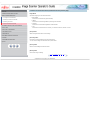
You can perform settings for the FUJITSU TWAIN32 Scanner Driver on this window.
The following describes the main setting items.
●
For details on each functions, refer to "FUJITSU TWAIN32 Scanner Driver Help" (appears by clicking [Help] or pressing [F1] button).
1 | 2 | 3 | 4 | 5 | 6 | 7 | 8 | 9 | 10 | 11···29
All Rights Reserved, Copyright (C) PFU LIMITED 2004
•
CONTENTS
2.4 How to use the Scanner Driver (Continued from the previous page)
Introduction
1 NAMES AND FUNCTIONS OF PARTS
Resolution
2 BASIC SCANNER OPERATION
Specifies the resolution of scanning.
It can be specified by selecting a default value from the list or customizing (specify any resolution in 1 dpi unit).
By marking the [Predefine] check box, you can select one from three predefined settings as [Normal], [Fine], [Super Fine] to scan documents
instead of setting details by yourself.
Otherwise, you can change the details of the predefined settings on the [Resolution Setting] window, which appears when you click on the
[...] button.
2.1 Turning the scanner ON/OFF
2.2 Loading documents onto the ADF
2.3 Scanning documents
2.4 How to use the Scanner Driver
3 SCANNING VARIOUS TYPES OF DOCUMENTS
Scan Type
4 DAILY CARE
Specifies the scanning method, the side(s) to be scanned (ADF Front Side, ADF Back Side, ADF Duplex) or details of Long page ( the size of
documents longer than A3).
5 REPLACING CONSUMABLES
6 TROUBLESHOOTING
7 ONLINE SETUP
8 DOCUMENT SPECIFICATION OF ADF
9 OPTIONS
Paper Size
Select the size of documents to be scanned from this list.
Windows for customizing the paper size will appear when you click on [...] besides the list. You can save any document size as a customized
setting (up to three) or for changing the order of the paper size in the list.
1 | 2 | 3 | 4 | 5 | 6 | 7 | 8 | 9 | 10 | 11···29
10 SCANNER SPECIFICATIONS
Appendix
All Rights Reserved, Copyright (C) PFU LIMITED 2004
•
CONTENTS
2.4 How to use the Scanner Driver (Continued from the previous page)
Introduction
1 NAMES AND FUNCTIONS OF PARTS
Image Mode
2 BASIC SCANNER OPERATION
Specifies the image type for the scanned documents.
2.1 Turning the scanner ON/OFF
●
Black & White
Documents are scanned in binary (black and white).
2.2 Loading documents onto the ADF
●
2.3 Scanning documents
2.4 How to use the Scanner Driver
●
3 SCANNING VARIOUS TYPES OF DOCUMENTS
●
4 DAILY CARE
Halftone
Documents are scanned through halftone processing in black and white.
Grayscale
Documents are scanned with 256 gradations of black and white.
Color
Documents are scanned colored. For this mode, you can select 24 bit Color, 256Color or 8 Color.
5 REPLACING CONSUMABLES
6 TROUBLESHOOTING
[Scan] button
7 ONLINE SETUP
Starts scanning documents with the current settings.
8 DOCUMENT SPECIFICATION OF ADF
9 OPTIONS
[Preview] button
10 SCANNER SPECIFICATIONS
Documents are scanned preliminary before the actual scanning.
You can confirm the image of the documents in the preview window.
Appendix
[Close] button
Saves the current settings and closes this window.
[Reset] button
Used to undo changes of settings.
1 | 2 | 3 | 4 | 5 | 6 | 7 | 8 | 9 | 10 | 11···29
All Rights Reserved, Copyright (C) PFU LIMITED 2004
•
CONTENTS
2.4 How to use the Scanner Driver (Continued from the previous page)
Introduction
1 NAMES AND FUNCTIONS OF PARTS
[Help] button
2 BASIC SCANNER OPERATION
Opens the "FUJITSU TWAIN32 Scanner Driver Help" window. The window also opens by pushing the [F1] key.
2.1 Turning the scanner ON/OFF
2.2 Loading documents onto the ADF
[About...] button
2.3 Scanning documents
Opens an information window about the FUJITSU TWAIN32 Scanner Driver's version.
2.4 How to use the Scanner Driver
3 SCANNING VARIOUS TYPES OF DOCUMENTS
[Option...] button
4 DAILY CARE
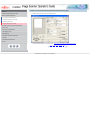
You can set up the details of optional functions on the window below.
5 REPLACING CONSUMABLES
6 TROUBLESHOOTING
7 ONLINE SETUP
8 DOCUMENT SPECIFICATION OF ADF
9 OPTIONS
10 SCANNER SPECIFICATIONS
Appendix
1 | 2 | 3 | 4 | 5 | 6 | 7 | 8 | 9 | 10 | 11···29
All Rights Reserved, Copyright (C) PFU LIMITED 2004
•
CONTENTS
2.4 How to use the Scanner Driver (Continued from the previous page)
Introduction
1 NAMES AND FUNCTIONS OF PARTS
[Rotation] tab
2 BASIC SCANNER OPERATION
Select this tab when setting image rotation, detection of document size, etc.
2.1 Turning the scanner ON/OFF
2.2 Loading documents onto the ADF
[Job/Cache] tab
2.3 Scanning documents
Select this tab when setting cache mode, job controls, double-feed detection, blank page skipping, etc.
2.4 How to use the Scanner Driver
3 SCANNING VARIOUS TYPES OF DOCUMENTS
[Generic] tab
4 DAILY CARE
Select this tab to change the unit displayed on the Setting Window for the FUJITSU TWAIN32 Scanner Driver.
(Millimeters, Inches, and Pixels are available)
5 REPLACING CONSUMABLES
6 TROUBLESHOOTING
[Startup] tab
7 ONLINE SETUP
8 DOCUMENT SPECIFICATION OF ADF
Select this tab for setting the Scanner Operation Panel.
(Displayed only when using the scanner of supported type.)
9 OPTIONS
10 SCANNER SPECIFICATIONS
[Filter] tab
Appendix
Select this tab for setting the image processing filter(s).
Page Edge Filler : Fills up the margins of the scanned documents with a selected color.
Digital Endorser : adds characters (such as names, dates, serial numbers, etc.) on scanned image data.
1···10 | 11 | 12 | 13 | 14 | 15 | 16 | 17 | 18 | 19 | 20 | 21···29
All Rights Reserved, Copyright (C) PFU LIMITED 2004
•
CONTENTS
2.4 How to use the Scanner Driver (Continued from the previous page)
Introduction
1 NAMES AND FUNCTIONS OF PARTS
[Compression] tab
2 BASIC SCANNER OPERATION
Select this tab for setting the compression rate of JPEG Transfer.
2.1 Turning the scanner ON/OFF
2.2 Loading documents onto the ADF
[Advance...] button
2.3 Scanning documents
Click this button for settings of the advanced image processing.
You can set Edge Extract, Gamma Pattern, White Level Follower, Dropout Color, Reverse, etc.
2.4 How to use the Scanner Driver
3 SCANNING VARIOUS TYPES OF DOCUMENTS
4 DAILY CARE
5 REPLACING CONSUMABLES
[Config...] button
Click this button for configuring the Setting Files.
You can save the changed settings as a Setting File. From next scanning, the settings are quickly changed by using these Setting Files.
6 TROUBLESHOOTING
7 ONLINE SETUP
HINT
8 DOCUMENT SPECIFICATION OF ADF
For details of each function, refer to the "FUJITSU TWAIN32 Scanner Driver Help".
9 OPTIONS
1···10 | 11 | 12 | 13 | 14 | 15 | 16 | 17 | 18 | 19 | 20 | 21···29
10 SCANNER SPECIFICATIONS
Appendix
All Rights Reserved, Copyright (C) PFU LIMITED 2004
•
CONTENTS
2.4 How to use the Scanner Driver (Continued from the previous page)
Introduction
1 NAMES AND FUNCTIONS OF PARTS
2.4.2 FUJITSU ISIS Scanner Driver
2 BASIC SCANNER OPERATION
2.1 Turning the scanner ON/OFF
FUJITSU ISIS Scanner Driver is designed for scanning documents with FUJITSU image scanner fi series by using application software that
complies with The ISIS standard. The following describes the procedure with examples of QuickScan for ordinary scanning by using this
driver software.
2.2 Loading documents onto the ADF
ATTENTION
2.3 Scanning documents
The procedure may vary depending on your application. If you use an application other than QuickScan, please refer to its Guide or Help for
further information.
2.4 How to use the Scanner Driver
3 SCANNING VARIOUS TYPES OF DOCUMENTS
4 DAILY CARE
5 REPLACING CONSUMABLES
6 TROUBLESHOOTING
Procedure for Basic Scanning Operation
1. Start up the application.
From the [Start] menu, select [Programs]-[QuickScan] and click [QuickScan].
2. Select your scanner on the window below.
Select [Scan] - [Select Scanner] on the menu bar.
7 ONLINE SETUP
8 DOCUMENT SPECIFICATION OF ADF
9 OPTIONS
10 SCANNER SPECIFICATIONS
Appendix
1···10 | 11 | 12 | 13 | 14 | 15 | 16 | 17 | 18 | 19 | 20 | 21···29
All Rights Reserved, Copyright (C) PFU LIMITED 2004
•
CONTENTS
2.4 How to use the Scanner Driver (Continued from the previous page)
Introduction
1 NAMES AND FUNCTIONS OF PARTS
3. Select [fi-5650C], then click the [OK] button.
2 BASIC SCANNER OPERATION
2.1 Turning the scanner ON/OFF
2.2 Loading documents onto the ADF
2.3 Scanning documents
2.4 How to use the Scanner Driver
3 SCANNING VARIOUS TYPES OF DOCUMENTS
4 DAILY CARE
5 REPLACING CONSUMABLES
6 TROUBLESHOOTING
7 ONLINE SETUP
8 DOCUMENT SPECIFICATION OF ADF
4. Select [Scan] - [New Batch] on the menu bar.
1···10 | 11 | 12 | 13 | 14 | 15 | 16 | 17 | 18 | 19 | 20 | 21···29
9 OPTIONS
10 SCANNER SPECIFICATIONS
Appendix
All Rights Reserved, Copyright (C) PFU LIMITED 2004
•
CONTENTS
2.4 How to use the Scanner Driver (Continued from the previous page)
Introduction
1 NAMES AND FUNCTIONS OF PARTS
5. Choose the scanning profile that you wish to use.
2 BASIC SCANNER OPERATION
2.1 Turning the scanner ON/OFF
2.2 Loading documents onto the ADF
2.3 Scanning documents
2.4 How to use the Scanner Driver
3 SCANNING VARIOUS TYPES OF DOCUMENTS
4 DAILY CARE
5 REPLACING CONSUMABLES
6 TROUBLESHOOTING
7 ONLINE SETUP
8 DOCUMENT SPECIFICATION OF ADF
9 OPTIONS
10 SCANNER SPECIFICATIONS
❍
Appendix
❍
❍
When creating a new profile
Select one from already existing profiles and click [Add Profile...] button.
→ A new profile will be created based on the profile you select.
When changing the settings of already existing profiles
Select one from already existing profiles and click [Edit Profile...] button.
→ The settings of the selected profile will be changed.
When using an existing profile
Select one from already existing profiles.
→ Scanning will be started according to the settings of the selected profile. → Go to the procedure 10.
1···10 | 11 | 12 | 13 | 14 | 15 | 16 | 17 | 18 | 19 | 20 | 21···29
All Rights Reserved, Copyright (C) PFU LIMITED 2004
•
CONTENTS
2.4 How to use the Scanner Driver (Continued from the previous page)
Introduction
1 NAMES AND FUNCTIONS OF PARTS
6. Select the [Scan] tab and click the [Scanner Settings] on the [Profile Editor] window.
2 BASIC SCANNER OPERATION
2.1 Turning the scanner ON/OFF
2.2 Loading documents onto the ADF
2.3 Scanning documents
2.4 How to use the Scanner Driver
3 SCANNING VARIOUS TYPES OF DOCUMENTS
4 DAILY CARE
5 REPLACING CONSUMABLES
6 TROUBLESHOOTING
7 ONLINE SETUP
8 DOCUMENT SPECIFICATION OF ADF
9 OPTIONS
10 SCANNER SPECIFICATIONS
Appendix
→ The configuration window of ISIS driver appears.
1···10 | 11 | 12 | 13 | 14 | 15 | 16 | 17 | 18 | 19 | 20 | 21···29
All Rights Reserved, Copyright (C) PFU LIMITED 2004
•
CONTENTS
2.4 How to use the Scanner Driver (Continued from the previous page)
Introduction
1 NAMES AND FUNCTIONS OF PARTS
7. Configure settings for scanning and click the [OK] button.
2 BASIC SCANNER OPERATION
2.1 Turning the scanner ON/OFF
2.2 Loading documents onto the ADF
2.3 Scanning documents
2.4 How to use the Scanner Driver
3 SCANNING VARIOUS TYPES OF DOCUMENTS
4 DAILY CARE
5 REPLACING CONSUMABLES
6 TROUBLESHOOTING
7 ONLINE SETUP
8 DOCUMENT SPECIFICATION OF ADF
9 OPTIONS
10 SCANNER SPECIFICATIONS
Appendix
HINT
For details on this dialog box, refer to "Configuration Window of FUJITSU ISIS Scanner Driver".
1···10 | 11 | 12 | 13 | 14 | 15 | 16 | 17 | 18 | 19 | 20 | 21···29
All Rights Reserved, Copyright (C) PFU LIMITED 2004
•
CONTENTS
2.4 How to use the Scanner Driver (Continued from the previous page)
Introduction
1 NAMES AND FUNCTIONS OF PARTS
2 BASIC SCANNER OPERATION
2.1 Turning the scanner ON/OFF
2.2 Loading documents onto the ADF
2.3 Scanning documents
2.4 How to use the Scanner Driver
3 SCANNING VARIOUS TYPES OF DOCUMENTS
8. The [Profile Editor] window appears. Click the [OK] button to return to [New batch] dialog.
HINT
Configure other settings of the profile, if necessary.
Refer to the "QuickScan Overview" or the "QuickScan Help" for further information on functions and operations of QuickScan. After
the installation of QuickScan, it is registered in the [Start] menu.
9. Load the documents on the scanner.
For detail on loading the documents, refer to 2.2 Loading documents onto the ADF.
1···10 | 11 | 12 | 13 | 14 | 15 | 16 | 17 | 18 | 19 | 20 | 21···29
4 DAILY CARE
5 REPLACING CONSUMABLES
6 TROUBLESHOOTING
7 ONLINE SETUP
8 DOCUMENT SPECIFICATION OF ADF
9 OPTIONS
10 SCANNER SPECIFICATIONS
Appendix
All Rights Reserved, Copyright (C) PFU LIMITED 2004
•
CONTENTS
2.4 How to use the Scanner Driver (Continued from the previous page)
Introduction
1 NAMES AND FUNCTIONS OF PARTS
10. Click the [Scan] button.
2 BASIC SCANNER OPERATION
2.1 Turning the scanner ON/OFF
2.2 Loading documents onto the ADF
2.3 Scanning documents
2.4 How to use the Scanner Driver
3 SCANNING VARIOUS TYPES OF DOCUMENTS
4 DAILY CARE
5 REPLACING CONSUMABLES
6 TROUBLESHOOTING
7 ONLINE SETUP
8 DOCUMENT SPECIFICATION OF ADF
9 OPTIONS
10 SCANNER SPECIFICATIONS
Appendix
→ Scanned images are displayed on the window.
11. End the application.
Select [Exit] from the [File] menu.
HINT
Refer to the "QuickScan Overview" or the "QuickScan Help" for further information on functions and operations of QuickScan. After
the installation of QuickScan, it is registered in the [Start] menu.
1···10 | 11 | 12 | 13 | 14 | 15 | 16 | 17 | 18 | 19 | 20 | 21···29
All Rights Reserved, Copyright (C) PFU LIMITED 2004
•
CONTENTS
2.4 How to use the Scanner Driver (Continued from the previous page)
Introduction
1 NAMES AND FUNCTIONS OF PARTS
Configuration Window of FUJITSU ISIS Scanner Driver
2 BASIC SCANNER OPERATION
2.1 Turning the scanner ON/OFF
2.2 Loading documents onto the ADF
2.3 Scanning documents
2.4 How to use the Scanner Driver
3 SCANNING VARIOUS TYPES OF DOCUMENTS
4 DAILY CARE
5 REPLACING CONSUMABLES
6 TROUBLESHOOTING
7 ONLINE SETUP
8 DOCUMENT SPECIFICATION OF ADF
9 OPTIONS
10 SCANNER SPECIFICATIONS
Appendix
1···10 | 11 | 12 | 13 | 14 | 15 | 16 | 17 | 18 | 19 | 20 | 21···29
All Rights Reserved, Copyright (C) PFU LIMITED 2004
•
CONTENTS
2.4 How to use the Scanner Driver (Continued from the previous page)
Introduction
1 NAMES AND FUNCTIONS OF PARTS
Image Mode
2 BASIC SCANNER OPERATION
Select a color mode suitable for the purpose from the menu.
2.1 Turning the scanner ON/OFF
●
2.2 Loading documents onto the ADF
2.3 Scanning documents
●
2.4 How to use the Scanner Driver
●
3 SCANNING VARIOUS TYPES OF DOCUMENTS
4 DAILY CARE
5 REPLACING CONSUMABLES
6 TROUBLESHOOTING
7 ONLINE SETUP
●
●
Black & White
Scans data in binary (black and white). Distinguishes black from white according to the fixed threshold. This scanning mode is suitable
for scanning line drawings and text documents.
16-level Gray scale
Scans data by 14 shades of gray plus black and white. This mode uses 4 bits per pixel.
256-level Gray scale
Scans data by 254 shades of gray plus black and white. This mode uses 8 bits per pixel. This mode is suitable for scanning
monochrome photographs.
24-bit Color
Scans data as full-colored image using 24 bits per pixel. This mode is suitable for scanning color photographs.
Image Processing
Binary processing is applied to the scanned images This mode is available only when Image Processing Software Option (separately
sold) is installed. Please refer to the Users Guide of Image Processing Software Option for details.
8 DOCUMENT SPECIFICATION OF ADF
9 OPTIONS
10 SCANNER SPECIFICATIONS
Appendix
Resolution
Specifies the number of pixels (dots) per inch.
Select a fixed resolution from the list or enter any value (from 50 to 600) manually.
A higher resolution setting produces finer image, but the file size becomes larger and takes much more time.
1···10 | 11···20 | 21 | 22 | 23 | 24 | 25 | 26 | 27 | 28 | 29
All Rights Reserved, Copyright (C) PFU LIMITED 2004
•
CONTENTS
2.4 How to use the Scanner Driver (Continued from the previous page)
Introduction
1 NAMES AND FUNCTIONS OF PARTS
Half tone
2 BASIC SCANNER OPERATION
Select the half tone pattern for half tone scanning. This setting is available when "Black & White" is selected in the "Image Mode".
2.1 Turning the scanner ON/OFF
Dither Pattern 0
2.2 Loading documents onto the ADF
This setting is suitable for scanning dark photographs.
2.3 Scanning documents
Dither Pattern 1
2.4 How to use the Scanner Driver
This setting is suitable for scanning dark-colored documents containing both text and photographs.
3 SCANNING VARIOUS TYPES OF DOCUMENTS
Dither Pattern 2
4 DAILY CARE
This setting is suitable for scanning light photographs.
5 REPLACING CONSUMABLES
Dither Pattern 3
6 TROUBLESHOOTING
This setting is suitable for scanning dark-colored documents containing both text and photographs.
7 ONLINE SETUP
Error Diffusion
8 DOCUMENT SPECIFICATION OF ADF
This function minimizes differences of color levels due to subtractive color process by diffusing the difference to the adjacent pixels. This
mode is suitable for scanning images of photographs, etc.
9 OPTIONS
10 SCANNER SPECIFICATIONS
Download
Executes processing with the dithered download pattern specified in the dithered download file.
Appendix
Brightness
Sets the brightness of the entire image. Specify the brightness as a number within the range of 1 (dark) to 255 (bright). To brighten the entire
image, decrease the value of the setting. To darken the entire image, increase the value.
Contrast
Sets the contrast between light and shadow of the scanned image. Specify the contrast as a number within the range of 1 (low [soft]) to 255
(high [sharp]). Increasing this value makes the contrast sharper.
1···10 | 11···20 | 21 | 22 | 23 | 24 | 25 | 26 | 27 | 28 | 29
All Rights Reserved, Copyright (C) PFU LIMITED 2004
•
CONTENTS
2.4 How to use the Scanner Driver (Continued from the previous page)
Introduction
1 NAMES AND FUNCTIONS OF PARTS
Scan Type
2 BASIC SCANNER OPERATION
Selects the scanning method.
2.1 Turning the scanner ON/OFF
ADF (Front Side)
2.2 Loading documents onto the ADF
Scans only the front sides of documents.
2.3 Scanning documents
ADF (Back Side)
2.4 How to use the Scanner Driver
Scans only back sides of documents.
3 SCANNING VARIOUS TYPES OF DOCUMENTS
ADF (Duplex)
4 DAILY CARE
Scans both front and the back sides of documents. When this option is selected, the each sheet of the document is scanned in "front"
→ "back" order. This option can be used only with application software that supports duplex scanning. Application software which do
not support duplex scanning will only scan one side of the document.
5 REPLACING CONSUMABLES
6 TROUBLESHOOTING
1···10 | 11···20 | 21 | 22 | 23 | 24 | 25 | 26 | 27 | 28 | 29
7 ONLINE SETUP
8 DOCUMENT SPECIFICATION OF ADF
9 OPTIONS
10 SCANNER SPECIFICATIONS
Appendix
All Rights Reserved, Copyright (C) PFU LIMITED 2004
•
CONTENTS
2.4 How to use the Scanner Driver (Continued from the previous page)
Introduction
1 NAMES AND FUNCTIONS OF PARTS
Paper Size
2 BASIC SCANNER OPERATION
Selects a paper size according to the size of the document to be scanned. Select a standard paper size from the list.
2.1 Turning the scanner ON/OFF
2.2 Loading documents onto the ADF
Paper Layout
2.3 Scanning documents
Specifies orientation of the documents as portrait or landscape.
2.4 How to use the Scanner Driver
3 SCANNING VARIOUS TYPES OF DOCUMENTS
Automatic Size and Skew Detection
4 DAILY CARE
Scanning with the [Automatic Size and Skew Detection] selected, the output will be adjusted to the detected page size. Document skewing is
detected and corrected for the output image.
When you mark this check box, “Scanner’s Maximum” is set in [Paper Size].
It is also possible to change the document size. Scanning performance may be improved when the paper size is reduced to the actual
document size. (For example, set the [paper size] as A5 when scanning documents of the size A5 or smaller.)
5 REPLACING CONSUMABLES
6 TROUBLESHOOTING
7 ONLINE SETUP
8 DOCUMENT SPECIFICATION OF ADF
[More...] button
9 OPTIONS
Opens [More Settings] window. Used for setting advanced features.
10 SCANNER SPECIFICATIONS
1···10 | 11···20 | 21 | 22 | 23 | 24 | 25 | 26 | 27 | 28 | 29
Appendix
All Rights Reserved, Copyright (C) PFU LIMITED 2004
•
CONTENTS
2.4 How to use the Scanner Driver (Continued from the previous page)
Introduction
1 NAMES AND FUNCTIONS OF PARTS
[Area...] button
2 BASIC SCANNER OPERATION
Opens the Scan Area dialog box.
Specify scan area for the document size.
The size can be set by dragging the frame with mouse.
Otherwise, enter any value for the setting.
2.1 Turning the scanner ON/OFF
2.2 Loading documents onto the ADF
2.3 Scanning documents
2.4 How to use the Scanner Driver
3 SCANNING VARIOUS TYPES OF DOCUMENTS
4 DAILY CARE
5 REPLACING CONSUMABLES
6 TROUBLESHOOTING
7 ONLINE SETUP
8 DOCUMENT SPECIFICATION OF ADF
9 OPTIONS
10 SCANNER SPECIFICATIONS
Appendix
1···10 | 11···20 | 21 | 22 | 23 | 24 | 25 | 26 | 27 | 28 | 29
All Rights Reserved, Copyright (C) PFU LIMITED 2004
•
CONTENTS
2.4 How to use the Scanner Driver (Continued from the previous page)
Introduction
1 NAMES AND FUNCTIONS OF PARTS
[Imprinter...] button
2 BASIC SCANNER OPERATION
Opens the Imprinter Configuration dialog box. Used for setting the strings to be printed by the imprinter.
2.1 Turning the scanner ON/OFF
2.2 Loading documents onto the ADF
2.3 Scanning documents
2.4 How to use the Scanner Driver
3 SCANNING VARIOUS TYPES OF DOCUMENTS
4 DAILY CARE
5 REPLACING CONSUMABLES
6 TROUBLESHOOTING
7 ONLINE SETUP
8 DOCUMENT SPECIFICATION OF ADF
9 OPTIONS
10 SCANNER SPECIFICATIONS
Appendix
ATTENTION
This function is available only when the Imprinter (sold separately) is installed to the scanner.
[JEPG...] button
Opens the JPEG Settings dialog box. Used for setting the compression rate of JPEG transfer.
[About...] button
This button displays the version information.
1···10 | 11···20 | 21 | 22 | 23 | 24 | 25 | 26 | 27 | 28 | 29
All Rights Reserved, Copyright (C) PFU LIMITED 2004
•
CONTENTS
2.4 How to use the Scanner Driver (Continued from the previous page)
Introduction
1 NAMES AND FUNCTIONS OF PARTS
[Setup IPC...] button
2 BASIC SCANNER OPERATION
This button displays the Image Processing dialog. This button is enabled when Image Processing Software Option (separately sold) is
installed and "Image Processing" is selected in the "Image Mode". Refer to the documentation provided with Image Processing Software
Option.
2.1 Turning the scanner ON/OFF
2.2 Loading documents onto the ADF
2.3 Scanning documents
2.4 How to use the Scanner Driver
3 SCANNING VARIOUS TYPES OF DOCUMENTS
4 DAILY CARE
5 REPLACING CONSUMABLES
6 TROUBLESHOOTING
7 ONLINE SETUP
8 DOCUMENT SPECIFICATION OF ADF
9 OPTIONS
10 SCANNER SPECIFICATIONS
Appendix
1···10 | 11···20 | 21 | 22 | 23 | 24 | 25 | 26 | 27 | 28 | 29
All Rights Reserved, Copyright (C) PFU LIMITED 2004
•
CONTENTS
2.4 How to use the Scanner Driver (Continued from the previous page)
Introduction
1 NAMES AND FUNCTIONS OF PARTS
2 BASIC SCANNER OPERATION
2.1 Turning the scanner ON/OFF
2.2 Loading documents onto the ADF
2.3 Scanning documents
2.4 How to use the Scanner Driver
3 SCANNING VARIOUS TYPES OF DOCUMENTS
4 DAILY CARE
5 REPLACING CONSUMABLES
6 TROUBLESHOOTING
7 ONLINE SETUP
8 DOCUMENT SPECIFICATION OF ADF
9 OPTIONS
10 SCANNER SPECIFICATIONS
Appendix
End of Page Detection
Scans the edge (bottom) of the documents and outputs data adjusted to the document length. When any page shorter than specified "Paper
Size" is included, the output size is adjusted to the detected short size.
Overscan
This option specifies the overscan function. This function makes the scanned images larger than the original documents by adding margins.
Gamma
Specifies Gamma correction. Correction patterns are: "Normal", "Soft", "Sharp", "Custom", or "Download".
DTC Variance
This option specifies the value for adjusting the variance based on the brightness of the image.
Edge Processing
This option specifies the sharpness of contour extraction.
●
Low, Mid, High
Emphasizes contour of images. Available settings are: Low, Mid, High
●
Smoothing
Smoothes jaggy images.
1···10 | 11···20 | 21 | 22 | 23 | 24 | 25 | 26 | 27 | 28 | 29
All Rights Reserved, Copyright (C) PFU LIMITED 2004
•
CONTENTS
2.4 How to use the Scanner Driver (Continued from the previous page)
Introduction
1 NAMES AND FUNCTIONS OF PARTS
Dropout Color
2 BASIC SCANNER OPERATION
This option excludes selected color (the three primary colors of light i.e. green, red, blue) from scanned images. For example, if the document
contains black text in a red frame and when the red color is selected, the scanner reads only the text and eliminate (drop out) the red frame.
2.1 Turning the scanner ON/OFF
2.2 Loading documents onto the ADF
Reverse
2.3 Scanning documents
Colors of scanned images are reversed.
2.4 How to use the Scanner Driver
3 SCANNING VARIOUS TYPES OF DOCUMENTS
4 DAILY CARE
Background
Specifies the Background color. Enabled only for the scanners equipped with Background color switching mechanisms.
5 REPLACING CONSUMABLES
6 TROUBLESHOOTING
Power saving
7 ONLINE SETUP
This option specifies the waiting time before the scanner switches to the Power save mode.
8 DOCUMENT SPECIFICATION OF ADF
9 OPTIONS
Double Feed Detection
10 SCANNER SPECIFICATIONS
Appendix
Detects Double-feeds (phenomena that two or more sheets are accidentally fed). You can set conditions for detecting Double-feeds so that
the scanner should stop and display error messages. Double feeds are scanned by the differences in document lengths or thicknesses.
1···10 | 11···20 | 21 | 22 | 23 | 24 | 25 | 26 | 27 | 28 | 29
All Rights Reserved, Copyright (C) PFU LIMITED 2004
CONTENTS
Chapter 3 SCANNING VARIOUS TYPES OF DOCUMENTS
Introduction
1 NAMES AND FUNCTIONS OF PARTS
This chapter describes how to scan various types of documents with examples of TWAIN Driver.
2 BASIC SCANNER OPERATION
3 SCANNING VARIOUS TYPES OF DOCUMENTS
3.1 Scanning double sided documents
3.2 Scanning documents with different widths
3.3 Scanning document longer than A3 size
3.4 Saving scanned images in PDF format
3.5 Selecting a color to drop out
3.6 Skipping blank pages
3.7 Detecting double-feeds
3.8 Correcting skewed documents
4 DAILY CARE
5 REPLACING CONSUMABLES
6 TROUBLESHOOTING
7 ONLINE SETUP
8 DOCUMENT SPECIFICATION OF ADF
9 OPTIONS
10 SCANNER SPECIFICATIONS
Appendix
All Rights Reserved, Copyright (C) PFU LIMITED 2004
CONTENTS
3.1 Scanning double sided documents
Introduction
1 NAMES AND FUNCTIONS OF PARTS
1. Load documents onto the ADF paper chute.
For details on how to load documents, refer to "2.2 Loading documents onto the ADF".
2 BASIC SCANNER OPERATION
3 SCANNING VARIOUS TYPES OF DOCUMENTS
3.1 Scanning double sided documents
2. Start up ScandAll 21.
At [ Start ] menu, select [Program] - [Scanner Utility for Microsoft Windows] - [ScandAll 21]. This starts up ScandAll 21.
3. Select [Select Source] from the [Scan] menu.
3.2 Scanning documents with different widths
3.3 Scanning document longer than A3 size
3.4 Saving scanned images in PDF format
3.5 Selecting a color to drop out
3.6 Skipping blank pages
3.7 Detecting double-feeds
3.8 Correcting skewed documents
4 DAILY CARE
5 REPLACING CONSUMABLES
6 TROUBLESHOOTING
7 ONLINE SETUP
8 DOCUMENT SPECIFICATION OF ADF
9 OPTIONS
10 SCANNER SPECIFICATIONS
→ The [Select Source] dialog box appears.
4. Select"FUJITSU fi-5650Cdj"(for Windows 95 and WindowsNT 4.0, select "FUJITSU TWAIN 32") and click the [Select] button.
Appendix
1|2|3
All Rights Reserved, Copyright (C) PFU LIMITED 2004
CONTENTS
3.1 Scanning double sided documents (Continued from the previous page)
Introduction
1 NAMES AND FUNCTIONS OF PARTS
5. Click [Scan To View] on the tool bar.
2 BASIC SCANNER OPERATION
3 SCANNING VARIOUS TYPES OF DOCUMENTS
3.1 Scanning double sided documents
3.2 Scanning documents with different widths
3.3 Scanning document longer than A3 size
→The [TWAIN Driver] dialog box appears.
6. Select [ADF (Duplex)] from [Scan Type].
3.4 Saving scanned images in PDF format
3.5 Selecting a color to drop out
3.6 Skipping blank pages
3.7 Detecting double-feeds
3.8 Correcting skewed documents
4 DAILY CARE
5 REPLACING CONSUMABLES
6 TROUBLESHOOTING
7 ONLINE SETUP
8 DOCUMENT SPECIFICATION OF ADF
9 OPTIONS
10 SCANNER SPECIFICATIONS
Appendix
1|2|3
All Rights Reserved, Copyright (C) PFU LIMITED 2004
CONTENTS
3.1 Scanning double sided documents (Continued from the previous page)
Introduction
1 NAMES AND FUNCTIONS OF PARTS
7. Click the [Scan] button.
→ Scanned images are displayed in ScandAll21 window.
2 BASIC SCANNER OPERATION
3 SCANNING VARIOUS TYPES OF DOCUMENTS
HINT
3.1 Scanning double sided documents
●
For details on ScandAll 21, refer to [ScandAll 21 Help].
3.2 Scanning documents with different widths
●
For details on settings of [TWAIN Driver] dialog box, refer to "2.4 How to use the Scanner Driver".
1|2|3
3.3 Scanning document longer than A3 size
3.4 Saving scanned images in PDF format
3.5 Selecting a color to drop out
3.6 Skipping blank pages
3.7 Detecting double-feeds
3.8 Correcting skewed documents
4 DAILY CARE
5 REPLACING CONSUMABLES
6 TROUBLESHOOTING
7 ONLINE SETUP
8 DOCUMENT SPECIFICATION OF ADF
9 OPTIONS
10 SCANNER SPECIFICATIONS
Appendix
All Rights Reserved, Copyright (C) PFU LIMITED 2004
CONTENTS
3.2 Scanning documents with different widths
Introduction
1 NAMES AND FUNCTIONS OF PARTS
2 BASIC SCANNER OPERATION
3 SCANNING VARIOUS TYPES OF DOCUMENTS
3.1 Scanning double sided documents
When you scan a batch of documents with different widths by using the ADF, you may get skewed images from smaller sized documents. Be
sure to scan only documents of the same width together. To prevent skewed images, enable [Automatic Size and Skew Detection] function.
For details on this function, refer to "3.8 Correcting skewed documents".
1. Align the page edges of the documents.
2. Load documents onto the ADF paper chute and move the side guides so that they contact both sides of the documents. If there is any
space between the side guides and the edges of documents, the scanned image may be skewed.
3.2 Scanning documents with different widths
3.3 Scanning document longer than A3 size
3.4 Saving scanned images in PDF format
ATTENTION
As shown in the figure below, smaller documents are not fed into the ADF if they do not to contact the Pick Arm. Make sure to load the
document so that all of sheets contact the Pick Arm.
3.5 Selecting a color to drop out
3.6 Skipping blank pages
3.7 Detecting double-feeds
3.8 Correcting skewed documents
4 DAILY CARE
5 REPLACING CONSUMABLES
6 TROUBLESHOOTING
7 ONLINE SETUP
For details on how to load documents, refer to "2.2 Loading documents onto the ADF".
8 DOCUMENT SPECIFICATION OF ADF
CAUTION
9 OPTIONS
10 SCANNER SPECIFICATIONS
When loading small documents onto the ADF paper chute, be careful not to touch the Chute roller cover for it may open while scanning
operation and your fingers may get caught.
Appendix
All Rights Reserved, Copyright (C) PFU LIMITED 2004
CONTENTS
3.3 Scanning document longer than A3 size
Introduction
1 NAMES AND FUNCTIONS OF PARTS
1. Load the documents onto the ADF paper chute.
For details on loading documents, refer to Chapter "2.2 Loading documents onto the ADF".
2 BASIC SCANNER OPERATION
2. Adjust the side guides to the document width.
3 SCANNING VARIOUS TYPES OF DOCUMENTS
3.1 Scanning double sided documents
3.2 Scanning documents with different widths
3. Start ScandAll 21.
At [ Start ] menu, select [Program] - [Scanner Utility for Microsoft Windows] - [ScandAll 21].
→ This starts up ScandAll 21.
3.3 Scanning document longer than A3 size
4. Select the scanner to use.
3.4 Saving scanned images in PDF format
5. Click [Scan To View] on the tool bar.
3.5 Selecting a color to drop out
3.6 Skipping blank pages
3.7 Detecting double-feeds
3.8 Correcting skewed documents
4 DAILY CARE
5 REPLACING CONSUMABLES
→ The [TWAIN Driver] dialog box appears.
6. Select "Long page (Front Side)" or "Long page (Duplex)" from [Scan Type]. [Long Page Paper Size Setting] window appears.
6 TROUBLESHOOTING
7 ONLINE SETUP
8 DOCUMENT SPECIFICATION OF ADF
9 OPTIONS
10 SCANNER SPECIFICATIONS
Appendix
7. Specify the length of documents and click [OK].
8. Click the [Scan] button.
For details on the settings of TWAIN driver, refer to Chapter "2.4 How to use the Scanner Driver".
→ The image of scanned documents are displayed on the ScandAll 21 window. For details on the functions and operations of
ScandAll 21, refer to [ScandAll 21 Help].
All Rights Reserved, Copyright (C) PFU LIMITED 2004
CONTENTS
3.4 Saving scanned images in PDF format
Introduction
1 NAMES AND FUNCTIONS OF PARTS
ATTENTION
2 BASIC SCANNER OPERATION
To save scanned images in PDF format, Adobe Acrobat 6.0 must be installed on your PC.
Install Adobe Acrobat 6.0 from the provided Adobe Acrobat CD-ROM. For details on installation, refer to fi-5650C Getting Started.
3 SCANNING VARIOUS TYPES OF DOCUMENTS
3.1 Scanning double sided documents
3.2 Scanning documents with different widths
3.3 Scanning document longer than A3 size
3.4 Saving scanned images in PDF format
3.5 Selecting a color to drop out
There are two methods for saving scanned images in PDF format:
1. Using ScandAll 21
This method is recommended for color or grayscale scanning and when a smaller PDF file size is required. Your benefits are: Reduced PDF data size - Simplified method for creating PDF files with no troublesome operations
2. Using Adobe Acrobat 6.0
This method is recommended for faster creation of PDF files and for black and white scanning.
Your benefits are: - Quick creation of PDF files with the original scan resolution. - Flexible creation of PDF files by changing the PDF
compression rates.
3.6 Skipping blank pages
3.7 Detecting double-feeds
3.8 Correcting skewed documents
The file size increases when scanning color documents by an ordinary method. However, you can drastically reduce the size by using the
Acrobat Distiller before saving the file.
1 | 2 | 3 | 4 | 5 | 6 | 7 | 8 | 9 | 10 | 11
4 DAILY CARE
5 REPLACING CONSUMABLES
6 TROUBLESHOOTING
7 ONLINE SETUP
8 DOCUMENT SPECIFICATION OF ADF
9 OPTIONS
10 SCANNER SPECIFICATIONS
Appendix
All Rights Reserved, Copyright (C) PFU LIMITED 2004
CONTENTS
3.4 Saving scanned images in PDF format (Continued from the previous page)
Introduction
1 NAMES AND FUNCTIONS OF PARTS
3.4.1 Using ScandAll 21
2 BASIC SCANNER OPERATION
1. Load the documents on the ADF paper chute.
3 SCANNING VARIOUS TYPES OF DOCUMENTS
2. Start up ScandAll 21.
Select [Program] - [ScannerUtility for Microsoft Windows] - [ScandAll21] from the [Start] menu.
3.1 Scanning double sided documents
→ This will start up the application.
3.2 Scanning documents with different widths
3. From the [Scan] menu select [To Adobe PDF].
3.3 Scanning document longer than A3 size
3.4 Saving scanned images in PDF format
3.5 Selecting a color to drop out
3.6 Skipping blank pages
3.7 Detecting double-feeds
3.8 Correcting skewed documents
4 DAILY CARE
5 REPLACING CONSUMABLES
6 TROUBLESHOOTING
7 ONLINE SETUP
8 DOCUMENT SPECIFICATION OF ADF
9 OPTIONS
10 SCANNER SPECIFICATIONS
Appendix
→ [TWAIN Driver] dialog box appears.
1 | 2 | 3 | 4 | 5 | 6 | 7 | 8 | 9 | 10 | 11
All Rights Reserved, Copyright (C) PFU LIMITED 2004
CONTENTS
3.4 Saving scanned images in PDF format (Continued from the previous page)
Introduction
1 NAMES AND FUNCTIONS OF PARTS
4. Set the scan resolution, paper size, etc., and then click the [Scan] button.
2 BASIC SCANNER OPERATION
3 SCANNING VARIOUS TYPES OF DOCUMENTS
3.1 Scanning double sided documents
3.2 Scanning documents with different widths
3.3 Scanning document longer than A3 size
3.4 Saving scanned images in PDF format
3.5 Selecting a color to drop out
3.6 Skipping blank pages
3.7 Detecting double-feeds
3.8 Correcting skewed documents
4 DAILY CARE
5 REPLACING CONSUMABLES
6 TROUBLESHOOTING
7 ONLINE SETUP
8 DOCUMENT SPECIFICATION OF ADF
1 | 2 | 3 | 4 | 5 | 6 | 7 | 8 | 9 | 10 | 11
9 OPTIONS
10 SCANNER SPECIFICATIONS
Appendix
All Rights Reserved, Copyright (C) PFU LIMITED 2004
CONTENTS
3.4 Saving scanned images in PDF format (Continued from the previous page)
Introduction
1 NAMES AND FUNCTIONS OF PARTS
2 BASIC SCANNER OPERATION
3 SCANNING VARIOUS TYPES OF DOCUMENTS
5. To end scanning, click the [Close] button.
→ The scanned image is displayed.
6. Enter the file name and select the destination to save the scanned image.
For details, refer to "ScandAll 21 Help".
3.1 Scanning double sided documents
3.2 Scanning documents with different widths
3.3 Scanning document longer than A3 size
3.4 Saving scanned images in PDF format
3.5 Selecting a color to drop out
3.6 Skipping blank pages
3.7 Detecting double-feeds
3.8 Correcting skewed documents
4 DAILY CARE
5 REPLACING CONSUMABLES
6 TROUBLESHOOTING
7 ONLINE SETUP
8 DOCUMENT SPECIFICATION OF ADF
1 | 2 | 3 | 4 | 5 | 6 | 7 | 8 | 9 | 10 | 11
9 OPTIONS
10 SCANNER SPECIFICATIONS
Appendix
All Rights Reserved, Copyright (C) PFU LIMITED 2004
CONTENTS
3.4 Saving scanned images in PDF format (Continued from the previous page)
Introduction
1 NAMES AND FUNCTIONS OF PARTS
3.4.2 Using Adobe Acrobat 6.0
2 BASIC SCANNER OPERATION
1. Load the documents on the ADF paper chute.
3 SCANNING VARIOUS TYPES OF DOCUMENTS
2. Start up Adobe Acrobat 6.0
Select [Program] - [Adobe Acrobat 6.0] from the [Start] menu. This starts up Adobe Acrobat 6.0.
3.1 Scanning double sided documents
3. From the [File] menu select [Create PDF] - [From Scanner].
3.2 Scanning documents with different widths
3.3 Scanning document longer than A3 size
3.4 Saving scanned images in PDF format
3.5 Selecting a color to drop out
3.6 Skipping blank pages
3.7 Detecting double-feeds
3.8 Correcting skewed documents
4 DAILY CARE
5 REPLACING CONSUMABLES
6 TROUBLESHOOTING
7 ONLINE SETUP
8 DOCUMENT SPECIFICATION OF ADF
9 OPTIONS
10 SCANNER SPECIFICATIONS
Appendix
→ [Create PDF From Scanner] dialog box appears.
1 | 2 | 3 | 4 | 5 | 6 | 7 | 8 | 9 | 10 | 11
All Rights Reserved, Copyright (C) PFU LIMITED 2004
CONTENTS
3.4 Saving scanned images in PDF format (Continued from the previous page)
Introduction
1 NAMES AND FUNCTIONS OF PARTS
4. Select [FUJITSU fi-5650Cdj] ([FUJITSU TWAIN 32] for WindowsNT 4.0) at [Device] and click the [Scan] button.
2 BASIC SCANNER OPERATION
3 SCANNING VARIOUS TYPES OF DOCUMENTS
3.1 Scanning double sided documents
3.2 Scanning documents with different widths
3.3 Scanning document longer than A3 size
3.4 Saving scanned images in PDF format
3.5 Selecting a color to drop out
3.6 Skipping blank pages
3.7 Detecting double-feeds
3.8 Correcting skewed documents
4 DAILY CARE
5 REPLACING CONSUMABLES
6 TROUBLESHOOTING
7 ONLINE SETUP
8 DOCUMENT SPECIFICATION OF ADF
9 OPTIONS
10 SCANNER SPECIFICATIONS
Appendix
→[TWAIN Driver] dialog box appears.
1 | 2 | 3 | 4 | 5 | 6 | 7 | 8 | 9 | 10 | 11
All Rights Reserved, Copyright (C) PFU LIMITED 2004
CONTENTS
3.4 Saving scanned images in PDF format (Continued from the previous page)
Introduction
1 NAMES AND FUNCTIONS OF PARTS
5. Select the scan resolution, document size, etc., and click the [Scan] button.
2 BASIC SCANNER OPERATION
3 SCANNING VARIOUS TYPES OF DOCUMENTS
3.1 Scanning double sided documents
3.2 Scanning documents with different widths
3.3 Scanning document longer than A3 size
3.4 Saving scanned images in PDF format
3.5 Selecting a color to drop out
3.6 Skipping blank pages
3.7 Detecting double-feeds
3.8 Correcting skewed documents
4 DAILY CARE
5 REPLACING CONSUMABLES
6 TROUBLESHOOTING
7 ONLINE SETUP
8 DOCUMENT SPECIFICATION OF ADF
9 OPTIONS
10 SCANNER SPECIFICATIONS
1 | 2 | 3 | 4 | 5 | 6 | 7 | 8 | 9 | 10 | 11
Appendix
All Rights Reserved, Copyright (C) PFU LIMITED 2004
CONTENTS
3.4 Saving scanned images in PDF format (Continued from the previous page)
Introduction
1 NAMES AND FUNCTIONS OF PARTS
6. To end scanning, click the [Done] button.
2 BASIC SCANNER OPERATION
3 SCANNING VARIOUS TYPES OF DOCUMENTS
3.1 Scanning double sided documents
3.2 Scanning documents with different widths
3.3 Scanning document longer than A3 size
3.4 Saving scanned images in PDF format
3.5 Selecting a color to drop out
→ The scanned image is displayed.
3.6 Skipping blank pages
3.7 Detecting double-feeds
3.8 Correcting skewed documents
4 DAILY CARE
5 REPLACING CONSUMABLES
6 TROUBLESHOOTING
7 ONLINE SETUP
8 DOCUMENT SPECIFICATION OF ADF
9 OPTIONS
10 SCANNER SPECIFICATIONS
Appendix
1 | 2 | 3 | 4 | 5 | 6 | 7 | 8 | 9 | 10 | 11
All Rights Reserved, Copyright (C) PFU LIMITED 2004
CONTENTS
3.4 Saving scanned images in PDF format (Continued from the previous page)
Introduction
1 NAMES AND FUNCTIONS OF PARTS
7. Select [Save as...] or [Save] from the [File] menu to save the scanned image.
2 BASIC SCANNER OPERATION
3 SCANNING VARIOUS TYPES OF DOCUMENTS
3.1 Scanning double sided documents
3.2 Scanning documents with different widths
3.3 Scanning document longer than A3 size
3.4 Saving scanned images in PDF format
3.5 Selecting a color to drop out
3.6 Skipping blank pages
3.7 Detecting double-feeds
3.8 Correcting skewed documents
4 DAILY CARE
5 REPLACING CONSUMABLES
6 TROUBLESHOOTING
7 ONLINE SETUP
8 DOCUMENT SPECIFICATION OF ADF
HINT
9 OPTIONS
For the details on Adobe Acrobat 6.0 operations, refer to the Adobe Acrobat 6.0 manual and Help.
10 SCANNER SPECIFICATIONS
1 | 2 | 3 | 4 | 5 | 6 | 7 | 8 | 9 | 10 | 11
Appendix
All Rights Reserved, Copyright (C) PFU LIMITED 2004
CONTENTS
3.4 Saving scanned images in PDF format (Continued from the previous page)
Introduction
1 NAMES AND FUNCTIONS OF PARTS
2 BASIC SCANNER OPERATION
3 SCANNING VARIOUS TYPES OF DOCUMENTS
HINT If you save scanned images by this procedure, the file size may increase greatly. For reducing the file size, follow the procedure below.
(It may take much more time than the usual saving procedure.)
1. Select [File] - [Print...]
2. On the following dialog specify [Adobe PDF] for [Name].
3.1 Scanning double sided documents
3.2 Scanning documents with different widths
3.3 Scanning document longer than A3 size
3.4 Saving scanned images in PDF format
3.5 Selecting a color to drop out
3.6 Skipping blank pages
3.7 Detecting double-feeds
3.8 Correcting skewed documents
4 DAILY CARE
5 REPLACING CONSUMABLES
6 TROUBLESHOOTING
7 ONLINE SETUP
8 DOCUMENT SPECIFICATION OF ADF
9 OPTIONS
10 SCANNER SPECIFICATIONS
Appendix
1 | 2 | 3 | 4 | 5 | 6 | 7 | 8 | 9 | 10 | 11
All Rights Reserved, Copyright (C) PFU LIMITED 2004
CONTENTS
3.4 Saving scanned images in PDF format (Continued from the previous page)
Introduction
1 NAMES AND FUNCTIONS OF PARTS
2 BASIC SCANNER OPERATION
3 SCANNING VARIOUS TYPES OF DOCUMENTS
3. Click the [Properties] button.
4. Click the [Adobe PDF Settings] tab.
5. From [Default Settings], select an option. Here, as an example, [Smallest file Size] is choosen.
3.1 Scanning double sided documents
ATTENTION
3.2 Scanning documents with different widths
The data size of the PDF file will change according to the option setting selected.
3.3 Scanning document longer than A3 size
3.4 Saving scanned images in PDF format
3.5 Selecting a color to drop out
3.6 Skipping blank pages
3.7 Detecting double-feeds
3.8 Correcting skewed documents
4 DAILY CARE
5 REPLACING CONSUMABLES
6 TROUBLESHOOTING
7 ONLINE SETUP
8 DOCUMENT SPECIFICATION OF ADF
9 OPTIONS
10 SCANNER SPECIFICATIONS
Appendix
6. Click the [OK] button.
7. Enter a file name and click the [Save] button on the [Save PDF File As] dialog box.
1 | 2 | 3 | 4 | 5 | 6 | 7 | 8 | 9 | 10 | 11
All Rights Reserved, Copyright (C) PFU LIMITED 2004
CONTENTS
3.5 Selecting a color to drop out
Introduction
1 NAMES AND FUNCTIONS OF PARTS
2 BASIC SCANNER OPERATION
3 SCANNING VARIOUS TYPES OF DOCUMENTS
A selected color (red, green, blue) can be removed (dropped out) from the scanned image data. For example, if the document contains black
text in green frames, you can set the scanner to get only the text and eliminate the green frames.
To drop out a color, change the setting in the driver setting dialog box.
1. Click [Advance] button in the [TWAIN Driver] dialog box.
3.1 Scanning double sided documents
3.2 Scanning documents with different widths
3.3 Scanning document longer than A3 size
3.4 Saving scanned images in PDF format
3.5 Selecting a color to drop out
3.6 Skipping blank pages
3.7 Detecting double-feeds
3.8 Correcting skewed documents
4 DAILY CARE
5 REPLACING CONSUMABLES
6 TROUBLESHOOTING
7 ONLINE SETUP
8 DOCUMENT SPECIFICATION OF ADF
9 OPTIONS
10 SCANNER SPECIFICATIONS
Appendix
→ The [Advance] dialog box appears.
1|2
All Rights Reserved, Copyright (C) PFU LIMITED 2004
CONTENTS
3.5 Selecting a color to drop out (Continued from the previous page)
Introduction
1 NAMES AND FUNCTIONS OF PARTS
2 BASIC SCANNER OPERATION
2. Select the color to drop out from [Dropout Color] under [More]. For example, if the document contains black text in green frames, you
can set the scanner to get only the text and eliminate the green frames.
If you do not wish to have any colors dropped out select "White".
3 SCANNING VARIOUS TYPES OF DOCUMENTS
3.1 Scanning double sided documents
3.2 Scanning documents with different widths
3.3 Scanning document longer than A3 size
3.4 Saving scanned images in PDF format
3.5 Selecting a color to drop out
3.6 Skipping blank pages
3.7 Detecting double-feeds
3.8 Correcting skewed documents
4 DAILY CARE
5 REPLACING CONSUMABLES
6 TROUBLESHOOTING
7 ONLINE SETUP
8 DOCUMENT SPECIFICATION OF ADF
9 OPTIONS
10 SCANNER SPECIFICATIONS
Appendix
3. Click [ OK ]button.
→ The display returns to [TWAIN Driver] dialog box. Perform the scanning operation on the dialog box.
1|2
All Rights Reserved, Copyright (C) PFU LIMITED 2004
CONTENTS
3.6 Skipping blank pages
Introduction
1 NAMES AND FUNCTIONS OF PARTS
2 BASIC SCANNER OPERATION
Change settings in the [TWAIN Driver] dialog box for skipping blank pages at scanning documents.
1. Click [Option] button in the [TWAIN Driver] dialog box.
3 SCANNING VARIOUS TYPES OF DOCUMENTS
3.1 Scanning double sided documents
3.2 Scanning documents with different widths
3.3 Scanning document longer than A3 size
3.4 Saving scanned images in PDF format
3.5 Selecting a color to drop out
3.6 Skipping blank pages
3.7 Detecting double-feeds
3.8 Correcting skewed documents
4 DAILY CARE
5 REPLACING CONSUMABLES
6 TROUBLESHOOTING
7 ONLINE SETUP
8 DOCUMENT SPECIFICATION OF ADF
9 OPTIONS
→ The [Option] dialog box appears.
10 SCANNER SPECIFICATIONS
1|2|3
Appendix
All Rights Reserved, Copyright (C) PFU LIMITED 2004
CONTENTS
3.6 Skipping blank pages (Continued from the previous page)
Introduction
1 NAMES AND FUNCTIONS OF PARTS
2. Click the [Job/Cache] tab.
2 BASIC SCANNER OPERATION
3 SCANNING VARIOUS TYPES OF DOCUMENTS
3.1 Scanning double sided documents
3.2 Scanning documents with different widths
3.3 Scanning document longer than A3 size
3.4 Saving scanned images in PDF format
3.5 Selecting a color to drop out
3.6 Skipping blank pages
3.7 Detecting double-feeds
3.8 Correcting skewed documents
4 DAILY CARE
5 REPLACING CONSUMABLES
6 TROUBLESHOOTING
7 ONLINE SETUP
8 DOCUMENT SPECIFICATION OF ADF
9 OPTIONS
3. Check the [Blank Page Skip] box.
* If an item other than “Ram cache” or “Use Both Memory” has been selected in the [Cache Mode:] and this check box is marked, it
will change to “Ram cache”.
10 SCANNER SPECIFICATIONS
1|2|3
Appendix
All Rights Reserved, Copyright (C) PFU LIMITED 2004
CONTENTS
3.6 Skipping blank pages (Continued from the previous page)
Introduction
1 NAMES AND FUNCTIONS OF PARTS
2 BASIC SCANNER OPERATION
4. With the slider control under [Blank Page Skip], specify the Blank Page Skip degree.
<In Binary/Halftone mode>
3 SCANNING VARIOUS TYPES OF DOCUMENTS
3.1 Scanning double sided documents
3.2 Scanning documents with different widths
3.3 Scanning document longer than A3 size
3.4 Saving scanned images in PDF format
3.5 Selecting a color to drop out
3.6 Skipping blank pages
3.7 Detecting double-feeds
For white pages, use the [Black Dots Ratio] slider bar to set the skip condition. For black pages, use the [White Dots Ratio] scroll bar
to set the skip condition.
The value displayed to the right of the scroll bar displays the noise ratio(*1). If a scanned document is below this value, it is recognized
as a blank page. The setting range is OFF(- -) and 0.2% to 3.0% (in increments of 0.2%).
*1: Ratio of black dots included in the scanning area. (for white pages)
3.8 Correcting skewed documents
<In Color/Grayscale mode>
4 DAILY CARE
5 REPLACING CONSUMABLES
6 TROUBLESHOOTING
7 ONLINE SETUP
8 DOCUMENT SPECIFICATION OF ADF
Use the slider bar to set the skip condition in five stages from 1 to 5. To make the blank pages easy to skip, increase the value of the
setting.
9 OPTIONS
1|2|3
10 SCANNER SPECIFICATIONS
Appendix
All Rights Reserved, Copyright (C) PFU LIMITED 2004
CONTENTS
3.7 Detecting double-feeds
Introduction
1 NAMES AND FUNCTIONS OF PARTS
2 BASIC SCANNER OPERATION
3 SCANNING VARIOUS TYPES OF DOCUMENTS
"Double-feed" is an error that occurs when two or more sheets are accidentally fed into the ADF at the same time. You can set the scanner to
display an error message when it detects a double-feed.
To set conditions for the double-feed detection, change the settings in the [TWAIN Driver] dialog box.
1. Click [Option] button in the [TWAIN Driver] dialog box.
3.1 Scanning double sided documents
3.2 Scanning documents with different widths
3.3 Scanning document longer than A3 size
3.4 Saving scanned images in PDF format
3.5 Selecting a color to drop out
3.6 Skipping blank pages
3.7 Detecting double-feeds
3.8 Correcting skewed documents
4 DAILY CARE
5 REPLACING CONSUMABLES
6 TROUBLESHOOTING
7 ONLINE SETUP
8 DOCUMENT SPECIFICATION OF ADF
9 OPTIONS
10 SCANNER SPECIFICATIONS
Appendix
→ The [Option] dialog box appears.
1|2|3
All Rights Reserved, Copyright (C) PFU LIMITED 2004
CONTENTS
3.7 Detecting double-feeds (Continued from the previous page)
Introduction
1 NAMES AND FUNCTIONS OF PARTS
2. Click the [Job/Cache] tab.
2 BASIC SCANNER OPERATION
3 SCANNING VARIOUS TYPES OF DOCUMENTS
3.1 Scanning double sided documents
3.2 Scanning documents with different widths
3.3 Scanning document longer than A3 size
3.4 Saving scanned images in PDF format
3.5 Selecting a color to drop out
3.6 Skipping blank pages
3.7 Detecting double-feeds
3.8 Correcting skewed documents
4 DAILY CARE
5 REPLACING CONSUMABLES
6 TROUBLESHOOTING
7 ONLINE SETUP
8 DOCUMENT SPECIFICATION OF ADF
1|2|3
9 OPTIONS
10 SCANNER SPECIFICATIONS
Appendix
All Rights Reserved, Copyright (C) PFU LIMITED 2004
CONTENTS
3.7 Detecting double-feeds (Continued from the previous page)
Introduction
1 NAMES AND FUNCTIONS OF PARTS
3. Select the detection conditions from [Double Feed Detection] under [ADF Option]. The following are the detection conditions
2 BASIC SCANNER OPERATION
None
Double-feed detection is not performed
3 SCANNING VARIOUS TYPES OF DOCUMENTS
Check overlapping
The scanner monitors the overlapping of documents.It detects a double-feed by differences in document
thickness when two or more document sheets are fed overlapping.
Check length
The scanner monitors the length of documents. It detects a double-feed by differences in the document length
when two or more document sheets are fed overlapping.
Check overlapping and length
The scanner monitors both document overlapping and length to detect double-feeds.
3.1 Scanning double sided documents
3.2 Scanning documents with different widths
3.3 Scanning document longer than A3 size
3.4 Saving scanned images in PDF format
3.5 Selecting a color to drop out
4. Click [ OK ] button to return to [ TWAIN driver ] dialog box. Perform the scanning operation on the dialog box.
For details, refer to "8.5 Double feed detection conditions".
3.6 Skipping blank pages
1|2|3
3.7 Detecting double-feeds
3.8 Correcting skewed documents
4 DAILY CARE
5 REPLACING CONSUMABLES
6 TROUBLESHOOTING
7 ONLINE SETUP
8 DOCUMENT SPECIFICATION OF ADF
9 OPTIONS
10 SCANNER SPECIFICATIONS
Appendix
All Rights Reserved, Copyright (C) PFU LIMITED 2004
CONTENTS
3.8 Correcting skewed documents
Introduction
1 NAMES AND FUNCTIONS OF PARTS
2 BASIC SCANNER OPERATION
3 SCANNING VARIOUS TYPES OF DOCUMENTS
3.1 Scanning double sided documents
With the TWAIN driver's [Automatic Size and Skew detection], you can set the scanner so that skew of documents are detected and
corrected automatically when skewed documents are fed into the ADF.
Change the setting in the [TWAIN Driver] dialog box to enable this function. The following shows the procedure for changing the setting in the
dialog box:
1. Click [Option] button in the [TWAIN Driver] dialog box.
3.2 Scanning documents with different widths
3.3 Scanning document longer than A3 size
3.4 Saving scanned images in PDF format
3.5 Selecting a color to drop out
3.6 Skipping blank pages
3.7 Detecting double-feeds
3.8 Correcting skewed documents
4 DAILY CARE
5 REPLACING CONSUMABLES
6 TROUBLESHOOTING
7 ONLINE SETUP
8 DOCUMENT SPECIFICATION OF ADF
9 OPTIONS
10 SCANNER SPECIFICATIONS
Appendix
→ The [Option] dialog box appears.
2. Click the [Rotation] tab.
1|2
All Rights Reserved, Copyright (C) PFU LIMITED 2004
CONTENTS
3.8 Correcting skewed documents (Continued from the previous page)
Introduction
1 NAMES AND FUNCTIONS OF PARTS
3. Select the "Automatic page size detection"] from the [Automatic Size and Skew Detection] menu.
2 BASIC SCANNER OPERATION
3 SCANNING VARIOUS TYPES OF DOCUMENTS
3.1 Scanning double sided documents
3.2 Scanning documents with different widths
3.3 Scanning document longer than A3 size
3.4 Saving scanned images in PDF format
3.5 Selecting a color to drop out
3.6 Skipping blank pages
3.7 Detecting double-feeds
3.8 Correcting skewed documents
4 DAILY CARE
5 REPLACING CONSUMABLES
6 TROUBLESHOOTING
7 ONLINE SETUP
8 DOCUMENT SPECIFICATION OF ADF
9 OPTIONS
10 SCANNER SPECIFICATIONS
Appendix
4. Click the [OK] button.
→ The display returns to [TWAIN Driver] dialog box.
5. Click the [Scan] button.
→ the scanning operation will be performed. (Skew documents will be corrected)
HINT
With [Priority] slider control, you can change accuracy of Automatic Page Size Detection. Move the slider to the right when improving the
detection accuracy. (Note that higher accuracy setting requires much more processing time and scanning speed becomes slower.)
ATTENTION
When using either of the following documents, the automatic page size detection may not function correctly:
- Paper of weight 52g/m2 or less.
- Not rectangular documents.
- Documents which their edges are filled.
1|2
All Rights Reserved, Copyright (C) PFU LIMITED 2004
CONTENTS
Chapter 4 DAILY CARE
Introduction
1 NAMES AND FUNCTIONS OF PARTS
This chapter describes how to clean the scanner.
2 BASIC SCANNER OPERATION
3 SCANNING VARIOUS TYPES OF DOCUMENTS
4 DAILY CARE
4.1 Cleaning materials and locations requiring cleaning
4.2 Cleaning the ADF
5 REPLACING CONSUMABLES
6 TROUBLESHOOTING
7 ONLINE SETUP
8 DOCUMENT SPECIFICATION OF ADF
9 OPTIONS
10 SCANNER SPECIFICATIONS
Appendix
All Rights Reserved, Copyright (C) PFU LIMITED 2004
CONTENTS
4.1 Cleaning material and locations requiring cleaning
Introduction
1 NAMES AND FUNCTIONS OF PARTS
1. Cleaning material
2 BASIC SCANNER OPERATION
Cleaning material
Part No.
Remarks
3 SCANNING VARIOUS TYPES OF DOCUMENTS
Cleaning paper
CA99501-0012
Used with Cleaner F1
Cleaner F1
(or isopropyl alcohol)
CA99501-0013
1 bottle
Moisten cloth with this fluid and wipe the scanner clean.
Cleaner F2
CA99501-0014
1 bottle ( 70 ml)
For cleaning the plastic rollers only.
Cotton swab
Commercially available one.
4 DAILY CARE
4.1 Cleaning materials and locations requiring cleaning
4.2 Cleaning the ADF
5 REPLACING CONSUMABLES
6 TROUBLESHOOTING
7 ONLINE SETUP
8 DOCUMENT SPECIFICATION OF ADF
9 OPTIONS
10 SCANNER SPECIFICATIONS
Appendix
Cloth
CAUTION
Do not clean rubber rollers with Cleaner F2.
1|2
All Rights Reserved, Copyright (C) PFU LIMITED 2004
CONTENTS
4.1 Cleaning material and locations requiring cleaning (Continued from the previous page)
Introduction
1 NAMES AND FUNCTIONS OF PARTS
2 BASIC SCANNER OPERATION
2. Locations requiring cleaning
Part
Names of parts
3 SCANNING VARIOUS TYPES OF DOCUMENTS
Using Cloth with Cleaner F1
Using Cotton swab with Cleaner F2
per 10,000 scans
per 10,000 scans
When stains are persistent
Chute roller
Yes
4.1 Cleaning materials and locations requiring cleaning
Pick arm
Yes
4.2 Cleaning the ADF
Pick roller
Yes
Yes
Brake roller
Yes
Yes
Feed roller
Yes
Yes
Plastic roller
Yes
Yes
4 DAILY CARE
ADF
Using cleaning paper with Cleaner F1
5 REPLACING CONSUMABLES
6 TROUBLESHOOTING
7 ONLINE SETUP
Sheet guide
Yes
Glass
Yes
Ultrasonic sensor
Clean this part with a dry lint-free
cloth.
8 DOCUMENT SPECIFICATION OF ADF
9 OPTIONS
10 SCANNER SPECIFICATIONS
Appendix
You have to clean the scanner frequently as following cases :
●
Scan a smooth surface document such as a coated paper.
●
Scan a printed document almost fill in the paper.
●
Scan a processed with chemicals document such as carbonless paper.
●
Scan a document having a high calcium content.
●
Scan a lot of penciled document.
CAUTION
Do not clean rubber rollers with Cleaner F2.
1|2
All Rights Reserved, Copyright (C) PFU LIMITED 2004
Yes
CONTENTS
4.2 Cleaning the ADF
Introduction
1 NAMES AND FUNCTIONS OF PARTS
4.2.1 Cleaning the ADF using with a cloth moisten with Cleaner F1
2 BASIC SCANNER OPERATION
Cleaning the Brake roller, Glasses, Sheet guides, Plastic rollers
3 SCANNING VARIOUS TYPES OF DOCUMENTS
4 DAILY CARE
4.1 Cleaning materials and locations requiring cleaning
4.2 Cleaning the ADF
5 REPLACING CONSUMABLES
1. Open the ADF while pushing the ADF button.
2. Using a cloth moisten with Cleaner F1, clean the Glasses, Sheet guides, Plastic rollers.
3. Open the brake roller holder and remove the brake roller. Using a cloth moisten with the F1Cleaner , clean the brake roller.
4. After cleaning the brake roller, reinstalled it in to the brake roller holder and close the holder.
5. Close the ADF.
6 TROUBLESHOOTING
7 ONLINE SETUP
8 DOCUMENT SPECIFICATION OF ADF
9 OPTIONS
10 SCANNER SPECIFICATIONS
Appendix
CAUTION
Be careful not to pinch your fingers with the ADF cover.
When operating the scanner, the ADF’s inside glass becomes very hot. Please take serious caution as the heat can cause burns.
Before you clean the inside of the scanner, turn off its power and unplug the AC adapter from the outlet and wait (at least three minutes) until
it gets cold.
ATTENTION
Install the Brake roller aligning the flat part of the shaft to the holder.
Confirm that the Brake roller is installed completely. If not, document jams or other feeding errors may occur.
As a guideline, clean the ADF per 10,000 scans.
This value may vary depending on the type of document that you scan. For example, when you scan documents which toner is not
sufficiently fixed, the scanner must be cleaned more frequently.
HINT
For information on the number of pages scanned, see 5.1 Consumable and Replacement Cycle.
1|2|3|4
All Rights Reserved, Copyright (C) PFU LIMITED 2004
CONTENTS
4.2 Cleaning the ADF (Continued from the previous page)
Introduction
1 NAMES AND FUNCTIONS OF PARTS
4.2.1 Cleaning the ADF using with a cloth moisten with Cleaner F1
(Continued from the previous page)
2 BASIC SCANNER OPERATION
Cleaning the Pick roller set
3 SCANNING VARIOUS TYPES OF DOCUMENTS
4 DAILY CARE
4.1 Cleaning materials and locations requiring cleaning
4.2 Cleaning the ADF
5 REPLACING CONSUMABLES
6 TROUBLESHOOTING
7 ONLINE SETUP
8 DOCUMENT SPECIFICATION OF ADF
9 OPTIONS
10 SCANNER SPECIFICATIONS
Appendix
1. Pressing on the ADF button pull slowly towards you the ADF to open and, remove the ADF paper chute from the scanner.
2. Open the pick roller cover. Remove the pick rollers (2 rollers) from the shafts and use a clean cloth with the F1 Cleaner to clean.
3. After cleaning the rollers, re-install them in their proper positions in the shafts.
4. Close the pick roller cover and attach the ADF paper chute.
5. Holding the upper center portion of the ADF, gently close it until the ADF button latches and clicks close.
Cleaning the Feed rollers
1. Open the ADF while pushing the ADF button. If you open the ADF when the indication of the Function No. display is "P" or "0", the
Feed rollers will not rotate even if you try operating the scanner as in step 2 below.
2. Hold a lint-free dry cloth moistened with the Cleaner F1 against the feed rollers.
3. Hold down both the "Send to" and "Scan" buttons on the operator panel. The Feed rollers start rotate a little. For details on locations of
the "Send to" and "Scan" buttons, refer to "1.2 Functions of the operator panel".
4. Perform 7 times the step 3 (the Feed rollers will rotate one full turn). Repeat this cleaning process until the rollers get completely
clean, otherwise any dirt on them can adversely affect the image pick-up performance.
5. Once you have cleaned the Feed Rollers, close the ADF by pushing it gently forward until the ADF button latches and clicks close.
CAUTION
-Be careful not to pinch your fingers with the ADF cover.
-The glass surface inside the ADF becomes hot during the operation of the scanner. Take care not to touch the glass.
1|2|3|4
All Rights Reserved, Copyright (C) PFU LIMITED 2004
CONTENTS
4.2 Cleaning the ADF (Continued from the previous page)
Introduction
1 NAMES AND FUNCTIONS OF PARTS
4.2.1 Cleaning the ADF using with a cloth moisten with Cleaner F1
(Continued from the previous page)
2 BASIC SCANNER OPERATION
Cleaning the Chute roller
3 SCANNING VARIOUS TYPES OF DOCUMENTS
Open the Chute roller cover and clean the Chute roller using a cloth moisten with Cleaner F1.
4 DAILY CARE
4.1 Cleaning materials and locations requiring cleaning
4.2 Cleaning the ADF
5 REPLACING CONSUMABLES
6 TROUBLESHOOTING
7 ONLINE SETUP
8 DOCUMENT SPECIFICATION OF ADF
9 OPTIONS
10 SCANNER SPECIFICATIONS
Appendix
Cleaning the Pick arm
Open the ADF while pushing the ADF button and clean the rollers located at the tip of Pick arm using a cloth moisten with Cleaner F1.
CAUTION
When closing the ADF, be careful not to pinch your fingers with the ADF cover.
1|2|3|4
All Rights Reserved, Copyright (C) PFU LIMITED 2004
CONTENTS
4.2 Cleaning the ADF (Continued from the previous page)
Introduction
1 NAMES AND FUNCTIONS OF PARTS
4.2.2 Cleaning the ADF using Cleaning paper
2 BASIC SCANNER OPERATION
1. Open the ADF while pushing the ADF button.
3 SCANNING VARIOUS TYPES OF DOCUMENTS
2. Apply Cleaner F1 on a new piece of cleaning paper.
4 DAILY CARE
4.1 Cleaning materials and locations requiring cleaning
4.2 Cleaning the ADF
3. Place the cleaning paper on the ADF so that its edge contact the plastic rollers.
4. Close the ADF and the cleaning paper is ejected through the ADF.
5. Repeat steps 1 through 4.
5 REPLACING CONSUMABLES
6 TROUBLESHOOTING
7 ONLINE SETUP
8 DOCUMENT SPECIFICATION OF ADF
9 OPTIONS
10 SCANNER SPECIFICATIONS
Appendix
ATTENTION
Leave the scanner on during the ADF cleaning.
1|2|3|4
All Rights Reserved, Copyright (C) PFU LIMITED 2004
CONTENTS
Chapter 5 REPLACING CONSUMABLES
Introduction
1 NAMES AND FUNCTIONS OF PARTS
This chapter describes how to replace scanner consumables.
2 BASIC SCANNER OPERATION
3 SCANNING VARIOUS TYPES OF DOCUMENTS
4 DAILY CARE
5 REPLACING CONSUMABLES
5.1 Consumable and replacement cycle
5.2 Replacing the brake roller
5.3 Replacing the pick roller set
6 TROUBLESHOOTING
7 ONLINE SETUP
8 DOCUMENT SPECIFICATION OF ADF
9 OPTIONS
10 SCANNER SPECIFICATIONS
Appendix
All Rights Reserved, Copyright (C) PFU LIMITED 2004
CONTENTS
5.1 Consumable and Replacement Cycle
Introduction
1 NAMES AND FUNCTIONS OF PARTS
The following table shows the specifications of consumables and guidelines for the replacement cycle.
2 BASIC SCANNER OPERATION
Description
Parts No.
Standard Replacement Cycle
3 SCANNING VARIOUS TYPES OF DOCUMENTS
Brake roller
PA03338-K010
After 250,000 scans or one year
4 DAILY CARE
Pick roller*
PA03338-K011
After 250,000 scans or one year
5 REPLACING CONSUMABLES
5.1 Consumable and replacement cycle
5.2 Replacing the brake roller
5.3 Replacing the pick roller set
* A set of two rollers.
The replacement cycles above are rough guidelines for the case of using A4/Letter wood free or wood containing paper 64 g/m2 (17 lb). This
cycle varies according to the type of the used paper and how frequently the scanner is used and cleaned.
ATTENTION
Use only the specified consumables.
6 TROUBLESHOOTING
1|2|3|4|5
7 ONLINE SETUP
8 DOCUMENT SPECIFICATION OF ADF
9 OPTIONS
10 SCANNER SPECIFICATIONS
Appendix
All Rights Reserved, Copyright (C) PFU LIMITED 2004
CONTENTS
5.1 Consumable and Replacement Cycle (Continued from the previous page)
Introduction
1 NAMES AND FUNCTIONS OF PARTS
2 BASIC SCANNER OPERATION
3 SCANNING VARIOUS TYPES OF DOCUMENTS
4 DAILY CARE
●
Guidelines for Consumable Replacement Cycle
With this product, you can learn how many times the consumables are used so that you can estimate the right timing for the replacement.
1. When turning on the power, check that the scanner is connected to your PC.
Refer to "2.2 Connecting the Scanner to a PC" in fi-5650C Getting Started for information about connecting the scanner to your
personal computer.
1|2|3|4|5
5 REPLACING CONSUMABLES
5.1 Consumable and replacement cycle
5.2 Replacing the brake roller
5.3 Replacing the pick roller set
6 TROUBLESHOOTING
7 ONLINE SETUP
8 DOCUMENT SPECIFICATION OF ADF
9 OPTIONS
10 SCANNER SPECIFICATIONS
Appendix
All Rights Reserved, Copyright (C) PFU LIMITED 2004
CONTENTS
5.1 Consumable and Replacement Cycle (Continued from the previous page)
Introduction
1 NAMES AND FUNCTIONS OF PARTS
2 BASIC SCANNER OPERATION
2. From [Start] menu, select [All Programs] - [Scanner Utility for Microsoft Windows] and click [Software Operation Panel].
→ The [FUJITSU Software Operation Panel] window appears.
3 SCANNING VARIOUS TYPES OF DOCUMENTS
4 DAILY CARE
5 REPLACING CONSUMABLES
5.1 Consumable and replacement cycle
5.2 Replacing the brake roller
5.3 Replacing the pick roller set
6 TROUBLESHOOTING
7 ONLINE SETUP
8 DOCUMENT SPECIFICATION OF ADF
9 OPTIONS
10 SCANNER SPECIFICATIONS
Appendix
1|2|3|4|5
All Rights Reserved, Copyright (C) PFU LIMITED 2004
CONTENTS
5.1 Consumable and Replacement Cycle (Continued from the previous page)
Introduction
3. Click the [Device Setting] tab.
1 NAMES AND FUNCTIONS OF PARTS
→ The following panel appears.
2 BASIC SCANNER OPERATION
3 SCANNING VARIOUS TYPES OF DOCUMENTS
4 DAILY CARE
5 REPLACING CONSUMABLES
5.1 Consumable and replacement cycle
5.2 Replacing the brake roller
5.3 Replacing the pick roller set
6 TROUBLESHOOTING
7 ONLINE SETUP
8 DOCUMENT SPECIFICATION OF ADF
9 OPTIONS
10 SCANNER SPECIFICATIONS
Appendix
You can confirm the following information on this panel:
●
●
●
●
Total number of scans
Brake Roller counter (approximate number of scans after resetting the Brake Roller counter)
Pick Roller (approximate number of scans after resetting the Pick Roller counter)
Print cartridge remaining ink (It will be displayed only when the Imprinter option (sold separately) is installed to the scanner).
1|2|3|4|5
All Rights Reserved, Copyright (C) PFU LIMITED 2004
CONTENTS
5.1 Consumable and Replacement Cycle (Continued from the previous page)
Introduction
1 NAMES AND FUNCTIONS OF PARTS
The following message may appear while you use the scanner:
2 BASIC SCANNER OPERATION
3 SCANNING VARIOUS TYPES OF DOCUMENTS
4 DAILY CARE
5 REPLACING CONSUMABLES
5.1 Consumable and replacement cycle
5.2 Replacing the brake roller
5.3 Replacing the pick roller set
6 TROUBLESHOOTING
7 ONLINE SETUP
8 DOCUMENT SPECIFICATION OF ADF
9 OPTIONS
Replace consumables when this message is displayed.
10 SCANNER SPECIFICATIONS
After clicking the [Ignore] button, this message will disappear and scanning will continue. Please replace the consumable as soon as possible.
As a default, this message appears again after 1,000 scans. If you do not wish this message to display, click the [ this message not display
again].
To stop scanning and replace the consumable, click the [Cancel] button.
Appendix
Replacement information is given in the following:
Brake Roller: see 5.2 Replacing the brake roller
Pick Roller:
see 5.3 Replacing the pick roller set
1|2|3|4|5
All Rights Reserved, Copyright (C) PFU LIMITED 2004
CONTENTS
5.2 Replacing the brake roller
Introduction
1 NAMES AND FUNCTIONS OF PARTS
2 BASIC SCANNER OPERATION
3 SCANNING VARIOUS TYPES OF DOCUMENTS
4 DAILY CARE
5 REPLACING CONSUMABLES
5.1 Consumable and replacement cycle
5.2 Replacing the brake roller
5.3 Replacing the pick roller set
6 TROUBLESHOOTING
7 ONLINE SETUP
8 DOCUMENT SPECIFICATION OF ADF
9 OPTIONS
10 SCANNER SPECIFICATIONS
Appendix
1. Remove all documents from the ADF paper chute.
2. Open the ADF cover by pushing down the ADF button.
3. Open the brake roller holder and remove the brake roller.
4. Remove the brake roller from its shaft.
5. Install a new roller to the shaft aligning the protrusion on the shaft to the slot on the brake roller.
6. Close the brake roller holder.
7. Push the center of the ADF cover to close it until the ADF button is locked.
8. Reset the Brake Roller counter. For details on resetting, refer to "7.6 Resetting the consumable counters".
CAUTION
●
Be careful not to pinch your fingers with the ADF cover.
●
Do not close the ADF cover when the Brake Roller Holder is opened.
ATTENTION
Confirm that the Brake roller is firmly installed. If not, it may cause feeding errors such as double-feeding.
All Rights Reserved, Copyright (C) PFU LIMITED 2004
CONTENTS
5.3 Replacing the pick roller set
Introduction
1 NAMES AND FUNCTIONS OF PARTS
1. Open the ADF while pushing the ADF button.
2 BASIC SCANNER OPERATION
3 SCANNING VARIOUS TYPES OF DOCUMENTS
4 DAILY CARE
5 REPLACING CONSUMABLES
5.1 Consumable and replacement cycle
5.2 Replacing the brake roller
5.3 Replacing the pick roller set
6 TROUBLESHOOTING
7 ONLINE SETUP
8 DOCUMENT SPECIFICATION OF ADF
9 OPTIONS
10 SCANNER SPECIFICATIONS
Appendix
2. Remove the ADF paper chute from the scanner.
3. Open the pick roller cover. Remove the rollers from the shafts.
4. Install the new pick rollers aligning their grooves to the shafts.
5. Close the pick roller cover.
6. Attach the ADF paper chute.
7. Push in the center of the ADF to close it until the ADF button is locked.
8. Reset the Pick Roller counter. For details on resetting, refer to "7.6 Resetting the consumable counters".
CAUTION
Be careful not to pinch your fingers with the ADF cover. -Do not close the ADF cover when the pick roller cover is opened.
ATTENTION
Confirm that rollers of the pick roller set are firmly installed. If not, they may cause feeding errors such as document jams.
All Rights Reserved, Copyright (C) PFU LIMITED 2004
CONTENTS
Chapter 6 TROUBLESHOOTING
Introduction
1 NAMES AND FUNCTIONS OF PARTS
This chapter describes how to remedy document jams, other troubles, items to check before contacting the dealer where you bought the
scanner, and how to check the device labels.
2 BASIC SCANNER OPERATION
3 SCANNING VARIOUS TYPES OF DOCUMENTS
4 DAILY CARE
5 REPLACING CONSUMABLES
6 TROUBLESHOOTING
6.1 Removing jammed documents
6.2 Indications of operator panel for errors
6.3 Items to check before contacting the dealer where you
bought the scanner
6.4 Checking labels on the scanner
7 ONLINE SETUP
8 DOCUMENT SPECIFICATION OF ADF
9 OPTIONS
10 SCANNER SPECIFICATIONS
Appendix
All Rights Reserved, Copyright (C) PFU LIMITED 2004
CONTENTS
6.1 Removing jammed documents
Introduction
1 NAMES AND FUNCTIONS OF PARTS
2 BASIC SCANNER OPERATION
3 SCANNING VARIOUS TYPES OF DOCUMENTS
CAUTION
-The glass surface inside the ADF becomes hot during the operation. Be careful not to touch the glass surface inside the ADF.
-Be careful not to pinch your fingers with the ADF.
4 DAILY CARE
If a document jam occurred because of double-feeding, etc., follow the procedure below to remove the jammed documents.
5 REPLACING CONSUMABLES
6 TROUBLESHOOTING
6.1 Removing jammed documents
6.2 Indications of operator panel for errors
6.3 Items to check before contacting the dealer where you
bought the scanner
6.4 Checking labels on the scanner
7 ONLINE SETUP
8 DOCUMENT SPECIFICATION OF ADF
9 OPTIONS
10 SCANNER SPECIFICATIONS
Appendix
1. Remove all documents from the ADF paper chute.
2. Open the ADF by pushing the ADF button.
3. Remove the jammed documents.
4. Push in the center of the ADF to close it until the ADF button is locked. Confirm that it is closed completely.
Make sure that the ADF is completely closed. When it is not completely closed, document jams or feeding errors may occur.
ATTENTION
If there is any metal object (paper clips, etc.) in the inside of the ADF, it causes document jams. Check the inside of the ADF and make sure
there is no metal object.
Be sure to remove metal object (paper clips, etc.) from the document before scanning.
All Rights Reserved, Copyright (C) PFU LIMITED 2004
CONTENTS
6.2 Indications of operator panel for errors
Introduction
1 NAMES AND FUNCTIONS OF PARTS
2 BASIC SCANNER OPERATION
3 SCANNING VARIOUS TYPES OF DOCUMENTS
When any error occurrs, the operator panel indicates "U" followed by a number for temporary errors or "E" followed by a number for device
alarms (permanent error). Temporary errors can be resolved by the operator, but the device alarm requires recovery works by support
engineers.
When Error Recovery Guide is installed on your PC, its window appears when Windows is started up. If any error or device alarm occurred,
this software displays information such as error names and error codes regarding the error/alarm. Record the information and click [Details]
on its window to learn detailed information for trouble shooting.
4 DAILY CARE
Temporary Errors :
5 REPLACING CONSUMABLES
A number appearing in alternation following the "U" refers to the following type of errors:
6 TROUBLESHOOTING
6.1 Removing jammed documents
6.2 Indications of operator panel for errors
6.3 Items to check before contacting the dealer where you
bought the scanner
6.4 Checking labels on the scanner
7 ONLINE SETUP
Indication
Meaning
U1
A paper feed error occurred.
U2
A double feed error occurred.
U4
The ADF cover is opened.
U6
The print cartridge is not installed (*).
U7
A paper detection failure has occurred at Imprinter.(*)
8 DOCUMENT SPECIFICATION OF ADF
* "U6" and "U7" are temporary errors related with the Imprinter option (sold separately).
9 OPTIONS
10 SCANNER SPECIFICATIONS
Appendix
HINT
Error Recover Guide is stored in Setup CD-ROM. When installing the application software, refer to "2.3.3 Installing other application
programs" in fi-5650C Getting Started.
1|2|3
All Rights Reserved, Copyright (C) PFU LIMITED 2004
CONTENTS
6.2 Indications of operator panel for errors (Continued from the previous page)
Introduction
1 NAMES AND FUNCTIONS OF PARTS
Device alarm:
2 BASIC SCANNER OPERATION
A number appearing in alternation following the "E" refers to the following type of device alarms:
3 SCANNING VARIOUS TYPES OF DOCUMENTS
Indication
Meaning
4 DAILY CARE
E2
Optical error (ADF front)
5 REPLACING CONSUMABLES
E3
Optical error (ADF back)
6 TROUBLESHOOTING
E4
Motor fuse malfunction
E5
Lamp fuse malfunction
E6
Operator panel malfunction
E7
EEPROM malfunction
E8
SCSI interface fuse malfunction
E9
Image memory malfunction
6.1 Removing jammed documents
6.2 Indications of operator panel for errors
6.3 Items to check before contacting the dealer where you
bought the scanner
6.4 Checking labels on the scanner
7 ONLINE SETUP
8 DOCUMENT SPECIFICATION OF ADF
When you encounter any alarm, turn off and on the scanner. If the alarm is still displayed on the Function No. display, contact the dealer
where you purchased the scanner or an authorized FUJITSU scanner service provider.
9 OPTIONS
1|2|3
10 SCANNER SPECIFICATIONS
Appendix
All Rights Reserved, Copyright (C) PFU LIMITED 2004
CONTENTS
6.2 Indications operator panel for errors (Continued from the previous page)
Introduction
1 NAMES AND FUNCTIONS OF PARTS
Indication
Meaning
2 BASIC SCANNER OPERATION
EA
Imprinter malfunction (*)
3 SCANNING VARIOUS TYPES OF DOCUMENTS
Ec
Memory malfunction
4 DAILY CARE
Ed
Malfunction at SCSI interface controller
EF
Background switching mechanism malfunction
E10
ROM malfunction
E11
Fan malfunction
E12
Heater malfunction
E15
Extended memory board malfunction * See the ATTENTION below.
E16
Option board malfunction
E17
Imprinter fuse malfunction (*)
7 ONLINE SETUP
E18
Sensor malfunction
8 DOCUMENT SPECIFICATION OF ADF
E19
LSI malfunction
E1A
Scanner inside communication malfunction
5 REPLACING CONSUMABLES
6 TROUBLESHOOTING
6.1 Removing jammed documents
6.2 Indications of operator panel for errors
6.3 Items to check before contacting the dealer where you
bought the scanner
6.4 Checking labels on the scanner
9 OPTIONS
10 SCANNER SPECIFICATIONS
* "EA" and "A17" are alarms related with the Imprinter option (sold separately).
Appendix
ATTENTION
An error has occurred to any of the additional memory boards installed by the user. Please check the following conditions given below, and
refer to "9.1 Extended memory board". This error indication will be displayed 3 times after turning on the scanner to indicate that the scanner
will perform scanning operations with the extended memory boards deactivated.
1.
2.
3.
4.
Check for correct additional memory module number.
Is the additional memory board installed correctly?
Isn't the additional memory board broken?
Two memory boards are required, are there two installed?
When you encounter any alarm, turn off and on the scanner. If the alarm is still displayed on the Function No. display, turn off the scanner,
remove the additional memory board and check that the scanner functions correctly. Return the memory board where the memory was
purchased or contact an authorized FUJITSU scanner service provider.
1|2|3
All Rights Reserved, Copyright (C) PFU LIMITED 2004
CONTENTS
6.3 Items to check before contacting the dealer where you bought the scanner
Introduction
1 NAMES AND FUNCTIONS OF PARTS
2 BASIC SCANNER OPERATION
Before you ask for repair service, click the link below to display Trouble shooting table and check the items on the table.
Trouble Shooting
3 SCANNING VARIOUS TYPES OF DOCUMENTS
4 DAILY CARE
If you cannot solve the problem after checking the remedies in the Trouble shooting table, contact the dealer where you bought the scanner
or an authorized FUJITSU scanner service provider. Before you ask for repair service, please collect the following information.
5 REPLACING CONSUMABLES
Check items:
6 TROUBLESHOOTING
6.1 Removing jammed documents
6.2 Indications of operator panel for errors
6.3 Items to check before contacting the dealer where you
bought the scanner
1. Model : fi-5650C
2. Serial No. : (Example) 000001
For details on the serial No., refer to section "6.4 Checking labels on the scanner".
3. Production date : (Example) 2004-01 (January, 2004)
For details on the production date, refer to section "6.4 Checking labels on the scanner".
1|2
6.4 Checking labels on the scanner
7 ONLINE SETUP
8 DOCUMENT SPECIFICATION OF ADF
9 OPTIONS
10 SCANNER SPECIFICATIONS
Appendix
All Rights Reserved, Copyright (C) PFU LIMITED 2004
CONTENTS
Introduction
6.3 Items to check before contacting the dealer where you bought the scanner (Continued from the
previous page)
1 NAMES AND FUNCTIONS OF PARTS
2 BASIC SCANNER OPERATION
3 SCANNING VARIOUS TYPES OF DOCUMENTS
Please print out the Check List as below, it will be displayed on a new window when you click the link, and fill as much information as
possible before contacting the agent.
The check list.
4 DAILY CARE
1|2
5 REPLACING CONSUMABLES
6 TROUBLESHOOTING
6.1 Removing jammed documents
6.2 Indications of operator panel for errors
6.3 Items to check before contacting the dealer where you
bought the scanner
6.4 Checking labels on the scanner
7 ONLINE SETUP
8 DOCUMENT SPECIFICATION OF ADF
9 OPTIONS
10 SCANNER SPECIFICATIONS
Appendix
All Rights Reserved, Copyright (C) PFU LIMITED 2004
CONTENTS
Trouble Shooting
Introduction
1 NAMES AND FUNCTIONS OF PARTS
2 BASIC SCANNER OPERATION
3 SCANNING VARIOUS TYPES OF DOCUMENTS
4 DAILY CARE
5 REPLACING CONSUMABLES
6 TROUBLESHOOTING
The scanner cannot be turned ON.
The Function No. display indicates an alarm after the scanner is powered ON.
Indication on the Function No. display goes out. The scanning does not start.
The scanning does not start.
Quality of scanned pictures or photos is not satisfactory.
6.1 Removing jammed documents
Quality of scanned text or lines is not satisfactory.
6.2 Indications of operator panel for errors
Images are distorted or blurred.
6.3 Items to check before contacting the dealer where you
bought the scanner
Vertical lines appear in the scanned images.
6.4 Checking labels on the scanner
Double-feed errors occur frequently.
7 ONLINE SETUP
Pickup errors occur frequently.
8 DOCUMENT SPECIFICATION OF ADF
Paper jams occur frequently.
9 OPTIONS
The scanned images are elongated
10 SCANNER SPECIFICATIONS
There is a shadow on the leading edge of the scanned images.
Appendix
All Rights Reserved, Copyright (C) PFU LIMITED 2004
CONTENTS
Symptom : The scanner cannot be turned ON.
Introduction
1 NAMES AND FUNCTIONS OF PARTS
Back to the trouble shooting index
2 BASIC SCANNER OPERATION
3 SCANNING VARIOUS TYPES OF DOCUMENTS
Is the power cable correctly connected?
Connect the power cable correctly.
NO
4 DAILY CARE
5 REPLACING CONSUMABLES
YES
6 TROUBLESHOOTING
6.1 Removing jammed documents
Push the power button.
Did you push the power button?
NO
6.2 Indications of operator panel for errors
6.3 Items to check before contacting the dealer where you
bought the scanner
YES
6.4 Checking labels on the scanner
7 ONLINE SETUP
8 DOCUMENT SPECIFICATION OF ADF
If you cannot solve the problem after taking measures, check the
items in "6.3 Items to check before contacting the dealer where
you bought the scanner" and contact the dealer or an authorized
FUJITSU service provider.
9 OPTIONS
10 SCANNER SPECIFICATIONS
Appendix
All Rights Reserved, Copyright (C) PFU LIMITED 2004
CONTENTS
Introduction
Symptom : The Function No. display indicates an alarm ("E" and any number or character) after the
scanner is powered ON.
1 NAMES AND FUNCTIONS OF PARTS
Back to the trouble shooting index
2 BASIC SCANNER OPERATION
3 SCANNING VARIOUS TYPES OF DOCUMENTS
4 DAILY CARE
Does the Function No. display indicate any alarm after turning
ON the scanner again?
5 REPLACING CONSUMABLES
NO
6 TROUBLESHOOTING
6.1 Removing jammed documents
6.2 Indications of operator panel for errors
If you cannot solve the problem after taking measures, check the
items in "6.3 Items to check before contacting the dealer where
you bought the scanner" and contact the dealer or an authorized
6.3 Items to check before contacting the dealer where you
bought the scanner
FUJITSU service provider.
6.4 Checking labels on the scanner
7 ONLINE SETUP
8 DOCUMENT SPECIFICATION OF ADF
9 OPTIONS
10 SCANNER SPECIFICATIONS
Appendix
All Rights Reserved, Copyright (C) PFU LIMITED 2004
The scanner operation is normal.
YES
CONTENTS
Symptom : Indication on the Function No. display goes out.
Introduction
1 NAMES AND FUNCTIONS OF PARTS
Back to the trouble shooting index
2 BASIC SCANNER OPERATION
3 SCANNING VARIOUS TYPES OF DOCUMENTS
Does the display remain blank even after you push any button
on the operator panel?
The scanner operation is normal.
NO
4 DAILY CARE
5 REPLACING CONSUMABLES
YES
6 TROUBLESHOOTING
6.1 Removing jammed documents
Does the display remain blank even after running ON the
scanner again?
6.2 Indications of operator panel for errors
6.3 Items to check before contacting the dealer where you
bought the scanner
YES
6.4 Checking labels on the scanner
7 ONLINE SETUP
8 DOCUMENT SPECIFICATION OF ADF
If you cannot solve the problem after taking measures, check the
items in "6.3 Items to check before contacting the dealer where
you bought the scanner" and contact the dealer or an authorized
FUJITSU service provider.
9 OPTIONS
10 SCANNER SPECIFICATIONS
Appendix
All Rights Reserved, Copyright (C) PFU LIMITED 2004
The scanner operation is normal.
NO
CONTENTS
Symptom : The scanning does not start.
Introduction
1 NAMES AND FUNCTIONS OF PARTS
Back to the trouble shooting index
2 BASIC SCANNER OPERATION
3 SCANNING VARIOUS TYPES OF DOCUMENTS
Load the documents correctly onto the ADF paper chute.
Are the documents loaded correctly on the ADF paper chute?
NO
4 DAILY CARE
5 REPLACING CONSUMABLES
YES
6 TROUBLESHOOTING
6.1 Removing jammed documents
Is the ADF closed completely?
Close the ADF completely.
NO
6.2 Indications of operator panel for errors
6.3 Items to check before contacting the dealer where you
bought the scanner
YES
6.4 Checking labels on the scanner
7 ONLINE SETUP
Connect the interface cable correctly.
Reference : "Getting Started" 2.2 Connecting the scanner to
Is the interface cable connected correctly?
NO
8 DOCUMENT SPECIFICATION OF ADF
9 OPTIONS
your PC
YES
10 SCANNER SPECIFICATIONS
Appendix
Is the connector of interface cable broken?
Use a new interface cable and correctly connect it.
YES
NO
(When using the scanner on SCSI interface) Is the SCSI ID set
correctly?
NO
Turn OFF the scanner and set the SCSI ID correctly, then turn
ON the scanner again.
Reference : "Getting Started" 2.2 Connecting the scanner to
your PC
YES
Does the scanning start after running ON the scanner again?
The scanner operation is normal.
YES
NO
If you cannot solve the problem after taking measures, check the
items in "6.3 Items to check before contacting the dealer where
you bought the scanner" and contact the dealer or an authorized
FUJITSU service provider.
All Rights Reserved, Copyright (C) PFU LIMITED 2004
CONTENTS
Symptom : Quality of scanned pictures or photos is not satisfactory.
Introduction
1 NAMES AND FUNCTIONS OF PARTS
Back to the trouble shooting index
2 BASIC SCANNER OPERATION
3 SCANNING VARIOUS TYPES OF DOCUMENTS
Did you select half toning or dithering?
Select half toning or dithering on your PC.
NO
4 DAILY CARE
5 REPLACING CONSUMABLES
YES
6 TROUBLESHOOTING
6.1 Removing jammed documents
NO
6.3 Items to check before contacting the dealer where you
bought the scanner
YES
6.4 Checking labels on the scanner
7 ONLINE SETUP
8 DOCUMENT SPECIFICATION OF ADF
Clean dirty locations.
Are the upper/lower glasses inside the ADF clean?
6.2 Indications of operator panel for errors
If you cannot solve the problem after taking measures, check the
items in "6.3 Items to check before contacting the dealer where
you bought the scanner" and contact the dealer or an authorized
FUJITSU service provider.
9 OPTIONS
10 SCANNER SPECIFICATIONS
Appendix
All Rights Reserved, Copyright (C) PFU LIMITED 2004
CONTENTS
Symptom : Quality of scanned text or lines is not satisfactory.
Introduction
1 NAMES AND FUNCTIONS OF PARTS
Back to the trouble shooting index
2 BASIC SCANNER OPERATION
3 SCANNING VARIOUS TYPES OF DOCUMENTS
Clean dirty locations.
Are the upper/lower glasses inside the ADF clean?
NO
4 DAILY CARE
5 REPLACING CONSUMABLES
YES
6 TROUBLESHOOTING
6.1 Removing jammed documents
If you cannot solve the problem after taking measures, check the
items in "6.3 Items to check before contacting the dealer where
6.2 Indications of operator panel for errors
you bought the scanner" and contact the dealer or an authorized
6.3 Items to check before contacting the dealer where you
bought the scanner
FUJITSU service provider.
6.4 Checking labels on the scanner
7 ONLINE SETUP
8 DOCUMENT SPECIFICATION OF ADF
9 OPTIONS
10 SCANNER SPECIFICATIONS
Appendix
All Rights Reserved, Copyright (C) PFU LIMITED 2004
CONTENTS
Symptom : Images are distorted or blurred.
Introduction
1 NAMES AND FUNCTIONS OF PARTS
Back to the trouble shooting index
2 BASIC SCANNER OPERATION
3 SCANNING VARIOUS TYPES OF DOCUMENTS
Clean dirty locations.
Are the upper/lower glasses inside the ADF clean?
NO
4 DAILY CARE
5 REPLACING CONSUMABLES
YES
6 TROUBLESHOOTING
6.1 Removing jammed documents
Is the ADF cover pressed down or heavy object placed on the
ADF during scanning?
6.2 Indications of operator panel for errors
6.3 Items to check before contacting the dealer where you
bought the scanner
YES
Do not press down the ADF or place heavy object on the ADF
during scanning.
NO
6.4 Checking labels on the scanner
7 ONLINE SETUP
Is something causing the scanner to vibrate during scanning?
YES
8 DOCUMENT SPECIFICATION OF ADF
9 OPTIONS
Do not allow anything to cause the scanner to vibrate while
scanning.
NO
10 SCANNER SPECIFICATIONS
Appendix
Is the scanner installed on a flat, level surface?
Install the scanner on a flat, level surface.
NO
YES
If you cannot solve the problem after taking measures, check the
items in "6.3 Items to check before contacting the dealer where
you bought the scanner" and contact the dealer or an authorized
FUJITSU service provider.
All Rights Reserved, Copyright (C) PFU LIMITED 2004
CONTENTS
Symptom : Vertical lines appear in the scanned images.
Introduction
1 NAMES AND FUNCTIONS OF PARTS
Back to the trouble shooting index
2 BASIC SCANNER OPERATION
3 SCANNING VARIOUS TYPES OF DOCUMENTS
Clean the upper/lower glasses inside the ADF.
Do the lines appear on the same part of images?
YES
4 DAILY CARE
NO
5 REPLACING CONSUMABLES
6 TROUBLESHOOTING
6.1 Removing jammed documents
Do the lines disappear on images with low resolution settings?
6.3 Items to check before contacting the dealer where you
bought the scanner
6.4 Checking labels on the scanner
7 ONLINE SETUP
NO
If you cannot solve the problem after taking measures, check the
items in "6.3 Items to check before contacting the dealer where
you bought the scanner" and contact the dealer or an authorized
8 DOCUMENT SPECIFICATION OF ADF
Scan the documents with low resolution settings.
YES
6.2 Indications of operator panel for errors
FUJITSU service provider.
9 OPTIONS
10 SCANNER SPECIFICATIONS
Appendix
All Rights Reserved, Copyright (C) PFU LIMITED 2004
CONTENTS
Symptom : Double-feed errors occur frequently.
Introduction
1 NAMES AND FUNCTIONS OF PARTS
Back to the trouble shooting index
2 BASIC SCANNER OPERATION
Do the documents satisfy the conditions described in "8.2
3 SCANNING VARIOUS TYPES OF DOCUMENTS
Use documents that satisfy the requirements.
Document Quality"?
NO
4 DAILY CARE
5 REPLACING CONSUMABLES
YES
6 TROUBLESHOOTING
6.1 Removing jammed documents
When the double-feed detection is ON, are the double feed
detection conditions satisfied?
6.2 Indications of operator panel for errors
6.3 Items to check before contacting the dealer where you
bought the scanner
Satisfy the double-feed detection conditions.
NO
YES
6.4 Checking labels on the scanner
7 ONLINE SETUP
Were the documents fanned before loaded onto the ADF paper
chute?
8 DOCUMENT SPECIFICATION OF ADF
9 OPTIONS
Fan the documents before loading, or reduce the number of
NO
sheets of the documents.
YES
10 SCANNER SPECIFICATIONS
Appendix
Have the documents just been printed out by a copier or laser
printer?
Fan the documents 3 or 4 times to remove static electricity from
YES
the paper.
NO
Reduce the number of sheets in the stack, referring to "8.3
Is the document stack over 20mm(A4)/10mm(A3)?
YES
Maximum ADF capacity".
NO
Are all the consumables (Pick roller set, Brake roller) installed
correctly?
Correctly install the consumable(Pick roller set, Brake roller), if
NO
needed.
YES
Clean the dirty consumable.
Is any of consumables (Pick roller set, Brake roller) dirty?
YES
NO
Is any of consumables (Pick roller set, Brake roller) worn out?
Check the consumable counter.
NO
If you cannot solve the problem after taking measures, check the
items in "6.3 Items to check before contacting the dealer where
you bought the scanner" and contact the dealer or an authorized
FUJITSU service provider.
All Rights Reserved, Copyright (C) PFU LIMITED 2004
Replace the consumable, if needed. Refer to "" for details on the
YES
consumable counter.
CONTENTS
Symptom : Pickup errors occur frequently.
Introduction
1 NAMES AND FUNCTIONS OF PARTS
Back to the trouble shooting index
2 BASIC SCANNER OPERATION
Do the documents satisfy the conditions described in "8.2
3 SCANNING VARIOUS TYPES OF DOCUMENTS
Use documents that satisfy the requirements.
Document Quality"?
NO
4 DAILY CARE
5 REPLACING CONSUMABLES
YES
6 TROUBLESHOOTING
6.1 Removing jammed documents
Were the documents fanned before loaded onto the ADF paper
chute?
6.2 Indications of operator panel for errors
6.3 Items to check before contacting the dealer where you
bought the scanner
Fan the documents before loading, or reduce the number of
NO
sheets of the documents.
YES
6.4 Checking labels on the scanner
7 ONLINE SETUP
Are all the consumables (Pick roller set, Brake roller) installed
correctly?
8 DOCUMENT SPECIFICATION OF ADF
9 OPTIONS
Correctly install the consumable(Pick roller set, Brake roller), if
NO
needed.
YES
10 SCANNER SPECIFICATIONS
Appendix
Clean the dirty consumable.
Is any of consumables (Pick roller set, Brake roller) dirty?
YES
NO
Is any of consumables (Pick roller set, Brake roller) worn out?
Check the consumable counter.
NO
If you cannot solve the problem after taking measures, check the
items in "6.3 Items to check before contacting the dealer where
you bought the scanner" and contact the dealer or an authorized
FUJITSU service provider.
All Rights Reserved, Copyright (C) PFU LIMITED 2004
Replace the consumable, if needed. Refer to "Replacing
YES
Consumables" for details on the consumable counter.
CONTENTS
Symptom : Paper jams occur frequently.
Introduction
1 NAMES AND FUNCTIONS OF PARTS
Back to the trouble shooting index
2 BASIC SCANNER OPERATION
Do the documents satisfy the conditions described in "8.2
3 SCANNING VARIOUS TYPES OF DOCUMENTS
Use documents that satisfy the requirements.
Document Quality"?
NO
4 DAILY CARE
5 REPLACING CONSUMABLES
YES
6 TROUBLESHOOTING
6.1 Removing jammed documents
Clean the ADF or remove debris from the ADF.
Is there any debris in the ADF?
YES
6.2 Indications of operator panel for errors
6.3 Items to check before contacting the dealer where you
bought the scanner
NO
6.4 Checking labels on the scanner
7 ONLINE SETUP
Are all the consumables (Pick roller set, Brake roller) installed
correctly?
8 DOCUMENT SPECIFICATION OF ADF
9 OPTIONS
Correctly install the consumable (Pick roller set, Brake roller) , if
needed.
NO
YES
10 SCANNER SPECIFICATIONS
Appendix
Clean the dirty consumable UI.
Is any of consumables (Pick roller set, Brake roller) dirty?
YES
NO
Is any of consumables (Pick roller set, Brake roller) worn out?
Check the consumable counter.
NO
If you cannot solve the problem after taking measures, check the
items in "6.3 Items to check before contacting the dealer where
you bought the scanner" and contact the dealer or an authorized
FUJITSU service provider.
All Rights Reserved, Copyright (C) PFU LIMITED 2004
Replace the consumable, if needed. Refer to "Replacing
YES
Consumables" for details on the consumable counter.
CONTENTS
Symptom : The scanned images are elongated
Introduction
1 NAMES AND FUNCTIONS OF PARTS
Back to the trouble shooting index
2 BASIC SCANNER OPERATION
3 SCANNING VARIOUS TYPES OF DOCUMENTS
Clean all of the rolles.
Did you cleaned all of the rollers?
NO
4 DAILY CARE
5 REPLACING CONSUMABLES
YES
6 TROUBLESHOOTING
6.1 Removing jammed documents
Do the documents satisfy the conditions described in "8.2
Use documents that satisfy the requirements.
Document Quality"?
NO
6.2 Indications of operator panel for errors
6.3 Items to check before contacting the dealer where you
bought the scanner
YES
6.4 Checking labels on the scanner
Adjust [Vertical magnification Adjustment]
7 ONLINE SETUP
8 DOCUMENT SPECIFICATION OF ADF
From [Start] menu, select [All Programs] - [Scanner Utility for
Microsoft Windows] and click [FUJITSU Software Operation
9 OPTIONS
Panel]. Click the [Device Setting] on the [FUJITSU Software
Operation Panel] window, then adjust [Vertical magnification
10 SCANNER SPECIFICATIONS
Appendix
Adjustment].
Is the problem fixed ?
NO
If you cannot solve the problem after taking measures, check the
items in "6.3 Items to check before contacting the dealer where
you bought the scanner" and contact the dealer or an authorized
FUJITSU service provider.
All Rights Reserved, Copyright (C) PFU LIMITED 2004
Normal Operation
YES
CONTENTS
Symptom : There is a shadow on the leading edge of the scanned images.
Introduction
1 NAMES AND FUNCTIONS OF PARTS
Back to the trouble shooting index
2 BASIC SCANNER OPERATION
3 SCANNING VARIOUS TYPES OF DOCUMENTS
Did you adjust the offset (starting position for scanning the
4 DAILY CARE
document)?
From [Start] menu, select [All Programs] - [Scanner Utility for
Microsoft Windows] and click [FUJITSU Software Operation
NO
Panel]. Click the [Device Setting] on the [FUJITSU Software
Operation Panel] window, then adjust [Sub] under [Offset
Setting].
5 REPLACING CONSUMABLES
6 TROUBLESHOOTING
YES
6.1 Removing jammed documents
6.2 Indications of operator panel for errors
If you cannot solve the problem after taking measures, check the
items in "6.3 Items to check before contacting the dealer where
6.3 Items to check before contacting the dealer where you
bought the scanner
you bought the scanner" and contact the dealer or an authorized
FUJITSU service provider.
6.4 Checking labels on the scanner
7 ONLINE SETUP
8 DOCUMENT SPECIFICATION OF ADF
9 OPTIONS
10 SCANNER SPECIFICATIONS
Appendix
All Rights Reserved, Copyright (C) PFU LIMITED 2004
Items to check before contacting the dealer where you
bought the scanner
Installation or PC connection issues
Trouble of connection to your PC
Meaning
Check the following items before you contact the dealer where you bought the scanner.
Findings
OS
General Details
Meaning
Model
Serial No. (*)
Production date (*)
Displayed error message
(For support engineers, please record the error message and send images of captured
screen.)
Interface
(Example) SCSI interface
Interface controllers
(Example) made by Adaptec SCSI Card 2940AU
Findings
(Example) fi-5650C
(Example) 000001
(Example) 2004-01 (January, 2004)
Feed system trouble
Meaning
Findings
Date of purchase
Document type
Symptom
Main purpose of use
Frequency of trouble
Last cleaning date
Total Page Count(ADF) (**)
Value of Consumable counter
*Please confirm the necessary information in the product label. (Refer to 6.4 Checking
labels on the scanner)
** Please confirm the Software Operation Panel. (Refer to 5.1 Consumable and
Replacement Cycle)
(Example) Pick roller set counter XXX
Displayed sign or number on
the Operator panel at trouble
Imaging system trouble
Meaning
Findings
Type and version of scanner
driver
Type of interface controller
(Example) made by Adaptec SCSI Card 2940AU
OS (Windows)
Application software
(Example) ScandAll 21, Acrobat
Others
Meaning
Can you send us both the original document and
the scanned images by e-mail or Fax?
Findings
CONTENTS
6.4 Checking labels on the scanner
Introduction
1 NAMES AND FUNCTIONS OF PARTS
The following illustrations are samples of the product labels of fi-5650C Image Scanner.
2 BASIC SCANNER OPERATION
3 SCANNING VARIOUS TYPES OF DOCUMENTS
4 DAILY CARE
5 REPLACING CONSUMABLES
6 TROUBLESHOOTING
6.1 Removing jammed documents
6.2 Indications of operator panel for errors
6.3 Items to check before contacting the dealer where you
bought the scanner
6.4 Checking labels on the scanner
7 ONLINE SETUP
8 DOCUMENT SPECIFICATION OF ADF
9 OPTIONS
The label position is as below.
10 SCANNER SPECIFICATIONS
Appendix
All Rights Reserved, Copyright (C) PFU LIMITED 2004
CONTENTS
Chapter 7 ONLINE SETUP
Introduction
1 NAMES AND FUNCTIONS OF PARTS
This chapter describes settings of fi-5650C Image Scanner using "Software Operation Panel".
2 BASIC SCANNER OPERATION
3 SCANNING VARIOUS TYPES OF DOCUMENTS
4 DAILY CARE
5 REPLACING CONSUMABLES
6 TROUBLESHOOTING
7 ONLINE SETUP
7.1 Online setup
7.2 Double-feed detection
7.3 Setting edge erasing
7.4 Setting dropout color
7.5 Setting of pre-pick mode
7.6 Resetting the consumable counters
7.7 Adjusting the offset
7.8 Adjusting the scan scale
7.9 Power saving
8 DOCUMENT SPECIFICATION OF ADF
9 OPTIONS
10 SCANNER SPECIFICATIONS
Appendix
All Rights Reserved, Copyright (C) PFU LIMITED 2004
CONTENTS
7.1 Online setup
Introduction
1 NAMES AND FUNCTIONS OF PARTS
2 BASIC SCANNER OPERATION
3 SCANNING VARIOUS TYPES OF DOCUMENTS
"Software Operation Panel" is an application program that is installed with driver software (TWAIN/ISIS). This software allows you to
configure various settings for fi-5650C with user-friendly interfaces. To start this application, select [All Programs] - [Scanner Utility for
Microsoft Windows] from [Start] menu then click [FUJITSU Software Operation Panel]. Details of settings are as follows:
No
Function
Description
Settings
Default
Double feed
Specifies double feed
detection method. The
scanner monitors
differences in document
length, overlapping or
both, for detecting doublefeeds.
None / Check Overlapping / Check Length / Check overlapping
and length For setting the length difference detection, select 15 /
10 / 20mm
None
4 DAILY CARE
5 REPLACING CONSUMABLES
1
6 TROUBLESHOOTING
7 ONLINE SETUP
Top/Bottom/Right/Left:
set the value from 0 to 15mm
(can be changed by 1mm)
7.1 Online setup
7.2 Double-feed detection
7.3 Setting of Page Edge Filler
7.4 Setting dropout color
7.5 Setting of pre-pick mode
7.6 Resetting the consumables counters
7.7 Adjusting the offset
7.8 Adjust the magnification
2
Page Edge Filler
Specifies area to be
erased from image
margins when scanning
documents.
Top/Bottom/Right/
Left: 0mm
7.9 Power saving
8 DOCUMENT SPECIFICATION OF ADF
9 OPTIONS
10 SCANNER SPECIFICATIONS
Appendix
(A: Image output area
B: Page Edge Filler area)
1|2
All Rights Reserved, Copyright (C) PFU LIMITED 2004
CONTENTS
7.1 Online setup (Continued from the previous page)
Introduction
1 NAMES AND FUNCTIONS OF PARTS
The following shows the contents of the setup:
2 BASIC SCANNER OPERATION
No
Function
Description
Settings
Default
3 SCANNING VARIOUS TYPES OF DOCUMENTS
3
Dropout Color
Use this function to drop out a color in
Grayscale or Binary mode.
Red/Green/Blue/White
Green
4
Pre pick
Select "Yes" to enable Prepicking,
otherwise select "No".
YES/NO
YES
5
Consumable counter
Used to know when to replace the
consumable items. After replacing the
consumable, reset this counter.
To reset
6
Offset adjustment
Set the horizontal and vertical offset for
scanning.
Main: -2 to 3 (can be changed
by 0.5mm)
Sub: -2 to 3 (can be changed
by 0.5mm)
Right & left : 0mm
Top & bottom : 0mm
7
Vertical magnification Adjustment
Set the magnification of a scanned image.
-6.3% to 6.3% (can be
changed by 0.1%)
0%
8
Power saving
Set the waiting time for the scanner to
switch into the power save mode
You can set the waiting time
from 5 minutes to 55 minutes
(can be changed by 5
minutes)
15minutes
4 DAILY CARE
5 REPLACING CONSUMABLES
6 TROUBLESHOOTING
7 ONLINE SETUP
7.1 Online setup
7.2 Double-feed detection
7.3 Setting of Page Edge Filler
7.4 Setting dropout color
7.5 Setting of pre-pick mode
7.6 Resetting the consumables counters
7.7 Adjusting the offset
1|2
7.8 Adjust the magnification
7.9 Power saving
8 DOCUMENT SPECIFICATION OF ADF
9 OPTIONS
10 SCANNER SPECIFICATIONS
Appendix
All Rights Reserved, Copyright (C) PFU LIMITED 2004
CONTENTS
7.2 Double-feed detection
Introduction
1 NAMES AND FUNCTIONS OF PARTS
2 BASIC SCANNER OPERATION
3 SCANNING VARIOUS TYPES OF DOCUMENTS
The settings for the double feed detection are as follows.
1. Select [All Programs] - [Scanner Utility for Microsoft Windows] from [Start] menu then click [FUJITSU Software Operation Panel].
2. Click [Device Setting 2] tab, then select [DoubleFeed] from [Preferences].
4 DAILY CARE
5 REPLACING CONSUMABLES
6 TROUBLESHOOTING
7 ONLINE SETUP
7.1 Online setup
7.2 Double-feed detection
7.3 Setting of Page Edge Filler
7.4 Setting dropout color
7.5 Setting of pre-pick mode
7.6 Resetting the consumables counters
7.7 Adjusting the offset
7.8 Adjust the magnification
7.9 Power saving
8 DOCUMENT SPECIFICATION OF ADF
9 OPTIONS
10 SCANNER SPECIFICATIONS
Appendix
3. When you select [Check Length] or [Check overlapping and length], select [Length] from 10, 15 or 20mm.
None : The double feed detection will not be performed.
Check Length : The documents length will be monitored.
Check Overlapping : Document overlapping will be monitored.
Check overlapping and length: The document length (you can select error detection tolerance from 10, 15 or 20mm) and
overlapping will be monitored. If the detected length deviation is within the specified tolerance, it will not be detected as an error.
ATTENTION
Change the double feed configure of the FUJITSU TWAIN32 Scanner driver before you change the double feed configure in the [Software
Operation Panel]. It will take precedence FUJITSU TWAIN32 Scanner driver.
All Rights Reserved, Copyright (C) PFU LIMITED 2004
CONTENTS
7.3 Setting of Page Edge Filler
Introduction
1 NAMES AND FUNCTIONS OF PARTS
1. Select [All Programs] - [Scanner Utility for Microsoft Windows] from [Start] menu then click [FUJITSU Software Operation Panel].
2 BASIC SCANNER OPERATION
2. When you scan documents with the ADF, click [Device Setting 2] tab, and select [PageEdgeFille(ADF)] from [Preferences]. Then
specify the area to delete by entering value in [Top], [Bottom], [Right] and [Left].
3 SCANNING VARIOUS TYPES OF DOCUMENTS
4 DAILY CARE
5 REPLACING CONSUMABLES
6 TROUBLESHOOTING
7 ONLINE SETUP
7.1 Online setup
7.2 Double-feed detection
7.3 Setting of Page Edge Filler
7.4 Setting dropout color
7.5 Setting of pre-pick mode
7.6 Resetting the consumables counters
7.7 Adjusting the offset
7.8 Adjust the magnification
7.9 Power saving
8 DOCUMENT SPECIFICATION OF ADF
9 OPTIONS
10 SCANNER SPECIFICATIONS
Appendix
ATTENTION
If you configure the Page Edge Filter in both [Software Operation Panel] and [FUJITSU TWAIN32 Scanner Driver], the images of [Software
Operation Panel] configuration will overwrite the images of FUJITSU TWAIN32 Scanner Driver configuration.
All Rights Reserved, Copyright (C) PFU LIMITED 2004
CONTENTS
7.4 Setting dropout color
Introduction
1 NAMES AND FUNCTIONS OF PARTS
2 BASIC SCANNER OPERATION
3 SCANNING VARIOUS TYPES OF DOCUMENTS
Set a color to be dropped out as follows.
1. Select [All Programs] - [Scanner Utility for Microsoft Windows] from [Start] menu then click [FUJITSU Software Operation Panel].
2. Click [Device Setting 2] tab, and select [Dropout color] from [Preferences].
4 DAILY CARE
5 REPLACING CONSUMABLES
6 TROUBLESHOOTING
7 ONLINE SETUP
7.1 Online setup
7.2 Double-feed detection
7.3 Setting of Page Edge Filler
7.4 Setting dropout color
7.5 Setting of pre-pick mode
7.6 Resetting the consumables counters
7.7 Adjusting the offset
7.8 Adjust the magnification
7.9 Power saving
8 DOCUMENT SPECIFICATION OF ADF
9 OPTIONS
10 SCANNER SPECIFICATIONS
Appendix
3. Mark the check box of the color to be dropped out (Red, Green, Blue and White).
Red : Red will be dropped out.
Green : Green will be dropped out.
Blue : Blue will be dropped out.
White : No dropout
ATTENTION
FUJITSU TWAIN32 Scanner driver selection has precedence over this setting.
All Rights Reserved, Copyright (C) PFU LIMITED 2004
CONTENTS
7.5 Setting of pre-pick mode
Introduction
1 NAMES AND FUNCTIONS OF PARTS
The settings of the pre-pick mode are as follows.
1. Select [All Programs] - [Scanner Utility for Microsoft Windows] from [Start] menu then click [FUJITSU Software Operation Panel].
2 BASIC SCANNER OPERATION
2. Click [Device Setting 2] tab, and select [Pre-Pick] from [Preferences].
3 SCANNING VARIOUS TYPES OF DOCUMENTS
4 DAILY CARE
5 REPLACING CONSUMABLES
6 TROUBLESHOOTING
7 ONLINE SETUP
7.1 Online setup
7.2 Double-feed detection
7.3 Setting of Page Edge Filler
7.4 Setting dropout color
7.5 Setting of pre-pick mode
7.6 Resetting the consumables counters
7.7 Adjusting the offset
7.8 Adjust the magnification
7.9 Power saving
8 DOCUMENT SPECIFICATION OF ADF
9 OPTIONS
10 SCANNER SPECIFICATIONS
Appendix
●
●
Yes : The setting prioritizes for the processing speed. The next document will be fed to the pick roller automatically.
No : The next document won't be fed to the pick roller automatically.
ATTENTION
FUJITSU TWAIN32 Scanner driver selection has precedence over this setting.
All Rights Reserved, Copyright (C) PFU LIMITED 2004
CONTENTS
7.6 Resetting the consumables counters
Introduction
1 NAMES AND FUNCTIONS OF PARTS
2 BASIC SCANNER OPERATION
3 SCANNING VARIOUS TYPES OF DOCUMENTS
Reset the consumables counters as follows.
1. Select [All Programs] - [Scanner Utility for Microsoft Windows] from [Start] menu then click [FUJITSU Software Operation Panel].
2. Click [Device Setting] tab.
4 DAILY CARE
5 REPLACING CONSUMABLES
6 TROUBLESHOOTING
7 ONLINE SETUP
7.1 Online setup
7.2 Double-feed detection
7.3 Setting of Page Edge Filler
7.4 Setting dropout color
7.5 Setting of pre-pick mode
7.6 Resetting the consumables counters
7.7 Adjusting the offset
7.8 Adjust the magnification
7.9 Power saving
8 DOCUMENT SPECIFICATION OF ADF
9 OPTIONS
10 SCANNER SPECIFICATIONS
Appendix
3. Click [Clear] button of the consumable which has been replaced.
→ The counter of the consumable replaced will return to zero.
All Rights Reserved, Copyright (C) PFU LIMITED 2004
CONTENTS
7.7 Adjusting The Offset
Introduction
1 NAMES AND FUNCTIONS OF PARTS
2 BASIC SCANNER OPERATION
3 SCANNING VARIOUS TYPES OF DOCUMENTS
The settings for adjusting the offset are as follows.
1. Select [All Programs] - [Scanner Utility for Microsoft Windows] from [Start] menu then click [FUJITSU Software Operation Panel].
2. Select [Device Setting] tab and click [Offset] button.
→ The following panel appears.
4 DAILY CARE
5 REPLACING CONSUMABLES
6 TROUBLESHOOTING
7 ONLINE SETUP
7.1 Online setup
7.2 Double-feed detection
7.3 Setting of Page Edge Filler
7.4 Setting dropout color
7.5 Setting of pre-pick mode
7.6 Resetting the consumables counters
7.7 Adjusting the offset
7.8 Adjust the magnification
7.9 Power saving
8 DOCUMENT SPECIFICATION OF ADF
9 OPTIONS
10 SCANNER SPECIFICATIONS
Appendix
3. In [Unit], select either "ADF (Front)" or "ADF (back)".
4. Change the value at [Main] and [Sub] to specify the offset for scanning.
All Rights Reserved, Copyright (C) PFU LIMITED 2004
CONTENTS
7.8 Adjust the magnification
Introduction
1 NAMES AND FUNCTIONS OF PARTS
2 BASIC SCANNER OPERATION
3 SCANNING VARIOUS TYPES OF DOCUMENTS
The the setting for the magnification is as follows.
1. From [Start] menu click [All Programs], select [Scanner Utility for Microsoft Windows] and click [FUJITSU Software Operation Panel].
2. Select [Device Setting] tab and click [Offset] button.
→ The following panel appears.
4 DAILY CARE
5 REPLACING CONSUMABLES
6 TROUBLESHOOTING
7 ONLINE SETUP
7.1 Online setup
7.2 Double-feed detection
7.3 Setting of Page Edge Filler
7.4 Setting dropout color
7.5 Setting of pre-pick mode
7.6 Resetting the consumables counters
7.7 Adjusting the offset
7.8 Adjust the magnification
7.9 Power saving
8 DOCUMENT SPECIFICATION OF ADF
9 OPTIONS
10 SCANNER SPECIFICATIONS
Appendix
3. Using the slider control under [Vertical magnification Adjustment], specify magnification scale.
All Rights Reserved, Copyright (C) PFU LIMITED 2004
CONTENTS
7.9 Power saving
Introduction
1 NAMES AND FUNCTIONS OF PARTS
2 BASIC SCANNER OPERATION
3 SCANNING VARIOUS TYPES OF DOCUMENTS
4 DAILY CARE
The setting for the power saving is as follows.
1. Select [All Programs] - [Scanner Utility for Microsoft Windows] from [Start] menu then click [FUJITSU Software Operation Panel].
2. Select [Device Setting] tab.
3. Using the slider control under [Power saving], specify waiting time for switching the scanner operation to power save mode.
5 REPLACING CONSUMABLES
6 TROUBLESHOOTING
7 ONLINE SETUP
7.1 Online setup
7.2 Double-feed detection
7.3 Setting of Page Edge Filler
7.4 Setting dropout color
7.5 Setting of pre-pick mode
7.6 Resetting the consumables counters
7.7 Adjusting the offset
7.8 Adjust the magnification
7.9 Power saving
8 DOCUMENT SPECIFICATION OF ADF
9 OPTIONS
10 SCANNER SPECIFICATIONS
Appendix
All Rights Reserved, Copyright (C) PFU LIMITED 2004
CONTENTS
Chapter 8 DOCUMENT SPECIFICATION OF ADF
Introduction
1 NAMES AND FUNCTIONS OF PARTS
This chapter describes the required document sizes and paper quality for ensuring a correct operation when scanning documents on the ADF.
2 BASIC SCANNER OPERATION
3 SCANNING VARIOUS TYPES OF DOCUMENTS
4 DAILY CARE
5 REPLACING CONSUMABLES
6 TROUBLESHOOTING
7 ONLINE SETUP
8 DOCUMENT SPECIFICATION OF ADF
8.1 Document size
8.2 Document quality
8.3 Maximum ADF capacity
8.4 Area not to be perforated
8.5 Double feed detection conditions
8.6 Background Color Areas
8.7 Job Separation Sheet
9 OPTIONS
10 SCANNER SPECIFICATIONS
Appendix
All Rights Reserved, Copyright (C) PFU LIMITED 2004
CONTENTS
8.1 Document size
Introduction
1 NAMES AND FUNCTIONS OF PARTS
The following shows the size of documents that can be scanned.
2 BASIC SCANNER OPERATION
3 SCANNING VARIOUS TYPES OF DOCUMENTS
4 DAILY CARE
5 REPLACING CONSUMABLES
6 TROUBLESHOOTING
7 ONLINE SETUP
8 DOCUMENT SPECIFICATION OF ADF
8.1 Document size
8.2 Document quality
8.3 Maximum ADF capacity
8.4 Area not to be perforated
8.5 Double feed detection conditions
8.6 Background Color Areas
8.7 Job Separation Sheet
9 OPTIONS
10 SCANNER SPECIFICATIONS
Appendix
Maximum
Minimum
A
B
A
B
297 (11.7 in.)
431 (17 in.) (*)
53 (2.0 in.)
74 (2.9 in.)
(Unit: mm)
* When "Long page" is selected in [Scan Type], B = 860mm (33.9 in.)
All Rights Reserved, Copyright (C) PFU LIMITED 2004
CONTENTS
8.2 Document quality
Introduction
2 BASIC SCANNER OPERATION
It is recommended to use documents of wood free paper and wood containing paper. When using other kinds of papers, perform a testscanning with a few sheets of the same type before executing the actual task in order to check whether or not the documents can be
scanned.
3 SCANNING VARIOUS TYPES OF DOCUMENTS
Paper thickness is expressed by "paper weight".
4 DAILY CARE
Following paper weights can be used with this scanner:
5 REPLACING CONSUMABLES
A4/Letter and under : 41g/m2 - 203 g/m2 (11lb to 54lb)
Larger than A4/Letter : 52 g/m2 - 203g/m2 (13.9lb to 54lb)
1 NAMES AND FUNCTIONS OF PARTS
6 TROUBLESHOOTING
(A3 is the maximum size )
7 ONLINE SETUP
The following documents may not be scanned successfully:
8 DOCUMENT SPECIFICATION OF ADF
Documents of non-uniform thickness (e.g. Envelope, etc.)
Wrinkled or curled documents
Folded or torn documents
Tracing paper
Coated paper
Carbon paper
Carbonless paper
Photo sensitive paper
Perforated or pounced documents
Documents that are not square or rectangular
Very thin documents
8.1 Document size
8.2 Document quality
8.3 Maximum ADF capacity
8.4 Area not to be perforated
8.5 Double feed detection conditions
8.6 Background Color Areas
1|2
8.7 Job Separation Sheet
9 OPTIONS
10 SCANNER SPECIFICATIONS
Appendix
All Rights Reserved, Copyright (C) PFU LIMITED 2004
CONTENTS
8.2 Document quality (Continued)
Introduction
1 NAMES AND FUNCTIONS OF PARTS
2 BASIC SCANNER OPERATION
Do not use the following documents:
●
●
3 SCANNING VARIOUS TYPES OF DOCUMENTS
4 DAILY CARE
5 REPLACING CONSUMABLES
6 TROUBLESHOOTING
7 ONLINE SETUP
8 DOCUMENT SPECIFICATION OF ADF
8.1 Document size
8.2 Document quality
●
●
●
Paper-clipped or stapled documents
Documents on which the ink is still wet
Documents smaller than A8 (Portrait) in size
Documents wider than A3 or 11 in. x 17 in. size
Documents other than paper such as fabric, metal foil, or transparencies
ATTENTION
❍
❍
When scanning semi-transparent documents, set the density to light to avoid bleed through.
To prevent the rollers from becoming dirty, avoid scanning documents containing large areas written or filled in pencil. If scanning of
such documents is inevitable, clean the rollers more frequently.
Carbonless paper contains chemical substances that may harm the Pad ASSY or rollers (e.g. Pick roller) when documents are fed.
Pay attention to the following:
Cleaning :
If pick errors occur frequently, clean the Pad ASSY and the Pick roller. For details on clean the Brake roller and the Pick roller set. For
details on cleaning the Brake roller and the Pick roller set, refer to "4.2 Cleaning the ADF".
8.3 Maximum ADF capacity
8.4 Area not to be perforated
8.5 Double feed detection conditions
8.6 Background Color Areas
8.7 Job Separation Sheet
9 OPTIONS
Replacing parts :
The service life of the Pad ASSY and the Pick roller may be shortened compared to the case of scanning wood containing paper
documents.
When scanning wood containing paper, the life of the Pad ASSY and the Pick roller may be shortened compared to the case of
scanning wood free paper.
When using the ADF, the leading edge of all document sheets must be evenly aligned. Make sure that curling at the leading edge is
within the following tolerances:
10 SCANNER SPECIFICATIONS
Appendix
1|2
All Rights Reserved, Copyright (C) PFU LIMITED 2004
CONTENTS
8.3 Maximum ADF capacity
Introduction
1 NAMES AND FUNCTIONS OF PARTS
The maximum number of sheets that can be loaded on the ADF paper chute is determined by the size and weight of the documents. The
following shows the maximum document loading capacity of the ADF according to the paper weight.
2 BASIC SCANNER OPERATION
3 SCANNING VARIOUS TYPES OF DOCUMENTS
4 DAILY CARE
5 REPLACING CONSUMABLES
6 TROUBLESHOOTING
7 ONLINE SETUP
8 DOCUMENT SPECIFICATION OF ADF
8.1 Document size
8.2 Document quality
8.3 Maximum ADF capacity
8.4 Area not to be perforated
8.5 Double feed detection conditions
8.6 Background Color Areas
8.7 Job Separation Sheet
Small Size:
The documents of A4/Letter or smaller size.
Large Size:
The documents over A4/Letter size.
9 OPTIONS
Unit
Conversion
10 SCANNER SPECIFICATIONS
g/m2
41
52
64
75
80
90
104
127
203
Appendix
lb
11
13.9
17.0
20.0
21
24.0
27.9
34.0
54
All Rights Reserved, Copyright (C) PFU LIMITED 2004
CONTENTS
8.4 Area not to be perforated
Introduction
1 NAMES AND FUNCTIONS OF PARTS
Document trouble might occur if there are punched holes in the shaded area of a document sheet shown below.
2 BASIC SCANNER OPERATION
3 SCANNING VARIOUS TYPES OF DOCUMENTS
4 DAILY CARE
5 REPLACING CONSUMABLES
6 TROUBLESHOOTING
7 ONLINE SETUP
8 DOCUMENT SPECIFICATION OF ADF
8.1 Document size
8.2 Document quality
8.3 Maximum ADF capacity
8.4 Area not to be perforated
8.5 Double feed detection conditions
8.6 Background Color Areas
8.7 Job Separation Sheet
9 OPTIONS
10 SCANNER SPECIFICATIONS
Appendix
All Rights Reserved, Copyright (C) PFU LIMITED 2004
CONTENTS
8.5 Double feed detection conditions
Introduction
1 NAMES AND FUNCTIONS OF PARTS
To obtain a correct monitoring and preventing miss detections of doublefeeds, the documents have to meet the following conditions.
2 BASIC SCANNER OPERATION
Check overlapping
3 SCANNING VARIOUS TYPES OF DOCUMENTS
Paper weight : 41 g/m2 - 203 g/m2 (10.9 lb to 53.9 lb)
4 DAILY CARE
Punched holes are not allowed within 35 mm (1.4 in.) of the vertical centerline of the document.
5 REPLACING CONSUMABLES
Other paper shall not be glued within 35 mm (1.4 in.) of the vertical centerline of the document.
6 TROUBLESHOOTING
Check length
7 ONLINE SETUP
Document length deviation : 1 % or less
8 DOCUMENT SPECIFICATION OF ADF
Punched holes are not allowed within 35 mm (1.4 in.) of the vertical centerline of the document.
8.1 Document size
Check overlapping and length
8.2 Document quality
Paper weight : 41 g/m2 - 203 g/m2 (10.9 lb to 53.9 lb)
8.3 Maximum ADF capacity
Document length deviation : 1 % or less
8.4 Area not to be perforated
Punched holes are not allowed within 35 mm (1.4 in.) of the vertical centerline of the document.
8.5 Double feed detection conditions
Other paper shall not be glued within 35 mm (1.4 in.) of the vertical centerline of the document.
8.6 Background Color Areas
8.7 Job Separation Sheet
9 OPTIONS
10 SCANNER SPECIFICATIONS
Appendix
ATTENTION
When the overlapping check is specified, the papers which contact closely each other, such as glued paper or electro-statically charged
paper, can result in the miss-detection of double-feed.
All Rights Reserved, Copyright (C) PFU LIMITED 2004
CONTENTS
8.6 Background Color Areas
Introduction
1 NAMES AND FUNCTIONS OF PARTS
2 BASIC SCANNER OPERATION
Paper white detection is performed in the shaded area as shown in the Figure below. The top 3mm area on both sides of a document, should
have no printing.
When the [White Level Follower] is selected, the color of this area must be the dropout color (color you want to remove) or the document's
background color (white) .
3 SCANNING VARIOUS TYPES OF DOCUMENTS
If the above cannnot be performed, turn the [White Level Follower] off before scanning.
4 DAILY CARE
For the details on dropout color, please refer to section 3.5 Selecting a color to drop out.
5 REPLACING CONSUMABLES
6 TROUBLESHOOTING
7 ONLINE SETUP
8 DOCUMENT SPECIFICATION OF ADF
8.1 Document size
8.2 Document quality
8.3 Maximum ADF capacity
8.4 Area not to be perforated
8.5 Double feed detection conditions
8.6 Background Color Areas
8.7 Job Separation Sheet
9 OPTIONS
10 SCANNER SPECIFICATIONS
Appendix
All Rights Reserved, Copyright (C) PFU LIMITED 2004
CONTENTS
8.7 Job Separation Sheet
Introduction
1 NAMES AND FUNCTIONS OF PARTS
2 BASIC SCANNER OPERATION
3 SCANNING VARIOUS TYPES OF DOCUMENTS
1. Shape
The following shows the typical format of the job separation sheet.
Document width must be Letter (8.5 inch) / A4 size width (210mm) or wider.
4 DAILY CARE
5 REPLACING CONSUMABLES
6 TROUBLESHOOTING
7 ONLINE SETUP
8 DOCUMENT SPECIFICATION OF ADF
8.1 Document size
8.2 Document quality
8.3 Maximum ADF capacity
8.4 Area not to be perforated
8.5 Double feed detection conditions
8.6 Background Color Areas
8.7 Job Separation Sheet
9 OPTIONS
10 SCANNER SPECIFICATIONS
Appendix
2. Document Specifications
Document width must be Letter (8.5 inch) / A4 size width (210mm) or wider.
All Rights Reserved, Copyright (C) PFU LIMITED 2004
CONTENTS
Chapter 9 OPTIONS
Introduction
1 NAMES AND FUNCTIONS OF PARTS
2 BASIC SCANNER OPERATION
This chapter describes the options (sold separately) for fi-5650C Image Scanner.
fi-5650C Image Scanner option.
3 SCANNING VARIOUS TYPES OF DOCUMENTS
No.
Name
Spec
Description
4 DAILY CARE
1
Imprinter (*)
PA03338-D301
Prints characters in the back side of the document after performing the
scanning.
2
Image Processing Software Option
PA43400-D72201
For image processing (Binarizaiton)
5 REPLACING CONSUMABLES
6 TROUBLESHOOTING
7 ONLINE SETUP
* By Using this Imprinter, a character string, such as the alphabet and numbers, can be printed in the scanned document.
It helps you to organize your documents by printing a name, date, time or a serial number on the scanned document.
8 DOCUMENT SPECIFICATION OF ADF
9 OPTIONS
9.1 Extended memory board
10 SCANNER SPECIFICATIONS
Appendix
All Rights Reserved, Copyright (C) PFU LIMITED 2004
CONTENTS
9.1 Extended memory board
Introduction
1 NAMES AND FUNCTIONS OF PARTS
2 BASIC SCANNER OPERATION
The scanning performance is optimized at higher resolution settings by installing additional memory boards. Additionally, with added memory
boards, scanning both sided color sheets at 401 dpi or at higher resolutions will not be suspended or interrupted.
1. Remove the screws on the rear side of the scanner, and remove the covers.
3 SCANNING VARIOUS TYPES OF DOCUMENTS
4 DAILY CARE
5 REPLACING CONSUMABLES
6 TROUBLESHOOTING
7 ONLINE SETUP
8 DOCUMENT SPECIFICATION OF ADF
9 OPTIONS
9.1 Extended memory board
2. Insert the memory boards into the slots and push it down so that the boards are fixed in by the claws.
10 SCANNER SPECIFICATIONS
Appendix
3. Secure the screws to fix the covers.
The following memory boards are recommendable for using with fi-5650C Color Image Scanner.
Manufacturer
Model
Memory Size
Micron Technology
MT4LSDT1664HG-13E
128MB
Micron Technology
MT8LSDT3264HG-13E
256MB
ATTENTION
Install 2 memory boards whose specifications must be equal, otherwise this option might not operate correctly.
HINT
To confirm the instalation of the extended memory board, check the scanner memory value of [standard information] on [Device information]
panel in [Software operation panel].
All Rights Reserved, Copyright (C) PFU LIMITED 2004
CONTENTS
Chapter 10 SCANNER SPECIFICATIONS
Introduction
1 NAMES AND FUNCTIONS OF PARTS
This chapter lists the scanner specifications.
2 BASIC SCANNER OPERATION
3 SCANNING VARIOUS TYPES OF DOCUMENTS
4 DAILY CARE
5 REPLACING CONSUMABLES
6 TROUBLESHOOTING
7 ONLINE SETUP
8 DOCUMENT SPECIFICATION OF ADF
9 OPTIONS
10 SCANNER SPECIFICATIONS
10.1 Basic Specification
10.2 Installation specification
10.3 External dimensions
Appendix
All Rights Reserved, Copyright (C) PFU LIMITED 2004
CONTENTS
10.1 Basic Specifications
Introduction
1 NAMES AND FUNCTIONS OF PARTS
No.
Items
Specification
2 BASIC SCANNER OPERATION
1
Operating method
Automatic Document Feeder(ADF)
3 SCANNING VARIOUS TYPES OF DOCUMENTS
2
Image sensor
Color CCD (Charge-coupled device) x 2
Front/Back
4 DAILY CARE
3
Light source
Incandescent cold cathode fluorescent lamp x4
Front/Back
Min.
A8 (Portrait)
Note *1
Max.
A3 or 11x17
Long page scanning : 297x863mm (11.7 x 34 in)
5 REPLACING CONSUMABLES
4
Scanning area
6 TROUBLESHOOTING
7 ONLINE SETUP
5
Paper weight
6
Scanning speed (A4, Portrait, 200dpi)
8 DOCUMENT SPECIFICATION OF ADF
9 OPTIONS
Remarks
41 g/m2(11lb) to 203 g/m2(54lb)
at ADF scanning
Simplex
55 ppm
Black&White
Grayscale/Color
Duplex
110 ipm
Note *2
200 sheets
A4, 80 g/m2
Note *3
10 SCANNER SPECIFICATIONS
10.1 Basic Specification
7
Capacity of ADF
10.2 Installation specification
10.3 External dimensions
*1 The minimum size for scanning is A8.
*2 The scanning speed is the maximum speed of the scanner hardware.
*3 The maximum loading capacity varies according to the document thickness. For details, refer to 8.3 Maximum ADF capacity.
Appendix
1|2
All Rights Reserved, Copyright (C) PFU LIMITED 2004
CONTENTS
10.1 Basic Specifications (Continued from the previous page)
Introduction
1 NAMES AND FUNCTIONS OF PARTS
No.
Items
Specification
2 BASIC SCANNER OPERATION
8
5 REPLACING CONSUMABLES
6 TROUBLESHOOTING
600 dpi
Output
50 dpi to 600 dpi
Black&White
Grayscale/Color
Optical resolution
3 SCANNING VARIOUS TYPES OF DOCUMENTS
4 DAILY CARE
Remarks
Basic
9
Grayscale level
24 bits/pixel (Color), 8 bits/pixel (Grayscale), 1 bit/pixel (Binary)
10
Halftone Patterns
Dither, Error diffusion
11
Interface
Ultra SCSI
Shield-type 50pin(pin type) halfpitch
USB 2.0/1.1
B type
Note *4
7 ONLINE SETUP
12
Other function
Hard real time JPEG compression
Grayscale/Color
8 DOCUMENT SPECIFICATION OF ADF
9 OPTIONS
*4 The SCSI and USB interfaces cannot be used at the same time.
1|2
10 SCANNER SPECIFICATIONS
10.1 Basic Specification
10.2 Installation specification
10.3 External dimensions
Appendix
All Rights Reserved, Copyright (C) PFU LIMITED 2004
CONTENTS
10.2 Installation specifications
Introduction
1 NAMES AND FUNCTIONS OF PARTS
Items
Specification
2 BASIC SCANNER OPERATION
3 SCANNING VARIOUS TYPES OF DOCUMENTS
Dimension (With ADF paper chute extension and stacker
extension retracted)
4 DAILY CARE
Depth
Height
639 mm
(25.2 in)
428 mm
(16.9 in)
301 mm
(11.9 in)
1179mm (46.4in) x 686mm (27.0in) x 600mm (23.6in) (Width x
Depth x Height)
Installation space
5 REPLACING CONSUMABLES
6 TROUBLESHOOTING
Width
Weight
20 kg (43.5 lb)
7 ONLINE SETUP
Input power
Voltage range
AC100V to 240V, ±10%
Phases
Single-phase
Frequency range
50/60 ± 3 Hz
8 DOCUMENT SPECIFICATION OF ADF
9 OPTIONS
Power consumption
10 SCANNER SPECIFICATIONS
216 W or less
Device status
Operating
Not operating
Temperature
5 to 35 °C
(41 to 95 °F)
-20 to 60 °C
(-4 to 140 °F)
Humidity
20 to 80%
8 to 95%
10.1 Basic Specification
10.2 Installation specification
10.3 External dimensions
Ambient condition
Appendix
All Rights Reserved, Copyright (C) PFU LIMITED 2004
CONTENTS
10.3 External dimensions
Introduction
1 NAMES AND FUNCTIONS OF PARTS
The external dimension of the fi-5650C Image Scanner
2 BASIC SCANNER OPERATION
3 SCANNING VARIOUS TYPES OF DOCUMENTS
4 DAILY CARE
5 REPLACING CONSUMABLES
6 TROUBLESHOOTING
7 ONLINE SETUP
8 DOCUMENT SPECIFICATION OF ADF
9 OPTIONS
10 SCANNER SPECIFICATIONS
10.1 Basic Specification
10.2 Installation specification
1|2
10.3 External dimensions
Appendix
All Rights Reserved, Copyright (C) PFU LIMITED 2004
CONTENTS
10.3 Physical dimensions (Continued from the previous page)
Introduction
1 NAMES AND FUNCTIONS OF PARTS
2 BASIC SCANNER OPERATION
3 SCANNING VARIOUS TYPES OF DOCUMENTS
4 DAILY CARE
5 REPLACING CONSUMABLES
6 TROUBLESHOOTING
7 ONLINE SETUP
8 DOCUMENT SPECIFICATION OF ADF
9 OPTIONS
10 SCANNER SPECIFICATIONS
10.1 Basic Specification
10.2 Installation specification
1|2
10.3 External dimensions
Appendix
(Side View)
All Rights Reserved, Copyright (C) PFU LIMITED 2004
CONTENTS
Appendix
Introduction
1 NAMES AND FUNCTIONS OF PARTS
2 BASIC SCANNER OPERATION
The Appendix is structured as follows:
Appendix 1 Before using [Scan] button and [Send to] button
Appendix 2 Glossary
3 SCANNING VARIOUS TYPES OF DOCUMENTS
4 DAILY CARE
5 REPLACING CONSUMABLES
6 TROUBLESHOOTING
7 ONLINE SETUP
8 DOCUMENT SPECIFICATION OF ADF
9 OPTIONS
10 SCANNER SPECIFICATIONS
Appendix
Appendix 1 "Scan" button and "Send to" button
Appendix 2 Glossary
All Rights Reserved, Copyright (C) PFU LIMITED 2004
CONTENTS
Appendix 1 Before using [Scan] button and [Send to] button
Introduction
1 NAMES AND FUNCTIONS OF PARTS
2 BASIC SCANNER OPERATION
3 SCANNING VARIOUS TYPES OF DOCUMENTS
4 DAILY CARE
5 REPLACING CONSUMABLES
6 TROUBLESHOOTING
By setting the link of the application software to the [ Scan ] button and [ Send to ] button, you can launch the linked application by simply
pushing the button.
For Windows 98, Windows Me, Windows 2000 and Windows XP:
1. Select [ Control panel ] from the [ Start ] menu.
2. Select [ Property ] from [ Scanner & Cameras ].
3. Select the [ Event ] tab.
4. Select the event. For Windows XP, select event to be performed by the application from the [ Select event ] menu.
7 ONLINE SETUP
8 DOCUMENT SPECIFICATION OF ADF
9 OPTIONS
10 SCANNER SPECIFICATIONS
Appendix
Appendix 1 Before using [Scan] button and [Send to] button
Appendix 2 Glossary
With this function, the next events can be selected.
Scan button (When clicking on [ Scan ] button)
Feeder loaded with paper (When document are loaded on the ADF)
Send to 1~9(When clicking the [ Send to ] button)
1|2|3
All Rights Reserved, Copyright (C) PFU LIMITED 2004
CONTENTS
Appendix 1 Before using [Scan] button and [Send to] button (Continued from the previous page)
Introduction
1 NAMES AND FUNCTIONS OF PARTS
5. Select the application executed by the event.
For Windows XP, select [ Performing selected program ] under [ Performing ] and then select the application to be processed.
2 BASIC SCANNER OPERATION
3 SCANNING VARIOUS TYPES OF DOCUMENTS
4 DAILY CARE
5 REPLACING CONSUMABLES
6 TROUBLESHOOTING
7 ONLINE SETUP
8 DOCUMENT SPECIFICATION OF ADF
9 OPTIONS
10 SCANNER SPECIFICATIONS
Appendix
Appendix 1 Before using [Scan] button and [Send to] button
Appendix 2 Glossary
6. Click [ OK ]
HINT
When loading documents on the ADF, a pop-up screen may be displayed. In order to avoid displaying the pop-up screen, to select
[ Feeder loaded with paper ] at [ Selecting event ] , and to select [ Nothing to do ] under [ Performing ] and click [ OK ].
The displayed screen may differ slightly according to your OS.
1|2|3
All Rights Reserved, Copyright (C) PFU LIMITED 2004
CONTENTS
Appendix 1 Before using [Scan] button and [Send to] button (Continued from the previous page)
Introduction
1 NAMES AND FUNCTIONS OF PARTS
2 BASIC SCANNER OPERATION
3 SCANNING VARIOUS TYPES OF DOCUMENTS
-For Windows 95 and Windows NT 4.0:
1. Right click [ FUJITSU Scanner Control Center ] on the task trail and select [ Option ].
2. Select the event for starting up the application from the [ Event ] menu.
With this function, the next events can be selected.
4 DAILY CARE
5 REPLACING CONSUMABLES
6 TROUBLESHOOTING
7 ONLINE SETUP
8 DOCUMENT SPECIFICATION OF ADF
9 OPTIONS
10 SCANNER SPECIFICATIONS
Appendix
Appendix 1 Before using [Scan] button and [Send to] button
Appendix 2 Glossary
Start/Scan (When pushing the [ Scan ] button)
Send to 1~9(Function button to switch the number when pushing the [Send to] button.
3. Click [ ... ] button right to the entry field of [Path].
4. Click [ OK ].
1|2|3
All Rights Reserved, Copyright (C) PFU LIMITED 2004