1
Universal Device Controller
User Guide
Rev 1
Version 3.0
7/19/2010
High Resolution Systems
Control Systems and Solutions
7111 Dixie Highway #151
Clarkston, MI 48346
www.HighResolutionSystems.com
UDC-400 and Universal Device Controller Technology
High Resolution Systems provides a control solution for fast and affordable setup and easy to use control interfaces
called Universal Device Controller. The UDC-400 is a software based device control platform that allows control of
devices using IP or serial protocols. The UDC technology comes with support of a growing list of devices or the user
can easily add their own custom command sets for devices not yet listed. These device protocols or command sets can
be saved and sent to us for improvements.
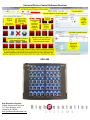
The software can be used by itself or with the USB connected UDC-400 control panel which can be assigned any
commands for any device. Each UDC-400 offers 40 physical buttons with three virtual pages of button layouts
providing a total of 120 unique user defined buttons. Each button can be programmed to execute multiple commands to
many devices on different networks with the push of a single button.
Universal Device Control Technology can be run on any windows computer and works with touch screens and mobile
devices. No proprietary hardware is required which can save on costs. Custom user interfaces can be built quickly and
easily with very little or no training saving huge costs on labor for any application needing control solutions. Any control
interface built in the Universal Device Control Software can be accessed through any device with a web browser and
the interface will look the same on an iphone, ipad, smartphone or any PC browser allowing for seamless remote
control.
The Universal Device Controller is great for recalling presets for room layouts from easy to build custom user interfaces.
UDC technology also features protocol translation which takes incoming commands such as PBUS or Art-Net and can
translate them to another protocol such as TCP or Telnet Ethernet commands. Protocol Translation provides a wide
range of uses such as extending the functionality of a Lighting console or TV switcher. Listen and Learn technology
makes this feature even easier when you don’t know what the incoming commands are. UDC will record them so that
every time UDC hears that recorded command coming in it will send a different, user defined protocol command out.
This allows you to use old controllers and control protocols with new technology. Listen and Learn gives the ability for
any device to talk to any other device quickly and easily.
High Resolution Systems
Control Systems and Solutions
7111 Dixie Highway #151
Clarkston, MI 48346
www.HighResolutionSystems.com
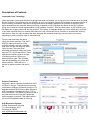
Universal Device Control Software Overview
UDC-400
High Resolution Systems
Control Systems and Solutions
7111 Dixie Highway #151
Clarkston, MI 48346
www.HighResolutionSystems.com
Descriptions of Features:
Listen and Learn Technology
Listen and Learn is used with unknown incoming commands and enables you to use your own controller as a Universal
Device Controller. This feature gives you the ability to use your computer running UDC software as a listening device to
record incoming commands. Once an incoming command is recorded it appears in the software as a button. Each
button pressed from the controller sending incoming commands to UDC populate as a button in the UDC software
giving you a virtual and visual representation of your hardware controller. Like any other button in UDC software you
can apply any outgoing command with any protocol. This feature for example allows you to use a third party controller
or any other controller that you currently have and turn it into a Universal Device Controller to communicate with any
other device. Now your old controllers that were designed with outdated technology can be used to control new
technology or new controllers used on old technology.
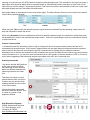
To use Listen and Learn first add a
Listen and Learn controller. Find the IP \
RS232 \Listen and Learn tab in the
controller window, click the controllers
drop down list and find the group titled
Listen & Learn. There are three
supported protocols for Listen and Learn
they are TCP, UDCP and RS232. These
three protocol options refer to the type
of incoming protocol. Select your
desired protocol type. This will add a
new tab representing your Listen and
Learn controller. There will be no
buttons so when you select the tab for
the
Protocol Translation
Used with a known incoming command set such
as PBUS or Art-Net. Translate known incoming
commands to different commands going out. For
example translate PBUS from a video switcher to
UDP commands or translate Art-Net to TCP or
serial commands. This allows any device to talk to
any other device even if they don’t speak the
same language or protocol. This feature allows
you to build a translation table of incoming
High Resolution Systems
Control Systems and Solutions
7111 Dixie Highway #151
Clarkston, MI 48346
www.HighResolutionSystems.com
commands linked to outgoing commands seen to the right.
To build a Protocol Translation table start in the controllers
windows go to the IP \ RS232 \ Listen and Learn tab and choose
a protocol type from the drop down list in the Protocol Translation
section as seen to the left.
Web Server
The Web Server allows remote web HTML access to UDC controllers or custom controller templates. This feature is
designed to extend the points of control to any machine with a web browser including mobile devices such as iPhone,
iPad, any PC or MAC, Android devices, Windows Mobile devices or any type of touch screen tablet or slate with a web
browser and network connectivity such as WiFi or LAN.
Our web server is a fully customizable and flexible technology that allows unlimited creativity to access Universal
Device Control through different control surfaces and interfaces. To design your own web pages simply design a UDC
Custom Controller, design and Listen & Learn Controller or use a UDC-400 controller. All button positions and images
are displayed in web browsers just like in the UDC software.
To connect to the software first start the Web Server by selecting start in the Web
Server drop down menu in the upper left next to the File drop down menu. Next
find the ip address of the computer running UDC which is displayed at the top of
the software then type that ip address into the browser. Turn off all firewalls and
make sure the browser machine or computer has connectivity with the UDC
computer which can be done by sending a ping command the UDC computer
from the browser computer in the cmd.exe prompt in any version of
Windows. The ping command is “ping xxx.xxx.xxx.xxx “ where the
xxx.xxx.xxx.xxx is the ip address of the UDC computer. See the example
ping command and note that you ip is most likely not the same as the ip
show in the cmd window.
By pressing or clicking buttons through the web browser that is remotely connected to UDC on a different computer
commands are then sent from the computer running UDC software to your devices.
When using the Web Server feature make sure the Web Server is running. You should see text in the title bar
under Your Ips that says Web Server Running… and remember that the web server does not start automatically
on restart of UDC software and must be started manually.
Matrix Router Functions and U-RCP
This feature gives you the ability to assign buttons as a Matrix Router function in order to build an XY (input/output)
Remote Control Panel (RCP) for a matrix router. This function is not specific to one router and can be used with any
type of switching matrix router. This is a generic XY function that does not send a command until you press a button
assigned as a Take or Autotake button. The Take or Autotake button holds the information about which device/router to
send the switch command to. This allows you to build a Universal Remote Control Panel (U-RCP) for matrix routers
High Resolution Systems
Control Systems and Solutions
7111 Dixie Highway #151
Clarkston, MI 48346
www.HighResolutionSystems.com
meaning you can have one XY (RCP) panel for multiple routers simultaneously. The command is sent once you press a
take button which specifies which router to send that switch to. Each different router would have its own Take or Auto
take button but use the same XY (input/output) buttons. This function is meant to be used with at least one of each input
and output buttons and one Take and/or Autotake button.
See images below for an example of these three button types. The Matrix Router Functions can be found at the bottom
of the button properties window.
When using the Take function the desired input and output buttons are selected first then pressing a take button will
send the command to switch the device.
When using Autotake press the Autotake button first then press the desired output you would like to switch then press
the desired input to send to the selected input/output switch. At the time of pressing the input the command will be sent
to switch the device.
Custom Command Sets
Command Sets are the information of how to talk to a device the device’s communication protocol and the list of
commands that the device uses. With Custom Command Sets you can easily add your own protocols and command
sets for devices which are not yet included in the UDC command set list. Simply copy the external command
information from a devices user manual into UDC software where you will find data and text fields to copy and paste the
control information in to. You can even save a command set as a file to share on another instance of UDC or to send to
us for feature upgrades of that command set and to be added to the UDC list of command sets.
Stacking Commands
One button has the ability defined
by the user to send more than
one command to more than one
device on different networks with
different protocols at the same
time.
This feature is useful to control
multiple devices from one button.
Common set ups would include
recalling presets for room control
or live event control.
As seen here three commands
are sent to different devices. This
is a view of a portion of the
properties window.
High Resolution Systems
Control Systems and Solutions
7111 Dixie Highway #151
Clarkston, MI 48346
www.HighResolutionSystems.com
Response Window
Gives you real time feedback and responses from devices you are sending commands to. Soon you will be able to
apply responses to buttons to perform a function when a response is seen. For example this will be used to send a
query command to a router to get visual feedback on the current switched state of that router.
High Resolution Systems
Control Systems and Solutions
7111 Dixie Highway #151
Clarkston, MI 48346
www.HighResolutionSystems.com