1
Officejet Enterprise Color X555
User Guide
www.hp.com/support/ojcolorX555
HP Officejet Enterprise Color X555
User Guide
Copyright and License
Trademark Credits
© 2014 Copyright Hewlett-Packard
Development Company, L.P.
Adobe®, Adobe Photoshop®, Acrobat®, and
PostScript® are trademarks of Adobe Systems
Incorporated.
Reproduction, adaptation, or translation
without prior written permission is prohibited,
except as allowed under the copyright laws.
The information contained herein is subject to
change without notice.
The only warranties for HP products and
services are set forth in the express warranty
statements accompanying such products and
services. Nothing herein should be construed
as constituting an additional warranty. HP shall
not be liable for technical or editorial errors or
omissions contained herein.
Part number: C2S11-90904
Edition 1, 4/2014
Apple and the Apple logo are trademarks of
Apple Computer, Inc., registered in the U.S. and
other countries. iPod is a trademark of Apple
Computer, Inc. iPod is for legal or rightholderauthorized copying only. Don't steal music.
Microsoft®, Windows®, Windows® XP, and
Windows Vista® are U.S. registered trademarks
of Microsoft Corporation.
UNIX® is a registered trademark of The Open
Group.
Table of contents
1 Product introduction ..................................................................................................................................... 1
Product comparison .............................................................................................................................................. 2
Product views ........................................................................................................................................................ 4
Product front view ............................................................................................................................... 4
Product back view ............................................................................................................................... 5
Interface ports ..................................................................................................................................... 6
Control-panel view .............................................................................................................................. 7
Product hardware setup and software installation .............................................................................................. 9
2 Paper trays ................................................................................................................................................. 11
Understand paper use ......................................................................................................................................... 12
Configure trays for paper type and size .............................................................................................................. 14
Configure a tray when loading paper ............................................................................................... 14
Configure a tray to match print job settings .................................................................................... 14
Configure a tray by using the control panel ..................................................................................... 15
Load Tray 1 (multi-purpose tray on left side of the product) ............................................................................ 16
Load Tray 2 or optional Tray 3 ............................................................................................................................ 17
3 Parts, supplies, and accessories ................................................................................................................... 19
Order parts, accessories, and supplies ............................................................................................................... 20
Ordering ............................................................................................................................................. 20
Parts and supplies ............................................................................................................................. 20
Accessories ........................................................................................................................................ 20
Replace the ink cartridges ................................................................................................................................... 21
4 Print ........................................................................................................................................................... 25
Print tasks (Windows) .......................................................................................................................................... 26
How to print (Windows) ..................................................................................................................... 26
Automatically print on both sides (Windows) .................................................................................. 27
Manually print on both sides (Windows) .......................................................................................... 28
Print multiple pages per sheet (Windows) ....................................................................................... 29
ENWW
iii
Select the paper type (Windows) ...................................................................................................... 30
Additional print tasks ........................................................................................................................ 30
Print tasks (Mac OS X) .......................................................................................................................................... 31
How to print (Mac OS X) ..................................................................................................................... 31
Automatically print on both sides (Mac OS X) .................................................................................. 31
Manually print on both sides (Mac OS X) .......................................................................................... 31
Print multiple pages per sheet (Mac OS X) ....................................................................................... 31
Select the paper type (Mac OS X) ...................................................................................................... 32
Additional print tasks ........................................................................................................................ 30
Store print jobs on the product to print later ...................................................................................................... 33
Create a stored job (Windows) .......................................................................................................... 33
Create a stored job (Mac OS X) .......................................................................................................... 34
Print a stored job ............................................................................................................................... 35
Delete a stored job ............................................................................................................................ 35
Mobile printing ..................................................................................................................................................... 36
HP Wireless Direct and NFC Printing ................................................................................................. 36
HP ePrint via email ............................................................................................................................ 37
HP ePrint software ............................................................................................................................ 37
AirPrint ............................................................................................................................................... 38
Print from the USB port ....................................................................................................................................... 39
Enable the USB port for printing ....................................................................................................... 39
Print USB documents ........................................................................................................................ 39
5 Manage the product ..................................................................................................................................... 41
Configure IP network settings ............................................................................................................................. 42
Printer sharing disclaimer ................................................................................................................. 42
View or change network settings ..................................................................................................... 42
Rename the product on a network ................................................................................................... 42
Manually configure IPv4 TCP/IP parameters from the control panel .............................................. 43
Manually configure IPv6 TCP/IP parameters from the control panel .............................................. 43
HP Embedded Web Server ................................................................................................................................... 45
How to access the HP Embedded Web Server (EWS) ........................................................................ 45
HP Embedded Web Server features .................................................................................................. 45
Information tab ............................................................................................................... 46
General tab ...................................................................................................................... 46
Print tab or Copy/Print tab ............................................................................................. 47
Scan/Digital Send tab (MFP models only) ...................................................................... 48
Fax tab (MFP models only) ............................................................................................. 49
Troubleshooting tab ....................................................................................................... 49
Security tab ..................................................................................................................... 50
HP Web Services tab ....................................................................................................... 50
iv
ENWW
Networking tab ............................................................................................................... 50
Other Links list ................................................................................................................ 52
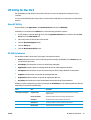
HP Utility for Mac OS X ......................................................................................................................................... 53
Open HP Utility .................................................................................................................................. 53
HP Utility features ............................................................................................................................. 53
HP Web Jetadmin ................................................................................................................................................. 55
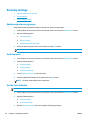
Economy settings ................................................................................................................................................ 56
Optimize speed or energy usage ...................................................................................................... 56
Set Sleep mode ................................................................................................................................. 56
Set the Sleep Schedule ...................................................................................................................... 56
Product security features .................................................................................................................................... 58
Security statements .......................................................................................................................... 58
IP Security .......................................................................................................................................... 58
Sign in to the product ........................................................................................................................ 58
Assign a system password ................................................................................................................ 58
Encryption support: HP High Performance Secure Hard Disks ........................................................ 59
Lock the formatter ............................................................................................................................ 59
Software and firmware updates ......................................................................................................................... 60
6 Solve general problems ............................................................................................................................... 61
Restore factory-set defaults ............................................................................................................................... 62
Control panel help system .................................................................................................................................. 63
A “Cartridge is low” or “Cartridge is very low” message displays on the product control panel ...................... 64
Change the “Very Low” settings ....................................................................................................... 64
For products with fax capability ..................................................................................... 64
Order supplies ................................................................................................................................... 65
Product does not pick up paper or misfeeds ...................................................................................................... 66
The product does not pick up paper ................................................................................................. 66
The product picks up multiple sheets of paper ................................................................................ 66
The document feeder jams, skews, or picks up multiple sheets of paper ...................................... 66
Clear jams ............................................................................................................................................................ 68
Auto-navigation for clearing jams .................................................................................................... 68
Experiencing frequent or recurring paper jams? .............................................................................. 68
Clear jams in the output bin .............................................................................................................. 69
Clear jams in Tray 1 (multipurpose tray) .......................................................................................... 70
Clear jams in the left door ................................................................................................................. 73
Clear jams in the ink collection unit area .......................................................................................... 74
Clear jams in Tray 2 ........................................................................................................................... 77
Clear jams in optional Tray 3 ............................................................................................................ 78
Improve print quality ........................................................................................................................................... 80
Print from a different software program ......................................................................................... 80
ENWW
v
Check the paper-type setting for the print job ................................................................................. 80
Check the paper type setting (Windows) ....................................................................... 80
Check the paper type setting (Mac OS X) ........................................................................ 80
Check ink cartridge status ................................................................................................................. 81
Clean the product .............................................................................................................................. 81
Print a cleaning page ...................................................................................................... 81
Clean the printhead ........................................................................................................ 82
Resolve ink smears ......................................................................................................... 82
Visually inspect the ink cartridge ...................................................................................................... 82
Check paper and the printing environment ...................................................................................... 82
Step one: Use paper that meets HP specifications ........................................................ 82
Step two: Check the environment .................................................................................. 83
Step three: Set the individual tray alignment ................................................................ 83
Calibrate the product to align the colors .......................................................................................... 83
Check other print job settings ........................................................................................................... 84
Adjust color settings (Windows) ..................................................................................... 84
Try a different print driver ................................................................................................................ 85
Solve wired network problems ........................................................................................................................... 87
Poor physical connection .................................................................................................................. 87
The computer is using the incorrect IP address for the product ...................................................... 87
The computer is unable to communicate with the product ............................................................. 87
The product is using incorrect link and duplex settings for the network ........................................ 88
New software programs might be causing compatibility problems ................................................ 88
The computer or workstation might be set up incorrectly .............................................................. 88
The product is disabled, or other network settings are incorrect ................................................... 88
Index ............................................................................................................................................................. 89
vi
ENWW
1
Product introduction
●
Product comparison
●
Product views
●
Product hardware setup and software installation
For more information:
In the US, go to www.hp.com/support/ojcolorX555.
Outside the US, go to www.hp.com/support. Select your country/region. Click Troubleshooting. Enter the
product name, and then select Search.
HP's all-inclusive help for your product includes the following information:
ENWW
●
Install and configure
●
Learn and use
●
Solve problems
●
Download software updates
●
Join support forums
●
Find warranty and regulatory information
1
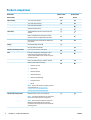
Product comparison
Model name
Model number
Paper handling
X555dn models
X555xh models
C2S11A
C2S12A
Tray 1 (50-sheet capacity)
Tray 2 (500-sheet capacity)
Tray 3 (500-sheet capacity)
Automatic duplex printing
Connectivity
10/100/1000 Ethernet LAN connection with IPv4
and IPv6
Easy-access USB port for printing and scanning
without a computer and upgrading the firmware
Hardware Integration Pocket (HIP) for adding thirdparty devices
Storage
HP Solid State Disk Drive (8 GB)
HP Crypto Disk Drive (500 GB)
Control-panel display and input
4.3 in. color touchscreen control panel
Print
Prints up to 42 pages per minute (ppm) on A4 or
Letter-size paper in Professional mode, up to
70 ppm in General Office mode, and up to 15 ppm in
Presentation mode
Easy-access USB printing (no computer required)
Mobile printing using the following:
●
HP ePrint via email
●
HP ePrint App
●
HP ePrint Software1
●
HP ePrint Enterprise
●
HP ePrint Home & Biz App
●
Google Cloud Print
●
AirPrint
NOTE: Get more information on mobility solutions
at the following links: www.hp.com/go/
mobileprinting; www.hpconnected.com;
www.hp.com/go/LaserJetMobilePrinting
Supported operating systems23
Windows XP SP3 or later, 32-bit and 64-bit
NOTE: The software installer does not support the
64-bit version, but the print driver supports it.
NOTE: Microsoft retired mainstream support for
Windows XP in April 2009. HP will continue to
provide best-effort support for the discontinued XP
operating system.
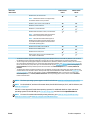
2
Chapter 1 Product introduction
ENWW
Model name
Model number
X555dn models
X555xh models
C2S11A
C2S12A
Windows Vista, 32-bit and 64-bit
NOTE: Windows Vista Starter is not supported by
the software installer or the print driver.
Windows 7, SP1 or later, 32-bit and 64-bit
Windows 8, 32-bit and 64-bit
Windows 8.1, 32-bit and 64-bit
Windows 2003 Server SP2 or later, 32-bit and 64-bit
NOTE: The software installer does not support the
64-bit version, but the print driver supports it.
NOTE: Microsoft retired mainstream support for
Windows Server 2003 in July 2010. HP will continue
to provide best-effort support for the discontinued
Server 2003 operating system.
Windows Server 2008, 32-bit and 64-bit
Windows Server 2008 R2, 64-bit
Windows Server 2012, 64-bit
Mac OS X 10.6, OS X 10.7 Lion, OS X 10.8 Mountain
Lion, and OS X 10.9 Mavericks
1
2
3
The HP ePrint Software supports the following operating systems: Windows Vista® (32-bit and 64-bit); Windows 7 (32-bit and 64bit); Windows 8 (32-bit and 64-bit); and Mac OS X 10.6, OS X 10.7 Lion, OS X 10.8 Mountain Lion, and OS X 10.9 Mavericks.
The list of supported operating systems applies to the Windows PCL 6, UPD PCL 6, UPD PCL 5, UPD PS, and Mac print drivers and to
the in-box software installation CD. For a current list of supported operating systems, go to www.hp.com/support/ojcolorX555 for
HP's all-inclusive help for your product. If you are located outside the US, go to www.hp.com/support, select a country/region, click
Drivers & Software, and then provide the product name or number. In the Download Options area, click Drivers, Software &
Firmware.
The HP Software Installer CD installs the HP PCL 6 driver for Windows operating systems along with other optional software. Mac
installer software is not included on the CD. The CD provides steps to download the Mac installer software from www.hp.com. Go to
www.hp.com/support, select the country/region, and then click Drivers & Software. Enter a product name or number. In the
Download Options area, click Drivers, Software & Firmware. Click the operating system version, and then click the Download
button in the Driver table.
NOTE:
The latest operating system support can be found online at: www.hp.com/support/ojcolorX555.
NOTE: For downloads of, and more information about, the HP UPD Postscript, PCL 5, and PCL 6 drivers, see
www.hp.com/go/upd.
UPD PCL 5 is not supported for Windows operating systems. For additional details on client and server
operating systems for the HP UPD, go to www.hp.com/go/upd, and then click the Specifications tab.
NOTE: For more information about mobile printing solutions, go to www.hp.com/go/mobileprinting;
www.hpconnected.com; or www.hp.com/go/LaserJetMobilePrinting.
ENWW
Product comparison
3
Product views
●
Product front view
●
Product back view
●
Interface ports
●
Control-panel view
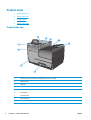
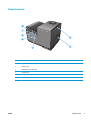
Product front view
9
1
2
3
4
8
7
6
5
4
1
Control panel with color touchscreen display (tilts up for easier viewing)
2
Output eject flap
3
Output bin
4
Output bin extension
5
Tray 2 (Main paper tray)
6
On/off button
7
Ink cartridge door
8
USB 2.0 Host port
9
Hardware integration pocket (HIP — for connecting accessory and third-party devices)
Chapter 1 Product introduction
ENWW
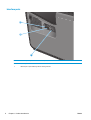
Product back view
7
6
5
1
4
3
ENWW
1
Left door (access for clearing jams and the ink collection unit)
2
Tray 1 (multipurpose tray)
3
Cable lock slot
4
Model and serial number label
5
Interface ports
6
Formatter (contains the interface ports)
7
Power connection
2
Product views
5
Interface ports
1
2
3
6
1
USB device port accepts a USB cable from a computer (alternative to network and wireless connections).
2
Ethernet port
3
USB host port accepts USB storage devices for Plug and Print
Chapter 1 Product introduction
ENWW
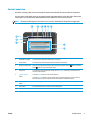
Control-panel view
The Home screen provides access to the product features and indicates the current status of the product.
You can return to the Home screen at any time by touching the Home button on the left side of the product
control panel. You can also touch the Home button in the upper-left corner of most screens.
NOTE:
The features that appear on the Home screen can vary, depending on the product configuration.
4
5
6 7 8 9
3
2
1
10
11
1
Home button and light
Touch to return to the product Home screen at any time.
2
Product status
The status line provides information about the overall product status.
3
HP logo or Home button
On any screen other than the Home screen, the HP logo changes to a Home
Home
ENWW
button. Touch the
button to return to the Home screen.
4
Stop button
Touch the Stop button to pause the current job. The Job Status screen opens, and then you can
cancel or continue the job.
5
Sign In or Sign Out
button
Touch the Sign In button to access secured features.
Touch the Sign Out button to sign out of the product if you have signed in for access to secured
features. After you sign out, the product restores all options to the default settings.
6
Language Selection
button
Touch the Language Selection button to select the language for the control-panel display.
7
Sleep button
Touch the Sleep button to put the product into Sleep mode.
8
Network button
Touch the Network button to find information about the network connection.
9
Help button
Touch the Help button to open the embedded help system.
Product views
7
8
10
Scroll bar
Touch the up or down arrows on the scroll bar to see the complete list of available features.
11
Features
Depending on the product configuration, the features that appear in this area can include any of the
following items:
Chapter 1 Product introduction
●
Quick Sets
●
Retrieve from USB
●
Retrieve from Device Memory
●
Job Status
●
Supplies
●
Trays
●
Administration
●
Device Maintenance
ENWW
Product hardware setup and software installation
For basic setup instructions, see the Hardware Installation Guide that came with the product. For additional
instructions, go to HP support on the Web.
In the US, go to www.hp.com/support/ojcolorX555 for HP's all-inclusive help for your product.
Outside the US, follow these steps:
1.
Go to www.hp.com/support.
2.
Select your country/region.
3.
Click Troubleshooting.
4.
Enter the product name (HP OfficeJet Enterprise Color X555), and then select Search.
Find the following support:
ENWW
●
Install and configure
●
Learn and use
●
Solve problems
●
Download software updates
●
Join support forums
●
Find warranty and regulatory information
Product hardware setup and software installation
9
10
Chapter 1 Product introduction
ENWW
2
Paper trays
●
Understand paper use
●
Configure trays for paper type and size
●
Load Tray 1 (multi-purpose tray on left side of the product)
●
Load Tray 2 or optional Tray 3
For more information:
In the US, go to www.hp.com/support/ojcolorX555.
Outside the US, go to www.hp.com/support. Select your country/region. Click Troubleshooting. Enter the
product name, and then select Search.
HP's all-inclusive help for your product includes the following information:
ENWW
●
Install and configure
●
Learn and use
●
Solve problems
●
Download software updates
●
Join support forums
●
Find warranty and regulatory information
11
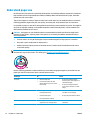
Understand paper use
HP Officejet inks for business are specifically developed for use with HP printheads. Unique ink formulations
help extend the life of the printheads and enhance reliability. When used with ColorLok® paper, these inks
provide laser-like color output.
This product supports a variety of paper and other print media. Paper or print media that does not meet the
following guidelines might cause poor print quality, increased jams, and premature wear on the product.
It is possible for paper to meet all of these guidelines and still not produce satisfactory results. This might be
the result of improper handling, unacceptable temperature and/or humidity levels, or other variables over
which Hewlett-Packard has no control.
CAUTION: Using paper or print media that does not meet Hewlett-Packard's specifications might cause
problems for the product, requiring repair. This repair is not covered by the Hewlett-Packard warranty or
service agreements.
●
For best results, use only HP-brand paper and print media designed for inkjet printers or multiuse.
●
Use paper or print media made for inkjet printers.
●
Hewlett-Packard Company cannot recommend the use of other brands of media because HP cannot
control their quality.
NOTE: Based on HP internal testing using a range of plain papers, HP highly recommends using papers with
the ColorLok® logo for this product. For details, go to www.hp.com/go/printpermanence.
Use the following guidelines to obtain satisfactory results when using special paper or print media. Set the
paper type and size in the printer driver to obtain the best results.
Media type
Do
Envelopes
●
Store envelopes flat.
●
●
Use envelopes where the seam
extends all the way to the corner of
the envelope.
Do not use envelopes that are
wrinkled, nicked, stuck together, or
otherwise damaged.
●
Do not use envelopes that have
clasps, snaps, windows, or coated
linings.
Labels
Letterhead or preprinted forms
12
Chapter 2 Paper trays
Do not
●
Use only labels that have no exposed
backing between them.
●
Do not use labels that have wrinkles
or bubbles, or are damaged.
●
Use labels that lie flat.
●
Do not print partial sheets of labels.
●
Use only full sheets of labels.
●
Use only letterhead or forms
approved for use in inkjet printers.
●
Do not use raised or metallic
letterhead.
ENWW
ENWW
Media type
Do
Do not
Heavy paper
●
Use only heavy paper that is
approved for use in inkjet printers
and meets the weight specifications
for this product.
●
Do not use paper that is heavier than
the recommended media
specification for this product unless it
is HP paper that has been approved
for use in this product.
Glossy or coated paper
●
Use only glossy or coated paper that
is approved for use in inkjet printers.
●
●
Print on the correct side of this type
of paper.
●
Do not attempt to duplex print on
this type of paper.
Do not use glossy or coated paper
designed for use in laser products.
Using laser printer glossy media can
result in ink puddling on the page and
covering the internal parts of the
product.
●
Printing on the incorrect side of this
type of paper can lead to puddling
and product contamination from
excess ink.
●
Duplex printing on this type of paper
can lead to smearing and product
contamination.
Understand paper use
13
Configure trays for paper type and size
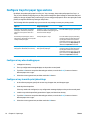
By default, the product pulls paper from Tray 2. If Tray 2 is empty, the product pulls paper from Tray 1, or
Tray 3 if it is installed. Configuring a tray on this product changes the speed settings to obtain the best print
quality for the type of paper that you are using. If you are using special paper for all or most print jobs on the
product, change this default tray setting on the product.
The following table lists possible ways you can use the tray settings to meet your printing needs.
Paper use
Configure the product
Print
Load Tray 1 and one other tray with the
same paper, and have the product pick
paper from one tray if the other one is
empty.
Load paper in Tray 1. No configuration is
needed, if the default settings for type and
size have not been changed.
From the software program, print the job.
Occasionally use special paper, such as
heavy paper or letterhead, from a tray that
usually contains plain paper.
Load special paper in Tray 1.
From the software program print dialog,
choose the paper type that matches the
special paper loaded in the tray before
sending the print job. Select Tray 1 as the
paper source from the Paper Quality tab
(Windows) or Paper Feed menu (Mac).
Frequently use special paper, such as
heavy paper or letterhead, from one tray.
Load special paper in Tray 1, and configure
the tray for the paper type.
From the software program print dialog,
choose the paper type that matches the
special paper loaded in the tray before
sending the print job. Select Tray 1 as the
paper source from the Paper Quality tab
(Windows) or Paper Feed menu (Mac).
Configure a tray when loading paper
1.
Load paper in the tray.
2.
The tray configuration message displays on the product control panel.
3.
Touch the OK button to accept the detected type and size, or touch the Modify button to choose a
different paper size or type.
4.
Select the correct type and size, and then touch the OK button.
Configure a tray to match print job settings
1.
In the software program, specify the source tray, the paper size, and the paper type.
2.
Send the job to the product.
If the tray needs to be configured, a tray configuration message displays on the product control panel.
14
3.
Load the tray with the specified type and size of paper, and then close the tray.
4.
Touch the OK button to accept the detected type and size, or touch the Modify button to choose a
different paper size or type.
5.
Select the correct type and size, and then touch the OK button.
Chapter 2 Paper trays
ENWW
Configure a tray by using the control panel
You can also configure the trays for type and size without a prompt from the product.
ENWW
1.
From the Home screen on the product control panel, scroll to and touch the Trays button.
2.
Touch the line for the tray that you want to configure, and then touch the Modify button.
3.
Select the paper type and size from the lists of options.
4.
Touch the OK button to save your selection.
Configure trays for paper type and size
15
Load Tray 1 (multi-purpose tray on left side of the product)
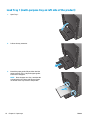
1.
Open Tray 1.
2.
Pull out the tray extension.
3.
Extend the paper guides fully and then load the
paper stack into Tray 1. Adjust the paper guides
to the size of the paper.
NOTE: Place the paper into Tray 1 with the side
to be printed on face-down and the top of page
on the side of the tray closest to the product.
16
Chapter 2 Paper trays
ENWW
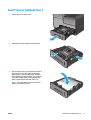
Load Tray 2 or optional Tray 3
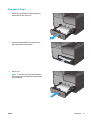
1.
Pull the tray out of the product.
2.
Slide open the paper length and width guides.
3.
Place the paper in the tray and make sure that it
is flat at all four corners. Slide the side paper
width guides so that they align with the papersize marking in the bottom of the tray. Slide the
front paper length guide so that it pushes the
stack of paper against the back of the tray.
NOTE: Place the paper into the tray with the
side to be printed on face-up.
ENWW
Load Tray 2 or optional Tray 3
17
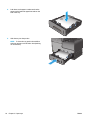
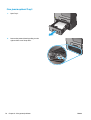
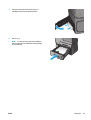
4.
Push down on the paper to make sure that the
paper stack is below the paper limit tabs on the
side of the tray.
5.
Slide the tray into the product.
NOTE: To close the tray, push in the middle or
with even pressure on both sides. Avoid pushing
on one side only.
18
Chapter 2 Paper trays
ENWW
3
Parts, supplies, and accessories
●
Order parts, accessories, and supplies
●
Replace the ink cartridges
For more information:
In the US, go to www.hp.com/support/ojcolorX555.
Outside the US, go to www.hp.com/support. Select your country/region. Click Troubleshooting. Enter the
product name, and then select Search.
HP's all-inclusive help for your product includes the following information:
ENWW
●
Install and configure
●
Learn and use
●
Solve problems
●
Download software updates
●
Join support forums
●
Find warranty and regulatory information
19
Order parts, accessories, and supplies
Ordering
Order supplies and paper
www.hp.com/go/suresupply
Order genuine HP parts or accessories
www.hp.com/buy/parts
Order through service or support providers
Contact an HP-authorized service or support provider.
Order using the HP Embedded Web Server (EWS)
To access, in a supported Web browser on your computer, enter the
product IP address or host name in the address/URL field. The EWS
contains a link to the HP SureSupply Web site, which provides options
for purchasing Original HP supplies.
Parts and supplies
The following parts are available for the product.
Item
Part number
Cartridge number
Description
Ink cartridges
D8J10A
HP 980A
Standard-capacity black ink cartridge with HP Officejet
pigment ink
D8J07A
HP 980A
Standard-capacity cyan ink cartridge with HP Officejet
pigment ink
D8J09A
HP 980A
Standard-capacity yellow ink cartridge with HP Officejet
pigment ink
D8J08A
HP 980A
Standard-capacity magenta ink cartridge with HP Officejet
pigment ink
Ink collection unit
B5L09A
HP Officejet Enterprise ink collection unit and duplex module
NOTE: For information about the yield for the cartridges, see www.hp.com/go/pageyield. Actual yield
depends on specific use.
Accessories
The following accessories are available for the product.
1
20
Item
Part number
Description
Paper-handling accessory
B5L07A
HP Officejet Enterprise 500-sheet paper tray (optional Tray 3)1
Product cabinet and stand
B5L08A
HP Officejet Enterprise printer cabinet and stand
Network accessory
J8029A
HP NFC/Wireless Direct Accessory
USB cable
8121-0868
2-meter A-to-B cable
Optional Tray 3 is available for the X555dn model only. You cannot add a second 500-sheet tray to the X555xh model.
Chapter 3 Parts, supplies, and accessories
ENWW
Replace the ink cartridges
The product uses four colors and has a different ink cartridge for each color: yellow (Y), cyan (C), magenta
(M), and black (K).
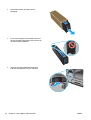
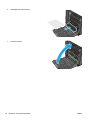
1.
Open the ink cartridge door.
2.
Push the old ink cartridge inward to unlock it.
3.
Grasp the edge of the old ink cartridge and then
pull the cartridge straight out to remove it.
ENWW
Replace the ink cartridges
21
4.
Remove the new ink cartridge from the
packaging.
C
0
98
5.
Do not touch the gold-colored metal contacts of
the ink cartridge. Fingerprints on the contacts can
cause print-quality problems.
C
980
6.
22
Insert the new ink cartridge into the product.
Push the cartridge until it “clicks” into place.
Chapter 3 Parts, supplies, and accessories
ENWW
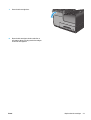
7.
Close the ink cartridge door.
8.
Place the old cartridge in the box and refer to
information about recycling used ink cartridges
on the ink cartridge box.
ENWW
Replace the ink cartridges
23
24
Chapter 3 Parts, supplies, and accessories
ENWW
4
Print
●
Print tasks (Windows)
●
Print tasks (Mac OS X)
●
Store print jobs on the product to print later
●
Mobile printing
●
Print from the USB port
For more information:
In the US, go to www.hp.com/support/ojcolorX555.
Outside the US, go to www.hp.com/support. Select your country/region. Click Troubleshooting. Enter the
product name, and then select Search.
HP's all-inclusive help for your product includes the following information:
ENWW
●
Install and configure
●
Learn and use
●
Solve problems
●
Download software updates
●
Join support forums
●
Find warranty and regulatory information
25
Print tasks (Windows)
How to print (Windows)
The following procedure describes the basic printing process for Windows.
1.
From the software program, select the Print option.
2.
Select the product from the list of printers. To change settings, click or tap the Properties or
Preferences button to open the print driver.
NOTE: The name of the button varies for different software programs.
26
3.
Click or tap the tabs in the print driver to configure the available options. For example, set the paper
orientation on the Finishing tab, and set the paper source, paper type, paper size, and quality settings
on the Paper/Quality tab.
4.
Click or tap the OK button to return to the Print dialog box. Select the number of copies to print from
this screen.
5.
Click or tap the OK button to print the job.
Chapter 4 Print
ENWW
Automatically print on both sides (Windows)
Use this procedure for products that have an automatic duplexer installed. If the product does not have an
automatic duplexer installed, or to print on paper types that the duplexer does not support, you can print on
both sides manually.
1.
From the software program, select the Print option.
2.
Select the product from the list of printers, and then click or tap the Properties or Preferences button
to open the print driver.
NOTE: The name of the button varies for different software programs.
ENWW
3.
Click or tap the Finishing tab.
4.
Select the Print on both sides check box. Click the OK button to close the Document Properties dialog
box.
5.
In the Print dialog box, click the OK button to print the job.
Print tasks (Windows)
27
Manually print on both sides (Windows)
Use this procedure for products that do not have an automatic duplexer installed or to print on paper that the
duplexer does not support.
1.
From the software program, select the Print option.
2.
Select the product from the list of printers, and then click or tap the Properties or Preferences button
to open the print driver.
NOTE: The name of the button varies for different software programs.
28
3.
Click or tap the Finishing tab.
4.
Select the Print on both sides (manually) check box. Click the OK button to print the first side of the
job.
5.
Retrieve the printed stack from the output bin, and place it in Tray 1.
6.
If prompted, touch the appropriate control panel button to continue.
Chapter 4 Print
ENWW
Print multiple pages per sheet (Windows)
1.
From the software program, select the Print option.
2.
Select the product from the list of printers, and then click or tap the Properties or Preferences button
to open the print driver.
NOTE: The name of the button varies for different software programs.
ENWW
3.
Click or tap the Finishing tab.
4.
Select the number of pages per sheet from the Pages per sheet drop-down list.
5.
Select the correct Print page borders, Page order, and Orientation options. Click the OK button to close
the Document Properties dialog box.
6.
In the Print dialog box, click the OK button to print the job.
Print tasks (Windows)
29
Select the paper type (Windows)
1.
From the software program, select the Print option.
2.
Select the product from the list of printers, and then click or tap the Properties or Preferences button
to open the print driver.
NOTE: The name of the button varies for different software programs.
3.
Click or tap the Paper/Quality tab.
4.
From the Paper type drop-down list, click the More... option.
5.
Expand the list of Type is: options.
6.
Expand the category of paper types that best describes your paper.
7.
Select the option for the type of paper you are using, and then click the OK button.
8.
Click the OK button to close the Document Properties dialog box. In the Print dialog box, click the OK
button to print the job.
Additional print tasks
In the US, go to www.hp.com/support/ojcolorX555.
Outside the US, go to www.hp.com/support. Select your country/region. Click Troubleshooting. Enter the
product name, and then select Search.
Instructions are available for performing specific print tasks, such as the following:
30
●
Create and use printing shortcuts or presets
●
Select the paper size, or use a custom paper size
●
Select the page orientation
●
Create a booklet
●
Scale a document to fit a specific paper size
●
Print the first or last pages of the document on different paper
●
Print watermarks on a document
Chapter 4 Print
ENWW
Print tasks (Mac OS X)
How to print (Mac OS X)
The following procedure describes the basic printing process for Mac OS X.
1.
Click the File menu, and then click the Print option.
2.
In the Printer menu, select the product.
3.
Open the menus drop-down list or click Show Details, and then select other menus to adjust the print
settings.
4.
Click the Print button.
Automatically print on both sides (Mac OS X)
NOTE: This feature is available if you install the HP print driver. It might not be available if you are using
AirPrint.
1.
Click the File menu, and then click the Print option.
2.
In the Printer menu, select the product.
3.
Open the menus drop-down list or click Show Details, and then click the Layout menu.
4.
Select a binding option from the Two-Sided drop-down list.
5.
Click the Print button.
Manually print on both sides (Mac OS X)
NOTE: This feature is available if you install the HP print driver. It might not be available if you are using
AirPrint.
1.
Click the File menu, and then click the Print option.
2.
In the Printer menu, select this product.
3.
Open the menus drop-down list or click Show Details, and then click the Manual Duplex menu.
4.
Click the Manual Duplex box, and select a binding option.
5.
Click the Print button.
6.
Go to the product, and remove any blank paper that is in Tray 1.
7.
Retrieve the printed stack from the output bin and place it with the printed-side facing down in the input
tray.
8.
If prompted, touch the appropriate control panel button to continue.
Print multiple pages per sheet (Mac OS X)
ENWW
1.
Click the File menu, and then click the Print option.
2.
In the Printer menu, select the product.
Print tasks (Mac OS X)
31
3.
Open the menus drop-down list or click Show Details, and then click the Layout menu.
4.
From the Pages per Sheet drop-down list, select the number of pages that you want to print on each
sheet.
5.
In the Layout Direction area, select the order and placement of the pages on the sheet.
6.
From the Borders menu, select the type of border to print around each page on the sheet.
7.
Click the Print button.
Select the paper type (Mac OS X)
1.
Click the File menu, and then click the Print option.
2.
In the Printer menu, select the product.
3.
Open the menus drop-down list or click Show Details, and then click the Finishing menu.
4.
Select a type from the Media-type drop-down list.
5.
Click the Print button.
Additional print tasks
In the US, go to www.hp.com/support/ojcolorX555.
Outside the US, go to www.hp.com/support. Select your country/region. Click Troubleshooting. Enter the
product name, and then select Search.
Instructions are available for performing specific print tasks, such as the following:
32
●
Create and use printing shortcuts or presets
●
Select the paper size, or use a custom paper size
●
Select the page orientation
●
Create a booklet
●
Scale a document to fit a specific paper size
●
Print the first or last pages of the document on different paper
●
Print watermarks on a document
Chapter 4 Print
ENWW
Store print jobs on the product to print later
●
Create a stored job (Windows)
●
Create a stored job (Mac OS X)
●
Print a stored job
●
Delete a stored job
Create a stored job (Windows)
You can store jobs on the product so you can print them at any time.
NOTE:
Your print driver might look different than what is shown here, but the steps are the same.
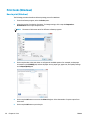
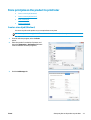
1.
From the software program, select the Print
option.
2.
Select the product from the list of printers, and
then select Properties or Preferences (the name
varies for different software programs).
3.
Click the Job Storage tab.
ENWW
Store print jobs on the product to print later
33
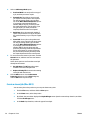
4.
5.
Select a Job Storage Mode option.
●
Proof and Hold: Print and proof one copy of
a job, and then print more copies.
●
Personal Job: The job does not print until
you request it at the product control panel.
For this job-storage mode, you can select
one of the Make Job Private/Secure options.
If you assign a personal identification
number (PIN) to the job, you must provide
the required PIN at the control panel. If you
encrypt the job, you must provide the
required password at the control panel.
●
Quick Copy: Print the requested number of
copies of a job and store a copy of the job in
the product memory so you can print it again
later.
●
Stored Job: Store a job on the product and
allow other users to print the job at any time.
For this job-storage mode, you can select
one of the Make Job Private/Secure options.
If you assign a personal identification
number (PIN) to the job, the person who
prints the job must provide the required PIN
at the control panel. If you encrypt the job,
the person who prints the job must provide
the required password at the control panel.
To use a custom user name or job name, click the
Custom button, and then enter the user name or
the job name.
Select which option to use if another stored job
already has that name:
6.
●
Use Job Name + (1-99): Append a unique
number to the end of the job name.
●
Replace Existing File: Overwrite the existing
stored job with the new one.
Click the OK button to close the Document
Properties dialog box. In the Print dialog box,
click the OK button to print the job.
Create a stored job (Mac OS X)
You can store jobs on the product so you can print them at any time.
34
1.
Click the File menu, and then click the Print option.
2.
In the Printer menu, select the product.
3.
By default, the print driver displays the Copies & Pages menu. Open the menus drop-down list, and then
click the Job Storage menu.
4.
In the Mode drop-down list, select the type of stored job.
Chapter 4 Print
ENWW
5.
●
Proof and Hold: Print and proof one copy of a job, and then print more copies.
●
Personal Job: The job does not print until you request it at the product control panel. If you assign
a personal identification number (PIN) to the job, you must provide the required PIN at the control
panel.
●
Quick Copy: Print the requested number of copies of a job and store a copy of the job in the
product memory so you can print it again later.
●
Stored Job: Store a job on the product and allow other users to print the job at any time. If you
assign a personal identification number (PIN) to the job, the person who prints the job must
provide the required PIN at the control panel.
To use a custom user name or job name, click the Custom button, and then enter the user name or the
job name.
Select which option to use if another stored job already has that name.
●
Use Job Name + (1-99): Append a unique number to the end of the job name.
●
Replace Existing File: Overwrite the existing stored job with the new one.
6.
If you selected the Stored Job or Personal Job option in step 3, you can protect the job with a PIN. Type
a 4-digit number in the Use PIN to Print field. When other people attempt to print this job, the product
prompts them to enter this PIN number.
7.
Click the Print button to process the job.
Print a stored job
Use the following procedure to print a job that is stored in the product memory.
1.
From the Home screen on the product control panel, scroll to and touch the Retrieve from Device
Memory button.
2.
Select the name of the folder where the job is stored.
3.
Select the name of the job. If the job is private or encrypted, enter the PIN or password.
4.
Adjust the number of copies, and then touch the Start
button to print the job.
Delete a stored job
When you send a stored job to the product memory, the product overwrites any previous jobs with the same
user and job name. If a job is not already stored under the same user and job name, and the product needs
additional space, the product might delete other stored jobs starting with the oldest. You can change the
number of jobs that the product can store from the General Settings menu on the product control panel.
Use this procedure to delete a job that is stored in the product memory.
ENWW
1.
From the Home screen on the product control panel, scroll to and touch the Retrieve from Device
Memory button.
2.
Select the name of the folder where the job is stored.
3.
Select the name of the job, and then touch the Delete button.
4.
If the job is private or encrypted, enter the PIN or the password, and then touch the Delete button.
Store print jobs on the product to print later
35
Mobile printing
HP offers multiple Mobile and ePrint solutions to enable wireless printing to an HP printer from a laptop,
tablet, smartphone, or other mobile device. To determine the best choice, go to www.hp.com/go/
LaserJetMobilePrinting (English only).
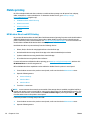
●
HP Wireless Direct and NFC Printing
●
HP ePrint via email
●
HP ePrint software
●
AirPrint
HP Wireless Direct and NFC Printing
HP provides HP Wireless Direct and NFC (Near Field Communication) printing for printers with the HP Jetdirect
2800w NFC & Wireless Direct Accessory (part number: J8029-90901) as well as certain other HP LaserJet
printers (check the printer’s documentation). See www.hp.com/go/jd2800wSupport for more information on
the HP Jetdirect 2800w NFC & Wireless Direct Accessory.
Use HP Wireless Direct to print wirelessly from the following devices:
●
iPhone, iPad, or iPod touch using Apple AirPrint or the HP ePrint app
●
Android mobile devices using the HP ePrint App or the Android embedded print solution
●
Symbian mobile devices using the HP ePrint Home & Biz App
●
PC and Mac devices using the HP ePrint Software
For more information on HP Wireless Direct printing, go to www.hp.com/go/wirelessprinting, and then click
HP Wireless Direct on the left navigation bar.
NFC and HP Wireless Direct capabilities can be enabled or disabled from the printer’s control panel.
1.
From the Home screen on the product control panel, scroll to and touch the Administration menu.
2.
Open the following menus:
3.
●
Network Settings
●
Wireless Menu
●
Wireless Direct
Touch the On menu item.
NOTE: In environments where more than one model of the same product is installed, it might be helpful to
provide each product a more unique SSID for easier product identification for HP Wireless Direct printing. The
SSID (Service Set Identifier) is also available on the How to Connect Page by touching the Network button
from the Home screen on the product control panel.
Follow this procedure to change the product SSID:
36
1.
From the Home screen on the product control panel, scroll to and touch the Administration menu.
2.
Open the following menus:
Chapter 4 Print
ENWW
●
Network Settings
●
Wireless Menu
●
Wireless Direct
●
SSID
3.
Touch the SSID name area.
4.
Use the keyboard to change the name.
5.
Touch OK.
HP ePrint via email
Use HP ePrint to print documents by sending them as an email attachment to the product's email address
from any email enabled device.
NOTE:
The product might require a firmware update to use this feature.
To use HP ePrint, the product must meet these requirements:
●
The product must be connected to a wired or wireless network and have Internet access.
●
HP Web Services must be enabled on the product, and the product must be registered with
HP Connected.
Follow this procedure to enable HP Web Services and register with HP Connected:
1.
Open the HP Embedded Web Server (EWS):
button to display the IP
a.
From the Home screen on the product control panel, touch the Network
address or host name.
b.
Open a Web browser, and in the address line, type the IP address or host name exactly as it
displays on the product control panel. Press the Enter key on the computer keyboard. The EWS
opens.
2.
Click the HP Web Services tab.
3.
Select the option to enable Web Services.
NOTE: Enabling Web Services might take several minutes.
4.
Go to www.hpconnected.com to create an HP ePrint account and complete the setup process.
HP ePrint software
The HP ePrint software makes it easy to print from a Windows or Mac desktop or laptop computer to any HP
ePrint-capable product. This software makes it easy to find HP ePrint-enabled products that are registered to
your HP Connected account. The target HP printer can be located in the office or at locations across the
globe.
ENWW
Mobile printing
37
●
Windows: After installing the software, open the Print option from within your application, and then
select HP ePrint from the installed printers list. Click the Properties button to configure print options.
●
Mac: After installing the software, select File, Print, and then select the arrow next to PDF (in the
bottom left of the driver screen). Select HP ePrint.
For Windows, the HP ePrint software supports TCP/IP printing to local network printers on the network (LAN
or WAN) to products that support UPD PostScript®.
Windows and Mac both support IPP printing to LAN or WAN network-connected products that support ePCL.
Windows and Mac also both support printing PDF documents to public print locations and printing using HP
ePrint via email through the cloud.
Go to www.hp.com/go/eprintsoftware for drivers and information.
NOTE:
The HP ePrint software is a PDF workflow utility for Mac, and is not technically a print driver.
NOTE:
HP ePrint Software does not support USB printing.
AirPrint
Direct printing using Apple’s AirPrint is supported for iOS 4.2 or later. Use AirPrint to print directly to the
product from an iPad, iPhone (3GS or later), or iPod touch (third generation or later) in the following
applications:
●
Mail
●
Photos
●
Safari
●
iBooks
●
Select third-party applications
To use AirPrint, the product must be connected to the same wireless network as the Apple device. For more
information about using AirPrint and about which HP products are compatible with AirPrint, go to the support
Web site for this product:
●
In the US, go to www.hp.com/support/ojcolorX555.
●
Outside the US, go to www.hp.com/support. Select your country/region. Click Troubleshooting. Enter
the product name, and then select Search.
NOTE:
38
Chapter 4 Print
AirPrint does not support USB connections.
ENWW
Print from the USB port
This product features easy-access USB printing, so you can quickly print files without sending them from a
computer. The product accepts standard USB flash drives in the USB port on the front of the product. You can
print the following types of files:
●
.pdf
●
.prn
●
.pcl
●
.ps
●
.cht
Enable the USB port for printing
Before you can use this feature, you must enable the USB port. Use the following procedure to enable the
port from the product control-panel menus:
1.
From the Home screen on the product control panel, scroll to and touch the Administration button.
2.
Open the following menus:
3.
●
General Settings
●
Enable Retrieve from USB
Select the Enable option, and then touch the Save button.
Print USB documents
1.
Insert the USB flash drive into the easy-access USB port.
NOTE: You might need to remove the cover from the USB port. Pull the cover straight out to remove it.
2.
The product detects the USB flash drive. Touch the OK button to access the drive, or, if prompted, select
the Retrieve from USB option from the list of available applications. The Retrieve from USB screen
opens.
3.
Select the name of the document that you want to print.
NOTE: The document might be in a folder. Open folders as necessary.
ENWW
4.
To adjust the number of copies, touch the Copies field, and then use the keypad to select the number of
copies.
5.
Touch the Start
button to print the document.
Print from the USB port
39
40
Chapter 4 Print
ENWW
5
Manage the product
●
Configure IP network settings
●
HP Embedded Web Server
●
HP Utility for Mac OS X
●
HP Web Jetadmin
●
Economy settings
●
Product security features
●
Software and firmware updates
For more information:
In the US, go to www.hp.com/support/ojcolorX555.
Outside the US, go to www.hp.com/support. Select your country/region. Click Troubleshooting. Enter the
product name, and then select Search.
HP's all-inclusive help for your product includes the following information:
ENWW
●
Install and configure
●
Learn and use
●
Solve problems
●
Download software updates
●
Join support forums
●
Find warranty and regulatory information
41
Configure IP network settings
●
Printer sharing disclaimer
●
View or change network settings
●
Rename the product on a network
●
Manually configure IPv4 TCP/IP parameters from the control panel
●
Manually configure IPv6 TCP/IP parameters from the control panel
Printer sharing disclaimer
HP does not support peer-to-peer networking, as the feature is a function of Microsoft operating systems
and not of the HP printer drivers. Go to Microsoft at www.microsoft.com.
View or change network settings
Use the HP Embedded Web Server to view or change IP configuration settings.
1.
2.
Open the HP Embedded Web Server (EWS):
button to display the IP
a.
From the Home screen on the product control panel, touch the Network
address or host name.
b.
Open a Web browser, and in the address line, type the IP address or host name exactly as it
displays on the product control panel. Press the Enter key on the computer keyboard. The EWS
opens.
Click the Networking tab to obtain network information. You can change settings as needed.
Rename the product on a network
If you want to rename the product on a network so that it can be uniquely identified, use the HP Embedded
Web Server.
1.
2.
42
Open the HP Embedded Web Server (EWS):
button to display the IP
a.
From the Home screen on the product control panel, touch the Network
address or host name.
b.
Open a Web browser, and in the address line, type the IP address or host name exactly as it
displays on the product control panel. Press the Enter key on the computer keyboard. The EWS
opens.
Open the General tab.
Chapter 5 Manage the product
ENWW
3.
On the Device Information page, the default product name is in the Device Name field. You can change
this name to uniquely identify this product.
NOTE: Completing the other fields on this page is optional.
4.
Click the Apply button to save the changes.
Manually configure IPv4 TCP/IP parameters from the control panel
Use the control-panel Administration menus to manually set an IPv4 address, subnet mask, and default
gateway.
1.
From the Home screen on the product control panel, scroll to and touch the Administration button.
2.
Open the following menus:
●
Network Settings
●
Jetdirect Menu
●
TCP/IP
●
IPV 4 Settings
●
Config Method
3.
Select the Manual option, and then touch the Save button.
4.
Open the Manual Settings menu.
5.
Touch the IP Address, Subnet Mask, or Default Gateway option.
6.
Touch the first field to open a keypad. Enter the correct digits for the field, and then touch the OK
button.
Repeat the process for each field, and then touch the Save button.
Manually configure IPv6 TCP/IP parameters from the control panel
Use the control-panel Administration menus to manually set an IPv6 address.
1.
From the Home screen on the product control panel, scroll to and touch the Administration button.
2.
To enable manual configuration, open the following menus:
●
Network Settings
●
Jetdirect Menu
●
TCP/IP
●
IPV6 Settings
●
Address
●
Manual Settings
●
Enable
Select the On option, and then touch the Save button.
ENWW
Configure IP network settings
43
44
3.
To configure the address, touch the Address button and then touch the field to open a keypad.
4.
Use the keypad to enter the address, and then touch the OK button.
5.
Touch the Save button.
Chapter 5 Manage the product
ENWW
HP Embedded Web Server
●
How to access the HP Embedded Web Server (EWS)
●
HP Embedded Web Server features
Use the HP Embedded Web Server to manage printing functions from a computer instead of the product
control panel.
●
View product status information
●
Determine the remaining life for all supplies and order new ones
●
View and change tray configurations
●
View and change the product control-panel menu configuration
●
View and print internal pages
●
Receive notification of product and supplies events
●
View and change network configuration
The HP Embedded Web Server works when the product is connected to an IP-based network. The HP
Embedded Web Server does not support IPX-based product connections. Internet access is not needed to
open and use the HP Embedded Web Server.
When the product is connected to the network, the HP Embedded Web Server is automatically available.
NOTE:
The HP Embedded Web Server is not accessible beyond the network firewall.
How to access the HP Embedded Web Server (EWS)
1.
From the Home screen on the product control panel, touch the Network
address or host name.
button to display the IP
2.
Open a Web browser, and in the address line, type the IP address or host name exactly as it displays on
the product control panel. Press the Enter key on the computer keyboard. The EWS opens.
To use the HP Embedded Web Server, the browser must meet the following requirements:
●
Windows: Microsoft Internet Explorer 5.01 or later or Netscape 6.2 or later
●
Mac OS X: Safari or Firefox using Bonjour or an IP address
●
Linux: Netscape Navigator only
●
HP-UX 10 and HP-UX 11: Netscape Navigator 4.7
HP Embedded Web Server features
ENWW
●
Information tab
●
General tab
●
Print tab or Copy/Print tab
HP Embedded Web Server
45
●
Scan/Digital Send tab (MFP models only)
●
Fax tab (MFP models only)
●
Troubleshooting tab
●
Security tab
●
HP Web Services tab
●
Networking tab
●
Other Links list
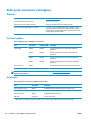
Information tab
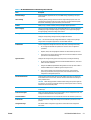
Table 5-1 HP Embedded Web Server Information tab
Menu
Description
Device Status
Shows the product status and shows the estimated life remaining of HP supplies. The
page also shows the type and size of paper set for each tray. To change the default
settings, click the Change Settings link.
Job Log
Shows a summary of all jobs the product has processed.
Configuration Page
Shows the information found on the configuration page.
Supplies Status Page
Shows the status of the supplies for the product.
Event Log Page
Shows a list of all product events and errors. Use the HP Instant Support link (in the
Other Links area on all HP Embedded Web Server pages) to connect to a set of dynamic
Web pages that help solve problems. These pages also show additional services
available for the product.
Usage Page
Shows a summary of the number of pages the product has printed, grouped by size,
type, and paper print path.
Device Information
Shows the product network name, address, and model information. To customize these
entries, click the Device Information menu on the General tab.
Control Panel Snapshot
Shows an image of the current screen on the control panel display.
Print
Upload a print-ready file from the computer to print. The product uses the default print
settings to print the file.
Printable Reports and Pages
Lists the internal reports and pages for the product. Select one or more items to print or
view.
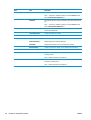
General tab
Table 5-2 HP Embedded Web Server General tab
Menu
Description
Control Panel Customization
Reorder, show, or hide features on the control-panel display.
Change the default display language.
46
Quick Sets Setup
Configure jobs that are available in the Quick Sets area of the Home screen on the
product control panel.
Alerts
Setup email alerts for various product and supplies events.
Chapter 5 Manage the product
ENWW
Table 5-2 HP Embedded Web Server General tab (continued)
Menu
Description
Control Panel Administration Menu
Shows the menu structure of the Administration menu on the control panel.
NOTE: Configure settings on this screen, or the HP Embedded Web Server provides
more advanced configuration options than are available through the Administration
menu.
AutoSend
Configure the product to send automated emails regarding product configuration and
supplies to specific email addresses.
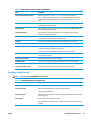
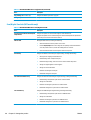
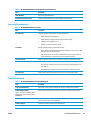
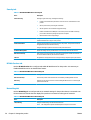
Edit Other Links
Add or customize a link to another Web site. This link displays in the Other Links area on
all HP Embedded Web Server pages.
Ordering Information
Enter information about ordering replacement toner cartridges. This information
displays on the supplies status page.
Device Information
Name the product and assign an asset number to it. Enter the name of the primary
contact who will receive information about the product.
Language
Set the language in which to display the HP Embedded Web Server information.
Date and Time
Set the date and time or synchronize with a network time server.
Energy Settings
Set or edit a wake time, sleep time, and sleep delay for the product. Set a different
schedule for each day of the week and for holidays.
Set which interactions with the product cause it to wake from sleep mode.
Backup and Restore
Create a backup file that contains product and user data. If necessary, use this file to
restore data to the product.
Restore Factory Settings
Restore product settings to the factory defaults.
Solution Installer
Install third-party software programs that can enhance the product functionality.
Firmware Upgrade
Download and install product firmware upgrade files.
Quota and Statistics Services
Provides connection information about third-party job-statistics services.
Print tab or Copy/Print tab
NOTE:
The tab is named Copy/Print for MFP models.
Table 5-3 HP Embedded Web Server Copy/Print tab
Menu
Description
Retrieve from USB Setup
Enable or disable the Retrieve from USB menu on the control panel.
Manage Stored Jobs
Enable or disable the ability to store jobs in the product memory.
Configure job-storage options.
Adjust Paper Types
Override the factory-default mode settings if print quality problems occur when using a
specific paper type.
Restrict Color
Permit or restrict color printing and copying.
Specify permissions for individual users or for jobs that are sent from specific software
programs.
General Print Settings
ENWW
Configure settings for all print jobs, including copy jobs or received faxes.
HP Embedded Web Server
47
Table 5-3 HP Embedded Web Server Copy/Print tab (continued)
Menu
Description
Copy Settings (MFP models only)
Configure the default options for copy jobs.
Manage Trays
Configure settings for paper trays.
Scan/Digital Send tab (MFP models only)
Table 5-4 HP Embedded Web Server Scan/Digital Send tab
Menu
Description
E-mail and Save to Network Folder Quick
Setup Wizards
Configure the product to send scanned images as email attachments.
Address Book
Manage the address book, including the following:
E-mail Setup
Save to Network Folder Setup
Save to USB Setup
48
Chapter 5 Manage the product
Configure the product to save scanned images to network-folder Quick Sets. Quicks Sets
provide easy access to files saved on the network.
●
Add email addresses into the product one at a time.
●
Use the Import/Export tab to load a large list of frequently-used email addresses
on to the product all at once, rather than adding them one at a time.
●
Edit email addresses that have already been saved in the product.
Configure the default email settings for digital sending, including the following:
●
Settings for the outgoing mail (SMTP) server
●
Default settings for E-mail Quick Sets jobs
●
Default message settings, such as the "From" address and the subject line
●
Settings for digital signatures and encryption
●
Settings for email notifications
●
Default scan settings for email jobs
●
Default file settings for email jobs
Configure the network folder settings for digital sending, including the following:
●
Default settings for Quick Sets jobs saved in a network folder
●
Settings for notifications
●
Default scan settings for jobs saved in a network folder
●
Default file settings for for jobs saved in a network folder
Configure the USB settings for digital sending, including the following:
●
Default settings for Quick Sets jobs saved on a USB flash drive
●
Settings for notifications
●
Default scan settings for jobs saved on a USB flash drive
●
Default file settings for for jobs saved on a USB flash drive
ENWW
Table 5-4 HP Embedded Web Server Scan/Digital Send tab (continued)
Menu
Description
OXPd: Workflow
Use third-party workflow tools.
Digital Sending Software Setup
Configure settings related to using optional Digital Sending software.
Fax tab (MFP models only)
Table 5-5 HP Embedded Web Server Fax tab
Menu
Description
Fax Send Setup
Configure settings for sending faxes, including the following:
Speed Dials
●
Default settings for outgoing faxes
●
Default setting for sending faxes using the internal fax modem
●
Settings for using a LAN fax service
●
Settings for using an Internet fax service
Manage speed dial numbers, including the following:
●
Import .CSV files containing email addresses, fax numbers, or user records, so that
they can be accessed on this product.
●
Export email, fax, or user records from the product into a file on the computer to
use as a data backup, or import the records onto another HP product.
Fax Receive Setup
Configure default print options for incoming faxes, and set up a fax printing schedule.
Fax Archive and Forwarding
Enable or disable fax archiving and fax forwarding, and configure basic settings for each:
Fax Activity Log
●
Fax archiving is a method to send a copy of all incoming and outgoing faxes to an
email address.
●
Fax forwarding is a method to forward incoming faxes to a different fax device.
Contains a list of the faxes that have been sent from or received by this product.
Troubleshooting tab
Table 5-6 HP Embedded Web Server Troubleshooting tab
Menu
Description
General Troubleshooting
Select from a variety of reports and tests to help solve problems with the product.
Retrieve Diagnostic Data
Export product information to a file that can be useful for detailed problem analysis.
NOTE: This item is available only if an
administrator password is set from the
Security tab.
ENWW
Calibration/Cleaning
Enable the automatic cleaning feature, create and print the cleaning page, and select an
option to calibrate the product immediately.
Firmware Upgrade
Download and install product firmware upgrade files.
Restore Factory Settings
Restore product settings to factory defaults.
HP Embedded Web Server
49
Security tab
Table 5-7 HP Embedded Web Server Security tab
Menu
Description
General Security
Settings for general security, including the following:
●
Configure an administrator password to restrict access to certain features on the
product.
●
Set PJL password for processing PJL commands.
●
Set file system access and firmware upgrade security.
●
Enable or disable the Host USB port on the control panel or the USB connectivity
port on the formatter for printing directly from a computer.
●
View the status of all security settings.
Access Control
Configure access to product functions for specific individuals or groups, and select the
method individuals use to sign in to the product.
Protect Stored Data
Configure and manage the internal hard drive for the product. This product includes an
encrypted hard drive for maximum security.
Configure settings for jobs that are stored on the product hard drive.
Certificate Management
Install and manage security certificates for access to the product and the network.
Web Service Security
Allow resources on this product to be accessed by web pages from different domains. If
no sites are added to the list, then all sites are trusted.
Self Test
Verify that the security functions are running according to expected system parameters.
HP Web Services tab
Use the HP Web Services tab to configure and enable HP Web Services for this product. It is necessary to
Enable HP Web Services to use the HP ePrint feature.
Table 5-8 HP Embedded Web Server Networking tab
Menu
Description
Web Services Setup
Connect this product to HP's ePrintCenter on the Web by enabling HP Web Services.
Web Proxy
Configure a proxy server if there are issues enabling HP Web Services or connecting the
product to the Internet.
Networking tab
Use the Networking tab to configure and secure network settings for the product when it is connected to an
IP-based network. This tab does not display if the product is connected to other types of networks.
Table 5-9 HP Embedded Web Server Networking tab
Menu
Description
TCP/IP Setting
Configure TCP/IP settings for IPv4 and IPv6 networks.
NOTE:
50
Chapter 5 Manage the product
The configuration options available depend on the print server model.
ENWW
Table 5-9 HP Embedded Web Server Networking tab (continued)
Menu
Description
Network Settings
Configure IPX/SPX, AppleTalk, DLC/LLC, and SNMP settings, depending on the print
server model.
Other Settings
Configure general printing protocols and services supported by the print server. The
available options depend on the print server model, but can include firmware update,
LPD queues, USB settings, support information, and refresh rate.
AirPrint
Enable, set up, or disable network printing from Apple supported products.
Select Language
Change the language displayed by the HP Embedded Web Server. This page displays if
the Web pages support multiple languages. Optionally, select supported languages
through language-preference settings in the browser.
Settings
View and restore current security settings to factory-default values.
Configure security settings using the Security Configuration Wizard.
NOTE: Do not use the Security Configuration Wizard to configure security settings
using network-management applications, such as HP Web Jetadmin.
Authorization
Mgmt. Protocols
802.1X Authentication
Control configuration management and use of this product, including the following:
●
Set or change the administrator password to control access to configuration
parameters.
●
Request, install, and manage digital certificates on the HP Jetdirect print server.
●
Limit host access to this product through an Access Control List (ACL) (for selected
print servers on IPv4 networks only).
Configure and manage security protocols for this product, including the following:
●
Set the security management level for the HP Embedded Web Server, and control
traffic over HTTP and HTTPS.
●
Configure the SNMP (Simple Network Management Protocol) operation. Enable or
disable the SNMP v1/v2c or SNMP v3 agents on the print server.
●
Control access through protocols that may not be secure, such as printing
protocols, print services, discovery protocols, name resolution services, and
configuration-management protocols.
Configure 802.1X authentication settings on the Jetdirect print server as required for
client authentication on the network, and reset the 802.1X authentication settings to
factory-default values.
CAUTION: When changing the 802.1X authentication settings; the product might lose
its connection. To reconnect, it might be necessary to reset the print server to a factorydefault state and reinstall the product.
ENWW
IPsec/Firewall
View or configure a Firewall policy or an IPsec/Firewall policy (for selected HP Jetdirect
models only).
Announcement Agent
Enable or disable the HP Device Announcement Agent, set the configuration server, and
configure mutual authentication using certificates.
Network Statistics
Display network statistics that are collected and stored on the HP Jetdirect print server.
Protocol Info
View a list of network-configuration settings on the HP Jetdirect print server for each
protocol.
Configuration Page
View the HP Jetdirect configuration page, which contains status and configuration
information.
HP Embedded Web Server
51
Other Links list
NOTE: Configure which links display in the Other Links list by using the Edit Other Links menu on the
General tab. The following are the default links.
Table 5-10 HP Embedded Web Server Other Links list
52
Menu
Description
Product Support
Connect to the support site for the product to search for help on various topics.
Shop for Supplies
Connect to the HP SureSupply Web site for information on purchasing original HP
supplies, such as toner cartridges and paper.
HP Instant Support
Connect to the HP Web site to find solutions to product problems.
Chapter 5 Manage the product
ENWW
HP Utility for Mac OS X
Use the HP Utility for Mac OS X to check product status or to view or change product settings from your
computer.
You can use the HP Utility when the product is connected with a USB cable or is connected to a TCP/IP-based
network.
Open HP Utility
From the Finder, click Applications, click Hewlett-Packard, and then click HP Utility.
If HP Utility is not included in the Utilities list, use the following procedure to open it:
1.
At the computer, open the Apple menu, click the System Preferences menu, and then click the Print
& Fax icon or the Print & Scan icon.
2.
Select the product in the left side of the window.
3.
Click the Options & Supplies button.
4.
Click the Utility tab.
5.
Click the Open Printer Utility button.
HP Utility features
The HP Utility toolbar is at the top of every page. It includes these items:
●
Devices: Click this button to show or hide Mac products found by the HP Utility in the Printers pane at
the left side of the screen.
●
All Settings: Click this button to return to the HP Utility main page.
●
Applications: Click this button to manage which HP tools or utilities appear in the Dock.
●
HP Support: Click this button to open a browser and go to the HP support Web site for the product.
●
Supplies: Click this button to open the HP SureSupply Web site.
●
Registration: Click this button to open the HP registration Web site.
●
Recycling: Click this button to open the HP Planet Partners Recycling Program Web site.
HP Utility consists of pages that you open by clicking in the All Settings list. The following table describes the
tasks that you can perform with HP Utility.
ENWW
Menu
Item
Description
Information and Support
Supplies Status
Shows the product supplies status and provides links for ordering
supplies online.
Device Information
Shows information about the currently selected product.
File Upload
Transfers files from the computer to the product.
Upload Fonts
Transfers font files from the computer to the product.
HP Connected
Accesses the HP Connected Web site.
HP Utility for Mac OS X
53
Menu
Item
Description
Update Firmware
Transfers a firmware update file to the product.
NOTE: This option is available only after you open the View menu and
select the Show Advanced Options item.
Commands
Sends special characters or print commands to the product after the print
job.
NOTE: This option is available only after you open the View menu and
select the Show Advanced Options item.
Printer Settings
Scan Settings
Supplies Management
Configures how the product should behave when supplies are nearing the
end of their estimated life.
Trays Configuration
Changes the default tray settings.
Output Devices
Manages settings for optional output accessories.
Duplex Mode
Turns on the automatic two-sided printing mode.
Protect Direct Ports
Disables printing over USB or parallel ports.
Stored Jobs
Manages print jobs that are stored on the product hard disk.
Network Settings
Configures the network settings, such as the IPv4 and IPv6 settings.
Additional Settings
Provides access to the HP Embedded Web Server.
Scan to E-mail
Opens the HP Embedded Web Server page for configuring settings for
scanning to email.
NOTE:
Scan to Network Folder
Opens the HP Embedded Web Server page for configuring settings for
scanning to a network folder.
NOTE:
54
Chapter 5 Manage the product
USB connections are not supported.
USB connections are not supported.
ENWW
HP Web Jetadmin
HP Web Jetadmin is an award-winning, industry-leading tool for efficiently managing a wide variety of
networked HP products, including printers, multifunction products, and digital senders. This single solution
allows you to remotely install, monitor, maintain, troubleshoot, and secure your printing and imaging
environment — ultimately increasing business productivity by helping you save time, control costs, and
protect your investment.
HP Web Jetadmin upgrades are periodically made available to provide support for specific product features.
Go to www.hp.com/go/webjetadmin and click the Self Help and Documentation link to learn more about
upgrades.
ENWW
HP Web Jetadmin
55
Economy settings
●
Optimize speed or energy usage
●
Set Sleep mode
●
Set the Sleep Schedule
Optimize speed or energy usage
The product has four incremental settings to optimize for speed or energy usage.
1.
From the Home screen on the product control panel, scroll to and touch the Administration button.
2.
Open the following menus:
3.
●
General Settings
●
Energy Settings
●
Optimum Speed/Energy Usage
Select the option that you want to use, and then touch the Save button.
NOTE: The default setting is Faster first page.
Set Sleep mode
1.
From the Home screen on the product control panel, scroll to and touch the Administration button.
2.
Open the following menus:
●
General Settings
●
Energy Settings
●
Sleep Timer Settings
3.
Touch Sleep/Auto Off After to select the option.
4.
Select the appropriate time period, and then touch the Save button.
NOTE: The sleep-mode default time is 30 minutes.
Set the Sleep Schedule
NOTE:
1.
From the Home screen on the product control panel, scroll to and touch the Administration button.
2.
Open the following menus:
3.
56
You must configure the date and time settings before you can use the Sleep Schedule feature.
●
General Settings
●
Date/Time Settings
Open the Date/Time Format menu and configure the following settings:
Chapter 5 Manage the product
ENWW
●
Date Format
●
Time Format
4.
Touch the Save button.
5.
Open the Date/Time menu and configure the following settings:
●
Date/Time
●
Time Zone
If you are in an area that uses daylight savings time, select the Adjust for Daylight Savings box.
6.
Touch the Save button.
7.
Touch the back-arrow button to return to the Administration screen.
8.
Open the following menus:
9.
●
General Settings
●
Energy Settings
●
Sleep Schedule
Touch the Add
button, and then select the type of event to schedule: Wake or Sleep.
10. Configure the following settings:
●
Time
●
Event Days
11. Touch the OK button, and then touch the Save button.
ENWW
Economy settings
57
Product security features
●
Security statements
●
IP Security
●
Sign in to the product
●
Assign a system password
●
Encryption support: HP High Performance Secure Hard Disks
●
Lock the formatter
Security statements
The product supports security standards and recommended protocols that help you keep the product secure,
protect critical information on your network, and simplify the way you monitor and maintain the product.
For in-depth information about HP's secure imaging and printing solutions, visit www.hp.com/go/
secureprinting. The site provides links to white papers and FAQ documents about security features.
IP Security
IP Security (IPsec) is a set of protocols that control IP-based network traffic to and from the product. IPsec
provides host-to-host authentication, data integrity, and encryption of network communications.
For products that are connected to the network and have an HP Jetdirect print server, you can configure IPsec
by using the Networking tab in the HP Embedded Web Server.
Sign in to the product
Some features on the product control panel can be secured so that unauthorized people cannot use them.
When a feature is secured, the product prompts you to sign in before you can use it. You can also sign in
without waiting for a prompt by touching the Sign In button on the Home screen.
Typically, you use the same user name and password that you use to sign in to your computer on the
network. Consult the network administrator for this product if you have questions about which credentials to
use.
After you have signed in to the product, a Sign Out button displays on the control panel. To maintain security
for the product, touch the Sign Out button when you have finished using the product.
Assign a system password
Assign an administrator password for access to the product and the HP Embedded Web Server so that
unauthorized users cannot change the product settings.
1.
Open the HP Embedded Web Server (EWS):
a.
58
From the Home screen on the product control panel, touch the Network
address or host name.
Chapter 5 Manage the product
button to display the IP
ENWW
b.
Open a Web browser, and in the address line, type the IP address or host name exactly as it
displays on the product control panel. Press the Enter key on the computer keyboard. The EWS
opens.
2.
Click the Security tab.
3.
Open the General Security menu.
4.
In the Username field, enter the name to associate with the password.
5.
Enter the password in the New Password field, and then enter it again in the Verify Password field.
NOTE: If you are changing an existing password, you must first enter the existing password in the Old
Password field.
6.
Click the Apply button. Make note of the password and store it in a safe place.
Encryption support: HP High Performance Secure Hard Disks
The hard disk provides hardware-based encryption so you can securely store sensitive data without
impacting product performance. This hard disk uses the latest Advanced Encryption Standard (AES) and has
versatile time-saving features and robust functionality.
Use the Security menu in the HP Embedded Web Server to configure the disk.
Lock the formatter
The formatter has a slot that you can use to attach a security cable. Locking the formatter prevents someone
from removing valuable components from it.
ENWW
Product security features
59
Software and firmware updates
HP regularly updates features that are available in the product firmware. To take advantage of the most
current features, update the product firmware. Download the most recent firmware update file from the
Web:
In the US, go to www.hp.com/support/ojcolorX555. Click Drivers & Software.
Outside the US, follow these steps:
60
1.
Go to www.hp.com/support.
2.
Select your country/region.
3.
Click Drivers & Software.
4.
Enter the product name (HP OfficeJet Enterprise Color X555), and then select Search.
Chapter 5 Manage the product
ENWW
6
Solve general problems
●
Restore factory-set defaults
●
Control panel help system
●
A “Cartridge is low” or “Cartridge is very low” message displays on the product control panel
●
Product does not pick up paper or misfeeds
●
Clear jams
●
Improve print quality
●
Solve wired network problems
For more information:
In the US, go to www.hp.com/support/ojcolorX555.
Outside the US, go to www.hp.com/support. Select your country/region. Click Troubleshooting. Enter the
product name, and then select Search.
HP's all-inclusive help for your product includes the following information:
ENWW
●
Install and configure
●
Learn and use
●
Solve problems
●
Download software updates
●
Join support forums
●
Find warranty and regulatory information
61
Restore factory-set defaults
1.
From the Home screen on the product control panel, scroll to and touch the Administration button.
2.
Open the following menus:
3.
●
General Settings
●
Restore Factory Settings
A verification message advises that completing the reset function might result in loss of data. Touch the
Reset button to complete the process.
NOTE:
62
The product restarts automatically after the reset operation completes.
Chapter 6 Solve general problems
ENWW
Control panel help system
The product has a built-in Help system that explains how to use each screen. To open the Help system, touch
the Help
button in the upper-right corner of the screen.
For some screens, the Help opens to a global menu where you can search for specific topics. You can browse
through the menu structure by touching the buttons in the menu.
Some Help screens include animations that guide you through procedures, such as clearing jams.
For screens that contain settings for individual jobs, the Help opens to a topic that explains the options for
that screen.
button to open a message that describes
If the product alerts you of an error or warning, touch the Help
the problem. The message also contains instructions to help solve the problem.
ENWW
Control panel help system
63
A “Cartridge is low” or “Cartridge is very low” message displays
on the product control panel
Cartridge is low: The product indicates when an ink cartridge level is low. Actual ink cartridge life remaining
may vary. Consider having a replacement available to install when print quality is no longer acceptable. The
ink cartridge does not need to be replaced now.
Cartridge is very low: The product indicates when the ink cartridge level is very low. Actual ink cartridge life
remaining may vary. Consider having a replacement available to install when print quality is no longer
acceptable. The ink cartridge does not need to be replaced now unless the print quality is no longer
acceptable.
Once an HP ink cartridge has reached Very Low, HP’s Premium Protection Warranty on that ink cartridge has
ended.
Change the “Very Low” settings
You can change the way the product reacts when supplies reach the Very Low state. You do not have to reestablish these settings when you install a new ink cartridge.
1.
From the Home screen on the product control panel, scroll to and touch Supplies.
2.
Open the following menus:
3.
●
Manage Supplies
●
Supply Settings
●
Black Cartridge or Color Cartridges
●
Very Low Settings
Select one of the following options:
●
Select the Stop option to set the product to stop printing when the cartridge reaches the Very Low
threshold.
●
Select the Prompt to continue option to set the product to stop printing when the cartridge
reaches the Very Low threshold. You can acknowledge the prompt or replace the cartridge to
resume printing.
●
Select the Continue option to set the product to alert you that the cartridge is very low, and to
continue printing beyond the Very Low setting without interaction. This can result in
unsatisfactory print quality.
For products with fax capability
When the product is set to the Stop or Prompt to continue option, there is some risk that faxes will not print
when the product resumes printing. This can occur if the product has received more faxes than the memory
can hold while the product is waiting.
The product can print faxes without interruption when it passes the Very Low threshold if you select the
Continue option for the ink cartridge, but print quality might degrade.
64
Chapter 6 Solve general problems
ENWW
Order supplies
ENWW
Order supplies and paper
www.hp.com/go/suresupply
Order through service or support providers
Contact an HP-authorized service or support provider.
Order using the HP Embedded Web Server (EWS)
To access, in a supported Web browser on your computer, enter
the product IP address or host name in the address/URL field. The
EWS contains a link to the HP SureSupply Web site, which
provides options for purchasing Original HP supplies.
A “Cartridge is low” or “Cartridge is very low” message displays on the product control panel
65
Product does not pick up paper or misfeeds
●
The product does not pick up paper
●
The product picks up multiple sheets of paper
●
The document feeder jams, skews, or picks up multiple sheets of paper
The product does not pick up paper
If the product does not pick up paper from the tray, try these solutions.
1.
Open the product and remove any jammed sheets of paper.
2.
Load the tray with the correct size of paper for your job.
3.
Make sure the paper size and type are set correctly on the product control panel.
4.
Make sure the paper guides in the tray are adjusted correctly for the size of paper. Adjust the guides to
the appropriate indentation in the tray.
5.
Check the product control panel to see if the product is waiting for you to acknowledge a prompt to feed
the paper manually. Load paper, and continue.
6.
The rollers above the tray might be contaminated. Clean the rollers with a lint-free cloth dampened
with warm water.
The product picks up multiple sheets of paper
If the product picks up multiple sheets of paper from the tray, try these solutions.
1.
Remove the stack of paper from the tray and flex it, rotate it 180 degrees, and flip it over. Do not fan
the paper. Return the stack of paper to the tray.
2.
Use only paper that meets HP specifications for this product.
3.
Use paper that is not wrinkled, folded, or damaged. If necessary, use paper from a different package.
4.
Make sure the tray is not overfilled. If it is, remove the entire stack of paper from the tray, straighten
the stack, and then return some of the paper to the tray.
5.
Make sure the paper guides in the tray are adjusted correctly for the size of paper. Adjust the guides to
the appropriate indentation in the tray.
6.
Make sure the printing environment is within recommended specifications.
The document feeder jams, skews, or picks up multiple sheets of paper
NOTE:
66
This information applies to MFP products only.
●
The original might have something on it, such as staples or self-adhesive notes, that must be removed.
●
Check that all rollers are in place and that the roller-access cover inside the document feeder is closed.
●
Make sure that the top document-feeder cover is closed.
●
The pages might not be placed correctly. Straighten the pages and adjust the paper guides to center the
stack.
Chapter 6 Solve general problems
ENWW
ENWW
●
The paper guides must be touching the sides of the paper stack to work correctly. Make sure that the
paper stack is straight and the guides are against the paper stack.
●
The document feeder input tray or output bin might contain more than the maximum number of pages.
Make sure the paper stack fits below the guides in the input tray, and remove pages from the output
bin.
●
Verify that there are no pieces of paper, staples, paper clips, or other debris in the paper path.
●
Clean the document-feeder rollers and the separation pad. Use compressed air or a clean, lint-free cloth
moistened with warm water. If misfeeds still occur, replace the rollers.
●
From the Home screen on the product control panel, scroll to and touch the Supplies button. Check the
status of the document-feeder kit, and replace it if necessary.
Product does not pick up paper or misfeeds
67
Clear jams
Auto-navigation for clearing jams
The auto-navigation feature assists you in clearing jams by providing step-by-step instructions on the
control panel. When you complete a step, the product displays instructions for the next step until you have
completed all steps in the procedure.
Experiencing frequent or recurring paper jams?
To reduce the number of paper jams, try these solutions.
68
1.
Use only paper that meets HP specifications for this product.
2.
Use paper that is not wrinkled, folded, or damaged. If necessary, use paper from a different package.
3.
Use paper that has not previously been printed or copied on.
4.
Make sure the tray is not overfilled. If it is, remove the entire stack of paper from the tray, straighten
the stack, and then return some of the paper to the tray.
5.
Make sure the paper guides in the tray are adjusted correctly for the size of paper. Adjust the guides so
they are touching the paper stack without bending it.
6.
Make sure that the tray is fully inserted in the product.
7.
If you are printing on heavy, embossed, or perforated paper, use the manual feed feature and feed
sheets one at a time.
8.
From the Home screen on the product control panel, scroll to and touch the Trays button. Verify that the
tray is configured correctly for the paper type and size.
9.
Make sure the printing environment is within recommended specifications.
Chapter 6 Solve general problems
ENWW
Clear jams in the output bin
1.
Look for jammed paper in the output bin area.
2.
Remove any visible media.
NOTE: If the sheet tears, make sure that all
fragments are removed before resuming
printing.
3.
Open and then close the left door to clear the
message.
ENWW
Clear jams
69
Clear jams in Tray 1 (multipurpose tray)
1.
If the jammed sheet is visible and easily
accessible in Tray 1, pull it from Tray 1.
NOTE: If the sheet tears, make sure that all of
the fragments are removed before you resume
printing.
70
2.
The jammed sheet may also be accessible by
removing Tray 2 and removing the jammed sheet
by pulling it to the right and then out of the
product.
3.
If the jammed sheet is not visible or easily
accessible in Tray 1, open the left door to access
the jammed sheet.
Chapter 6 Solve general problems
ENWW
4.
If the paper is still not visible or accessible,
remove the ink collection unit by pulling it out
with both hands. Set the unit aside, upright, on a
piece of paper to prevent ink spills.
CAUTION: When pulling out the ink collection
unit, avoid making direct contact with the black
cylinder to prevent ink smear on skin or clothes.
5.
Lower the platen by pressing down on the green
tab. This will cause the product to try to feed the
sheet through the print zone. You may need to
gently pull on the sheet if it does not feed.
Remove the sheet.
6.
Lift the green tab to place the platen back into its
operating position.
ENWW
Clear jams
71
72
7.
Reinstall the ink collection unit.
8.
Close the left door.
Chapter 6 Solve general problems
ENWW
Clear jams in the left door
1.
Open the left door.
2.
Gently remove any visible paper from the rollers
and delivery area.
NOTE: If the sheet tears, make sure that all
fragments are removed before you resume
printing. Do not use sharp objects to remove
fragments.
3.
Close the left door.
ENWW
Clear jams
73
Clear jams in the ink collection unit area
1.
Open the left door.
2.
If you can see the trailing edge of the sheet,
remove the sheet from the product.
3.
If the paper is not visible or accessible, remove
the ink collection unit by pulling it out with both
hands. Set the unit aside, upright, on a piece of
paper to prevent ink spills.
CAUTION: When pulling out the ink collection
unit, avoid making direct contact with the black
cylinder to prevent ink smear on skin or clothes.
74
Chapter 6 Solve general problems
ENWW
4.
Lower the platen by pressing down on the green
tab. This will cause the product to try to feed the
sheet through the print zone. You might need to
gently pull on the sheet if it does not feed.
Remove the sheet.
5.
Lift the green tab to place the platen back into its
operating position.
ENWW
Clear jams
75
76
6.
Reinstall the ink collection unit.
7.
Close the left door.
Chapter 6 Solve general problems
ENWW
Clear jams in Tray 2
1.
Open Tray 2 by pulling it out and releasing the
latch at the rear left of the tray.
2.
Remove the jammed sheet by pulling it to the
right and then out of the product.
3.
Close Tray 2.
NOTE: To close the tray, push in the middle or
with even pressure on both sides. Avoid pushing
on one side only.
ENWW
Clear jams
77
Clear jams in optional Tray 3
1.
Open Tray 3.
3
2.
Remove the jammed sheet by pulling it to the
right and then out of the product.
3
78
Chapter 6 Solve general problems
ENWW
3.
If the jam cannot be cleared at the tray, try
clearing the jam from the lower left door.
4.
Close Tray 3.
NOTE: To close the tray, push in the middle or
with even pressure on both sides. Avoid pushing
on one side only.
3
ENWW
Clear jams
79
Improve print quality
If the product is having print-quality problems, try the following solutions in the order presented to resolve
the issue.
●
Print from a different software program
●
Check the paper-type setting for the print job
●
Check ink cartridge status
●
Clean the product
●
Visually inspect the ink cartridge
●
Check paper and the printing environment
●
Calibrate the product to align the colors
●
Check other print job settings
●
Try a different print driver
Print from a different software program
Try printing from a different software program. If the page prints correctly, the problem is with the software
program from which you were printing.
Check the paper-type setting for the print job
Check the paper type setting when printing from a software program and the printed pages have smears,
fuzzy or dark print, curled paper, scattered dots of ink, or small areas of missing ink.
Check the paper type setting (Windows)
1.
From the software program, select the Print option.
2.
Select the product, and then click the Properties or Preferences button.
3.
Click the Paper/Quality tab.
4.
From the Paper Type drop-down list, click the More... option.
5.
Expand the list of Type is: options.
6.
Expand the category of paper types that best describes your paper.
7.
Select the option for the type of paper you are using, and click the OK button.
8.
Click the OK button to close the Document Properties dialog box. In the Print dialog box, click the OK
button to print the job.
Check the paper type setting (Mac OS X)
80
1.
Click the File menu, and then click the Print option.
2.
In the Printer menu, select the product.
Chapter 6 Solve general problems
ENWW
3.
By default, the print driver displays the Copies & Pages menu. Open the menus drop-down list, and then
click the Finishing menu.
4.
Select a type from the Media Type drop-down list.
5.
Click the Print button.
Check ink cartridge status
Follow these steps to check the estimated life remaining in the ink cartridges if your printed pages have small
unprinted areas, streaks, or bands.
1.
From the Home screen on the product control panel, scroll to and touch the Supplies button.
2.
The status of all supply items is listed on the screen.
3.
To print or view a report of the status of all supply items, including the genuine HP part number for
reordering the supply, touch the Manage Supplies button. Touch the Supplies Status button, and then
touch either the Print or View button.
4.
Check the percent of life remaining for the cartridges and if applicable, the status of other replaceable
maintenance parts.
Print quality problems can occur when using an ink cartridge that is at its estimated end of life. The
supplies status page indicates when a supply level is very low. After an HP supply has reached the very
low threshold, HP’s premium protection warranty on that supply has ended.
The ink cartridge does not need to be replaced now unless the print quality is no longer acceptable.
Consider having a replacement available to install when print quality is no longer acceptable.
If you determine that you need to replace an ink cartridge or other replaceable maintenance parts, the
supplies status page lists the genuine HP part numbers.
5.
Check to see if you are using a genuine HP cartridge.
A genuine HP ink cartridge has the words “HP” or “Hewlett-Packard” on it, or has the HP logo on it. For
more information on identifying HP cartridges go to www.hp.com/support. Select your country/region.
Click Troubleshooting. Enter the product name, and then select Search.
Hewlett-Packard cannot recommend the use of non-HP supplies, either new or remanufactured.
Because they are not HP products, HP cannot influence their design or control their quality. If you are
using a refilled or remanufactured ink cartridge and are not satisfied with the print quality, replace the
cartridge with a genuine HP ink cartridge.
Clean the product
Print a cleaning page
Print a cleaning page to remove dust and excess debris from the paper path if you are having any of the
following problems:
●
Specks of ink are on the printed pages.
●
Repeated marks occur on the printed pages.
Use the following procedure to print a cleaning page.
ENWW
Improve print quality
81
1.
From the Home screen on the product control panel, scroll to and touch the Device Maintenance button.
2.
Touch Calibration/Cleaning, and then touch Print Cleaning Page to print the page.
3.
The cleaning process can take several minutes. When it is finished, discard the printed page.
Clean the printhead
1.
From the Home screen on the product control panel, scroll to and touch the Device Maintenance button.
2.
Touch Calibration/Cleaning.
3.
Touch Clean Print head.
Resolve ink smears
1.
From the Home screen on the product control panel, scroll to and touch the Device Maintenance button.
2.
Touch Calibration/Cleaning.
3.
Touch Resolve Ink Smear.
Visually inspect the ink cartridge
1.
Remove the ink cartridge from the product, and verify that there is no debris in the cartridge path.
2.
Examine the metal connector of the ink cartridge.
CAUTION: Do not touch the metal connector on the edge of the cartridge. Fingerprints on the metal
connector can cause print-quality problems.
C
980
3.
If you see any scratches, or other damage on the metal connector, replace the ink cartridge.
4.
If the metal connector does not appear to be damaged, push the cartridge gently back into its slot until
it locks in place. Print a few pages to see if the problem has resolved.
Check paper and the printing environment
Step one: Use paper that meets HP specifications
Some print-quality problems arise from using paper that does not meet HP specifications.
82
Chapter 6 Solve general problems
ENWW
●
Always use a paper type and weight that this product supports.
●
Use paper that is of good quality and free of cuts, nicks, tears, spots, loose particles, dust, wrinkles,
voids, staples, and curled or bent edges.
●
Use paper that has not been previously printed on.
●
Use paper that does not contain metallic material, such as glitter.
●
Use paper that is designed for use in laser printers. Do not use paper that is designed only for use in
Inkjet printers.
●
Use paper that is not too rough. Using smoother paper generally results in better print quality.
Step two: Check the environment
The environment can directly affect print quality and is a common cause for print-quality or paper-feeding
issues. Try the following solutions:
●
Move the product away from drafty locations, such as open windows or doors, or air-conditioning vents.
●
Make sure the product is not exposed to temperatures or humidity outside of product specifications.
●
Do not place the product in a confined space, such as a cabinet.
●
Place the product on a sturdy, level surface.
●
Remove anything that is blocking the vents on the product. The product requires good air flow on all
sides, including the top.
●
Protect the product from airborne debris, dust, steam, grease, or other elements that can leave residue
inside the product.
Step three: Set the individual tray alignment
Follow these steps when text or images are not centered or aligned correctly on the printed page when
printing from specific trays.
1.
From the Home screen on the product control panel, scroll to and touch the Administration button.
2.
Open the following menus:
●
General Settings
●
Print Quality
●
Image Registration
3.
Select the tray that you want to adjust.
4.
Touch the Print Test Page button, and then follow the instructions on the printed pages.
5.
Touch the Print Test Page button to verify the results, and then make further adjustments if necessary.
6.
When you are satisfied with the results, touch the Save button to save the new settings.
Calibrate the product to align the colors
Calibration is a product function that optimizes print quality.
ENWW
Improve print quality
83
Follow these steps to resolve print print-quality problems such as misaligned color, colored shadows, blurry
graphics, or other print-quality issues.
1.
From the Home screen on the product control panel, scroll to and touch the Device Maintenance button.
2.
Open the following menus:
3.
●
Calibration/Cleaning
●
Full Calibration
Touch the Start button to start the calibration process.
A Calibrating message will display on the product control panel. The calibration process takes a few
minutes to complete. Do not turn the product off until the calibration process has finished.
4.
Wait while the product calibrates, and then try printing again.
Check other print job settings
When printing from a software program, follow these steps to try to resolve the issue by adjusting other
print-driver settings.
Adjust color settings (Windows)
Follow these steps if colors on the printed page to not match colors on the computer screen, or if the colors
on the printed page are not satisfactory.
Change the color theme
84
1.
From the software program, select the Print option.
2.
Select the product, and then click the Properties or Preferences button.
3.
Click the Color tab.
4.
Select the HP EasyColor check box to clear it.
5.
Select a color theme from the Color Themes drop-down list.
●
Default (sRGB): This theme sets the product to print RGB data in raw device mode. When using this
theme, manage color in the software program or in the operating system for correct rendering.
●
Vivid (sRGB): The product increases the color saturation in the midtones. Use this theme when
printing business graphics.
●
Photo (sRGB): The product interprets RGB color as if it were printed as a photograph using a digital
mini lab. The product renders deeper, more saturated colors differently than with the Default
(sRBG) theme. Use this theme when printing photos.
●
Photo (Adobe RGB 1998): Use this theme with printing digital photos that use the AdobeRGB color
space rather than sRGB. Turn off color management in the software program when using this
theme.
Chapter 6 Solve general problems
ENWW
6.
●
None: No color theme is used.
●
Custom Profile: Select this option to use a custom input profile to accurately control color output
(for example, to emulate a specific HP Color LaserJet product). Download custom profiles from
www.hp.com.
Click the OK button to close the Document Properties dialog box. In the Print dialog box, click the OK
button to print the job.
Change the color options
1.
From the software program, select the Print option.
2.
Select the product, and then click the Properties or Preferences button.
3.
Click the Color tab.
4.
Select the HP EasyColor check box to clear it.
5.
Click the Automatic or Manual setting.
●
Automatic setting: Select this setting for most color print jobs
●
Manual setting: Select this setting to adjust the color settings independently from other settings.
Click the Settings button to open the manual color-adjusment window.
NOTE: Changing color settings manually can impact output. HP recommends that only color
graphics experts change these settings.
6.
Click the Print in Grayscale option to print a color document in black and shades of gray. Use this option
to print color documents for photocopying or faxing.
7.
Click the OK button to close the Document Properties dialog box. In the Print dialog box, click the OK
button to print the job.
Try a different print driver
You might need to use a different print driver when printing from a software program and the printed pages
have unexpected lines in graphics, missing text, missing graphics, incorrect formatting, or substituted fonts.
Download any of the following drivers from the HP Web site. In the US, go to www.hp.com/support/
ojcolorX555. Outside the US, go to www.hp.com/support. Select your country/region. Click Download Drivers
& Software. Enter the product name, and then select Search.
HP PCL 6 driver
ENWW
●
Provided as the default driver on the product CD. This driver is automatically
installed unless you select a different one.
●
Recommended for all Windows environments
●
Provides the overall best speed, print quality, and product-feature support for
most users
●
Developed to align with the Windows Graphic Device Interface (GDI) for the best
speed in Windows environments
●
Might not be fully compatible with third-party and custom software programs that
are based on PCL 5
Improve print quality
85
HP UPD PS driver
HP UPD PCL 5
HP UPD PCL 6
86
Chapter 6 Solve general problems
●
Recommended for printing with Adobe® software programs or with other highly
graphics-intensive software programs
●
Provides support for printing from postscript emulation needs, or for postscript
flash font support
●
Recommended for general office printing in Windows environments
●
Compatible with previous PCL versions and older HP LaserJet products
●
The best choice for printing from third-party or custom software programs
●
The best choice when operating with mixed environments, which require the
product to be set to PCL 5 (UNIX, Linux, mainframe)
●
Designed for use in corporate Windows environments to provide a single driver for
use with multiple product models
●
Preferred when printing to multiple product models from a mobile Windows
computer
●
Recommended for printing in all Windows environments
●
Provides the overall best speed, print quality, and printer feature support for most
users
●
Developed to align with Windows Graphic Device Interface (GDI) for best speed in
Windows environments
●
Might not be fully compatible with third-party and custom software programs that
are based on PCL 5
ENWW
Solve wired network problems
Check the following items to verify that the product is communicating with the network. Before beginning,
print a configuration page from the product control panel and locate the product IP address that is listed on
this page.
●
Poor physical connection
●
The computer is using the incorrect IP address for the product
●
The computer is unable to communicate with the product
●
The product is using incorrect link and duplex settings for the network
●
New software programs might be causing compatibility problems
●
The computer or workstation might be set up incorrectly
●
The product is disabled, or other network settings are incorrect
NOTE: HP does not support peer-to-peer networking, as the feature is a function of Microsoft operating
systems and not of the HP print drivers. For more information, go to Microsoft at www.microsoft.com.
Poor physical connection
1.
Verify that the product is attached to the correct network port using a cable of the correct length.
2.
Verify that cable connections are secure.
3.
Look at the network port connection on the back of the product, and verify that the amber activity light
and the green link-status light are lit.
4.
If the problem continues, try a different cable or port on the hub.
The computer is using the incorrect IP address for the product
1.
Open the printer properties and click the Ports tab. Verify that the current IP address for the product is
selected. The product IP address is listed on the product configuration page.
2.
If you installed the product using the HP standard TCP/IP port, select the box labeled Always print to
this printer, even if its IP address changes.
3.
If you installed the product using a Microsoft standard TCP/IP port, use the hostname instead of the IP
address.
4.
If the IP address is correct, delete the product and then add it again.
The computer is unable to communicate with the product
1.
ENWW
Test network communication by pinging the network.
Solve wired network problems
87
a.
Open a command-line prompt on your computer. For Windows, click Start, click Run, type cmd,
and then press Enter.
b.
Type ping followed by the IP address for your product.
For Mac OS X, open the Network Utility, and then supply the IP address in the correct field in the
Ping pane.
c.
2.
If the window displays round-trip times, the network is working.
If the ping command failed, verify that the network hubs are on, and then verify that the network
settings, the product, and the computer are all configured for the same network.
The product is using incorrect link and duplex settings for the network
Hewlett-Packard recommends leaving these settings in automatic mode (the default setting). If you change
these settings, you must also change them for your network.
New software programs might be causing compatibility problems
Verify that any new software programs are correctly installed and that they use the correct print driver.
The computer or workstation might be set up incorrectly
1.
Check the network drivers, print drivers, and the network redirection settings.
2.
Verify that the operating system is configured correctly.
The product is disabled, or other network settings are incorrect
88
1.
Review the configuration page to check the status of the network protocol. Enable it if necessary.
2.
Reconfigure the network settings if necessary.
Chapter 6 Solve general problems
ENWW
Index
covers
locating 4
A
accessories
ordering 20
AirPrint 38
B
bin, output
jams, clearing 69
bins, output
locating 4
Bonjour
identifying 45
browser requirements
HP embedded Web Server 45
C
calibrate
colors 83
cartridges
replacing 21
change
ink cartridge 21
cleaning
ink smears 82
paper path 81
printhead 82
color options
changing, Windows 84
color theme
changing, Windows 84
colors
calibrate 83
control panel
help 63
locating 4
locating features 7
copy settings
HP Embedded Web Server
ENWW
47
D
default gateway, setting 43
deleting
stored jobs 35
digital send settings
HP Embedded Web Server 48
document feeder
paper-feeding problems 66
double-sided printing
Mac 31
Windows 28
duplex printing
Mac 31
duplex printing (double-sided)
settings (Windows) 27
Windows 28
duplexing
manually (Mac) 31
manually (Windows) 28
E
easy-access USB printing 39
Embedded Web Server
changing network settings 42
changing product name 42
opening 42
Embedded Web Server (EWS)
assigning passwords 58
features 45
network connection 45
energy use, optimizing 56
Ethernet (RJ-45)
locating 6
Explorer, versions supported
HP Embedded Web Server 45
F
fax settings
HP Embedded Web Server
file upload, Mac 53
firmware
update, Mac 54
fonts
upload, Mac 53
49
G
gateway, setting default 43
general configuration
HP Embedded Web Server 46
H
hard disks
encrypted 59
hardware integration pocket (HIP)
locating 4
Help button
locating 7
help, control panel 63
Hi-Speed USB 2.0 printing port
locating 6
HIP (hardware integration pocket)
locating 4
Home button
locating 7
HP Embedded Web Server
changing network settings 42
changing product name 42
copy settings 47
digital send settings 48
fax settings 49
general configuration 46
HP Web Services 50
information pages 46
network settings 50
opening 42
Index
89
other links list 52
print settings 47
scan settings 48
security settings 50
troubleshooting tools 49
HP Embedded Web Server (EWS)
features 45
network connection 45
HP ePrint 37
HP ePrint software 37
HP Utility 53
HP Utility for Mac
Bonjour 53
features 53
HP Utility, Mac 53
HP Web Jetadmin 55
HP Web Services
enabling 50
HP Wireless Direct Printing 36
I
information pages
HP Embedded Web Server 46
ink cartridge
low threshold settings 64
using when low 64
ink cartridge door
locating 4
ink cartridge status 81
ink cartridges
part numbers 20
replacing 21
ink collection unit
jams 74
locating 5
ink smears
cleaning 82
input tray
loading 16
interface ports
locating 6
Internet Explorer, versions supported
HP Embedded Web Server 45
IP Security 58
IPsec 58
IPv4 address 43
IPv6 address 43
90
Index
J
jams
auto-navigation 68
causes of 68
ink collection unit 74
output bin, clearing 69
paper path, clearing 73
Jetadmin, HP Web 55
jobs, stored
creating (Windows) 33
deleting 35
Mac settings 34
printing 35
L
labels
printing (Windows) 30
LAN port
locating 6
Language Selection button
locating 7
left door
jams, clearing 73
locating 5
loading paper
input tray 16
local area network (LAN)
locating 6
lock
formatter 59
M
Mac driver settings
Job Storage 34
Macintosh
HP Utility 53
main PCA
locating 5
managing network 42
manual duplex
Mac 31
Windows 28
memory
included 2
mobile printing solutions 2
multiple pages per sheet
printing (Mac) 31
printing (Windows) 29
N
Near Field Communication printing
36
Netscape Navigator, versions
supported
HP embedded Web Server 45
network
product name, changing 42
settings, changing 42
settings, viewing 42
Network button
locating 7
network settings
HP Embedded Web Server 50
networks
default gateway 43
HP Web Jetadmin 55
IPv4 address 43
IPv6 address 43
subnet mask 43
supported 2
NFC printing 36
O
on/off button
locating 4
online help, control panel 63
operating systems (OS)
supported 2
ordering
accessories 20
supplies and accessories 20
OS (operating system)
supported 2
other links list
HP Embedded Web Server 52
output bin
jams, clearing 69
locating 4
P
pages per minute 2
pages per sheet
selecting (Mac) 31
selecting (Windows) 29
paper
jams 68
selecting 82
paper jams
ink collection unit 74
ENWW
paper path
jams, clearing 73
paper pickup problems
solving 66
paper type
selecting (Windows) 30
paper types
selecting (Mac) 32
paper, ordering 20
ports
locating 6
power connection
locating 5
power switch
locating 4
print on both sides
Mac 31
manually, Windows 28
Windows 28
print settings
HP Embedded Web Server 47
printhead
cleaning 82
printing
from USB storage accessories
39
stored jobs 35
printing on both sides
settings (Windows) 27
R
Refresh button
locating 7
restore factory settings 62
RJ-45 port
locating 6
S
scan settings
HP Embedded Web Server
secuity settings
HP Embedded Web Server
security
encrypted hard disk 59
settings
restore factory 62
Sign in
control panel 58
Sign In button
locating 7
ENWW
48
50
Sign Out button
locating 7
Sleep button
locating 7
smears
cleaning 82
software
HP Utility 53
special paper
printing (Windows) 30
speed, optimizing 56
Start button
locating 7
status
HP Utility, Mac 53
status of product 7
Stop button
locating 7
storage, job
Mac settings 34
stored jobs
creating (Mac) 34
creating (Windows) 33
deleting 35
printing 35
storing jobs
with Windows 33
subnet mask 43
supplies
low threshold settings 64
ordering 20
status, viewing with HP Utility for
Mac 53
using when low 64
supplies status 81
system requirements
HP Embedded Web Server 45
Tray 2
jams, clearing 77, 78
locating 4
Tray 3
part number 20
trays
capacity 2
configure 14
included 2
jams, clearing 77, 78
locating 4
troubleshooting
jams 68
network problems 87
paper feed problems 66
wired network 87
troubleshooting tools
HP Embedded Web Server
two-sided printing
settings (Windows) 27
49
U
USB cable, part number 20
USB port
enabling 39
locating 4, 6
USB storage accessories
printing from 39
W
Web browser requirements
HP Embedded Web Server 45
Web sites
HP Web Jetadmin, downloading
55
T
TCP/IP
manually configuring IPv4
parameters 43
manually configuring IPv6
parameters 43
transparencies
printing (Windows) 30
Tray 1
jams, clearing 70
locating 5
Index
91
92
Index
ENWW
© 2014 Hewlett-Packard Development Company, L.P.
www.hp.com
*C2S11-90904*
*C2S11-90904*
C2S11-90904