1
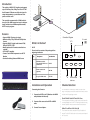
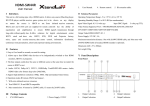
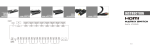
Introduction PC This switcher is HDMI V1.3 Compliant and supports up to 36-bit Deep Color, Dolby True-HD or DTS HD Audio formats. IR Remote can fully select input for output independently, or push button on Front panel can do the same. DVD Monitor PS3 The especially recommended 4x1 HDMI switch allows up to four HMDI source devices to be independently switched to on HDMI compatible monitor, HDTV’s and/or projector. HDMI HR-4P MAC Features 6XSSRUW+'0,EGHHSFRORUVLJQDO 0DLQWDLQVSSLDQGSYLGHR formats 6XSSRUWV+'0,GLJLWDODXGLRIRUPDW/3&0 Dolby-AC3/DTS7.1/DSD 0DQXDORSHUDWHGRU,5UHPRWHFRQWUROERWKDUH available $7&+'&3FRPSOLDQW &RQQHFW)RXU+'0,&RPSRQHQWVWRDQ+'79 Monitor 6HDPOHVV6ZLWFKLQJ%HWZHHQ+'0,6RXUFHV Connection Diagram IR Control To TV What’s in the box? HR-4P Please check the contents of the package before beginning installation. Qty Description Part Number HDMI Router/Switch 4Port Includes HR-4P and PS5VDC1A-C HR-4PS 1 Remote control Unit (optional) RMT-HR 1 IR-eye for HDMI switch EYE-IRH 1 Power DC 5V 1A INPUT 1 Power LED OUTPUT INPUT 2 IR INPUT 3 SELECT INPUT 4 HDMI Cables, to devices Installation and Operation Channel Selection Connecting the Converter You can select the channels you want to access in two ways. Front panel push button selection and remote control included with the package content. 1. IR and Remote Connect the HR-2P to the TV/Monitor with HDMI cable(included with the unit). 2. Connect all the source to the HR-2P via HDMI cable. 3. Connect Power Adaptor. FRONT PANEL PUSH BUTTON SELECTION The front panel push button is used to select whicchannel is currentlydisplayed on the HDTV. Pressing the button during normal operation will cause next channell to be selected. REMOTE CONTROL SELECTION (IR) The channel can also be selected through the attached remote. Push the IR code button o the remote control panel for 2 seconds.