1
PSM for VM & IK & User Manual
Using PSM Configuration Application
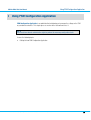
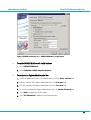
Figure 8: VACMAN & Identikey Tab -> VACMAN Middleware using database
¾
To enable VACMAN Middleware 3.0 with database
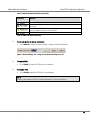
1. Select VACMAN Middleware
2. Select Embedded or ODBC-compliant database
¾
To configure the Digipass Administrative User
1. Enter the IP address or the name of the Authentication Server in the Server Location field
2. Enter the username of the Digipass Administrative User in the Username field
3. Enter the password of the Digipass Administrative User in the Password field
4. Re-enter the password of the Digipass Administrative User in the Confirm Password field
5. Select Apply to confirm and save the settings
6. Select Test Connection to validate the connection parameters
© 2008 VASCO Data Security. All rights reserved. Unauthorized duplication or distribution is prohibited.
21