1
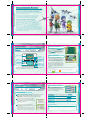
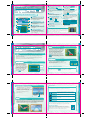
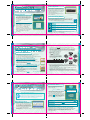
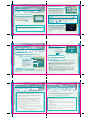
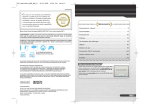
Viewing the Keyboard Screen
Options
Input letters from the keyboard by touching them. Press OK
when you’re finished with your selection.
Select Options on the Mode Select screen (p. 38) to display the
following Option menu selections.
Nickname
Keyboard
Sound
Shift Button
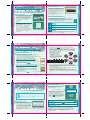
This is where you can adjust the game’s sound settings. Choose from
stereo, surround or headphone settings. You can also adjust the
character voice settings. Choose from User – player-created voice,
Normal – the default voice, or Machine – no voice.
Touch this to change
the keyboard.
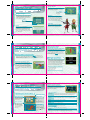
Voice Record
Control Type
This is where you can choose the control type used on the Combat
screen. Available controller types are Type A – normal with rumble,
Type B – reverse with rumble, Type C – normal without rumble, Type D
– reverse without rumble.
Nickname
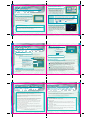
You can use your own voice to create unique voice data for individual
characters in the game. Answer questions out loud when they appear
on screen, then press [ICON]. When you’ve answered all of the
questions, the data confirmation screen will be displayed. To make sure
the voice is OK, tap the character for whom you want to use it and take
a listen. If everything’s all right, touch OK to finalize the voice.
Clear Data
Ready a eight-letter or less nickname for use in Wi-Fi Battle.
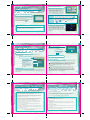
This is where you can clear game data. Select Voice Data to clear voice
data that you’ve recorded, or choose Single Data, which erases all
single player data, or choose Wi-Fi Results, which erases all
Wi-Fi results.
If you don’t input a nickname, your Nintendo DS game system
nickname will be used by default.
42
43
Once data has been erased, it’s gone forever! Be careful!
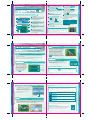
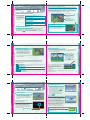
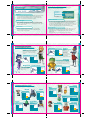
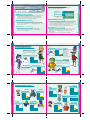
Character Intros
For information on viewing individual fighter specs,
see p. 23.
Fox
Falco
Sky Claw
The hero of the game. He’s the leader
of the mercenary group, Star Fox. He
possesses a strong sense of justice,
and is brave. He can be too serious
at times.
Lasers
Single
Lock
Multi
Bombs
1
Shields
Boost
Arwing II
Lasers
Single
Lock
Single
Bombs
2
Slippy
Shields
Fox’s closest friend on the Star Fox
team. He’s a better mechanic than he
is a pilot, and he comes up with all
kinds of weapons for the team to use.
Boost
Krystal
A brash and
headstrong pilot
who has issues
with authority
figures. His
undeniable flying
skills make him an
indispensable
member of the team.
Cloud Runner
A former member of team
Star Fox. She’s strong and
kind, but can be overly
stubborn as well.
44
Bullfrog
Lasers
Twin
Lasers
Lock
Single
Lock
None
Bombs
1
Bombs
3
Shields
Shields
Boost
Boost
Plasma
45
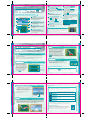
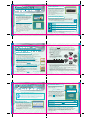
Character Intros
Lucy
For information on viewing individual fighter specs,
see p. 23.
Leon
Rainbow Delta
Lasers
Twin
1
Lock
None
Shields
Twin
Bombs
3
Boost
Lock
Single
Lock
Multi
Bombs
2
Bombs
1
Boost
Shields
Boost
Boost
Amanda
Tadpole
Panther
Black Rose
Lasers
N/A
Lasers
Zapper
Lock
Wide
Lock
N/A
Bombs
2
Bombs
1
Shields
Shields
Boost
Boost
46
Single
Bombs
Lasers
Shields
Shields
Plasma
Twin
Red Fang
Monkey Arrow
Lasers
Cornerian
Lock
Wolf
Dash
Lasers
Sky Bunny
Bill
Katt
Cat’s Paw MK. II
Lasers
Single
Shields
Lock
Multi
Boost
Bombs
1
Peppy
Arwing
Lasers
Arc
Lasers
Lock
Single
Lock
Single
Bombs
2
Bombs
2
Shields
Shields
Boost
Boost
Twin
47