1
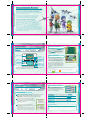
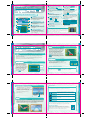
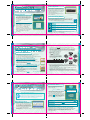
In days gone by, the burning desire of Dr. Andross to rule the Lylat
system filled the galaxy with the chaos of war. The mad ape sent out
wave after wave of armies from his stronghold on the planet
Venom, and used unique forms of radiation to create horrible
monsters and terrible soldiers. His ambition swept this army across
the galaxy to the planet Corneria.
It was there, however, that a quartet of mercenaries known
as Star Fox put an end to the threat, and the leader of the
team, Fox McCloud, defeated Andross in single combat.
In the years that followed, Venom was designated a
forbidden planet and placed under the rigorous
watch of Cornerian forces. All was going well until a
mysterious army suddenly sprung forth from the toxic seas of the
planet. Controlled by a mysterious leader called the Anglar
Emperor, this new threat cuts through the Lylat system like a scythe
through ripe wheat. The unexpected attack once again places the
peoples, cities, and culture of the Lylat system in dire peril.
But much to the shock and dismay of the Lylat people, the members
of Star Fox have gone their separate ways…leaving Fox McCloud as
the lone obstacle in the Anglar army’s path. Despite the odds, Fox
heroically launches himself into the fray. But can he survive without
the aid of his former teammates?
06
07
Controls
Combat Controls
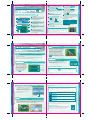
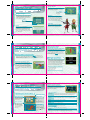
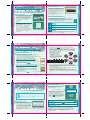
You will control Star Fox Command by using both the Touch
Screen and buttons. For more on Touch Screen controls,
see page 14.
Top Screen
Y Button
X Button
L Button
Mic
+Control Pad
Touch Screen
R Button
POWER Button
On the Combat Screen (see p. 12) use the
A, B, X, Y, L or R Buttons—or the +Control
Pad—to fire lasers and initiate lock-on
attacks. Press START to display the pause
menu. (see p. 13) All other actions are
performed on the Touch Screen with
a stylus.
Other Controls
On menu screens, you can make
selections and change screens by tapping
icons or bars. You can also touch the
screen to scroll through conversations or
make game-progression choices.
A Button
B Button
START Button
SELECT Button
Closing the DS during game play will initiate Sleep Mode and conserve
battery life. Open the DS to resume game play.
(You can also press the A, B, X, Y, L or R
Buttons—or the +Control Pad—to scroll
through conversations.) Additionally, you
can skip conversations by touching the
Skip icon.
The color of the frames around the screen shots in this manual denote which
screen is being show.
Top screen images have a
frame, while Touch Screen images
have a
frame.
08
09
Getting Started
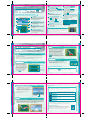
Once you have Star Fox Command up and running, go to the
mode select screen to choose the mode you want to play.
Mode Select Screen
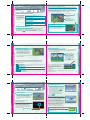
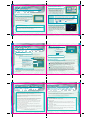
Once you are on the title screen, press the
A Button or START (or tap the Touch
Screen) to bring up the Mode Select
screen. Select the mode you want to play
from the menu that appears.
Powering Up
1 Make sure your Nintendo DS is off, then insert the Star Fox Command
Game Card into the DS Game Card slot until it clicks into place.
If you’re using the DS Rumble Pak, insert it into the Game Boy
Advance slot.
2 Turn the power on and read the information on
the start-up screen shown to the right. When
you’ve finished, tap the Touch Screen to advance
to the DS menu screen.
3 On the DS menu screen, tap the Star Fox
Command panel to display the title screen and
start the game.
If you have your Nintendo DS start-up mode set to
Auto, the DS menu screen will not appear. See your
Nintendo DS instruction booklet for more details.
10
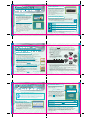
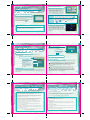
Single Player
Play the one-player story mode. (See p. 18)
Download Play
Use the DS local wireless system to play versus
matches with up to 6 players. (See p. 32)
Wi-Fi
Match piloting skills with up to 3 friends via
Nintendo Wi-Fi Connection. (See p. 34)
Options
Adjust a variety of game settings. (See p. 40)
About Saving
This game has an auto-save feature. Game progress will be saved when
you clear a mission or change any game setting in the options menu.
11