1
12
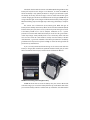
FIGURE 4 – Inserting memory card(s)
To open the Memory card slot cover, you pull the cover toward you until it
pops open. If you try to plug in the memory cards backwards or upside down,
they will not insert properly. There is only one way the memory cards can be
fully inserted, as shown in figure 4.
You can see that I have both memory cards inserted in FIGURE 4. Neither
are fully inserted into the camera in the reference picture. The blue 32GB card is
an SDHC card and the red 32GB card is a CF card. Press your memory card(s) all
the way in, with their labels facing in the same direction as you see in FIGURE 4.
Now, format the cards to make them work best with the camera. See page 289
in the book for detailed information on how to format memory cards.