1
microcircuit
threshold gate
input spike train
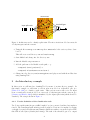
Figure 1: Architecture used to classify a spike train. The microcircuit is modeled as a network
of leaky-integrate-and-fire neurons.
2. Unzip the file learning-tool-VER.zip where VER stands for the version you have downloaded.
This will create a subdirectory lsm and lsm/learning
3. Start Matlab and change into the directory lsm
4. Run the Matlab script install.m.
5. Add the path lsm to the Matlab search path; e. g.
• addpath(’/home/jack/lsm’)} or
• addpath(’C:\Work\Neuroscience\lsm’).
6. Change into the directory lsm/learning/demos and play around with them. Have fun
using Learning-Tool !
2
An Introductory example
In this section we will introduce Learning-Tool by means of an introductory example. In
this simple example we will train a readout neuron modeled as a threshold gate (see
[Hertz et al., 1991]) to classify a spike train. This readout neuron will receive its input
from a neural microcircuit modeled as a network of leaky-integrate-and-fire neurons (see
[Gerstner and Kistler, 2002]) which is stimulated by the input spike train (which should be
classified). The setup is shown in Figure 1.
2.0.1
Precise definition of the classification task
Two Poisson spike trains (freqency 20 Hz, length 0.5 sec) are generated, and fixed as templates
0 and 1. The actual input spike train is generated as jittered versions of a template by varying
each spike by a random drawn amount (Gaussion distribuion with zero mean and a given STD;
this STD is called jitter (default jitter=4 ms)). The task of the threshold gate is to output
4