1
EPC‐100 User Manual TUCOR IRRIGATION CONTROLLERS
LTD
USER MANUAL
LTD
1
Copyright August 2015. All rights reserved. No part of this publication may be reproduced, stored in a retrieval system, or transmitted in any form or by any means electronic, mechanical, photocopying, recording or otherwise without the prior permission of the publisher.
Address:
Tucor, Inc.
518 Wallace Rd
Wexford, PA 15090‐8642
Phone: 800‐272‐7472
724‐935‐6850
Fax: 724‐935‐8233
Email: [email protected]
450-230-0009/A
LTD User manual
Content
Chapter 1: Introducing LTD ...................................................................................................... 7
The Controller .......................................................................................... 7
Irrigation Features .................................................................................... 7
Chapter 2: Operating the controller......................................................................................... 9
The Display .............................................................................................. 9
A standard display when idling in Auto mode ...................................10
Button and Controls .......................................................................................11
The Seven Main Modes ...........................................................................11
OFF (Red) ................................................................................................12
MANUAL (Brown) ....................................................................................12
AUTO (Grey) ............................................................................................12
PROGRAM (Light blue) ............................................................................12
SETUP (Dark blue) ...................................................................................13
ADVANCED (Black) ..................................................................................13
SOLENOID AMPS (Light green) ................................................................13
Chapter 3: Programming the LTD........................................................................................... 15
Basic Controller Configuration ................................................................15
Setting the date and time .......................................................................15
Configuring Irrigation Programs ..............................................................16
Configuring the stations ................................................................................18
Configuring a station in a program ................................................................19
Setting Water Days ........................................................................................22
Selecting the water days .........................................................................24
Setting Start Times ..................................................................................24
Adjusting Water Usage (Water Budget or ET) ................................................27
Adjusting the ET (Water budget) .............................................................30
Activating/deactivating a Program ..........................................................32
Adding a Booster Pump ...........................................................................33
1
LTD Installation and troubleshooting
Adding a Master Valve (Supply Pump) .................................................... 35
Testing a Program ................................................................................... 35
Chapter 4: Running the LTD ................................................................................................... 37
Running LTD in Auto Mode ..................................................................... 37
Pausing a Running Program .................................................................... 38
Resuming a paused program .................................................................. 40
Running Extra Stations in Auto Mode ..................................................... 40
Running a station manually .................................................................... 41
Running Extra Programs in Auto Mode ................................................... 42
Running LTD in Manual Mode ................................................................. 43
Alarms .......................................................................................................... 45
Becoming aware of alarms on‐site ......................................................... 45
Receiving alarm notifications on email ................................................... 46
Viewing the alarm list ............................................................................. 49
Alarms in the LTD ..............................................................................50
Monitor Data ................................................................................................ 54
Rain Shutdown .............................................................................................. 57
Chapter 5: Advanced Features............................................................................................... 59
Intelliset ........................................................................................................ 59
FloGuard ....................................................................................................... 60
FloStack ........................................................................................................ 60
Feature Manager .......................................................................................... 60
Appendix A: How Amount Based Rain Alarms Work ..............................................................63
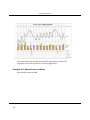
Example A.1 .......................................................................................63
Example A.2. ......................................................................................65
Example A.3. ......................................................................................66
Configuring the Extended Rain Shutdown Feature ........................................ 67
Examples using Different Parameters ..................................................... 71
Example A.4. ......................................................................................71
2
LTD Installation and troubleshooting
Example A.5 .......................................................................................72
Example A.6 .......................................................................................73
Example A.7 .......................................................................................74
Appendix B: Adding an ET Device ...........................................................................................77
How ET Works with the LTD .................................................................... 77
Example B.1. ET calculation with rain shortage .................................78
Example B.2. ET calculation with excess rain ....................................79
Example B.3. Calculating ET run time ................................................80
Example B.4. How minimum ET value works ....................................81
Examples ............................................................................................82
Example B.5. All parameters in use ...................................................82
Numbers ............................................................................................83
Table Explanation ..............................................................................84
Example B.6. No Min ET ....................................................................85
Numbers ............................................................................................86
Table Explanation ..............................................................................87
Example B.7. No Max ET ....................................................................87
Numbers ............................................................................................88
Explanation ........................................................................................89
Example B.8. No soil holding .............................................................90
Numbers ............................................................................................90
Example B.9. Max. hourly rain ...........................................................92
Options for Getting ET Data .......................................................................... 93
Using Historical ET Data ................................................................................ 94
Configuring for Historical ET Data ........................................................... 95
Appendix C: Adding a flow sensor ..........................................................................................99
Alarm Types .......................................................................................99
Setting Alarm Thresholds ..................................................................... 100
Setting the alarm reaction delay .......................................................... 100
3
LTD Installation and troubleshooting
Setting the high flow threshold ............................................................ 102
Setting the Flow Deviation ................................................................... 103
Setting the unscheduled flow threshold ............................................... 104
Setting the master pump failure threshold ........................................... 105
Setting Alarm Actions ........................................................................... 107
Configuring alarm action for MPF ......................................................... 107
Setting Expected Station Flow .............................................................. 108
Entering expected flow for a station ..................................................... 108
Running the "learn flow" feature .......................................................... 109
Viewing the Current Flow ........................................................................... 110
Inspecting and Toggling Station Status ........................................................ 112
Managing station status ....................................................................... 112
Appendix D: Moisture sensors ..............................................................................................115
The Role of Moisture Sensors ...................................................................... 115
Calculate .............................................................................................. 116
Communicate ....................................................................................... 117
Validate ................................................................................................ 117
How irrigation is adjusted by moisture sensors .................................... 118
How moisture sensor input affects ET .................................................. 121
Abbreviations ..................................................................................122
VSM ranges for the different soil types ...........................................122
Example D.1. Dry start condition (stress point) ...............................124
Example D.2. Optimal start condition .............................................126
Example D.3.Wet start condition (field capacity) ............................129
Appendix E: Changing Station Run Sequence and Mapping .................................................137
Example E.1. Putting a new station in the middle of the run chain 137
Changing the station run sequence .................................................138
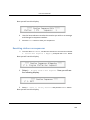
Resetting station run sequences ........................................................... 139
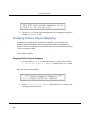
Changing Station Output Mapping .............................................................. 140
4
LTD Installation and troubleshooting
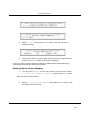
Changing Station Output Mapping ..................................................140
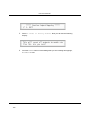
Resetting Station Output Mapping ..................................................141
Appendix F: Using Simple Flow Management.......................................................................143
Configuring for Flow Management .............................................................. 143
How the Flow Management Works ............................................................. 143
Setting the System Flow Capacity ................................................................ 144
Appendix G: Defining a custom irrigation period..................................................................147
Example G.1. Skewed days with custom irrigation periods ................... 147
Configuring the Irrigation Period .......................................................... 149
Appendix H: Advanced irrigation: Misting, Cycle and Soak ..................................................151
How is This Different from Regular Programs? ............................................ 151
When the LTD Alters Your Program ....................................................... 152
How to Configure for Misting or Cycle & Soak ............................................. 153
Full misting program example .........................................................153
Enabling Misting ................................................................................... 154
Setting the Start Times With Count and End Time ................................ 156
Things to Keep in Mind ............................................................................... 158
Glossary ........................................................................................................... 159
5
LTD Installation and troubleshooting
6
Chapter 1: Introducing LTD
The LTD is a microprocessor based irrigation control system. A central controller and up to 50 field stations comprise a complete system. In addition the controller will accept input from several external sensors in order to adjust its irrigation to the local weather conditions.
The Controller
The heart of a LTD based system is the controller. This is a microprocessor controlled device that stores your irrigation programs and LTD individual stations in the field when to activate their valve(s).
Irrigation Features
Here are the main features that the LTD utilizes to help you automate your irrigation:
• Controls up to 50 solenoids (specifications vary depending on model) attached to valves or relays via the built‐in connection board and three expansion boards.
• Provides ET corrected irrigation for optimal adjusted water consumption.
• Measures water flow and raises alarms or halts irrigation on unexpected flow.
• Allows for 10 independent irrigation programs. In addition there is a fixed test program that activates all 50 stations in turn.
• A program can activate up to 50 stations in named order.
• Each station can run for up to 17:59:50 (In fact, you can boost this even further by increasing the "water budget". For more information turn to Adjusting the ET (Water budget) on page 30.
• Each program can activate one booster pumps in addition to the stations.
LTD User Manual • Master valves and booster pumps will be activated in parallel in all connection and expansion boards (specifications vary depending on model).
• All programs have 12 start times per day.
• All programs can run simultaneously.
• You configure each program to run on any selection of days in a 14 day period, or on odd/even dates.
• You can activate one or more valves or programs manually while one or more programs are running, up to a total of 12 simultaneously running valves.
• A master valve can be selected that will open when any program or station is run.You typically assign master valve status to the valve controlling access to municipal water or pumping station.
• Up to 10 moisture sensors that can monitor soil moisture and adjust irrigation accordingly.
8
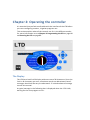
Chapter 2: Operating the controller
It is essential that you feel comfortable with the interface of the LTD before you start configuring stations, irrigation programs etc.
This section explains what all the controls are for in the different modes. For more information turn to Chapter 3: Programming the LTD on page 15 and Running the LTD on page 37.
The Display
The LTD has a back lit LCD display with two rows of 40 characters. Since the limit is 40 characters per row, sometimes words are abbreviated, but all messages should still be easy to understand ‐ if in doubt about a message, consult this manual.
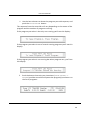
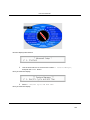
A typical message is the following that is displayed when the LTD is idle, waiting for the next program to run:
LTD User Manual A standard display when idling in Auto mode
This simply states that the next program to run is program number one, the program's total run time is 40 minutes, and it will run on Tuesday at 09:44 PM, activating two stations in turn. In the top right you see the current time.
You will learn all about programs in For more information turn to Chapter 3: Configuring Irrigation Programs on page 18.
10
LTD User Manual Button and Controls
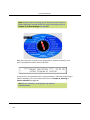
Jog wheel
Item selector
The LTD is handled by the dial and item selectors in conjunction. Select the mode using the dial, scroll through dialogs using the item selectors and confirm or cancel your selections using the YES and CANCEL buttons.
The Seven Main Modes
The LTD works in seven different modes, each allowing you to handle a subset of the controller functionality.
Each main mode has its own color on the front plate (provided in parenthesis after each mode name)
11
LTD User Manual OFF
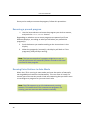
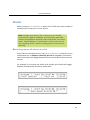
This is short for "Irrigation Off" ‐ practically this means that the connection to the controller is shut down and no programs will be run. The display will still be lit and you'll see this message:
Idling in Irr. Off mode
This is also where you can manually turn irrigation off when it’s raining.
MANUAL
In manual mode you can start a program or a single station manually.
AUTO
AUTO is the normal operating position and is probably where your system will spend the most of it's time. When in auto mode the LTD makes sure that all programs are run according to schedule. Once everything is configured, you switch the system to auto mode and leave it to do its job.
You also have the option of starting additional valves or programs manually while a program is running in auto mode. This can be useful if you notice that an area needs a little extra watering but you don't want to create a new program to take care of it ‐ just turn on the nearest valve for a few minutes.
PROGRAM
This is the mode you switch to when creating programs. For more information turn to Chapter 3: Configuring Irrigation Programs on page 18.
12
LTD User Manual SETUP
This mode lets you configure the controller for various sensor inputs, view alarms and rain event status.
ADVANCED
In advanced mode you can configure a lot of settings that you don't have to change in the daily work with the controller:
• FloStack ‐ plan and control system flow
• FloGuard ‐ monitor the controller for potential problems
• Intelliset ‐ manage ET devices, moisture sensors and related operations
• Define a custom irrigation period
• Assign booster pumps to programs
• Manage the run sequence and mapping of your stations
• Enable/disable whether or not to display the line
• Feature manager ‐ enable/disable features only used by a subset of users, like misting and "cycle & soak" irrigation
• Erase the entire controller's data ‐ in case you're setting up a new system from scratch
SOLENOID AMPS
In this mode you can test each valve in the field individually.
13
LTD User Manual 14
Chapter 3: Programming the LTD
Like conventional controllers, the LTD must be programmed to control your irrigation. The controller itself needs to be configured with basics like date and time, and in addition, the stations need to be configured and tested. Finally, you need to create your irrigation programs, and possibly configure the system for sensor inputs.
All of this happens at the controller, and this chapter walks you through all the tasks.
Basic Controller Configuration
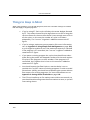
The controller will remember date/time for up to two weeks when not connected to a power outlet. Most likely it will have lost this information when you first receive it, so the very first thing you have to do to get going is to set the date and time:
Setting the date and time
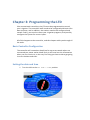
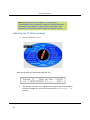
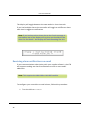
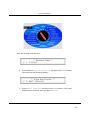
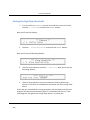
1 Turn the dial to the SET DATE & TIME position
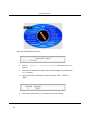
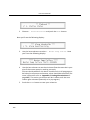
LTD User Manual Now the display looks something like this:
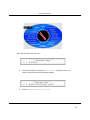
2
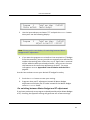
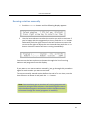
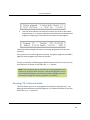
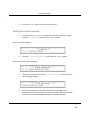
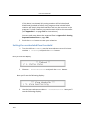
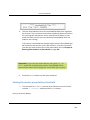
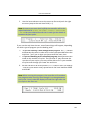
You change the settings with the up and down item selectors and move between the day, month and year slots with the left and right item selectors.
Push the ENTER button to save your setting - now the controller will save the date.
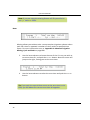
Note: The week day will be calculated automatically from the date you choose.
Important! Daylight savings are not handled automatically.
Configuring Irrigation Programs
The LTD holds 10 programs that can each activate 50 stations in turn. Each program can run 12 times a day on odd, even or selected days in a two week period. Additionally, each program can activate a booster pump and a master valve throughout the duration of the program.
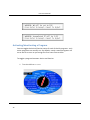
There is also a test program which can not be modified. This program is primarily used to troubleshoot the system. To start configuring a program, turn the dial to PROGRAM.
16
LTD User Manual Important! Throughout this section we assume that you have turned the dial to the PROGRAM position ‐ you then use the item selectors to choose the program you wish to edit, and then move the dial along to the aspect of the program you wish to edit (run time, water days, start times etc.). When working this way you will see both the PROGRAM and e.g. WATER DAYS
Turn to PROGRAM mode.
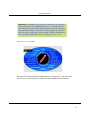
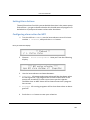
Now the LTD shows you the configuration for "Program 1". The first time you do this, most settings are blank, and the display will look like this:
17
LTD User Manual Program / Name selector
Water days
Total run time
Active/Passive
Number of stations in program
Number of run times
First start time
Water budget
The following sections walk you through everything you need to know in order to customize the 10 programs.
Configuring the stations
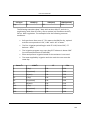
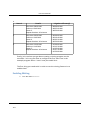
Each of the 10 programs can activate up to 50 stations in turn. The stations are run in turn according to their IDs, starting from ST01, ST02 etc1. To configure a program, simply set the run times of each station to the number of minutes you wish it to run. Here's an example of an irrigation program:
Station
Run Time
ST01
10 min
ST02
5 min
ST04
50 min
1.1If you want the stations to run in a different order than this, you must assign sequence numbers to each station and the sequence number will determine the order
instead.
18
LTD User Manual ST16
10 min
...
...
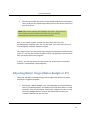
Note: A station can appear in as many programs as you wish, but obviously only one program can run a station at a time.
If two programs wish to run the same station at the same time, the station will simply keep running until the last program no longer needs it running.
Now let's look at how you configure the individual stations in a program.
Configuring a station in a program
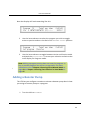
1 Turn the dial to PROGRAM.
19
LTD User Manual Now the display will look something like this:
2
Use the item selectors to scroll to the program you wish to configure a station for.
3
Now turn the dial to the RUN TIME position. Say you selected program 2 ‐ then the display will look like this:
Note: The PROGRAM position will remain lit, and the RUN TIME
position will be blinking, indicating that you are in PROGRAM
mode, working on the RUN TIME aspect of the program.
4
Use the item selectors to select the station you wish to configure and push the ENTER button.
Now the cursor jumps to the right of the display, allowing you to select the station run time.
20
LTD User Manual Tip:Instead of browsing through the list of available stations with the item selectors you can use the STATION button to browse only stations with a defined run time.This comes in handy when modifying run times of an existing program.
Note: The PROGRAM position will remain lit, and the RUN TIME
position will be blinking, indicating that you are in PROGRAM
mode, working on the RUN TIME aspect of the program.
A couple of notes on run times:
• Run times longer than four minutes are run in ten second blocks and will be rounded up to the nearest block.
For instance, run times of 00:04:14 and 00:04:18 will both be rounded to 0:04:20.
• Run time shorter than four minutes are not rounded.
• The maximum run time is 17:59:50.
• You can "delete" a station from a program by simply setting the run time to 0.
5
Use the item selectors to select the number of minutes you wish the station to run, and push the ENTER button to save your setting.
Now the controller returns to the main screen for editing the run time. Say you just set station number five to run five minutes in program two, the display will look like this:
21
LTD User Manual Pushing the CANCEL button when adjusting the run time will discard the new run time and keep the original one, even if this is zero.
Now you can select other stations and repeat steps four and five to determine how they should run in this program.
Setting Water Days
There are three ways to determine which days a program will run.
• On all odd dates (1, 3, 5 etc.)
• On all even dates (2, 4, 6 etc.)
• On selected days in a 14 day cycle.You select the days and the LTD will loop through the 14 day schedule.
To make the configuration as intuitive as possible, the 14 day period always starts with the current day.
1 Turn the dial to PROGRAM
Now the display will look something like this:
22
LTD User Manual 2
Use the item selectors to navigate to the program you wish to adjust the start times for and turn the dial to the WATER DAYS position.
3
Use the item selectors to choose between "Odd dates", "Even dates" or "14 day period" and push the ENTER button.
Note: The definition of an "Odd date" does not include the 31st day in a month because this would cause the program to run two days in a row (e.g. May 31 and June 1.) The same goes for February 29 on leap years.
If you select odd or even dates, you are done now, but if you select "14 day period" you need to walk through the next steps as well.
4
Assuming that today is a Sunday, the list of days will start with an "S" and a cursor will be blinking ontop of the first "S":
23
LTD User Manual Selecting the water days
5
Now you can use the item selectors to navigate through the days. The up and down arrows will toggle the selected day to On/Off. Here's how selecting only Mondays, Wednesdays and Fridays would look like:
6
Once happy with the selection of days, push the CANCEL button or turn the dial away to go back to the main water days screen. If you choose to turn away the dial, you will see the controller return to the main water budget dialog.
Now you can turn the dial to another position to edit the remaining aspects of the program.
Setting Start Times
Each program in the LTD can run up to 12 times per day.
Note: When you set the first start time for a program the controller automatically sets the program as active. For more information turn to Chapter 3: Activating/deactivating a Program on page 32.
1 Turn the dial to PROGRAM.
24
LTD User Manual Now the display will look something like this:
2
Use the item selectors to navigate to the program you wish to adjust the start times for and turn the dial to the START TIME position. Now you'll see the following display:
25
LTD User Manual Note: If you are using the misting feature of LTD you will also see Cyc and End fields:
Note: Misting allows you to determine a more complex irrigation scheme where each start time is repeated a number of times within a specified time frame. For more information turn to Appendix H: Advanced irrigation: Misting, Cycle and Soak on page 151.
3
Use the item selectors to locate the one of the 12 runs you wish to set a start time for, and push the ENTER button. Now the cursor will jump to the right, letting you set the start time:
4
Use the item selectors to select the start time and push the ENTER
button.
Tip: If you push the up and down arrow at the same time in this field, you will delete the current start time all together.
26
LTD User Manual 5
Now the controller will return to the default display for setting start times, and you can repeat steps two and three for all the start times you wish to set.
6 Once you are all done, simply turn the dial on to what you need to Note: Your start times will be sorted by start time ‐ if the second edit next.
start time you enter is before the first one, they will be swapped around next time you browse the list.
Note
Also, if you select another number for your start than the next chronologically available one, the LTD will save your start with the next chronologically available number anyway. This means that if you have two starts assigned and assign a third one but to the "6" run slot, this will be saved as start 3 and appear as such the next time you want to edit the program. In short, you can say that your start times are sorted by time and their numbers "compressed" chronologically.
Adjusting Water Usage (Water Budget or ET)
There are two ways of determining how to adjust the amount of water used by an irrigation program:
• Setting the "Water Budget" to a value between 0 and 250 percent. Just as you would expect, this determines how much water is used. However, since the controller simply tells a station to start or stop, the water budget doesn't control the water flow as such, but instead it determines the run time.
27
LTD User Manual This means that if you have set up a program to run five stations for 10 minutes each, this is what will happen with the water budget set to 100 percent. But if you decrease the water budget to 80 percent, each station will only run eight minutes, and if you set the water budget to 120 percent, each station will run for 12 minutes.
Note: If the water budget is zero, the station will not run at all.
• Letting ET adjustment decide how the irrigation should be carried out. This way you tell the LTD how much water you want the program to provide per day, and then the controller will adjust for any ET and Rain input it receives. For more information turn to Appendix B: Adding an ET Device on page 87.
The following two procedures walk you through configuring a program for each of the two options.
1 Turn the dial to PROGRAM
Now the display will look something like this:
28
LTD User Manual 2
Use the item selectors to navigate to the program you wish to adjust the water budget for and turn the dial to the ET position.
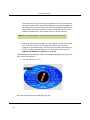
Now you'll see the following display:
Note: Please see the note below, "On switching between Water Budget and ET adjustment" on page 31.
3
Use the item selectors to choose "Water Budget" and push the Water Budget button. Now you'll see the following screen:
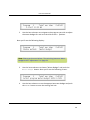
4
Use the item selectors to set the appropriate water budget and push the ENTER button to save the setting and exit.
29
LTD User Manual Note: Adjusting the water budget is an easy way to accommodate shifting weather conditions without having to reconfigure all programs to apply more or less water. Just increase or decrease the water budget as needed, and the Adjusting the ET (Water budget)
1 Turn the dial to PROGRAM
Now the display will look something like this:
2
30
Use the item selectors to navigate to the program you wish to adjust the water budget for and turn the dial to the WATER BUDGET / ET
position.
LTD User Manual 3
Use the item selectors to choose "ET" and push the ENTER button. Now you'll see the following display:
Note: Please see the note below, On switching between Water .
Budget and ET adjustment
4
If you want the program to run before it has received an ET budget from the controller, you can provide one manually that will then be used as the starting point. After that, any ET figure that is received will be added to what you already entered ‐ thus you can also use this feature to do a one‐time adjustment of the ET. For more information turn to Appendix B: How ET Works with the LTD on page 77.
Use the item selectors to set your desired ET budget for today.
5
Push the ENTER button to save your setting.
6
Programs that use ET adjustment instead of Water Budget adjustment will display the ET value instead of the Water Budget value in PROGRAM mode:
On switching between Water Budget and ET adjustment
If you have previously set a program to be adjusted by either Water Budget or ET, choosing the opposite setting will generate one of two warnings:
31
LTD User Manual Activating/deactivating a Program
You can toggle the Active/Passive status of each of the 10 programs ‐ only active programs are actually run. By default, newly created programs are set to Active as soon as you assign the first start time to them.
To toggle a program between Active and Passive:
1 Turn the dial to PROGRAM
32
LTD User Manual Now the display will look something like this:
2
Use the item selectors to select the program you wish to toggle active or passive and turn the dial to the PROGRAM STATUS position:
3
Use the item selectors to toggle between Active and Passive mode and push the ACTIVE/PASSIVE to save your selection and exit to the main display for Program mode.
Note: Making a program passive does not erase the program. In fact, a passive program can still be run manually. For more information turn to Chapter 4: Running LTD in Manual Mode on Note: page 43 and Capter 4: Running Extra Stations in Auto Mode on page 47.
Adding a Booster Pump
The LTD lets you configure a station to activate a booster pump.Here's how you assign a booster pump to a program:
1 Turn the dial to ADVANCED
33
LTD User Manual Now the display looks like this:
34
2
Select 6. Booster to Program Assignment and push the ENTER
button.
3
Use the item selectors to select one of the 10 programs and push the ENTER button.
4
Now use the item selectors to select between "Non", "BO1" or "BO2":
5
Once done, push the ENTER button to save the setting.
LTD User Manual 6
Now you can repeat steps three and four for to assign booster pumps to more programs, or push the CANCEL button to return to the main display for Advanced mode.
Adding a Master Valve (Supply Pump)
You might want to have the LTD control the opening of your supply pump when irrigation is active, and shut it down when irrigation is over.
Note: A station can not run a pump on its own ‐ you must attach a relay connected to an external power source and the station will then activate the relay.
Testing a Program
After setting up your programs, you might want to test them without having to wait around for all of them to actually run.
Since this is the same approach as you would take in a troubleshooting scenario, please refer to the separate User manual manual. 35
LTD User Manual 36
Chapter 4: Running the LTD
Day to day usage of the LTD is pretty simple ‐ the whole point of having a system like this is to automate the irrigation, so little or no intervention will be needed once your system is up and running.
Running LTD in Auto Mode
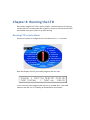
Once your system is configured, turn the dial to the AUTO position:
Now the display will tell you which program will run next:
In this case the next program that will run is number one. It has two stations and will run on Tuesday at 09:44 PM for 40 minutes.
LTD User Manual You don't have to do anything more ‐ just leave the controller in AUTO
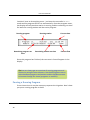
mode and the program will be run automatically. Once the program starts, the display will tell you what station is running, and the remaining run time for both the running station and the entire program:
Running program
Running station
Current time
Remaining program run time
Remaining station run time
Current flow
Once this program has finished, the next one in line will appear in the display.
Tip:You can always get an overview of running programs and stations by using the item selectors: Use the left/right arrows to select between programs and stations and the up/down arrows to browse through the items (programs or stations).
Pausing a Running Program
From time to time it may be necessary to pause the irrigation. Here's how you put a running program on hold:
38
LTD User Manual 1 Use the item selectors to locate the program you wish to pause, and push the PAUSE/RESUME button.
The response from the controller will vary depending on the status of the program and the number of programs running:
If the program you select is the only one running you'll see this display:
If the program you select is one of several running programs you'll see this display:
If the program you select is not running but other programs are, you'll see this display:
2
Push the button that suits your intentions (PAUSE/RESUME or
PROGRAM) and the controller will pause the program(s) and return to the list of programs:
39
LTD User Manual Once you're ready to resume the program, follow this procedure:
Resuming a paused program
1 Use the item selectors to locate the program you wish to resume, and push the PAUSE/RESUME button.
Depending on whether one or more programs are paused you'll see different displays, according to what you did when you paused the program(s).
2
Push the button you need according to the instructions in the display.
3
When the program(s) resume(s), the display will look as if the program(s) had just kept running.
Note: The last ten seconds of a program might be re‐run, so each pause/resume will potentially add ten seconds to the total run time for that program.
Running Extra Stations in Auto Mode
When the LTD is running in auto mode you have the option of manually starting additional stations simultaneously. This can come in handy if a certain part of the terrain needs a little extra watering but you don't want to reconfigure a program for just one time's sake.
Note: The LTD supports up to 12 simultaneously running stations. This means that if for instance two programs are running, you can start ten more stations manually.
40
LTD User Manual Running a station manually
1 Push the STATION button and the following display appears:
2
Use the item selectors to select the station you wish to activate. If you're happy with the suggested run time, push the ENTER button. Otherwise push the right arrow of the item selectors to move the cursor to the right to adjust the run time and then push the ENTER
button. Now the station will start running immediately:
You can use the item selectors to browse through the list of running stations and programs from this display.
If you want to run more stations manually, just go through this procedure again for each station you want to activate.
To stop a manually started station before the end of its run time, use the item selectors to locate it and push the STOP button.
Note: You can always get an overview of running programs and stations by using the item selectors: Use the left/right arrows to select between programs and stations and the up/down arrows to browse through the items (programs or stations).
41
LTD User Manual Running Extra Programs in Auto Mode
When the LTD is running in auto mode you have the option of manually starting additional programs in parallel.
Note: If you select programs that try to start the same station in overlapping periods, the station will start when the first program asks for it and stop when the last program doesn't need it any more.
So, if program 1 wants to run station 12 from 08:00 to 08:10 and program 2 wants to run that same station from 08:05 to 08:15, the station will be run from 08:00 to 08:15.
Running a program manually has the advantage that you can select which station should be run first, allowing you to skip a part of the program.
1 Push the PROGRAM button.
Now there will be an arrow next to the program number, indicating that you should select the program you wish to run:
2
42
Use the item selectors to pick the desired program and push the right arrow in the item selectors to move on to select which station should be the first to run:
LTD User Manual 3
Use the item selectors to select the station you wish to start with, and push the ENTER button. Now the controller will run the selected program, keeping you informed of the status of the program:
You can browse through the status of running programs with the item selectors.
If you want to run more programs manually, just go through this procedure again for each program you want to activate.
To stop a manually started program before the end of its run time, use the item selectors to locate it and push the STOP button.
Note: You can always get an overview of running programs and stations by using the item selectors: Use the left/right arrows to select between programs and stations and the up/down arrows to browse through the items (programs or stations).
Running LTD in Manual Mode
The LTD allows you to run all programs and stations manually only ‐ not obeying the schedules for the 10 programs. To enable this feature, turn the dial to the MANUAL position:
43
LTD User Manual Note: Please check the setting of the "Revert to auto" feature before working in manual mode. For more information turn to Chapter 5: Feature Manager on page 60.
Now the controller is ready to run programs or stations manually, and you're prompted to select one of the two:
From here on, the procedure for running stations is identical to Running a station manually. For more information turn to Chapter 4: Running a station manually on page 41.
Tip:You can manually run programs and stations simultaneously.
44
LTD User Manual Alarms
When running in AUTO or MANUAL mode, the LTD will react on a number of conditions by raising one or more alarms.
Note: Though some alarms, like a rain alarm, can halt the execution of irrigation schedules, you can always start both stations and programs manually, even when there is an active alarm. Two exceptions: if a short alarm is active, you can not start anything, and if a station is failing you can not start this manually.
Becoming aware of alarms on‐site
If the LTD has received an alarm, and is in AUTO or MANUAL mode (For more information turn to Chapter 4: Running the LTD on page 37), the bottom row of the display will toggle between normal text and the alarm that has arrived.
For example, if you had a rain alarm at 01:10 PM, your display will toggle between normal mode and alarm notification:
45
LTD User Manual The display will toggle between the two modes in short intervals.
If you had multiple alarms the controller will toggle to a different alarm each time it toggles to notification.
Note: If you had more than three alarms the fourth message in the bottom row of the display will say that you should visit the alarm list for details ‐ the display will look something like this:
Receiving alarm notifications on email
If your communication subscription with your supplier allows it, the LTD will support sending out alarm notifications to one or more email addresses.
Note: This requires the WIN‐100 or LAN‐200 module.
To configure your controller to email alarms, follow this procedure:
1 Turn the dial to ADVANCED
46
LTD User Manual Now the display looks like this:
2
Scroll down to Alarm Notification and press the ENTER button. Now you see the following display:
3
Select Email addresses and press the ENTER button. If no email addresses are entered, you can select Add new:
47
LTD User Manual Now you can enter an email address using the up/down arrow keys to select the characters. Once you are done, press the ENTER button.
4
Next you configure which alarms should be emailed. Select Alarm
Notification settings and press the ENTER button. Now you see the following display:
Here you can scroll between the different alarms emitted by the controller.
5
Select the alarm you wish to configure and press the ENTER button. Now you see the following display:
You can select each email address you have entered, and determine if you want an email when this type of alarm is raised and/or when it is recalled.
48
LTD User Manual 6
Setting
On
Off
Select the email you wish to configure for the current alarm and press the ENTER button. Use the arrow keys to set On and Off to either Yes or No ‐ see the explanation table below:
Selection
Meaning
Yes
Send email when the alarm is raised
No
No email when the alarm is raised
Yes
Send email when the alarm is recalled
No
No email when the alarm is recalled
Viewing the alarm list
To view the list of alarms in the LTD, follow this procedure:
1 Turn the dial to the VIEW ALARMS position. Now you'll see a scrollable list of the different types of alarms known to the LTD:
In this case there is no Off time for the alarm, meaning that the alarm is still on. Had the alarm ceased you would see the end time too.
Use the item selectors to scroll through the list. The list contains information on the latest observed alarms of the 12 known alarm types:
Note: The alarm list will not survive a power failure ‐ if the controller loses power, the list is wiped clean.
49
LTD User Manual Alarms in the LTD
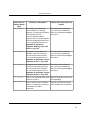
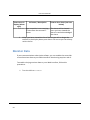
Short name in display (Alarm
type)
50
Full name / Description
How to clear alarm (see note below)
1. Rain
Rain alarm.
Will automatically disappear when it stops raining.
2. Alarm
Whatever alarm you have attached to the alarm termnial. If you're using the AUX terminal for a flow sensor, you won't ever see this alarm.
The alarm stays on as long as the attached alarm is active, but you can clear it by viewing the alarm list.
3. ET
Evapotranspiration alarm.
This will only ever be raised if you're running in "ET‐enabled" mode. For more information turn to Appendix B: How ET Works with the LTD on page 77.
Will automatically disappear when the "ET enable" device is no longer controlling your irrigation.
LTD User Manual Short name in display (Alarm
type)
4. Short
Full name / Description
Short alarm.
Note
A short alarm may really be a "Broken Fuse" alarm or a general "Overload" alarm ‐ it need not be a true short in your system.
Overload is defined as a current of more than 2A for more than five minutes.
If you enable current readings, you will get a "FUSE" message in the display if a fuse is blown out.
You may also run the electrical test for a specific station and get a definite answer to whether there is an overload situation of a blown fuse in that station. 5. High F
6. MPF
How to clear alarm (see note below)
The alarm stays on as long as there is a short in your system. You can clear the notification by viewing the alarm list.
High flow alarm
The alarm stays on as long as the flow is too high.You can clear the notification by viewing the alarm list.
Main pump failure
The alarm will be cleared once you have viewed the alarm list and acknowledged the alarm.
51
LTD User Manual Short name in display (Alarm
type)
Full name / Description
How to clear alarm (see note below)
7. USch F
Unscheduled flow alarm. This means that water is flowing in your pipes when you're not irrigating. Such an alarm indicates that you have a leak.
Stays on as long as the flow is too high. The normally open master valve (NOM) will be activated, so the alarm will clear itself, but you can clear the notification by viewing the alarm list.
8. St. Err
Station error alarm.This means that one or more stations in the field have failed, and will only be raised if you are using a flow sensor.
Stays on until all stations are labeled OK (For more information turn to Appendix C: Inspecting and Toggling Station Status on page 112).You can clear the notification by viewing the alarm list.
Note
This alarm only concerns flow related problems ‐ not any electrical errors that may occur in a station. 9. Max St.
52
Maximum number of stations reached. This means that a program tried to start a station when the maximum number of stations was already running.
The alarm will be cleared once you have viewed the alarm list and acknowledged the alarm.
LTD User Manual Short name in display (Alarm
type)
Full name / Description
How to clear alarm (see note below)
10. Repeat.
The number of repeats has been reduced in a misting program. This typically happens if ET expands the run
time for repeats and the program can't fit all the repeats into the configured time frame. For more information turn to Appendix H: Advanced irrigation: Misting, Cycle and Soak on page 151.
The alarm will be cleared once you have viewed the alarm list and acknowledged the alarm.
11. NW Prg.
A program has not been run because it was set to start in the non‐water time window. For more information turn to Appendix G: Defining a custom irrigation period on page 163.
The alarm will be cleared once you have viewed the alarm list and acknowledged the alarm.
12. NW Stp.
A program was halted because it was running when entering the non‐water time window. For more information turn to Appendix G: Defining a custom irrigation period on page 163.
The alarm will be cleared once you have viewed the alarm list and acknowledged the alarm.
13. Mst NR.
There is no response from your Stays on until the sensors are moisture sensors.
all responding.
14. Mst Lv.
One or more of your moisture Stays on until the moisture sensors is reporting a moisture level is above the threshold.
level below the alarm threshold.
53
LTD User Manual Short name in display (Alarm
type)
Full name / Description
15. Rem ET
Your controller is not receiving ET data from the remote ET server.
2
How to clear alarm (see note below)
The alarm will be cleared once you have viewed the alarm list and acknowledged the alarm.
When you have viewed the list of alarms you will no longer be notified in the display about past alarms. Of course you can always revisit the list.
Monitor Data
If your communication subscription allows, you can enable the controller to send monitor data to your Web interface. Monitoring requires web 3.
To enable relaying monitor data to your Web interface, follow this procedure:
1 Turn the dial to ADVANCED
54
LTD User Manual Now the display looks like this:
2
Use the arrow keys to select Monitor Data and press the ENTER
button. Now you see the following display:
3
Select Enable/Disable mon events.
55
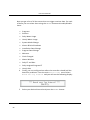
LTD User Manual Now you get a list of all the events that can trigger monitor data. For each of these you can select them using the ENTER button and enable/disable them:
• Programs
• Stations
• Daily Water Usage
• Hourly Water Usage
• System Mode Change
• Alarms & Rain Shutdown
• Installation Data Change
• Program Data Change
• Moisture
• Clock Changed
• Water Window
• Daily ET and Rain
• Daily Assigned Program ET
• Hourly Rain
56
4
Finally you can configure how often the controller should poll the board for problems. From the main Monitor Data menu select Board surv log interval and you will see the following display:
5
Select your desired interval and press the ENTER button.
LTD User Manual Rain Shutdown
Despite all the features controlling irrigation in your LTD you still have a manual handle to pull if you want to halt irrigation immediately ‐ typically if heavy rain sets in.
To halt all irrigation immediately, simply turn the dial to RAIN OFF:
Note: The rain shutdown can be enabled for 999 hours.
You will be prompted to enter the number of hours you wish to halt irrigation. Use the item selectors to enter the number of hours and press the ENTER button to start the shutdown.
To end the shutdown, push the CANCEL button.
57
LTD User Manual 58
Chapter 5: Advanced Features
Intelliset
With the Intelliset feature set you can allow external evapotranspiration (ET) devices to control your irrigation.
Intelliset comes in a couple of flavors:
• Simple ET which allows a WR7 Receiver to tell the LTD if it should irrigate today or not.
• Complex ET control based on historical ET data: you enter the historical ET correction figures for the entire year and use these to adjust your irrigation throughout the year.You can also use the historical data as a fall‐back mechanism for a connected weather station.
• Complex ET control which allows the LTD to adjust the irrigation level based on ET data from a weather station ‐ exact amount of rain and environmental conditions.
• Complex ET control based on remote ET data received from a central ET server.
All methods ensure more efficient water consumption than you would see from using a "flat" irrigation scheme throughout the year.
In addition the LTD provides two extra sources of information about irrigation needs:
• Moisture sensors that will tell you exactly how moist your soil is, giving you the best evidence of how much irrigation is needed.
• "Extended rain shutdown" ‐ a feature that will halt all irrigation after a rain alarm has occurred, regardless of what your ET tells you about irrigation needs.
• For more information turn to Appendix B: Adding an ET Device on page 77.
LTD User Manual FloGuard
FloGuard is the LTD safety system that constantly monitors the controller for potential problems and raises alarms when needed.
FloGuard will detect things like pipe leaks, faulty stations, malfunctioning pumps and many other things that could otherwise go unnoticed and damage your system.
You will also get notifications of "normal" alarms like rain alarms, ET input, short circuits and any alarms stemming from your own auxiliary input devices.
Note: FloGuard requires a flow meter to be connected.
FloStack
The FloStack feature set helps you plan and control the flow in your system.
By entering an expected flow for each station and a maximum system flow capacity you can ensure that the LTD will not try to start more valves than the system can feed.
An extremely handy feature is the "Learn Flow" feature that automatically detects the flow of each station by running all stations in turn and comparing with measurements from a flow sensor.
You can read about FloStack in For more information turn to Appendix C: Adding a flow sensor on page 99.
Feature Manager
The Feature Manager lets you enable a few extra features that not all users will need, most notably the Mist Manager.
60
LTD User Manual With the Mist Manager you can add an extra perspective on running irrigation schedules. Instead of a program just running one station at a time for a fixed duration, you can break each run into multiple cycles.
Instead of telling the LTD to run a number of stations for three minutes each, you can tell it to run each station in 18 second time slices 10 times with breaks in between.This adds up to the same water consumption, but allows the irrigation to soak in between the cycles.
Irrigation cycles that are measured in seconds are typically referred to as "misting", whereas cycles that are measured in minutes are referred to as "Cycle & Soak".
You can read all about the Feature Manager in For more information turn to Appendix H: Advanced irrigation: Misting, Cycle and Soak on page 151.
Another feature is "Revert to auto", which will pull your controller back into auto mode, when it has been sitting in other modes for 10 minutes. This ensures that irrigation will always be resumed, even if someone leaves the controller hanging in a random menu item.
Note: The controller will not revert to auto if in "Irrigation off" or "Extended rain shutdown". Also, when performing a short finding, the time limit is not 10 minutes but three hours. This feature is enabled by default.
61
LTD User Manual 62
Appendix A: How Amount Based Rain Alarms Work
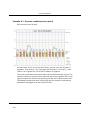
The following examples show how the amount based rain alarm works. In all the examples the usable rain is 0.86”.
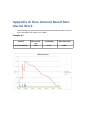
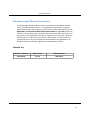
Example A.1
.
Daily ET
Max. hourly rain
Soil holding
Rain alarm limit
0.20" (standard)
0.20"
0.50"
0.02"
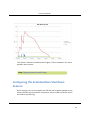
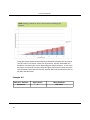
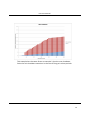
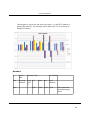
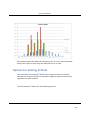
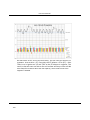
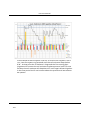
LTD User Manual The graphs show the rain built up the balance whenever it rains. Every hour the balance is reduced by a fraction of the Daily ET ( ¼ during the night and ¾ during the day). When the balance reaches the Rain alarm limit the rain alarm will go on/off.
The second rain burst shows a situation where the max hour rain limits makes limitations. More details below.
The third rain burst shows that we hit the soil holding and by that limit the balance.
Note: The graph spans three full days.
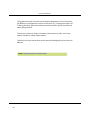
64
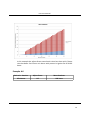
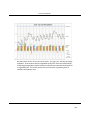
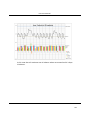
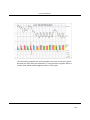
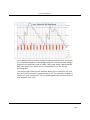
LTD User Manual This graph shows how the balance grows minute by minute. At each whole hour the balance is corrected for max hourly rain and for the hourly dry out. In this case the hour between 7 AM and 7 AM has too much rain compared to max hourly rain and the balance is reduced.
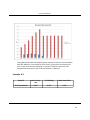
Example A.2.
Daily ET
Max. hourly rain
Soil holding
Rain alarm limit
0.20" (standard)
0.20"
0.50"
0.10"
65
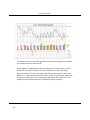
LTD User Manual In this graph we see the same as in example 1 except that the rain alarm goes on later and off earlier.
Note: The graph spans three full days.
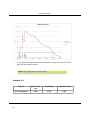
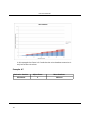
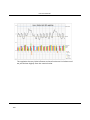
Example A.3.
66
Daily ET
Max. hourly rain
Soil holding
Rain alarm limit
0.30" (standard)
0.20"
0.50"
0.02"
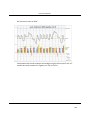
LTD User Manual This shows a more dry condition with higher ET than standard. The alarm period is then shorter.
Note: The graph spans three full days.
Configuring the Extended Rain Shutdown Feature
Given enough rain, at some point the LTD will halt irrigation (based on the values you have set in Section A.1. However, there is a way to further refine this feature by defining:
67
LTD User Manual • How many hours the rain alarm must be active before an extended rain shutdown will actually occur.
• If the extended rain shutdown should be longer than the duration of the rain alarm.
• For how long the extended rain shutdown can last.
Note: The Extended Rain Alarm behaves exactly as if you turned the dial to RAIN OFF (For more information turn to Chapter 4: Rain Shutdown on page 57).
First you must enable the extended rain shutdown feature set:
1 Turn the dial to ADVANCED
Now the display looks like this:
68
LTD User Manual 2
Select 8. Feature Manager. Now you will see the following:
3
Select 2. Ena/Dis Extended Rain Alarm. Now you will see the following:
4
Select Enable and push the ENTER button to save.
Now you are ready to actually configure the extended rain shutdown parameters:
1 Use the item selectors to select 3. Intelliset and push the ENTER
button. Now you'll see the following screen:
2
Select 3. Extended Rain Alarm. Now you see the following screen:
69
LTD User Manual Important
Note: Note: You will only see this menu item if you enabled the feature as described in the previous procedure.
The three values you must set here are:
Setting
Description
Minimum Rain For how long must the rain alarm have been active before an Duration
extended rain shutdown takes place.
Adjustment
You can use this value to prolong the duration of the rain shutdown. If the rain alarm has been active for an hour and you set the adjustment to 3.0, the shutdown will last three hours.
Max. Shutdown
How many hours can the rain shutdown be kept up. Value is between 0 and 999 hours.
70
LTD User Manual Examples using Different Parameters
The following examples show how the extended rain shutdown feature works on different parameters. It is important to notice that using the amount based rain alarm feature in the LTD (For more information turn to Appendix A: How Amount Based Rain Alarms Work on page 63) utilize the normal ET to simulate a dry out, which means the rain alarm will stay on as long time as the applied rain will last in respect to ET. Normally it will not be necessary to extend the rain alarm in these cases. If a rain contact is used without any dry out mechanism the extended rain shutdown is an excellent feature to avoid irrigation for a period after rainfall.
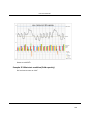
Example A.4.
Rain min. duration
Adjust factor
Max shutdown
45 minutes
1 (1:1)
999 hours
71
LTD User Manual Note: Setting a value to zero is the same as disabling the feature.
The graph shows how the extended rain shutdown extends the rain alarm. The rain itself is of course 1 hour for 60 minutes, but the extended rain shutdown on top of that varies depending on the parameters. In this case the factor is one so 60 minutes rain alarm gives an extension with one hour rain shutdown. Note that the first 45 minutes don’t have extensions due to the Rain Min Duration.
Example A.5
Rain min. duration
Adjust factor
Max shutdown
45 minutes
5
999 hours
72
LTD User Manual In this example the adjust factor extend each rain alarm hour with 5 hours rain shut down. So 6 hours rain alarm with prevent irrigation for 6+30=36 hours.
Example A.6
Rain min. duration
Adjust factor
Max shutdown
45 minutes
0.5
999 hours
73
LTD User Manual In this example the factor is 0.5 and thus the rain shutdown extension is only half of the rain alarm.
Example A.7
Rain min. duration
Adjust factor
Max shutdown
45 minutes
5
20 hours
74
LTD User Manual This example has the same factor as example 2, but the max shutdown limits the rain shutdown extension in the case of long rain alarm periods.
75
LTD User Manual 76
Appendix B: Adding an ET Device
Evapotranspiration (ET) devices can help the LTD adjust irrigation based on weather conditions.You can either let an ET device provide daily input on how the irrigation should be adjusted, or you can enter historic ET data on how the weather usually behaves throughout the year and the controller will adjust its irrigation accordingly.
Note: Historical ET data acts as "fall back" data for the controller if the communication with a connected weather station should fail. Thus, you should enter historical ET data even if you are using a weather stations.
How ET Works with the LTD
The LTD will receive ET data from an external weather station or from a historical ET report describing the evaporation throughout the year. Combining this data with the input from a rain sensor or a tipping rain bucket, and the expected level of irrigation the controller can calculate exactly how much water to use for irrigation.
Here's a rough breakdown of how ET works with the LTD ‐ the items are in no particular order but should all be considered when planning for ET adjusted irrigation:
• The controller needs a number of inputs in order to calculate the ET correction:
• Amount of water that has evaporated and transpired (The ET figure)
• Amount of rain fall (The rain figure)
• How much water the soil can retain (Soil holding)
LTD User Manual • How much water is used for irrigation under normal circumstances
• The ET and rain figures are provided by a weather station and a rain sensor ‐ the rest is entered by you at the controller (if you use historical ET data, this is entered at the controller as well).
• Every day at midnight the controller adds up the ET and rain input it has received and calculates how to adjust tomorrow's "ET Budget" ‐ the amount of water that the irrigation should provide.
Note: If you use a custom irrigation period, this happens at the start of your irrigation period, which might not be midnight. For more information turn to Appendix G: Defining a custom irrigation period on page 147.
Let's look at two examples ‐ one where ET has exceeded the rain fall, and one that works the other way around:
Example B.1. ET calculation with rain shortage
In this example the rain fall has not been able to make up for the ET.
• 0.30" of water was lost due to ET in the last 24 hours.
• 0.20" of rain has fallen in the last 24 hours.
• Your soil holding is set to 0.50".
Now we're short of 0.10" of water since this is the difference between ET and fallen rain. Thus the ET Budget for tomorrow will be adjusted with 0.4".
Since we don't have any excess water, the soil holding value is irrelevant.
78
LTD User Manual Example B.2. ET calculation with excess rain
In this example the relationship is reversed and we have more rain than ET ‐ soil holding is the same.
• 0.30" of water was lost due to ET in the last 24 hours.
• 0.90" of rain has fallen in the last 24 hours.
• Your soil holding is set to 0.50".
You would think that the ET budget for tomorrow should simply be adjusted with ‐0.6" because the excess rain lets us irrigate 0.6" less. However, since the soil is only capable of holding 0.5" we can not benefit from all of the rain, but only 0.5" of the 0.6". Conclusion: tomorrow's ET budget will be adjusted with ‐0.5", meaning that we will not need to irrigate at all. Unless, of course, the ET budget is still positive after adjusting with ‐0.5.
In other words: we can never benefit more from fallen rain than the soil is capable of holding back. So this example will end up with a ‐0.5" adjustment no matter how much more rain we have had. • If you don't connect a weather station but let your programs run from historical ET data the controller simply reads the historical data each midnight, subtracts the rain figure and adds the result to the ET budget.
Note: You can still use a tipping rain bucket to measure fallen rain and have this affect the ET correction. Soil holding is still a limiting factor on how much we can benefit from rain fall.
79
LTD User Manual Note: When the LTD looks at the ET budget and has to figure out how long it has to irrigate, it looks at the "ET Base" setting (see Step 4 Page 96 for instructions on how to set this value).
A bit of background is needed to understand how this works:
When the controller is irrigating normally, it is considered to be irrigating at a water budget of 100% (For more information turn to Chapter 3: Adjusting Water Usage (Water Budget or ET) on page 31). In order for the ET figure to make sense to the controller, you need to tell it what the ET figure would be when running at a 100% water budget. So, if the "ET Base" setting 1 is 0.20", and today's ET budget says 0.10", the controller will run at a water budget of 50 percent, meaning that programs will only run 50 percent of their configured run time.
The tricky part is to make your irrigation programs fit into this model. If the "ET Base" setting is 0.20", you have to make sure that all your programs are configured to apply exactly 0.20" every day. So you have to look at the application rate in each zone and adjust run time and number of start times accordingly.
Let's look at an example:
Example B.3. Calculating ET run time
The following formula is used to calculate the run time (values explained in the table below): ( 60 x ET0 x Kc ) / ( Pr x Ie )
Description
Example value
60
A constant value
60
ET0
Evapotranspiration base
0.20
1. We recommend using the highest monthly ET for your area as the base.
80
LTD User Manual Kc
Crop coefficient
0.50
Pr
Precipitation rate from manufacturer's data
0.45
Ie
Irrigation coefficient
0.80
Based on the example values above, the run time would be:
(60 x 0.20 x 0.50) / (0.45 x 0.80) = 16.7 minutes.
• It is possible to set a minimum ET value that determines whether irrigation will take place at all (see Step 4 Page 96). There can be several reasons to set a minimum ET value:
• If you only provide an insignificant amount of water, the effect is useless.
• If you have rotating valves, maybe they won't make a complete rotation before their short run time is over, and you'll get uneven irrigation.
But isn't a bit of water better than no water at all? Yes, but take a look at this example to see why setting a minimum ET can be a good idea:
Example B.4. How minimum ET value works
In this example we assume the following circumstances for the program in question:
• Today's ET budget has been adjusted to 0.4".
• The program has four start times.
• The minimum ET value has been set to 0.2" because irrigating less than this gives you an uneven irrigation and has little effect on the 81
LTD User Manual turf.
Each of the four start times can irrigate one fourth of the total ET budget, meaning 0.1". Here's how each of the four start times will take place:
Start time #
Action
Explanation
1
No irrigation
The budget is 0.4" and there are four starts left, meaning that each must provide 0.4/4 = 0.1" which is below the 0.2" minimum.
2
No irrigation
The budget is 0.4" and there are three starts left, meaning that each must provide 0.4/3 = 0.13" which is below the 0.2" minimum.
3
Irrigation
The budget is 0.4" and there are two starts left, meaning that each must provide 0.4/2 = 0.2" which equals the 0.2" minimum.
Now the 0.2" that the program provided is subtracted from the budget, so the budget is now 0.2".
4
Irrigation
The budget is 0.2" and there is one start left that must provide 0.2/1 = 0.2" which equals the 0.2" minimum.
Now the ET minimum value has ensured that we got two useful irrigations instead of four uneven irrigations.
Examples
The following examples show a week with ET, Rain, ET balance and irrigation with various combinations of ET parameters.
Example B.5. All parameters in use
Min. ET
0.20"
82
Max. ET
0.35"
Soil holding
0.40"
Max. hourly rain
0.10"
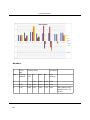
LTD User Manual The program is set to run one time every day; i.e. it will if ET balance is greater than Min ET. The example starts with 0.20” ET, no rain and an empty ET balance.
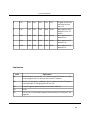
Numbers
Day
Past
12:01 AM
24 Hour Cycle
Starting balance
Irrig
atio
n
11:59 PM
E.T.
Rain
Etc.
End balance
0.20
0.00
0.20
0.20
This is what we have when day 1 starts
83
LTD User Manual 1
0.20
0.20 0.29
0.10
0.19
0.19
Irrigate ETc from last day
2
0.19
0.00 0.32
0.00
0.32
0.51
No irrigation as ET balance < Min. ET (0.20)
3
0.51
0.35 0.26
0.11
0.15
0.31
Irrigate for the last two days, but only Max ET (0.35)
4
0.31
0.31 0.27
0.53
‐0.26 ‐0.26
Irrigation during night. Rain comes during the day.
5
‐0.26
0.00 0.28
0.50
‐0.22 ‐0.40
No irrigation as ET balance < 0
6
‐0.40
0.00 0.24
0.00
0.24
‐0.16
No irrigation as ET balance < 0
7
‐0.19
0.00 0.29
0.00
0.29
0.13
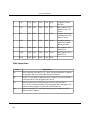
Table Explanation
Date
Explanation
7/1
The ET balance is set to ETc = ET – Rain. As the ET balance >= Min ET the program will run and use the entire ET balance.
7/2
The ETc = 0.19, which is added to the ET balance. As the ET balance is less than Min ET the program will not run.
7/3
The ET balance will now be the sum of ETc for 7/2 and 7/3; i.e. 0.51”. As this is above the Max ET the program will only apply 0.35” and the remaining 0.16” will be left in the ET balance.
7/4
Just a normal day. ET – Rain from the past day is added to the ET balance and it irrigates.
84
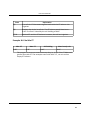
LTD User Manual Date
Explanation
7/5
A lot of rain. ETc becomes negative and so do the ET balance. No irrigation.
7/6
Another day with a lot of rain. The ET balance would have been ‐
0.48” if it wasn’t limited by the soil holding of 0.40”
7/7+8
Positive ETc and the ET balance increases, but still no irrigation.
Example B.6. No Min ET
Min. ET
0.00"
Max. ET
0.35"
Soil holding
0.40"
Max. hourly rain
0.10"
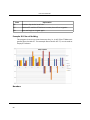
The program is set to run one time every day; i.e. it will if the ET balance is greater than Min ET.The example starts with 0.20” ET, no rain and an empty ET balance.
85
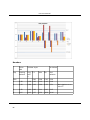
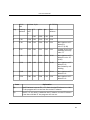
LTD User Manual Numbers
Day
12:01 AM
24 Hour Cycle
Starting balance
Irrig
atio
n
Past
11:59 PM
E.T.
Rain
Etc.
End balance
0.20
0.00
0.20
0.20
1
0.20
0.20 0.29
0.10
0.19
0.19
2
0.19
0.00 0.32
0.00
0.32
0.51
3
0.32
0.32 0.26
0.11
0.15
0.15
4
0.15
0.15 0.27
0.53
‐0.26 ‐0.26
86
No irrigation as no min. ET.
LTD User Manual 5
‐0.26
0.00 0.28
0.50
‐0.22 ‐0.40
No irrigation as ET balance < 0. Limited by soil holding.
6
‐0.40
0.00 0.24
0.00
0.24
‐0.16
No irrigation as ET balance < 0
7
‐0.16
0.00 0.29
0.00
0.29
0.13
No irrigation as ET balance < 0
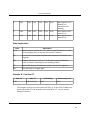
Table Explanation
Date
Explanation
7/1‐4
The ET balance is set to ETc = ET – Rain. As the ET balance is >= Min ET the program will run and use the entire ET balance.
7/5
A lot of rain. ETc becomes negative and so does the ET balance. No irrigation.
7/6
Another day with a lot of rain. The ET balance would have been ‐
0.48” if it wasn’t limited by the soil holding of 0.40”
7/7
Positive ETc and the ET balance increases, but still no irrigation.
7/8
Now we begin to irrigate again.
Example B.7. No Max ET
Min. ET
0.20"
Max. ET
0.00" (Infinite)
Soil holding
0.40"
Max. hourly rain
0.10"
The program is set to run one time every day; i.e. it will if the ET balance is greater than Min ET.The example starts with 0.20” ET, no rain and an empty ET balance.
87
LTD User Manual Numbers
Day
12:01 AM
24 Hour Cycle
Starting balance
Irrig
atio
n
1
11:59 PM
E.T.
Rain
Etc.
End balance
0.20
0.00
0.20
0.20
2
0.20
0.20 0.29
0.10
0.19
0.19
3
0.19
0.00 0.32
0.00
0.32
0.51
88
No irrigation as ET balance < min. ET (0.20)
LTD User Manual 4
0.51
0.51 0.26
0.11
0.15
0.15
Irrigate for the last two days and no max. ET.
5
0.15
0.15 0.27
0.53
‐0.26 ‐0.26
No irrigation as ET balance < min. ET (0.20)
6
‐0.11
0.00 0.28
0.50
‐0.22 ‐0.33
No irrigation as ET balance < 0
7
‐0.33
0.00 0.24
0.00
0.24
‐0.09
No irrigation as ET balance < 0
8
‐0.09
0.00 0.29
0.00
0.29
0.20
No irrigation as ET balance < 0
Explanation
Date
Explanation
7/1
The ET balance is set to ETc = ET – Rain. As the ET balance is >= Min ET the program will run and use the entire ET balance.
7/2
The ETc = 0.19, which is added to the ET balance. As the ET balance is less than Min ET the program will not run.
7/3
A lot of irrigation because there is no limit in Max ET.
7/4
As 7/2
7/5
A lot of rain. ETc becomes negative and so does the ET balance. No irrigation.
89
LTD User Manual Date
Explanation
7/6
Another day with a lot of rain.
7/7
Positive ETc and the ET balance increase, but still no irrigation.
7/8
Now we begin to irrigate again.
Example B.8. No soil holding
The program is set to run one time every day; i.e. it will if the ET balance is greater than the Min ET. The example starts with 0.20” ET, no rain and an empty ET balance.
Numbers
90
LTD User Manual Day
12:01 AM
24 Hour Cycle
Starting balance
Irrig
atio
n
1
11:59 PM
E.T.
Rain
Etc.
End balance
0.20
0.00
0.20
0.20
2
0.20
0.20 0.29
0.10
0.19
0.19
3
0.19
0.00 0.32
0.00
0.32
0.51
No irrigation as ET balance <
min. ET (0.20)
4
0.51
0.35 0.26
0.11
0.15
0.31
Irrigate for the last two days, but only max. ET.
5
0.31
0.31 0.27
0.53
‐0.26 ‐0.26
No irrigation as ET balance < min. ET (0.20)
6
‐0.26
0.00 0.28
0.50
‐0.22 ‐0.48
No irrigation as ET balance < 0.
Not limited by soil holding.
7
‐0.48
0.00 0.24
0.00
0.24
‐0.24
No irrigation as ET balance < 0
8
‐0.24
0.00 0.29
0.00
0.29
0.20
No irrigation as ET balance < 0
Date
Explanation
7/1
The ET balance is set to ETc = ET – Rain. As the ET balance is >= Min ET the program will run and use the entire ET balance.
7/2
The ETc = 0.19, which is added to the ET balance. As the ET balance is less than the Min ET the program will not run.
91
LTD User Manual Date
Explanation
7/3
The ET balance will now be the sum of ETc for 7/2 and 7/3; i.e. 0.51”. As this is above the Max ET the program will only apply 0.35” and the remaining 0.16” will be left in the ET balance.
7/4
Just a normal day. ET – Rain from the past day is added to the ET balance and it irrigates.
7/5
A lot of rain. ETc becomes negative and so does the ET balance. No irrigation.
7/6
Another day with a lot of rain. No limit in the ET balance as there is no soil holding
7/7+8
Positive ETc and the ET balance increases, but still no irrigation.
Example B.9. Max. hourly rain
The program is set to run one time every day; i.e. it will if ET balance is greater than Min ET. The example starts with 0.20” ET, no rain and an empty ET balance.
92
LTD User Manual The example shows the effect of max hourly rain. If it rains more than Max hourly rain within an hour only the Max hourly rain is used.
Options for Getting ET Data
Your controller will accept ET data from a number of sources, and the mechanisms using the ET data to calculate irrigation aspects are identical, regardless of input method.
The LTD accepts ET data from the following sources:
93
LTD User Manual Name in controller menu
Description
Local Weather
Station
Input is pulses from a weather station and tipping bucket (For more information turn to on page 97)
Historic ET
Manually entered historical ET data (For more information turn to Using Historical ET Data on page 94)
Remote ET & Rain
ET and rain data is received from the RealNet server.
Remote ET
ET data is received from the RealNet server. No rain data received.
Local WS with Alarm
send
Same as Local Weather Station, but rain alarm activation/de‐activation will be passed on to the RealNet server.
For more information turn to on page 97 (swap in your preferred source for the local weather station.)
Using Historical ET Data
If you don't have a local weather station you can use historical ET data to correct your irrigation instead.
Before you start this procedure you need to know how much water evaporates every month of the year ‐ on a daily basis. Meaning that for each month you'll get to enter a figure that will be used each day that month.
94
LTD User Manual Note: Your start times will be sorted by start time ‐ if the second start time you enter is before the first one, they will be swapped around next time you browse the list.
Configuring for Historical ET Data
1 1. Turn the dial to ADVANCED
Now the display looks like this:
2
Use the item selectors to select 3. Intelliset and push the ENTER
button. Now you'll see the following screen:
95
LTD User Manual 96
3
Select 1. ET. Now the display will look like this:
4
Select 6. Device Setup. Now the display will look like this:
5
Select 1. ET Input Method. Now the display will look like this:
6
Select Historic and push the ENTER button.
7
Push the CANCEL button once to go back to the main Intelliset™ menu.
8
Select 5. Historic Data Settings in the menu and push the ENTER button. Now you'll see the following screen:
LTD User Manual 9
Use the item selectors to browse the months and set the daily ET adjustment for each.
10 Push the CANCEL button to return to the main Intelliset™ menu.
97
LTD User Manual 98
Appendix C: Adding a flow sensor
The LTD can measure the flow of water in your system and react on any unusual situation by quarantining faulty stations, stacking programs that exceed the expected flow or even cutting off the water supply completely if it seems that you have a leak.
This works by letting a flow sensor measure the flow on the main pipe that feeds your system, and connecting the flow sensor to the LTD.
There are four types of flow alarms ‐ three of which can go off when irrigating and one that is only relevant when no stations are running:
Alarm Types
Alarm Name
Description
What happens?
High Flow
Occurs when your system is using more gallons per minute than your defined threshold.
All running programs are halted.
Flow Deviation
Occurs when your flow is above or below a certain percentage from the expected flow.
All running stations are halted and blacklisted.
Unscheduled Flow
Occurs when there is a flow Normally open master valve even when there shouldn't (NOM) is activated for be (when no stations are 17:59:50.
running). This indicates a leak somewhere on the pipe.
LTD User Manual Alarm Name
Master Pump Failure (MFP)
Description
Occurs when your flow is below a certain threshold.
What happens?
The master pump or all running programs are stopped, depending on your configuration (For more information turn to Appendix C: Setting Alarm Actions on page 107).
Before you can take advantage of the features associated with flow sensor input you have to connect a flow sensor and configure a few things in the controller. The following sections walk you through the process.
Setting Alarm Thresholds
For each of the alarms described in Appendix C: Alarm Types on page 99, you must set a threshold value, and you also need to tell the controller for how long the alarm must be on before the controller should take action.
Note: Setting a threshold to zero will disable the alarm. This section describes how to enter these settings.
Setting the alarm reaction delay
1 Turn the dial to ADVANCED, use the item selectors to scroll to item number 3. FloGuard, and push the ENTER button.
Now you'll see this display:
100
LTD User Manual 2
Choose 2. Alarm Thresholds and push the ENTER button.
Now you'll see the following display:
3
Use the item selectors to select 1. Alarm Reaction Delay. Now you'll see the following display:
4
Use the item selectors to set the reaction time in minutes. The controller won't raise any sensor alarms until they have been on for this period.
Note: A Master Pump Failure (MPF) will ignore this setting ‐ MPF alarms have a fixed delay of 30 seconds.
5
Push the ENTER button to save your selection.
101
LTD User Manual Setting the high flow threshold
1 Turn the dial to ADVANCED, use the item selectors to scroll to item number 3. FloGuard, and push the ENTER button.
Now you'll see this display:
2
Choose 2. Alarm Thresholds and push the ENTER button.
Now you'll see the following display:
3
Use the item selectors to select 2. High Flow. Now you'll see the following display:
4
Use the item selectors to set the maximum flow in gallons per minute. If this flow is exceeded the controller will raise a high flow alarm.
If this alarm is activated all running programs will be halted, but the next program will be started normally when it is scheduled. Of course, if the next program also generates a high flow alarm it is halted too.
102
LTD User Manual 5
Push the ENTER button to save your selection.
Setting the Flow Deviation
1 Turn the dial to ADVANCED, use the item selectors to scroll to item number 3. FloGuard, and push the ENTER button.
Now you'll see this display:
2
Choose 2. Alarm Thresholds and push the ENTER button.
Now you'll see the following display:
3
Use the item selectors to select 3. Flow Deviation. Now you'll see the following display:
4
Use the item selectors to set the deviation percentage from expected flow. The controller will raise an alarm if the flow exceeds or falls short of the expected flow with this many percent.
103
LTD User Manual If this alarm is activated all running stations will be halted and blacklisted (marked as failed). Any programs that include failed stations will simply skip those stations and run the next one in the program. To clear a station you need to mark it OK on the controller (see Appendix C: on page 112 for instructions.)
You can read more about the expected flow in Appendix C: Setting Expected Station Flow on page 108.
5
Push the ENTER button to save your selection.
Setting the unscheduled flow threshold
1 Turn the dial to ADVANCED, use the item selectors to scroll to item number 3. FloGuard, and push the ENTER button.
Now you'll see this display:
2
Choose 2. Alarm Thresholds and push the ENTER button.
Now you'll see the following display:
3
104
Use the item selectors to select 4. Unscheduled Flow. Now you'll see the following display:
LTD User Manual 4
Use the item selectors to set the unscheduled flow limit in gallons per minute. This is an alarm that will be raised only when no stations are running.You may have a minor natural leak of water in your pipes but here you can set the maximum flow allowed when no stations are running. If this alarm is activated the normally open master valve (NOM) will be activated, and remain on for 999 minutes. It can be turned off just like any other station (For more information turn to Chapter 4: Running Extra Stations in Auto Mode on page 40).
Important! If you turn the mode selector away from AUTO or MANUAL mode the normally open master valve (NOM) will be reset and the water will no longer be cut off from your system.
5
Push the ENTER button to save your selection.
Setting the master pump failure threshold
1 Turn the dial to ADVANCED, use the item selectors to scroll to item number 3. FloGuard, and push the ENTER button.
Now you'll see this display:
105
LTD User Manual 2
Choose 2. Alarm Thresholds and push the ENTER button.
Now you'll see the following display:
106
3
Use the item selectors to select 5. Master Pump Failure. Now you'll see the following display:
4
Use the item selectors to set the minimum flow that must be in your pipe if the master pump is working correctly.
You can decide whether this alarm should result in all programs to be halted, or all pumps and master valves should be turned off (For more information turn to Appendix C: Setting Alarm Actions on page 107). The action you choose will be in effect until the next station gets activated (manually or by a program.)
5
Push the ENTER button to save your selection.
LTD User Manual Setting Alarm Actions
The only flow alarm for which you can decide the action is the master pump failure alarm ‐ you get to decide whether this should cause all programs to be halted or all pumps and master valves to be shut down.
Configuring alarm action for MPF
1 Turn the dial to ADVANCED, use the item selectors to scroll to item number 3. FloGuard, and push the ENTER button.
Now you'll see this display:
2
Choose 3. Action Configuration. Now you'll see the following display:
3
Use the item selectors to choose between:
• Pumps/MVs: All pumps and master valves will be shut down when an alarm goes off. The programs will still be finished even if the pumps are turned off in order not to interrupt the irrigation schedule since an MPF alarm will be cleared next time a program has to start.
• Programs: All running programs will be shut down when an alarm goes off.
4
Push the ENTER button to save your selection.
107
LTD User Manual Setting Expected Station Flow
In order to be able to calculate when the current flow is deviating from the expected flow, the LTD needs to know how much flow you expect each station to pull.
To teach the controller about the expected flow you can either enter a value for each station or run the automated "learn flow" feature that will assess the flow for each station in turn.
Note: Please be advised that the system will not be able to handle a flow higher than 9999 gallons per minute.
Entering expected flow for a station
1 Turn the dial to ADVANCED and select 2. FloStack.
Now you'll see the following display:
Scroll down and select 2. Expected Flow by pushing the ENTER button. Now you'll see a scrollable list of stations and their expected flow in gallons per minute:
108
LTD User Manual 2
Use the item selectors to locate the station you wish to configure and push the ENTER button.
3
Now you can set the expected flow using the item selectors and save your setting by pushing ENTER again.
If the above procedure seems to tedious there's an easier way ‐ you can let the LTD asses the expected flow for each station. If you choose this approach the controller will run all stations in turn for a fixed duration, measure the flow for each of them and save the flow as the expected one.
Running the "learn flow" feature
1 Turn the dial to ADVANCED and select 2. FloStack.
Now you'll see the following display:
2
Scroll down and select 3. Learn Flow by pushing the ENTER
button. Now you'll see the following display:
109
LTD User Manual 3
Use the item selectors (both up, down, right and left) to choose a station to start from and set the run time for each station. All stations will be run for the same period of time.
The LTD measures the flow continuously while the station is running the "Learn Flow" feature but only the last measurement is used. The last measurement is likely to be the most accurate one as the flow will have stabilized after running for a few minutes.
4
Push ENTER to start the test. Now you'll see the starting the test at the station you selected (ST1) and running it for the selected duration (3 minutes):
5
When a station is done running its measured flow will be stored as the expected flow for that station. Pushing CANCEL at any time will abort the "learn flow" feature but the stations measured so far are still saved. This means that you don't have to measure all stations in one sitting ‐ simply re‐run the "learn flow" feature with a new "Start from" setting to finish what you may have cancelled earlier.
Viewing the Current Flow
Given that you have configured your flow sensor correctly, the LTD lets you see the real time flow directly in the controller display:
1 Turn the dial to ADVANCED, use the item selectors to scroll to item number 3. FloGuard, and push the ENTER button.
Now you'll see this display:
110
LTD User Manual 2
Select 4. Flow Sensor Setup, and push the ENTER button.
Now you'll see this display:
3
Select 3. Current Flow Pulses and GPM and you'll see the current system flow in both pulses per second and gallons per minute:
Note: The LTD can measure correctly up to a flow of 250 pulses per second. If your flow exceeds this you should use a sensor that has a higher "water amount per pulse" ratio. However, a higher frequency is preferred over a lower one, as it provides the most accurate measuring, so in an ideal world your frequency closes in on 250 pulses per second without ever exceeding it. 111
LTD User Manual Inspecting and Toggling Station Status
Stations can be blacklisted if the controller suspects that they are faulty and cause deviations in the expected flow (For more information turn to Appendix C: Setting the Flow Deviation on page 103). However, the controller might blacklist an innocent station since all stations that are running when the deviation takes place are blacklisted. So, to enable these stations again you need to toggle their status from Failed to OK.
Tip:Since blacklisted stations are simply skipped when running programs that require them, marking a station as failed is an excellent way of taking a single station out of use without having to redo the program all together. This can be useful if you just need to check or replace the station in the field.
This procedure explains how you toggle station status:
Managing station status
1 Turn the dial to ADVANCED, use the item selectors to scroll
to item number 3. FloGuard, and push the ENTER button.
Now you'll see this display:
2
112
Select 1. Station Status by pushing the ENTER button. Now you'll see a scrollable list of stations and their status ‐ Failed or OK:
LTD User Manual 3
If you wish to toggle the status of a station, locate it with the item selectors and push the ENTER button.
Tip:Instead of browsing through the entire list of stations you can use the STATION button to browse only failed stations.
Using the item selectors again, you can toggle the station between OK and Failed status.
4
Push the CANCEL button to exit the menu.
113
LTD User Manual 114
Appendix D: Moisture sensors
With moisture sensors your controller can learn the exact moisture levels in the soil and adjust irrigation based on this knowledge.
The Role of Moisture Sensors
Adding moisture sensors to your LTD takes the guesswork out of irrigation and adds a new level of intelligence to the picture ‐ you now enjoy "Total Cycle Management":
1 Calculate your irrigation run times based on local ET and Rain
2
Communicate ‐ get runtimes and system status via the Internet
3
Validate runtime scheduling based on feedback from the soil
LTD User Manual Let's examine the three components of Total Cycle Management in turn.
Calculate
When planning irrigation you look at the best evapotranspirational (ET) data you have available. In descending order of accuracy you may have access to one or more of the following:
• Data from a local weather station.
• Real‐time ET data from an off‐site weather station.
• Daily weather reports from an off‐site weather station.
116
LTD User Manual • Historical weather data for your area.
In addition you know about the soil type, vegetation and other factors that should affect your irrigation planning, but even the best planning is still, in essence, guesswork, as you don't know for sure how the soil is responding.
Communicate
With an intelligent irrigation controller like the LTD you get a lot of help in correcting your calculations along the way. A variety of alarms (For more information turn to Chapter 4: Alarms on page 45) can be raised and many will lead to your irrigation schedules being adjusted to the new conditions.
For example, if it rains heavily, the LTD won't blindly keep irrigating as you may have told it to.
The LTD logs everything elaborately and even lets you view real-time data in the
web based interface. With this knowledge you can re‐adjust your calculation, but still, an important piece is missing from the puzzle.
Validate
To validate your calculations and the feedback the system has given you there is no way around measuring the exact levels of moisture in the ground.
By adding moisture sensors to the LTD you are now full circle. Irrigation can now be adjusted automatically based on the data flowing from your moisture sensors, and long term you can adjust your schedules according to what you learn from the full circle irrigation scheme, gradually refining your irrigation schedules to perfection.
117
LTD User Manual When setting up moisture sensors with the LTD, you tell the controller which soil type you are measuring, and then the LTD will pull in data every 10 minutes, and you are allowed to configure precisely how the controller should react to this data ‐ this happens as fine grained as on a per‐program basis:
• Set limits for how dry the soil should be before irrigating and how moist it must be before irrigation is prevented.
• Determine whether or not the collected data should affect current irrigation directly, or if the data should just be collected for schedule refinement later on.
The moisture sensors also work in conjunction with the regular ET mechanism and affects the amount of water assigned to irrigation moving forward. The range of ET adjustment can be from zero to two times the daily ET, meaning that a very dry soil can result in ET being doubled and a very moist soil can bring the ET for the following day to zero.
You determine per program how much the controller can adjust the ET by setting a value between 0 and 100%, a 100% being double from normal ET (For more information turn to Appendix D: How irrigation is adjusted by moisture sensors on page 118.)
How irrigation is adjusted by moisture sensors
Each program can accept input from a moisture sensor and its input can be used for the following:
• Allow irrigation if the moisture level is low enough
• Raise an alarm if the moisture level is too low
• Prevent irrigation if the moisture level is too high
• Optionally adjust the ET balance
118
LTD User Manual Note: Each moisture sensor can control multiple programs and its input can be interpreted differently by different programs.
Here is how you configure your programs to use a moisture sensor:
1 Turn the dial to ADVANCED
PAUSE/
RESUME
STOP
MANUAL
AUTO
SET DATE & TIME
OFF
PROGRAM
RAIN OFF
RUN TIME
RAIN ALARM STATUS
WATER DAYS
VIEW ALARMS
START TIME
WATER BUDGET / ET
VIEW ET & RAIN
PROGRAM STATUS
VIEW MOISTURE SENSOR
ADVANCED
SETUP SENSORS
SOLENOID AMPS
TWO WIRE
SHORT FINDING
DECODER
PROGRAMMING
Now the display looks like this:
2
Use the item selectors to select 3. Intelliset and push the ENTER
button. Now you'll see the following screen:
119
LTD User Manual 3
Select 2. Moisture and push the ENTER button. Now the display looks
like this:
4
Select the first option: 1. Moisture program settings and push the
ENTER button. Now the display looks like this:
5
Now, using the item selectors, set the values for all seven columns:
Column
120
Description
Pgm
The program to assign a moisture sensor to.
Sens
Which sensor to assign.
Allow
The lower threshold for when irrigation will be allowed ‐ e.g. 5% means that irrigation will be allowed as long as the moisture readings are below 5%.
Prevent
The higher threshold for when irrigation will be prevented ‐ e.g. 30% means that irrigation will be prevented if the moisture readings are 30% or higher.
LTD User Manual Column
Alarm
Description
The lower threshold for when an alarm will be raised.
Ctrl
Set to Yes or No depending on whether you want the moisture
sensors to control your Irrigation. If irrigation is prevented due to high moisture readings, ET for the following day will be
increased.
Reg
A percentage with which the ET will be adjusted. 0% means no adjustment and 100% means that the ET will be as much as doubled for the following day.
6
Push the ENTER button to save your configuration.
7
Repeat steps four and five for each program you wish to assign a moisture sensor to.
Once you have completed all the procedures in this section, your system should be up and running, utilizing moisture sensor readings and adjusting irrigation accordingly.
How moisture sensor input affects ET
The LTD can handle single moisture sensor via the external RS232 port and an additional external RS232/RS485 (SMI‐100) converter. The controller can handle up to 10 moisture sensors on a multi drop line.
The moisture sensor is able to allow or prevent irrigation and/or adjust ET on specific programs dependent on the actual moisture and the setup. All the setup can be done at the controller and on the WEB. It is also possible to view the actual moisture level both on the controller and on the WEB.
The moisture sensors may be set up to simply allow or prevent irrigation. The irrigation is still controlled by water days, WB or ET, start times, etc. The sensor just acts as a switch for one or more programs.
121
LTD User Manual More powerfully, the moisture sensor is also able to adjust the daily ET, which is added to the ET balance corrected for rain for each program. The principle is that high moisture shall reduce the ET applied to the ET balance and low moisture shall increase the ET applied to the ET balance. With full regulation the adjusted ET shall vary between 0 and double the amount of daily ET. The regulation is individual per program.
Abbreviations
Term
Description
A user definable regulation factor between 0 and
Factor %
100%. Set to 0 means no regulation. Set to 100% means full regulation.
100% regulation when wet
No ET is added to the balance.
100% regulation when dry
2x the ET is added to the balance.
Wet
At or near field capacity.
Dry
At or near permanent wilt point.
Optimal
The target balance between soil and climate ET.
VSM
The actual volumetric soil moisture.
ETm
Moisture adjusted ET and corrected for rain and
added to ET balance.
ET
ET for the prior 24 hour period.
Rain
Rain for the prior 24 hour period.
VSM ranges for the different soil types
Soil type
VSM(dry)
VSM(wet)
VSM(Optimal)
Standard
0
49
25.5
Sand
2
22
12
Loam
6
36
21
122
LTD User Manual Soil type
Clay
VSM(dry)
15
VSM(wet)
50
VSM(Optimal)
32.5
The following examples show 7 days with various daily ET and rain in combination with start off of dry, wet or optimal soil condition with 0%, 50% or 100% regulation. The examples have the following common conditions:
• Soil type loam. Root zone 4”. This means the VSM for dry, optimal and wet corresponds to 0.24”, 0.84” and 1.44” of water.
• The first irrigation period begins with ET=0.20, Rain=0.00”, ET balance = 0.00”.
• The irrigation program runs every day if ET balance is above 0.00” (no minimum/maximum ET defined.)
• Allow and prevent irrigation based on the moisture is not used.
• The water applied by irrigation and rain reach the root zone the same day.
Factor %
VSM %
ET
ETm
0
6 (dry)
0.20
0.20
0
21 (optimal)
0.20
0.20
0
36 (wet)
0.20
0.20
50
6 (dry)
0.20
0.30
50
21 (optimal)
0.20
0.20
50
36 (wet)
0.20
0.10
100
6 (dry)
0.20
0.40
100
21 (optimal)
0.20
0.20
100
36 (wet)
0.20
0.00
123
LTD User Manual Example D.1. Dry start condition (stress point)
Soil moisture starts at 0.24”
We start with 0.20” ET and no rain the first day. The soil is dry, but we have no
regulation. Thus the ETm = ET. Every day the ET balance = ETm (ET) – Rain. There is no irrigation on 7/5 as the ET balance is negative. The result is that we start out with a dry soil and we will keep a dry soil. The moisture content in the soil varies over the day as the irrigation falls in the night (increase soil moisture) and during the day the ET dries out the soil. The example shows that most of the days the soil moisture is below the permanent wilting point at the end of the day.
124
LTD User Manual We start with 0.20” ET and no rain the first day. The soil is dry, and we have 50%
regulation. Thus the ETm will be regulated up by 50% from the collected ET in the beginning and as the soil moisture reaches the nominal level the ETm is regulated less. The trend shows the soil moisture is growing until it reaches the optimum level.
125
LTD User Manual This shows the same tendency as the 50% regulation, just that the regulation of the soil moisture is far more aggressive.
Example D.2. Optimal start condition
Soil moisture starts at 0.84”
126
LTD User Manual In this case the soil moisture was in balance when we started and it is kept in balance.
127
LTD User Manual The regulation has very little influence as the soil moisture is in balance and we just deviate slightly from the nominal value.
128
LTD User Manual Same as with 50%
Example D.3.Wet start condition (field capacity)
Soil moisture starts at 1.44”
129
LTD User Manual We start with 0.20” ET and no rain the first day. The soil is wet, but we have no
regulation. Thus the ETm = ET. Every day the ET balance = ETm (ET) – Rain. There is no irrigation on 7/5 and 7/13 as the ET balance is negative. The result is that we start out with a wet soil and we will keep a wet soil.We even keep the moisture above the field capacity, which means most of the
irrigation is waisted.
130
LTD User Manual The soil will dry towards the nominal value over time. It will still irrigate, but with less ETm than the collected ET. Using prevent irrigation above a certain level would avoid irrigation when it is very wet.
131
LTD User Manual The same picture as the 50% regulation just that the progression towards the nominal value is much faster.
How irrigation is adjusted by moisture sensors The same results can be drawn for the other soil types.The only difference is the VSM range.
Min and max for ET come into play when the system starts to use the ET balance; i.e. after the moisture correction, which is on what we add to the ET balance. Max hourly rain is during the day when we collect rain. Soil holding is the maximum that the ET balance can go negative.
132
LTD User Manual Soil moisture starts at 0.24”.
Compared to the similar example in the beginning the minimum ET of 0.15” avoids the small amount of irrigation on 7/4 and 7/14.
133
LTD User Manual In the example the Allow irrigation is set to 0.34” and Prevent irrigation is set to
1.34”.Thus the irrigation is prevented until the soil moisture drops below 0.34”. At that point the ET balance is large and the first coming days irrigation will increase the soil moisture to above prevent level.The next five days the soil moisture will drop due to ET until it again allows irrigation. In the next period it will not increase above the prevent and start settle at
the optimum.
134
LTD User Manual This example has the same allow and prevent settings as the previous, but instead
of ET controlled irrigation as water budget program is used.The water budget program is set with start times at 1 AM, 2 AM, 3 AM, 4 AM, 5 AM and 6 AM. Each start apply 0.15” water and it is assumed this is in the soil the following hour.
The result is again that the soil moisture drops until it is below 0.34” and then on 7/3 the controller irrigates 6 times 0.15”.The next day it irrgates 3 times 0.15” until it reach the 1.34”.The following days the soil dries out and it all repeates from 7/10.
135
LTD User Manual 136
Appendix E: Changing Station Run Sequence and Mapping
Normally stations in a program will be run in the order indicated by their station ID
numbers (For more information turn to Chapter 3: Configuring Irrigation Programs on page 16), but you can circumvent this by assigning sequence numbers to stations instead.
The typical scenario if when you want to add a station to an existing installation ‐ instead of this station always being run as the last one due to its high ID number, you can "merge" it into the middle of the pack by using sequence numbers.
Example E.1. Putting a new station in the middle of the run chain
Consider a scenario where you have 40 stations with ID numbers from 1 to 40 placed in the terrain.You want to add number 41 but you would like it to be run after station 20 instead of in the end of a program cycle. To achieve this you would alter the sequence number for ST41 to 21:
Normal run sequence
Run sequence after changing the sequence number for ST41 to 21
ST1
ST1
ST2
ST2
St3
St3
...
...
ST20
ST20
ST21
SY41
ST22
ST21
...
...
ST39
ST38
ST40
ST39
LTD User Manual Normal run sequence
Run sequence after changing the sequence number for ST41 to 21
ST41
ST40
If station run sequences are changed, this will show when you are assigning
stations to a program - if you changed the sequence like in the example above, scrolling through the station list you would see ST41 appear right after ST20 in the list.
Note: In all other places (station test, expected flow lists, etc.) stations are listed according to station ID and not to run sequence.
The following two procedures show you how to alter and reset station run sequences.
Changing the station run sequence
1 Turn the dial to ADVANCED, use the item selectors to scroll to item number
6. Station Run Sequence & Mapping, and push the ENTER button.
Now you will see this display:
138
2
Select 1. Program Station Run Sequence. Now you will see the following
display:
3
Select 1. Edit and push the ENTER button.
LTD User Manual Now you will see this display:
4
Use the item selectors to select the station you wish to re‐arrange and change its sequence number.
5
Push the ENTER button to save your sequences.
Resetting station run sequences
1 Turn the dial to ADVANCED, use the item selectors to scroll to item number
6. Station Run Sequence & Mapping, and push the ENTER button.
Now you will see this display:
2
Select 1. Program Station Run Sequence. Now you will see
the following display:
3
Select 2. Reset to factory default and push the ENTER button.
Now you will see this display:
139
LTD User Manual 4
Push the ENTER button to acknowledge that you're resetting the sequence
numbers, or CANCEL to exit.
Changing Station Output Mapping
In addition to changing the station run sequence, you may alter the mapping between station names and physical stations, meaning that station 1 can be re‐mapped to not activate the valve connected to terminal 1, but an arbitrary valve.
This is how it is done:
Changing Station Output Mapping
1 Turn the dial to ADVANCED, use the item selectors to scroll to item number
6. Station Run Sequence & Mapping, and push the ENTER button.
Now you will see this display:
2
140
Select 2. Station Output Mapping and press the ENTER button. Now
the display will look like this:
LTD User Manual 3
Select 1. Edit and press the ENTER button. Now you will see the
following display:
4
Use the item selectors to map station names to physical output terminals
and press the ENTER button to save your mapping.+
In case you want to reset to the factory defaults of stations names mapped directly to
corresponding terminal IDs, follow this procedure:
Resetting Station Output Mapping
1 Turn the dial to ADVANCED, use the item selectors to scroll to item number
6. Station Run Sequence & Mapping, and push the ENTER button.
Now you will see this display:
2
Select 2. Station Output Mapping and press the ENTER button. Now
the display will look like this:
141
LTD User Manual 142
3
Select 2. Reset to factory default. Now you will see the following
display:
4
Push the ENTER button to acknowledge that you are resetting all mappings,
or CANCEL to exit.
Appendix F: Using Simple Flow Management The LTD allows for simple flow management by comparing the current flow to
system capacity and preventing too many stations from running at once.
Configuring for Flow Management
Setting up your system for flow management only involves two things:
1 Defining the expected flow for your stations. For more information turn to Appendix C: Setting Expected Station Flow on page 108.
2
Set the maximum system capacity. For more information turn to Appendix F: Setting the System Flow Capacity on page 144.
How the Flow Management Works
Whenever a station is about to start, the LTD will try to determine whether the system has sufficient capacity to start the station by doing a little calculation. A station can be started if:
(Required Capacity + Capacity in Use) <= Total Capacity
In plain words: the capacity required by the station plus the capacity already used must not exceed the total system capacity.
The required capacity and the capacity in use is determined from the station flow, whether entered or learned (For more information turn to Appendix C: Setting Expected Station Flow on page 108).
LTD User Manual If a station can not be started it will be queued in "pending" state. On the controller this will appear as "Waiting", just as paused stations. However, pending stations have a higher priority than others next time the LTD frees some capacity. (This is known as the stacking mechanism.)
There are a couple of things to keep in mind when using flow management:
• When running in AUTO mode, manually started stations will overrule the flow management and ignore the higher priority of pending stations. Manually started programs will obey the flow management though.
• The entire concept of flow management is ignored when running in MANUAL mode.
• When pausing a program the LTD will release the capacity to flow management and thus the program might go into "pending" state when resumed if the capacity is used up by other stations.
Setting the System Flow Capacity
If you tell the LTD about the flow capacity of your pipes, the controller can automatically
queue up stations that would exhaust the capacity by starting. Here's how you enter the
flow capacity at the controller:
1 Turn the dial to ADVANCED and select 2. FloStack.
Now you'll see the following display:
2
144
Select 1. System Flow Capacity and you'll see this display:
LTD User Manual 3
Use the item selectors to set the system flow capacity and push the ENTER
button to save your setting.
Important
Leaving the System Flow Capacity at zero GPM means that the setting won't be used to correct which stations are started.
145
LTD User Manual 146
Appendix G: Defining a custom irrigation period
You can change the standard irrigation window in the LTD that runs from 12:00 AM
to 12:00 AM. This has two effects:
1 The entire water cycle will start when your irrigation period starts. If this is different from 12:00 AM, please be aware that:
• Programs will start running on the first start time after your irrigation period starts. This can potentially lead to a bit of confusion where programs leap into days you wouldn't think they should be running, or start running before they normally would.
Important! The irrigation period normally starts at midnight, but if you move the start into the PM window, your period starts earlier. Moving the start into the AM window will start the period later.
Example G.1. Skewed days with custom irrigation periods
Consider a program with four start times: 02:00 AM, 05:00 AM, 06:00 PM and 11:00 PM that runs on odd days.
If your irrigation period starts at 08:00 PM and runs to 08:00 PM, here's how the program could run:
LTD User Manual Date
Start time
September 2.
11:00 PM
Action
Runs despite the even date - your
irrigation period has started earlier than midnight.
September 3.
02:00 AM
Runs as expected.
September 3.
05:00 AM
Runs as expected.
September 3.
06:00 PM
Runs as expected.
September 3.
11:00 PM
Will not run despite the odd date ‐ your irrigation window has closed.
...
...
...
• All ET calculations are based on the irrigation period, be it the standard one or your custom period.
2
You can define a "non‐water" window by not letting the period span 24 hours. If you define the start to 06:00 PM and the end to 08:00 AM no programs or stations will be started between 08:00 AM and 06:00 PM.
Note: You can still run both stations and programs manually in the non‐water window.
Programs that try to start in the non-water window will generate an alarm. And if a
program is running when the non‐water window starts the program is halted and an alarm is raised. For more information turn to Chapter 4: Alarms on page 45.
Here is how you actually define the irrigation period at the controller:
148
LTD User Manual Configuring the Irrigation Period
1 Turn the dial to ADVANCED, use the item selectors to scroll to item number
4. Irrigation Period, and push the ENTER button.
Now you'll see this display:
2
Use the item selectors to set the start and end time and push the ENTER
button to save your settings.
149
LTD User Manual 150
Appendix H: Advanced irrigation: Misting, Cycle and Soak
The LTD lets you go beyond regular irrigation and build misting and "Cycle & Soak" programs.
Important! The basics are the same as when building a regular irrigation program, so make sure to read Chapter 3: Configuring Irrigation Programs on page 16. and pay particular attention to Chapter 3: Setting Start Times on page 24.
How is This Different from Regular Programs?
Misting and "Cycle & Soak" programs are configured the same way as regular programs (see Chapter 3: Configuring Irrigation Programs on page 16 for a walk‐through), except for one point: The program start times have a more elaborate configuration.
In addition to start time, you configure an end time and a cycle count for how often you want the program repeated within this time frame. The controller will then "even out" the repeats within your time frame, leaving identical breaks between them.
So, if the total run time for your program is ten minutes and you configure the program to run three times between 10:00 AM and 11:00 AM, your program will run at 10:00, 10:25 and 10:50, leaving 15 minute breaks at 10:10 and 10:35.
LTD User Manual The terms "Misting" and "Cycle & Soak" refer to two variants of this concept:
• Misting: typically describes a program that runs its stations for a very short time ‐ run times are in seconds.
• Cycle & Soak: typically describes a program that uses longer run times ‐ measured in minutes.
Both will run a number of cycles per start, whereas a normal program will only run once per start.
When the LTD Alters Your Program
There are a number of scenarios where the LTD will reduce the number of repeats in a program start:
Program was paused
If a program has been paused the LTD will not aggregate the cycles that should have been run in the pause ‐ these cycles are just ignored and the program continues at the point it would be at had it not been paused.
Maximum system capacity met
If a program tries to run a cycle when the maximum system capacity is reached, this cycle is just dropped.
ET adjustments
If ET adjustments have dictated that you can irrigate less then normally today, reducing the number of cycles can be the outcome.
If the number of cycles is reduced, a Repeat alarm is raised. (See Chapter 4: Alarms on page 45 for details.)
152
LTD User Manual How to Configure for Misting or Cycle & Soak
A misting program will typically run a number of stations for just a few seconds at a time,
and then add longer breaks between the program start times.
Here's an example of a simple misting program:
Station
Run time
ST1
0:00:05
ST2
0:00:08
ST3
0:00:15
ST4
0:00:06
ST5
0:00:08
...
...
Note: Since the LTD will start stations every ten seconds you might experience short breaks between starts in a misting program. For example you'll see short breaks of between five and two seconds in the program above.
For run time over four minutes, the end time is aligned to ten second slots too, so for example a run time of 0:05:13 will run for 0:05:20.
And here's a program that start at various frequencies in different time intervals:
Full misting program example
153
LTD User Manual #
Start #
Details
Irrigation will start @
1
Start time: 08:00 AM
End time: 09:00 AM
Count: 3
Repeat duration: 10 minutes
• 08:00:00 AM
• 08:25:00 AM
• 08:50:00 AM
2
Start time: 09:00 AM
End time: 10:00 AM
Count: 4
Repeat duration: 10 minutes
• 09:00:00 AM
• 09:16:40 AM
• 09:33:20 AM
• 09:50:00 AM
3
Start time: 10:00 AM
End time: 11:00 AM
Count: 5
Repeat duration: 10 minutes
• 10:00:00 AM
• 10:12:30 AM
• 10:25:00 AM
• 10:37:30 AM
• 10:50:00 AM
Finally, let's see how you go about creating a misting program on the controller ‐ let's say you want to configure the first start time in the example program above ‐ here's how you would do it:
The first thing you need to do in order to use the misting features is to enable them:
Enabling Misting
1 Turn the dial to ADVANCED
154
LTD User Manual Now the display looks like this:
2
Use the item selectors to scroll to item number 8. Feature Manager,
and push the ENTER button.
Now you'll see this display:
3
Select 1. Ena/Dis Cycle and End Time.
Now you'll see this display:
155
LTD User Manual 4
Use the item selectors to select Enable and push the ENTER button to save
your setting.
And then you're ready to configure the program:
Setting the Start Times With Count and End Time
1 Create your program as explained in 1 ,, but when you get to Chapter 3: Setting Start Times on page 28, swap that part out for the instructions in this procedure instead.
2
Use the item selectors to navigate to the program you wish to adjust the start times for and push the START TIMES button.
Now you'll see the following display:
3
Use the item selectors to locate the one of the four runs you wish to set a start time for, and push the ENTER button.
Now the cursor will jump to the right, letting you set the start time:
4
156
Use the item selectors to set the start time to 08:00 AM and push the right arrow to jump to the cycle field (Cyc).
LTD User Manual 5
Use the item selectors to set the count to four and push the right arrow to jump to the end time field (End).
Note: As soon as you enter the End field, the controller will set the default end time to (total run time * count) + start time
= 08:04.You must extend the end time in order get the breaks in between the four cycles:
If you cut the end time shorter, one of two things will happen, depending on which type of program you are dealing with:
• • If you are handling a water budget based program: The Cyc field will
automatically decrease in order to fit in the cycles possible before the end time ‐ you'll see it when you have saved the start time.
• • If you are handling an ET controlled program: No adjustments are made to the number of cycles. The fact that ET may decrease the run time of your cycles, you may still be able to fit in your number of cycles even though you lower the end time.
6
Set the end time to 09:00 and push the ENTER button to save your settings
- now the cycles will be evenly spread out in the hour between 08:00 and 09:00.
Note: When running this program, the controller still considers the program to be running, even though it is waiting between two cycles ‐ here's what the display will look like right after the first cycle in the first run:
157
LTD User Manual Things to Keep in Mind
When using misting or cycle & soak programs, there are a number of things to consider
that don't apply to regular programs:
• If you're using ET: Each cycle still obeys the water budget dictated by ET. This means that each cycle might have to run for so long that the time frame for the start time doesn't have enough room to fit in all the cycles. In this case the number of cycles is cut down adequately. The "cut out" irrigation is added to tomorrow's ET figure.
• If you're using a maximum system capacity (For more information turn to Appendix F: Using Simple Flow Management on page 159) a cycle might be unable to run if the maximum capacity is reached. If the program is ET controlled, the "cut out" irrigation is added to tomorrow's ET figure.
• If you pause a misting program the cycles that should have taken place during the pause are dropped in order to fit the total number of cycles in the program run time window. If the program is ET controlled, the irrigation that is lost on this account is added to tomorrow's ET figure.
• You should ensure that flow limits or reaction delay is set to consider the "on/off" nature of misting programs in order to avoid false alarms. Ideally you should use a separate pipe system without flow sensors for misting programs. For more information turn to Appendix C: Setting Alarm Thresholds on page 110.
• The LTD can handle up to five station starts within ten seconds, so you should avoid starting more than five stations at once, or you will start seeing alarms.
158
Glossary
Term
Description
Cable
Two wires surrounded by insulation.
Two‐wire
Synonym for a cable.
Wire
An individual copper wire.
LTD User Manual 160
Tucor, Inc.
518 Wallace Rd
Wexford, PA 150908642
Phone: 8002727472
7249356850
Fax: 7249358233
Email: [email protected]