1
<Toc> <Ind>
2.3
2-3
<Chapter 2 Setup >
Connecting JUXTA Instrument to Personal
Computer
This section describes how to connect a JUXTA instrument to a personal computer.
2.3.1
Items Required for Connection
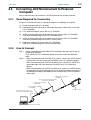
To connect a JUXTA instrument to a personal computer, the following are required:
(1) Personal computer with VJ77 installed
(2) Communication cable with 9-pin D-sub female connectors at both ends (comes with
VJ77): E9786WK
(3) VJ77-dedicated adapter (comes with VJ77): E9789HA
(4) JUXTA communication cable (3-pin connector type) (comes with VJ77):F9182ED
Used when communicating with JUXTA F, W and M series.
(5) JUXTA communication cable (5-pin connector type) (comes with VJ77):F9182EE
Used when communicating with JUXTA D series (DSC2).
(6) Adapter for modular-jack (comes with VJ77):E9786WH
Used when communicating with JUXTA VJ and M series.
2.3.2
How to Connect
Step 1
Connect the dedicated cable (IBM PC/AT compatible cable with 9-pin D-sub) to
the personal computer.
Then, connect the VJ77-dedicated adapter to the other end of the dedicated
cable.
Step 2
• When communicating with JUXTA D series (DSC2), connect the JUXTA communication cable with 5-pin connector (F9182EE) to the VJ77-dedicated adapter.
• When communicating with JUXTA F, W and M series, connect the JUXTA communication cable with 3-pin connector (F9182ED) to the VJ77-dedicated
adapter.
• When communicating with JUXTA VJ and M series, connect the JUXTA communication cable with 5-pin connector to the VJ77-dedicated adapter, then connect
the modular jack adapter (E9786WH) to the connector of the JUXTA communication cable.
(6) Adapter for modular-jack
(E9786WH)
(4)(5) JUXTA communication cable
(F9182ED or F9182EE)
(3) Communication adapter
(E9789HA)
(2) Communication cable
(E9786WK)
JUXTA VJ series
9-pin D-sub female connectors
for IBM PC/AT compatible models
(1) Personal computer with VJ77 installed
IM 77J01J77-01E
5th Edition : Feb. 28, 2011-00