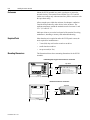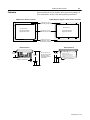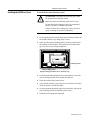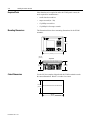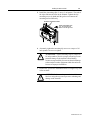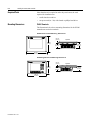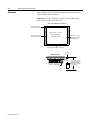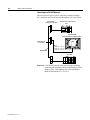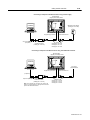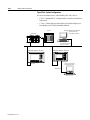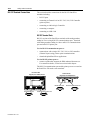
1
Allen-Bradley PanelView Operator Terminals User Manual Important User Information Because of the variety of uses for the products described in this publication, those responsible for the application and use of this control equipment must satisfy themselves that all necessary steps have been taken to assure that each application and use meets all performance and safety requirements, including any applicable laws, regulations, codes and standards. The illustrations, charts, sample programs and layout examples shown in this guide are intended solely for purposes of example. Since there are many variables and requirements associated with any particular installation, Allen-Bradley does not assume responsibility or liability (to include intellectual property liability) for actual use based upon the examples shown in this publication. Allen-Bradley publication SGI-1.1, Safety Guidelines for the Application, Installation and Maintenance of Solid-State Control (available from your local Allen-Bradley office), describes some important differences between solid-state equipment and electromechanical devices that should be taken into consideration when applying products such as those described in this publication. Reproduction of the contents of this copyrighted publication, in whole or part, without written permission of Allen-Bradley Company, Inc., is prohibited. Throughout this manual we use notes to make you aware of safety considerations: ! ATTENTION: Identifies information about practices or circumstances that can lead to personal injury or death, property damage or economic loss. Attention statements help you to: • identify a hazard • avoid a hazard • recognize the consequences Important: Identifies information that is critical for successful application and understanding of the product. PanelBuilder, PanelView, SLC, SLC 500, SLC 5/01, SLC 5/02, SLC 5/03, SLC 5/0, MicroLogix, ControlLogix, Data Highway Plus are trademarks of Allen-Bradley Company, Inc. PLC and PLC-5 are registered trademarks of Allen-Bradley, Inc. Microsoft, MS-DOS and Windows are trademarks or registered trademarks of Microsoft Corporation. x-3 Table of Contents Table of Contents Preface Preface Objectives . . . . . . . . . . . . . . . . . . . . . . . . . . . . . . . . . .P-1 Contents of Manual . . . . . . . . . . . . . . . . . . . . . . . . . . . . . . . . .P-2 Intended Audience . . . . . . . . . . . . . . . . . . . . . . . . . . . . . . . . . .P-3 Conventions . . . . . . . . . . . . . . . . . . . . . . . . . . . . . . . . . . . . . . .P-3 Terminology . . . . . . . . . . . . . . . . . . . . . . . . . . . . . . . . . . . . . . .P-3 Installing PanelView Terminals . . . . . . . . . . . . . . . . . . . . . . . .P-3 European Union Directive Compliance . . . . . . . . . . . . . . . . . .P-3 Related Publications . . . . . . . . . . . . . . . . . . . . . . . . . . . . . . . . .P-4 Technical Support . . . . . . . . . . . . . . . . . . . . . . . . . . . . . . . . . .P-4 Technical Product Assistance . . . . . . . . . . . . . . . . . . . . . . . . .P-4 Terminal Overview Chapter 1 Intended Uses . . . . . . . . . . . . . . . . . . . . . . . . . . . . . . . . . 1-1 Terminal Types . . . . . . . . . . . . . . . . . . . . . . . . . . . . . . . . . . . .1-1 Color and Grayscale Terminals . . . . . . . . . . . . . . . . . . . . . . . .1-5 PanelView 550 Features . . . . . . . . . . . . . . . . . . . . . . . . . . . . .1-6 PanelView 600 Features . . . . . . . . . . . . . . . . . . . . . . . . . . . . .1-12 PanelView 900/1000 Features. . . . . . . . . . . . . . . . . . . . . . . . .1-16 PanelView 1400 Features . . . . . . . . . . . . . . . . . . . . . . . . . . . .1-20 Applications . . . . . . . . . . . . . . . . . . . . . . . . . . . . . . . . . . . . . .1-24 Touch Screen Operation . . . . . . . . . . . . . . . . . . . . . . . . . . . . .1-25 Keypad Operation . . . . . . . . . . . . . . . . . . . . . . . . . . . . . . . . . .1-25 Configuration Mode Menu . . . . . . . . . . . . . . . . . . . . . . . . . . .1-26 Terminal Messages . . . . . . . . . . . . . . . . . . . . . . . . . . . . . . . . .1-26 Printing . . . . . . . . . . . . . . . . . . . . . . . . . . . . . . . . . . . . . . . . . .1-26 Alarm List . . . . . . . . . . . . . . . . . . . . . . . . . . . . . . . . . . . . . . .1-27 Accessories . . . . . . . . . . . . . . . . . . . . . . . . . . . . . . . . . . . . . . .1-28 Replacement Parts . . . . . . . . . . . . . . . . . . . . . . . . . . . . . . . . .1-30 Initial Setup Chapter 2 Chapter Objectives . . . . . . . . . . . . . . . . . . . . . . . . . . . . . . . . . .2-1 Wiring and Safety Guidelines . . . . . . . . . . . . . . . . . . . . . . . . .2-1 Connecting AC Power . . . . . . . . . . . . . . . . . . . . . . . . . . . . . . .2-2 Connecting DC Power . . . . . . . . . . . . . . . . . . . . . . . . . . . . . . .2-5 Resetting the Terminal . . . . . . . . . . . . . . . . . . . . . . . . . . . . . . .2-7 Power-up Sequence . . . . . . . . . . . . . . . . . . . . . . . . . . . . . . . . .2-8 Publication 2711-6.1 ii Table of Contents Configuring the Terminal Chapter 3 Chapter Objectives . . . . . . . . . . . . . . . . . . . . . . . . . . . . . . 3-1 Application Settings . . . . . . . . . . . . . . . . . . . . . . . . . . . . . 3-1 Accessing the Configuration Mode Menu . . . . . . . . . . . . 3-2 Selecting a Language . . . . . . . . . . . . . . . . . . . . . . . . . . . . 3-4 Using a Memory Card . . . . . . . . . . . . . . . . . . . . . . . . . . . 3-5 Configuring Communications . . . . . . . . . . . . . . . . . . . . . 3-6 DH-485 Communications . . . . . . . . . . . . . . . . . . . . . . 3-6 DH+ Communications . . . . . . . . . . . . . . . . . . . . . . . . . 3-8 Remote I/O Communications . . . . . . . . . . . . . . . . . . . 3-9 ControlNet Communications . . . . . . . . . . . . . . . . . . . 3-10 DeviceNet Communications . . . . . . . . . . . . . . . . . . . 3-12 DF1 Communications . . . . . . . . . . . . . . . . . . . . . . . . 3-14 Configuring Presets . . . . . . . . . . . . . . . . . . . . . . . . . . . . 3-16 Viewing Terminal Information . . . . . . . . . . . . . . . . . . . 3-17 Adjusting Screen Parameters . . . . . . . . . . . . . . . . . . . . . 3-18 Setting the Time and Date . . . . . . . . . . . . . . . . . . . . . . . 3-25 Setting up the Printer . . . . . . . . . . . . . . . . . . . . . . . . . . . 3-26 Using a Memory Card Chapter 4 Chapter Objectives . . . . . . . . . . . . . . . . . . . . . . . . . . . . . . Supported Memory Cards . . . . . . . . . . . . . . . . . . . . . . . . Using the Memory Card Retainer . . . . . . . . . . . . . . . . . . Loading Application from a Memory Card . . . . . . . . . . . Loading Application on a Memory Card . . . . . . . . . . . . . Storing Font Files on a Memory Card . . . . . . . . . . . . . . . Removing a Memory Card . . . . . . . . . . . . . . . . . . . . . . . . Running Applications 4-1 4-1 4-2 4-4 4-6 4-8 4-8 Chapter 5 Chapter Objectives . . . . . . . . . . . . . . . . . . . . . . . . . . . . . . 5-1 Application Information . . . . . . . . . . . . . . . . . . . . . . . . . . 5-1 Push Button Operation . . . . . . . . . . . . . . . . . . . . . . . . . . . 5-2 Control Lists . . . . . . . . . . . . . . . . . . . . . . . . . . . . . . . . . . . 5-3 Numeric Entry Controls . . . . . . . . . . . . . . . . . . . . . . . . . . 5-6 Screen Selectors . . . . . . . . . . . . . . . . . . . . . . . . . . . . . . . . 5-8 List Indicators . . . . . . . . . . . . . . . . . . . . . . . . . . . . . . . . . 5-10 Multistate Indicators . . . . . . . . . . . . . . . . . . . . . . . . . . . . 5-10 Bar Graph Displays . . . . . . . . . . . . . . . . . . . . . . . . . . . . 5-10 Numeric Data Displays . . . . . . . . . . . . . . . . . . . . . . . . . 5-11 Message Displays . . . . . . . . . . . . . . . . . . . . . . . . . . . . . . 5-11 Time or Date . . . . . . . . . . . . . . . . . . . . . . . . . . . . . . . . . 5-11 Printing . . . . . . . . . . . . . . . . . . . . . . . . . . . . . . . . . . . . . . 5-12 Alarms . . . . . . . . . . . . . . . . . . . . . . . . . . . . . . . . . . . . . . 5-12 Publication 2711-6.1 Table of Contents Installing the PV550 Terminal iii Chapter 6 Chapter Objectives . . . . . . . . . . . . . . . . . . . . . . . . . . . . . .6-1 Hazardous Locations . . . . . . . . . . . . . . . . . . . . . . . . . . . . .6-1 Enclosures . . . . . . . . . . . . . . . . . . . . . . . . . . . . . . . . . . . . .6-2 Required Tools . . . . . . . . . . . . . . . . . . . . . . . . . . . . . . . . .6-2 Mounting Dimensions . . . . . . . . . . . . . . . . . . . . . . . . . . . .6-2 Clearances . . . . . . . . . . . . . . . . . . . . . . . . . . . . . . . . . . . . .6-3 Cutout Dimensions . . . . . . . . . . . . . . . . . . . . . . . . . . . . . .6-4 Installing the PV550 in a Panel . . . . . . . . . . . . . . . . . . . . .6-5 Installing the PV600 Terminal Chapter 7 Chapter Objectives . . . . . . . . . . . . . . . . . . . . . . . . . . . . . .7-1 Hazardous Locations . . . . . . . . . . . . . . . . . . . . . . . . . . . . .7-1 Enclosures . . . . . . . . . . . . . . . . . . . . . . . . . . . . . . . . . . . . .7-1 Required Tools . . . . . . . . . . . . . . . . . . . . . . . . . . . . . . . . .7-2 Mounting Dimensions . . . . . . . . . . . . . . . . . . . . . . . . . . . .7-2 Cutout Dimensions . . . . . . . . . . . . . . . . . . . . . . . . . . . . . .7-2 Clearances . . . . . . . . . . . . . . . . . . . . . . . . . . . . . . . . . . . . .7-3 Installing the PV600 in a Panel . . . . . . . . . . . . . . . . . . . . .7-4 Installing the PV900/1000 Terminals Chapter 8 Installing the PV1400 Terminal Chapter 9 Chapter Objectives . . . . . . . . . . . . . . . . . . . . . . . . . . . . . .8-1 Hazardous Locations . . . . . . . . . . . . . . . . . . . . . . . . . . . . .8-1 Enclosures . . . . . . . . . . . . . . . . . . . . . . . . . . . . . . . . . . . . .8-1 Required Tools . . . . . . . . . . . . . . . . . . . . . . . . . . . . . . . . .8-2 Mounting Dimensions . . . . . . . . . . . . . . . . . . . . . . . . . . . .8-2 Clearances . . . . . . . . . . . . . . . . . . . . . . . . . . . . . . . . . . . . .8-4 Cutout Dimensions . . . . . . . . . . . . . . . . . . . . . . . . . . . . . .8-5 Installing the PV900/PV1000 in a Panel . . . . . . . . . . . . . .8-6 Chapter Objectives . . . . . . . . . . . . . . . . . . . . . . . . . . . . . .9-1 Enclosures . . . . . . . . . . . . . . . . . . . . . . . . . . . . . . . . . . . . .9-1 Required Tools . . . . . . . . . . . . . . . . . . . . . . . . . . . . . . . . .9-1 Mounting Dimensions . . . . . . . . . . . . . . . . . . . . . . . . . . . .9-2 Clearances . . . . . . . . . . . . . . . . . . . . . . . . . . . . . . . . . . . . .9-3 Cutout Dimensions . . . . . . . . . . . . . . . . . . . . . . . . . . . . . .9-4 Installing the PV1400 in a Panel . . . . . . . . . . . . . . . . . . . .9-5 Publication 2711-6.1 iv Table of Contents Making Terminal Connections Chapter 10 Troubleshooting and Maintenance Chapter 11 Appendix A Specifications Appendix B Messages, Codes and Self-Test Numbers Appendix C European Union Directive Compliance Chapter Objectives . . . . . . . . . . . . . . . . . . . . . . . . . . . . . 10-1 Wiring and Safety Guidelines . . . . . . . . . . . . . . . . . . . . 10-1 Remote I/O Terminal Connections . . . . . . . . . . . . . . . . 10-2 DH-485 Terminal Connections . . . . . . . . . . . . . . . . . . . 10-6 DH+ Terminal Connections . . . . . . . . . . . . . . . . . . . . . 10-13 RS-232 Terminal Connections . . . . . . . . . . . . . . . . . . . 10-16 ControlNet Connections . . . . . . . . . . . . . . . . . . . . . . . . 10-20 DeviceNet Terminal Connections . . . . . . . . . . . . . . . . 10-25 DF1 Terminal Connections . . . . . . . . . . . . . . . . . . . . . 10-27 Connecting a Computer or Printer to Terminal. . . . . . . 10-30 Chapter Objectives . . . . . . . . . . . . . . . . . . . . . . . . . . . . . Equipment Required . . . . . . . . . . . . . . . . . . . . . . . . . . . . Using the Troubleshooting Chart . . . . . . . . . . . . . . . . . . LED Indicators . . . . . . . . . . . . . . . . . . . . . . . . . . . . . . . . Cleaning the Display Window . . . . . . . . . . . . . . . . . . . . Replacing the Clock Module . . . . . . . . . . . . . . . . . . . . . Replacing the Backlight . . . . . . . . . . . . . . . . . . . . . . . . . Glossary Index Publication 2711-6.1 11-1 11-1 11-1 11-4 11-5 11-5 11-5 Preface Preface Read this preface to familiarize yourself with the rest of this manual. • contents of this manual • intended audience • conventions used • terminology • installing PanelView terminals • European Union Directive Compliance • related publications • technical support Publication 2711-6.1 P-2 Preface Contents of Manual Publication 2711-6.1 The following table gives an overview of this manual. Chapter Title Purpose 1 Terminal Overview Describes features of the PanelView terminals. 2 Initial Setup 3 Configuring the Terminal Shows how to configure the terminal using the Configuration Mode menu. 4 Using a Memory Card Tells how to copy applications to and from a memory card. 5 Running Applications Describes objects common to most applications. 6 Installing the PanelView 550 Terminal Shows how to mount the PanelView 550 terminal in an enclosure or panel. 7 Installing the PanelView 600 Terminal Shows how to mount the PanelView 600 terminal in an enclosure or panel. 8 Installing the PanelView 900/1000 terminal Shows how to mount the PanelView 900 or 1000 terminal in an enclosure or panel. 9 Installing the PanelView 1400 Terminal Shows how to mount the PanelView 1400 terminal in an enclosure or panel. 10 Making Terminal Connections Describes connections for the Remote I/O, DH-485, DH+, RS-232, DF1, ControlNet and DeviceNet versions of the PanelView terminals. Also shows how to connect a computer or printer to terminals with an RS-232 serial port. 11 Troubleshooting and Maintenance Provides assistance in identifying and correcting common operating problems. Also gives procedures for routine maintenance. Describes how to apply power and reset the PanelView terminals. Preface Intended Audience P-3 No special knowledge is required to understand this manual or operate the PanelView terminals. Before running an application, you must know the functions of all screens and screen objects. This information is available from the application designer. Equipment installers must be familiar with standard panel installation techniques. Conventions The manual uses the following conventions: • PV550 refers to the PanelView 550 terminal. • PV600 refers to the PanelView 600 terminal. • PV900 refers to the PanelView 900 terminal. • PV1000 refers to the PanelView 1000 terminal. • PV1400 refers to the PanelView 1400 terminal. • PanelView terminal refers to any one of the PanelView terminals. Terminology This manual contains some terms that may be unfamiliar. Use the glossary of this manual for assistance. Installing PanelView Terminals Each terminal is shipped with installation instructions and a panel cutout. Please follow these instructions when installing your PanelView terminal in a panel or enclosure. European Union Directive Compliance Refer to Appendix C for details on installing the PanelView terminals in industrial environments requiring compliance with European Union Directives. Publication 2711-6.1 P-4 Preface Related Publications Refer to the following publications if necessary. Publication Description 2711-6.0 PanelBuilder Software User Manual 2711-6.2 Getting Started with PanelBuilder User Manual 2711-6.3 PROFIBUS DP Communications for PanelView Terminals 2711-6.0.4 DeviceNet Communications for PanelView Terminals 2711-6.10 ControlNet Communications for PanelView Terminals 2711-805 PanelView File Transfer Utility 1770-4.1 Programmable Controller Wiring and Grounding Guidelines 1770-6.2.2 Data Highway/Data Highway Plus/Data Highway-485 Cable Installation Manual 1785-5.7 Enhanced PLC-5 Programmable Controllers InstallationInstructions For information relating to your controller, refer to the appropriate manual. Technical Support Allen-Bradley offers support services worldwide, with over 75 Sales/ Support Offices, 512 authorized Distributors and 260 authorized Systems Integrators located throughout the United States alone, plus Allen-Bradley representatives in every major country in the world. Local Product Support Contact your local Allen-Bradley representative for: Technical Product Assistance Publication 2711-6.1 • sales and order support • product technical training • warranty support • support service agreements If you need to contact Allen-Bradley for technical assistance, please review the information in Chapter 11 on Troubleshooting first. Then call your local Allen-Bradley representative. Chapter 1 Terminal Overview This chapter gives an overview of the PanelView Operator Terminals. Intended Uses • intended uses • terminal types and features • applications • configuration mode • terminal messages • printing • accessories and replacement parts You can use the PanelView operator terminals for a wide variety of machine control and monitoring applications. ! Terminal Types ATTENTION: Do not use a PanelView terminal for emergency stops or other controls critical to the safety of personnel or equipment. Use separate hardwired operator interface devices that do not depend on solid state electronics. See the inside front cover of this manual for guidelines. PanelView terminals are available in a variety of options. Differences are in: • display size and type (monochrome, grayscale, color) • operator input (touch screen or keypad) • communication port (DH-485, RS-232, Remote I/O, DH+, ControlNet, DeviceNet, DF1) • RS-232 printer port support In addition, some terminals are available with: • AC or DC power (L1 at the end of a catalog number indicates a DC terminal, for example, 2711-B5A1L1, or -T9C1L1). • Stainless steel (L2 indicates a stainless steel terminal with AC power, 2711-T9C1L2. L3 indicates a stainless steel terminal with DC power, 2711-T9C1L3.) Contact your Allen-Bradley representative for availability. Publication 2711-6.1 1-2 Terminal Overview PanelView 550 Monochrome Terminals The Touch Screen version of the PanelView 550 terminal is available only with 24V DC power. The L1 in the catalog number indicates DC power. Operator Input Communication Ports RIO DH-485 RS-232 DH+ DeviceNet Printer Port RS-232 ControlNet DF1 ä ä ä ä ä ä ä ä ä ä ä ä ä ä ä ä ä 2711-B5A8 2711-B5A9 2711-B5A10 2711-B5A15 2711-B5A16 2711-K5A1 2711-K5A2 ä ä 2711-K5A3 2711-K5A5 ä Keypad ä ä ä ä ä ä ä ä ä ä ä ä ä 2711-K5A8 2711-K5A9 2711-K5A10 2711-K5A15 2711-K5A16 2711-T5A1L1 2711-T5A2L1 ä ä 2711-T5A3L1 2711-T5A5L1 ä ä ä ä ä 1 2711-B5A3 2711-B5A5 ä Touch Screen (24V dc only) 2711-B5A1 2711-B5A2 ä ä Touch Screen and Keypad Catalog1 Number ä ä ä ä ä 2711-T5A8L1 2711-T5A9L1 2711-T5A10L1 2711-T5A15L1 2711-T5A16L1 Add L1 to the end of a catalog number for 24V dc power. Add L2 to the end of a catalog number for stainless steel. Not available for the touch screen terminals. Add L3 to the end of a catalog number for 24V dc power and stainless steel. Stainless steel is not available for the touch screen terminals. Publication 2711-6.1 Terminal Overview 1-3 PanelView 600 Color Terminals Operator Input Communication Ports RIO DH-485 RS-232 DH+ DeviceNet ä ä ä ä 2711-B6C1 2711-B6C2 ä 2711-B6C3 ä Touch Screen and Keypad 2711-B6C5 ä ä ä ä ä ä ä ä ä ä ä ä ä ä 2711-B6C8 2711-B6C9 2711-B6C10 2711-B6C15 2711-B6C16 2711-K6C1 2711-K6C2 ä 2711-K6C3 ä 2711-K6C5 ä Keypad ä ä ä ä 1 Catalog1 Number Printer Port RS-232 ControlNet DF1 ä ä ä ä ä 2711-K6C8 2711-K6C9 2711-K6C10 2711-K6C15 2711-K6C16 L1 added to the end of a catalog number indicates 24V dc power. PanelView 900 Monochrome Terminals Operator Input Communication Ports RIO DH-485 RS-232 DH+ DeviceNet ä ä ä ä 2711-T9A3 2711-T9A5 ä ä ä ä ä ä ä ä ä ä ä ä ä ä 2711-T9A8 2711-T9A9 2711-T9A10 2711-T9A15 2711-K5A16 2711-K9A1 2711-K9A2 ä ä 2711-K9A3 2711-K9A5 ä Keypad ä ä ä ä 1 2711-T9A1 2711-T9A2 ä ä Touch Screen Catalog1 Number Printer Port RS-232 ControlNet DF1 ä ä ä ä ä 2711-K9A8 2711-K9A9 2711-K9A10 2711-K9A15 2711-K9A16 L1 added to the end of a catalog number indicates 24V dc power. Publication 2711-6.1 1-4 Terminal Overview PanelView 900 Color Terminals Operator Input Communication Ports RIO DH-485 RS-232 DH+ DeviceNet ControlNet DF1 ä ä ä Touch Screen ä ä ä ä ä ä ä ä Keypad ä ä ä 1 Catalog1 Number Printer Port RS-232 ä ä ä ä ä ä ä ä ä ä ä ä ä ä 2711-T9C1 2711-T9C3 2711-T9C8 2711-T9C9 2711-T9C10 2711-T9C15 2711-T9C16 2711-K9C1 2711-K9C3 2711-K9C8 2711-K9C9 2711-K9C10 2711-K9C15 2711-K9C16 L1 added to the end of a catalog number indicates 24V dc power. PanelView 1000 Color Terminals Operator Input Communication Ports RIO DH-485 RS-232 DH+ DeviceNet ä ä ä Touch Screen ä ä ä ä ä ä ä ä Keypad ä ä ä 1 Publication 2711-6.1 Catalog1 Number Printer Port RS-232 ControlNet DF1 ä ä ä ä ä ä ä ä ä ä ä ä ä ä 2711-T10C1 2711-T10C3 2711-T10C8 2711-T10C9 2711-T10C10 2711-T10C15 2711-T10C16 2711-K10C1 2711-K10C3 2711-K10C8 2711-K10C9 2711-K10C10 2711-K10C15 2711-K10C16 L1 added to the end of a catalog number indicates 24V dc power. Terminal Overview 1-5 PanelView 1000 Grayscale Terminals Operator Input Communication Ports RIO DH-485 RS-232 DH+ DeviceNet ä ä ä Touch Screen ä ä ä ä ä ä ä ä Keypad ä ä ä 1 Catalog1 Number Printer Port RS-232 ControlNet DF1 ä ä ä ä ä ä ä ä ä ä ä ä ä ä 2711-T10G1 2711-T10G3 2711-T10G8 2711-T10G9 2711-T10G10 2711-T10G15 2711-T10G16 2711-K10G1 2711-K10G3 2711-K10G8 2711-K10G9 2711-K10G10 2711-K10G15 2711-K10G16 L1 added to the end of a catalog number indicates 24V dc power. PanelView 1400 Color Terminals Operator Input Communication Ports RIO DH-485 RS-232 DH+ DeviceNet Printer Port RS-232 ControlNet DF1 ä ä ä Touch Screen ä ä ä ä ä ä ä Keypad ä ä ä ä Color and Grayscale Terminals ä ä ä ä ä ä ä ä ä ä ä ä ä ä Catalog1 Number 2711-T14C1 2711-T14C3 2711-T14C8 2711-T14C9 2711-T14C10 2711-T14C15 2711-T14C16 2711-K14C1 2711-K14C3 2711-K14C8 2711-K14C9 2711-K14C10 2711-K14C15 2711-K14C16 Color terminals support a fixed palette of 16 standard EGA colors. Grayscale terminals support a fixed palette of 4 colors (shades of gray). All color in an application is defined when the application is created. Colors are not selectable at the terminal. Publication 2711-6.1 1-6 Terminal Overview PanelView 550 Features This section defines features of the PanelView 550 terminals. PanelView 550 Features (Front) Keypad Terminal 3 4 1 2 Keypad & Touch Screen Terminal Cell 16 Cell 1 5 6 Cell 113 Cell 128 Touch Screen Terminal Cell 1 Cell 16 5 6 Cell 113 Publication 2711-6.1 Cell 128 Terminal Overview 1-7 # Feature Description 1 Function Keys (F1 - F10) On keypad terminals, use the function keys to initiate functions on the terminal display. These keys may have custom legends. On keypad & touch screen terminals, you can initiate functions using the function keys and/or touch screen objects. 2 Cursor Keys 3 Numeric Entry Keys Use the cursor keys to move the cursor in displayed lists, to select a numeric entry object, or to enter configuration mode. 0-9 . ← ↵ Enters numeric values. Enters a decimal point. Enters a negative value. Clears entered digits or cancels the scratchpad. Stores an entered value. 4 Keypad Terminal Display On keypad terminals, initiate the function of a displayed object, such as an ON or OFF push button, by pressing a function key (F1 - F10). 5 Touch Screen Terminal Display On touch screen or keypad & touch screen terminals, initiate the function of a displayed object, such as an ON or OFF push button, by touching the screen object. Each interactive screen object occupies one or more of 128 cells. On keypad & touch screen terminals, you can initiate functions using the function keys and/or touch screen objects. 6 Touch Cells (Touch Screen terminal) The 128 touch cells (16 columns x 8 rows) let you initiate functions by touching the screen. Interactive screen objects are aligned with touch cells when the application is created. Publication 2711-6.1 1-8 Terminal Overview PanelView 550 Keypad or Keypad & Touch Screen Terminals (Back) DH-485 Version without RS-232 Port 4 5 3 2 6 7 1 AC connector shown, DC connector looks different 11 10 8 9 DH-485 Version with RS-232 Port 18 11 10 Backlight lamp behind access cover RS-232 Version Remote I/O, DH+, DeviceNet, ControlNet or DF1 Version with RS-232 Port 12 RS-232 Version with additional RS-232 Port 18 Publication 2711-6.1 12 13, 14, 15, 16 or 17 18 Terminal Overview 1-9 # Feature Description 1 Power Connection Terminals Connects to external power source. 2 Nameplate Label Provides product information. 3 Sealing Gasket Seals the front of the terminal to an enclosure or panel. 4 COMM LED (Green) Indicates when communications is occurring. 5 FAULT LED (Red) Indicates firmware or hardware faults. 6 Memory Card Slot Accepts a memory card which stores applications. 7 Access Cover Provides access to the replaceable backlight lamp. 8 Backlight Lamp Light source for the display backlight. Light transmits through a fiberoptic bundle to the back of the LCD display. 9 Spare Bulb Holder Stores a spare backlight lamp. 10 DH-485 Communication Port Connects to an SLC controller, DH-485 network, or Wallmount Power Supply (Cat. No. 1747-NP1). 11 DH-485 Programming Connector Connects to a Personal Computer Interface Converter (Cat. No. 1747-PIC) for transferring applications. Also connects to an SLC programmer, such as the Hand-Held Terminal (Cat. No. 1747-PT1). 12 RS-232 Communication Port Connects to the Channel 0 port of an SLC 5/03 or 5/04 controller for point-to-point DH-485 communications. Also connects to the RS232 serial port of a computer for transferring applications. Channel 0 Port is configured for DH-485 communications using the Advanced Programming Software. 13 Remote I/O Port Connects to a scanner or sub-scanner on a Remote I/O network. 14 DH+ Communication Port Connects to a PLC or SLC 5/04 controller on a DH+ link. 15 DeviceNet Connector Connects to a DeviceNet network. 16 ControlNet Connectors Connects to a ControlNet network. 17 DF1 Communication Port Connects to a PLC, SLC or MicroLogix controller with a DF1 port. 18 RS-232 Printer/ File Transfer Port Connects to a printer. On Remote I/O, DH+, DeviceNet and ControlNet terminals, this port also connects to the RS-232 port of a computer for transferring applications. Publication 2711-6.1 1-10 Terminal Overview PanelView 550 Touch Screen Terminal Features (Back) DH-485 Version without RS-232 Port 5 4 6 3 2 7 1 11 10 9 8 DH-485 Version with RS-232 Port Backlight lamp behind access cover 9 11 10 18 RS-232 Version Remote I/O, DH+, DeviceNet, ControlNet or DF1 Version with RS-232 Port 12 RS-232 Version with additional RS-232 Port 12 Publication 2711-6.1 18 18 13, 14, 15, 16 or 17 Terminal Overview 1-11 # Feature Description 1 Power Connection Terminals Connects to external DC power source. 2 Sealing Gasket Seals the front of the terminal to an enclosure or panel. 3 FAULT LED (Red) Indicates firmware or hardware faults. 4 COMM LED (Green) Indicates when communications is occurring. 5 Nameplate Label Provides product information. 6 Memory Card Slot Accepts a memory card which stores applications. 7 Reset Button Resets the terminal. 8 Access Cover Provides access to the replaceable backlight lamp. 9 Backlight Lamp Light source for the display backlight. 10 DH-485 Communication Port Connects to an SLC controller, DH-485 network, or Wallmount Power Supply (Cat. No. 1747-NP1). 11 DH-485 Programming Connector Connects to a Personal Computer Interface Converter (Cat. No. 1747-PIC) for transferring applications. Also connects to an SLC programmer, such as the Hand-Held Terminal (Cat. No. 1747-PT1). 12 RS-232 Communication Port Connects to the Channel 0 port of an SLC 5/03 or 5/04 controller for point-to-point DH-485 communications. Also connects to the RS232 serial port of a computer for transferring applications. Channel 0 Port is configured for DH-485 communications using the Advanced Programming Software. 13 Remote I/O Port Connects to a scanner or sub-scanner on a Remote I/O network. 14 DH+ Communication Port Connects to a PLC or SLC 5/04 controller on a DH+ link. 15 DeviceNet Connector Connects to a DeviceNet network. 16 ControlNet Connectors Connects to a ControlNet network. 17 DF1 Communication Port Connects to a PLC, SLC or MicroLogix controller with a DF1 port. 18 RS-232 Printer/ File Transfer Port Connects to a printer. On Remote I/O, DH+, DeviceNet or ControlNet terminals, this port also connects to the RS-232 port of a computer for transferring applications. Publication 2711-6.1 1-12 Terminal Overview PanelView 600 Features This section defines features of the PanelView 600 terminals. PanelView 600 Features (Front) Keypad Terminal 3 4 1 2 Touch Screen Terminal Cell 1 Cell 16 5 6 Cell 113 Publication 2711-6.1 Cell 128 Terminal Overview 1-13 # Feature Description 1 Function Keys (F1 - F10) Use the function keys on keypad terminals to initiate functions on the terminal display. These keys may have custom legends. On the keypad & touch screen terminals, you can initiate functions using the function keys and/or touch screen objects. 2 Cursor Keys Use the cursor keys to move the cursor in displayed lists, to select a numeric entry object, or to enter configuration mode. 3 Numeric Entry Keys 0-9 . ← ↵ Enters numeric values. Enters a decimal point. Enters a negative value. Clears entered digits or cancels the scratchpad. Stores an entered value. 4 Keypad Terminal Display On keypad terminals, initiate the function of a displayed object, such as an ON or OFF push button, by pressing a function key (F1 - F10). 5 Touch Screen Terminal Display On keypad & touch screen terminals, initiate the function of a displayed object, such as an ON or OFF push button, by touching the screen object. Each interactive screen object occupies one or more of 128 cells. On touch screen & keypad terminals, you can initiate functions, using the function keys and/or touch screen objects. 6 Touch Cells (Touch Screen terminal) The 128 touch cells (16 columns x 8 rows) let you initiate functions by touching the screen. Interactive screen objects are aligned with touch cells when the application is created. Publication 2711-6.1 1-14 Terminal Overview PanelView 600 Terminal Features (Back) Remote I/O, DH+, DeviceNet, ControlNet or DF1 Version with RS-232 Port 4 10, 11, 12, 13 or 14 15 DH-485 Version 3 2 7 8 1 DH-485 Version with RS-232 Port 7, 8, 9, 10 11, 12, 13, 14, 15 6 15 7 8 RS-232 Version 9 Publication 2711-6.1 5 RS-232 Version with additional RS-232 Port 15 9 Terminal Overview 1-15 # Feature Description 1 Power Connection Terminals Connects to external power source. 2 Nameplate Label Provides product information. 3 Memory Card Slot Accepts a memory card which stores applications. 4 Sealing Gasket Seals the front of the terminal to an enclosure or panel. 5 FAULT LED (Red) Indicates firmware or hardware faults. 6 COMM LED (Green) Indicates when communications is occurring. 7 DH-485 Communication Port Connects to an SLC controller, DH-485 network, or Wallmount Power Supply (Cat. No. 1747-NP1). 8 DH-485 Programming Connector Connects to a Personal Computer Interface Converter (Cat. No. 1747-PIC) for transferring applications. Also connects to an SLC programmer, such as the Hand-Held Terminal (Cat. No. 1747-PT1). 9 RS-232 Communication Port Connects to the Channel 0 port of an SLC 5/03 or 5/04 controller for point-to-point DH-485 communications. Also connects to the RS232 serial port of a computer for transferring applications. Channel 0 Port is configured for DH-485 communications using the Advanced Programming Software. 10 Remote I/O Port Connects to a scanner or sub-scanner on a Remote I/O network. 11 DH+ Communication Port Connects to a PLC or SLC 5/04 controller on a DH+ link. 12 DeviceNet Connector Connects to a DeviceNet network. 13 ControlNet Connectors Connects to a ControlNet network. 14 DF1 Communication Port Connects to a PLC, SLC or MicroLogix controller with a DF1 port. 15 RS-232 Printer/ File Transfer Port Connects to a printer. On Remote I/O, DH+, DeviceNet or ControlNet terminals, this port also connects to the RS-232 port of a computer for transferring applications. Publication 2711-6.1 1-16 Terminal Overview PanelView 900/1000 Features This section defines features of the PanelView 900 and 1000 terminals. PanelView 900/1000 Terminal Features (Front) Keypad Terminal 4 3 1 2 Touch Screen Terminal Cell 1 5 6 Cell 24 Cell 361 Cell 384 Publication 2711-6.1 Terminal Overview 1-17 # Feature Description 1 Function Keys (F1 - F16) Use the function keys on keypad terminals to initiate functions on the terminal display. These keys may have custom legends. 2 Cursor Keys Use the cursor keys to move the cursor in displayed lists, to select a numeric entry object or to enter configuration mode. 3 Numeric Entry Keys 0-9 . ← ↵ Enters numeric values. Enters a decimal point. Enters a negative value. Clears entered digits or cancels the scratchpad. Stores an entered value. 4 Keypad Terminal Display On keypad terminals, initiate the function of a displayed object, such as an ON or OFF push button, by pressing a function key (F1 - F16). 5 Touch Screen Terminal Display On touch screen terminals, initiate the function of a displayed object, such as an ON or OFF push button, by touching the screen object. Each interactive screen object occupies one or more of 384 cells. 6 Touch Cells (Touch Screen terminal) The 384 touch cells (24 columns x 16 rows) let you initiate functions by touching the screen. Interactive screen objects are aligned with touch cells when the application is created. Publication 2711-6.1 1-18 Terminal Overview PanelView 900/1000 Terminal Features (Back) Remote I/O, DH+, DF1, DeviceNet, or ControlNet Version with RS-232 Port 4 Back View Touch Screen Terminal 3 11, 12, 13, 14 or 15 16 5 2 DH-485 Version 6 1 8 9 8, 9, 10 11, 12, 13, 14, 15, 16 7 DH-485 Version with RS-232 Port 4 Back View Keypad Terminal 16 8 9 3 RS-232 Version 5 2 6 10 1 RS-232 Version with additional RS-232 Port 16 Publication 2711-6.1 10 8, 9, 10 11, 12, 13, 14, 15, 16 7 Terminal Overview 1-19 # Feature Description 1 Power Connection Terminals Connects to external power source. 2 Nameplate Label Provides product information. 3 Reset Button Resets the terminal. 4 Sealing Gasket Seals the front of the terminal to an enclosure or panel. 5 Memory Card Slot Accepts a memory card which stores applications. 6 FAULT LED (Red) Indicates firmware or hardware faults. 7 COMM LED (Green) Indicates when communications is occurring. 8 DH-485 Communication Port Connects to an SLC controller, DH-485 network, or Wallmount Power Supply (Cat. No. 1747-NP1). 9 DH-485 Programming Connector Connects to a Personal Computer Interface Converter (Cat. No. 1747-PIC) for transferring applications. Also connects to an SLC programmer, such as the Hand-Held Terminal (Cat. No. 1747-PT1). 10 RS-232 Communication Port Connects to the Channel 0 port of an SLC 5/03 or 5/04 controller for point-to-point DH-485 communications. Also connects to the RS232 serial port of a computer for transferring applications. Channel 0 Port is configured for DH-485 communications using the Advanced Programming Software. 11 Remote I/O Port Connects to a scanner or sub-scanner on a Remote I/O network. 12 DH+ Communication Port Connects to a PLC or SLC 5/04 controller on a DH+ link. 13 DeviceNet Connector Connects to a DeviceNet network. 14 ControlNet Connectors Connects to a ControlNet network. 15 DF1 Communication Port Connects to a PLC, SLC or MicroLogix controller with a DF1 port. 16 RS-232 Printer/ File Transfer Port Connects to a printer. On Remote I/O, DH+, DeviceNet and ControlNet terminals, this port also connects to the RS-232 port of a computer for transferring applications. Publication 2711-6.1 1-20 Terminal Overview PanelView 1400 Features This section defines features of the PanelView 1400 terminals. PanelView 1400 Terminal Features (Front) Keypad Terminal 3 4 1 2 Touch Screen Terminal Cell 1 Cell 24 5 6 Cell 361 Publication 2711-6.1 Cell 384 Terminal Overview 1-21 # Feature Description 1 Function Keys (F1 - F21) Use the function keys on keypad terminals to initiate functions on the terminal display. These keys may have custom legends. 2 Cursor Keys Use the cursor keys to move the cursor in displayed lists, to select a numeric entry object, or to enter configuration mode. 3 Numeric Entry Keys 0-9 . ← ↵ Enters numeric values. Enters a decimal point. Enters a negative value. Clears entered digits or cancels the scratchpad. Stores an entered value. 4 Keypad Terminal Display On keypad terminals, initiate the function of a displayed object, such as an ON or OFF push button, by pressing a function key (F1 - F21). 5 Touch Screen Terminal Display On touch screen terminals, initiate the function of a displayed object, such as an ON or OFF push button, by touching the screen object. Each interactive screen object occupies one or more of 384 cells. 6 Touch Cells (Touch Screen terminal) The 384 touch cells (24 columns x 16 rows) let you initiate functions by touching the screen. Interactive screen objects are aligned with touch cells when the application is created. Publication 2711-6.1 1-22 Terminal Overview PanelView 1400 Terminal Features (Back and Sides) Remote I/O, DH+, DeviceNet, ControlNet or DF1 Version with RS-232 Port 18 1 17 16 15 7, 8, 9 10, 11, 12 13, 14, 15 2 10, 11, 12, 13 or 14 DH-485 Version with RS-232 Port 6 5 4 3 Left Side 7 8 15 19 RS-232 Version with additional RS-232 Port Right Side 9 15 20 Publication 2711-6.1 Terminal Overview 1-23 # Feature Description 1 Brightness Control Adjusts the brightness of the color display. 2 Contrast Control Adjusts the contrast of the color display. 3 Nameplate Label Provides product information. 4 FAULT LED (Red) Indicates firmware or hardware faults. 5 COMM LED (Green) Indicates when communications is occurring. 6 Power Connection Terminals Connects to external power source. 7 DH-485 Communication Port Connects to an SLC controller, DH-485 network, or Wallmount Power Supply (Cat. No. 1747-NP1). 8 DH-485 Programming Connector Connects to a Personal Computer Interface Converter (Cat. No. 1747-PIC) for transferring applications. Also connects to an SLC programmer, such as the Hand-Held Terminal (Cat. No. 1747-PT1). 9 RS-232 Communication Port Connects to the Channel 0 port of an SLC 5/03 or 5/04 controller for point-to-point DH-485 communications. Also connects to the RS-232 serial port of a computer for transferring applications. 10 Remote I/O Port Connects to a scanner or sub-scanner on a Remote I/O network. 11 DH+ Communication Port Connects to a PLC or SLC 5/04 controller on a DH+ link. 12 DeviceNet Connector Connects to a DeviceNet network. 13 ControlNet Connector Connects to a ControlNet network. 14 DF1 Communication Port Connects to a PLC, SLC or MicroLogix controller with a DF1 port. 15 RS-232 Printer/ File Transfer Port Connects to a printer. On Remote I/O, DH+, DeviceNet or ControlNet terminals, this port also connects to the RS-232 port of a computer for transferring applications. 16 Memory Card Eject Button Ejects memory card from slot. 17 Memory Card Slot Accepts a memory card which stores applications. 18 Sealing Gasket Seals the front of the terminal to an enclosure or panel. 19 Reset Button Resets the terminal. 20 CRT Board Adjustments See the warning below. ! ATTENTION: Only qualified service technicians should access the CRT board adjustments. Failure to follow this caution could result in electrical shock, a misadjusted monitor, or a damaged monitor. Publication 2711-6.1 1-24 Terminal Overview Applications PanelView terminals operate with custom designed applications. The first time you power on the terminal, (no application file loaded), the terminal displays the Configuration Mode menu. Chapter 3 describes the terminal functions you can configure from this menu. Note: Remote I/O terminals provide an out-of-box application for setting Remote I/O communication parameters. If an application is loaded, the terminal displays the application’s start-up screen. Note: The application designer is responsible for documenting the operation of the application and selecting a startup screen. How the terminal operates depends on the application and the type of terminal (touch screen or keypad). Publication 2711-6.1 Terminal Overview 1-25 Touch Screen Operation Applications for touch screen terminals are controlled by touching screen objects. Keypad Operation Applications for keypad terminals are controlled by pressing function keys that correspond to screen objects. Data is entered manually using the numeric entry keys. A function key legend kit is available for each terminal to create custom labels for the function keys. See the accessories at the end of this chapter. ! ATTENTION: Do not press multiple touch screen objects or multiple function keys at the same time. This may result in unintended operation. Publication 2711-6.1 1-26 Terminal Overview Configuration Mode Menu You can configure terminal functions from the Configuration Mode menu including: • select a language • upload/download applications with a memory card • set or display serial communication parameters • select preset values • obtain terminal and application information • adjust screen parameters • set time and date • set printer parameters (for terminals with an RS-232 printer port) • return to run mode Chapter 3 describes how to enter configuration mode and the operations you can perform the Configuration Mode menu. Terminal Messages Terminals messages display: • status of an operation • minor faults, errors, or numeric entry mistakes • operator prompts Appendix B describes terminal messages and provides a list of recommended actions. Printing PanelView terminals equipped with an RS-232 printer port can print: • triggered messages in a message display • triggered states of a multistate indicator • alarm messages • alarm list Print attributes for objects are defined in the application. Any printer that supports the IBM enhanced character set can be connected to the RS-232 printer port of a PanelView terminal. Publication 2711-6.1 Terminal Overview Alarm List 1-27 PanelView terminals support an Alarm List queue to store information on triggered alarms. The Alarm List stores a maximum of 100 alarms or as many as the terminal can hold in nonvolatile RAM. The number of alarms stored in the list is configured using the PanelBuilder software. The Alarm List stores the following data for each alarm: • acknowledge indicator • alarm date and time • acknowledge date and time • alarm trigger value • alarm text including variables The Alarm List is cleared: • when an application is downloaded to the terminal • when the terminal is reset or power is cycled The Alarm List object may appear on the Alarm Banner or other application screens. The data that displays in the Alarm List is configured using the PanelBuilder Software. Publication 2711-6.1 1-28 Terminal Overview Accessories Software Catalog No. 2711-ND3 550 600 900 1000 1400 ä ä ä ä ä Description Windows software required for creating PanelView applications on a personal computer. Function Key Legend Kits Catalog No. 2711-NF1 550 600 900 1000 1400 ä Description 5 legend inserts with key labels F1-F10 on one side. Use blank side to create custom labels. 2711-NF2A ä 1 legend insert for PV900 keypad (monochrome) terminal with key labels F1-F16 on one side. Use blank side to create custom labels. 2711-NF2C ä 1 legend insert for PV900 keypad (color) terminal with key labels F1-F16 on one side. Use blank side to create custom labels. ä 2711-NF4 1 legend insert with key labels F1-F10 on one side. Use blank side to create custom labels. ä 2711-NF5 ä 2711-NF6 2 legend inserts. One has key labels F1-F16; the other has key labels F17-F21. Use blank sides to create custom labels. 1 legend insert with key labels F1-F16. Use blank side to create custom labels. Memory Cards and Retainer Catalog No. Publication 2711-6.1 Description 550 600 900 1000 1400 2711-NM11 ä ä ä ä ä 256K memory card for storing applications. 2711-NM12 ä ä ä ä 1M flash memory card for storing applications. 2711-NM13 ä ä ä ä ä 2M flash memory card for storing applications. 2711-NM14 ä ä ä ä ä 4M flash memory card for storing applications. 2711-NM22 ä ä ä ä ä 2M flash ATA card for storing applications and font files. 2711-NM24 ä ä ä ä ä 4M flash ATA card for storing applications and font files. 2711-NM26 ä ä ä ä ä 6M flash ATA card for storing applications and font files. 2711-NMCC ä ä ä ä 2711-NMCD ä Secures memory card in all terminals except the PV1400 and PV550 touch screen. Prevents electrostatic discharge. Secures memory card in 550 touch screen terminal and prevents electrostatic discharge. Terminal Overview 1-29 Antiglare Overlay Self-adhesive filters are available to minimize the reflection of terminal displays. Catalog No. 550 2711-NV4 ä 2711-NV4T (Touch Screen Terminals) ä 600 900 2711-NV3K (Keypad) ä 2711-NV3T (Touch Screen Terminals) ä 1000 1400 ä 2711-NV5 ä 2711-NV7K (Keypad Terminals) ä 2711-NV7T (Touch Screen Terminals) 2711-NV6K (Keypad Terminals) ä 2711-NV6T (Touch Screen Terminals) ä DH-485 Operating and Programming Cables Catalog No. Description 1747-PIC Personal Computer Interface Converter converts RS-232 signals to/from RS-485 signals. Use to transfer applications between a DH-485 terminal and a computer. 1747-C10 1.83 meter (6 foot) cable connects a DH-485 terminal to an SLC or DH-485 network. 1747-C11 0.30 meter (1 foot) cable connects a DH-485 terminal to an SLC or DH-485 network. 1747-C20 6.1 meter (20 foot) cable connects a DH-485 terminal to an SLC or DH-485 network. 1747-CP3 45 cm (17.7 inch) cable connects an RS-232 terminal to an AIC+ (Port1) through a null modem adapter. 1761-CBL-AP00 45 cm (17.7 inch) cable connects an RS-232 terminal to an AIC+ (Port2) through a null modem adapter. 1761-CBL-AC00 3 meter (9.8 foot) cable connects an RS-232 terminal to an AIC+ (Port1) through a null modem adapter. 1761-CBL-PM02 2 meter (6.5 foot) cable connects an RS-232 terminal to an AIC+ (Port2) through a null modem adapter. 1761-CBL-AS03 3 meter (9.8 foot) cable connects a DH-485 terminal to an AIC+ (Port3). 1761-CBL-AS09 9.9 meter (29.5 foot) cable connects a DH-485 terminal to an AIC+ (Port3). PanelView File Transfer Utility Catalog No. 2711-ND7 Description Transfers .PVA files between a DH-485 terminal and a computer from the DOS environment. Does not require Windows. Power Supply and Link Couplers The following items are available for all DH-485 PanelView terminals. Catalog No. Description 1747-NP1 Wallmount Power supply provides power for DH-485 communications when an SLC or network is not connected. 1747-AIC AIC Link Coupler links devices on a DH-485 network. 1747-NET-AIC AIC+ Link Coupler links devices on a DH-485 network including MicroLogix. Publication 2711-6.1 1-30 Terminal Overview RS-232 Cables Catalog No. Description 2711-NC13 5 meter (16.4 foot) connects an RS-232 terminal to the Channel 0 port of an SLC 5/03 controller or the RS-232 port of a computer or printer. 2711-NC14 10 meter (32.7 foot) cable connects an RS-232 terminal to the Channel 0 port of an SLC 5/03 controller or the RS-232 port of a computer or printer. 2706-NC13 3 meter (10 ft) cable connects an RS-232 terminal to an SLC 5/03 controller or the RS-232 port of a computer or printer. Remote I/O Cable Catalog No. Description 1770-CD Replacement Parts Shielded, 3-conductor cable (Belden 9463) for connecting a Remote I/O terminal to a Remote I/O network. Backlight Lamps Catalog No. 2711-NL1 550 600 900 ä Halogen backlight lamp for all PV550 terminals. Provides backlighting for LCD display. ä 2711-NL2 Backlight for PV900 color terminal. ä 2711-NL3 Description 1000 Backlight for PV600 color terminal. ä 2711-NL4 Backlight for PV1000 color terminal. Real Time Clock Modules Catalog No. 550 2711-NB2 ä 2711-NB3 ä 2711-NB4 ä 600 900 1000 1400 Description Real time clock module for PV550 (Series D or earlier). Does not apply to the PV550 touch screen terminals. Contains lithium battery. ä ä ä ä Real time clock module for PV600, PV900, PV1000, PV1400 or PV550 (Series E or later). Does not apply to PV550 touch screen terminals. Contains lithium battery. Real time clock module for PV550 touch screen only terminals. Contains lithium battery. Panel Mount Clips and Studs Catalog No. 550 600 900 1000 1400 ä 2711-NP1 ä 2711-NP2 ä ä 2711-NP3 Description 10 panel mount clips for PV1400 terminal. 6 panel mount clips for PV600, PV900 or PV1000 terminals. ä Optional panel mount studs (18) for PV1400 terminals. Remote I/O Connector Publication 2711-6.1 Catalog No. 550 600 900 1000 1400 Description 22112-046-03 ä ä ä ä ä Terminal block connector plugs into Remote I/O port of Remote I/O terminals. Chapter 2 Initial Setup Chapter Objectives Wiring and Safety Guidelines This chapter provides information on: • wiring and safety guidelines • connecting AC or DC power • resetting the terminal • power-up sequence Use publication NFPA 70E, Electrical Safety Requirements for Employee Workplaces when wiring the PanelView terminals. In addition to the NFPA general guidelines: • connect the terminal to its own branch circuit. The input power should be protected by a fuse or circuit breaker rated at no more than 15 Amps. • route incoming power to the PanelView terminal by a separate path from the communications cable. ! • ATTENTION: Do not run signal wiring and power wiring in the same conduit. where power and communication lines must cross, they should cross at right angles. Communication lines can be installed in the same conduit as low level DC I/O lines (less than 10 volts). Publication 2711-6.1 2-2 Initial Setup Connecting AC Power Below are AC electrical ratings for the PanelView terminals. The PV550 touch screen only terminal is available only with DC power, not AC power. Terminal Type Supply Voltage Power Consumption PV550 85 to 264V ac, 47 to 63 Hz 45 VA maximum PV600 85 to 264V ac, 43 to 63 Hz 60 VA maximum PV900M/PV900C 85 to 264V ac, 47 to 63 Hz 110 VA maximum PV1000G/PV1000C 85 to 264V ac, 47 to 63 Hz 100 VA maximum PV1400 85 to 264V ac, 43 to 63 Hz 200 VA maximum ! ATTENTION: Do not apply power to the PanelView terminal until all wiring connections have been made. Failure to do so may result in electrical shock. AC Power Connections The PanelView terminals are IEC 1131-2 Equipment Class I devices and require you to connect the GND (Ground) or (Protective Earth) terminal to an earth conductor. ! ATTENTION: The PanelView terminals are designed for safe use when installed in a NEMA Type 12, 13, 4X (indoor use only), IP54 or IP65 rated enclosure. ! ATTENTION: Explosion Hazard - Do not connect or disconnect equipment while circuit is live unless area is known to be non-hazardous. To connect power to the AC versions of the PanelView terminals: 1. Secure AC power wires to the L1 and L2N terminal block screws. 2. Secure the Earth Ground/Protective Earth wire to the GND or the screw on the terminal block. ! ATTENTION: Improper wiring of the power terminals may result in voltage at the communication connector shells. Refer to the figure below when wiring. 3. Apply power to the terminal Publication 2711-6.1 Initial Setup 2-3 PanelView 550 Terminal 120/240V ac, 3 Wire, U.S. Color Code L1 L2N 120/240V ac, 3 Wire, European Harmonized Color Code GND L1 Black (Line) Brown (Line) White (Neutral) Blue (Neutral) L2N GND Green (Earth Ground) Green/Yellow (Protective Earth) To Power Source To Power Source Publication 2711-6.1 2-4 Initial Setup PanelView 900/1000 Terminal Power Terminal Block (fixed) 120/240V ac, 3 Wire European Harmonized Color Code 120/240V ac, 3 Wire, U.S. Color Code L1 L2N GND/PE L1 L2N GND/PE Brown (Line) Blue (Neutral) Green/Yellow (Protective Earth) Black (Line) White (Neutral) Green (Earth Ground) To Power Source To Power Source PanelView 1400 Terminal Screwdriver Slot Power Terminal Block (fixed) 120/240V ac, 3 Wire, U.S. Color Code GND/PE 120/240V ac, 3 Wire European Harmonized Color Code GND/PE L2/N L2/N L1/L L1/L Green (Earth Ground) White (Neutral) Black (Line) Publication 2711-6.1 Green/Yellow (Protective Earth) Blue (Neutral) Brown (Line) Initial Setup Connecting DC Power 2-5 The L1 versions (Cat. No. 2711-K5A1L1, -T9C1L1) of the PV550, PV600, PV900, and PV1000 terminals connect to a 24V dc power source. The table below shows the electrical ratings for the DC versions of the terminals. Electronic circuitry and an internal fuse protect the terminals from reverse polarity and over-voltage conditions Terminal Type Supply Voltage (24V dc nominal) Power Consumption PV550 18 to 30V dc 18 Watts max. (0.75A @ 24V dc) PV550 (touch only) 18 to 32V dc 18 Watts max. (0.75A @ 24V dc) PV600 18 to 32V dc 34 Watts max. (1.4A @ 24V dc) PV900M 18 to 30V dc 58 Watts max. (2.5A @ 24V dc) PV900C 18 to 32V dc 50 Watts max. (2.1A @ 24V dc) PV1000G 18 to 32V dc 40 Watts max. (1.7A @ 24V dc) PV1000C 18 to 32V dc 50 Watts max. (2.1A @ 24V dc) ! ATTENTION: Do not connect the PanelView terminal to an AC power source. Connecting to an AC power source may damage the terminal. Do no ! ! ATTENTION: The PanelView terminals are designed for safe use when installed in a NEMA Type 12, 13, 14X (indoor use only), IP54 or IP65 rated enclosure. ATTENTION: Use only a safety extra-low voltage (SELV) power supply as a source for the PanelView 550 touch screen terminal. A SELV power supply does not exceed 42.4V dc. Publication 2711-6.1 2-6 Initial Setup DC Power Connections Connect the power source to the terminal at the 3-screw terminal block (fixed). To connect power to the DC versions of the PanelView terminals: 1. Secure the DC power wires to the terminal block screws. 2. Secure the Earth Ground wire to the correct terminal block screw. ! ATTENTION: Explosion Hazard - Do not connect or disconnect equipment while circuit is live unless area is known to be non-hazardous. ! ATTENTION: Do not apply power to the PanelView terminal until all wiring connections have been made. Failure to do so may result in electrical shock. 3. Apply 24V dc power to the terminal. PanelView 550/600 Terminal Power Terminal Block (fixed) Power Terminal Block (fixed) + - + Earth Ground DC Negative DC Positive Publication 2711-6.1 PanelView 900 Keypad Terminal Earth Ground DC Negative DC Positive Initial Setup Resetting the Terminal 2-7 Resetting the terminal re-initializes the PanelView terminal (same as cycling power). To reset the PV550 (keypad, keypad & touch screen) and PV600: Simultaneously press the Left arrow , Right arrow keys. The terminal performs its powerup sequence. , and Enter ↵ The sequence in which keys are pressed (while running an application), determines what appears after the reset. • If you press the Left and Right arrow keys before the Enter ↵ key, the Configuration Mode menu appears. • If you press the Enter ↵ key before the arrow keys, the terminal runs the loaded application. To reset the PV550 (touch screen)/PV900/PV1000/PV1400: • Use a narrow non-conductive tool to press the reset button shown below. The terminal performs its powerup sequence. ! ATTENTION: Use a nonconducting object to press the Reset button. Do not use a conducting object such as a paper clip which may damage the terminal. Do not use the tip of a pencil, graphite may damage the terminal. PanelView 900/1000 PanelView 1400 Reset Button On the PV550 touch screen terminals, the Reset button is located on the right, below the Memory Card slot. Publication 2711-6.1 2-8 Initial Setup Power-up Sequence When resetting or applying power to a PanelView terminal, the terminal runs a series of self-tests. The initial display shows copyright information and the status of each self-test number. See Appendix B for a description of the self-test numbers. COPYRIGHT ALLEN-BRADLEY COMPANY 1999, ALL RIGHTS RESERVED VXX.XX TESTING VERIFICANADO PRUFEN VERIFICATION AUTOTEST 2 Self-test Number For DH-485 and RS-232 Terminals • If an application is loaded, the terminal displays either the screen that was present prior to reset or power down, or the startup screen. • If an application is not loaded, the Configuration Mode menu appears. Function keys do not appear on touch screen terminals. PV900 Keypad Terminal Note: On PV550/600 terminals, the Reset Video Button is F9. Publication 2711-6.1 Initial Setup 2-9 For Remote I/O Terminals An out-of-box application screen opens allowing you to set Remote I/O parameters for the terminal. This screen is only available for initial setup. Once an application is downloaded, the Remote I/O setup screen is erased. The table on the next page defines the Remote I/O Parameters. 0 PV550 Terminal PanelView 900 Keypad Terminal Publication 2711-6.1 2-10 Initial Setup Press this function key on: To set this RIO Parameter Description Options F1 Rack # Rack address of terminal on RIO network. On PV550/600: Press ↵ to open the scratchpad. Enter the rack address and press ↵ again. On PV900/PV1000/PV1400: Press F1 to set the rack #, then use the up and down arrow keys to select an address. 0 to 76 F1 F2 Rack Size Rack size of terminal. Each key press displays a different size. The terminal occupies a single rack. 1/4, 1/2, 3/4, Full F2 F3 Starting Module Group Starting module group number of the terminal in the assigned rack. Each key press displays a different module group. 0,1 2,3 4,5 6,7 F3 F4 Pass-Through Enabled Enables or Disables Pass-Through, which lets you transfer applications between a computer on a DH+ link and a terminal on a Remote I/O link. A PLC-5 controller passes data between the networks. Yes or No F4 F5 Last Chassis Specifies whether the terminal occupies the last module group in the assigned rack (applies only to PLC2 controllers). Yes or No Block Transfer Timeout Timeout value for block transfers. Each key press toggles a value. 0 to 60 seconds (0 is the default) Baud Rate Baud rate at which the terminal will communicate on the RIO network. Baud Max. Cable Length 57.6K 10,000 ft 115.2K 5,000 ft 230.4K 2,500ft 550/600 900/1000/1400 ↵ F5 F6 Publication 2711-6.1 F6 Chapter 3 Configuring the Terminal Chapter Objectives Application Settings This chapter tells how to use the Configuration Mode menu to configure terminal settings and perform operations including how to: • access the Configuration Mode menu • select a language • use a memory card • configure communications (DH485, DH+, Remote I/O, ControlNet, DeviceNet, DF1) • configure presets • view terminal information • set the time and date • adjust display parameters • set up the printer Configuration parameters are set from the terminal or from the PanelBuilder software when creating the application. Settings downloaded with the application have priority over terminal settings if the following option is enabled in the Terminal Setup dialog of the PanelBuilder software. x Use Downloaded configuration settings In addition, the application may allow the controller to change the following while the application is running: • time and date • current display screen • piloted control lists Publication 2711-6.1 3-2 Configuring the Terminal Accessing the Configuration Mode Menu The Configuration Mode menu appears on powerup if an application is not loaded or if the menu was last displayed prior to a reset or power down. To access Configuration Mode on keypad terminals: If an application is running, simultaneously press the Left Right arrow keys on the terminal keypad. and To access Configuration Mode on touch screen terminals: • press the Goto Config. Screen button on an application screen or • press the filled box in the lower right corner of the screen during powerup. Note: Most of the screens in this chapter are for the PanelView 900 keypad terminal. The screens for other terminals are similar. On keypad terminals you press terminal function keys to modify settings. On touch screen terminals, you press the screen field or button. Function keys do not appear on touch screen terminals. Note: On PV550/PV600 terminals, the Reset Video button is F9. Operations List Select an operation using the Up or Down Enter ↵ key (keypad terminals) or press to enter the selection. arrow keys. Press the (touch screen terminals) Language [F8] Displays the language menu. Run Mode [F2] Runs the loaded application. Reset Video [F15] or [F9] Resets the video to default settings. The reset video function is useful if the screen is set to non-viewable settings. Publication 2711-6.1 Configuring the Terminal 3-3 Comm and Fault LED The 2 LEDs on the Configuration Mode menu indicate the operating state of the terminal. The operating states vary for each communication protocol. DH-485/DH+ LED Indicators Comm Fault Remote I/O LED Indicators Comm Fault This pattern Indicates Solid Fill Normal operating state Blinking No communications Flashing When power is first applied (momentarily) No Fill Normal operating state Blinking Hardware is functioning but no application file is loaded or the current application is corrupt. This pattern Indicates Solid Fill Normal operating state No Fill No communications Blinking PLC controller is in program mode Flashing When power is first applied (momentarily) No Fill Normal operating state Blinking Hardware is functioning but no application file is loaded or the current application is corrupt. Publication 2711-6.1 3-4 Configuring the Terminal Selecting a Language Press the Language button, [F8] key, from the Configuration Mode menu to display the Language Selection screen. Choisir Français Deutsches Meün auswãhlen Scagliere Italiano Escoger Español Select English FIN EXIT USCITA SALIR EXIT The terminal supports 5 languages: • French • German • Italian • Spanish • English Language List Select a language using the up or down arrow keys. All configuration screens and terminal messages will be displayed in the selected language. Exit [F10] or [F16] Returns to the Configuration Mode menu. Publication 2711-6.1 Configuring the Terminal Using a Memory Card 3-5 Select Memory Card from the Configuration Mode menu to transfer applications between a memory card and the terminal. Chapter 4 describes the transfer procedure. Valid Card Inserted F1 Memory Card Listing F8 Disconnect Card APPLICATIONS ON CARD \*.PVA ############ F2 Restore from Card F3 Save to Card F4 Erase / Format Card EXIT F16 Memory Card Listing [F1] Displays the file names of applications on the memory card. Only 1 file name is displayed at a time. Press the Memory Card Listing button or [F1] to scroll through the file names. This button does not display the names of font files (*.OTF). Disconnect Card [F8] or [F5] Closes all files on the memory card. Press Disconnect before removing the card from the slot to ensure all files are closed. A message appears when you can remove the card from the card slot. Failure to follow this procedure could damage the card. Applications on Card Displays the selected application file stored on the memory card. Restore From Card [F2] Transfers the application under Applications on Card to the terminal. Any application in the terminal is overwritten. Save to Card [F3] Saves the current application in the terminal to the memory card. Erase/Format Card [F4] Erases and formats a 2711-NM11, -12, -13, -14 memory card. This function deletes all applications on the card. You can’t delete individual files. Don’t perform this operation on a 2711-NM22, -24, -26 ATA card or the card will be inoperable. Exit [F10] or [F16] Returns to the Configuration Mode menu. Publication 2711-6.1 3-6 Configuring the Terminal Configuring Communications Select Communication Setup from the Configuration Mode menu to display or change the communication settings for your PanelView terminal. The screen that appears depends on the communication protocol of the terminal. DH-485 Communications The DH-485 screen lets you modify or display DH-485 settings for either a DH-485 or RS-232 PanelView terminal. Default settings are: • Max Node Address = 31 • Node Address = 2 • Baud Rate = 19200 ! ATTENTION: Settings downloaded with a DH-485 application take priority over terminal settings and take effect immediately after the download. DH-485 Max Node: 31 F1 Node: 2 F2 19200 Baud: Comm LED Fault LED F3 EXIT F16 Max Node [F1] Opens the numeric entry scratchpad. Enter the highest node number on the network (up to 31) and press the Enter ↵ key. (On touch screen terminals, press the ↵ key on the scratchpad). A change to the maximum node address takes effect immediately. Node [F2] Opens the numeric entry scratchpad. Enter the node address of the terminal (0 - 31) and press the Enter ↵ key. (On touch screen terminals, press the ↵ key on the scratchpad). If you enter a value greater than the maximum node address, the value is accepted and the maximum node address is updated. A node address change takes effect immediately. Baud [F3] Steps through the baud rates with each key press: 1200, 2400, 9600, 19200. The selected baud rate takes effect immediately. Publication 2711-6.1 Configuring the Terminal 3-7 Comm LED Pattern Indicates Solid Fill Normal operating state Blinking No communications established Fault LED Pattern Indicates No Fill Normal operating state Blinking Hardware is functioning but no application file is loaded or the current application is corrupted. Exit [F10] or [F16] Returns to the Configuration Mode menu. Publication 2711-6.1 3-8 Configuring the Terminal DH+ Communications The DH+ screen lets you display or modify communication settings for the DH+ version of the PanelView terminals. ATTENTION: Settings downloaded with a DH+ application take priority over terminal settings and take effect immediately after the download. ! DH+ Node: 2 F1 Baud: 57.6 K F2 Comm LED Fault LED EXIT F16 Node [F1] Opens the numeric entry scratchpad. Enter the node address (0 - 77 octal) of the terminal on the DH+ link and press the Enter ↵ key. (On touch screen terminals, press the Enter key on the scratchpad). A node change takes effect immediately. Baud [F2] Steps through the baud rates with each key press: 57.6K (default), 115.2K, 230.4K. The selected rate takes effect immediately. The maximum cable length is restricted at higher baud rates. Comm LED • solid fill - normal operating state • blinking - no communications established • no fill - hardware failure Fault LED • no fill - normal operating state • blinking - hardware is functioning but an application is not loaded or the current application is corrupted. • solid fill - hardware failure Exit [F10] or [F16] Returns to the Configuration Mode menu. Publication 2711-6.1 Configuring the Terminal 3-9 Remote I/O Communications The RIO Configuration screen lets you display communication settings for a Remote I/O terminal. Remote I/O settings are configured with the out-of-box application provided with the terminal or from the PanelBuilder software. RIO Configuration Rack Number: 3 Rack Size: Full Starting Group: 0,1 Pass-Through Enabled: Yes Last Chassis: Yes 115.2K Baud: No PLC Communication F3 EXIT F16 Settings are read only, except for baud rate. Rack Number (read only) Displays the current rack number (0 to 76 octal) of the terminal. Rack Size (read only) Displays the current rack size (1/4, 1/2, 3/4 or Full) of the terminal. Starting Group (read only) Displays the starting module group of the terminal: 0,1 2,3 4,5 6,7 Pass-Through Enabled (read only) Enables/disables Pass-Through which allows you to transfer applications between a computer on the Allen-Bradley DH+ network and a terminal on the Remote I/O link. A PLC-5 controller passes data between the two networks. Last Chassis (ready only) Indicates whether the terminal occupies the last module group in its assigned rack. Baud [F3] Steps through the baud rates with each key press: 57.6K (default), 115.2K, 230.4K. The selected rate takes effect immediately. The maximum cable length is restricted at higher baud rates. Exit [F10] or [F16] Returns to the Configuration Mode menu. Publication 2711-6.1 3-10 Configuring the Terminal ControlNet Communications The ControlNet screen lets you display communications settings for a ControlNet terminal. You are only allowed to change the Node Address and Interscan Delay settings. ATTENTION: Settings downloaded with a ControlNet application take priority over terminal settings and take effect immediately after the download. ! ControlNet New Node Address F2: ## Active Node Address: 03 Interscan Delay F3: 100 FW Revision: ######## Channel Status Comms Status Restart Terminal F1 ms Serial #: ######## Channel B Connected EXIT F16 New Node Address [F2] Opens the numeric entry scratchpad. Enter the node address (01 - 99 decimal) of the terminal and press the Enter ↵ key. On touch screen terminals, press the ↵ key on the scratchpad. The initial default is 3. The change takes effect after the terminal is reset. If you enter a value greater than the UMAX node address, the terminal will not go online with the network. Active Node Address (read only) Displays the current address of the PanelView terminal. Interscan Delay [F3] Opens the numeric entry scratchpad so you can change the Interscan Delay. Enter the delay (100 to 1000 milliseconds in multiples of 100) and press the Enter key. On touch screen terminals, press the ↵ key on the scratchpad. The initial default is 100. A change takes effect immediately. FW Revision (read only) Shows the revision # of the firmware in the ControlNet terminal. Serial Number (read only) Displays a unique, 32-bit serial number for the PanelView terminal. Comms Status Displays the current status of the communication card. Connected appears when the PanelView is connected to the network and operating properly. Publication 2711-6.1 Configuring the Terminal 3-11 Channel Status Displays a value indicating the current status of channel A and B. The definition of each status condition follows the table. If multiple status conditions apply, the highest priority condition is displayed. Displayed Value Status A B Displayed Value Status A B Displayed Value Status A B Displayed Value Status A B 119 7 7 87 7 5 55 7 3 23 7 1 118 6 7 86 6 5 54 6 3 22 6 1 117 5 7 85 5 5 53 5 3 21 5 1 116 4 7 84 4 5 52 4 3 20 4 1 115 3 7 83 3 5 51 3 3 19 3 1 114 2 7 82 2 5 50 2 3 18 2 1 113 1 7 81 1 5 49 1 3 17 1 1 112 0 7 80 0 5 48 0 3 16 0 1 103 7 6 71 7 4 39 7 2 7 7 0 102 6 6 70 6 4 38 6 2 6 6 0 101 5 6 69 5 4 37 5 2 5 5 0 100 4 6 68 4 4 36 4 2 4 4 0 99 3 6 67 3 4 35 3 2 3 3 0 98 2 6 66 2 4 34 2 2 2 2 0 97 1 6 65 1 4 33 1 2 1 1 0 96 0 6 64 0 4 32 0 2 0 0 0 Status Indicates Priority 7 Terminal failure. Contact Allen-Bradley for technical support. 1 (Highest) 6 Self test being performed. Wait for end of test. 2 5 Incorrect node configuration. Check for duplicate nodes. 3 Incorrect network configuration (such as overflow/ underflow if signaled by host, out-of-step). Check for a node greater than UMAX. 4 Cable fault or lonely connection (such as disconnected cable, redundancy warning). 5 2 Temporary network errors (such as bad MAC frame, screeners not programmed). 6 1 Channel ok. 7 0 Channel disabled. 8 (Lowest) 4 3 Restart Terminal [F1] Resets the PanelView terminal. A new node address takes affect after a reset. Exit [F10] or [F16] Returns to the Configuration Mode menu. Publication 2711-6.1 3-12 Configuring the Terminal DeviceNet Communications The DeviceNet screen lets you display or modify communication settings for a DeviceNet terminal. ATTENTION: Settings downloaded with a DeviceNet application take priority over terminal settings and take effect immediately after the download. ! DeviceNet New Node Address F2: Active Node Address: New Baud F3: Active Baud: 2 Input Size: 0 Output Size: 0 125K 125K Bus-off Interrupt F4: Hold in Reset Interscan Delay F5: 500 Comms Firmware Revision: Restart Terminal F1 ms Serial Number: Mod/Net LED: Not Connected EXIT F16 Restart Terminal [F1] Resets the terminal. New Node Address [F2] Opens the numeric entry scratchpad. Enter the node address (0 - 63) of the PanelView terminal on the DeviceNet link and press the Enter ↵ key. On touch screen terminals, press the ↵ key on the scratchpad. A node change takes effect on reset. Active Node Address (read only) Displays the current network operating address of the PanelView terminal. New Baud [F3] Step through the baud rates with each key press: 125K (default), 250K, 500K. The selected takes effect immediately. The maximum cable length is restricted at higher baud rates. Active Baud (read only) Displays the current baud rate of the PanelView terminal. The baud rate is set to the New Baud value at power-up. The active baud is the rate of the PanelView, not the network. The PanelView is not automatically set to the network baud rate. Publication 2711-6.1 Configuring the Terminal 3-13 Bus-off Interrupt [F4] Specifies what occurs when a CAN bus-off interrupt occurs on the DeviceNet network. The PanelView is not allowed network access when Hold on Reset is selected and a Bus-off Interrupt occurs. • Hold in Reset holds the PanelView and waits for a communications reset or a terminal reset. • Reset and Continue Communications resets DeviceNet communications and re-establishes the communications link. Interscan Delay [F5] Opens the numeric entry scratchpad so you can change the delay between scans of the Explicit-Client tags. Enter a value of 0 to 65535 milliseconds and press the Enter ↵ key. (On touch screen terminals, press the ↵ key on the scratchpad.) The default is 500 milliseconds. This time delay is inserted between each full scan of the ExplicitClient tags in the current screen context. The value is initially set by the downloaded application but can be changed by an operator. When changed, the new value takes effect immediately. Explicit-Client mode will generate low priority, network messaging at intervals less than 500 milliseconds. Input Size Displays the number of words (0 to 64) sent by the PanelView in an I/ O message. The default value is 0, which indicates that no output data is exchanged with the scanner. This value is set by the downloaded application. Output Size Displays the number of words (0 to 64) received by the PanelView in an I/O message. The default value is 0, which indicates no output data is exchanged with the scanner. This value is set by the downloaded application. Comm LED • solid fill - normal operating state • blinking - no communications established • no fill - hardware failure Exit [F10] or [F16] Returns to the Configuration Mode menu. Publication 2711-6.1 3-14 Configuring the Terminal DF1 Communications The DF1 screen lets you display or modify DF1/full duplex communication settings for a DF1 PanelView terminal. ATTENTION: Settings downloaded with a DF1 application have priority over terminal settings and take effect immediately after the download. ! DF1 - Full Duplex Communication Parameters F1 F2 No Parity 8 Data Bits 1 Stop Bit 9600 F3 Fault LED 64 CRC Handshaking Node F4 Comm LED Error Detection Baud Rate F5 OFF Connected EXIT F16 Communication Parameters [F1] Sets the communication parameters for the DF1 port on the PanelView terminal. The settings must match the target device. Each key press toggles through the available combinations for: • Parity = None (default), Even or Odd • Data Bits = 8 • Stop Bits = 1 (default) or 2 The DF1 port on the PLC-5 controllers allows a parity of Even or None parity with 8 Data Bits. For the SLC controllers, the parity is fixed at None and uses CRC error detection. Baud Rate [F2] Steps through the baud rates for the DF1 communications port with each key press: 1200, 2400, 4800, 9600, 19200. The initial default is 9600.The baud rate must match the baud rate of the target device. Error Detection [F3] Specifies the type of error checking performed on data. The default is CRC (Cyclic Redundancy Check). Publication 2711-6.1 • BCC (Block Check Character) - modulo-256 arithmetic sum of an array of data bytes used for medium-level data verification. • CRC (Cyclic Redundancy Code) - calculated on an array of data bytes and used for high-level data verification. Configuring the Terminal 3-15 Node [F4] Specifies the node number (0 - 254 decimal) for DF1 network communications. For point-to-point communications with an SLC, PLC, MicroLogix or a 1761-NET DNI module, the default node number of 64 is used. When you press F4, the numeric entry scratchpad opens. Enter a node number and press the Enter ↵ key. (On touch screen terminals, press the ↵ key on the scratchpad.) Handshaking [F5] Specifies the type of handshaking used by the RS-232 port. • On (CTS/RTS enabled) • OFF (CTS/RTS disabled) Press F5 or touch the box to select an option. The default is Off. Comm LED • solid fill - normal operating state • blinking - no communications established with logic controller • no fill - hardware failure Fault LED • no fill - normal operating state • blinking - hardware is functioning but an application is not loaded or the current application is corrupted. Exit [F10] or [F16] Returns to the Configuration Mode menu. Publication 2711-6.1 3-16 Configuring the Terminal Configuring Presets Select Preset Operations from the Configuration Mode menu to set the values of control objects after a reset or power cycle. You can set presets to: • values provided by the PanelView application or • last values entered from terminal prior to a reset or power down. PRESET OPERATIONS Power Up With: Presets Last States F1 Restart Unit And Load Values Key Repeat Rate F7 F15 1000 ms Key Repeat Delay 200 ms EXIT F16 Power-Up with Presets or Last States Displays the current power-up selection. Use the up and down arrow keys on keypad terminals (or the up and down keys on touch screen terminals) to select an option. The selection takes effect the next time the terminal is powered on. • Select Presets to load initial values of control objects (into PLC/ SLC data tables) with values supplied by application. • Select Last States to load initial values of control objects (into PLC/SLC data tables) with values entered at the terminal prior to a terminal reset or power down. Restart Unit and Load Values [F1] Loads the values selected in the Power-Up With list and resets the terminal. Key Repeat Rate [F4] or [F7] Specifies the number of repeats that occur per second when a key is pressed and held. Steps through key repeat rates: 0 (disabled), 200ms (5 times/sec), 250ms (4 times/sec), 330ms (3 times/sec), 500ms (2 times/sec), 1000ms (1 time/sec). Key Repeat Delay [F9] or [F15] Specifies how long a key must be pressed before it is repeated. Steps through delay rates: 200ms, 400ms, 600ms, 800ms, 1000ms, 1500ms, 2000ms, 2500ms. Exit [F10] or [F16] Returns to the Configuration Mode menu. Publication 2711-6.1 Configuring the Terminal Viewing Terminal Information 3-17 Select Terminal Info from the Configuration Mode menu to display information about your terminal. This information may be needed when calling for technical support. TERMINAL INFO Boot: ############ Firmware: ############ Hardware: ####################################### Filename: ############ Fontfile: ############ ############ Bytes Used ############ Bytes Free EXIT F16 Boot Displays the boot code revision. Firmware Displays the firmware revision. Hardware Displays the hardware configuration. Keypad (CPS) Touch Screen (TS) Keypad and Touch Screen (TS CPS) Communications Port (P0.485,P0.232,P1.RIO,P1.DH+,P1.232,P1.DF1) Screen Size (SS5.5, SS6.0, SS9.0, SS10.0, SS14.0) Filename Displays the name of the active application file. If the application file exists but is invalid, the file name appears as ********. • Bytes Used displays the number of bytes used by the loaded application. • Bytes Free displays the number of bytes available. Font File Displays the name of the external font file used by the application. Exit [F10] or [F16] Returns to the Configuration Mode menu. Publication 2711-6.1 3-18 Configuring the Terminal Adjusting Screen Parameters Select Screen Setup from the Configuration Mode menu to adjust settings of the terminal display. Changes take effect immediately. PanelView 550 Screen Setup SCREEN SETUP Contrast Backlight F2 F7 Off F3 Backlight Timeout 10 min. F9 10 Reset Video Video Mode F4 Reverse EXIT F10 Note: Certain settings may make viewing the screen difficult. Do not exit this screen until viewing adjustments are acceptable. Backlight [F2] Turns the backlight On, Off or to Timed mode. When set to Timed, the Backlight Timeout value determines when the backlight is turned off. Contrast [F3] Increases or decreases the display contrast. The contrast settings range from 0 to 10. Video Mode [F4] Toggles between normal video (dark text/graphics on a light background) and reverse video (light text/graphics on a dark background). Changes take effect immediately. Backlight Timeout [F7] Specifies when the backlight turns off if user input or a controller screen change is not received. The timeout settings are 5, 10, 20, 25, or 30 minutes. The Backlight Timeout value is used when the Backlight parameter is set to Timed. Reset Video [F9] Resets the display to normal (default settings). The [F9] key is also active on the Configuration Mode menu. If the screen is set to a nonviewable setting, press the Left and Right arrow keys simultaneously. Then press [F9] to reset the screen. Exit [F10] or [F16] Returns to the Configuration Mode menu. Publication 2711-6.1 Configuring the Terminal 3-19 PanelView 600/900/1000 Color - Screen Setup SCREEN SETUP Screen Saver Normal Intensity Off 100 F1 F2 Reset Video F15 SCREEN SAVER Timeout Intensity 10 min. F9 0 F10 EXIT F16 Note: Certain settings may make viewing the screen difficult. Do not exit this screen until viewing adjustments are acceptable. Normal Intensity [F2] Adjusts the intensity of the display with each key press. PV600/1000 settings are 10 - 100, in 10 step increments. PV900 settings are 50 100, in 10 step increments. Screen Saver Mode [F1] Sets the screen saver to Timed or Off. When Timed, the screen intensity is reduced if user input or a controller screen change is not received within the time specified in the Screen Saver Timeout box. Screen Saver Timeout [F6] or [F9] Specifies when an inactive screen enters screen saver mode. The timeout is adjusted in steps with each key press: 5, 10, 15, 20, 25, or 30 minutes. Screen Saver Intensity [F7] or [F10] Adjusts the intensity of the display during screen saver mode. PV600/ 1000 settings are 0 - 100, in 10 step increments. PV900 settings are 0, and 50 - 100, in 10 step increments. It is recommended that you set the intensity to a value less than 100 to prolong the life of the backlight. Reset Video [F9] or [F15] Resets the display to normal video (default settings). The [F9] and [F15] keys are active on the Configuration Mode menu. If the screen is non-viewable, press the left and right arrow keys simultaneously. Then press [F9] or [F15] to reset the screen. Exit [F10] or [F16] Returns to the Configuration Mode menu. Publication 2711-6.1 3-20 Configuring the Terminal PanelView 900 Monochrome - Screen Setup SCREEN SETUP SCREEN SAVER Normal Intensity 80 Mode Timed F1 F3 Video Mode Normal Timeout 10 min. F2 F4 Reset Video Intensity 80 F15 F5 SCREEN CONDITIONER Mode Disabled F6 Hour Minute ## : 0# F8 F7 EXIT F16 Note: Certain settings may make viewing the screen difficult. Do not exit this screen until viewing adjustments are acceptable. Normal Intensity [F1] Adjusts the intensity of the display with each key press: 35, 40, 50, 60, 70, 80, 90, 100. A new setting takes effect immediately. Video Mode [F2] Toggles between normal video (light text/graphics on a dark background) and reverse video (dark text/graphics on a light background). The change takes effect immediately. Normal video is recommended. Screen Saver Mode [F3] Sets the screen saver to Timed or Off. When Timed, the screen intensity is reduced if user input or a controller screen change is not received within the time specified in the Screen Saver Timeout box. Screen Saver Timeout [F4] Specifies when an inactive screen enters screen saver mode. The timeout is adjusted in steps with each key press: 5, 10, 15, 20, 25 or 30 minutes. Screen Saver Intensity [F5] Adjusts the intensity of the display during screen saver mode. The intensity is adjusted with each key press: 0, 35, 40, 50, 60, 70, 80, 90, 100 Publication 2711-6.1 Configuring the Terminal 3-21 Screen Conditioner Mode [F6] Enables or disables the screen conditioner. This parameter sets a daily schedule for conditioning the display of a PV900 monochrome terminal to prevent image burn-in. The conditioning process takes approximately 30 minutes and will not start until the terminal is inactive and in screen saver mode. You can interrupt the screen saver or conditioner at any time by pressing a key or the touch screen. If the screen conditioner is interrupted, it will resume when the screen saver is reactivated. If you do not use the conditioner, random pixels will illuminate around objects after a period of time (approximately one year). Screen Conditioner Hour [F7] Specifies the hour at which to start the screen conditioner. The numeric entry scratchpad opens. Enter a value between 0 - 23, then press the Enter ↵ key (on touch screen terminals, press the Enter key on the scratchpad). Screen Conditioner Minute [F8] Specifies the minute at which to start the screen conditioner. The numeric entry scratchpad opens. Enter a value between 0-59, then press the Enter ↵ key (on touch screen terminals, press the Enter key on the scratchpad). Reset Video [F15] Resets the display to normal video (default settings). On keypad terminals, the [F15] key is also active on the Configuration Mode menu. If the screen is non-viewable, press the Left and Right arrow keys simultaneously. Then press [F15] to reset the screen. Exit [F16] Returns to the Configuration Mode menu. Publication 2711-6.1 3-22 Configuring the Terminal PanelView 1000 Grayscale -Screen Setup SCREEN SETUP Screen Saver Video Mode Off Normal Reset Video F1 F2 F15 SCREEN SAVER Timeout Intensity 10 min. 0 F9 F10 EXIT F16 Note: Certain settings may make viewing the screen difficult. Do not exit this screen until viewing adjustments are acceptable. Video Mode [F2] Toggles between normal video (darker text/graphics on a light background) and reverse video (lighter text/graphics on a dark background). The change takes effect immediately. Normal video is recommended. Screen Saver Mode [F1] Sets the screen saver to Timed or Off. When Timed, the screen intensity is reduced if user input or a controller screen change is not received within the time specified in the Screen Saver Timeout box. Screen Saver Timeout [F9] Specifies when an inactive screen enters screen saver mode. The timeout is adjusted in 5 minute increments with each key press, from 5 to 30 minutes. Screen Saver Intensity [F10] Adjusts the intensity of the display during screen saver mode. Settings are 0 (lowest intensity) or 100 (highest intensity). 0 is recommended to prolong the display life. Reset Video [F15] Resets the display to normal video (default settings). On keypad terminals, the [F15] key is also active on the Configuration Mode menu. If the screen is non-viewable, press the Left and Right arrow keys simultaneously. Then press [F15] to reset the screen. Exit [F16] Returns to the Configuration Mode menu. Publication 2711-6.1 Configuring the Terminal 3-23 PanelView 1400 Color Setup SCREEN SETUP SCREEN SAVER Mode Off F1 Timeout 5 min. F2 Intensity 100 F3 DEGAUSS Auto Normal Intensity Enabled 100 F8 F4 Hour Minute ## : 0# F5 F6 Manual Degauss F7 Reset Video F15 ALIGN TOUCH GRID Touch Screen only EXIT F16 Note: Certain settings may make viewing the screen difficult. Do not exit this screen until viewing adjustments are acceptable. Screen Saver Mode [F1] Sets the screen saver to Timed or Off. When Timed, the screen intensity is reduced if user input or a controller screen change is not received within the time specified in the Screen Saver Timeout box. Screen Saver Timeout [F2] Specifies when an inactive screen enters screen saver mode. The timeout is adjusted in 5 minute increments with each key press, from 5 to 30 minutes. Screen Saver Intensity [F3] Adjusts the intensity of the display during screen saver mode. The intensity is adjusted with each key press: 0, 25, 50, 75, 100. Degauss Auto [F4] Enables or disables automatic degaussing. The degauss process takes a few seconds and will not start until the terminal is inactive. Automatic degaussing occurs at midnight unless you adjust the hour and time parameters. Degauss Hour [F5] Specifies the hour to start automatic degaussing. The numeric entry scratchpad opens. Enter a value between 0 - 23, then press the Enter ↵ key (on touch screen terminals, press the Enter key on the scratchpad). Degauss Minute [F6] Specifies the minute to start automatic degaussing. The numeric entry scratchpad opens. Enter a value between 0 - 59, then press the Enter ↵ key (on touch screen terminals, press the Enter key on the scratchpad). Manual Degauss [F7] Allows you to manually degauss the display. When you press [F7], the display is degaussed immediately. Publication 2711-6.1 3-24 Configuring the Terminal Normal Intensity [F8] Adjusts the intensity of the display with each key press: 25, 50, 75, 100. The new setting takes effect immediately. Reset Video [F15] Resets the display to normal video (default settings). On keypad terminals, the [F15] key is also active on the Configuration Mode menu. If the screen is non-viewable, press the Left and Right arrow keys simultaneously. Then press [F15] to reset the screen. Align Touch Grid - PV1400 Touch Screen only Opens the touch alignment screen, which lets you realign the screen with the touch grid. This function is useful when the terminal is positioned at an angle and viewing the screen is difficult unless you realign the screen. EXIT F16 Move the screen until it aligns with the touch cells. Alignment changes are permanent. Press: To: Move the screen up one pixel. Move the screen down one pixel. Move the screen to the right 2 pixels. Move the screen to the left 2 pixels. Move the screen to its factory default position. Exit Exit the touch alignment screen and return to Screen Setup. Exit [F16] Returns to the Configuration Mode menu. Publication 2711-6.1 Configuring the Terminal Setting the Time and Date 3-25 Select Date/Time from the Configuration Mode menu to reset the data and/or time. DATE/TIME Year #### Month #### Day #### F1 F2 F3 Minute #### Second #### Hour #### F9 F11 F10 MMM/DD/YYYY EXIT F16 MHH:MM:SS PM Setting the Time Use screen buttons (touch screens) or function keys to set the time. On PV50/PV600 Press: On PV900/1000/1400 Press: To: Hours button [F6] key Hour button [F9] key Set current hour Minute button [F7] Minute button [F10] Set minutes Second button [F8] Second button [F11] Set seconds The scratchpad opens to enter each setting. Use the terminal keypad to enter the values. Press ↵ after each entry. Changes take effect immediately. Setting the Date Use screen buttons (touch screens) or function keys to set the date. Press: To: Year button [F1] key Set current year Month button [F2] Set month (1 to 12) Day button [F3] Set day (1 to 31) The scratchpad opens to enter each setting. Use the terminal keypad to enter the values. Press ↵ after each entry. Changes take effect immediately. Exit [F10] or [F16] Returns to the Configuration Mode menu. Publication 2711-6.1 3-26 Configuring the Terminal Setting up the Printer Select Printer Setup from the Configuration Mode menu to set parameters for those terminals equipped with an RS-232 printer port. Any printer that supports the IBM enhanced character set can be connected to the RS-232 printer port. PRINTER SETUP Handshaking Communication Parameters Baud Rate XON/XOFF No Parity 8 Data Bits 1 Stop Bit 19200 F2 F1 F3 Port Mode Top Of Form F9 Printing Enabled EXIT F16 F10 Printer settings are maintained between power cycles. Page format parameters for printing are defined in the Terminal Setup dialog and downloaded with the application. Handshaking [F1] Specifies the type of handshaking used by the RS-232 port. • None (initial default) • Hardware • XON/XOFF Communication Parameters [F2] Sets the communication parameters for the printer port. Each key press toggles through the available combinations for: • Parity (None, Even or Odd) • Data Bits (7 or 8) • Stop Bits (1 or 2) Baud Rate [F3] Sets the baud rate of the printer port. The baud rate must match the baud rate of the printer. The baud rate is adjusted with each key press: 1200, 2400, 4800, 9600, 19200. The initial default is 9600. Publication 2711-6.1 Configuring the Terminal 3-27 Top of Form [F6] or [F9] Notifies the PanelView terminal the printer is at the top of a page. Manually adjust the printer to the top of the page before pressing the Top of Form button. The printer also uses the Perforation Skip Value (if defined in the Printer Setup of the PanelBuilder software) when the Top of Form button is pressed. On powerup, the terminal assumes the printer is at the top of a page. Port Mode [F7] or [F10] Enables or disables printing for the RS-232 port. The RS-232 port on some terminals supports both printing and application transfers. If you disable printing, the port is used for application transfers. Exit [F10] or [F16] Returns to the Configuration Mode menu. Publication 2711-6.1 3-28 Configuring the Terminal Publication 2711-6.1 Chapter 4 Using a Memory Card Chapter Objectives Supported Memory Cards This chapter describes: • supported memory cards • using the memory card retainer • loading application from a memory card • loading application on a memory card • storing font files on a memory card • removing a memory card Memory cards are available to transfer application files to/from a PanelView terminal. PanelView terminals running firmware 3.0 (or later) and computers with an ATA card drive support the following cards: • 2M flash ATA card (Catalog No. 2711-NM22) • 4M flash ATA card (Catalog No. 2711-NM24) • 6M flash ATA card (Catalog No. 2711-NM26) All PanelView terminals and computers with a DataBook TMB240 or TMB250 card drive support these cards: • 256K flash memory card (Catalog No. 2711-NM11) • 1M flash memory card (Catalog No. 2711-NM12) • 2M flash memory card (Catalog No. 2711-NM13) • 4M flash memory card (Catalog No. 2711-NM14) Publication 2711-6.1 4-2 Using a Memory Card Using the Memory Card Retainer A Memory Card Retainer (Catalog No. 2711-NMCC or -NMCD) is shipped with all PanelView terminals, except the PV1400. It is required for: • UL508 installations • vibration/mechanical shock environments • CE certified installations • installations where the application uses a font file on a memory card, and the card must remain in the terminal during operation. The following illustration shows the memory card and the memory card retainer. The card loads in the back of the terminal with the key slot on top. Key Slot Memory Card Retainer Connector Slots Memory Card Slot A-B logo on right side Note: The back of the PanelView 900 terminal is shown above. The location of the card slot will vary between the different terminals. Publication 2711-6.1 Using a Memory Card 4-3 The Memory Card Retainer protects against: • electrical shock from loose high voltage wires in an electrical enclosure per UL508 ! • electrostatic discharge (ESD) up to 15KV ! • ATTENTION: When permanently installing a memory card in an electrical enclosure, the memory card retainer must be used to avoid accidental contact of high voltage leads to metal surfaces on the card. Failure to use the retainer could result in physical injury or damage to the terminal. ATTENTION: Without the memory card retainer installed, electrostatic discharge could reset or damage the PanelView terminal. accidental removal or ejection of the memory card from the card slot. ! ATTENTION: Accidental removal of an ATA flash card from the card slot could result in damage to the card. Publication 2711-6.1 4-4 Using a Memory Card Loading Application from a Memory Card The procedure below shows how to load an application on a memory card into the PanelView terminal. ! ATTENTION: Explosion Hazard - Do not install or remove memory card unless power has been switched off or the area is known to be non-hazardous. To load an application from a memory card: 1. Insert the memory card in the card slot of the terminal. If the terminal does not have an application loaded, the Configuration Mode menu appears. Skip step 2. 2. Open the Configuration Mode menu by simultaneously pressing the Left and Right arrows (on keypad terminals), or the Goto Config. Screen button (on touch screen terminals. Function keys do not appear on touch screen terminals. 3. Select Memory Card and press the Enter ↵ key. 4. Press Memory Card Listing, [F1] on keypad terminals, until the application file you want to load is displayed. Publication 2711-6.1 Using a Memory Card 4-5 5. Press Restore From Card, [F2] on keypad terminals, to begin the transfer. Because this operation overwrites the current application in the terminal, you are prompted to abort or continue. Proceed with download? F1 - Abort F2 - Continue The terminal displays the status of the transfer. In progress . . . 6. When the transfer is complete, the PanelView terminal checks the validity of the application, resets and runs the application. Publication 2711-6.1 4-6 Using a Memory Card Loading Application on a Memory Card The steps below shows how to load an application in the terminal onto a memory card. ! ATTENTION: Explosion Hazard - Do not install or remove memory card unless power has been switched off or the area is known to be non-hazardous. To transfer an application to a memory card: 1. Insert the memory card into the card slot of the terminal. 2. Open the Configuration Mode menu by simultaneously pressing the Left and Right arrows (on keypad terminals), or the Goto Config. Screen button (on touch screen terminals. Function keys do not appear on touch screen terminals. 3. Select Memory Card and press the Enter ↵ key. 4. If necessary, press Erase/Format Card, [F4] key on keypad terminals, to format or erase a 2711-NM11, -12, -13, -14 memory card. Do not perform this operation on a 2711-NM22, -24, -26 ATA card. The card becomes inoperable. Because this operation erases all data on the memory card, you are prompted to abort or continue. Format erases entire card? F1 - Abort F2 - Continue Publication 2711-6.1 Using a Memory Card 4-7 5. Press Save to Card, [F3] on keypad terminals, to transfer the application in the terminal to the card. If the application already exists on the memory card, you are prompted to abort or continue. The .PVA file exits: F1 - Abort F2 - Upload with new PVA file The terminal displays the status of the transfer. In progress . . . 6. When the transfer is complete, the application file name appears in the Applications on Card list. Press Memory Card Listing, [F1] key on keypad terminals, to scroll through the list. Note: If you upload a file that exists on the memory card, the uploaded file name is altered with a sequential digit as a suffix. For example, Control.pva becomes Control0.pva. For files with eight character names, a digit overwrites the last character. For example, Motorcon.pva becomes Motorco0.pva. Publication 2711-6.1 4-8 Using a Memory Card Storing Font Files on a Memory Card Memory cards also store font files for languages used by PanelView applications. The font file contains the character set for the language. The memory card containing the font file must be inserted in the PanelView terminal while the application is running. The terminal uses the font file to display characters on the application screen. To view the name of the font file used by an application, select Terminal Info from the Configuration Mode menu. Because the memory card must remain in the terminal while the application is running, it is recommended that you use the Memory Card Retainer (Cat. No. 2711-NMCC, -NMCD) to secure the card in the card slot. The retainer ensures the card is not accidentally removed or dislodged during terminal operation. Removing a Memory Card Follow the procedure below to remove a memory card from the PanelView terminal. Failure to follow this procedure may result in damage to the card. 1. Select Memory Card from the Configuration Mode menu. 2. Press the Disconnect Card button. This ensures that all files are closed on the card. A message prompts you to remove the card from the slot. You can continue or abort the operation. 3. Press the Continue button. 4. Remove the memory card from the card slot. On PV1400 terminals, press the Memory Card Eject button. Publication 2711-6.1 Chapter 5 Running Applications Chapter Objectives Application Information This chapter describes operating procedures common to most applications: • push button operation • control lists • numeric entry controls • screen selectors • list indicators • multistate indicators • bar graphs • numeric data displays • message displays • time or date • printing • alarms The application designer is responsible for documenting the operation of an application. Before running the application, you should understand what processes are being controlled and monitored. ! ATTENTION: Do not press multiple touch screen objects at the same time. Pressing multiple objects simultaneously may result unintended operation. Publication 2711-6.1 5-2 Running Applications Push Button Operation Screen push buttons function like mechanical push buttons. Push Button ON OFF Push buttons have a variety of appearances. Push buttons may change their inner text, fill pattern, border or shape when pressed (each state assigned different attributes). OFF Toggle Foreground/ Background ON Border, White Fill SLOW No Border, Diagonal Fill STOP Ellipse, White Fill The following are common to most push buttons: Publication 2711-6.1 • All push buttons are momentarily disabled (0.5 second) after a screen change. This prevents multiple buttons, in the same location on different screens, from being pressed inadvertently. • All push buttons must be released on the previous screen before buttons can be pressed on the new screen. • Momentary push buttons are assigned a hold time. The hold time maintains the pressed state so that each change of state can be read by the controller at least once. The hold time varies between 0 and 1 second depending on the configured setting. Running Applications Control Lists 5-3 Control lists perform functions similar to push buttons. They can modify either individual bits or values at a controller address. Cursor indicates selected item Active selection is highlighted Vertical bar indicates active control list Active List Item Active item is highlighted. Active Control List Has a vertical indicator bar on the left side of the list. Only one control list or numeric entry cursor point can be active on a screen. To activate a control list: • touch the object (touch screen terminals only) • or press the assigned function key • or on a screen with multiple control lists or numeric entry cursor points, press the Left or Right arrows to move the indicator bar between the objects. Tank Level Control Hopper Control Empty Tank Open Hopper 1 1/4 Fill Level Open Hopper 2 1/2 Fill Level Open Hopper 2 Full Tank Close Hopper 2 MovesMove Moves the vertical bar Publication 2711-6.1 5-4 Running Applications Cursor Indicates the selected item. Move the cursor up or down the control list using the Up and Down arrow keys. Cursor operation is configured by the application designer. If the cursor is at the first or last item in a control list pressing the Up arrow (when at the top) or the Down arrow (when at the bottom) will either: • cause no movement of the cursor, or • move the cursor to the top or bottom of the list. Tank Level Control Tank Level Control Empty Tank 1/4 Fill Fill Level Level 1/4 1/2 Fill Level Full Tank Empty Tank 1/4 Fill Fill Level Level 1/4 1/2 Fill Level Full Tank MovesMove If the list contains more items than can appear at one time, the list scrolls. If the cursor is at the top or bottom of a scrolling list, the list scrolls one row at a time as the arrow keys are pressed. List Keys Touch screen terminals require list keys on the screen to move the cursor in a control list and select entries. The following table shows the list keys. List Key Type Description Move Up Moves the cursor to the previous item in the list. Move Down Moves the cursor to the next item in the list. Home Moves the cursor to the first item in the list. End Moves the cursor to the last item in the list. Page Up Moves the cursor up one page in a scrolling list. Page Down Moves the cursor down one page in a scrolling list. Backspace Returns the cursor to the currently highlighted selection. Enter Confirms a selection and sends the value to the controller if Write on Enter was configured for the control list. Cursor - Piloted Control Lists Publication 2711-6.1 Running Applications 5-5 On a piloted control list, some items are under controller operation only. In addition, some items may be designated as inactive. You cannot select controller items or inactive items. In both cases, the cursor is hollow when you select the item. State 1 Active State State 3 State 4 State 5 Cursor at state 2, an active state State 1 State 1 State 2 State2 State 2 State 2 Inactive State State 3 State 4 Inactive State State 5 Cursor at inactive state 3, Cursor changes and highlight remains in original position State 3 State 4 State 5 Cursor at active state 4, Cursor changes back and highlight moves to selection. To select an item on a control list: 1. Select the control list by: • touching the screen object (touch screen terminals only) • or pressing its function key • or pressing the Left or Right arrow keys until the control list has a vertical bar indicating it is active 2. Move the cursor up or down the list using the Up or Down arrows. If the cursor is hollow, the item cannot be selected. 3. Depending on the application design, you may or may not have to press ↵ to enter the selection indicated by the cursor. Publication 2711-6.1 5-6 Running Applications Numeric Entry Controls Two types of controls allow a numeric value at a controller address: Cursor Point and Keypad Enable button. Cursor Point Press F1 to Enter New Speed Current Speed = 100 RPM Motor 1 45 Active Cursor Point Motor 2 100 Numeric Entry Cursor Point 34962 A keypad enable button appears like a standard push button. The data displayed in the button is the last value sent to the button’s tag address. When selected, a numeric entry scratchpad opens. Keypad Enable Button Enter Value 367 A keypad enable button appears like a standard push button. The data displayed in the button is the last value sent to the button’s tag address. When selected, a numeric entry scratchpad opens. Scratchpad Both controls display a numeric entry scratchpad in the center of the screen. The scratchpad shows the current value entered and the range of possible values you can enter. Current value entered in scratchpad 550 Touch Screen only Terminal Scratchpad Keypad and Keypad/Touch Screen Terminal Scratchpad 900/1000/1400Touch Screen Terminal Scratchpad During data entry, wait until the number you enter appears in the scratchpad before entering the next number. Publication 2711-6.1 Running Applications 5-7 To enter a cursor point: 1. Select the cursor point by: • touching the object (touch screen terminal only) • pressing the associated function key • press the Left or Right arrows until the cursor point shows a vertical bar 2. Press Enter ↵ or type the first digit of the number you want to enter. The scratchpad opens. 3. Enter the value using the terminal keypad and press Enter ↵. To enter a value using the keypad enable button: 1. Press the keypad enable button. The scratchpad opens. 2. Enter the value using the terminal keypad and press Enter ↵. To change an entry on a scratchpad: 1. Press the backspace ← key to delete one character at a time. 2. Enter a new value and press Enter ↵. To cancel a scratchpad: 1. Press the Backspace ← key to delete one character at a time. 2. When pressing Backspace ← in an empty scratchpad (value = 0), the scratchpad is removed. Publication 2711-6.1 5-8 Running Applications Screen Selectors The 2 types of screen selector controls are Screen List Selectors and Screen buttons. Screen List Selector Screen Controls Monitor Pump Status ScS Valve Status Vertical bar indicates active list Tank Control Tank Screen Goto Screen Button Previous Screen Return Screen Button Goto and Return screen buttons can have a variety of appearances such as unique inner text, fill pattern, border or shape. Return screen buttons display the previous screen. Goto screen buttons display the assigned screen. Screen lists display a list of application screens. The selected screen is highlighted. To activate a screen list: • touch the object (touch screen only) • or press the assigned function key • or on a screen with multiple screen lists, press the Left arrow key until a vertical bar appears. To select an item on a screen list: 1. Move the cursor up or down the list using the Up arrow keys. 2. Press Enter ↵ to enter the selection. The selected screen is displayed. Publication 2711-6.1 or Right or Down Running Applications 5-9 Cursor Operation Cursor operation is configured by the application designer. If the cursor is at the first or last item in a screen list, pressing the Up arrow (when at top) or Down arrow (when at bottom) will either: • cause no movement of the cursor, or • move the cursor to the top or bottom of the list Screen Controls Monitor Pump Status Valve Status Tank Control Screen Controls Monitor Pump Status Valve Status Tank Control MovesMove If a screen list contains more items than can appear at one time, the list scrolls. If the cursor is at the top or bottom of a scrolling list, the list scrolls one row at a time as the Up/Down arrows are pressed. List Keys Touch screen terminals require list keys on the screen to move the cursor in a screen list and select an entry. The following table shows the list keys. List Key Type Description Move Up Moves the cursor to the previous item in the list. Move Down Moves the cursor to the next item in the list. Home Moves the cursor to the first item in the list. End Moves the cursor to the last item in the list. Page Up Moves the cursor up one page in a scrolling list. Page Down Moves the cursor down one page in a scrolling list. Backspace Returns the cursor to the currently highlighted selection. Enter Confirms a selection and displays the screen. Publication 2711-6.1 5-10 Running Applications List Indicators List indicators highlight an item from a list depending upon the status of either a bit or value at a controller address. List Indicator Mixer Speed Off Low Medium High Current status is highlighted Mixer On Mixer Off An indicator list may have a maximum of 255 entries. The list automatically scrolls to display the status of an item. Note: List indicators do not have a cursor selector lists. Multistate Indicators like control or screen Multistate indicators display the status of either a bit or value at a controller address. Multistate indicators can have a variety of appearances. In addition, multistate indicators may change their inner text, fill pattern, or graphic with each state (each state assigned different attributes). Each indicator may have up to 2,000 states. Temp High Temp Low Toggle Foreground/ Background Bar Graph Displays Border, White Fill OFF Normal Cross Hatch, No Border Ellipse, White Fill Bar graphs provide a graphical representation of a variable value. Bar graphs can appear with or without scales and border, and can have a variety of fill patterns. 100 +200 -10 Vertical Bar Hatched Filll, No Scale Publication 2711-6.1 0 Vertical Bar Solid Fill, with Scale -200 3 Vertical Bars Various Fills, with Scale 0 +10 2 Horizontal Bars Different Fill, with Scale Running Applications Numeric Data Displays 5-11 Numeric Data Displays may appear with or without supporting text. Flow= 37 Gallons 000239.45 Depending on the application design, displayed data may have these properties: Message Displays Time or Date • zero fill • fixed, floating or no decimal point • different field widths (number of digits) • various text sizes • scaled Message displays contain alphanumeric characters and are displayed when triggered by a controller. The message display can be any size and will not overlap other controls. Messages may contain: • alphanumeric text • variable data • graphics • time and date Time and date information can appear as a separate item or in some control/display objects (push buttons, multistate indicators, message displays or data displays). A time and date can appear with or without supporting text. The date can have a variety of formats. Month/Day/Year 7/3/99 With Leading Zeroes 07/03/99 Day/Month/Year 3/7/99 With 4 Digit Year 3/7/99 Year/Month/Day 99/7/3 With User-Defined Separator 7*3*99 The time can also have a variety of formats. 12 Hour Format 2:56 With Time Zone & Time Standard Designations 07/03/97 24 Hour Format 14:56 With Leading Zeroes 02:56 with Seconds 14:56:29 With User-Defined Separator 14*56*29 Publication 2711-6.1 5-12 Running Applications Printing Terminals equipped with an RS-232 printer port can print: • triggered messages in a message display • triggered states of a multistate indicator • alarm messages • alarm history Text is printed without formatting options. Print attributes for objects and alarms are defined in the application. Printing is a background operation. While printing, the terminal continues to update and you can perform other terminal operations. The terminal prints messages in the order they are received. If the print buffer is full, the terminal displays a queue full warning message. New print requests are aborted. The print queue is not maintained between power cycles. Any messages in the queue when the terminal is reset are cleared. Alarms Applications that support alarms may contain: • • • Alarm Banner display that pops up when an alarm is triggered Alarm buttons that enable the operator to act on an alarm (Print Alarm, Acknowledge Alarm, Clear Alarm, Acknowledge All) Alarm List which stores information on triggered alarms (Print Alarm List or Clear Alarm List button) Alarm configurations are application dependent. Consult your application designer for details on how to handle alarms for your application. Publication 2711-6.1 Chapter 6 Installing the PV550 Terminal Chapter Objectives Hazardous Locations This chapter describes how to mount the PV550 terminal in a panel or enclosure including: • hazardous locations • enclosures • required tools • mounting dimensions • clearances • cutout dimensions • installing the PV550 terminal in a panel See the nameplate label on terminal for hazardous locations certifications. ! ATTENTION: In Class 1, Division 2 Hazardous locations, the PanelView 550 terminal must be wired per the National Electric Code as it applies to hazardous locations. Peripheral equipment must also be suitable for the location in which it is installed. The following PV550 terminals have an operating temperature code of T2 (maximum operating temperature of 300° C or 572° F). • keypad terminals (series C or higher) • keypad & touch screen terminals (series C or higher) • all touch screen only terminals Do not install these terminals in environments where atmospheric gases have ignition temperatures less than 300° C (572° F). Publication 2711-6.1 6-2 Installing the PV550 Terminal Enclosures Mount the PV550 terminal in a panel or enclosure to protect the internal circuitry. The terminal meets NEMA Type 12/13 and 4X (indoor ruse) ratings only when mounted in a panel or enclosure with the equivalent rating. Allow enough space within the enclosure for adequate ventilation. Consider heat produced by other devices in the enclosure. The ambient temperature around the terminals must be between 0° and 55° C (32° and 131° F). Make provisions to access the back panel of the terminal for wiring, maintenance, installing a memory card and troubleshooting. Required Tools Mounting Dimensions Other than the tools required to make the PV550 panel cutout, the tools required for installation are: • 7 mm (M4) deep well socket wrench or nut driver • small slotted screwdriver • torque wrench (in / lbs) The illustration below shows mounting dimensions for the PV550 terminals. PV550 Keypad, Keypad & Touch Screen Terminals Top View 167 mm (6.57 in) 106 mm (4.17 in) 86 mm (3.39 in) 266 mm (10.47 in) PV550 Touch Screen Terminals Top View 150 mm (5.92 in) 183 mm (7.21 in) Publication 2711-6.1 64 mm (2.54 in) 82 mm (3.20 in) Installing the PV550 Terminal Clearances 6-3 When installing the PV550 terminal, allow space for mounting, air flow, maintenance, memory card and legend strip installation PV550 Touch Screen Terminals PV550 Keypad, Keypad & Touch Screen Terminals Leave 25 mm (1.0 in) for Mounting and Air Flow Terminal Cutout Terminal Cutout Use full size template shipped with terminal Use full size template shipped with terminal Leave 25 mm (1.0 in) for Mounting and Air Flow Leave 38 mm (1.5 in) for Mounting, Air Flow and Wiring Connections Back Clearance Back Clearance 64 mm (2.54 in) 109 mm (4.3 in) 207 mm (8.15 in) is required to insert and remove a memory card with the memory card retainer. 86 mm (3.39 in) Card Memory Card Retainer Memory Card Retainer Card Publication 2711-6.1 6-4 Installing the PV550 Terminal Cutout Dimensions Use the full size template shipped with the PV550 terminal to mark the cutout dimensions. Below is a reduce size cutout. PV550 Keypad, Keypad & Touch Screen Terminals 243 mm (9.55 in) 191 mm (7.51 in) 25.9 mm (1.02 in) 106 mm (4.19 in) 85 mm (3.33 in) 3.3 mm (0.13 in) 4.8 mm dia (0.188 in) Front Recommended Panel Cutout Dimensions 150 mm (5.91 in) 3.3 mm (0.13 in) 144 mm (5.66 in) PV550 Touch Screen Terminals 165 mm (6.49 in) 4.8 mm dia. (0.188 in) 98 mm (3.86 in) Publication 2711-6.1 158 mm (6.20 in) Recommended Panel Cutout Dimensions R 1.8 mm (0.07 in) 125 mm (4.91 in) Installing the PV550 Terminal Installing the PV550 in a Panel 6-5 To install the PV550 terminal in a panel: ! ATTENTION: Disconnect all electrical power from the panel before making the cutout. Make sure the area around the panel cutout is clear. Do not allow metal cuttings to enter any components that may already be installed in the panel. Failure to follow this warning may result in personal injury or damage to the panel components. 1. Cut an opening in the panel using the panel cutout provided with the terminal. Remove any sharp edges or burrs. 2. Make sure the terminal sealing gasket is properly positioned on the terminal as shown below. This gasket forms a compression type seal. Do not use sealing compounds. Sealing Gasket Adhesive Legend Strip (Keypad and Keypad &Touch Screen Terminals only) 3. On the keypad and keypad & touch screen terminals, secure the ends of the legend strips to the legend strip adhesive. 4. Place the terminal in the panel cutout. 5. Verify that the opening is the proper size to clear the bezel and to allow the gasket to contact the panel. 6. On the keypad and keypad & touch screen terminals, position the ends of the legend inserts behind the panel cutout. 7. Install the self-locking nuts hand tight Publication 2711-6.1 6-6 Installing the PV550 Terminal PV550 Keypad, Keypad & Touch Screen Terminals. Mounting Studs (3 Top, 3 Bottom) Protective installation label Self-locking nuts (6 used, 8 provided) PV550 Touch Screen Terminal Protective installation label Mounting Studs (2 left, 2 right) Self-locking nuts (4 used, 8 provided) 8. Alternately tighten the self-locking nuts until the terminal is held firmly against the panel. Tighten nuts to a torque of 10 inchpounds. Do not over-tighten. ! ATTENTION: Mounting nuts must be tightened to a torque of 10 inch-pounds to provide a proper seal and to prevent potential damage to the terminal. AllenBradley assumes no responsibility for water or chemical damage to the terminal or other equipment within the enclosure because of improper installation. 9. Remove the protective installation label covering the top vents of the terminal. ! Publication 2711-6.1 ATTENTION: Failure to remove the protective installation label covering the top vents could result in overheating and damage to the terminal. Chapter 7 Installing the PV600 Terminal Chapter Objectives Hazardous Locations This chapter describes how to mount the PV600 terminal in a panel or enclosure including: • hazardous locations • enclosures • required tools • mounting dimensions • cutout dimensions • clearances • installing the PV600 terminal in a panel See the nameplate label on terminal for certifications on hazardous locations. ! ATTENTION: In Class 1, Division 2 Hazardous locations, the PanelView terminal must be wired per the National Electric Code as it applies to hazardous locations. Peripheral equipment must also be suitable for the location in which it is installed. The PV600 terminals have an operating temperature code of T4 (maximum operating temperature of 135° C or 275° F). Do not install the terminals in environments where atmospheric gases have ignition temperatures less than 135° C (275° F). Enclosures Mount the PV600 terminal in a panel or enclosure to protect the internal circuitry. The terminal meets NEMA Type 12/13 and 4X (indoor ruse) ratings only when mounted in a panel or enclosure with the equivalent rating. Allow enough space within the enclosure for adequate ventilation. Consider heat produced by other devices in the enclosure. The ambient temperature around the terminals must be between 0° and 55° C (32° and 131° F). Make provisions to access the back panel of the terminal for wiring, maintenance, installing a memory card and troubleshooting. Publication 2711-6.1 7-2 Installing the PV600 Terminal Required Tools Mounting Dimensions Other than the tools required to make the PV600 panel cutout, the tools required for installation are: • small slotted screwdriver • torque wrench (in. / lbs) • #2 phillips screwdriver • #2 phillips bit for torque wrench The illustration below shows mounting dimensions for the PV600 terminals. 192 mm (7.55 in) 290 mm (11.40 in) 6.9 mm (0.27 in) Top View 116 mm (4.57 in) 91 mm (3.60 in) Cutout Dimensions Use the full size template shipped with the PV600 terminal to mark the cutout dimensions. Below is a reduce size cutout. 167 mm (6.57 in) Recommended Panel Cut-out Dimensions 264 mm (10.39 in) Publication 2711-6.1 Installing the PV600 Terminal Clearances 7-3 When installing the PV600 terminal, allow adequate space for mounting, air flow, maintenance, memory card and legend strip installation. Side, Top and Bottom Clearances Leave 51 mm (2.0 in) for Mounting and Air Flow Terminal Cutout - Front View Leave 25 mm (1.0 in) for Mounting and Air Flow Use full size template shipped with terminal Leave 38 mm (1.5 in) for Mounting, Air Flow and Legend Insert Leave 51 mm (2.0 in) for Mounting and Wiring Connections 6.9 mm (0.27 in) Back Clearance 220 mm (8.65 in) is required to insert and remove a memory card with the memory card retainer. 91 mm (3.60 in) Card Memory Card Retainer Publication 2711-6.1 7-4 Installing the PV600 Terminal Installing the PV600 in a Panel To install the PV600 terminal in a panel: ! ATTENTION: Disconnect all electrical power from the panel before making the cutout. Make sure the area around the panel cutout is clear. Do not allow metal cuttings to enter any components that may already be installed in the panel. Failure to follow this warning may result in personal injury or damage to the panel components. 1. Cut an opening in the panel using the panel cutout provided with the terminal. Remove any sharp edges or burrs. 2. Make sure the terminal sealing gasket is properly positioned on the terminal as shown below. This gasket forms a compression type seal. Do not use sealing compounds. Sealing Gasket 3. Although the keypad legend strip can be installed any time, we recommend that you install it after the terminal is installed. 4. Place the terminal in the panel cutout. Publication 2711-6.1 Installing the PV600 Terminal 7-5 5. Install the 4 mounting clips (2 on top, 2 on bottom). The ends of the clips slide into the slots on the terminal. Tighten the clip mounting screws by hand until the gasket seal contacts the mounting surface uniformly. Protective installation labels Install 4 mounting clips: Top - left and right slots Bottom - left and right slots 6. Alternately tighten the mounting clip screws to a torque of 10 inch-pounds. Do not over-tighten. ! ATTENTION: Tighten mounting clips to a torque of 10 inch-pounds to provide a proper seal and to prevent potential damage to the terminal. Allen-Bradley assumes no responsibility for water or chemical damage to the terminal or other equipment within the enclosure because of improper installation. 7. Remove the 2 protective installation labels covering the top vents of the terminal. ! ATTENTION: Remove the protective installation labels covering the top vents to prevent overheating and damage to the terminal. Publication 2711-6.1 7-6 Installing the PV600 Terminal Publication 2711-6.1 Chapter 8 Installing the PV900/1000 Terminals Chapter Objectives Hazardous Locations This chapter describes how to mount the PV900 and PV1000 terminals in a panel or enclosure including: • hazardous locations and enclosures • required tools • mounting dimensions • clearances • cutout dimensions • installing the PV900/PV1000 terminal in a panel See the nameplate label on terminal for certifications on hazardous locations. ! ATTENTION: In Class 1, Division 2 Hazardous locations, the PanelView terminal must be wired per the National Electric Code as it applies to hazardous locations. Peripheral equipment must also be suitable for the location in which it is installed. The PV900/PV1000 terminals have an operating temperature code of T4 (maximum operating temperature of 135° C or 275° F). Do not install the terminals in environments where atmospheric gases have ignition temperatures less than 135° C (275° F). Enclosures The PV900/PV1000 terminal must be mounted in an environment that provides IEC-1131-2 Pollution degree 2 protection. Mount the terminal in a panel or enclosure to protect the internal circuitry. The terminal meets NEMA Type 12/13 and 4X (indoor ruse) ratings only when mounted in a panel or enclosure with the equivalent rating. Allow enough space within the enclosure for adequate ventilation. Consider heat produced by other devices in the enclosure. The ambient temperature around the terminals must be between 0° and 55° C (32° and 131° F). Make provisions to access the back panel of the terminal for wiring, maintenance, installing a memory card and troubleshooting. Publication 2711-6.1 8-2 Installing the PV900/1000 Terminals Required Tools Mounting Dimensions Other than the tools required to make the panel cutout, the tools required for installation are: • small slotted screwdriver • torque wrench (in. / lbs) with slotted or phillips head driver PV900 Terminals The illustrations below show mounting dimensions for the PV900 monochrome and color terminals. PV900 Touch Terminal Mounting Dimensions 6.9 mm (0.27 in) 249 mm (9.80 in) Top View 112 mm (4.40 in) 90 mm (3.54 in) 336 mm (13.24 in) PV900 Keypad Terminal Mounting Dimensions 6.9 mm (0.27 in) 249 mm (9.80 in) 406 mm (15.97 in) Publication 2711-6.1 90 mm (3.54 in) Top View 112 mm (4.40 in) Installing the PV900/1000 Terminals 8-3 PV1000 Terminals The illustrations below show the mounting dimensions for the PV1000 grayscale and color terminals. PV1000 Touch Terminal Mounting Dimensions 6.9 mm (0.27 in) 282 mm (11.11 in) Top View 112 mm (4.40 in) 90 mm (3.54 in) 370 mm (14.58 in) PV1000 Keypad Terminal Mounting Dimensions 6.9 mm (0.27 in) 282 mm (11.11 in) 90 mm (3.54 in) Top View 112 mm (4.40 in) 423 mm (16.64 in) Publication 2711-6.1 8-4 Installing the PV900/1000 Terminals Clearances Allow adequate space for mounting, air flow, maintenance, memory card and legend strip installation. Important: If using a memory card and/or memory card retainer, allow a back clearance to load the card. Side, Top and Bottom Clearances Leave 51 mm (2.0 in) for Mounting and Air Flow Terminal Cutout - Front View Leave 51 mm (2.0 in) for Mounting and Air Flow Use full size template shipped with terminal Leave 51 mm (2.0 in) for Mounting, Air Flow and Legend Insert Leave 51 mm (2.0 in) for Mounting and Wiring Connections Back Clearance 6.9 mm (0.27 in) 90 mm (3.54 in) Memory Card Retainer Publication 2711-6.1 Card 222 mm (8.73 in) is required to insert and remove a memory card with the memory card retainer. Installing the PV900/1000 Terminals Cutout Dimensions 8-5 Use the full size template shipped with the PV900 and PV1000 terminals to mark the cutout dimensions. The following illustrations show reduced cutouts for these terminals with dimensions. PV900 Panel Cutout Dimensions PV900 Keypad Terminals 224 mm (8.8 in) Recommended Panel Cut-out Dimensions PV900 Touch Screen Terminals 224 mm (8.8 in) 375 mm (14.75 in) Recommended Panel Cut-out Dimensions 305 mm (12.00 in) PV1000 Panel Cutout Dimensions PV1000 Keypad Terminals 257 mm (10.11 in) Recommended Panel Cut-out Dimensions 390 mm (15.35 in) PV1000 Touch Screen Terminals 257 mm (10.11 in) Recommended Panel Cut-out Dimensions 338 mm (13.29 in) Publication 2711-6.1 8-6 Installing the PV900/1000 Terminals Installing the PV900/PV1000 in a Panel To install the PV900/PV1000 terminal in a panel: ! ATTENTION: Disconnect all electrical power from the panel before making the cutout. Make sure the area around the panel cutout is clear. Do not allow metal cuttings to enter any components that may already be installed in the panel. Failure to follow this warning may result in personal injury or damage to the panel components. 1. Cut an opening in the panel using the panel cutout provided with the terminal. Remove any sharp edges or burrs. 2. Make sure the terminal sealing gasket is properly positioned on the terminal as shown below. This gasket forms a compression type seal. Do not use sealing compounds. Sealing Gasket 3. Although the keypad legend strip can be installed any time, we recommend that you install it after the terminal is installed. 4. Place the terminal in the panel cutout. Publication 2711-6.1 Installing the PV900/1000 Terminals 8-7 5. Install the 6 mounting clips (2 on top, 2 on bottom, 1 on each side). The ends of the clips slide into the slots on the terminal. Tighten the clip mounting screws by hand until the gasket seal contacts the mounting surface uniformly. Protective installation labels Install 6 mounting clips: Top - left and right slots Bottom - left and right slots Sides - left and right 6. Alternately tighten the mounting clip screws to a torque of 10 inch-pounds. Do not over-tighten. ! ATTENTION: Tighten mounting clips to a torque of 10 inch-pounds to provide a proper seal and to prevent potential damage to the terminal. Allen-Bradley assumes no responsibility for water or chemical damage to the terminal or other equipment within the enclosure because of improper installation. 7. Remove the 2 protective labels covering the top vents of the terminal. ! ATTENTION: Remove the protective installation labels covering the top vents to prevent overheating and damage to the terminal. Publication 2711-6.1 8-8 Installing the PV900/1000 Terminals Publication 2711-6.1 Chapter 9 Installing the PV1400 Terminal Chapter Objectives Enclosures This chapter describes how to mount the PV1400 terminal in a panel or enclosure including: • enclosures • recommended tools • mounting dimensions • clearances • cutout dimensions • installing the PV1400 terminal in a panel The PV1400 terminal must be mounted in an environment that provides IEC-1131-2 Pollution degree 2 protection. Mount the PV1400 terminal in a panel or enclosure to protect the internal circuitry. The terminal meets NEMA Type 12/13 and 4X (indoor ruse) ratings only when mounted in a panel or enclosure with the equivalent rating. Allow enough space within the enclosure for adequate ventilation. Consider heat produced by other devices in the enclosure. The ambient temperature around the terminals must be between 0° and 55° C (32° and 131° F). Make provisions to access the back sides of the terminal. Access is required for wiring, routine maintenance, adjusting brightness/ contrast, installing a memory card and troubleshooting. Required Tools In addition to the tools required to make the panel cutout, you need the tools below. For clip mounting: • socket screwdriver (phillips head or slotted) • 16-inch (406 am) extension rod (minimum) • socket driver (in/lab torque wrench recommended) For stud mounting: • 7/32 and 3/8 inch socket • 16-inch (406 mm) extension rod (minimum) • socket driver (in/lb torque wrench recommended) Publication 2711-6.1 9-2 Installing the PV1400 Terminal Mounting Dimensions The illustrations below show mounting dimensions for the PV1400 terminals. PV1400 Touch Terminal Mounting Dimensions 3.3 mm (0.13 in) 355 mm (13.97 in) Top View 394 mm (15.53 in) 370 mm (14.58 in) 441 mm (17.37 in) PV1400 Keypad Terminal Mounting Dimensions 3.3 mm (0.13 in) 355 mm (13.97 in) 483 mm (19.0 in) Publication 2711-6.1 370 mm (14.58 in) Top View 394 mm (15.53 in) Installing the PV1400 Terminal Clearances 9-3 Allow adequate space for mounting, air flow, maintenance, adjusting brightness/contrast, memory card and legend strip installation. Important: If using a memory card, allow a back clearance to load the card. Side, Top and Bottom Clearances Leave 51 mm (2.0 in) for Mounting and Air Flow Terminal Cutout - Front View Use full size template shipped with terminal Leave 51 mm (2.0 in) for Mounting Leave 51 mm (2.0 in) for Mounting and Air Flow 3.3 mm (0.13 in) Back Clearance 370 mm (14.58 in) Approximately 400 mm (15.74 in) is required to insert and load a memory card. Card Publication 2711-6.1 9-4 Installing the PV1400 Terminal Cutout Dimensions Use the full size template provided with the terminal to mark cutout dimensions. The illustration below shows reduced size cutouts with dimensions. PV1400 Keypad Terminals 419 mm (16.50 in) 110 mm (4.35 in) 221 mm (8.70 in) 170 mm (6.70 in) 7/32 in (5.56 mm) Typical 18 Holes 140 mm (5.50 in) 38 mm 1.50 in 305 mm (12.0 in) Ignore stud holes if mounting terminal using panel clips. 233 mm (9.16 in) PV1400 Touch Screen Terminals 391 mm (15.40 in) 127 mm (5.0 in) 169 mm (6.65 in) 140 mm (5.50 in) Ignore stud holes if mounting terminal using panel clips. 305 mm (12.0 in) 212 mm (8.35 in) Publication 2711-6.1 7/32 in (5.56 am) Typical 18 Holes Installing the PV1400 Terminal Installing the PV1400 in a Panel 9-5 This section gives procedures for mounting a PV1400 using: • mounting clips (10 shipped with terminal, 10 required) • mounting studs (ordered separately, Catalog No. 2711-NP3) ! ATTENTION: Disconnect all electrical power from the panel before making the cutout. Make sure the area around the panel cutout is clear. Do not allow metal cuttings to enter any components that may already be installed in the panel. Failure to follow this warning may result in personal injury or damage to the panel components. To install the PV1400 terminal in a panel using clips: 1. Cut an opening in the panel using the panel cutout provided with the terminal. Remove any sharp edges or burrs. Do not drill the mounting stud holes if you are using clips. 2. Make sure the sealing gasket is properly positioned on the terminal as shown below. This gasket forms a compression type seal. Do not use sealing compounds. Sealing Gasket 3. Although the keypad legend strip can be installed any time, we recommend that you install them after the terminal is installed. 4. Place the PV1400 in the panel cutout. The terminal will snap into the panel as the temporary retaining tabs lock against the panel. Note: The PV1400 has 2 metal tabs (on bottom edge) that temporarily lock the terminal against the panel. These tabs only facilitate installation of the mounting hardware. The tabs are not designed to provide permanent mounting. Publication 2711-6.1 9-6 Installing the PV1400 Terminal 5. Install the 10 mounting clips (3 on top, 3 on bottom, 2 on each side). The ends of the clips slide into slots on the terminal.Tighten the clip mounting screws hand tight. Install 10 Mounting Clips = Recommended Placement Keypad Version Touch Screen Version 6. Alternately tighten the mounting clip screws until the terminal is held firmly against the panel. Tighten mounting screws to a torque of 10 inch-pounds. Do not over-tighten. ! Publication 2711-6.1 ATTENTION: Tighten mounting clips to a torque of 10 inch-pounds to provide a proper seal and to prevent potential damage to the terminal. Allen-Bradley assumes no responsibility for water or chemical damage to the terminal or other equipment within the enclosure because of improper installation. Installing the PV1400 Terminal 9-7 To install the PV1400 terminal in a panel using mounting studs: 1. Cut an opening in the panel using the panel cutout shipped with the terminal. Carefully drill 5.56 mm (7/32 inch) holes for studs as indicated. 2. Install the mounting studs (Catalog No. 2711-NP3) using a 7/32inch socket on the end of the stud. Turn stud clockwise and tighten to approximately 10-inch pounds (1.1 N•m). Bezel Mounting Studs (Qty 18 for Keypad, 12 for Touch Gasket Panel or Enclosure Self-locking Nuts Spacer 3. Make sure the sealing gasket is properly positioned on the terminal. This gasket forms a compression type seal (NEMA Type 4). Do not use sealing compounds ! ATTENTION: Be careful not to damage the sealing gasket when installing or removing studs. A damaged seal may result in damage to the PanelView terminal and other panel components due to a leaking seal. 4. Place the PV1400 in the panel cutout aligning the studs with the mounting holes. Publication 2711-6.1 9-8 Installing the PV1400 Terminal 5. Install the self-locking nuts hand tight. ATTENTION: Tighten mounting nuts to a torque of 10 inch-pounds (1.1 N•m) to provide a proper seal and prevent potential damage to the terminal. Allen-Bradley assumes no responsibility for water or chemical damage to the terminal or other equipment within the enclosure because of improper installation. ! 6. Alternately tighten the self-locking nuts (use 3/8 inch socket) until the PV1400 is held firmly against the panel. (The recommended tightening sequence is shown below). The studs have an integral spacer that prevents the gasket from being over-compressed. The amount of torque required increases significantly as the gasket reaches the proper compression. Tighten nuts to a torque of 10 inch-pounds (1.1 N•m). 18 9 1 5 9 13 16 15 7 8 11 12 17 10 2 6 14 5 8 7 3 Recommended Torque Sequence Keypad Terminals 4 1 4 Recommended Torque Sequence Touch Terminals 3 11 12 10 2 6 Note that sequence starts at center studs and continues to the corner studs. Publication 2711-6.1 Chapter 10 Making Terminal Connections Chapter Objectives Wiring and Safety Guidelines This chapter describes network and device connections for PanelView terminals. • wiring and safety guidelines • Remote I/O connections • DH+ connections • DH-485 connections • RS-232 (DH-485) connections • ControlNet connections • DeviceNet connections • DF1 connections • Computer or printer connection to RS-232 serial port Use publication NFPA 70E, Electrical Safety Requirements for Employee Workplaces when wiring the PanelView terminals. In addition to the NFPA general guidelines: • route communication cables to terminal by a separate path from incoming power. ! ATTENTION: Do not run signal wiring and power wiring in the same conduit. • where power and communication lines must cross, they should cross at right angles. Communication lines can be installed in the same conduit as low level DC I/O lines (less than 10 volts). • grounding minimizes noise from Electromagnetic Interference (EMI) and is a safety measure in electrical installations. • use the National Electric Code published by the National Fire Protection Association as a source for grounding. Publication 2711-6.1 10-2 Making Terminal Connections Remote I/O Terminal Connections This section describes connections for the Remote I/O PanelView terminals including: • Remote I/O port • supported controllers • making Remote I/O connections • Remote I/O Pass-Through Remote I/O Terminal Ports The Remote I/O versions of the PanelView terminal (catalog numbers ending in 1) have a Remote I/O port and an RS-232 port. Use the Remote I/O port to: • communicate with the Remote I/O scanner port on a PLC controller • communicate with SLC controllers using a 1747-SN Remote I/O scanner module • communicate with other Remote I/O scanners • transfer applications using Remote I/O Pass-Through Use the RS-232 Port to: • transfer PanelView applications between a computer and the terminal. • connect a printer. For details on connecting to the RS-232 port, see the last section in this chapter. PanelView 550 Keypad (2711-K5A1) Shown PanelView 900 Keypad (2711-K9A1) Shown Remote I/O Port Remote I/O Port Publication 2711-6.1 RS-232 Port RS-232 Port Making Terminal Connections 10-3 Supported Controllers The Remote I/O terminal connects to any Allen-Bradley 1771 Remote I/O link. Applicable host controllers include almost all AllenBradley PLCs, computers, VME controllers, and DEC Q-Bus controllers with a Remote I/O scanner module. New PLC product releases that support 1771 Remote I/O will also work with PanelView. When connecting a PanelView terminal to a controller refer to the user manual for your controller or scanner module for connection diagrams and any Remote I/O limitations. The table below provides a summary of possible connections. Controller Scanner PLC-5/11, 5/151, 5/20, 5/25, 5/30, 5/60, 5/250 PLC Integral 1771-SN Connect PanelView terminals directly to the Remote I/O port (scanner mode). Connect PanelView terminals through the 1771-SN subscanner module. PLC-5/10, 5/12 1771-SN Connect PanelView terminals through the 1771-SN subscanner module. 1771-SN or Connect PanelView terminals to the PLC-2 family of processors through a 1771-SN I/O subscanner module. PLC-2 1772-SD22 PLC-3 and PLC-3/10 None PLC-3/10 Remote I/O Scanner3 Comments Connect PanelView terminals directly to a PLC-3. Connect PanelView terminals to the PLC-3/10 through the Remote I/O scanner. SLC-5/00, 5/02, 5/03, 5/04, 5/05 1747-SN Connect PanelView terminals through the 1747-SN subscanner module. Each module provides an additional Remote I/O link for up to 4 racks. Important: Only Series B and later versions of the 1747-SN subscanner support block transfers. IBM PC 6008-SI 6008-SI I/O scanner is compatible with IBM PC or compatible computers. The scanner provides a computer access to the 1771 Remote I/O link. VME 6008-SV 6008-SV I/O scanner provides access to the 1771 Remote I/O link for VME controllers. DEC Q-BUS 6008-SQ 6008-SQ I/O scanner provides access to the 1771 Remote I/O link for DEC Q-BUS controllers. 1 If using a PLC-5/15 with partial rack addressing and block transfers, you must use Series B, Rev. J or later. 2 If using a 1775-SD2 Remote Scanner/Distribution Panel, use revision 3 or later. 3 If using a 1775-S4A Remote Scanner/Distribution Panel, user Series B or later. Publication 2711-6.1 10-4 Making Terminal Connections Making Remote I/O Connections To connect a PanelView terminal to a Remote I/O scanner, use cable Catalog No. 1770-CD (equivalent to Belden 9463). The maximum cable length (link distance) is determined by the baud rate. • 2,800 meters (10,000 feet) for 57.6K baud • 1,400 meters (5,000 feet) for 115.2K baud • 700 meters (2,500 feet) for 230.4K See Programmable Controller Wiring and Grounding Guidelines (Publication 1770-4.1). The user manual for the I/O scanner module also provides cabling information. PanelView 550 Keypad (2711-K5A1) Shown PanelView 900 Keypad (2711-K9A1) Shown Remote I/O Port 3-pin Terminal Block Connector Clear = 2 Shield Blue = 1 To PLC or Scanner Remote I/O Port Connector (One provided with each terminal) Cable (Catalog No. 1770-CD) Note: The polarity of the Remote I/O Connector on the PanelView terminal is reversed from the PLC Scanner connector. However, the polarity is the same as the scanner card connection to the SLC. Publication 2711-6.1 Making Terminal Connections 10-5 Remote I/O Pass-Through Remote I/O terminals allow the transfer of applications from a computer on the Allen-Bradley DH+ link to a PLC-5 controller. The controller passes data to the PanelView terminal over the Remote I/O network. PLC-5 DH+ Computer Remote I/O Pass-Through Remote I/O Network PanelView To transfer an application using Remote I/O Pass-Through: 1. A Data Highway Plus Interface Module must be installed in the computer. Allen-Bradley offers a variety of interface cards for a DH+ connection between a computer and a controller. 2. The appropriate communication driver must be configured on the computer. 3. Connect the computer to the PLC. See the instruction sheets provided with the communication module or card to select the proper cable. Connect the cable between the computer and the controller. 4. Pass-Through must be enabled for the terminal. Check the RIO Configuration screen on the terminal’s Configuration Mode menu. Pass-Through is enabled using the out-of-box application provided with the terminal or when defining Remote I/O parameters in the PanelBuilder software. 5. Refer to the online help in the PanelBuilder software for procedures on how to transfer applications using Pass-Through. Publication 2711-6.1 10-6 Making Terminal Connections DH-485 Terminal Connections This section describes connections for the DH-485 PanelView terminals. • DH-485 terminal ports • Connecting to a single SLC controller (Point-to-Point) • Connecting to a DH-485 network • Connecting a Hand-held terminal • Connecting a computer DH-485 Terminal Ports DH-485 PanelView terminals with catalog numbers ending in 2 have two DH-485 ports. Terminals with catalog numbers ending in 3 also have an RS-232 printer port. Use the DH-485 Communications port to: • communicate with a single or multiple SLC controllers over a DH-485 network. Use the DH-485 SLC Programming connector to: • upload/download PanelView applications • monitor SLC operation, enter/modify SLC programs, test network devices Use the RS-232 Printer port to: • connect a printer that supports the IBM enhanced character set. For details on connecting to the RS-232 port, see the last section in this chapter. The DH-485 communications port and programming connector may appear in different locations on specific terminals. Identify the ports by their size and shape or by the port labels. PanelView 550 Keypad (2711-K5A3) Shown PanelView 900 Keypad (2711-K9A3) Shown RS-232 Printer Port RS-232 Printer Port DH-485 Communications Port DH-485 SLC Programming Connector Publication 2711-6.1 DH-485 SLC Programming Connector DH-485 Communications Port Making Terminal Connections 10-7 Connecting to a Single SLC Controller (Point-to-Point) To connect a DH-485 terminal to a single SLC controller use one of these cables: • 0.3 meter (1 foot) Catalog No. 1747-C11 • 1.83 meter (6 foot) Catalog No. 1747-C10 • 6.1 meter (20 foot) Catalog No. 1747-C20 PanelView 900 Touch Screen (2711-T9A2) Shown SLC SLC 500 Communications Connector DH-485 Communications Port Pin 1 Cable, Catalog No. 1747-C10 Cable, Catalog No. 1747-C11 Cable, Catalog No. 1747-C20 Pin 8 To PanelView Terminal 8-pin Female Plug Connection Diagram Pin # Connect to: 1 1 2 2 3 3 4 4 5 5 6 6 7 7 8 8 Pin # Pin 1 Pin 8 Side shown is opposite latch To SLC Communications Connector 8-pin, Male, Modular Plug The DH-485 connectors are not electrically isolated. If electrical isolation is required, use Link Couplers (Catalog No. 1747-AIC) as shown on next page. ! ATTENTION: Electrical isolation using Link Couplers (Catalog No. 1747-IC) is required where the distance between the PanelView terminal and the SLC is greater than 6.1 meters (20 feet). Publication 2711-6.1 10-8 Making Terminal Connections Connecting to a DH-485 Network This section shows how to connect a DH-485 terminal to multiple SLC controllers on a DH-485 network through the AIC Link Coupler. Link Coupler Catalog No. 1747-AIC Network with Link Couplers SLC PanelView 900 Touch Screen (2711-T9A2) Shown Power Source or 1747-NP1 CableCatalog No. 1747-C10 Catalog No. 1747-C11 Catalog No. 1747-C20 Belden 9842 SLC 5/01 Important: The DH-485 network cable requires proper shielding, grounding and termination. Refer to Data Highway / Data Highway Plus / Data Highway-485 Cable Installation Manual (Publication No. 1770-6.2.2). Publication 2711-6.1 Making Terminal Connections 10-9 The illustration below shows how to connect a DH-485 terminal to a Micrologix or SLC controller using the AIC+ Link Coupler (Catalog No. 1761-NET-AIC). AIC+ MicroLogix 1000 Catalog No. 1761-NET-AIC CableCatalog No. 1761-AS03 Catalog No. 1761-As09 Catalog No. 1761-CBL-AS08 Catalog No. 1761-CBL-AS09 Catalog No. 1761-CBL-PM02 1761-CBL-AP00 PanelView 900 Touch Screen (2711-T9A2) Shown SLC 5/03, 5/04, 5/05 AIC+ Catalog No. 1761-NET-AIC CableCatalog No. 1761-AS03 Catalog No. 1761-As09 Catalog No. 1761-CBL-AS08 Catalog No. 1761-CBL-AS09 Channel 0 Port Catalog No. 1747-CP3 To 24V DC Power PanelView 900 Touch Screen (2711-T9A2) Shown AIC+ AIC Catalog No. 1747-AIC Catalog No. 1761-NET-AIC MicroLogix 1000 Belden 9842 To PanelView Catalog No. 1761-CBL-PM02 1761-CBL-AP00 PanelView 900 Do not connect the PanelView to Port 3 of the AIC+ when Port 3 is networked to other devices. CableCatalog No. 1747-C10 Catalog No. 1747-C11 Catalog No. 1747-C20 Publication 2711-6.1 10-10 Making Terminal Connections Connecting a Computer On DH-485 terminals, PanelView applications are transferred: • through the DH-485 programming connector to the terminal. • through any node on a DH-485 network. To connect a computer to the PanelView terminal, you need: • a cable (same cables used to transfer applications from APS software to SLC) - 0.3 meter (1 foot) cable, Catalog No. 1747-C11 - 1.83 meter (6 foot) cable, Catalog No. 1747-C10 - 6.1 meter (20 foot) cable, Catalog No. 1747-C20 • Personal Computer Interface Converter (PIC), Catalog No. 1747PIC. The PIC connects to the computer. The cable connects the PIC to the DH-485 programming connector. Personal Computer Interface Converter (PIC) The Personal Computer Interface Converter (PIC) receives power from a controller through DH-485 connections. When connecting a computer directly to a PanelView terminal without a controller connected, you need to use a power supply (Catalog No. 1747-NP1). The power supply connects to the DH-485 communications connector with the same cables used to connect an SLC. Important: The terminal must be connected to an SLC, DH-485 network, or power supply (Catalog No. 1747-NP1). This connection provides power to the PIC. Connecting Earth Ground to PanelView Terminals When using the 1747-PIC converter with the PV600, PV900, PV1000 color and PV1000 grayscale terminals, you must connect the Earth Ground terminal on the back of the terminal to Earth Ground. Connect the Earth Ground terminal using 14-gauge, stranded wire no longer than 1 meter (40 inches). Earth Ground Terminal PV900 Color Terminals Publication 2711-6.1 Making Terminal Connections 10-11 Connecting a Computer to DH-485 Connector using a Power Supply PanelView 900 Keypad (2711-K9A2) Shown PanelBuilder Wallmount Power Supply (Catalog No. 1747-NP!) To DH-485 Programming Connector 25-pin to 9-pin Adapter (if required) Personal Computer Interface Converter (Catalog No. 1747-PIC) To DH-485 Communications Port Cable Catalog No. 1747-C10 Catalog No. 1747-C11 Catalog No. 1747-C20 Connecting a Computer to DH-485 Connector using a DH-485 Powered Device PanelView 900 Keypad (2711-K9A2) Shown PanelBuilder SLC 500 or DH-485 Network To DH-485 Programming Connector To DH-485 Communications Port (if required) 25-pin to 9-pin Adapter Personal Computer Interface Converter (Catalog No. 1747-PIC) Note: The computer can connect to any node on the network. It is not necessary to directly connect the computer to the PanelView terminal. Cable Catalog No. 1747-C10 Catalog No. 1747-C11 Catalog No. 1747-C20 Publication 2711-6.1 10-12 Making Terminal Connections Connecting a Hand-Held Terminal To connect a Hand-Held Terminal (HHT) to the PanelView terminal, use cable Catalog No. 1747-C10. One end of the cable connect to the HHT connector and the other end connects to the DH-485 programming connector on the terminal. All power is supplied to the HHT through the cable. Important: The PanelView terminal must be connected to an SLC, DH-485 network or power supply. This connection provides power for the HHT. PanelView 900 Touch Screen (2711-T9A2) Shown Hand-Held Terminal Catalog No. 1747-PT1 To DH-485 Programming Connector DH-485 Communications Port Must be connected to an SLC, DH-485 network, or wallmount power supply (Cat. No. 1747-NP1) to provide power for the HHT. Cable, 1.83 meters (6 feet) Catalog No. 1747-C10 Publication 2711-6.1 Making Terminal Connections DH+ Terminal Connections 10-13 This section describes connections for the DH+ PanelView terminals including: • DH+ connectors • typical DH+ system configuration • making DH+ connections DH+ Terminal Ports The DH+ versions of the PanelView terminals have a DH+ port and an RS-232 port. Use the DH+ port to: • communicate with a PLC-5 controller on the Allen-Bradley DH+ link via the processor’s DH+ port. • communicate with an SLC 5/04 controller (Channel 0 port) on the Allen-Bradley DH+ link via the processor’s DH+ port. Use the RS-232 port to: • transfer PanelView applications between a computer and the DH+ terminal using a direct connection. • connect a printer. For connection details, see the last section in this chapter. PanelView 550 Keypad (2711-K5A8) Shown PanelView 900 Keypad (2711-K9A8) Shown DH+ Port DH+ Port RS-232 Port RS-232 Port Publication 2711-6.1 10-14 Making Terminal Connections Typical DH+ System Configuration For more information on the Allen-Bradley DH+ link, refer to: • 1785-5.7 Enhanced PLC-5 Programmable Controllers Installation Instructions • 1770-6.2.2 Data Highway/Data Highway Plus/Data Highway II/ Data Highway 485 Cable Installation Manual. Download application to PanelView 1 over local DH+ link 2 over a direct serial link PLC-5 SLC 5/04 or DH+ RSLinx Port DH+ communication card installed in computer 1 1 PanelView 900 DH+ Terminal PanelView 550 DH+ Terminal DH+ Port DH+ Port Computer for developing PanelView applications 2 Publication 2711-6.1 RS-232 Port Serial Link Making Terminal Connections 10-15 Making DH+ Connections Use the Belden 9463 twin axial cable (1770-CD) to connect a DH+ PanelView terminal to the DH+ link. You can connect a DH+ link in 2 ways: • trunk line/drop line - from the drop line to the connector screw terminals on the DH+ connectors of the processor • daisy chain - to the connector screw terminals on the DH+ connectors on the processor Follow these guidelines when installing DH+ communication links: • do not exceed these cable lengths: - trunk line-cable length: 3,048 m (10,000 cable ft) - drop-cable length: 30.4 m (100 cable-ft) • do not connect more than 64 stations on a single DH+ link PLC-5/30, -5/40, -5/46, -5/40L, -5/60, -5/60C -5/60L, -5/80, 5/80C, -5/86 Processor PLC 5/11, -5/20, -5/26 Processor PanelView 550 DH+ Terminal 2 Clear 1 Shield SH Blue 2 1770-CD (Belden Cable) 1 Blue 2 Shield SH Clear 1 82Ω or 150Ω resistor PanelView 900 DH+ Terminal 2 Blue 1 2 Shield SH Clear 1 82Ω or 150Ω resistor Publication 2711-6.1 10-16 Making Terminal Connections RS-232 Terminal Connections This section describes connections for the RS-232 PanelView terminals including: • RS-232 ports • connecting to Channel 0 of an SLC 5/03, 5/04, 5/05 Controller (point-to-point) • connecting to a MicroLogix Controller • connecting a computer • connecting to a DH+ link RS-232 Terminal Ports RS-232 versions of the PanelView terminals with catalog numbers ending in 5 have a single RS-232 communications port. Terminals with catalog numbers ending in 9 have an RS-232 communications port and an RS-232 printer port. Use the RS-232 communicatons port to: • communicate with a single SLC 5/03, 5/04, or 5/05 controller (Channel 0 port) using point-to-point communications • download/upload PanelView applications Use the RS-232 printer port to: • connect a printer that supports the IBM enhanced character set. For connection details, see the last section in this chapter. The RS-232 communications port and the printer port are reversed on the PanelView 550 touch screen terminals. PanelView 550 Keypad (2711-K5A9) Shown PanelView 900 Keypad (2711-K9A9) Shown RS-232 Printer Port RS-232 Printer Port Publication 2711-6.1 RS-232 Communications Port RS-232 Communications Port Making Terminal Connections 10-17 Connecting to an SLC 5/03, 5/04, 5/05 Controller (Point-to-Point) This section shows how to connect an SLC-5/03, 5/04 or 5/05 controller to the RS-232 PanelView terminal for point-to-point communications. On terminals with two ports, use the RS-232 Communications Port. Use one of these cables: • 5 meter (16.4 foot) Catalog No. 2711-NC13 • 10 meter (32.7 foot) Catalog No. 2711-NC14 • 3 meter (10 foot) Catalog No. 2706-NC13 PanelView 900 Touch Screen (2711-T9A5) Shown SLC 5/03, 5/04, 5/05 RS-232 Communications Port 5 11 9 6 To PanelView Terminal 9-pin, Male, D-Shell Connector Channel 0 Port RS-232 Connector 5 Cable, Catalog No. 2711-NC13 Cable, Catalog No. 2711-NC14 Cable, Catalog No. 2706-NC13 1 9 6 To SLC 5/03, 5/04, 5/05 Channel 0 Port 9-pin, Male, D-Shell Connector Pin # Pin # Required pins 1 1 2 Data In (RXD) Data Out (TXD) 2 3 Data Out (TXD) Data In (RXD) 3 4 4 Signal Common 5 5 Signal Common 6 6 7 7 8 8 9 9 Important: You must configure the Channel 0 Port of the SLC 5/03, 5/04, 5/05 controller for DH-485 communications using the RSLogix 500, or AI500 software. Publication 2711-6.1 10-18 Making Terminal Connections Connecting to a MicroLogix Controller This section shows how to connect the RS-232 or DH-485 version of the PanelView terminal to a MicroLogix 1000 controller through an AIC+ Link Coupler. AIC+ MicroLogix 1000 Catalog No. 1761-NET-AIC CableCatalog No. 1761-CBL Catalog No. 1761-AS03 Catalog No. 1761-As09 Catalog No. 1761-CBL-PM02 1761-CBL-AP00 PanelView 900 Catalog No. 1746-CP3 (2711-xxx5 or -xxx9) RS-232 Communications Cables Catalog No. 2711-NC13 Catalog No. 2711-NC14 Catalog No. 2706-NC13 Computer Note: On PanelView 550 terminals, pin 8 on the RS-232 connector is pulled high. Do not use the 2711-NC13 cable. Connecting a Computer This section shows how to connect a computer to the RS-232 PanelView terminal for transferring applicatons. Computer PanelView 900 Touch Screen (2711-T9A5) Shown PanelBuilder To Comm 1 or Comm 2 Port To RS-232 Communications Port 9-pin to 25-pin Adapter (if required) Publication 2711-6.1 RS-232 Communications Cables Catalog No. 2711-NC13, 5 m (16.4 ft) Catalog No. 2711-NC14, 10 m (32.7 ft) Catalog No. 2706-NC13, 3 m (10 ft) Making Terminal Connections 10-19 Connecting to a DH+ Link This section shows connections for transferring applications between a computer on the Allen-Bradley DH+ link and an RS-232 PanelView terminal, through an SLC 5/04 controller. The RS-232 Communications port on the terminal connects to the CH0 port of the controller using one of the cables listed below. PanelView 900 Touch Screen (2711-T9A5) Shown Computer PanelBuilder To 1784-KT/B Port To RS-232 Communications Port DH+ Network Cable Catalog No. 1784-CP6 or Catalog No. 1784-CP with 1784-CP7 Adapter SLC 5/04 CPU Cable Catalog No. 2706-NC13, 2711-NC13,-NC14 To CH1 Port To CH0 Port Publication 2711-6.1 10-20 Making Terminal Connections ControlNet Connections This section describes connections for the ControlNet PanelView terminals including: • ControlNet Protocol • Compatible ControlNet Controllers • ControlNet ports on the PanelView terminal • Typical ControlNet network • Making ControlNet connections Related Information For more information on ControlNet products, refer to the following publications. • ControlNet System Overview (Publication 1786-2.9) • ControlNet System Planning and Installation Manual (17866.2.1) • ControlNet Cable System Component List (AG-2.2) The Allen-Bradley website (www.ab.com) provides information and product descriptions of ControlNet products. Under the Products and Services heading, select Communications ControlNet Protocol The PanelView terminal supports release 1.5 of ControlNet. Unscheduled (peer) addressing of tags is supported. Scheduled (I/O) addressing is not supported. ControlNet allows a flexible control architecture that can work with multiple processors and up to 99 nodes (via taps) anywhere along the trunk cable of the network. There is no minimum tap separation and you can access the ControlNet network from every node (including adapters). Publication 2711-6.1 Making Terminal Connections 10-21 Compatible ControlNet Controllers The ControlNet PanelView supports unscheduled PCCC (Programmable Controller Communication Command) messaging with the following controllers: • PLC-5/20C • PLC-5/40C • PLC-5/60C • PLC-5/80C ControlNet Terminal Ports ControlNet versions of the PanelView terminal (catalog numbers ending in 15) have a ControlNet communication port and an RS-232 serial port. • Use the ControlNet port to connect to devices on a DeviceNet network. • Use the RS-232 port to transfer applications between a computer and the terminal or to connect a printer. For details on connecting to the RS-232 port, see the last section in this chapter. PanelView 900 shown ControlNet Communications Port RS-232 Port Publication 2711-6.1 10-22 Making Terminal Connections Typical ControlNet Network Below is a typical ControlNet network with a PanelView terminal installed on a network drop. PanelView 900 2711-T9A15 Shown ControlNet Port BNC Coaxial Cable RS-232 Port Printer Computer for developing PanelView applications or 1784-KTC(X) Card to ControlNet (RSLinx) & WinPFT Serial Link ControlLogix 5550 1784-CNB Module Personal Computer Personal Computer 1784-KTC(X) Interface Card PLC-5/40C Serial Link 1770-KFC 1786-RG6 Cable PLC-5/80C Flex I/O (1784-ACN) = Taps = Terminators Publication 2711-6.1 Repeater (1786-RPT) Making Terminal Connections 10-23 Making ControlNet Connections Use the pinout information below to connect the PanelView to a ControlNet network. Important: Follow the ControlNet network layout and design as specified in the ControlNet Cable System Planning and Installation Manual (Publication 1786-6.2. Redundant BNC Cable Connectors NAP Connector Pin 1 Channel B Channel A Pin # NAP Signal 1 Signal Common 2 No Connection 3 TX_H 4 TX_L 5 RX_L 6 RX_H 7 No Connection 8 Signal Common Shell Earth Ground Publication 2711-6.1 10-24 Making Terminal Connections NAP and Redundant Cables ControlNet cables, taps, connectors. Refer to the ControlNet Cable System Planning and Installation manual (Publication 1786-6.2.1) for descriptions of these components. For information on purchasing these items, refer to the Allen-Bradley ControlNet Cable System Component List (Publication AG-2.2). Item Catalog Number RG-6 quad-shield 1786-RG6 Coax repeater 1786-RPT, -RPTD Coax taps 1786-TPR, -TPS, -TPYR, -TPYS Network access cable 1786-CP Coax tool kit 1786-CTK Segment terminators 1786-XT BNC connectors 1786-BNC, -BNCJ, -BNCP, -BNCJ1 Important: Do not connect to a network using both the redundant cable BNC connector and the Network Access Port (NAP). Publication 2711-6.1 Making Terminal Connections DeviceNet Terminal Connections 10-25 This chapter describes connections for the DeviceNet PanelView terminals including: • DeviceNet connectors • typical DeviceNet network DeviceNet Terminal Ports The DeviceNet versions of the PanelView terminals (catalog numbers ending in 10) have a DeviceNet port and an RS-232 serial port. • Use the DeviceNet port to connect to devices on a DeviceNet network. • Use the RS-232 port to transfer applications between a computer and the terminal or to connect a printer. For details on connecting to the RS-232 port, see the last section in this chapter. PanelView 900 shown 5 1 DeviceNet Port RS-232 Port Making DeviceNet Connections Use one of the cables below to connect the DeviceNet version of the PanelView terminal to a DeviceNet network. Cable Publication No. DeviceNet Cable, 50 meters (164 feet) 1485C-P1A50 DeviceNet Cable, 100 meters (328 feet) 1485C-P1A150 DeviceNet Cable, 150 meters (492 feet) 1485C-P1A300 Important: Refer to DeviceNet Cable System Planning and Installation manual (Publication 1485-6.7.1) for network layout and design information DeviceNet Terminal Block 1 Terminal Signal Function Color 1 COM Common Black 2 CAN_L Signal Low Blue 3 SHIELD Shield Uninsulated 4 CAN_H Signal High White 5 VDC+ Power Supply Red 5 Publication 2711-6.1 10-26 Making Terminal Connections Typical DeviceNet Network Below is a typical DeviceNet network with PanelView terminals installed on 2 of the network drops. A DeviceNet network requires a 24V dc power supply. DeviceNet power consumption is 24mA - 90mA @24V dc. The PanelView terminal does not receive its power from the network. PLC-5 SLC 5/04 or DeviceNet Scanner Module (Catalog No. 1747-SDN) DeviceNet Scanner Module (Catalog No. 1747-SDN) PanelView PanelView RS-232 Port DeviceNet Port DeviceNet Port Serial Link SM C Smart Motor Controller RediSTATION Drive Publication 2711-6.1 Computer for developing PanelView applications Making Terminal Connections DF1 Terminal Connections 10-27 This section describes connections for the DF1 versions of the PanelView terminal including: • compatible controllers • DF1 terminal ports • connecting to a controller (point-to-point) • using a modem • connecting to a DeviceNet network Compatible Controllers The DF1 terminals support full duplex communications with the following controllers. • SLC, PLC or MicroLogix 1000 via 1761-Net DNI module • SLC 5/03, 5/04, or 5/05E (Ethernet version) via Channel 0/DF1 port • PLC-5/10, 5/12, 5/15, or 5/25 via bridge such as the 1770-KF2, or 1785-KE • PLC-5/11, 5/20, 5/26, 5/40, 5/46, 5/60, 5/80 via Channel 0/DF1 port • Ethernet versions of the PLC-5/20E, 5/40E, 5/80E, SLC 5/05E via Channel 0/DF1 port • ControlNet versions of the PLC-5/20C, 5/40C, 5/60C, 5/80C via Channel 0/DF1 port DF1 Terminal Ports The DF1 versions of the PanelView terminals have a DF1 (Full Duplex) communications port and an RS-232 serial port. • Use the DF1 port to communicate with a logic controller using DF1 full duplex communications. • Use the RS-232 serial port to transfer applications between a computer and the terminal or to connect a printer. For connection details, see the last section in this chapter. PanelView 900 shown DF1 Port RS-232 File Transfer/Printer Port Publication 2711-6.1 10-28 Making Terminal Connections DF1/RS-232 Port Connector The DF1 port on the PanelView terminal is a 9-pin, male, RS-232 connector. The table below shows the pinout descriptions for this port and how these pins map to the DF1 ports on the controllers. DF1 Port 9-pin DF1 Port Signal Name Signal Description 2 RXD Receive Data 2 2 4 3 TXD Transmit Data 3 3 7 4 DTR Data Terminal Ready 4 20 5 SG Signal Ground 5 7 6 DSR Data Set Ready 6 6 1 SLC 9-pin PLC 25-pin MicroLogix/ DNI 8-pin DIN No Connection 7 RTS Request to Send 7 4 8 CTS Clear to Send 8 5 9 2 No Connection The maximum cable length for DF1/full duplex communications is 15.24 meters (50 feet). Connecting to a MicroLogix 1000 The following shows a point-to-point connection between the DF1 port of the PanelView terminal and a MicroLogix 1000. PanelView AIC+ 1761-NET-AIC MicroLogix 1000 DF1 Port 1761-CBL-HM02 DF1 Port 2711-NC13, -NC14 Cable The 1761-NET-AIC is used only with the MicroLogix and eliminates grounding level differences between the controller and PanelView. Connecting to an SLC or PLC The following shows a point-to-point connection between the DF1 port of the PanelView terminal and an SLC or PLC controller. PanelView SLC 5/03, 5/04, 5/05 DF1 Port 2711-NC13, -NC14 Cable DF1 Port PLC 5 2711-NC13, -NC14 Cable 9 to 25-Pin Adapter DF1 Port Use an optical isolator or equivalent when grounding level differences exist between the controller or modem and the PanelView. Publication 2711-6.1 Making Terminal Connections 10-29 Using a Modem Wire or radio modem communications is possible between a DF1 terminal and controller. Each modem must support full duplex communications. Refer to your modem user manual for details on settings and configuration. PanelView Optical Isolator DF1 Port Controller Modem Modem Connecting to a DeviceNet Network The following illustration shows a DF1 PanelView terminal connected to a single controller (MicroLogix, SLC or PLC) in a DeviceNet network. MicroLogix 1000 DF1 PanelView DF1 1761-NET DNI Module 1761-NET DNI Module 1761-CBL-HM02 or DeviceNet 1761-CBL-PM02 SLC 5/03, 5/04, 5/05 1761-CBL-PM02 DF1 port DF1 Null Modem Cable 24V dc Power Supply 2755-PW46 or PLC 5/40C The SLC or PLC requires the PM02 cable. Only a single processor can be connected. DF1 Constructing a Null Modem Cable To construct a null modem cable, refer to the following pinout: 9-pin 25-pin 9-pin 3 TXD TXD 3 3 2 RXD RXD 2 2 5 GND GND 7 5 1 CD CD 8 1 4 DTR DTR 20 4 6 DSR DSR 6 6 8 CTS CTS 5 8 7 RTS RTS 4 7 Publication 2711-6.1 10-30 Making Terminal Connections Connecting a Computer or Printer to the Terminal Most of the PanelView terminals have an RS-232 serial port you can use to: • download/upload applications over a serial link • and/or connect a printer that supports the IBM enhanced character set The illustration below shows how to make these connections. Communication parameters for the RS-232 port are set on the Printer Setup screen of the Configuration Mode menu. Computer PanelView 900 DH+ Terminal RS-232 Port PanelView 550 DH+ Terminal Available Cables 2711-NC13 5 m (16.4 ft) 2711-NC14 10 m (32.7 ft) 2706-NC13 3 m (10 ft) 9-pin to 25-pin Adapter (if required) Printer RS-232 Port RS-232 Port PV550 Printer Port 9-pin male 1 NC 2 TXD or TX1 (Data Transmit) 3 RXD or RX1 (Data Receive) 4 NC 5 GND 6 DSR (pulled high to +12V) 7 NC 8 CTS (pulled high to +12V) 9 NC Publication 2711-6.1 PV600/900/1000/1400 Printer Port 9-pin male 1 NC 2 TXD or TX1 (Data Transmit) 3 RXD or RX1 (Data Receive) 4 NC 5 GND 6 DSR (pulled high to +12V) 7 RTS or RX2 (Data Receive) 8 CTS or TX2 (Data Transmit 9 NC Printer/Computer Port 9-pin female 1 DCD 2 RXD (Data Receive) 3 TXD (Data Transmit) 4 DTR 5 GND 6 DSR 7 RTS 8 CTS 9 NC Chapter 11 Troubleshooting and Maintenance Chapter Objectives This chapter tells how to isolate and correct common operating problems and perform routine maintenance tasks. • equipment required • using troubleshooting chart • LED indicators • cleaning display window • replacing clock module • replacing backlight Equipment Required Other than verifying that the correct power source is connected to the terminal (use a voltmeter), no electronic diagnostic equipment is required for troubleshooting. Using the Troubleshooting Chart The following pages provide a troubleshooting chart for the terminal. This chart lists the most common operating problems, causes, and steps to correct them. ! ATTENTION: The PanelView terminals contain hazardous voltages. Do not insert objects or let objects fall into the terminal through ventilation slots. Always disconnect power when checking wiring connections. Failure to take adequate precautions may result in electrical shock. Publication 2711-6.1 11-2 Troubleshooting and Maintenance Troubleshooting Chart Problem Probable Cause(s) Corrective Action(s) Terminal does not power up. Improper connection to power source. Verify correct voltage at power terminals on the back of the terminal. No communications with SLC or PLC controller. 1. Communications (COMM) fault. 1. Check status of COMM LED. 2. Baud rates not set properly. 3. Controller is not in run mode. Verify cable connections using cable diagrams in Chapters 6 - 9. 4. Terminal node and maximum node numbers are not set correctly. 2. Verify that terminal and controller are set at the same baud rate. 5. Controller fault. 4. Verify node number settings. 3. Place controller in run mode. 5. Refer to controller user manual. No communications with PLC but COMM LED is green. 1. PanelView is trying to communicate with a controller at a different address. 1. Verify address of the controller. 2. Change setting of the inhibit bit. 2. The inhibit bit is set as the default on the Channel Status Screen in the PLC. No communications with computer. 1. Communications (COMM) fault. 2. No SLC, network, or power supply connection at terminal’s DH-485 port. 3. Baud rates not set correctly. 4. Terminal node and maximum node numbers are not set correctly. 5. Computer fault. 6. Communication driver not properly loaded. 7. Printer port is enabled. 1. Check status of COMM LED. Verify cable connections using cable diagrams in Chapter 10. 2. Personal Computer Interface Converter (PIC) receives power from DH-485 connection. Verify that the terminal is connected to an SLC, network, or wallmount power supply as shown in Chapter 6. 3. Verify that terminal and computer are set at the correct baud rate. 4. Verify node number settings. 5. Refer to user manual for computer. 6. Refer to RSLinx online help or manual. 7. Disable printing on the Printer Setup screen of the Configuration Mode menu. Clock Module Battery Low message is displayed. Clock module needs replacing. Replace clock module as described in instructions provided with clock module kit. Cannot transfer application from memory card. 1. Memory card is not properly installed. 1. Verify correct installation. 2. Application is too large for terminal memory. 3. Check that memory card is properly seated. Application may be corrupt. 3. Data checksum is incorrect. 4. Invalid file format. Publication 2711-6.1 2. Reduce size of application file. 4. Verify file format (.PVA) being transferred. Troubleshooting and Maintenance 11-3 Problem Probable Cause(s) Corrective Action(s) Cannot transfer application to memory card. 1. Memory card is not properly installed. 1. Verify correct installation. 2. Memory card is write protected.1 2. Change memory card protection switch. 3. File currently exists on memory 3. Erase and reformat card. card.1 4. Application file is too large, not enough space on memory card. 1 5. Invalid memory card format. 6. Data checksum is incorrect. 7. Application does not exist.1 4. Reduce size of application file or erase/format memory card. 5. Replace or reformat memory card. If problem continues, try another card. 6. Check that card is installed correctly. If problem continues, try another card. 7. Check the Terminal Info screen to verify that an application exists. Communications problem. Check status of COMM LED. See problem ’No communications with SLC or PLC controller’ for more information. Application file name appears as ******* on Terminal Info screen. 1. Application is invalid. 1. Download application and try again. 2. Application is unusable because of error. 2. Download new application. Area on color screen appears dark. One of the backlight tubes has burnt out. Replace color backlight. Screen objects are not visible. 1. Correct power is not applied. 1. Verify power connections. 2. Contrast or intensity is not set correctly. 2. Access Screen Setup on the Configuration Mode menu and adjust the contrast. On keypad terminals, press the left and right arrow keys simultaneously, then press [F9] or [F15]. Screen objects do not function.1 3. Terminal is in screen saver mode. 4. PV550 backlight lamp is not on. 5. Terminal’s backlight is burnt out. 3. Access Screen Setup on the Configuration Mode menu to see if terminal is set for screen saver mode. 4. Access Screen Setup on the Configuration Mode menu and turn on backlight. 5. Replace backlight. Values do not update on display but appear as asterisks **** 1. Terminal is not communicating with controller. 1. Check status of COMM LED. Refer to problem ’No communication with SLC or PLC controller’ for more details. 2. Value is invalid or exceeds the field width defined for the object. 2. Change the field width for the object. 1 Terminal displays a warning message with instructions if these errors occur. Publication 2711-6.1 11-4 Troubleshooting and Maintenance LED Indicators Use the COMM and Fault LED indicators to isolate operating problems. The illustration below shows the location of these indicators. COMM LED Fault LED COMM LED Fault LED PV900 Back View PV600/PV1000 is similar PV550 Back View DH-485 and DH+ LED Indications LED Comm1 State Indicates On (steady green) Normal operating state (no communication faults). Good hardware connection. Off (power applied) Fault detected • Make sure controller is run mode • Verify baud settings of terminal and controller • Verify proper terminal to controller connections Blinking No communications established Off Normal operating state On (steady red) Fault detected. Cycle power to the terminal. If the fault still exists, the terminal requires servicing. Flashing Hardware is functioning but no application is loaded or the current application is corrupt. Fault 1 Comm LED stays on until powerup self-tests are complete. Remote I/O LED Indications LED State On (steady green) Normal operating state (no communication faults) Off (power applied) Communications not functioning • Verify that baud rate and rack settings match the PLC settings • Verify proper terminal to controller connections • Verify that the PLC enables Remote I/O communications Blinking No communications established. PLC is in program mode Comm1 Off Normal operating state On (steady red) Fault detected. Cycle power to the terminal. If the fault still exists, the terminal requires servicing. Flashing Hardware is functioning but no application is loaded or the current application is corrupt. Fault 1 Publication 2711-6.1 Indicates Comm LED stays on until powerup self-tests are complete Troubleshooting and Maintenance Cleaning the Display Window 11-5 To clean the display window: ! ATTENTION: Use of abrasive cleansers or solvents may damage the window. Do not scrub or use brushes. 1. Disconnect power from the terminal at the power source. 2. Use a clean sponge or a soft cloth to clean the display with a mild soap or detergent. 3. Dry the display with a chamois or moist cellulose sponge to avoid water spots. Removing Paint and Grease Remove fresh paint splashes and grease before drying by rubbing lightly with isoproply alcohol (70% concentration). Afterward, provide a final wash using a mild soap or detergent solution. Rinse with clean water. Equipment Hose Downs Be aware that screen objects on touch cell terminals may activate during equipment hose downs. ! Replacing the Clock Module ATTENTION: Because touch terminals have sensitive touch cell regions, it is possible for screen objects to activate during equipment hose downs. The Real-Time Clock (RTC) module contains a lithium battery used only by the real-time clock. The battery is not used for application backup or input retention. The clock module has a typical life expectancy of 7 years. The clock module replacement kits for the PanelView terminals are listed in Chapter 1 under Replacement Parts. Replacement instructions are provided with the kits. ! Replacing the Backlight ATTENTION: The clock module contains lithium. Do not attempt to dispose of the module in a fire or incinerator. Doing so may cause the clock module to explode. Follow disposal regulations in your area for lithium battery disposal. Replacement backlights are available for the PanelView terminals. See Replacement Parts in Chapter 1 for the catalog numbers. Replacement instructions are provided with the kits. Publication 2711-6.1 11-6 Troubleshooting and Maintenance Publication 2711-6.1 Appendix A Specifications PanelView 550 Terminals Electrical AC Power Supply Voltage Limits Power Consumption 85 to 264V ac, 47 to 63 Hz 45 VA maximum DC Power Supply Voltage Limits Power Consumption Supply Voltage Limits (touch screen only) Power Consumption (touch screen only) 18 to 30V dc (24V dc nominal) 18 Watts, max. (0.75A @ 24V dc) 18 to 32V dc (24V dc nominal) 18 Watts, max. (0.75A @ 24V dc) Mechanical Enclosure NEMA Type 12/13, 4X (Indoor use only), IP54, IP65 LED Indicators COMM Fault Green Red Weight Keypad, Keypad & Touch Touch Screen 1.2 kg (2.7 lbs) .93 kg (2.1 lbs) Dimensions- Keypad, Keypad & Touch mm Inches 167 (H) x 266 (W) x 106 (D) 6.57 (H) x 10.47 (W) x 4.17 (D) Dimensions- Touch Screen mm inches 150 (H) x 183 (W) x 82 (D) 5.92 (H) x 7.21 (W) x 3.20 (D) Installed Depth- Keypad, Keypad & Touch 86 mm (3.39 inches) 118 mm (4.64 inches) with memory card retainer 207 mm (8.15 inches) with memory card retainer and clearance to insert and remove memory card Installed Depth- Touch Screen 64 mm (2.54 inches) 109 mm (4.30 inches) with memory card retainer 207 mm (8.15 inches) with memory card retainer and clearance to insert and remove memory card Display Type Liquid Crystal Display (LCD) Size 120 x 60 mm (4.75 x 2.38 in.) Pixels 256 x 128 Touch Cells 128 (16 columns x 8 rows) Touch Cell Size 16 x 16 pixels Terminal Memory PV550 ( Series E or later) or PV550T (Series A or later) Total Application Flash Memory PV550 (Prior to Series E) Total Application Flash Memory 240K bytes (application screens) 112K bytes (application screens) Publication 2711-6.1 A-2 Specifications Environment Operating Temperature 0 to 55° C (32 to 131° F) Storage Temperature -20 to 70° C (-4 to 158° F) Relative Humidity (non-condensing) 5 to 95% at 0 to 30° C (32 to 86° F) 5 to 75% at 31 to 40° C (88 to 104° F) 5 to 50% at 41 to 55° C (106 to 131° F) Heat Dissipation 20 Watts (69 BTU/HR) for AC Power or DC Power Impulse Shock (operating/non-operating) 30G/50G Vibration (operating) 2G up to 2,000 Hz Character Sizes (Pixel size = 0.47 x 0.47 mm) Size in Pixels (width x height) Characters/Row Maximum Rows Dimensions in mm Width x Height 6x8 40 16 2.2 x 3.2 6 x 16 20 16 3.8 x 5.6 6 x 24 13 16 3.8 x 8.4 12 x 8 40 8 7.6 x 2.8 12 x 16 20 8 7.6 x 5.6 12 x 24 13 8 7.6 x 8.4 18 x 8 40 5 11.2 x 2.8 18 x 16 20 5 11.2 x 5.6 18 x 24 13 5 11.2 x 8.4 PanelView 600 Color Terminals Electrical AC Power Supply Voltage Limits Power Consumption 85 to 264V ac, 43 to 63 Hz 60 VA maximum DC Power Supply Voltage Limits Power Consumption 18 to 32V dc (24V dc nominal) 34 Watts max. (1.4A @ 24V dc) Mechanical Enclosure NEMA Type 12/13, 4X (Indoor use only), IP54, IP65 LED Indicators COMM Fault Green Red Weight 2 kg (4.4 lbs) Dimensions Installed Depth Publication 2711-6.1 mm inches 192 (H) x 290 (W) x 116 (D) 7.55 (H) x 11.40 (W) x 4.57 (D) 99 mm (3.89 inches) 131 mm (5.14 inches) with memory card retainer 220 mm (8.65 inches) with memory card retainer and clearance to insert and remove memory card Specifications A-3 Display Type Active Matrix Thin-Film Resistor (TFT) with Cold Cathode Fluorescent (CCF) Backlight Size 115 x 86 mm (4.54 x 3.4 in.) Pixels 320 x 234 Touch Cells 128 (16 columns x 8 rows) Touch Cell Size 20 x 29 pixels Terminal Memory Total Application Flash Memory 240K bytes (application screens) Environment Operating Temperature 0 to 55° C (32 to 131° F) Storage Temperature -25 to 70° C (-13 to 158° F) Relative Humidity (non-condensing) 5 to 95% at 0 to 55° C (32 to 131° F) Heat Dissipation 32 Watts (107 BTU/HR) for AC or DC Power Impulse Shock (operating/non-operating) 30G/50G Vibration (operating) 2G up to 2,000 Hz Terminal Memory Total Application Flash Memory 240K bytes (application screens) Environment Operating Temperature 0 to 55° C (32 to 131° F) Storage Temperature -25 to 70° C (-13 to 158° F) Relative Humidity (non-condensing) 5 to 95% at 0 to 55° C (32 to 131° F) Heat Dissipation 32 Watts (107 BTU/HR) for AC or DC Power Impulse Shock (operating/non-operating) 30G/50G Vibration (operating) 2G up to 2,000 Hz Character Sizes (Pixel size = 0.36 x 0.37 mm) Size in Pixels (width x height) Dimensions in mm Width x Height Characters/Row Maximum Rows 6x9 52 25 2.9 x 5.9 8 x 16 39 14 2.9 x 5.9 8 x 24 39 9 2.9 x 8.9 16 x 24 19 9 5.8 x 8.9 24 x 32 13 7 8.6 x 11.8 32x 40 9 5 11.5 x 14.8 Publication 2711-6.1 A-4 Specifications PanelView 900 Monochrome and Color Terminals Electrical AC Power - PV900M and PV900C Supply Voltage Limits Power Consumption 85 to 264V ac, 47 to 63 Hz 110 VA maximum DC Power - PV900M Supply Voltage Limits Power Consumption DC Power - PV900C Supply Voltage Limits Power Consumption 18 to 30 V dc (24V dc nominal) 58 Watts max. (2.5A @ 24V dc) 18 to 32 V dc (24V dc nominal) 50 Watts max. (2.1A @ 24V dc) Mechanical Enclosure NEMA Type 12/13, 4X (Indoor use only) IP54, IP65 LED Indicators COMM Fault Green Red Weight - PV900M Keypad Touch Screen 3.14 kg (4.4 lbs) 2.91 kg (6.4 lbs) Weight - PV900C Keypad Touch Screen 3.18 kg (7.0 lbs) 2.95 kg (6.5 lbs) Dimensions - PV900M/900C Keypad Publication 2711-6.1 mm inches 249 (H) x 406 (W) x 112 (D) 9.80 (H) x 15.97 (W) x 4.40 (D) Dimensions - PV900M/900C Touch Screen mm inches 249 (H) x 336 (W) x 112 (D) 9.80 (H) x 13.24 (W) x 4.40 (D) Installed Depth - PV900M 97 mm (3.81 inches) 129 mm (5.06 inches) with memory card retainer 220 mm (8.65 inches) with memory card retainer and clearance to insert and remove memory card Installed Depth - PV900C 99 mm (3.89 inches) 131 mm (5.14 inches) with memory card retainer 222 mm (8.73 inches) with memory card retainer and clearance to insert and remove memory card Specifications A-5 Display PV900M Type AC Gas Plasma Size 210 x 131 mm (8.27 x 5.17 in.) Pixels 640 x 400 Touch Cells 384 (24 columns x 16 rows) Touch Cell Size 26 x 25 pixels PV900C Type Active Matrix Thin-Film Resistor (TFT) with Cold Cathode Fluorescent (CCF) Backlight Size 171 x 130 mm (6.73 x 5.12 in.) Pixels 640 x 480 Touch Cells 384 (24 columns x 16 rows) Touch Cell Size 26 x 30 pixels Terminal Memory PV900M (prior to Series E) Total Application Flash Memory 240K bytes (application screens) PV900M (Series E, firmware 3.0 or later), PV900C Total Application Flash Memory 1008K bytes (application screens) Environment PV900M Operating Temperature 0 to 55° C (32 to 131° F) Storage Temperature -25 to 70° C (-13 to 158° F) Relative Humidity (non-condensing) 5 to 85% at 0 to 30° C (32 to 86° F) Heat Dissipation 50 Watts (165 BTU/HR) for AC Power or DC Power Impulse Shock (operating/non-operating) 15G/30G Vibration (operating) 1G up to 2,000 Hz PV900C Operating Temperature 0 to 55° C (32 to 131° F) Storage Temperature -25 to 70° C (-13 to 158° F) Relative Humidity (non-condensing) 5 to 95% at 0 to 55° C (32 to 131° F) Heat Dissipation 39 Watts (133 BTU/HR) Impulse Shock (operating/non-operating) 15G/30G Vibration (operating) 1G up to 2,000 Hz Publication 2711-6.1 A-6 Specifications Character Sizes - PV900M (Pixel size = 0.33 x 0.33 mm) Size in Pixels (width x height) 8 x 16 Characters/Row Maximum Rows 79 24 Dimensions in mm Width x Height 2.6 x 5.3 8 x 24 79 16 2.6 x 7.9 16 x 24 39 16 5.3 x 7.9 24 x 32 26 12 7.9 x 10.6 32x 40 19 9 10.6 x 13.2 Character Sizes - PV900C (Pixel size = 0.27 x 0.27 mm) Size in Pixels (width x height) 8 x 16 Publication 2711-6.1 Characters/Row Maximum Rows 79 24 Dimensions in mm Width x Height 2.2 x 4.3 8 x 24 79 19 2.2 x 6.5 16 x 24 39 19 4.3 x 6.5 24 x 32 26 14 6.5 x 8.6 32x 40 19 11 8.6 x 10.8 Specifications A-7 PanelView 1000 Grayscale and Color Terminals Electrical AC Power - PV1000G and PV1000C Supply Voltage Limits Power Consumption 85 to 264V ac, 47 to 63 Hz 100 VA maximum DC Power - PV1000G Supply Voltage Limits Power Consumption DC Power - PV1000C Supply Voltage Limits Power Consumption 18 to 32 V dc (24V dc nominal) 40 Watts max. (1.7A @ 24V dc) 18 to 32 V dc (24V dc nominal) 50 Watts max. (2.1A @ 24V dc) Mechanical Enclosure NEMA Type 12/13, 4X (Indoor use only) IP54, IP65 LED Indicators COMM Fault Green Red Weight - PV1000G Keypad Touch 3.27 kg (7.2 lbs) 3.18 kg (7.0 lbs) Weight - PV1000C Keypad Touch Screen 3.72 kg (8.2 lbs) 3.58 kg (7.9 lbs) Dimensions-PV1000G/1000C Keypad mm inches Dimensions - PV1000G/1000C Touch Screen mm inches 282 (H) x 423 (W) x 112 (D) 11.11 (H) x 16.64 (W) x 4.40 (D) 282 (H) x 370 (W) x 112 (D) 11.11 (H) x 14.58 (W) x 4.40 (D) Installed Depth - PV1000G 97 mm (3.81 inches) 129 mm (5.06 inches) with memory card retainer 220 mm (8.65 inches) with memory card retainer and clearance to insert and remove memory card Installed Depth - PV1000C 99 mm (3.89 inches) 131 mm (5.14 inches) with memory card retainer 222 mm (8.73 inches) with memory card retainer and clearance to insert and remove memory card Terminal Memory Total Application Flash Memory 1008K bytes (application screens) Publication 2711-6.1 A-8 Specifications Display PV1000G Type Electroluminescent Size 211 x 158 mm (8.3 x 6.2 in.) Pixels 640 x 480 Touch Cells 384 (24 columns x 16 rows) Touch Cell Size 26 x 30 pixels PV1000C Type Active Matrix Thin-Film Resistor (TFT) with Cold Cathode Fluorescent (CCF) Backlight Size 211 x 158 mm (8.3 x 6.2 in.) Pixels 640 x 480 Touch Cells 384 (24 columns x 16 rows) Touch Cell Size 26 x 30 pixels Environment Operating Temperature 0 to 55° C (32 to 131° F) Storage Temperature -25 to 70° C (-13 to 158° F) Relative Humidity (non-condensing) 5 to 95% at 0 to 55° C (32 to 131° F) Heat Dissipation 39 Watts (132 BTU/HR) for Grayscale and Color Impulse Shock (operating/non-operating) 15G/30G Vibration (operating) 2G up to 2,000 Hz Character Sizes - PV1000G and PV1000C (Pixel size = 0.33 x 0.33 mm) Size in Pixels (width x height) Publication 2711-6.1 Dimensions in mm Width x Height Characters/Row Maximum Rows 8 x 16 79 24 8 x 24 79 19 2.6 x 7.9 16 x 24 39 19 5.3 x 7.9 24 x 32 26 14 7.9 x 10.6 32x 40 19 11 10.6 x 13.2 2.2 x 5.3 Specifications A-9 PanelView 1400 Color Terminals Electrical AC Power Supply Voltage Limits Power Consumption 85 to 264V ac, 43 to 63 Hz 200 VA maximum Mechanical Enclosure NEMA Type 12/13, 4X (Indoor use only) IP54, IP65 LED Indicators COMM Fault Green Red Weight Keypad Touch Screen 20.3 kg (44.75 lbs) 19.6 kg (43.2 lbs) Dimensions - PV1400 Keypad mm iinches 355 (H) x 483 (W) x 394 (D) 13.97 (H) x 19.0 (W) x 15.53 (D) Dimensions - PV1400 Touch Screen mm inches Installed Depth 355 (H) x 441 (W) x 394 (D) 13.97 (H) x 17.37 (W) x 15.53 (D) 370 mm (14.58 inches) 400 mm (15.75 inches) with clearance to insert and remove memory card Terminal Memory Total Application Flash Memory 1008K bytes (application screens) Display Type Color CRT Size 255 x 191 mm (10.0 x 7.5 in.) Pixels 800 x 600 Touch Cells 384 (24 columns x 16 rows) Touch Cell Size 33 x 37 pixels Environment Operating Temperature 0 to 55° C (32 to 131° F) Storage Temperature -40 to 85° C (-40 to 185° F) Relative Humidity (non-condensing) 5 to 95% at 0 to 55° C (32 to 131° F) Heat Dissipation 78 Watts (264 BTU/HR) Impulse Shock (operating/non-operating) 15G/30G Vibration (operating) 1G up to 2,000 Hz Publication 2711-6.1 A-10 Specifications Character Sizes - PV1400 (Pixel size = 0.32 x 0.32 mm) Size in Pixels (width x height) Characters/Row Dimensions in mm Width x Height Maximum Rows 8 x 20 99 29 2.5 x 6.4 16 x 24 49 24 5.1 x 7.6 24 x 32 33 18 7.6 x 10.2 32 x 40 24 14 10.2 x 12.7 32 x 64 24 9 10.2 x 20.4 Communications DH-485 Network Baud Rate Distance Maximum 1200, 2400, 9600, 19.2K 1219 meters (4,000 feet) DH+ Network Baud Rate Distance Maximum 57.6K, 115.2K, 230.4K 3048 meters (10,000 feet) RS-232 or DH-485 Point-to-Point Baud Rates Distance Maximum 1200, 2400, 9600, 19.2K 6.1 meters (20 feet) Remote I/O Baud Rates Publication 2711-6.1 57.6K, 2,800 meters (10,000 feet) 115.2K, 1,400 meters (5,000 feet) DeviceNet Baud Rates 125K, 250K, 500K ControlNet Network Baud Rate Distance Maximum 5M 1,000 meters (3,280 feet) DF1/Full Duplex Communications Baud Rate Distance Maximum 1200, 2400, 4800, 9600, 19.2K 15.24 meters (50 feet) RS-232 Printer Port Baud Rates Parity Data Bits Stop Bits Handshaking 1200, 2400, 9600, 19.2K None, Even, Odd 7 or 8 1 or 2 None, Software (XON, XOFF), Hardware Specifications Agency Certifications A-11 See Nameplate label on each terminal for certifications. 550 600 900M Emissions (Class B: Light Industrial) EN50081- 1:1992 900C 1000G ä1 ä1 1000C 1400 ä1 Emissions (Class A: Industrial) EN50081-2:1993 ä ä ä Immunity (Industrial) EN50082-2:1995 ä ä ä ä ä ä ä Programmable Controllers Equipment Requirements and Tests) EN61131 2:1995 ä ä ä ä ä ä ä Low Voltage Directive (Safety Sections of EN61131-2) ä ä ä ä ä ä ä UL508 ä ä ä ä ä ä ä ä ä ä UL1604 Class 1, Div 2, Groups A, B, C, D, T4 ä 2,4 ä ä ä 3 UL2279 (IEC79-15) Class 1, Zone 2, Groups IIC, T4 ä ä ä DEMKO prEN5002 1 Ex Na Group IIC, T4 ä ä ä CSA 22.2, No. 142 CSA 22.2, No. 213 Class 1, Div 2, Groups A, B, C, D, T4 ä ä 2,4 ä ä ä ä ä ä ä3 ä ä ä ä 1 DeviceNet PanelView terminals are Class A for Emissions PV550 (Series C or later) or PV550 Touch Screen Only (Series A or later) 3 PV900M (Series C or later) 4 All PV550 terminals have a Temperature Code Rating of T2 2 Publication 2711-6.1 A-12 Specifications Publication 2711-6.1 Appendix B Messages, Codes and Self-Test Numbers This appendix lists: Types of Terminal Messages • terminal messages and codes that may appear during terminal operation • description of self-test numbers Status Messages Indicate the terminal is performing an operation that may limit access to the terminal, such as an application download or a communication problem. The message disappears when the terminal completes the operation or when the condition is satisfied. Reminder Messages Indicate a minor fault or mistake. Reminder messages appear when an invalid operation is attempted, such as entering an out-of-range value. Pressing any key removes the message. Warning Messages Indicate the operation may produce undesirable results. You must respond to warning messages as indicated in the message. Fault Messages Indicate the terminal has detected a condition which prevents further operation. The current application will halt. The terminal must be reset (power cycled) to recover from this type of error. Publication 2711-6.1 B-2 Messages, Codes and Self-Test Numbers Terminal Messages Error Number Terminal Messages 200-206, 300, 318-321, 328, 329, 331, 346, 347, 355, 356, 358, 367, 404, 411, 416, 417, 421-425, 447449, 457, 459, 700, 1105, 1111, 1113, 1115, 12071211, 20022009, 2016, 2018, 2021, 2028 and 20229 A fault has occurred. Error = X 208 Write to logic controller failed 303 Aborted. 304 File read access error 305 File write access error 307 File not supported 308 Meaning Recommended Action Minor Fault or Terminal Fault A minor fault was detected that could impact terminal operation or a terminal fault was detected. Press any key to recover from a minor fault. For terminal faults, contact technical support with the error code. Come Status Controller does not accept data from the terminal. Controller is not connected. Check connections (on Remote I/O units). Verify that controller is in run mode and not busy. Verify that controller data files are not in use by other applications. Reminder/File Transfer Status The terminal received an abort command during a file transfer. Try again. Reminder Error reading the source file from a source device. Try again. If problem continues, contact technical support. Reminder Error writing source file. Try again. If problem continues, contact technical support. Reminder/File Transfer Status File is incompatible with the terminal’s firmware. Contact technical support to verify compatibility. File must be a .PVA file. Timeout Reminder / File Transfer Status The terminal was waiting for the partner device in a file transfer, but the terminal timed out before the data or expected reply was received. Check cable connections or data corruption with noise on cable. Verify that the computer was not reset. Try again. Data corrupted. Verify file and retry. Reminder/File Transfer Status The data checksum has failed in a file transfer. Check electrical and cable connections. Try the file transfer again. 312 Unknown device Reminder / File Transfer Status Destination or source device is invalid for a read or write application transfer. Verify the file type entered. Try again. 313 File too large Reminder/File Transfer Status File too large to be transferred to the terminal. In a memory card transfer, the card does not have enough space. Reduce application size. See Appendix A for terminal requirements. If copying to a card, check card space. 314 No Card Inserted Reminder You tried to transfer data to/ from a memory card but there is no card in the card slot. Install a memory card and try again. 309-311 Publication 2711-6.1 Type Messages, Codes and Self-Test Numbers Error Number Terminal Message Type B-3 Meaning Recommended Action Reminder Memory card is unformatted, contains an unrecognizable format or is corrupt. Reformat the card or replace it with a new card if corrupt. Try again. 315 Unformatted card 316 Write Protected Card Reminder / File Transfer Status A write command to the card failed because the card switch is in the protected mode. Select write mode by changing the switch on the top edge of the card. Try again. 317 File exists. Cannot overwrite Reminder/File Transfer Status See message 342. This message only occurs when the file cannot be renamed. Change the file name or save to a new memory card. 323 No application on PV terminal Reminder/File Transfer Status You tried to load an application on a memory card but there is no application in the terminal. View the Terminal Info screen to see if an application is loaded in the terminal. 324 Check card status Reminder/File Transfer Status Problem formatting the memory card. Try a new memory card. 325 Unformatted card Reminder Memory card is unformatted, contains an unrecognizable format or is corrupt. Reformat the card or replace it with a new card. Try again. 326 No Card Inserted Reminder You tried to transfer data to/ from a memory card but there is no card in the card slot. Install a memory card and try again. 327 No files Reminder You tried to transfer a file from the memory card but there are no files on the card. Use memory card containing application (.PVA) files. 330 Write Protected Card Reminder / File Transfer Status A write command to the card failed because the card switch is in protected mode. Select write mode by changing the switch on the top edge of the card. Try again. 332 No application on PV terminal Reminder/File Transfer Status You tried to load an application on a memory card but there is no application in the terminal. View the Terminal Info screen to see if an application is loaded in the terminal. 333 File in use - Request denied Reminder Attempt to format memory card containing a file used by the application. This usually occurs when an application requires a font file on the memory card. Format the memory card on a computer or a PanelView terminal that does not have an application loaded. 334 Unexpected card removal. Please disconnect card before removal. Reminder / File Transfer Status You removed the memory card during normal operation and did not press the Disconnect button on the Memory Card configuration screen. Press the Disconnect Card button to close the files on the card. When prompted, remove the card from the slot and then re-insert the card. Enter Configuration Mode and press the Run Mode button. 340 Format erases entire card: 0 or F1 Abort 1 or F2 - Continue Warning Operator pressed [F4] Erase / Format Card on the Memory Card configuration screen. Enter appropriate response: 0 or F1 to abort 1 or F2 to continue 341 Proceed with download? 0 or F1 -Abort 1 or F2 - Continue Warning You pressed [F2], Restore From Card on the Memory Card configuration screen. Enter appropriate response: 0 or F1 to abort 1 or F2 to continue Publication 2711-6.1 B-4 Messages, Codes and Self-Test Numbers Error Number Terminal Message Type Meaning Recommended Action 342 The PVA File exists. 0 or F1 -Abort 1 or F2 - Upload with new PVA filename You pressed [F3], Save To Card on the Memory Card configuration screen when the file exists on the card. Enter appropriate response: 0 or F1 to abort 1 or F2 to upload new PVA file. 361 Value not in range Entered value is outside of valid range. Enter a value within the valid range. 364 Closing Files . . . Status Terminal is preparing for removal of memory card. Wait for files to close before removing memory card. 365 Remove card . . . Reminder You must remove the memory card for the terminal to continues operation. Remove the memory card. 366 Card disconnection will require card removal to continue operation. Warning Attempt to disconnect the memory card. After memory card is disconnected it must be removed from card slot before the terminal will operate. File is incompatible with the terminal’s firmware. Contact technical support to verify compatibility. File must be a .PVA file. Reminder / File Transfer Status Reminder 392-396 File not supported Reminder/File Transfer Status 415 Retained memory lost. Presets were loaded. Reminder The battery backed memory was invalid during startup. The system defaulted to preset values instead of the last states. No action necessary. Terminal reverts to defaults. 436 Logic Controller has screen control Reminder You tried to change the application screen but it is configured for controller only access. No action required, controller will change screens as programmed. DH-485 Messages Error Number Terminal Message Type Meaning Recommended Action 612 No active node(s) found on network Comm Status No other DH-485 devices can be located on the network. Verify that the PanelView terminal and SLC are correctly connected to the system. If the error occurs. again, check the node addresses, baud rates, and maximum node addresses. Reset the terminal. 613 Required network node(s) not found Comm Status 1. If the message is flashing, the terminal is trying to read or write one or more SLC files that are unavailable. 1. The files do not exist on SLC. Create files on SLC. 2. The network is active, but SLCs are not located at the expected nodes. Node and maximum node numbers may not be set correctly. 2. Verify that the SLC(s) required by the application are at the expected node addresses with the communication parameters set properly. 615 Duplicate node address Comm Status More than one node was assigned the same address. Verify all device nodes. 616 Data errors on the link Comm Status Corrupt data packets were detected on DH-485 network. Verify controller addressing and baud rate settings. Check for loose or reversed wiring. Publication 2711-6.1 Messages, Codes and Self-Test Numbers B-5 ControlLogix Messages (See Terminal Codes for messages below) Error Number 634 Terminal Message Write Fail Type Comm Status Meaning Recommended Action ControlLogix Tag or address does not exist or is the wrong data type. Check tag address. Designated slot does not contain a ControlLogix Processor. 634 Read Fail Comm Status ControlLogix Tag or address does not exist or is the wrong data type. Designated slot does not contain a ControlLogix Processor. Check for data type mismatch. Verify ControlLogix slot location. Check tag address. Check for data type mismatch. Verify ControlLogix slot location. ControlNet Messages (See Terminal Codes for messages below) 634 PanelView offline Comm Warning PanelView is offline. Check connections 634 Write fail. Comm Warning PanelView is communicating with the controller. The data table address does not exist. Check / define data table address in the controller. 634 Write timeout. Comm Warning PanelView is not communicating with the logic controller. Check connections and node configuration in the application. 634 Read fail. Comm Warning PanelView is communicating with the controller. The data table address does not exist. Check/define data table address in the controller. 634 Read timeout. Comm Warning PanelView is not communicating with the controller. Check/define data table address in the controller. 636 Initial write failed. Reminder Write to Logic Controller on Startup was configured and on powerup, the PanelView could not write initial values to a node’s data table address. or Write to Logic Controller on Startup was not configured and the PanelView was unable to write a controller. Note: The error is only displayed on the first write attempt. Check/define data table address in the controller. Check communication connections and node configuration in the application. Publication 2711-6.1 B-6 Messages, Codes and Self-Test Numbers Remote I/O Messages Error Number Terminal Message Type Meaning Recommended Action 661 Timeout - No Block Transfer Writes Comm Status The PLC is communicating with the terminal, but the PanelView is not receiving BTW requests required by the application. Check ladder logic for missing BTW instructions (instructions are not enabled) or addressing errors. Check for logic controller errors. 662 Timeout - No Block Transfer Reads Comm Status The PLC is communicating with the terminal, but the PanelView is not receiving BTR requests required by the application. Check ladder logic for missing BTR instructions (instructions are not enabled) or addressing errors. Check for logic controller errors. 663 No PLC communications Comm Status The PLC is not communicating. Possible causes are disconnected cable, no power to PLC, incorrect baud rate or rack settings for PLC configuration. COMM LED is off. Check for pulled cables and PLC power. Check baud rate settings and rack configurations. Check wiring of connector. Communication resumes when problem is corrected. 664 PLC in program mode Comm Status The PLC is offline (in Program Mode). The COMM LED on the Configuration Mode menu a g. Place the PLC in run mode to resume communication. 665 Timeout - No Block Transfer Requests Comm Status The PLC is communicating with the terminal, but the PanelView is not receiving BTR or BTW requests required by the application. Check ladder logic for missing BTR or BTW instructions (instructions are not enabled) or addressing errors. Check for logic controller errors. 666 Invalid Rack Configuration Comm Status No communications can occur because of an invalid rack configuration. Correct the RIO rack configuration. 667 Remote I/O Hardware Failed Comm Status During startup, the terminal detected a missing, corrupt or nonfunctional Remote I/O card. The terminal will run but not communicate. Contact technical support and provide specific message. DH+ Messages Error Number Terminal Message Type Meaning Recommended Action 675 Required network node(s) not found Comm Status The network is active, but the logic controller(s) are not located at the expected nodes. Verify that the logic controller(s) required by the application are at the expected node addresses and that the communication parameters are set properly. 676 File access error 1. The terminal is trying to access one or more controller data files that are unavailable. 1. The data files do not exist on the controller. Create the data files. 2. If the message is flashing, the terminal is trying to read or write data files that are unavailable. 2. The data file is smaller than what is required. For example, the PanelView uses N7:10 but only N7:0 is defined in the controller. Publication 2711-6.1 Comm Status Messages, Codes and Self-Test Numbers Error Number Terminal Message 677 Unstable DH+ network 678 679 Type B-7 Meaning Recommended Action Comm Status Corrupt data packets or intermittent system configuration was detected on DH+ network. Verify all controller addressing and baud rate settings. Check for loose or reversed wiring. Duplicate node detected Comm Status More than one node was assigned the same address. Verify all device nodes. No active Node(s) found on network Comm Status No other DH+ devices can be located on the network. Verify that PanelView terminal and logic controller(s) are correctly connected to the system. Check cable and wiring. If error continues, verify that baud rates on the terminal and controller are the same. Communication resumes when the problem is corrected. 681 DH+ hardware failed Comm Status During startup, the terminal detected a missing, corrupt, or nonfunctional DH+ card. The terminal will run but not communicate. Contact technical support and provide the specific terminal message. 1109 Font file unavailable, Font error = **** Minor Fault or Terminal Fault You downloaded an application to the PanelView without the appropriate memory card (containing the font file) inserted in the card slot of the terminal. From the Memory Card screen, press the Disconnect button to close the files on the card. Remove the card from the card slot. Locate the card containing the font file or copy the correct font file to a card. Insert the correct memory card in the card slot and enter Run mode. 1110 No valid application Reminder You tried to run an application that has not been downloaded to the terminal. Download application to terminal. 2005 Application file: Insufficient RAM Terminal Fault Application file may be too large. Try again. If possible, reduce the size of the application. Application file contains errors Terminal Fault Application contains incompatible data. Check application and try again. Reminder The battery backed memory was invalid during startup. The system defaulted to preset values instead of the last states. No action necessary. Terminal reverts to defaults. 2007 - 2010 2011 Retained memory lost. Presets were loaded. 2012 Application file: Too many retained memory devices Terminal Fault The battery-backed RAM is too full to hold all devices requiring presets. Reduce the number of control objects. Use global objects. 2014 Hardware configuration is corrupted Terminal Fault The terminal hardware configuration is corrupt. Contact technical support. 2030, 2031 Hardware and firmware do not match Terminal Fault A mismatch exists between the terminal firmware and the terminal hardware. Verify that the series and revision markings on the back of the terminal are compatible with the firmware. Publication 2711-6.1 B-8 Messages, Codes and Self-Test Numbers Terminal Codes Terminal Codes are displayed on the PanelView terminal during operation or terminal configuration. DeviceNet Codes These codes appear as a banner at the top of an application screen or as an LED status on the terminal’s Configuration screen. Error 634 appears in upper left of banner. Codes less than 10 are minor faults and clear automatically when corrected. Codes above 10 require a terminal reset to clear. DeviceNet Comm Status Code Publication 2711-6.1 Indicates: Recommended Action 1 No connections established. Occurs on power-up until a device connection is established on the network. Establish a connection over DeviceNet to the PanelView. 2 A connection is in the timed out state. Occurs once I/O messaging is stopped after an I/O connection has been running. Check the network wiring and that the master device (scanner) is operational. 3 An Explicit-Client tag cannot be obtained. Occurs if the device associated with an Explicit-Client tag is not responding or the peer tag does not exist at the specified class, instance, and attribute number. Check the data location is correct and that the end device is attached and operational. For write tags, ensure that the appropriate attribute is targeted. If the targeted device is UCMM capable, ensure it has enough explicit message connections to allow the PanelView to take one. If the targeted device is not UCMM capable, ensure that it is owned by a Master device (scanner). 4 A zero length I/O message was received placing the I/O application in idle mode. Occurs when the scanner is in program mode. Error clears when switched back to run. Correct the problem of the Master sending the I/O idle condition. 5 Message Overrun. Message traffic from the PanelView is being generated quicker than it is possible to send the data. Occurs with large I/O sizes when Change-OfState is being used and state changes are occurring very quickly or if polling too fast. Slow down I/O polling or the state changes generating change of state I/O messages. Use cyclic I/O at a fast heartbeat rate rather than change-of-state. Use the production inhibit capability on the master. 11 No network power detected. Occurs if network 24V is not present. Check the wiring and termination resistors and make sure the baud rate is correct. Reset the terminal. 12 Dup MAC Failure. Occurs if the PanelView powers up with the same Node Address present on the network. Change the node address to an used address. 13 Bus-off Interrupt occurred. CAN Chip is held in reset. Caused by noise on network signal lines or an attempt to connect to the network at the wrong baud rate. Check baud rate and network wiring, including termination resistors. Reset the terminal. Messages, Codes and Self-Test Numbers B-9 These codes appear as a box in the middle of the screen. Error 636 appears in the upper left corner. Operation of the terminal continues. Alert messages can be cleared. DeviceNet Alert Code Indicates: Recommended Action 2 Unsupported DeviceNet Message received. The Network Access Object received a message that is not supported. Should not occur in normal operation. Clear the message. If problem re-occurs, contact Allen-Bradley. 3 Initial Writes Failure. The Motherboard failed to send all input data to the daughter card prior to network startup. Should not occur during normal operation. Clear the message. If problem reoccurs, contact Allen-Bradley. 4 Invalid Explicit-Client Address. Occurs at runtime if the node address associated with the Explicit-Client tag is the same as the PanelView. Clear the message and determine which tag in the application is pointing to the PanelView’s node address. Correct the application. 7 Change-Of-State Input Overrun. Occurs if PanelView state changes on I/O input data occurred faster than the PanelView could send them to the I/O scanner. Clear the message. Excessive network traffic could cause this problem if inputs are changing rapidly. 8 Identity Object Reset Service received over DeviceNet. Occurs if an external device sends an Identify Object Reset Service to the PanelView. An external network device has requested a PanelView terminal reset. Press a key to clear the alarm. 10 Unsupported DeviceNet message received. Should not occur during normal operation. Clear the message. If problem reoccurs, contact Allen-Bradley. 12 Invalid ASA Number (0x00000000 or 0xFFFFFFFF). Occurs if the flash memory is corrupt or an invalid ASA number was programmed. Clear the message. The message occurs each time the terminal is reset. The terminal operates normally but you should correct the problem. Contact Allen-Bradley. 13 Invalid Screen Context Priority received. Should not occur in normal operation. Clear the message. If problem reoccurs, contact Allen-Bradley. 14 Get Next Scan Item Failed in peer mode. Should not occur in normal operation. Clear the message. If problem reoccurs, contact Allen-Bradley. 15 Explicit-Client Input Data not received. Will occur if an input (push button) changes a second time before its previous state was sent on the network. Only for Explicit-Client Tags. Clear the message. Excessive network traffic could cause this problem if inputs are changing rapidly. Handle high speed input data over I/O connections if possible. Also make sure the addressed attribute exists and can be set on the network. 16 I/O Connection Size does not match size of I/O data in Assembly Instances 1 & 2. Programmed connection sizes for I/O do not match the amount of data represented by the I/O type tags. Clear the message and if the problem reoccurs, consult Allen-Bradley. 19 Get Next Contact Request Failure. In Explicit-Client Mode scanning, the request to obtain the next tag in current context failed. Should not occur in normal operation. Clear the message. If problem reoccurs, contact Allen-Bradley. Publication 2711-6.1 B-10 Messages, Codes and Self-Test Numbers ControlLogix Codes ControlLogix Terminal Alert Code Alert Type Indicates: Recommended Action(s) 603 Critical fault File download error Reset the terminal. If problem occurs again, contact Allen-Bradley for technical support. 9020 Critical fault An internal fault occurred. Reset the terminal. If problem occurs again, contact Allen-Bradley for technical support. ControlNet Codes These errors appear at the top of the application screen or on the terminal’s configuration screen. If you should get an alert number that is not listed, contact Allen-Bradley for technical support. ControlNet Indicates: Recommended Action(s) The communications device has completed the request to force the device into the listen-only state. The PanelView was detected as having a duplicate node address and is in the listen-only mode. Check the node address (MAC ID) of the devices on the network to verify that addresses are not duplicated. Warning The PanelView was forced to a listenonly state. Contact Allen-Bradley for technical support. Warning A fixed tag packet was received but there is no place to route the packet. The data packet is discarded and the error message is displayed. Contact Allen-Bradley for technical support. Warning An attempt was made to open an unsupported transport class. Contact Allen-Bradley for technical support. 1829 Warning An attempt was made to open a Class 1 transport with application triggering or a Class 3 transport with cyclic triggering. Contact Allen-Bradley for technical support. 3333 Warning A connection has timed out. A file transfer was unexpectedly interrupted. Try to transfer again. Error Code 1803 1824 1826 1828 Publication 2711-6.1 Alert Type Informational Messages, Codes and Self-Test Numbers B-11 These messages appear on the terminal screen as DC Error = xx. If you get an alert number that is not listed here, contact Allen-Bradley for technical support. ControlNet Alert Code Alert Type Indicates: Recommended Action(s) 9000 Critical fault Interface startup failed. Contact Allen-Bradley for technical support. 9003 Critical fault CIP S/N is not valid. Contact Allen-Bradley for technical support. 9004 Critical fault Out of buffers. Contact Allen-Bradley for technical support. 9010 Critical fault Invalid target node, target node is the same as the PanelView, or larger than the UMAX. Check node address of all devices on the network including the PanelView terminal. 9012 Communications Warning ControlNet object received a reset request. Contact Allen-Bradley for technical support. 9014 Critical fault A fatal CPU fault occurred. Contact Allen-Bradley for technical support. 9015 Critical fault A ControlNet hardware fault occurred. Contact Allen-Bradley for technical support. 9016 Critical fault RAM verification failed at startup. Contact Allen-Bradley for technical support. 9017 Critical fault CRC verification failed at startup. Contact Allen-Bradley for technical support. 9018 Critical fault A critical internal error occurred. Contact Allen-Bradley for technical support. 9019 Critical fault An internal fault occurred. Reset terminal, if problem occurs again, contact Allen-Bradley for technical support. 9020 Critical fault An internal fault occurred. Reset terminal. If problem occurs again, reload application. If problem persists, contact Allen-Bradley for technical support. Publication 2711-6.1 B-12 Messages, Codes and Self-Test Numbers Remote I/O Communication Loss When communication fails on a Remote I/O network: • Object states are maintained and the message "No PLC Communication" is displayed on the screen. • If Block Transfers are defined for the application, but no BTR or BTW instructions are received, another message appears when the Block Transfer Timeout occurs. These messages continue to display until communications is established. If a write operation is attempted to the logic program controlling the PanelView objects, the terminal will display the message "Error: Write to Logic Controller failed". If a PanelView object is activated during a communication loss, the object retains its new state and sends this state value to the controller when communications is established. Publication 2711-6.1 Messages, Codes and Self-Test Numbers Self-test Numbers B-13 The self-test numbers appear on the screen during powerup. COPYRIGHT ALLEN-BRADLEY COMPANY 1999, ALL RIGHTS RESERVED VXX.XX TESTING VERIFICANADO PRUFEN VERIFICATION AUTOTEST 2 Self-test Number Test Number Indicates 1 STATIC RAM test 2 Terminal searching for a file to download. 10 Erase boot flash area. 11 Copy boot code 12 Boot code copy successful 13 Boot code copy failed. Check for error after boot code is copied to the onboard flash EPROM. 20 Erase firmware from flash EPROM 21 Copy firmware to firmware flash memory 22 Firmware copy successful 23 Firmware copy failed 24 Performed CRC base firmware check 25 Firmware not compatible with boot code 26 Firmware not compatible with hardware 30 Watchdog test 31 Stuck key test 32 Real time clock test 33 LCD RAM failed 34 Performed CRC extended firmware check Note: You may not see all of these test numbers during a powerup. If a test fails, the terminal displays: ERROR! FEHLER! ERREUR! ERRORE! The following test numbers appear only if a problem occurs. Test Number Indicates 40 No executable code to run after boot 50 Wrong memory card format 60 CPU could not execute code Publication 2711-6.1 B-14 Messages, Codes and Self-Test Numbers The table below shows fault conditions that may occur during powerup. Publication 2711-6.1 Fault Indicator Indicates Solid Red Static RAM Test failed. Contact technical support. Blinking Red (6 times per second) Checksum test on boot code failed. Contact technical support. Blinking Red (5 seconds on/5 seconds off) Boot code is incorrect for terminal type (touch screen or keypad). Contact technical support. Appendix C European Union Directive Compliance If the PanelView Operator Terminals are installed within the European Union or EEA regions and have the CE mark, the following regulations apply. EMC and Low Voltage Directives These apparatuses are tested to meet Council Directive 89/336/EEC Electromagnetic Compatibility (EMC), and amending directives 91/ 263/EEC, 92/31/EEC, 93/68/EEC; 72/23/EEC Low Voltage Directive, and amending directive 93/68/EEC using the following standards, in whole or in part: 550 600 900M Emissions (Class B: Light Industrial) EN50081- 1:1992 900C 1000G ä ä 1 1000C 1400 ä1 1 Emissions (Class A: Industrial) EN50081-2:1993 ä ä ä Immunity (Industrial) EN50082-2:1995 ä ä ä ä ä ä ä ä ä ä ä ä ä ä ä ä ä ä ä ä ä DEMKO prEN5002 1 Ex Na Group IIC, T4 ä 1 DeviceNet PanelView terminals are Class A for Emissions ä ä Programmable Controllers Equipment Requirements and Tests) EN61131 2:1995 Low Voltage Directive (Safety Sections of EN61131-2) ä Intended Use of Product According to these Standards, the factor which determines, for EMC purposes, whether a product is deemed to be "Industrial" rather than "Residential, commercial or light industrial", is given in clause 1 of EN50081-2 as follows: Apparatus covered by this standard is not intended for connection to a public mains network supplied from a high- or mediumvoltage transformer dedicated for the supply of an installation feeding a manufacturing or similar plant. When installed in Europe, any other application is in contravention of European Union Directives, and a breach of these laws. The PanelView 900 color, the 1000 grayscale and the 1400 terminals are certified for direct connection to a low-voltage public mains supply or to a dedicated source, which is intended to interface to a low-voltage public mains supply. Publication 2711-6.1 C-2 European Union Directive Complaince Wiring Recommendations To reduce electrical noise, connect the PanelView terminal to its own branch circuit. The input power source should be protected by a fuse or circuit breaker rated no more than 15 amps. Route incoming power to the PanelView terminal by a separate path from the communications cable. Where power and communication lines must cross, they should cross at right angles. Communication lines can be installed in the same conduit as low level DC I/O lines (less than 10 Volts). Declaration Conformity Declarations of Conformity are available upon request for the PanelView terminals. Contact your local Allen-Bradley representative or distributor and request the following Allen-Bradley corporate numbers: Publication 2711-6.1 • 43500-218-01 for the PanelView 550 keypad or keypad & touch screen terminals • 43500-219-01 for the DC power versions of the above PanelView 550 terminals • 43500-307-01 for the PanelView 550 touch screen only terminals • 43500-260-01 for the PanelView 600 terminals • 43500-177-01 for the PanelView 900 monochrome terminals • 43500-235-01 for the PanelView 900 color terminals • 43500-274-01 for the PanelView 1000 grayscale terminals • 43500-279-01 for the PanelView 1000 color terminals • 43500-269-01 for the PanelView 1400 terminals Glossary Glossary adapter ControlNet device which responds to scanner messages (also called slave device). address 1) A character string that uniquely identifies a memory location. 2) A character string that uniquely identifies the physical location of an input or output circuit. application In the context of PanelBuilder, an application is a logical arrangement of screens which replace the functions of a control panel and consist of push buttons, data entry objects, control lists and indicators. The application runs in a PanelView terminal. application file File containing configuration information for a PanelView terminal. Files exist in either a PanelView (.PVA) or a PanelBuilder (.PBA) format. Files transferred to a terminal are in a .PVA format. Files within PanelBuilder are in a .PBA format. ATA card Advanced Technology Attachment (ATA), Intelligent Drive Electronics (IDE), PC Cards (formerly PCMCIA) combine the drive controller and memory storage device. ATA cards can be accessed with standard Copy or Delete commands on a computer. The card looks like a hard drive to the user. You can use the card on a variety of computers without any special setup. baud A unit of signaling speed equal to the number of discrete conditions or signal events per second.Where one bit is encoded on each signalling event, the number of baud is the same as the number of bit/s. boot revision Revision number of the terminal boot code. bridge Device that allows network data to pass from one link to another link. controller A unit, such as a programmable controller or relay panel, that controls machine or process elements. Publication 2711-6.1 G-2 Glossary cursor keys Up, down, left, right arrows on the terminal keypad. These keys are used to move a selection cursor or the active object indicator bar. DF1 Allen-Bradley communication protocol based on an ANSI X3.281976 specification. cursor keys Up, down, left, right arrows on the terminal keypad. These keys are used to move a selection cursor or the active object indicator bar. download See upload/download. DH-485 link Data Highway 485 link. An Allen-Bradley token-passing carrier-band link for a local area network. DH+ link Data Highway Plus link. An Allen-Bradley token-passing baseband link for a local area network. EMI Electromagnetic Interference. Any electromagnetic disturbance that interrupts, obstructs, or otherwise impairs the performance of electronic equipment. EPROM Erasable Programmable Read-only Memory. A PROM that can be erased, usually with ultraviolet light, then re-programmed with electrical signals. As with all PROMs, it is nonvolatile random-access memory. EEPROM (flash) Electrically-Erasable PROM. A type of PROM that can be erased and re-programmed by electrical signals. As with all PROMs, it is nonvolatile random-access memory. Used by the PanelView terminals to stored applications. firmware Logic stored in read-only memory. function keys Set of keys (labeled F1-F10, F1-F16 or F1-21) on the PanelView terminals used to initiate functions. The function keys are userdefined and may have custom labels. Publication 2711-6.1 Glossary G-3 interscan delay Determines the amount of time the PanelView waits before re-reading the current screen data from the logic controller. keeper The network controller of a ControlNet network. keypad Set of 14 keys (numeric 0-9, decimal point, backspace, minus, and enter) to the right of the display on keypad terminals. These keys are used to enter data. LED Light-Emitting Diode. Memory Card A storage medium which can store a PanelView application and/or a font file. MicroLogix An Allen-Bradley programmable controller. NEMA standards Consensus standards in the United States for electrical equipment approved by the members of the National Electrical Manufacturers Association (NEMA). network Collection of connected nodes including the connection paths, repeaters, and bridges. Network Access Point (NAP) Port providing temporary access to a ControlNet network through the RJ-45 connector. Network Update Time (NUT) The ControlNet network update time established for the communications link. node The connection point at which medium access is provided. PanelBuilder software A Windows program used to develop applications which run in PanelView terminals. PanelView terminal An Allen-Bradley keypad or touch screen terminal providing the operator interface to the logic controller when an application is executing. Publication 2711-6.1 G-4 Glossary PC 1) Personal Computer. 2) Programmable Controller. 3) Printed Circuit. PCCC Acronym for Programmable Controller Communication Commands. PLC controller 1) An Allen-Bradley programmable controller with a name that has the prefix PLC. See programmable controller. preset value A value loaded into a controller data table when an application is first started. programmable controller A solid-state control system that has a user-programmable memory for storage of instructions to implement specific functions such as I/O control, logic, timing, counting, report generation, communication, arithmetic, and data file manipulation. A controller consists of a central processor, input/output interface, and memory. A controller is designed as an industrial control system. real time clock Internal clock that provides time, day, month and year. remote I/O 1) I/O connected to a processor across a serial link. With a serial link, remote I/O can be located long distances from the processor. remote I/O link A serial link for carrying I/O data between a PLC or SLC processor/ scanner and remote I/O adapters. repeater Two-port component that receives and transmits all data from one segment to another. restore To load an application from a memory (PC) card. RS-232 An EIA standard that specifies electrical, mechanical, and functional characteristics for serial binary communication circuits in a point-topoint link. RS-485 An EIA standard that specifies electrical characteristics of balancedvoltage digital interface circuits in a multi-point link. Publication 2711-6.1 Glossary G-5 scheduled messages Messages that occur at a regular specified interval. They are assigned a particular portion of the network update time (NUT) and are always transmitted at that time. safety extra-low voltage (SELV) A voltage which, under all operating conditions does not exceed 42.4 V peak or dc between conductors, or between any conductor and earth, in a circuit which is isolated from the main power supply by means of a safety isolating transformer or an equivalent means. National regulations have to be considered for a correct isolation voltage rating. scratchpad A window that appears in the center of the terminal display that allows data entry using the terminal or screen keypad. screen 1) the viewing surface on which data is displayed. 2) The visual image on a screen. segment Trunk-cable sections connected through taps with terminators at each end and no repeaters. SLC An Allen-Bradley programmable controller with a name that has the prefix SLC. SMAX Highest ControlNet node address which can communicate during the scheduled portion of the network update interval. tap Hardware component that connects devices to the ControlNet trunk cable. touch cell 1 of 128 or 384 rectangular areas on the terminal display that can sense when touched. touch screen The display window of the terminal that responds when touched. trunk cable Bus or central part of a cable system. unscheduled messages Messages that are sent on an as needed basis. Unscheduled messages are sent during the unscheduled portion of the network update interval. Publication 2711-6.1 G-6 Glossary UMAX Highest ControlNet node address which can communicate during the unscheduled portion of the network update interval. upload/download Commonly referred to the reading/writing across a link relatively large blocks of data from one device to another. Whether it is considered an upload or download may depend upon whether it is a read or write and upon which device initiates the transaction. When data is transferred to a programming device, it is considered an upload. When data is transferred from a programming device, it is considered a download. Publication 2711-6.1 Index A AC power connecting, 2-2–2-4 electrical ratings, 2-2 accessories antiglare overlay, 1-29 backlight lamp, 1-30 cables, 1-29–1-30 file transfer utility, 1-29 function key legend kits, 1-28 memory card retainer, 1-28 memory cards, 1-28 mounting clips, 1-30 mounting studs, 1-30 real time clock, 1-30 wallmount power supply, 1-29 Comm LED, 3-3, 11-4 communication ports, available, 1-2–1-5 configuration mode menu, 1-26 accessing, 3-2 operations list, 3-2 alarms content, 5-12 description, 1-27 configuration screens ControlNet, 3-10 DeviceNet, 3-12 DF1, 3-14 DH+, 3-8 DH-485, 3-6 language selection, 3-4 memory card transfers, 3-5 preset operations, 3-16 printer setup, 3-26 Remote I/O, 2-9, 3-9 screen setup, 3-18–3-23 terminal information, 3-17 time and date, 3-25 Allen-Bradley, contacting for assistance, P-44 contacting Allen-Bradley, P-44 antiglare overlay, 1-29 control lists, 5-3 activating, 5-3 active item, 5-3 active list, 5-3 cursor, 5-4 list keys, 5-4 piloted, 5-4 selecting an item, 5-5 vertical indicator bar, 5-4 application files running, 1-24 settings, 3-1 audience, P-43 B backlight lamps, 1-30 replacing, 11-5 bar graphs, 5-10 boot code revision, 3-17 C cables ControlNet, 10-23 DeviceNet, 10-25 DF1, 10-29 DH+, 10-15 DH-485, 1-29, 10-7 DH-485 network, 10-8, 10-9 Remote I/O, 1-30, 10-4 RS-232, 1-30 card, memory, 1-28, 3-5, 4-1 ControlNet communications active node, 3-10 available terminals, 1-2–1-5 channel status, 3-11 communication status, 3-10 compatible controllers, 10-21 connecting a printer, 10-30 ControlNet ports, 10-21 ControlNet protocol, 10-20 firmware revision, 3-10 interscan delay, 3-10 making connections, 10-23 new node, 3-10 related information, 10-20 serial number, 3-10 typical network, 10-22 certifications, A-11 cleaning, display window, 11-5 Publication 2711-6.1 I-ii Index D data entry keypad enable button, 5-6 numeric entry cursor point, 5-6 scratchpad, 5-6 date and time setup, 3-25 DC power connecting, 2-5–2-6 electrical ratings, 2-5 declarations of conformity, C-2 degaussing PanelView 1400 enabling/disabling, 3-23 setting schedule, 3-23 DeviceNet communications active baud rate, 3-12 active node, 3-12 available terminals, 1-2–1-5 bus-off interrupt, 3-13 connecting a computer, 10-30 connecting a printer, 10-30 DeviceNet ports, 10-25 input size, 3-13 interscan delay, 3-13 LED indicators, 3-13 making connections, 10-25 new baud rate, 3-12 new node, 3-12 output size, 3-13 DF1 communications available terminals, 1-2–1-5 baud rate, 3-14 Comm LED, 3-15 compatible controllers, 10-27 configuration screen, 3-14 connecting to a DeviceNet network, 10-29 connecting to a MicroLogix 1000, 10-28 connecting to an SLC or PLC, 10-28 DF1 port pinouts, 10-28 DF1 ports, 10-27 error detection (CRC or BCC), 3-14 handshaking, 3-15 null modem cable, 10-29 serial communication parameters, 3-14 using a modem, 10-29 DH+ communications available terminals, 1-2–1-5 baud, 3-8 cable, 10-15 configuration screen, 3-8, 3-13 Publication 2711-6.1 connecting a computer, 10-30 connecting a printer, 10-30 DH+ communications port, 10-13 LED indicators, 3-8 making DH+ connections, 10-15 node, 3-8 RS-232 port, 10-13 typical system configuration, 10-14 DH-485 communications available terminals, 1-1–1-5 baud rate, 3-6 cables, 10-7 configuration screen, 3-6 connecting a computer, 10-10 connecting a printer, 10-30 DH-485 communications port, 10-6 DH-485 programming connector, 10-6 hand-held terminal connection, 10-12 LED indicators, 3-7 link coupler, 10-8, 10-9 maximum node, 3-6 MicroLogix connection, 10-9 network connection, 10-8 node address, 3-6 ports, 10-6 power supply, 10-10 RS-232 port, 10-6 SLC connection, 10-7 SLC connection using AIC+, 10-9 display adjusting settings, 3-18–3-23 cleaning window, 11-5 displays color, 1-1 grayscale, 1-1 monochrome, 1-1 E European Union Directive Compliance, P-43, C-1 F Fault LED, 3-3, 11-4 fault messages, B-1 file transfer utility, 1-29 firmware revision, 3-17 font files, 3-17, 4-8 function key legend kits, 1-25, 1-28 Index I K indicators bar graphs, 5-10 list indicators, 5-10 multistate indicators, 5-10 key repeat delay, 3-16 rate, 3-16 initial screen, 2-8 keypad terminals available options, 1-1–1-5 operation, 1-25 installation of terminals, P-43, P-44 Installing the PanelView 1000 clearances, 8-4 cutout dimensions, 8-5 enclosures, 8-1 hazardous locations, 8-1 mounting dimensions, 8-3 panel installation, 8-6 required tools, 8-2 Installing the PanelView 1400 clip mounting, 9-5 cutout dimensions, 9-4 enclosures, 9-1 mounting dimensions, 9-2 required tools, 9-1 stud mounting, 9-7 Installing the PanelView 550 clearances, 6-3 cutout dimensions, 6-4 enclosures, 6-1 hazardous locations, 6-1 mounting dimensions, 6-2 panel installation, 6-5 required tools, 6-2 Installing the PanelView 600 clearances, 7-3 cutout dimensions, 7-2 enclosures, 7-1 hazardous locations, 7-1 mounting dimensions, 7-2 panel installation, 7-4 required tools, 7-2 Installing the PanelView 900 clearances, 8-4 cutout dimensions, 8-5 enclosures, 8-1 hazardous locations, 8-1 mounting dimensions, 8-2 panel installation, 8-6 required tools, 8-2 I-iii keypad enable button, 5-6 L language selection, 3-4 types, 3-4 LEDs Comm, 3-3, 11-4 Fault, 3-3, 11-4 link coupler, 1-29, 10-8, 10-9 list indicators, 5-10 list keys control lists, 5-4 screen selector lists, 5-9 M manual contents, P-42 memory card, 1-28 closing files on card, 3-5 disconnect button, 3-5 erase and format, 3-5 installation, 4-2 loading application from card, 4-4 loading application onto card, 4-6 removing, 3-5, 4-8 restoring application from card, 3-5 saving application to card, 3-5 storing font files, 4-8 types, 4-1 using retainer, 4-2 viewing applications on card, 3-5 write protection, 11-3, B-3 message displays, 5-11 messages fault, B-1 general, B-2 reminder, B-1 Remote I/O, B-12 status, B-1 warning, B-1 Publication 2711-6.1 I-iv Index mounting clips, 1-30 mounting studs, 1-30 multistate indicators, 5-10 N numeric data displays, 5-11 numeric entry controls cursor point, 5-6 description, 5-6 entering data, 5-7 keypad enable button, 5-6 scratchpad, 5-6 P PanelView 1000 adjusting display intensity, 3-19 connecting AC power, 2-2 connecting DC power, 2-5 features, 1-16 installation, 8-1 resetting, 2-7 screen adjustments, 3-19, 3-22 screen saver, 3-19, 3-22 specifications, A-7 PanelView 1400 adjusting display intensity, 3-24 aligning the touch grid, 3-24 connecting AC power, 2-2 degaussing, 3-23 features, 1-20 installation, 9-1 resetting, 2-7 screen adjustments, 3-23 screen saver, 3-23 specifications, A-9 PanelView 550 adjusting contrast, 3-18 connecting AC power, 2-2 connecting DC power, 2-5 installation, 6-1 resetting, 2-7 screen adjustments, 3-18 specifications, A-1 turning backlight on and off, 3-18 PanelView 600 adjusting display intensity, 3-19 connecting AC power, 2-2 connecting DC power, 2-5 Publication 2711-6.1 features, 1-12 installation, 7-1 resetting, 2-7 screen adjustments, 3-19 screen saver, 3-19 specifications, A-2 PanelView 900 adjusting display intensity, 3-19, 3-20 conditioning the display, 3-21 connecting AC power, 2-2, 2-5 features, 1-16 installation, 8-1 resetting, 2-7 screen adjustments, 3-19, 3-20 screen saver, 3-19, 3-20 specifications, A-4 PanelView terminals operation, 1-25 types, 1-1 Pass-Through, 2-10, 3-9 personal computer interface converter, 1-29 connecting earth ground, 10-10 PIC converter, 10-10 power connection AC power, 2-2–2-4 DC power, 2-5–2-6 power supply, 1-29, 10-10 powerup sequence, 2-8 DH-485 terminals, 2-8 Remote I/O terminals, 2-9 RS-232 terminals, 2-8 preset operations initial values, 3-16 last state values, 3-16 powerup screen, 3-16 preset values, 3-16 restart and load values, 3-16 printer port setup communication settings, 3-26 configuring, 3-26 enabling/disabling printing, 3-27 handshaking, 3-26 port pinout, 10-30 top of form, 3-27 printing, 1-26, 5-12 Index push buttons hold time, 5-2 operation, 5-2 R real time clock, 1-30 replacement, 11-5 reminder messages, B-1 Remote, 3-9 Remote I/O communications available terminals, 1-2–1-5 baud rate, 2-10, 3-9 block transfer timeout, 2-10 cable, 10-4 configuration screen, 3-9 connecting a computer, 10-30 connecting a printer, 10-30 connecting to a Remote I/O scanner, 10-4 last chassis, 2-10, 3-9 out-of-box application, 2-9 Pass-Through, 2-10, 3-9 rack number, 2-10, 3-9 rack size, 2-10, 3-9 Remote I/O port, 10-2 RS-232 port, 10-2 starting module group, 2-10 supported controllers, 10-3 reset video, 3-2 resetting PanelView 1000, 2-7 PanelView 1400, 2-7 PanelView 550, 2-7 PanelView 600, 2-7 PanelView 900, 2-7 RS-232 (DH-485) communications available terminals, 1-2–1-5 connecting a computer, 10-18 connecting a printer, 10-30 connecting to DH+ link, 10-19 RS-232 port, 10-16 SLC connection, 10-17 RS-232 serial port cables, 10-30 configuring, 3-26 connecting a computer, 10-30 connecting a printer, 10-30 port pinout, 10-30 run mode, 3-2 I-v S scale, bar graph, 5-10 scratchpad cancelling, 5-7 entering data, 5-7 screen saver, 3-19–3-23 screen selectors activating a list, 5-8 description, 5-8 list keys, 5-9 selecting an item, 5-8 vertical indicator bar, 5-9 self-test numbers, 2-8, B-13 specifications PanelView 1000, A-7 PanelView 1400, A-9 PanelView 550, A-1 PanelView 600, A-2 PanelView 900, A-4 status messages, B-1 T terminal information boot revision, 3-17 current application, 3-17 firmware revision, 3-17 font file in use, 3-17 hardware configuration, 3-17 terminal messages, B-2 terminals installation, P-43, P-44 types, 1-1 terminology, P-43 time and date setup, 3-25 touch screen terminals available options, 1-2–1-5 troubleshooting contacting Allen-Bradley, P-44 correcting problems, 11-2 problems, 11-2 terminal messages, B-2 W wallmount power supply, 1-29, 10-10 warning messages, B-1 write protection memory card, 11-3, B-3 Publication 2711-6.1 I-vi Index Publication 2711-6.1 Publication 2711-6.1 - December 1998 Supersedes Publication 2711-6.1 - July 1997 Supersedes Publication 2711-6.1.3 - April 1998 40061-360-01(D) 1998 Rockwell International. All Rights Reserved. Printed in USA