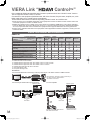
1
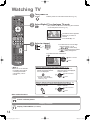
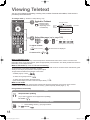
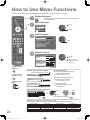
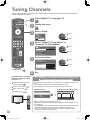
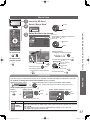
Input Labels
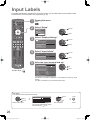
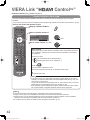
For easier identification and selection of the input mode, you can label each input terminals or skip
terminal that is not connected to any equipment. (p. 20)
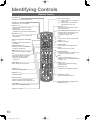
POWER
INPUT
TV
AV
OFF TIMER
ASPECT MENU
EXIT
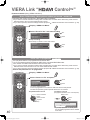
1
Display the menu
2
Select “Setup”
MENU
access
Main Menu
Picture
Sound
RETURN
OPTION
R
TEXT
G
Y
B
3
STTL INDEX HOLD
select
Setup
Select “Display Settings”
access
Setup Menu
Off Timer
Off
Digital TV Tuning Menu
Display Settings
Access
VIERA Link Settings
System Menu
Other Settings
MUTE
POWER
4
SURROUND
Select “Input Labels”
To return to TV
access
Display Settings
Teletext
Input Labels
Banner Display Timeout
Playing Time Display
PROGRAMME
5
REC
select
TOP
Access
3 seconds
On
select
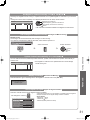
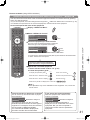
Select an input terminal and set
Input Labels
AV1
AV2
AV3
PC
HDMI1
HDMI2
HDMI3
Digital TV
Analogue TV
EXIT
AV1
AV2
AV3
PC
HDMI1
HDMI2
HDMI3
Digital TV
Analogue TV
set
select
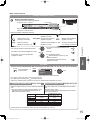
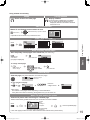
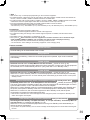
The labels you set will be displayed in “Input Selection” menu (p. 20) or
banner.
●If “Skip” is selected, you cannot select the mode.
User input
You can name each input terminals freely.
select
User input
select
access
Select “User input”
Name
A
U
a
u
B
V
b
v
C
W
c
w
RETURN
A
D
X
d
x
E F G
Y Z
e f g
y z (
H I J K L M N O P Q R S T
0 1 2 3 4 5 6 7 8 9 ! : #
h i j k l m n o p q r s t
) + - . * _
(maximum: ten characters)
You can set characters by using
numeric buttons. p. 22
set
Set characters
Store
26
th_l42s10a_Eng_4gc0331.indb 26
2009/07/24 10:23:18