1
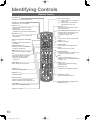
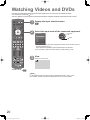
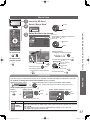
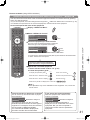
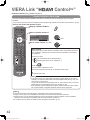
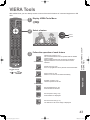
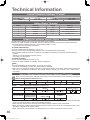
Panasonic equipment connected to the TV can be directly operated with the remote control.
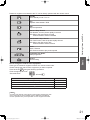
Standby
Set to Standby mode / Turn on
POWER
Play
Playback videocassette / DVD
Rewind / Skip / Search
VCR: Rewind, view the picture rapidly in reverse
DVD: Skip to the previous track or title
Press and hold to search backward
Fast-forward / Skip / Search
VCR: Fast-forward, view the picture rapidly forward
DVD: Skip to the next track or title
Press and hold to search forward
Pause
Pause / Resume
DVD: Press and hold to play at slow speed
Programme Up / Down
Select programme
PROGRAMME
Basic
Record
Start recording
REC
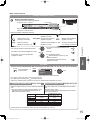
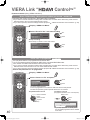
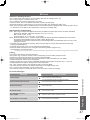
How to change the code for each equipment
Each type of Panasonic equipment has its own remote control code.
Please change the code for each equipment you want to operate.
POWER
Press and hold
during the following operations
Enter the appropriate code
See table below
Watching Videos and DVDs
Stop
Stop the operations
Press
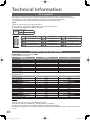
Type of equipment
Code
DVD Recorder / DVD Player / Blu-ray Disc Player
70 (default)
Player theatre / Blu-ray Disc theatre
71
VCR
72
VIERA Link compatible equipments
“VIERA Link Control” (p. 38)
73
Note
●Confirm if the remote control works correctly after changing the code.
●The codes will be reset to default values if batteries are replaced.
●Some operations may not be possible on some equipment models.
21
th_l42s10a_Eng_4gc0331.indb 21
2009/07/24 10:23:08