1
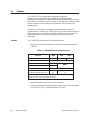
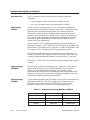
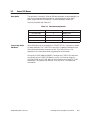
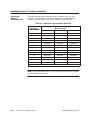
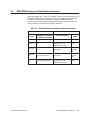
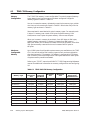
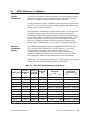
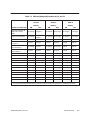
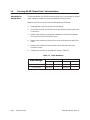
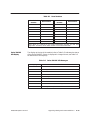
1.1 Features The TI545/TI555 CPUs and support equipment comprise a computer-controlled system that is capable of controlling complex manufacturing systems. This system performs the same functions as relays, static control, or card logic control systems. It can detect the change in state of input signals from such devices as pushbuttons, limit switches, and analog sensors. Acting on this information and executing a Relay Ladder Logic (RLL) program stored in memory, the TI545/TI555 CPU produces output signals to drive motor starters, solenoids, pilot lights, modulating control valves, etc. These signals are used to regulate the operation of various pieces of equipment. Features The TI545/TI555 systems offer the following features: • Memory and I/O capacities and scan performance are summarized in Table 1-1. Table 1-1 TI545/TI555 Capacity/Performance Feature TI545 –1102 TI555 –1101 –1102 User Memory (bytes) 192K 384K EEPROM (EPROM) (bytes) Discrete I/O Points Word I/O Points 256K 2048 1 8192 2 1024 1 Control Relays Scan Performance (milliseconds/KW, best case) 1920K 32,768 .67 .07 Notes: 1 Total I/O count may not exceed 2,048 points. 2 Total I/O count may not exceed 8,192 points. 1-2 System Overview • Optional password protection for user programs. • Support for Report By Exception (RBE) when used as a control element in a SIMATIC PCS System (Release 3.0 or later). TI545/TI555 System Manual