1
LD 500/500V User Manual
Operation
This section explains how to fine-tune your monitor's screen image to suit your personal
preferences, or to adapt it for different applications or lighting conditions.
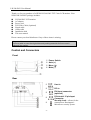
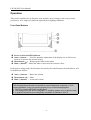
Front Panel Buttons
Power Switch with LED indicator
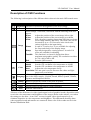
Auto (+) button — Used for automatic adjustment of the display size to full-screen
mode or to increase the selected values.
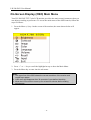
Menu button (↵) — Brings up the OSD control menu
Mute (-) button — Mutes the audio or decreases the selected values
In the power-saving mode, the functions accessed by the control buttons described above will
be modified as follows:
Auto (+) buttons — Raises the volume.
Menu button (↵) — Mute
Mute (-) buttons — Lowers the volume.
Important:
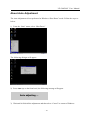
The Auto adjustment function is intended for use on Macintosh computers, or PCs
running Windows. It may not function properly if any of the following applies:
1. The PC is running MS-DOS (not Windows).
2. The background color for the “wallpaper” or “desktop” pattern is set to black or dark.
3. A graphics board that is not completely compatible is installed in the PC.
-9-