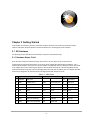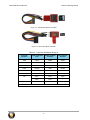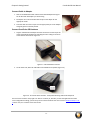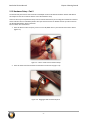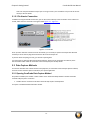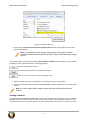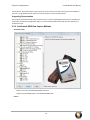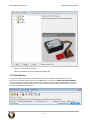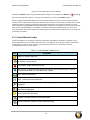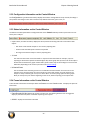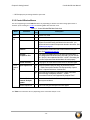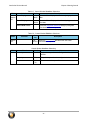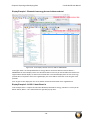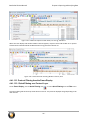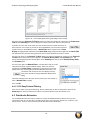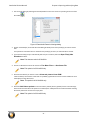
1
User Manual Revision Date: 11/2/2015 ComProbe SD User Manual Copyright © 2000-2015 Frontline Test Equipment, Inc. FTS, Frontline, Frontline Test System, ComProbe Protocol Analysis System and ComProbe are registered trademarks of Frontline Test Equipment, Inc. The Bluetooth SIG, Inc. owns the Bluetooth® w ord mark and logos, and any use of such marks by Frontline is under license. All other trademarks and registered trademarks are property of their respective owners. -i- ComProbe SD User Manual Contents Chapter 1 ComProbe Hardware & Software 1 1.1 What is in this manual 2 1.2 Computer Minimum System Requirements 2 1.3 Software Installation 2 1.3.1 From CD: 2 1.3.2 From Download: 3 Chapter 2 Getting Started 4 2.1 SD Hardware 4 2.1.1 Hardware Setup - Part 1 4 2.1.2 Hardware Setup - Part 2 7 2.1.2.1 Pin Header Connection 8 2.2 Data Capture Methods 8 2.2.1 Opening ComProbe Data Capture Method 8 2.2.2 ComProbe® SDIO Data Capture Methods 10 2.3 Control Window 11 2.3.1 Control Window Toolbar 12 2.3.2 Configuration Information on the Control Window 13 2.3.3 Status Information on the Control Window 13 2.3.4 Frame Information on the Control Window 13 2.3.5 Control Window Menus 14 2.3.6 Minimizing Windows 17 Chapter 3 Configuration Settings 18 3.1 SD/SDIO Configuration 18 3.1.1 Hardware Settings 18 3.1.2 SD I/O Settings - Datasource 19 Chapter 4 Capturing and Analyzing Data 20 4.1 Capture Data 20 4.1.1 Capturing Data to Disk - General Procedure 4.2 Protocol Stacks 20 21 4.2.1 Protocol Stack Wizard 22 - ii - ComProbe SD User Manual 4.2.2 Creating and Removing a Custom Stack 23 4.2.3 Reframing 24 4.2.4 Unframing 24 4.2.5 How the Analyzer Auto-traverses the Protocol Stack 25 4.2.6 Providing Context For Decoding When Frame Information Is Missing 25 4.3 Analyzing Byte Level Data 26 4.3.1 Event Display 26 4.3.2 The Event Display Toolbar 27 4.3.3 Opening Multiple Event Display Windows 29 4.3.4 Calculating CRCs or FCSs 29 4.3.5 Calculating Delta Times and Data Rates 29 4.3.6 Switching Between Live Update and Review Mode 30 4.3.7 Data Formats and Symbols 30 4.3.7.1 Switching Between Viewing All Events and Viewing Data Events 30 4.3.7.2 Switching Between Hex, Decimal, Octal or Binary 31 4.3.7.3 Switching Between ASCII, EBCDIC, and Baudot 32 4.3.7.4 Selecting Mixed Channel/Sides 32 4.3.7.5 List of all Event Symbols 33 4.3.7.6 Font Size 34 4.4 Analyzing Protocol Decodes 35 4.4.1 Frame Display Window 35 4.4.1.1 Frame Display Toolbar 38 4.4.1.2 Frame Display Status Bar 41 4.4.1.3 Hiding and Revealing Protocol Layers in the Frame Display 41 4.4.1.4 Physical vs. Logical Byte Display 41 4.4.1.5 Sorting Frames 42 4.4.1.6 Frame Display - Find 42 4.4.1.7 Synchronizing the Event and Frame Displays 44 4.4.1.8 Working with Multiple Frame Displays 45 4.4.1.9 Working with Panes on Frame Display 45 4.4.1.10 Frame Display - Byte Export 45 - iii - ComProbe SD User Manual 4.4.1.11 Panes in the Frame Display 47 4.4.1.11.1 Summary Pane 47 4.4.1.11.2 Customizing Fields in the Summary Pane 50 4.4.1.11.3 Frame Symbols in the Summary Pane 51 4.4.1.11.4 Decode Pane 51 4.4.1.11.5 Radix or Hexadecimal Pane 52 4.4.1.11.6 Character Pane 52 4.4.1.11.7 Binary Pane 53 4.4.1.11.8 Event Pane 53 4.4.1.11.9 Change Text Highlight Color 53 4.4.1.12 Protocol Layer Colors 54 4.4.1.12.1 Data Byte Color Notation 54 4.4.1.12.2 Changing Protocol Layer Colors 54 4.4.1.13 Filtering 54 4.4.1.13.1 Display Filters 55 4.4.1.13.1.5 Defining Node and Conversation Filters 60 4.4.1.13.1.6 The Difference Between Deleting and Hiding Display Filters 60 4.4.1.13.1.7 Editing Filters 62 4.4.1.13.2 Connection Filtering 64 4.4.1.13.2.1 Creating a Connection Filter 64 4.4.1.13.2.2 Connection Filter Display 67 4.4.1.13.3 Protocol Filtering from the Frame Display 69 4.4.1.13.3.1 Quick Filtering on a Protocol Layer 69 4.4.1.13.3.2 Easy Protocol Filtering 70 4.5 Data/Audio Extraction 70 Chapter 5 Navigating and Searching the Data 74 5.1 Find 74 5.1.1 Searching within Decodes 75 5.1.2 Searching by Pattern 77 5.1.3 Searching by Time 79 5.1.4 Using Go To 81 - iv - ComProbe SD User Manual 5.1.5 Searching for Special Events 82 5.1.6 Searching by Signal 83 5.1.7 Searching for Data Errors 87 5.1.8 Find - Bookmarks 89 5.1.9 Changing Where the Search Lands 90 5.1.10 Subtleties of Timestamp Searching 91 5.2 Bookmarks 91 5.2.1 Adding, Modifying or Deleting a Bookmark 91 5.2.2 Displaying All and Moving Between Bookmarks 92 Chapter 6 Saving and Importing Data 94 6.1 Saving Your Data 94 6.1.1 Saving the Entire Capture File 94 6.1.2 Saving the Entire Capture File with Save Selection 95 6.1.3 Saving a Portion of a Capture File 96 6.2 Adding Comments to a Capture File 96 6.3 Confirm Capture File (CFA) Changes 97 6.4 Loading and Importing a Capture File 97 6.4.1 Loading a Capture File 97 6.4.2 Importing Capture Files 98 6.5 Printing 98 6.5.1 Printing from the Frame Display/HTML E xport 6.5.2 Printing from the Event Display 98 101 6.6 Exporting 102 6.6.1 Frame Display Export 102 6.6.2 Exporting a File with Event Display Export 102 6.6.2.1 Export Filter Out 105 6.6.2.2 Exporting Baudot 105 Chapter 7 General Information 106 7.1 System Settings and Progam Options 106 7.1.1 System Settings 106 7.1.1.1 System Settings - Disabled/Enabled Options -v- 108 ComProbe SD User Manual 7.1.1.2 Advanced System Options 108 7.1.1.3 Selecting Start Up Options 109 7.1.2 Changing Default File Locations 110 7.1.3 Side Names 112 7.1.4 Timestamping 113 7.1.4.1 Timestamping Options 113 7.1.4.2 Enabling/Disabling Timestamp 114 7.1.4.3 Changing the Timestamp Resolution 114 7.1.4.4 Switching Between Relative and Absolute Time 115 7.1.4.5 Displaying Fractions of a Second 116 7.2 Technical Information 116 7.2.1 Performance Notes 116 7.2.2 BTSnoop File Format 117 7.2.3 Ring Indicator 119 7.2.4 Progress Bars 120 7.2.5 Event Numbering 120 7.2.6 Useful Character Tables 120 7.2.6.1 ASCII Codes 120 7.2.6.2 Baudot Codes 121 7.2.6.3 EBCDIC Codes 121 7.2.6.4 Communication Control Characters 121 7.2.7 The Frontline Serial Driver 123 7.2.8 DecoderScript Overview 123 7.2.9 Bluetooth low energy ATT Decoder Handle Mapping 124 7.3 Contacting Technical Support 125 Appendicies 126 Appendix A: Application Notes 128 List of Figures Figure 2.1 - Standard SD Adapter and Cable 5 - vi - ComProbe SD User Manual Figure 2.2 - Micro SD Adapter and Cable 5 Figure 2.3 - SD2.0 Hardware Interface 6 Figure 2.4 - SD 2.0 Hardware Interface - Analysis Side Showing USB mini-B Receptacle 6 Figure 2.5 - Device Under Test Connection Setup 7 Figure 2.6 - Plugging IC Board to the Analysis PC 7 Figure 2.7 - Pin Header 8 Figure 2.8 - Desktop Folder Link 9 Figure 2.9 - ComProbe Analyzer Control Window 12 Figure 4.1 - Packet Transfer Dialog 21 Figure 4.2 - Format Menu 31 Figure 4.3 - Header labels, right click 31 Figure 4.4 - Data display right click menu 32 Figure 4.5 - Event Display Options menu 35 Figure 4.6 - Event Display Font Size Selection 35 Figure 4.7 - Frame Display with all panes active 36 Figure 4.8 - Frame Display Find text entry field 42 Figure 4.9 - Search/Find Dialog 43 Figure 4.10 - Frame Display File menu, Byte Export 46 Figure 4.11 - Byte Export dialog 46 Figure 4.12 - Save As dialog 47 Figure 4.13 - Sample Exported Frames Text File 47 Figure 4.14 - Example Protocol Tags 48 Figure 4.15 - Summary pane (right) with Tooltip on Column 5 (Tran ID) 49 Figure 4.16 - Frame Display Protocol Layer Color Selector 54 Figure 4.17 - Example: Set Conditions Self Configuring Based on Protocol Selection 56 Figure 4.18 - Example: Set Conditions Self Configuring Based on Frame Range 57 Figure 4.19 - Two Filter Conditions Added with an AND Operator 59 Figure 4.20 - Save Named Filter Condition Dialog 59 Figure 4.21 - Using Named Filters Section of Quick Filters to Show/Hide Filters 62 Figure 4.22 - Set Condition Dialog in Advanced View 63 Figure 4.23 - Rename Filters Dialog 64 - vii - ComProbe SD User Manual Figure 4.24 - Connection Filter from the Frame Display Menu 65 Figure 4.25 - Connection Filter from the Frame Display Toolbar right-click 65 Figure 4.26 - Connection Filter from the Frame Display Pane right-click 66 Figure 4.27 - Connection Filter from frame selection right-click 67 Figure 4.28 - Front Display: Filtered on Access Address 0x8e89bed6 68 Figure 4.29 - Unfiltered: Capture File with Classic, low energy, and 802.11 69 Figure 4.30 - Connection Filter selecting All 802.11 frames, front 69 Figure 4.31 - Frame Display Quick Filtering and Hiding Protocols Dialog 70 Figure 5.1 - Find Dialog 74 Figure 5.2 - Find Decode Tab Search for String 75 Figure 5.3 - Find Decode Tab Side Restriction 76 Figure 5.4 - Find Pattern Tab 78 Figure 5.5 - Find Pattern Tab Side Restrictions 78 Figure 5.6 - Find by Time tab 79 Figure 5.7 - Find Go To tab 81 Figure 5.8 - Find Special Events tab 83 Figure 5.9 - Find Signal tab. 84 Figure 5.10 - Find Signal Tab 85 Figure 5.11 - Find Error tab. 87 Figure 5.12 - Find Bookmark tab. 90 Figure 5.13 - Bookmarked Frame (3) in the Frame Display 91 Figure 5.14 - Find Window Bookmark tab Used to Move Around With Bookmarks 93 Figure 6.1 - Windows Save dialog 95 Figure 6.2 - Frame Display Print Dialog 99 Figure 6.3 - Frame Display Print Preview Dialog 100 Figure 6.4 - Event Display Print Dialog 102 Figure 6.5 - Event Display Export Example: .csv file. 103 Figure 6.6 - Example: .csv Event Display Export, Excel spreadsheet 105 Figure 7.1 - System Settings Single File Mode 107 Figure 7.2 - Advanced System Options dialog 109 Figure 7.3 - Start Up Options dialog 110 - viii - ComProbe SD User Manual Figure 7.4 - File Locations dialog 111 Figure 7.5 - File Locations Browse dialog 111 Figure 7.6 - Example: Side Names Where "Slave" and "Master" are current 113 - ix - Chapter 1 ComProbe Hardware & Software Frontline Test Equipment ComProbe family of protocol analyzers work with the following technologies. l Classic Bluetooth® l Bluetooth low energy l Dual Mode Bluetooth (simultaneous Classic and low energy) l Bluetooth Coexistence with 802.11 l Bluetooth HCI (USB, SD, High Speed UART) l NFC l 802.11 (Wi-Fi) l SD l USB l HSU (High Speed UART) The ComProbe hardware interfaces with your computer that is running our robust software engine called the ComProbe Protocol Analysis System or ComProbe software. Whether you are sniffing the air or connecting directly to the chip Frontline analyzers use the same powerful ComProbe software to help you test, troubleshoot, and debug communications faster. ComProbe software is an easy to use and powerful protocol analysis platform. Simply use the appropriate ComProbe hardware or write your own proprietary code to pump communication streams directly into the ComProbe software where they are decoded, decrypted, and analyzed. Within the ComProbe software you see packets, frames, events, coexistence, binary, hex, radix, statistics, errors, and much more. This manual is a user guide that takes you from connecting and setting up the hardware through all of the ComProbe software functions for your ComProbe hardware. Should you have any questions contact the Frontline Technical Support Team. -1- ComProbe SD User Manual Chapter 1 ComProbe Hardware & Software 1.1 What is in this manual The ComProbe User Manual comprises the following seven chapters. The chapters are organized in the sequence you would normally follow to capture and analyze data: set up, configure, capture, analyze, save. You can read them from beginning to end to gain a complete understanding of how to use the ComProbe hardware and software or you can skip around if you only need a refresher on a particular topic. Use the Contents, Index, and Glossary to find the location of particular topics. l Chapter 1 ComProbe Hardware and Software. This chapter will describe the minimum computer requirements and how to install the software. l Chapter 2 Getting Started. Here we describe how to set up and connect the hardware, and how to apply power. This chapter also describes how to start the ComProbe software in Data Capture Methods. You will be introduced to the Control window that is the primary operating dialog in the ComProbe software. l Chapter 3 Configuration Settings. The software and hardware is configured to capture data. Configuration settings may vary for a particular ComProbe analyzer depending on the technology and network being sniffed. There are topics on configuring protocol decoders used to disassemble packets into frames and events. l Chapter 4 Capturing and Analyzing Data. This Chapter describes how to start a capture session and how to observe the captured packets, frames, layers and events. l Chapter 5 Navigating and Searching the Data. Here you will find how to move through the data and how to isolate the data to specific events, often used for troubleshooting device design problems. l Chapter 6 Saving and Importing Data. When a live capture is completed you may want to save the captured data for future analysis, or you may want to import a captured data set from another developer or for use in interoperability testing. This chapter will explain how to do this for various data file formats. l Chapter 7 General Information. This chapter provides advanced system set up and configuration information, timestamping information, and general reference information such as ASCII, baudot, and EBCDIC codes. This chapter also provides information on how to contact Frontline's Technical Support team should you need assistance. 1.2 Computer Minimum System Requirements Frontline supports the following computer systems configurations: l Operating System: Windows 7 and 8 l USB Port: USB 2.0 or USB 3.0 High-Speed The ComProbe software must operate on a computer with the following minimum characteristics. l Processor: Core i5 processor at 2.7 GHz l RAM: 4 GB l Free Hard Disk Space: 20 GB 1.3 Software Installation 1.3.1 From CD: Insert the ComProbe installer disc into your DVD drive. Click on the Install CPAS shortcut and follow the directions. -2- Chapter 1 ComProbe Hardware & Software ComProbe SD User Manual 1.3.2 From Download: Download the latest CPAS installer from FTE.com. Once downloaded, double-click the installer and follow the directions. -3- Chapter 2 Getting Started In this chapter we introduce you to the ComProbe hardware and show how to start the ComProbe analyzer software and explain the basic software controls and features for conducting the protocol analysis. 2.1 SD Hardware The following sections describe the NFC hardware connectors and hardware setup. 2.1.1 Hardware Setup - Part 1 Once you have installed the software and the device drivers, the next step is to set up the hardware. Provided with the ComProbe SD hardware is one of two Secure Digital (SD) Input/Output (IO) adapters: 1) the standard SD card adapter, and 2) the micro SD card adapter. Provided with each is a cable that must be connected to the adapter prior to the connecting the adapter to the ComProbe SD hardware. The following tables lists the ComProbe SD Hardware pinout, with corresponding cable color-code and the adapter pinout. In addition the table shows the pin designation for the SD 4-bit and 1-bit high-speed mode and the SPI mode. Table 2.1 - SDIO Pinout Pin SD 4-bit Mode SD 1-bit Mode 1 CD/DAT3 Data Line 3 - 2 CMD Command Line CMD 3 VSS1 Ground 4 VDD 5 CS Card Select Command Line DI Data Input VSS1 Ground VSS1 Ground Supply Voltage VDD Supply Voltage VDD Supply Voltage CLK Clock CLK Clock SCLK Clock 6 VSS2 Ground VSS2 Ground VSS2 Gound 7 DAT0 Data Line 0 DATA Data Line DO Data Output 8 DAT1 Data Line 1/Interrupt IRQ Interrupt IRQ Interrupt 9 DAT2 Data Line 2/ Read Wait RW Read Wait - - -4- - SPI Mode ComProbe SD User Manual Chapter 2 Getting Started Figure 2.1 - Standard SD Adapter and Cable Figure 2.2 - Micro SD Adapter and Cable Table 2.2 - ComProbe SD Adapter Wiring List ComProbe Hardware Adapter Cable Wire Color Standard Adapter Pin/Label Micro Adapter Pin/Label GND Black 4/GND 4/GND CLK Brown 7/CLK 6/CLK CMD Red 3/CMD 3/CMD DAT0 Orange 9/D0 7/DAT0 DAT1 Yellow 10/D1 8/DAT1 DAT2 Green 1/D2 1/DAT2 CD Blue 5/CD 2/CD Blue* 5/D3* - Purple 6/VCC 5/VCC VDD * 4-bit mode -5- Chapter 2 Getting Started ComProbe SD User Manual Connect Cable to Adapter 1. Refer to the SDIO Pinout table and the ComProbe SD Adapter Wiring list for the SD mode and adapter you will be using. 2. Identify the wire color associated with the pin on the adaper for the appropriate mode. 3. Place the cable wire free end pin over the appropriate pin on the adapter and gently push on until fully seated. Connect ComProbe SD Hardware 1. Plug the standard SD card adapter with the connectors into the 10 pin slot of the ComProbe SD hardware by matching the color coding on the wires to the label on the hardware Figure 2.3. Figure 2.3 - SD2.0 Hardware Interface 2. On the other side, attach the USB cable to the USB Mini B receptacle (Figure 2.4). Figure 2.4 - SD 2.0 Hardware Interface - Analysis Side Showing USB mini-B Receptacle That is it for the hardware setup right now. We are not done yet, but after you start the application and make some configurations settings, you will set up the rest of the hardware then. That comes in Hardware Setup – Part 2. But for now, let's continue to the next section. -6- ComProbe SD User Manual Chapter 2 Getting Started 2.1.2 Hardware Setup - Part 2 You have already seen how to connect the SD card adapter to the ComProbe SD hardware and the USB cable to the analysis PC. N ow let's continue with the rest of the hardware setup. There are two ways to complete the setup. First let's look at what to do if you are using the card that fits in the slot on the IC board. Then we will identify what to do if you want to wire the Pin Header because you do not want to use the standard SD form factor connection. Device Under Test Connection 1. Insert the Device under Test (DUT), such as a micro SD, MMC memory card into the slot on the IC board (Figure 2.5). Figure 2.5 - Device Under Test Connection Setup 2. Insert the other end of the IC board into the SD slot on the test PC (Figure 2.6). Figure 2.6 - Plugging IC Board to the Analysis PC -7- Chapter 2 Getting Started ComProbe SD User Manual That is the complete hardware setup if you are using a memory card. It is different if you want to connect directly to the Pin Header. 2.1.2.1 Pin Header Connection In addition to using the standard connection, you can also connect directly to the Pin Header on the IC board. To do that, follow the wire schematic in the figure below Figure 2.7 - Figure 2.7 - Figure 2.7 - Pin Header Once you have made the connections to the Pin Header, you are ready to capture and analyze data. With this method you do not have to plug the board into the SD slot on the analysis PC. If you have done everything correctly, you will start capturing data. For information on analyzing data with ComProbe software, please see the ComProbe User Manual, in the Documentation folder under the ComProbe Protocol Analysis System desktop folder. 2.2 Data Capture Methods This section describes how to load Frontline Test Equipment, Inc ComProbe Protocol Analysis System software, and how to select the data capture method for your specific application. 2.2.1 Opening ComProbe Data Capture Method On product installation, the installer creates a folder on the windows desktop labeled "Frontline ComProbe Protocol Analysis System <version#>". 1. Double-click the "Frontline ComProbe Protocol Analysis System" desktop folder This opens a standard Windows file folder window. -8- ComProbe SD User Manual Chapter 2 Getting Started Figure 2.8 - Desktop Folder Link 2. Double-click on Frontline ComProbe Protocol Analysis System and the system displays the Select Data Capture Method dialog. Note: You can also access this dialog by selecting Start > All Programs > Frontline ComProbe Protocol Analysis System (Version #) > Frontline ComProbe Protocol Analysis System Three buttons appear at the bottom of the dialog; Run, Cancel, and Help. When the dialog first opens, Cancel and Help are active, and the Run button is inactive (grayed out). starts the selected protocol stack. closes the dialog and exits the user back to the desktop. takes the user to this help file as does pressing the F1 key. 3. Expand the folder and select the data capture method that matches your configuration. 4. Click on the Run button and the ComProbe Control Window will open configured to the selected capture method. Note: If you don't need to identify a capture method, then click the Run button to start the analyzer. Creating a Shortcut A checkbox labeled Create Shortcut When Run is located near the bottom of the dialog. This box is un-checked by default. Select this checkbox, and the system creates a shortcut for the selected method, and places it in the "Frontline ComProbe Protocol Analysis System <version#>" desktop folder and in the start menu when you click -9- Chapter 2 Getting Started ComProbe SD User Manual the Run button. This function allows you the option to create a shortcut icon that can be placed on the desktop. In the future, simply double-click the shortcut to start the analyzer in the associated protocol. Supporting Documentation The Frontline ComProbe Protocol Analysis System directory contains supporting documentation for development (Automation, DecoderScript, application notes), user documentation (Quick Start Guides and User Manual), and maintenance tools. 2.2.2 ComProbe® SDIO Data Capture Methods l Bluetooth® SDIO o Requires one ComProbe SD/SDIO/SPI/MMC hardware. o Captures and decodesBluetooth® and SD/SDIO/SPI/MMC data. l SD 2.0 - 10 - ComProbe SD User Manual Chapter 2 Getting Started o Requires one ComProbe SD hardware. o Captures and decodes Bluetooth and SD/SDIO/SPI/MMC data. 2.3 Control Window The analyzer displays information in multiple windows, w ith each window presenting a different type of information. The Control window opens when the Run button is clicked in the Select Data Capture Method window. The Control window provides access to each ComProbe analyzer functions and settings as well as a brief overview of the data in the capture file. Each icon on the toolbar represents a different data analysis function. A sample Control Window is shown below. - 11 - Chapter 2 Getting Started ComProbe SD User Manual Figure 2.9 - ComProbe Analyzer Control Window Because the Control w indow can get lost behind other windows, every window has a Home icon that brings the Control w indow back to the front. Just click on the Home icon to restore the Control window. When running the Capture File Viewer, the Control window toolbar and menus contain only those selections needed to open a capture file and display the About box. Once a capture file is opened, the analyzer limits Control window functions to those that are useful for analyzing data contained in the current file. Because you cannot capture data while using Capture File Viewer, data capture functions are unavailable. For example, w hen viewing Ethernet data, the Signal Display is not available. The title bar of the Control window displays the name of the currently open file. The status line (below the toolbar) shows the configuration settings that w ere in use when the capture file was created. 2.3.1 Control Window Toolbar Toolbar icon displays vary according to operating mode and/or data displayed. Available icons appear in color, while unavailable icons are not visible. Grayed-out icons are available for the ComProbe hardware and software configuration in use but are not active until certain operating conditions occur. All toolbar icons have corresponding menu bar items or options. Table 2.3 - Control Window Toolbar Icon List Icon Description Open File - Opens a capture file. I/O Settings - Opens settings Start Capture - Begins data capture to disk Stop Capture - Available after data capture has started. Click to stop data capture. Data can be reviewed and saved, but no new data can be captured. Save - Saves the capture file. Clear - Clears or saves the capture file. Event Display - (framed data only) Opens a Event Display, with the currently selected bytes highlighted. Frame Display - (framed data only) Opens a Frame Display, with the frame of the currently selected bytes highlighted. Notes - Opens the Notes dialog. Cascade - Arranges windows in a cascaded display. Extract Data/Audio - Opens the Extract Data/Audio dialog. - 12 - ComProbe SD User Manual Chapter 2 Getting Started 2.3.2 Configuration Information on the Control Window The Configuration bar (just below the toolbar) displays the hardware configuration and may include I/O settings. It also provides such things as name of the network card, address information, ports in use, etc. 2.3.3 Status Information on the Control Window The Status bar located just below the Configuration bar on the Control window provides a quick look at current activity in the analyzer. l Capture Status, or Status for Sodera, displays Not Active, Paused or Running and refers to the state of data capture o Not Active means that the analyzer is not currently capturing data. o Paused means that data capture has been suspended. o Running means that the analyzer is actively capturing data. l % Used The next item shows how much of the buffer or capture file has been filled. For example, if you are capturing to disk and have specified a 200 Kb capture file, the bar graph tells you how much of the capture file has been used. When the graph reaches 100%, capture either stops or the file begins to overwrite the oldest data, depending on the choices you made in the System Settings. l Utilization/Events The second half of the status bar gives the current utilization and total number of events seen on the network. This is the total number of events monitored, not the total number of events captured. The analyzer is always monitoring the circuit, even when data is not actively being captured. These graphs allow you to keep an eye on what is happening on the circuit, without requiring you to capture data. 2.3.4 Frame Information on the Control Window Frame Decoder information is located just below the Status bar on the Control window. It displays two pieces of information. l Frame Decoder (233 fps) displays the number of frames per second being decoded. You can toggle this display on/off with Ctrl-D, but it is available only during a live capture. l #132911 displays the total frames decoded. - 13 - Chapter 2 Getting Started ComProbe SD User Manual l 100% displays the percentage of buffer space used. 2.3.5 Control Window Menus The menus appearing on the Control window vary depending on whether the data is being captured live or whether you are looking at a .cfa file. The following tables describe each menu. Table 2.4 - Control Window File Menu Selections Hot Selection Description Key Mode Live Close Closes Live mode. Capture File Go Live Returns to Live mode Reframe If you need to change the protocol stack used to interpret a capture file and the framing is different in the new stack, you need to reframe in order for the protocol decode to be correct. See Reframing on page 24 Unframe Removes start-of-frame and end-of-frame markers from your data. SeeUnframing on page 24 Recreate Companion File This option is available when you are working with decoders. If you change a decoder while working with data, you can recreate the ".frm file", the companion file to the ".cfa file". Recreating the ".frm file" helps ensure that the decoders will work properly. Reload Decoders The plug-ins are reset and received frames are decoded again. Live & Capture File Open Capture File Ctrl- Opens a Windows Open file dialog. at the default location -O "...\Public Documents\Frontline Test Equipment\My Capture Files\". Capture files have a .cfa extension. Save Ctrl- Saves the current capture or capture file. Opens a Windows S Save As dialog at the default location "...\Public Documents\Frontline Test Equipment\My Capture Files\". Exit ComProbe Protocol Analysis System Shuts down the ComProbe Protocol Analysis System and all open system windows. Recent capture files A list of recently opened capture files will appear. The View menu selections will vary depending on the ComProbe analyzer in use. - 14 - ComProbe SD User Manual Table 2.5 - Control Window View Menu Selections Selection Hot key Description Mode Live & Capture File Chapter 2 Getting Started Event Display CtrlShift-E Opens the Event Display window for analyzing byte level data. Frame Display CtrlShift-M Opens the Frame Display window for analyzing protocol level data Extract Data Audio... Opens the Data/Audio Extraction dialog for pulling data from decoded Bluetooth protocols. Table 2.6 - Control Window Edit Menu Selections HotSelection Description key Mode Capture File Notes CtrlOpens the Notes window that allows the user to add Shift-O comments to a capture file. Mode Live Selection Control Window Live Menu Selections Hot-Key Description Start Capture Shift-F5 Begins data capture from the configured wireless devices. Stop Capture F10 Stops data capture from the configured wireless devices. Clear ShiftF10 Clears or saves the capture file. - 15 - Chapter 2 Getting Started Mode Live & Capture File ComProbe SD User Manual Table 2.7 - Control Window Options Menu Selections HotSelection Description Key 0 - Classic Hardware Settings 1 - Bluetooth low energy 0 - Classic I/O Settings 1 - Bluetooth low energy System Settings AltEnter Opens the System Settings dialog for configuring capture files. Directories... Opens the File Locations dialog where the user can change the default file locations. Check for New Releases at Startup When this selection is enabled, the program automatically checks for the latest Frontline protocol analyzer software releases. Side Names... Opens the Side Names dialog used to customize the names of the slave and master wireless devices. Protocol Stack... Opens the Select a Stack dialog where the user defines the protocol stack they want the analyzer to use when decoding frames. Set Initial Decoder Parameters... Opens the Set Initial Decoder Parameters window. Each entry in the window takes effect from the beginning of the capture onward or until redefined in the Set Subsequent Decoder Parameters dialog. This selection is not present if no decoder is loaded that supports this feature. Set Subsequent Decoder Parameters... Opens the Set Subsequent Decoder Parameters dialog where the user can override an existing parameter at any frame in the capture. Each entry takes effect from the specified frame onward or until redefined in this dialog on a later frame. This selection is not present if no decoder is loaded that supports this feature. Automatically Request Missing Decoder Information When checked, this selection opens a dialog that asking for missing frame information. When unchecked, the analyzer decodes each frame until it cannot go further and it stops decoding. This selection is not present if no decoder is loaded that supports this feature. Enable/Disable Audio Expert System When enabled, the Audio Expert System is active, other wise it is not available. Only available when an Audio Expert System licensed device is connected. The Windows menu selection applies only to the Control window and open analysis windows: Frame Display, Event Display, Message Sequence Chart, Bluetooth Timeline, Bluetooth low energy Timeline, and Coexistence View. All other windows, such as the datasource, are not affected by these selections. - 16 - ComProbe SD User Manual Mode Live & Capture File Chapter 2 Getting Started Table 2.8 - Control Window Windows Menu Selections Selection Hot-Key Description Cascade Ctrl-W Arranges open analysis windows in a cascaded view with window captions visible. Close All Views Closes Open analysis windows. Minimize Control Minimizes All When checked, minimizing the Control window also minimizes all open analysis windows. Frame Display and Event Display When these windows are open the menu will display these selections. Clicking on the selection will bring that window to the front. Mode Live & Capture File Selection Control Window Help Menu Selections Hot-Key Description Help Topics Opens the ComProbe Help window. About ComProbe Protocol Analysis System Provides a pop-up showing the version and release information, Frontline contact information, and copyright information. Support on the Web Opens a browser to fte.com technical support page. 2.3.6 Minimizing Windows Windows can be minimized individually or as a group when the Control window is minimized. To minimize windows as a group: 1. Go to the Window menu on the Control window. 2. Select Minimize Control Minimizes All. The analyzer puts a check next to the menu item, indicating that when the Control window is minimized, all windows are minimized. 3. Select the menu item again to deactivate this feature. 4. The windows minimize to the top of the operating system Task Bar. - 17 - Chapter 3 Configuration Settings In this section the ComProbe software is used to configure an analyzer for capturing data . 3.1 SD/SDIO Configuration 3.1.1 Hardware Settings The Hardware Settings dialog is used to select a device to sniff/scan. To access the Hardware Settings dialog: 1. Select Hardware Settings from the Options menu on the Control window. 2. Select a device from the Available Sniffers drop-down list. 3. Select OK. If no devices are found, the list will be blank. You can also select Refresh List to make sure the list is complete. - 18 - ComProbe SD User Manual Chapter 3 Configuration Settings 3.1.2 SD I/O Settings - Datasource Figure 3.1 SD/SDIO I/O Settings Dialog Physical Layer Selection The Physical Layer Selection section of I/O Settings dialog has three radio buttons lets you select the Physical Layer of your device under test. l The default physical layer is SDIO, which you w ill use the majority of the time. l If you know the physical layer is a Serial Peripheral Interface, select SPI. l If you are not sure if the physical layer is "SDIO" or "SPI", select Autodetect. The software w ill attempt to automatically determine the physical layer and select it for you. Note, however, that Autodetect tries to make the best possible judgment by peeking at the data but may not be accurate all the time.. Voltage Level Selection (for ComProbe SD 2.0 only) The Voltage Level Selection section of I/O Settings dialog has three radio buttons which lets you select the operating voltage for your device under test. By default the operating voltage is set to 3.3 V and most of the devices, such as SD cards, MMC, etc. use 3.3 V. However, you may change the voltage accordingly through this setting if your device under test works at 1.8 V or 1.2 V . Note: This feature is not available in the old ComProbe SD Protocol Analyzer. If you are using one of these devices you will not see the Voltage Level Selection. - 19 - Chapter 4 Capturing and Analyzing Data The following sections describe the various ComProbe software functions that capture and display data packets. 4.1 Capture Data 4.1.1 Capturing Data to Disk - General Procedure Note: Capture is not available in Viewer mode. 1. Click the Start Capture button to begin capturing to a file. This icon is located on the Control , Event Display, and Frame Display windows. 2. Files are placed in My Capture Files by default and have a .cfa extension. Choose Directories from the Options menu on the Control window to change the default file location. Note: For the Dashboard, when you capture to series of files, the window displays the data from the beginning of the first capture, even when a new file in the series is created. This is because the Dashboard is a "Session Monitor", which means that even if you capture to a series of files, the data from the first file is always displayed. The display does not refresh when a new capture file in a series is created. 3. Watch the status bar on the Control window to monitor how full the file is. When the file is full, it begins to wrap, w hich means the oldest data will be overwritten by new data. 4. Click the Stop Capture icon to temporarily stop data capture. Click the Start Capture icon again to resume capture. Stopping capture means no data will be added to the capture file until capture is resumed, but the previously captured data remains in the file. 5. To clear captured data, click the Clear icon . l If you select Clear after selecting Stop Capture, a dialog appears asking whether you want to save the data. - 20 - ComProbe SD User Manual Chapter 4 Capturing and Analyzing Data o You can click Save File and enter a file name when prompted . o If you choose Do Not Save, all data will be cleared. o If you choose Cancel, the dialog closes with no changes. l If you select the Clear icon while a capture is occurring: o The capture stops. o A dialog appears asking if you want to save the capture o You can select Yes and save the capture or select No and close the dialog. In either case, the existing capture file is cleared and a new capture file is started. o If you choose Cancel, the dialog closes with no changes. To see how to capture to a single file, choose System Settings from the Options menu on the Control window. When live capture stops, no new packets are sniffed but there can still be packets that were previously sniffed but not yet read by the ComProbe analyzer. This happens when packets are being sniffed faster than the ComProbe analyzer can process them. These packets are stored either on the ComProbe hardware itself or in a file on the PC. If there are remaining packets to be processed when live capture stops the Transferring Packets dialog below is displayed showing the packets yet to be read by the ComProbe analyzer. The dialog shows the name of each ComProbe hardware device, its process id in square brackets, and the number of packets remaining. These stored packets are read until they’re exhausted or the user clicks the Discard button on the dialog. Unlike 802.11, Bluetooth packets never come in faster than the datasource can process them. However, Bluetooth packets must still be stored so that they can be read in chronological order with the 802.11 packets. Figure 4.1 - Packet Transfer Dialog 4.2 Protocol Stacks - 21 - Chapter 4 Capturing and Analyzing Data ComProbe SD User Manual 4.2.1 Protocol Stack Wizard The Protocol Stack wizard is where you define the protocol stack you want the analyzer to use when decoding frames. To start the wizard: 1. Choose Protocol Stack from the Options menu on the Control window or click the Protocol Stack icon on the Frame Display. 2. Select a protocol stack from the list, and click Finish. Most stacks are pre-defined here. If you have special requirements and need to set up a custom stack, see Creating and Removing a Custom Stack on page 23. 1. If you select a custom stack (i.e. one that was defined by a user and not included with the analyzer), the Remove Selected Item From List button becomes active. 2. Click the Remove Selected Item From Listbutton to remove the stack from the list. You cannot remove stacks provided with the analyzer. If you remove a custom stack, you need to define it again in order to get it back. If you are changing the protocol stack for a capture file, you may need to reframe. See Reframing on page 24 for more information. You cannot select a stack or change an existing one for a capture file loaded into the Capture File Viewer (the Capture File Viewer is used only for viewing capture files and cannot capture data). Protocol Stack changes can only be made from a live session. - 22 - ComProbe SD User Manual Chapter 4 Capturing and Analyzing Data 4.2.2 Creating and Removing a Custom Stack To create a custom stack: 1. Choose Protocol Stack from the Options menu on the Control window or click the Protocol Stack icon on the Frame Display toolbar. 2. Select Build Your Own from the list and click Next. 3. The system displays an information screen that may help you decide if you need to define your own custom stack. Defining a custom stack means that the analyzer uses the stack for every frame. Frames that do not conform to the stack are decoded incorrectly. Click Next to continue. Select Protocols 1. Select a protocol from the list on the left. 2. Click the right arrow button to move it to the Protocol Decode Stack box on the right, or double-click the protocol to move it to the right. 3. To remove a protocol from the stack, double-click it or select it and click the left arrow button. 4. If you need to change the order of the protocols in the stack, select the protocol you want to move, and click on the Move Up and Move Down buttons until the protocol is in the correct position. 5. The lowest layer protocol is at the top of the list, with higher layer protocols listed underneath. Auto-traversal (Have the analyzer Determine Higher Layers) If you need to define just a few layers of the protocol stack, and the remaining layers can be determined based on the lower layers: 1. Click the All additional stack layers can be determined automatically button. 2. If your protocol stack is complete and there are no additional layers, click the There are no additional stack layers button. - 23 - Chapter 4 Capturing and Analyzing Data ComProbe SD User Manual 3. If you select this option, the analyzer uses the stack you defined for every frame. Frames that do use this stack are decoded incorrectly. Save the Stack 1. Click the Add To Predefined List button. 2. Give the stack a name, and click Add. In the future, the stack appears in the Protocol Stack List on the first screen of the Protocol Stack wizard. Remove a Stack 1. Select it in the first screen and click Remove Selected Item From List. 2. If you remove the stack, you must to recreate it if you need to use it again. Note: If you do not save your custom stack, it does appear in the predefined list, but applies to the frames in the current session. However, it is discarded at the end of the session. 4.2.3 Reframing If you need to change the protocol stack used to interpret a capture file and the framing is different in the new stack, you need to reframe in order for the protocol decode to be correct. You can also use Reframe to frame unframed data. The original capture file is not altered during this process. Note: You cannot reframe from the Capture File Viewer (accessed by selecting Capture File Viewer or Load Capture File to start the software and used only for viewing capture files). To reframe your data, load your capture file, select a protocol stack, and then select Reframe from the File menu on the Control w indow. Reframe is only available if the frame recognizer used to capture the data is different from the current frame recognizer. In addition to choosing to Reframe, you can also be prompted to Reframe by the Protocol Stack Wizard. 1. Load your capture file by choosing Open from the File menu on the Control window, and select the file to load. 2. Select the protocol stack by choosing Protocol Stack from the Options menu on the Control w indow, select the desired stack and click Finish. 3. If you selected a protocol stack that includes a frame recognizer different from the one used to capture your data, the Protocol Stack Wizard asks you if you want to reframe your data. Choose Yes. 4. The analyzer adds frame markers to your data, puts the framed data into a new file, and opens the new file. The original capture file is not altered. See Unframing on page 24 for instructions on removing framing from data. 4.2.4 Unframing This function removes start-of-frame and end-of-frame markers from your data. The original capture file is not altered during this process. You cannot unframe from the Capture File Viewer (accessed by selecting Capture File Viewer or Load Capture File to start the software and used only for viewing capture files). - 24 - ComProbe SD User Manual Chapter 4 Capturing and Analyzing Data To manually unframe your data: 1. Select Unframe from the File menu on the Control w indow. Unframe is only available if a protocol stack was used to capture the data and there is currently no protocol stack selected. In addition to choosing to Unframe, you can also be prompted to Unframe by the Protocol Stack Wizard. 1. Load your capture file by choosing Open from the File menu on the Control window. 2. Select the file to load. 3. Choose Protocol Stack from the Options menu on the Control window 4. Select None from the list 5. Click Finish. The Protocol Stack Wizard asks you if you w ant to unframe your data and put it into a new file. 6. Choose Yes. The system removes the frame markers from your data, puts the unframed data into a new file, and opens the new file. The original capture file is not altered. See Reframing on page 24 for instructions on framing unframed data. 4.2.5 How the Analyzer Auto-traverses the Protocol Stack In the course of doing service discovery, devices ask for and receive a Protocol Descriptor List defining which protocol stacks the device supports. It also includes information on which PSM to use in L2CAP, or the channel number for RFCOMM, or the port number for TCP or UDP. The description below talks about how the analyzer auto-traverses from L2CAP using a dynamically assigned PSM, but the principle is the same for RFCOMM channel numbers and TCP/UDP port numbers. The analyzer looks for SDP Service Attribute Responses or Service Search Attribute Responses carrying protocol descriptor lists. If the analyzer sees L2CAP listed with a PSM, it stores the PSM and the U UID for the next protocol in the list. After the SDP session is over, the analyzer looks at the PSM in the L2CAP Connect frames that follow. If the PSM matches one the analyzer has stored, the analyzer stores the source channel ID and destination channel ID, and associates those channel IDs with the PSM and UUID for the next protocol. Thereafter, when the analyzer sees L2CAP frames using those channel IDs, it can look them up in its table and know w hat the next protocol is. In order for the analyzer to be able to auto-traverse using a dynamically assigned PSM, it has to have seen the SDP session giving the Protocol Descriptor Lists, and the subsequent L2CAP connection using the PSM and identifying the source and channel IDs. If the analyzer misses any of this process, it is not able to auto-traverse. It stops decoding at the L2CAP layer. For L2CAP frames carrying a known PSM (0x0001 for SDP, for example, or 0x0003 for RFCOMM), the analyzer looks for Connect frames and stores the PSM along with the associated source and destination channel IDs. In this case the analyzer does not need to see the SDP process, but does need to see the L2CAP connection process, giving the source and destination channel IDs. 4.2.6 Providing Context For Decoding When Frame Information Is Missing There may be times when you need to provide information to the analyzer because the context for decoding a frame is missing. For example, if the analyzer captured a response frame, but did not capture the command frame - 25 - Chapter 4 Capturing and Analyzing Data ComProbe SD User Manual indicating the command. The analyzer provides a way for you to supply the context for any frame, provided the decoder supports it. (The decoder writer has to include support for this feature in the decoder, so not all decoders support it. Note that not all decoders require this feature.) If the decoder supports user-provided context, three items are active on the Options menu of the Control window and the Frame Display window. These items are Set Initial Decoder Parameters, Automatically Request Missing Decoding Information, and Set Subsequent Decoder Parameters. (These items are not present if no decoder is loaded that supports this feature.) Set Initial Decoder Parameters is used to provide required information to decoders that is not context dependent but instead tends to be system options for the protocol. Choose Set Initial Decoder Parameters in order to provide initial context to the analyzer for a decoder. A dialog appears that shows the data for which you can provide information. If you need to change this information for a particular frame : 1. Right-click on the frame in the Frame Display window 2. Choose Provide <context name>. Alternatively, you can choose Set Subsequent Decoder Parameter from the Options menu. 3. This option brings up a dialog showing all the places where context data was overridden. 4. If you know that information is missing, you can't provide it, and you don't want to see dialogs asking for it, un-check Automatically Request Missing Decoding Information. 5. When unchecked, the analyzer doesn't bother you with dialogs asking for frame information that you don't have. In this situation, the analyzer decodes each frame until it cannot go further and then simply stop decoding. 4.3 Analyzing Byte Level Data 4.3.1 Event Display To open this window click the Event Display icon on the Control w indow toolbar. The Event Display window provides detailed information about every captured event. Events include data bytes, data related information such as start-of-frame and end-of-frame flags, and the analyzer information, such as when the data capture was paused. Data bytes are displayed in hex on the left side of the window, with the corresponding ASCII character on the right. - 26 - ComProbe SD User Manual Chapter 4 Capturing and Analyzing Data Figure 4.1 Event Display Click on an event to find out more about it. The three status lines at the bottom of the window are updated with information such as the time the event occurred (for data bytes, the time the byte w as captured), the value of the byte in hex, decimal, octal, and binary, any errors associated with the byte, and more. Events with errors are shown in red to make them easy to spot. When capturing data live, the analyzer continually updates the Event Display as data is captured. Make sure the Lock icon is displayed on the toolbar to prevent the display from updating (Clicking on the icon again will unlock the display). While locked, you can review your data, run searches, determine delta time intervals between bytes, and check CRCs. To resume updating the display, click the Lock icon again. You can have more than one Event Display open at a time. Click the Duplicate View icon to create a second, independent Event Display window. You can lock one copy of the Event Display and analyze your data, while the second Event Display updates as new data is captured. Event Display is synchronized with the Frame Display and Mesage Sequence Chart dialogs. Selecting a byte in Event Display will also select the related frame in the Frame Display and the related message in the Message Sequence Chart. 4.3.2 The Event Display Toolbar Home – Brings the Control window to the front. Home – Brings the Control window to the front. Start Capture - Begins data capture to disk. Stop Capture - Closes a capture file and stops data capture to disk. - 27 - Chapter 4 Capturing and Analyzing Data ComProbe SD User Manual Save - Prompts user for a file name. If the user supplies a name, a .cfa file is saved. Clear- Discards the temporary file and clears the display. Lock - In the Lock state, the window is locked so you can review a portion of data. Data capture continues in the background. Clicking on the Lock icon unlocks the window. Unlock - In the Unlock state, the screen fills in the data captured since the screen lock and moves down to display incoming data again. Clicking on the Unlock icon locks the window. Duplicate View - Creates a second Event Display window identical to the first. Frame Display - (framed data only) Brings up a Frame Display, with the frame of the currently selected bytes highlighted. Display Capture Notes - Brings up the Capture Notes window where you can view or add notes to the capture file. Add/Modify Bookmark - Add a new or modify an existing bookmark. Display All Bookmarks - Shows all bookmarks and lets you move between bookmarks. Find - Search for errors, string patterns, special events and more. Go To - Opens the Go To dialog, where you can specify which event number to go to. CRC - Change the algorithm and seed value used to calculate CRCs. To calculate a CRC, select a byte range, and the CRC appears in the status lines at the bottom of the Event Display. Mixed Sides - (Serial data only) By default, the analyzer shows data with the DTE side above the DCE side. This is called DTE over DCE format. DTE data has a white background and DCE data has a gray background. The analyzer can also display data in mixed side format. In this format, the analyzer does not separate DTE data from DCE data but shows all data on the same line as it comes in. DTE data is still shown with a white background and DCE data with a gray background so that you can distinguish between the two. The benefit of using this format is that more data fits onto one screen. Character Only - The analyzer shows both the number (hex, binary, etc.) data and the character (ASCII, EBCDIC or BAUDOT) data on the same screen. If you do not wish to see the hex characters, click on the Character Only button. Click again to go back to both number and character mode. Number Only - Controls whether the analyzer displays data in both character and number format, or just number format. Click once to show only numeric values, and again to show both character and numeric values. All Events - Controls whether the analyzer shows all events in the window, or only data bytes. Events include control signal changes and framing information. - 28 - ComProbe SD User Manual Chapter 4 Capturing and Analyzing Data Timestamping Options – Brings up the timestamping options window which has options for customizing the display and capture of timestamps. 4.3.3 Opening Multiple Event Display Windows Click the Duplicate View icon from the Event Display toolbar to open a second Event Display window. You can open as many Event Display windows as you like. E ach Event Display is independent of the others and can show different data, use a different radix or character set, or be frozen or live. The Event Display windows are numbered in the title bar. If you have multiple Event Displays open, click on the Event Display icon on the Control window toolbar to show a list of all the Event Displays currently open. Select a window from the list to bring it to the front. 4.3.4 Calculating CRCs or FCSs The cyclic redundancy check (CRC) is a function on the Event Display window used to produce a checksum. The frame check sequence (FCS) are the extra checksum characters added to a frame to detect errors. 1. Open the Event Display window. 2. Click and drag to select the data for which you want to generate a CRC. 3. Click on the CRC icon . 4. In the CRC dialog box, click on the down arrow to show the list of choices for CRC algorithms.. 5. Enter a Seed value in hexadecimal if desired. 6. Click OK to generate the CRC. It appears in the byte information lines at the bottom of the Event Display w indow. Whenever you select a range of data, a CRC is calculated automatically. 4.3.5 Calculating Delta Times and Data Rates 1. Click on the E vent Display icon on the Control window to open the Event Display window. 2. Use the mouse to select the data you want to calculate a delta time and rate for. 3. The Event Display w indow displays the delta time and the data rate in the status lines at the bottom of the window. - 29 - Chapter 4 Capturing and Analyzing Data ComProbe SD User Manual Figure 4.2 Delta fields 4.3.6 Switching Between Live Update and Review Mode The Event Display and Frame Display windows can update to display new data during live capture, or be frozen to allow data analysis. By default, the Event Display continually updates with new data, and the Frame Display is locked. 1. Make sure the Lock icon 2. Click the Unlock is active so the display is locked and unable to scroll. icon again to resume live update. The analyzer continues to capture data in the background w hile the display is locked. Upon resuming live update, the display updates w ith the latest data. You can have more than one Event Display or Frame Display w indow open at a time. Click the Duplicate View icon to open additional Event or Frame Display windows. The lock/resume function is independent on each window. This means that you can have two Event Display windows open simultaneously, and one window can be locked while the other continues to update. 4.3.7 Data Formats and Symbols 4.3.7.1 Switching Between Viewing All Events and Viewing Data Events By default, the analyzer on the Event Display dialog shows all events1 that include: l Data bytes l Start-of-frame l End-of-frame characters l Data Captured Was Paused. 1An event is anything that happens on the circuit or which affects data capture. Data bytes, control signal changes, and long and short breaks are all events, as are I/O Settings changes and Data Capture Paused and Resumed. - 30 - ComProbe SD User Manual Click on the Display All Events icon Chapter 4 Capturing and Analyzing Data to remove the non-data events. Click again to display all events. See List of all Event Symbols on page 33 for a list of all the special events shown in the analyzer and what they mean. 4.3.7.2 Switching Between Hex, Decimal, Octal or Binary On the Event Display window the analyzer displays data in Hex by default. There are several ways to change the radix1 used to display data. Go to the Format menu and select the radix you want. A check mark next to the radix indicates w hich set is currently being used. Figure 4.2 - Format Menu 1. Right-click on the data display header labels and choose a different radix. Figure 4.3 - Header labels, right click 2. Or right-click anywhere in the data display and select a different radix. 1The base of a number system. B inary is base 2, octal is base 8, decimal is base 10 and hexadecimal is base 16. - 31 - Chapter 4 Capturing and Analyzing Data ComProbe SD User Manual Figure 4.4 - Data display right click menu If you want to see only the numerical values, click on the Numbers Only icon on the Event Display toolbar. 4.3.7.3 Switching Between ASCII, EBCDIC, and Baudot On the Event Display window, the analyzer displays data in ASCII by default when you click on the Characters Only icon . There are several ways to change the character set used to display data. 1. Go to the Format menu and select the character set you want. A check mark next to the character set indicates which set is currently being used. 2. With the data displayed in characters, right-click on the data panel header label to choose a different character set. If you want to see only characters, click on the Characters Only icon on the Event Display toolbar. 4.3.7.4 Selecting Mixed Channel/Sides If you want to get more data on the Event Display window, you can switch to mixed sides mode. This mode puts all the data together on the same line. Data from one side (Slave ) is shown on a white background and data from the other side ( Master )is shown on a gray background. 1. Click once on the Mixed Sides icon to put the display in mixed sides mode. 2. Click again to return to side over side mode. 3. You can right click in the center of the data display window to change between mixed and side over side modes by selecting Display Sides Together. A check mark is displayed. Click on Display Sides Together to remove the check mark and return to side-by-side display. 4. Right click in the sides panel on the right of the data display and select Display Sides Together. A check mark is displayed. Click on Display Sides Together to remove the check mark and return to side-byside display. - 32 - ComProbe SD User Manual Chapter 4 Capturing and Analyzing Data 4.3.7.5 List of all Event Symbols By default, the Event Display shows all eventsevents1, w hich includes control signal changes, start and end of frame characters and flow control changes. If you want to see only the data bytes, click on the All Events button . Click again to display all events. Click on a symbol, and the analyzer displays the symbol name and sometimes additional information in the status lines at the bottom of the Event Display window. For example, clicking on a control signal change symbol displays which signal(s) changed. In addition to data bytes, the events shown are (in alphabetical order): Table 4.3 - Event Symbols Symbol Event Abort Broken Frame - The frame did not end when the analyzer expected it to. This occurs most often with protocols where the framing is indicated by a specific character, control signal change, or other data related event. Buffer Overflow - Indicates a buffer overflow error. A buffer overflow always causes a broken frame. Control Signal Change - One or more control signals changed state. Click on the symbol, and the analyzer displays which signal(s) changed at the bottom of the Event Display window. Data Capture Paused - The Pause icon was clicked, pausing data capture. No data is recorded while capture is paused. Data Capture Resumed - The Pause icon was clicked again, resuming data capture. Dropped Frames - Some number of frames were lost. Click on the symbol, and the analyzer displays many frames were lost at the bottom of the Event Display window. End of Frame - Marks the end of a frame. Flow Control Active - An event occurred which caused flow control to become active (i.e. caused the analyzer to stop transmitting data) Events which activate flow control are signal changes or the receipt of an XON character. Flow Control Inactive - An event occurred which caused flow control to become inactive (i.e. caused the analyzer to transmit data). Events which deactivate flow control are signal changes or the receipt of an XOFF character. Frame Recognizer Change - A lowest layer protocol was selected or removed here, causing the frame recognizer to be turned off or on. I/O Settings Change - A change was made in the I/O Settings window which altered the baud, parity, or other circuit setting. 1An event is anything that happens on the circuit or which affects data capture. Data bytes, control signal changes, and long and short breaks are all events, as are I/O Settings changes and Data Capture Paused and Resumed. - 33 - Chapter 4 Capturing and Analyzing Data ComProbe SD User Manual Table 4.3 - Event Symbols (continued) Symbol Event Long Break Low Power - The battery in the ComProbe® is low. Short Break SPY Event (SPY Mode only) - SPY events are commands sent by the application being spied on to the UART. Start of Frame - Marks the start of a frame. Begin Sync Character Strip End Sync Character Strip Sync Dropped Sync Found Sync Hunt Entered Sync Lost Test Device Stopped Responding - The analyzer lost contact with the ComProbe for some reason, often because there is no power to the ComProbe. Test Device Began Responding - The analyzer regained contact with the ComProbe. Timestamping Disabled - Timestamping was turned off. Events following this event are not timestamped. Timestamping Enabled - Timestamping was turned on. Events following this event have timestamps. Truncated Frame- A frame that is not the same size as indicated within its protocol. Underrun Error Unknown Event 4.3.7.6 Font Size The font size can be changed on several Event Display windows. Changing the font size on one window does not affect the font size on any other window. To change the font size: - 34 - ComProbe SD User Manual Chapter 4 Capturing and Analyzing Data 1. Click on Event Display menu Options, and select Change the Font Size. Figure 4.5 - Event Display Options menu 2. Choose a font size from the list. Figure 4.6 - Event Display Font Size Selection 3. Click OK. 4.4 Analyzing Protocol Decodes 4.4.1 Frame Display Window To open this window Click the Frame Display icon on the Control w indow toolbar, or select Frame Display from the View menu. - 35 - Chapter 4 Capturing and Analyzing Data ComProbe SD User Manual Figure 4.7 - Frame Display with all panes active Frame Display Panes The Frame Display window is used to view all frame related information. It is composed of a number of different sections or "panes", w here each pane shows a different type of information about a frame. l Summary Pane - The Summary Pane displays a one line summary of each frame for every protocol found in the data, and can be sorted by field for every protocol. Click here for an explanation of the symbols next to the frame numbers. l Decode Pane - The Decode Pane displays a detailed decode of the highlighted frame. Fields selected in the Decode Pane have the appropriate bit(s) or byte(s) selected in the Radix, Binary, Character , and Event panes l Radix Pane - The Radix Pane displays the logical data bytes in the selected frame in either hexadecimal, decimal or octal. l Binary Pane - The Binary Pane displays a binary representation of the logical data bytes. l Character Pane - The Character Pane displays the character representation of the logical data bytes in either ASCII, EBCDIC or Baudot. l Event Pane - The Event Pane displays the physical data bytes in the frame, as received on the network. By default, all panes except the Event Pane are displayed w hen the Frame Display is first opened. Protocol Tabs Protocol filter tabs are displayed in the Frame Display above the Summary pane. - 36 - ComProbe SD User Manual Chapter 4 Capturing and Analyzing Data l These tabs are arranged in separate colorcoded groups. These groups and their colors are General (white), Classic Bluetooth (blue), Bluetooth low energy (green), 802.11 (orange), USB (purple), NFC (brown) and SD (teal). The General group applies to all technologies. The other groups are technology-specific. l Clicking on a protocol filter tab in the General group filters in all packets containing that protocol regardless of each packet’s technology. l Clicking on a protocol filter tab in a technology-specific group filters in all packets containing that protocol on that technology. l A protocol filter tab appears in the General group only if the protocol occurs in more than one of the technology-specific tab groups. For example, if L2CAP occurs in both Classic Bluetooth and Bluetooth low energy , there will be L2CAP tabs in the General group, the Classic Bluetooth group, and the Bluetooth low energy group. Select the Unfiltered tab to display all packets. There are several special tabs that appear in the Summary Pane w hen certain conditions are met. These tabs appear only in the General group and apply to all technologies. The tabs are: l Bookmarks appear when a bookmark is first seen. l Errors appear when an error is first seen. An error is a physical error in a data byte or an error in the protocol decode. l Info appears when a frame containing an Information field is first seen. The tabs disappear when the capture buffer is cleared during live capture or when decoders are reloaded, even if one of the tabs is currently selected. They subsequently reappear as the corresponding events are detected. Comparing Frames If you need to compare frames, you can open additional Frame Display windows by clicking on the Duplicate View icon . You can have as many Frame Display windows open at a time as you wish. Frame Wrapping and Display In order to assure that the data you are seeing in Frame Display are current, the following messages appear describing the state of the data as it is being captured. l All Frame Display panes except the Summary pane display "No frame selected" when the selected frame is in the buffer (i.e. not wrapped out) but not accessible in the Summary pane. This can happen when a tab is selected that doesn’t filter in the selected frame. l When the selected frame w raps out (regardless of whether it was accessible in the Summary pane) all Frame Display panes except the Summary pane display "Frame w rapped out of buffer". - 37 - Chapter 4 Capturing and Analyzing Data ComProbe SD User Manual l When the selected frame is still being captured, all Frame Display panes except the Summary pane display "Frame incomplete". 4.4.1.1 Frame Display Toolbar The buttons that appear in the Frame Display window vary according to the particular configuration of the analyzer. For controls not available the icons will be grayed-out. Table 4.4 - Frame Display Toolbar Icons Icon Description Control – Brings the Control window to the front. Open File - Opens a capture file. I/O Settings - Opens the I/O Settings dialog. Start Capture - Begins data capture to a user designated file. Stop Capture - Closes a capture file and stops data capture to disk. Save - Save the currently selected bytes or the entire buffer to file. Clear- Discards the temporary file and clears the display. Event Display – Brings the Event Display window to the front. Duplicate View - Creates a second Frame Display window identical to the first. Apply/Modify Display Filters - Opens the Display Filter dialog. Quick Protocol Filter - brings up a dialog box where you can filter or hide one or more protocol layers. Protocol Stack - brings up the Protocol Stack Wizard where you can change the stack used to decode framed data - 38 - ComProbe SD User Manual Chapter 4 Capturing and Analyzing Data Table 4.4 - Frame Display Toolbar Icons(continued) Icon Description Reload Decoders - When Reload Decoders is clicked, the plug-ins are reset and received frames are redecoded. For example, If the first frame occurs more than 10 minutes in the past, the 10-minute utilization graph stays blank until a frame from 10 minutes ago or less is decoded. Find - Search for errors, string patterns, special events and more. Display Capture Notes - Brings up the Capture Notes window where you can view or add notes to the capture file. Add/Modify Bookmark - Add a new or modify an existing bookmark. Display All Bookmarks - Shows all bookmarks and lets you move between bookmarks. Extract Data - Opens the Extract Data dialog. Reload Decoders - When Reload Decoders is clicked, the plug-ins are reset and received frames are re-decoded. For example, If the first frame occurs more than 10 minutes in the past, the 10-minute utilization graph stays blank until a frame from 10 minutes ago or less is decoded. Filter: Text giving the filter currently in use. If no filter is being used, the text reads "All Frames" which means that nothing is filtered out. To see the text of the entire filter, place the cursor over the text and a ToolTip pops up with the full text of the filter. The following icons all change how the panes are arranged on the Frame Display. Additional layouts are listed in the View menu. Show Default Panes - Returns the panes to their default settings. Show Only Summary Pane - Displays only the Summary pane. Shall All Panes Except Event Pane Makes the Decode pane taller and the Summary pane narrower. - 39 - Chapter 4 Capturing and Analyzing Data ComProbe SD User Manual Table 4.4 - Frame Display Toolbar Icons(continued) Icon Description Toggle Display Lock - Prevents the display from updating. Go To Frame First Frame - Moves to the first frame in the buffer. Previous Frame - Moves to the previous frame in the buffer. Next Frame - Moves to the next frame in the buffer. Last Frame - Moves to the last frame in the buffer. Find on Frame Display only searches the Decode Pane for a value you enter in the text box. Find Previous Occurrence - Moves to the previous occurrence of the value in the Frame Display Find. Find Next Occurrence - Moves to the next occurrence of the value in the Frame Display Find. Cancel Current Search - Stops the current Frame Display Find. Summary Drop Down Box: Lists all the protocols found in the data in the file. This box does not list all the protocol decoders available to the analyzer, merely the protocols found in the data. Selecting a protocol from the list changes the Summary pane to display summary information for that protocol. When a low energy predefined Named Filter (like Nulls and Polls) is selected, the Summary drop-down is disabled. - 40 - ComProbe SD User Manual Chapter 4 Capturing and Analyzing Data Table 4.4 - Frame Display Toolbar Icons(continued) Icon Description Text with Protocol Stack: To the right of the Summary Layer box is some text giving the protocol stack currently in use. Note: If the frames are sorted in other than ascending frame number order, the order of the frames in the buffer is the sorted order. Therefore the last frame in the buffer may not have the last frame number. 4.4.1.2 Frame Display Status Bar The Frame Display Status bar appears at the bottom of the Frame Display. It contains the following information: l Frame #s Selected: Displays the frame number or numbers of selected (highlighted) frames, and the total number of selected frames in parentheses l Total Frames: The total number of frames in the capture buffer or capture file in real-time l Frames Filtered In: The total number of frames displayed in the filtered results from user applied filters in real-time 4.4.1.3 Hiding and Revealing Protocol Layers in the Frame Display Hiding protocol layers refers to the ability to prevent a layer from being displayed on the Decode pane. Hidden layers remain hidden for every frame where the layer is present, and can be revealed again at any time. You can hide as many layers as you wish. Note: Hiding from the Frame Display affects only the data shown in the Frame Display and not any information in any other window. There are two ways to hide a layer. 1. Right-click on the layer in the Decode pane, and choose Hide [protocol name] Layer In All Frames. 2. Click the Set Protocol Filtering button on the Summary pane toolbar. In the Protocols to Hide box on the right, check the protocol layer(s) you want hidden. Click OK when finished. To reveal a hidden protocol layer: 1. Right-click anywhere in the Decode pane 2. Choose Show [protocol name] Layer from the right-click menu, or click the Set Protocol Filtering button and un-check the layer or layers you want revealed. 4.4.1.4 Physical vs. Logical Byte Display The Event Display window and Event Pane in the Frame Display window show the physical bytes. In other words, they show the actual data as it appeared on the circuit. The Radix, Binary and Character panes in the Frame Display window show the logical data, or the resulting byte values after escape codes or other character altering codes have been applied (a process called transformation). - 41 - Chapter 4 Capturing and Analyzing Data ComProbe SD User Manual As an example, bytes with a value of less than 0x20 (the 0x indicates a hexadecimal value) cannot be transmitted in Async PPP. To get around this, a 0x7d is transmitted before the byte. The 0x7d says to take the next byte and subtract 0x20 to obtain the true value. In this situation, the Event pane displays 0x7d 0x23, while the Radix pane displays 0x03. 4.4.1.5 Sorting Frames By default, frames are sorted in ascending numerical sequence by frame number. Click on a column header in the Summary pane to sort the frames by that column. For example, to sort the frames by size, click on the Frame Size column header. An embossed triangle next to the header name indicates w hich column the frames are sorted by. The direction of the triangle indicates w hether the frames are in ascending or descending order, with up being ascending. Note that it may take some time to sort large numbers of frames. 4.4.1.6 Frame Display - Find Frame Display has a simple Find function that you can use to search the Decode Pane for any alpha numeric value. This functionality is in addition to the more robust Search/Find dialog. Frame Display Find is located below the toolbar on the Frame Display dialog. Figure 4.8 - Frame Display Find text entry field Where the more powerful Search/Find functionality searches the Decode, Binary, Radix, and Character panes on Frame Display using TImestamps, Special Events, Bookmarks, Patterns, etc., - 42 - ComProbe SD User Manual Chapter 4 Capturing and Analyzing Data Figure 4.9 - Search/Find Dialog Find on Frame Display only searches the Decode Pane for a value you enter in the text box. To use Find: 1. Select the frame w here you want to begin the search. 2. Enter a value in the Find text box. Note: Note: The text box is disabled during a live capture. 3. Select Find Previous Occurrence or Find Next Occurrence to begin the search on frames prior to the frame you selected, to begin the search on frames following the frame you selected. The next occurrence of the value (if it is found) will be highlighted in the Decode Pane. 4. Select Find Previous Occurrence or Find Next Occurrence to continue the search. There are several important concepts to remember with Find. - 43 - Chapter 4 Capturing and Analyzing Data ComProbe SD User Manual l When you enter a search string and select Enter, the search moves forward. l If you select Find Previous Occurrence, when the search reaches the first frame it w ill then cycle to the last frame and continue until it reaches the frame w here the search began. l Shift + F3 is a shortcut for Find Previous Occurrence. l If you select Find Next Occurrence, when the search reaches the last frame it will then cycle to the first frame and continue until it reaches the frame w here the search began. l F3 is a shortcut for Find Next Occurrence. l You cannot search while data is being captured. l After a capture is completed, you cannot search until Frame Display has finished decoding the frames. l Find is not case sensitive. l The status of the search is displayed at the bottom of the dialog. l The search occurs only on the protocol layer selected. l To search across all the protocols on the Frame Display, select the Unfiltered tab. l A drop-down list displays the search values entered during the current session of Frame Display. l The search is cancelled when you select a different protocol tab during a search. l You can cancel the search at any time by selecting the Cancel Current Search button. 4.4.1.7 Synchronizing the Event and Frame Displays The Frame Display is synchronized with the Event Display. Click on a frame in the Frame Display and the corresponding bytes is highlighted in the Event Display. Each Frame Display has its own Event Display. As an example, here's what happens if the following sequence of events occurs. 1. Click on the Frame Display icon in Control window toolbar to open the Frame Display. 2. Click on the Duplicate View icon to create Frame Display #2. 3. Click on Event Display icon in Frame Display #2. Event Display #2 opens. This Event Display is labeled #2, even though there is no original Event Display, to indicate that it is synchronized with Frame Display #2. 4. Click on a frame in Frame Display #2. The corresponding bytes are highlighted in Event Display #2. 5. Click on a frame in the original Frame Display. Event Display #2 does not change. - 44 - ComProbe SD User Manual Chapter 4 Capturing and Analyzing Data 4.4.1.8 Working with Multiple Frame Displays Multiple Frame Displays are useful for comparing two frames side by side. They are also useful for comparing all frames against a filtered subset or two filtered subsets against each other. l To create a second Frame Display, click the Duplicate View icon on the Frame Display toolbar. This creates another Frame Display window. You can have as many Frame Displays open as you wish. Each Frame Display is given a number in the title bar to distinguish it from the others. l To navigate between multiple Frame Displays, click on the Frame Display icon in the Control window toolbar. A drop-down list appears, listing all the currently open Frame Displays. l Select the one you want from the list and it comes to the front. Note: When you create a filter in one Frame Display, that filter does not automatically appear in the other Frame Display. You must use the Hide/Reveal feature to display a filter created in one Frame Display in another. Note: When you have multiple Frame Display windows open and you are capturing data, you may receive an error message declaring that "Filtering cannot be done while receiving data this fast." If this occurs, you may have to stop filtering until the data is captured. 4.4.1.9 Working with Panes on Frame Display When the Frame Display first opens, all panes are displayed except the Event pane (To view all the panes, select Show All Panes from the View menu). l The Toggle Expand Decode Pane icon makes the decode pane longer to view lengthy decodes better. l The Show Default Panes icon l The Show only Summary Pane icon returns the Frame Display to its default settings. displays on the Summary Pane. To close a pane, right-click on the pane and select Hide This Pane from the pop-up menu, or de-select Show [Pane Name] from the View menu. To open a pane, right-click on the any pane and select Show Hidden Panes from the pop-up menu and select the pane from the fly-out menu, or select Show [Pane Name] from the View menu. To re-size a pane, place the cursor over the pane border until a double-arrow cursor appears. Click and drag on the pane border to re-size the pane. 4.4.1.10 Frame Display - Byte Export The captured frames can be exported as raw bytes to a text file. - 45 - Chapter 4 Capturing and Analyzing Data ComProbe SD User Manual 1. From the Frame Display File menu select Byte Export.... Figure 4.10 - Frame Display File menu, Byte Export 2. From the Byte Export window specify the frames to export. l All Frames exports all filtered-in frames including those scrolled off the Summary pane. Filtered-in frames are dependent on the selected Filter tab above the Summary pane. Filtered-out frames are not exported. l Selected Frames export is the same as All Frames export except that only frames selected in the Summary pane will be exported. Figure 4.11 - Byte Export dialog Click the OK button to save the export. Clicking the Cancel button will exit Byte Export. 3. The Save As dialog will open. Select a directory location and enter a file name for the exported frames file. - 46 - ComProbe SD User Manual Chapter 4 Capturing and Analyzing Data Figure 4.12 - Save As dialog Click on the Save button. The exported frames are in a text file that can be opened in any standard text editing application. The header shows the export type, the capture file name, the selected filter tab, and the number of frames. The body shows the frame number, the timestamp in the same format shown in the Frame Display Summary pane, and the frame contents as raw bytes. Figure 4.13 - Sample Exported Frames Text File 4.4.1.11 Panes in the Frame Display 4.4.1.11.1 Summary Pane The Summary pane displays a one-line summary of every frame in a capture buffer or file, including frame number, timestamp, length and basic protocol information. The protocol information included for each frame depends on the protocol selected in the summary layer box (located directly below the main toolbar). On a two-channel circuit, the background color of the one-line summary indicates w hether the frame came from the DTE or the DCE device. Frames with a white background come from the DTE device, frames with a gray background come from the DCE device. The ComProbe USB Summary pane in displays a one-line summary of every transaction in a capture buffer or - 47 - Chapter 4 Capturing and Analyzing Data ComProbe SD User Manual file. Whenever there is a transaction it is shown on a single line instead of showing the separate messages that comprise the transaction. The Msg column in that case says “Transaction”. Each message in a transaction contains a packet identifier (PID). All of the PIDs in a transaction are shown in the transaction line. All "IN" transactions (i.e. transactions that contain an IN token message) are shown with a purple background. All other transactions and all non-transactions are shown with a white background. "IN" transactions have special coloring because that is the only place where the primary data flow is from a device to the Host. The protocol information included for each frame depends on the protocol selected in the summary layer box (located directly below the main toolbar). Frame numbers in red indicate errors, either physical (byte-level) or frame errors. If the error is a frame error in the displayed protocol layer, the bytes where the error occurred is displayed in red. The Decode Pane gives precise information as to the type of error and where it occurred. The Summary pane is synchronized with the other panes in this window. Click on a frame in the Summary pane, and the bytes for that frame is highlighted in the Event pane while the Decode pane displays the full decode for that frame. Any other panes which are being viewed are updated accordingly. If you use one pane to select a subset of the frame, then only that subset of the frame is highlighted in the other panes. Protocol Tabs Protocol filter tabs are displayed in the Frame Display above the Summary pane. l These tabs are arranged in separate color-coded groups. These groups and their colors are General (white), Classic Bluetooth® (blue), Bluetooth low energy (green), 802.11 (orange), USB (purple), and SD (brown). The General group applies to all technologies. The other groups are technology-specific. Figure 4.14 - Example Protocol Tags l Clicking on a protocol filter tab in the General group filters in all packets containing that protocol regardless of each packet’s technology. l Clicking on a protocol filter tab in a technology-specific group filters in all packets containing that protocol on that technology. l A protocol filter tab appears in the General group only if the protocol occurs in more than one of the technology-specific tab groups. For example, if L2CAP occurs in both Classic Bluetooth and Bluetooth low energy , there will be L2CAP tabs in the General group, the Classic Bluetooth group, and the Bluetooth low energy group. Select the Unfiltered tab to display all packets. There are several special tabs that appear in the Summary pane w hen certain conditions are met. These tabs appear only in the General group and apply to all technologies. The tabs are: - 48 - ComProbe SD User Manual Chapter 4 Capturing and Analyzing Data l Bookmarks appear when a bookmark is first seen. l Errors appear when an error is first seen. An error is a physical error in a data byte or an error in the protocol decode. l Info appears when a frame containing an Information field is first seen. The tabs disappear when the capture buffer is cleared during live capture or when decoders are reloaded, even if one of the tabs is currently selected. They subsequently reappear as the corresponding events are detected. The tabs disappear when the capture buffer is cleared during live capture or when decoders are reloaded, even if one of the tabs is currently selected. They subsequently reappear as the corresponding events are detected. Use the navigation icons, keyboard or mouse to move through the frames. The icons the first and last frames in the buffer, respectively. Use the Go To icon and move you to to move to a specific frame number. Placing the mouse pointer on a summary pane header with truncated text displays a tooltip showing the full header text. Figure 4.15 - Summary pane (right) with Tooltip on Column 5 (Tran ID) Sides in Bluetooth low energy A Bluetooth low energy data connection consists of connection events, which are a series of transmissions on the same channel. In each connection event the master transmits first, then the slave, and then the devices take turns until the connection event is finished. When the data connection is encrypted and the packets are successfully decrypted, the sniffer can determine exactly who sent which packet (only non-empty, encrypted packets – empty packets are never encrypted). These packets are labeled either ‘M’ for master or ‘S’ for slave. When the data connection is unencrypted or when encrypted packets are not successfully decrypted by the sniffer, the sniffer cannot distinguish the two devices’ (master and slave) packets by their content, just by the packet timing. In those cases we label each device as side ‘1’ or ‘2’, not as master or slave. In each connection event, packets sent by the device which transmitted first in the connection event are labeled ‘1’, and packets sent by the device which transmitted second are labeled ‘2’. If no packets in the connection event are missed by the sniffer, the device labeled ‘1’ is the master and the device labeled ‘2’ is the slave. However, if we do not capture the very first packet in a connection event (i.e. the packet sent by the master) but do capture the packet sent by the slave, w e label the slave as side ‘1’ since it is the first device we heard in the connection event. Because there is potential clock drift since the last connection event, - 49 - Chapter 4 Capturing and Analyzing Data ComProbe SD User Manual we cannot use the absolute timing to correct this error; there would still be cases w here we get it wrong. Therefore w e always assign ‘1’ to the first packet in a connection event. So even though it is rare, there are connection events where packets sent by the slave device are labeled ‘1’ and packets sent by the master are labeled ‘2’. Finally, in a noisy environment it is also possible that the sniffer does not capture packets in the middle of a connection event. If this occurs and the sniffer cannot determine the side for the remaining packets in that connection event, the side is labeled ‘U’ for “unknown”. 4.4.1.11.2 Customizing Fields in the Summary Pane You can modify the Summary Pane in Frame Display. Summary pane columns can be reordered by dragging any column to a different position. Fields from the Decode pane can be added to the summary pane by dragging any Decodepane field to the desired location in the summary pane header. If the new field is from a different layer than the summary pane a plus sign (+) is prepended to the field name and the layer name is added in parentheses. The same field can be added more than once if desired, thus making it possible to put the same field at the front and back (for example) of a long header line so that the field is visible regardless of where the header is scrolled to. An added field can be removed from the Summary pane by selecting Remove New Column from the rightclick menu. The default column layout (both membership and order) can be restored by selecting Restore Default Columns from the Format or right-click menus. Changing Column Widths To change the width of a column: 1. Place the cursor over the right column divider until the cursor changes to a solid double arrow. 2. Click and drag the divider to the desired width. 3. To auto-size the columns, double-click on the column dividers. Hiding Columns To hide a column: 1. Drag the right divider of the column all the way to the left. 2. The cursor changes to a split double arrow when a hidden column is present. 3. To show the hidden column, place the cursor over the divider until it changes to a split double arrow, then click and drag the cursor to the right. 4. The Frame Size, Timestamp, and Delta columns can be hidden by right-clicking on the header and selecting Show Frame Size Column, Show Timestamp Column, or Show Delta Column. Follow the same procedure to display the columns again. Moving Columns - Changing Column Order To move a column : - 50 - ComProbe SD User Manual Chapter 4 Capturing and Analyzing Data 1. Click and hold on the column header 2. Drag the mouse over the header row. 3. A small w hite triangle indicates where the column is moved to. 4. When the triangle is in the desired location, release the mouse. Restoring Default Column Settings To restore columns to their default locations, their default widths, and show any hidden columns 1. Right-click on any column header and choose Restore Default Column Widths, or select Restore Default Column Widths from the Format menu. 4.4.1.11.3 Frame Symbols in the Summary Pane A green dot means the frame was decoded successfully, and the protocol listed in the Summary Layer drop-down box exists in the frame. No dot means the frame was decoded successfully, but the protocol listed in the Summary Layer drop-down box does not exist in the frame. A green circle means the frame was not fully decoded. There are several reasons why this might happen. l One reason is that the frame compiler hasn't caught up to that frame yet. It takes some time for the analyzer to compile and decode frames. Frame compilation also has a lower priority than other tasks, such as capturing data. If the analyzer is busy capturing data, frame compilation may fall behind. When the analyzer catches up, the green circle changes to either a green dot or no dot. l Another reason is if some data in the frame is context dependent and we don't have the context. An example is a compressed header w here the first frame gives the complete header, and subsequent frames just give information on what has changed. If the analyzer does not capture the first frame with the complete header, it cannot decode subsequent frames with partial header information. A magenta triangle indicates that a bookmark is associated w ith this frame. Any comments associated with the bookmark appear in the column next to the bookmark symbol. 4.4.1.11.4 Decode Pane The Decode pane (aka detail pane) is a post-process display that provides a detailed decode of each frame transaction (sometimes referred to as a frame). The decode is presented in a layered format that can be expanded and collapsed depending on which layer or layers you are most interested in. Click on the plus sign to expand a layer. The plus sign changes to a minus sign. Click on the minus sign to collapse a layer. Select Show All or Show Layers from the Format menu to expand or collapse all the layers. Layers retain their expanded or collapsed state between frames. Protocol layers can be hidden, preventing them from being displayed on the Decode pane. Right-click on any protocol layer and choose Hide [protocol name] from the right-click menu. In a USB transaction, all messages that comprise the transaction are shown together in the detail pane. The color coding that is applied to layers when the detail pane displays a single message - 51 - Chapter 4 Capturing and Analyzing Data ComProbe SD User Manual is applied to both layers and messages when the detail pane displays a transaction. To keep the distinction between layers and messages clear, each header of each message in the detail pane ends with the word “Message” or “Messages”. The latter is used because data and handshake messages are shown as a single colorcoded entry Each protocol layer is represented by a color, w hich is used to highlight the bytes that belong to that protocol layer in the Event, Radix, Binary and Character panes. The colors are not assigned to a protocol, but are assigned to the layer. The Event, Radix, Binary, Character and Decode panes are all synchronized with one another. Clicking on an element in any one of the panes highlights the corresponding element in all the other panes. Click the Toggle Expand Decode Pane icon to make the Decode pane taller. This allows for more of a lengthy decode to be viewed without needing to scroll. 4.4.1.11.5 Radix or Hexadecimal Pane The Radix pane displays the logical bytes in the frame in either hexadecimal, decimal or octal. The radix can be changed from the Format menu, or by right-clicking on the pane and choosing Hexadecimal, Decimal or Octal. Because the Radix pane displays the logical bytes rather than the physical bytes, the data in the Radix pane may be different from that in the Event pane. See Physical vs. Logical Byte Display for more information. Colors are used to show which protocol layer each byte belongs to. The colors correspond to the layers listed in the Decode pane. The Event, Radix, Binary, Character and Decode panes are all synchronized with one another. Clicking on an element in any one of the panes highlights the corresponding element in all the other panes. 4.4.1.11.6 Character Pane The Character pane represents the logical bytes in the frame in ASCII, EBCDIC or Baudot. The character set can be changed from the Format menu, or by right-clicking on the pane and choosing the appropriate character set. Because the Character pane displays the logical bytes rather than the physical bytes, the data in the Character pane may be different from that in the Event pane. See Physical vs. Logical Byte Display for more information. Colors are used to show which protocol layer each byte belongs to. The colors correspond to the layers listed in the Decode pane. The Event, Radix, Binary, Character and Decode panes are all synchronized with one another. Clicking on an element in any one of the panes highlights the corresponding element in all the other panes. - 52 - ComProbe SD User Manual Chapter 4 Capturing and Analyzing Data 4.4.1.11.7 Binary Pane The Binary pane displays the logical bytes in the frame in binary. Because the Binary pane displays the logical bytes rather than the physical bytes, the data in the Binary pane may be different from that in the Event pane. See Physical vs. Logical Byte Display for more information. Colors are used to show which protocol layer each byte belongs to. The colors correspond to the layers listed in the Decode pane. The Event, Radix, Binary, Character and Decode panes are all synchronized with one another. Clicking on an element in any one of the panes highlights the corresponding element in all the other panes. 4.4.1.11.8 Event Pane The Event pane shows the physical bytes in the frame. You can choose between displaying only the data events or displaying all events by clicking the All Events icon . Displaying all events means that special events, such as Start of Frame, End of Frame and any signal change events, are displayed as special symbols within the data. The status lines at the bottom of the pane give the same information as the status lines in the Event Display window. This includes physical data errors, control signal changes (if appropriate), and timestamps. Because the Event pane displays the physical bytes rather than the logical bytes, the data in the Event pane may be different from that in the Radix, Binary and Character panes. See Physical vs. Logical Byte Display for more information. Colors are used to show which protocol layer each byte belongs to. The colors correspond to the layers listed in the Decode pane. The Event, Radix, Binary, Character and Decode panes are all synchronized with one another. Clicking on an element in any one of the panes highlights the corresponding element in all the other panes. 4.4.1.11.9 Change Text Highlight Color Whenever you select text in the Binary, Radix, or Character panes in Frame Display, the text is displayed with a highlight color. You can change the color of the highlight. 1. Select Change Text Highlight Color from the Options menu. You can also access the option by right clicking in any of the panes. 2. Select a color from the drop-down menu. 3. Click OK. The highlight color for the text is changed. - 53 - Chapter 4 Capturing and Analyzing Data ComProbe SD User Manual Select Cancel to discard any selection. Select Defaults to return the highlight color to blue. 4.4.1.12 Protocol Layer Colors 4.4.1.12.1 Data Byte Color Notation The color of the data in the panes specifies which layer of the protocol stack the data is from. All data from the first layer is bright blue, the data from the second layer is green, the third layer is pink, etc. The protocol name for each layer in the Decode pane is in the same color. Note that the colors refer to the layer, not to a specific protocol. In some situations, a protocol may be in two different colors in two different frames, depending on where it is in the stack. You can change the default colors for each layer. Red is reserved for bytes or frames with errors. In the Summary pane, frame numbers in red mean there is an error in the frame. Also, the Errors tab is displayed in red. This could be a physical error in a data byte or an error in the protocol decode. Bytes in red in the Radix, Character, Binary and Event panes mean there is a physical error associated with the byte. 4.4.1.12.2 Changing Protocol Layer Colors You can differentiate different protocol layers in the Decode, Event, Radix, Binary and Character panes. 1. Choose Select Protocol Layer Colors from the Options menu to change the colors used. The colors for the different layers is displayed. 2. To change a color, click on the arrow next to each layer and select a new color. 3. Select OK to accept the color change and return to Frame Display. Select Cancel to discard any selection. Select Defaults to return the highlight colors to the default settings. Figure 4.16 - Frame Display Protocol Layer Color Selector 4.4.1.13 Filtering Filtering allows the user to control the display which capture frames are displayed. Filters fall into two general categories: - 54 - ComProbe SD User Manual Chapter 4 Capturing and Analyzing Data 1. Display filters allow a user to look at a subset of captured data without affecting the capture content. Frames matching the filter criteria appear in the Frame Display; frames not matching the criteria will not appear. 2. Connection filters Two options are available. a. A Bluetooth connection: Displays only the frames associated with a Classic Bluetooth link or a Bluetooth low energy access address. A new Frame Display will open showing only the protocol tabs, frames, summary, and events associated with that particular Bluetooth connection. b. A specific wireless or wired technology. Displays all of the frames associated with: l Classic Bluetooth l Bluetooth low energy l 802.11 l HCI A new Frame Display will open showing only the protocol tabs, frames, summary and events associated with the selected technology. 4.4.1.13.1 Display Filters A display filter looks at frames that have already been captured. It looks at every frame in the capture buffer and displays those that match the filter criteria. Frames that do not match the filter criteria are not displayed. Display filters allow a user to look at a subset of captured data without affecting the capture content. There are three general classes of display filters: l Protocol Filters l Named Filters l Quick Filter Protocol Filters Protocol filters test for the existence of a specific single layer. The system creates a protocol filter for each decoder that is loaded if that layer is encountered in a capture session. There are also three special purpose filters that are treated as protocol filters: l All Frames with Errors l All Frames with Bookmarks l All Special Information N odes Named Filters l Named filters test for anything other than simple single layer existence. Named filters can be constructed that test for the existence of multiple layers, field values in layers, frame sizes, etc., as well as combinations of those things. N amed filters are persistent across sessions. - 55 - Chapter 4 Capturing and Analyzing Data ComProbe SD User Manual l Named filters are user-defined. U ser-defined filters persist in a template file. User defined filters can be deleted. Quick Filters l Quick Filters are combinations of Protocol Filters and/or Named Filters that are displayed on the Quick Filter tab. l Quick Filters cannot be saved and do not persist across sessions. l Quick Filters are created on the Quick Filter Dialog. 4.4.1.13.1.1 Creating a Display Filter There are two steps to using a display filter. Define the filter conditions, and then apply the filter to the data set. The system combines both filter definition and application in one dialog. 1. Click the Display Filters icon on the Frame Display window or select Apply/Modify Display Filters from the Filter menu to open the Set Condition dialog box. The Set Condition dialog is self configuring which means that when you Select each frame under Conditions the following displayed fields depend on your selection. With each subsequent selection the dialog fields will change depending on you selection in that field. Figure 4.17 - Example: Set Conditions Self Configuring Based on Protocol Selection - 56 - ComProbe SD User Manual Chapter 4 Capturing and Analyzing Data Figure 4.18 - Example: Set Conditions Self Configuring Based on Frame Range 2. Select Include or Exclude to add filtered data or keep out filtered data respectively. 3. Select the initial condition for the filter from the drop-down list. 4. Set the parameters for the selected condition in the fields provided. The fields that appear in the dialog box are dependent upon the previous selection. Continue to enter the requested parameters in the fields provided until the condition statement is complete. 5. Click OK. The system displays the Save Named Condition dialog. Provide a name for the filter condition or accept the default name provided by the system and click OK. Prohibited characters are left bracket '[', right bracket ']' and equal sign '='. The Set Condition dialog box closes, creates a tab on the Frame Display with the filter name, and applies the filter. The filter also appears in the Quick Filtering and Hiding Protocols dialog. When a display filter is applied, a description of the filter appears to the right of the toolbar in the Frame Display windows. Notes: l The system requires naming and saving of all filters created by the user. l The OK button on the Set Condition dialog box is unavailable (grayed out) until the condition selections are complete. l When you have multiple Frame Display windows with a display filter or filters, those filter do not automatically appear in other Frame Display windows. You must use the Hide/Reveal feature to display a filter created in one Frame Display in different Frame Display window. 4.4.1.13.1.2 Including and Excluding Radio Buttons All filter dialog boxes contain an Include and an Exclude radio button. These buttons are mutually exclusive. The Include/Exclude selection becomes part of the filter definition, and appears as part of the filter description displayed to the right of the Toolbar. Include: A filter constructed with the "Include" button selected, returns a data set that includes frames that meet the conditions defined by the filter and omits frames that do not. Exclude: A filter constructed with the "Exclude" button selected, returns a data set that excludes frames that meet the conditions defined by the filter and consists of frames that do not. - 57 - Chapter 4 Capturing and Analyzing Data ComProbe SD User Manual 4.4.1.13.1.3 Named Display Filters You can create a unique display filter by selecting a data type on the Frame Display and using a right click menu. When you create a Name Filter, it appears in the Quick Filtering dialog, where you can use it do customize the data you see in the Frame Display panes. 1. Select a frame in the Frame Display Summary Pane. 2. Right click in the one of the data columns in the Summary Pane: CRC, NESN, DS, Packet Success, Ethertype, Source Address, etc. 3. Select Filter in (data type) = . The Filtering Results dialog appears. 4. Enter a name for the filter 5. Select OK. The filter you just created appears in the Named Filters section of the Quick Filtering dialog. 4.4.1.13.1.4 Using Compound Display Filters Compound filters use boolean logic to create complex and precise filters. There are three primary Boolean logic operators: AND, OR, and NOT. The AND operator narrows the filter, the OR operator broadens the filter, and the NOT operator excludes conditions from the filtered results. Include parentheses in a compound filter to nest condition sets within larger condition sets, and force the filter-processing order. There are two steps to using a compound filter. Define the filter conditions, and then apply the filter to the data set. The analyzer combines both filter definition and application in one dialog. 1. Click the Display Filters icon on the Frame Display w indow or select Apply/Modify Display Filters… from the filter menu to open the Set Condition dialog box. 2. Click the Advanced button on the Set Condition dialog box. 3. Select Include or Exclude radio button. Now you can set the conditions for the filter. 4. Select the initial condition for the filter from the combo box at the bottom of the dialog for Select each frame. 5. Set the parameters for the selected condition in the fields provided. The fields that appear in the dialog box are dependent upon the previous selection. Continue to enter the requested parameters in the fields provided until the conditions statement is complete. - 58 - ComProbe SD User Manual Chapter 4 Capturing and Analyzing Data Figure 4.19 - Two Filter Conditions Added with an AND Operator 6. Click the plus icon Use the up on the left side of the dialog box and repeat steps 4 and 5 for the next condition. and down the delete button arrow icons on the left side of the dialog box to order your conditions, and to delete conditions from your filter. 7. Continue adding conditions until your filter is complete. 8. Include parentheses as needed and set the boolean operators. 9. Click OK. 10. The system displays the Save Named Condition dialog. Provide a name for the filter condition or accept the default name provided by the system and click OK. Figure 4.20 - Save Named Filter Condition Dialog The Set Condition dialog box closes, creates a tab on the Frame Display w ith the filter name, and applies the filter. When a display filter is applied, a description of the filter appears to the right of the toolbar in the Frame Display windows. Note: The OK button on the Set Condition dialog box is unavailable (grayed out) until the condition selections are complete. - 59 - Chapter 4 Capturing and Analyzing Data ComProbe SD User Manual 4.4.1.13.1.5 Defining Node and Conversation Filters There are two steps to using Node and Conversation display filter. Define the filter conditions, and then apply the filter to the data set. The analyzer combines both filter definition and application in one dialog. 1. Click the Display Filters icon on the Frame Display w indow or select Apply/Modify Display Filters… from the filter menu to open the Set Condition dialog box. 2. From the Select each frame combo box choose frames with the conversation as the initial condition. 3. Select an address type—IP, MAC, TCP/UDB—from the Typecombo box (The address type selection populates both Address combo boxes with node address in the data set that match the type selection). 4. Select a node address from the first Address combo box. 5. Choose a direction arrow from the direction box . The left arrow filters on all frames where the top node address is the destination, the right arrow filters on all frames where the top node address is the source, and the double arrow filters on all frames where the top node address is either the source or the destination. 6. If you want to filter on just one node address, skip step 7 and continue with step 8. 7. If you want to filter on traffic going between two address nodes (i.e. a conversation), select a node address from the second Address combo box.. 8. Click OK. The Set Condition dialog box closes and the analyzer applies the filter. When a display filter is applied, a description of the filter appears to the right of the toolbar in the Frame Display windows. Note: The OK button is unavailable (grayed out) until the condition selections are complete. 4.4.1.13.1.6 The Difference Between Deleting and Hiding Display Filters If you wish to remove a filter from the system permanently, then use the Delete procedure. However, if all you want to do is remove a filter as a means to un-clutter the display, then use the Hide procedure. Deleting a saved filter removes the filter from the current session and all subsequent sessions. In order to retrieve a deleted filter, the user must recreate it using the Set Conditions dialog. Hiding a filter merely removes the filter from the display. A hidden filter can be reapplied using the Show/Hide procedure. - 60 - ComProbe SD User Manual Chapter 4 Capturing and Analyzing Data Deleting Saved Display Filters 1. Select Delete Display Filters from the Filter menu in the Frame Display window to open the Delete Named Condition dialog. The system displays the Delete Named Condition dialog with a list of all user defined filters. 2. Select the filter to be deleted from the list. 3. Click the Delete button. 4. Click OK. The Delete Named Condition dialog box closes and the system deletes the filter. Hiding and Revealing Display Filters If a display filter is showing the following steps will hide that filter but will not delete it. 1. Select Hide/Show Display Filters… from the Filter menu on the Frame Display window to open the Hide/Show Filters dialog. The system displays the Hide/Show Filters dialog with a list of all user defined filters. 2. Select the filter to be hidden from the combo box. 3. Click the Hide button. The Hide button is only showing if the selected filter is currently showing in the Frame Display. 4. Click OK. The Hide/Show Filters dialog box closes, and the system hides the filter and removes the filter tab from the Frame Display. If a display filter is hidden the following steps will reveal that filter in the Frame Display. 1. Select Hide/Show Display Filters… from the Filter menu in the Frame Display window to open the Hide/Show Filters dialog. The system displays the Hide/Show Filters dialog with a list of all user defined filters. 2. Select the filter to be revealed from the combo box. 3. Click the Show button. 4. Click OK. The Hide/Show Filters dialog box closes and the system reveals the filter in the Frame Display. You can also open the Quick Filter dialog and check the box next to the hidden filter to show or hide a display filter. - 61 - Chapter 4 Capturing and Analyzing Data ComProbe SD User Manual Figure 4.21 - Using Named Filters Section of Quick Filters to Show/Hide Filters Note: When you have multiple Frame Display windows with a display filter or filters, those filter do not automatically appear in other Frame Display windows. You must use the Hide/Show dialog to display a filter created in one Frame Display in different Frame Display window. 4.4.1.13.1.7 Editing Filters Modifying a Condition in a Filter 1. Click the Display Filters icon Display on the Frame window or select Apply/Modify Display Filters… from the Filter menu to open the Set Condition dialog box. The Set Condition dialog box displays the current filter definition at the top of the dialog. To display another filter, click the Open icon, and select the filter from the pop-up list of all the saved filters. 2. Edit the desired parameter of the condition: Because the required fields for a condition statement depend upon previously selected parameters, the Set Condition dialog box may display additional fields that were not present in the original filter. In the event this occurs, continue to enter the requested parameters in the fields provided until the condition statement is complete. 3. Click OK. The system displays the Save Named Condition dialog. Ensure that the filter name is displayed in the text box at the top of the dialog, and click OK. If you choose to create an additional filter, then provide a new name for the filter condition or accept the default name provided by the system and click OK.) The Set Condition dialog box closes, and the system applies the modified filter. Note: When a display filter is applied, a description of the filter appears to the right of the toolbar in the Frame Display windows. Note: The OK button on the Set Condition dialog box is unavailable (grayed out) until the condition selections are complete. Deleting a Condition in a Filter If a display filter has two or more conditions you can delete conditions. If there is only one condition set in the filter you must delete the filter using Delete Display Filters… from the Filters menu. - 62 - ComProbe SD User Manual Chapter 4 Capturing and Analyzing Data 1. Click the Display Filters icon on the Frame Display w indow or select Apply/Modify Display Filters… from the Filter menu to open the Set Condition dialog box. Click on the Advanced button to show the condition in Boolean format. The dialog box displays the current filter definition. To display another filter, click the Open icon, and select the filter from the pop-up list of all the saved filters. Figure 4.22 - Set Condition Dialog in Advanced View 2. Select the desired condition from the filter definition. 3. Click the Delete Selected Line icon. 4. Edit the Boolean operators and parentheses as needed. 5. Click OK. The system displays the Save Named Condition dialog. Ensure that the filter name is displayed in the text box at the top of the dialog, and click OK. (If you choose to create an additional filter, then provide a new name for the filter condition or accept the default name provided by the system and click OK.) The Set Condition dialog box closes, and the system applies the modified filter. Note: When a display filter is applied, a description of the filter appears to the right of the toolbar in the Frame Display windows. Note: The OK button on the Set Condition dialog box is unavailable (grayed out) until the condition selections are complete. Renaming a Display Filter 1. Select Rename Display Filters… from the Filter menu in the Frame Display w indow to open the Rename Filter dialog. The system displays the Rename Filter dialog with a list of all user defined filters in the Filters combo box. - 63 - Chapter 4 Capturing and Analyzing Data ComProbe SD User Manual Figure 4.23 - Rename Filters Dialog 2. Select the filter to be renamed from the combo box. 3. Enter a new name for the filter in the New Name box. Optionally click the Apply button and the new name will appear in the Filters combo box and the New Name box will empty. This option allows you to rename several filters without closing the Rename Filter dialog each time. 4. Click OK. The Rename Filter dialog box closes and the system renames the filter. 4.4.1.13.2 Connection Filtering Connection Filtering allows the user to view a subset of the total available packets within the Frame Display. The subset can include data from a single Bluetooth connection, or all of the BR/EDR packets, all of the low energy packets, all of the 802.11 packets, or all of the HCI packets. Bluetooth Applicability A connection (device pair) is identified by 1. A Link for Classic Bluetooth, 2. An Access Address for Bluetooth low energy. The link ID is a number that the ComProbe software assigns to identify a pair of devices in a BR/EDR connection. In the Frame Display details pane, the Baseband layer contains the link ID field if the field’s value is not 0. An Access Address is contained in every Bluetooth low energy packet. The Access Address identifies a connection between a slave and a master or an advertising packet. Connection filtering displays only the frames, protocols, summary, details, and events for the selected connections. Note: Connection Filters are not persistent across sessions. 4.4.1.13.2.1 Creating a Connection Filter In the Frame Display there are four ways to create a connection filter. From the Frame Display Filter menu Click on the Frame Display Filter menu Connection Filter selection. From the drop down menu, select Classic or Bluetooth low energy. The options are - 64 - ComProbe SD User Manual Chapter 4 Capturing and Analyzing Data l Classic Bluetooth: o All will filter in all Classic Bluetooth frames. You are in effect filtering out any Bluetooth low energy frames and are selecting to filter in all the Classic Bluetooth links. o Links displays all the master-slave links. You can select only one link to filter in. The selected link will filter in only the frames associated with that link. l Bluetooth low energy: o All will filter in all Bluetooth low energy frames. You are in effect filtering out any Classic Bluetooth frames and are selecting to filter in all Bluetooth low energy access addresses. o Access Addresses displays all the low energy slave device's access address. You can select only one access address to filter. The selected link will filter in only the frames associated with that access address. l 802.11: o All will filter in all 802.11 frames. You are in effect filtering out any other technology frames. l HCI: o All will filter in all HCI frames. You are in effect filtering out any other technology frames. Figure 4.24 - Connection Filter from the Frame Display Menu From the Frame Display toolbar Right-click anywhere in the toolbar and select Connection Filter from the pop-up menu. The procedure for creating a connection filter are identical as described in From the Frame Display Filter menu, above. Figure 4.25 - Connection Filter from the Frame Display Toolbar right-click - 65 - Chapter 4 Capturing and Analyzing Data ComProbe SD User Manual From the Frame Display panes Right-click anywhere in a Frame Display pane and select Connection Filter in the pop-up menu. The procedure for creating a connection filter are identical as described in From the Frame Display Filter menu, above. Figure 4.26 - Connection Filter from the Frame Display Pane right-click From the Frame Display frame selection Select a frame in the summary pane. Right-click and select Connection Filter in the pop-up menu. The procedure for creating a connection filter are identical as described in From the Frame Display Filter menu, above. If the frame you have selected is associated with a Classic Bluetooth link or a Bluetooth low energy access address, an additional pop-up menu item will appear as shown in the example image below. This selection is a predetermined filter based on your selection. In the example, frame "6471" is associated with "Link 4", so the predetermined filter assumes that you may want create a connection filter for that link. Clicking on Connection Filter Link = 4 will filter in "Link 4" frames without opening all the drop-down menus. - 66 - ComProbe SD User Manual Chapter 4 Capturing and Analyzing Data Figure 4.27 - Connection Filter from frame selection right-click Creating from any Frame Display window A Connection Filter can be created from any open Frame Display window, and the filtering will always be applied to the original captured data set. 4.4.1.13.2.2 Connection Filter Display Once you have selected which connections to filter in, another Frame Display will open. The original Frame Display will remain open, and can be minimized. Note: The system currently limits the number of frame displays to 5. This limit includes any Frame Displays opened using Duplicate View from the Toolbar (see Working with Multiple Frame Displays on page 45) The new Frame Display with the filtered connection frames will only contain the data defined by the filter criteria. That is, the criteria could be a single link or data for a particular technology. - 67 - Chapter 4 Capturing and Analyzing Data ComProbe SD User Manual Display Example 1: Bluetooth low energy Access Address selected Figure 4.28 - Front Display: Filtered on Access Address 0x8e89bed6 In the figure above is an example Bluetooth low energy data set connection filtered on Access Address = 0x8e89bed6. The Frame Display in the front is the filtered data set. One way to note the difference between the original and the filtered display is to observe the Protocol Tabs. In the filtered display there are four low energy protocol tabs as compared to nine in the original display. This access address connection is not using five of the protocols. From any open Frame display the user can set another Connection Filter based on the original data set. Display Example 2: All 802.11 data filtered in In this example, there is a capture file with Classic Bluetooth, Bluetooth low energy, and 802.11. To view just the 802.11 data set, 802.11 = All is selected from the right-click pop up menu. - 68 - ComProbe SD User Manual Chapter 4 Capturing and Analyzing Data Figure 4.29 - Unfiltered: Capture File with Classic, low energy, and 802.11 When the Frame Display with the filtered 802.11 data set appears, only the Protocol Tabs for 802.11 are present and the tabs for Classic Bluetooth and Bluetooth low energy have been filtered out. Figure 4.30 - Connection Filter selecting All 802.11 frames, front 4.4.1.13.3 Protocol Filtering from the Frame Display 4.4.1.13.3.1 Quick Filtering on a Protocol Layer On the Frame Display , click the Quick Filtering icon or select Quick Filtering from the Filter menu. This opens a dialog that lists all the protocols discovered so far. The protocols displayed change depending on the data received. - 69 - Chapter 4 Capturing and Analyzing Data ComProbe SD User Manual Figure 4.31 - Frame Display Quick Filtering and Hiding Protocols Dialog The box on the left is Protocols To Filter In. When you select the checkbox for a protocol in the Protocols to Filter In, the Summary pane will only display those frames that contain data from that protocol. If you filter on more than one protocol, the result are all frames that contain at least one of those protocols. For example, if you filter on IP and IPX NetBIOS, you receive all frames that contain either IP or IPX NetBIOS (or both). A Quick Filter tab then appears on the Frame Display. Changing the filter definition on the Quick Filter dialog changes the filter applied on the Quick Filter tab. Quick filters are persistent during the session, but are discarded when the session is closed. The box in the center is the Protocols To Hide. When you select the checkbox for a protocol in the Protocols To Hide, data for that protocol will not appear in the Decode, Binary, Radix, and Character panes. The frames containing that type data will still appear in the Summary pane, but not in the Decode, Binary, Radix, and Character panes. The box on the right is the Named Filters. It contains filters that you create using the Named Filter and Set Condition dialogs. When you select the checkbox for the Name Filters, a tab appears on the Summary Pane that displays the frame containing the specific data identified in the filter. The named Filter tab remains on the Frame Display Summary Pane unless you hide it using the Hide/Show Display Filters dialog. Check the small box next to the name of each protocol you want to filter in, hide, or Named Filter to display. Then click OK 4.4.1.13.3.2 Easy Protocol Filtering There are two types of easy protocol filtering. The first method lets you filter on the protocol shown in the Summary pane, and the second lets you filter on any protocol discovered on the network so far. 4.5 Data/Audio Extraction You use Data/Audio Extraction to pull out data from various decoded Bluetooth® protocols. Once you have extracted the data, you can save them into different file types, such as text files, graphic files, email files, .mp3 files, and more. Then you can examine the specific files information individually. - 70 - ComProbe SD User Manual Chapter 4 Capturing and Analyzing Data 1. You access this dialog by selecting Extract Data/Audio from the View menu or by clicking on the icon from the toolbar . Figure 4.5 Data/Audio Extraction Settings dialog 2. Choose a checkbox(es) on the left side of the dialog to identify from which profile(s) you want to extract data. It's important to note that if there is no data for the profile(s) you select, no extracted file is created. 3. If you want the file(s) to open automatically after they are extracted, select the Open File(s) After Extraction checkbox. Note: This does not work for SCO/eSCO. 4. Click on a radio button to write the streams as Two Mono Files or as One Stereo File. Note: This option is for SCO/eSCO only. 5. Select the checkbox if you want to convert A-Law and µ-law to Linear PCM. CVSD are always converted to Linear PCM. It's probably a good idea to convert to Linear PCM since more media players accept this format. Note: This option is for SCO/eSCO only. 6. Select the Add Silence packets to insert the silence packets (dummy packets) for the reserved empty slots into the extracted file. If this option is not selected, the audio packets are extracted without inserting the silence packets for the reserved empty slots. Note: This option is for SCO/eSCO only. - 71 - Chapter 4 Capturing and Analyzing Data ComProbe SD User Manual 7. Select Extract. A Save As dialog appears. The application will assign a file name and file type for each profile you select in Step 1 above. The file type varies depending on the original profile. A separate file for each profile will be created, but only for those profiles w ith available data. 8. Select a location for the file. 9. Click Save. The Data Extraction Status and Audio Extraction Status dialogs appear. When the process is complete the dialogs display what files have been created and where they are located. Figure 4.6 Data and Audio Extraction Status If you selected Open Files(s) After Extraction, the files open automatically. 10. If you did not select this option, you can open a file by simply double-clicking on the name. Also, if a file type is unknown, you can select the file and it appears in the Rename to: text box. - 72 - ComProbe SD User Manual Chapter 4 Capturing and Analyzing Data Figure 4.7 Rename To in the bottom section of Data Extraction Status Then you can rename the file, adding a file type to attempt to open the file. When you are finished, select Close to close the dialogs. - 73 - Chapter 5 Navigating and Searching the Data The following sections describe how to navigate through the data and how to find specific data or packet conditions of interest to the user. 5.1 Find Capturing and decoding data within the ComProbe analyzer produces a wealth of information for analysis. This mass of information by itself, however, is just that, a mass of information. There has to be ways to manage the information. ComProbe software provides a number of different methods for making the data more accessible. One of these methods is Find. Figure 5.1 - Find Dialog - 74 - ComProbe SD User Manual Chapter 5 Navigating and Searching the Data Find, as the name suggests, is a comprehensive search function that allows users to search for strings or patterns in the data or in the frame decode. You can search for errors, control signal changes, bookmarks, special events, time, and more. Once the information is located, you can easily move to every instance of the Find results. 5.1.1 Searching within Decodes Searching within decodes lets you to do a string search on the data in the Decode Pane of the Frame Display window. To access the search within decodes function: 1. Open a capture file to search. 2. Open the Event Display 3. Click on the Find icon or Frame Display window. or choose Find from the Edit menu. 4. Click on the Decode tab of the Find dialog. Note: The tabs displayed on the Find dialog depend on the product you are running and the content of the capture file you are viewing. Figure 5.2 - Find Decode Tab Search for String - 75 - Chapter 5 Navigating and Searching the Data ComProbe SD User Manual Figure 5.3 - Find Decode Tab Side Restriction There are several options for error searching on the Decoder tab. l Search For String in Decoder allows you to enter a string in the text box. You can use characters, hex or binary digits, w ildcards or a combination of any of the formats when entering your string. Every time you type in a search string, the analyzer saves the search. The next time you open Find, the drop-down list will contain your search parameters. l Search for All Errors finds frame errors as well as frames with byte-level errors (such as parity or CRC errors). l Search for Frame Errors Only finds frame specific errors, such as frame check errors. l Search for Information Frame only searches information frames. 1. Enter the search string. 2. Check Ignore Case to do a case-insensitive search. 3. When you have specified the time interval you want to use, click on the Find Next or Find Previous buttons to start the search from the current event. The result of the search is displayed in the Decode pane in Frame Display. - 76 - ComProbe SD User Manual Chapter 5 Navigating and Searching the Data Side Restrictions - Side Restriction means that the analyzer looks for a pattern coming wholly from the DTE or DCE side. If you choose to search w ithout regard for data origin, the analyzer looks for a pattern coming from one or both sides. For example, if you choose to search for the pattern ABC and you choose to search without regard for data origin, the analyzer finds all three instances of ABC shown here. The first pattern, with the A and the C coming from the DTE device and the B coming from the DCE is a good example of how using a side restriction differs from searching without regard to data origin. While searching without regard for data origin finds all three patterns, searching using a side restriction never finds the first pattern, because it does not come wholly from one side or the other. If you choose to search for the pattern ABC, and you restrict the search to just the DTE side, the analyzer finds the following pattern: In this example, the analyzer finds only the second pattern (highlighted above) because we restricted the search to just the DTE side. The first pattern doesn't qualify because it is split between the DTE and DCE sides, and the third pattern, though whole, comes from just the DCE side. If we choose both the DTE and the DCE sides in the above example, then the analyzer finds the second pattern followed by the third pattern, but not the first pattern. This is because each side has one instance in which the whole pattern can be found. The analyzer completely searches the DTE side first, followed by the DCE side. Note: Side Restriction is available for pattern and error searching. 1. Select one of the two options. 2. Select DTE, DCE, or both. 3. When you made your selections, click on the Find Next or Find Previous buttons to start the search from the current event. The result of the search is displayed in the Decode pane in Frame Display. 5.1.2 Searching by Pattern Search by Pattern lets you perform a traditional string search. You can combine any of the formats when entering your string, and your search can include wildcards. To access the search by pattern function: 1. Open a capture file to search. 2. Open the Event Display or Frame Display - 77 - window. Chapter 5 Navigating and Searching the Data 3. Click on the Find icon ComProbe SD User Manual or choose Find from the Edit menu. 4. Click on the Pattern tab of the Find dialog. Note: The tabs displayed on the Find dialog depend on the product you are running and the content of the capture file you are viewing. Figure 5.4 - Find Pattern Tab Figure 5.5 - Find Pattern Tab Side Restrictions Pattern allows you to enter a string in the text box. You can use characters, hex or binary digits, control characters, w ildcards or a combination of any of the formats when entering your string. Every time you type in a search string, the ComProbe analyzer saves the search. The next time you open Find, the drop-down list will contain your search parameters. 1. Enter the search pattern. 2. Check Ignore Case to do a case-insensitive search. - 78 - ComProbe SD User Manual Chapter 5 Navigating and Searching the Data 3. When you have specified the pattern you want to use, click on the Find Next or Find Previous buttons to start the search from the current event. The result of the search is displayed in the in Frame Display and Event Display. Refer to Searching by Decode on page 75 for information on Side Restrictions 5.1.3 Searching by Time Searching with Time allows you search on timestamps on the data in Frame Display and Event Display window. To access the search by time function: 1. Open a capture file to search. 2. Open the Event Display 3. Click on the Find icon or Frame Display window. or choose Find from the Edit menu. 4. Click on the Time tab of the Find dialog. Note: The tabs displayed on the Find dialog depend on the product you are running and the content of the capture file you are viewing. Figure 5.6 - Find by Time tab The analyzer can search by time in several different ways. Search for Absolute/Relative timestamp. - 79 - Chapter 5 Navigating and Searching the Data ComProbe SD User Manual l Absolute - An absolute timestamp search means that the analyzer searches for an event at the exact date and time specified. If no event is found at that time, the analyzer goes to the nearest event either before or after the selected time, based on the "Go to the timestamp" selection. l Relative - A relative search means that the analyzer begins searching from whatever event you are currently on, and search for the next event a specific amount of time away. 1. Select Absolute or Relative 2. Select the date and time using the drop-down lists for Month, Year, Day, Hour, Minute, Second, 1/10000000. Note: Month and Year are not available if you select Relative. 3. When you have specified the time interval you want to use, click on the Go To, Move Forward or Move Backward buttons to start the search from the current event. Note: When you select Absolute as Search for, Go To is available. When you select Relative as Search for, Move Forward or Move Backwardis available. Go to the timestamp: On or before/ On or after The analyzer searches for an event that matches the time specified. If no event is found at the time specified, the analyzer goes to the nearest event either before or after the specified time. Choose w hether to have the analyzer go to the nearest event before the specified time or after the specified time by clicking the appropriate radio button in the Go to the timestamp box. If you are searching forward in the buffer, you usually want to choose the On or After option. If you choose the On or Before option, it may be that the analyzer finishes the search and not move from the current byte, if that byte happens to be the closest match. When you select Absolute as Search for, the radio buttons are On or before the specified time or On or after the specified time. When you select Relative as Search for, the radio buttons are On or before the specified time relative to the first selected item or On or after the specified time relative to the last selected item. 1. Select On or before the specified time or On or after the specified time. 2. When you have specified the time interval you want to use, click on the Go To, Move Forward or Move Backward buttons to start the search from the current event. When you select Absolute as Search for, Go To is available. When you select Relative as Search for, Move Forward or Move Backwardis available. There are a couple of other concepts to understand in respect to searching with timestamps. l The analyzer skips some special events that do not have timestamps, such as frame markers. Data events that do not have timestamps because timestamping was turned off either before or during capture are also skipped. - 80 - ComProbe SD User Manual Chapter 5 Navigating and Searching the Data l Timestamping can be turned on and off while data is being captured. As a result, the capture buffer may have some data with a timestamp, and some data without. When doing a search by timestamp, the analyzer ignores all data without a timestamp. l The raw timestamp value is the number of 100-nanosecond intervals since the beginning of January 1, 1601. This is standard Windows time. 5.1.4 Using Go To Searching with Go To allows you to go to a particular frame or event, or to move through the data X number of events or frames at a time. You can move either forward or backwards through the data. To access the Go To function: 1. Open a capture file to search. 2. Open the Event Display 3. Click on the Find icon or Frame Display window. or choose Find from the Edit menu. 4. Click on the Go To tab of the Find dialog. 5. The system displays the Find dialog with the Go To tab selected. Note: The tabs displayed on the Find dialog depend on the product you are running and the content of the capture file you are viewing. Figure 5.7 - Find Go To tab To go to a particular frame : 1. Select the Frame Number radio button 2. Type the frame number in the box. 3. Click the Go To button. - 81 - Chapter 5 Navigating and Searching the Data ComProbe SD User Manual 4. To move forward or backward a set number of frames, type in the number of frames you want to move 5. Then click the Move Forward or Move Back button. To go to a particular event : 1. Select the Data Event Number or All Events Number radio button. 2. Type the number of the event in the box. 3. Click the Go To button. 4. To move forward or backwards through the data, type in the number of events that you want to move each time. 5. Then click on the Move Forward or Move Backward button. 6. For example, to move forward 10 events, type the number 10 in the box, and then click on Move Forward. Each time you click on Move Forward, Frontline moves forward 10 events. See Event N umbering for why the Data Event Number and All Events Number may be different. As a general rule, if you have the Show All Events icon depressed on the Event Display window or Frame Display Event pane, choose All Events Number. If the Show All Events button is up, choose Data Event Number. 5.1.5 Searching for Special Events Frontline inserts or marks events other than data bytes in the data stream. For example, the analyzer inserts startof-frame and end-of-frame markers into framed data, marking where each frame begins and ends. If a hardware error occurs, the analyzer shows this using a special event marker. You can use Find to locate single or multiple special events. To access the search for special events function: 1. Open a capture file to search. 2. Open the Event Display 3. Click on the Find icon or Frame Display window. or choose Find from the Edit menu. 4. Click on the Special Events tab of the Find dialog. Note: The tabs displayed on the Find dialog depend on the product you are running and the content of the capture file you are viewing. - 82 - ComProbe SD User Manual Chapter 5 Navigating and Searching the Data Figure 5.8 - Find Special Events tab 5. Check the event or events you want to look for in the list of special events. Use Check All or Uncheck All buttons to make your selections more efficient. 6. Click Find N ext and Find Previous to move to the next instance of the event. Not all special events are relevant to all types of data. For example, control signal changes are relevant only to serial data and not to Ethernet data. For a list of all special events and their meanings, see List of all Event Symbols on page 33. 5.1.6 Searching by Signal Searching with Signal allows you to search for changes in control signal states for one or more control signals. You can also search for a specific state involving one or more control signals, with the option to ignore those control signals whose states you don’t care about. The analyzer takes the current selected byte as its initial condition when running searches that rely on finding events where control signals changed. To access the search by time function: 1. Open a capture file to search. 2. Open the Event Display 3. Click on the Find icon or Frame Display window. or choose Find from the Edit menu. 4. Click on the Signal tab of the Find dialog. - 83 - Chapter 5 Navigating and Searching the Data ComProbe SD User Manual Note: The tabs displayed on the Find dialog depend on the product you are running and the content of the capture file you are viewing. Figure 5.9 - Find Signal tab. - 84 - ComProbe SD User Manual Chapter 5 Navigating and Searching the Data Figure 5.10 - Find Signal Tab You will choose one qualifier—Searching for event where, then choose one or more control signals Control Signals The section with the check boxes allows you to specify w hich control signals the analyzer should pay attention to when doing the search. The analyzer pays attention to any control signal with a check mark. l Click on a box to place a check mark next to a control signal l Click again to uncheck the box l By default, the analyzer searches all control signals, which means all boxes start out checked. For example, if you are only interested in finding changes in RTS and CTS, you would check those two boxes and uncheck all the other boxes. This tells the analyzer to look only at the RTS and CTS lines when running the search. The other signals are ignored. The control signals types include: l USB - Pin 1 l USB - Pin 2 l USB - Pin 3 l USB - Pin 4 or l RS232 - Request to Send (RTS) l RS232 - Clear to Send (CTS) l RS232 - Data Set Ready (DSR) l RS232 - Data Terminal Ready (DTR) l RS232 - Carrier Detect (CD) l RS232 - Ring Indicator (RI). Click here to learn more about the Breakout Box and Pins 1 - 4. Searching for event where: l The first three options are all fairly similar, and are described together. These options are searching for an event where: o One or more control signals changed o One or more control signals changed from off to on o One or more control signals changed from on to off l Searching for an event w here one or more signals changed means that the analyzer looks at every control signal that you checked, and see if any one of those signals changed state at any time. - 85 - Chapter 5 Navigating and Searching the Data ComProbe SD User Manual o If you want to look at just one control signal: n Check the box for the signal. n Uncheck all the other boxes. n Choose to search for an event where one or more signals changed. n The analyzer notes the state of the selected signal at the point in the buffer where the cursor is, search the buffer, and stop when it finds an event where RTS changed state. n If the end of the buffer is reached before an event is found, the analyzer tells you that no matches were found. l Searching for events w here control signals changed state from off to on, or vice versa, is most useful if the signals are usually in one state, and you want to search for occasions where they changed state. For example: o If DTR is supposed to be on all the time but you suspect that DTR is being dropped o Tell the analyzer to look only at DTR by checking the DTR box and unchecking the others o Do a search for where one or more control signals changed from on to off. o The analyzer would search the DTR signal and stop at the first event where DTR dropped from on to off. l Searching for an Exact State To search for an exact state means that the analyzer finds events that match exactly the state of the control signals that you specify. o First, choose to search for an event where your choices exactly describe the state. o This changes the normal check boxes to a series of radio buttons labeled On, Off and Don’t Care for each control signal. o Choose which state you want each control signal to be in. o Choose Don’t Care to have the analyzer ignore the state of a control signal. o When you click Find N ext, the analyzer searches for an event that exactly matches the conditions selected, beginning from the currently selected event. o If the end of the buffer is reached before a match is found, the analyzer asks you if you want to continue searching from the beginning. o If you want to be sure to search the entire buffer, place your cursor on the first event in the buffer. o Select one of the four radio buttons to choose the condition that must be met in the search o Select one or more of the checkboxes for Pin 1, 2, 3, or 4. o Or, Select one or more of the checkboxes for Request to Send (RTS), Clear to Send (CTS), Data Set Ready (DSR), Data Terminal Ready (DTR), Carrier Detect (CD), and Ring Indicator (RI). o Click Find Next to locate the next occurrence of the search criteria or Find Previous to locate an earlier occurrence of the search criteria. - 86 - ComProbe SD User Manual Chapter 5 Navigating and Searching the Data 5.1.7 Searching for Data Errors The analyzer can search for several types of data errors. Searching for data error sallows you to choose which errors you want to search for and whether to search the DTE or DCE data or both. Bytes with errors are shown in red in the Event Display window, making it easy to find errors visually when looking through the data. To access the search by time function: 1. Open a capture file to search. 2. Open the Event Display 3. Click on the Find icon or Frame Display window. or choose Find from the Edit menu. 4. Click on the Errors tab of the Find dialog. Note: The tabs displayed on the Find dialog depend on the product you are running and the content of the capture file you are viewing. Figure 5.11 - Find Error tab. Searching for event where The first three options are all fairly similar, and are described together. These options are searching for an event where: l one or more error conditions changed l one or more error conditions occurred l one or more error conditions were off (i.e. no errors occurred) Selecting Which Errors to Search The section with the check boxes allows you to choose w hich errors the analyzer should look for. Click on a box to check or un-check it. - 87 - Chapter 5 Navigating and Searching the Data ComProbe SD User Manual If you want to search only for overrun errors l check the box if shown l un-check the other boxes. To search for all types of errors l check all boxes The most common search is looking for a few scattered errors in otherwise clean data. To do this type of search: l choose to Search for an event where one or more error conditions occurred l choose which errors to look for l By default, the analyzer looks for all types of errors. In contrast, searching for an event where one or more error conditions were off means that the analyzer looks for an event where the errors were not present. For example, if you have data that is full of framing errors, and you know that somewhere in your 20 megabyte capture file the framing got straightened out, you could choose to search for an event w here one or more error conditions were off, and choose to search only for framing. The analyzer searches the file, and finds the point at which framing errors stopped occurring. Searching for an event where the error conditions changed means that the analyzer searches the data and stop at every point where the error condition changed from on to off, or off to on. For example, if you have data where sometimes the framing is wrong and sometimes right, you would choose to search framing errors w here the error condition changed. This first takes you to the point where the framing errors stopped occurring. When you click Find Next, the analyzer stops at the point when the errors began occurring again. Clicking Find Previous will search backwards from the current postion. The analyzer takes the current selected byte as its initial condition when running searches that rely on finding events where error conditions changed. The analyzer searches until it finds an event where error conditions changed or it reaches the end of the buffer, at which point the analyzer tells you that there are no more events found in the buffer. If you are searching for an exact match, the analyzer asks you if you want to continue searching from the beginning of the buffer. Searching for Exact Error Conditions - 88 - ComProbe SD User Manual Chapter 5 Navigating and Searching the Data To search for an exact state means that the analyzer finds events that exactly match the error conditions that you specify. l Select the This exactly describes the state radio button. l This changes the normal check boxes to a series of radio buttons labeled On, Off and Don’t Care for each error. o On means that the error occurred o Off means that the error did not occur o Don’t Care means that the analyzer ignores that error condition. l Select the appropriate state for each type of error. Example: If you need to find an event where just an overrun error occurred, but not any other type of error, you would choose overrun error to be On, and set all other errors to Off. This causes the analyzer to look for an event where only an overrun error occurred. If you want to look for events where overrun errors occurred, and other errors may have also occurred but it really doesn’t matter if they did or not, choose overrun to be On, and set the others to Don’t Care. The analyzer ignores any other type of error, and find events where overrun errors occurred. To find the next error, click the Find Next button. To find an error that occurred earlier in the buffer to where you are, click the Find Previous button. 5.1.8 Find - Bookmarks Searching with Bookmarks allows you search on specific bookmarks on the data in Frame Display and Event Display w indow. Bookmarks are notes/reminders of interest that you attach to the data so they can be accessed later. To access the search for bookmarks 1. Open a capture file to search. 2. Open the Event Display 3. Click on the Find icon or Frame Display window. or choose Find from the Edit menu. 4. Click on the Bookmarks tab of the Find dialog. Note: The tabs displayed on the Find dialog depend on the product you are running and the content of the capture file you are viewing. - 89 - Chapter 5 Navigating and Searching the Data ComProbe SD User Manual Figure 5.12 - Find Bookmark tab. There are several ways to locate bookmarks. l Select the bookmark you want to move to and click the Go To button. l Simply double-click on the bookmark. l Click the Move Forward and Move Back buttons to move through the frames to the bookmarks shown in the window. When the bookmark is found it is highlighted in the window. There are three ways to modify bookmarks: 1. Click on Delete to remove the selected bookmark. 2. Click on Modify... to change the selected Bookmark name. 3. Remove All will delete all bookmarks in the window. The Find window Bookmark tab will also appear when using functions other than Find such as when clicking on the Display All Bookmarks icon. 5.1.9 Changing Where the Search Lands When doing a search in the analyzer, the byte or bytes matching the search criteria are highlighted in the Event Display. The first selected byte appears on the third line of the display. To change the line on which the first selected byte appears: 1. Open fts.ini (located in the C:\User\Public\Public Documents\Frontline Test Equipment\) 2. Go to the [CVEventDisplay] section 3. Change the value for SelectionOffset. 4. If you want the selection to land on the top line of the display, change the SelectionOffset to 0 (zero). - 90 - ComProbe SD User Manual Chapter 5 Navigating and Searching the Data 5.1.10 Subtleties of Timestamp Searching Timestamping can be turned on and off while data is being captured. As a result, the capture buffer may have some data with a timestamp, and some data without. When doing a search by timestamp, the analyzer ignores all data without a timestamp. Note: The raw timestamp value is the number of 100-nanosecond intervals since the beginning of January 1, 1601. This is standard Windows time. 5.2 Bookmarks Bookmarks are electronic sticky notes that you attach to frames of interest so they can be easily found later. In Frame Display bookmarked frames appear with a magenta triangle icon next to them. Figure 5.13 - Bookmarked Frame (3) in the Frame Display In the Event Display bookmarks appear as a dashed line around the start of frame marker. Bookmarks are easy to create and maintain, and are a very valuable tool for data analysis. When you create or modify a bookmark, you have up to 84 characters to explain a problem, leave yourself a reminder, leave someone else a reminder, etc. Once you create a bookmark it will be saved with the rest of the data in the .cfa file. When you open a .cfa file, the bookmarks are available to you. Once you have created a bookmark, you can use the Find function or other navigation methods to locate and move among them. 5.2.1 Adding, Modifying or Deleting a Bookmark You can add, modify, or delete a bookmarks from Frame Display and Event Display Add: 1. Select the frame or event you want to bookmark. 2. There are three ways to access the Add Bookmark dialog. a. Select Add or Modify Bookmark from the Bookmarks menu on the Frame Display and Event Display, b. Select the Add or Modify Bookmark icon on one of the toolbars, or c. Right-click on the frame/event and choosing Add Bookmark…. 3. In the dialog box, add a comment (up to 84 characters) in the text box to identify the bookmark. 4. Click OK. Once you create a bookmark it will be saved with the rest of the data in the .cfa file. When you open a .cfa file, the bookmarks are available to you. - 91 - Chapter 5 Navigating and Searching the Data ComProbe SD User Manual Modify 1. Select the frame or event with the bookmark to be edited. 2. There are three ways to access the Add/Modfy Bookmark dialog. a. Select Add or Modify Bookmark from the Bookmarks menu on the Frame Display and Event Display' b. Select the Add or Modify Bookmark icon on one of the toolbars, or c. Right-click on the frame/event and choosing Modify Bookmark… on the selection. 3. Change the comment in the dialog box 4. Click OK. The edited bookmark will be saved as a part of the .cfa file. 5. You can also select Display All Bookmarks from the Frame Display and Event Display toolbar or the Bookmarks menu. the Find window will open on the Bookmark tab. Select the bookmark you want to modify and click the Modify… button. Change the comment in the dialog box, and click OK. Delete 1. Select the frame or event with the bookmark to be deleted. 2. There are three ways to access the Add/Modfy Bookmark dialog. a. Select Add or Modify Bookmark from the Bookmarks menu on the Frame Display and Event Display, b. Select the Add or Modify Bookmark icon on one of the toolbars, or c. Right-click on the frame/event and choosing Modify Bookmark… on the selection. 3. Click on the Delete button. The bookmark will be deleted. 4. You can also select Display All Bookmarks from the Frame Display and Event Display toolbar or the Bookmarks menu. the Find window will open on the Bookmark tab. Select the bookmark you want to delete and click the Delete button. 5.2.2 Displaying All and Moving Between Bookmarks There are three ways to move between bookmarks. 1. Press the F2 key to move to the next frame or event with a bookmark. 2. Select Go to Next Bookmark from the Bookmarks menu. 3. Click the Display All Bookmarks icon . Select the bookmark you want to move to and click the Go To button, or simply double-click on the bookmark. Click the Move Forward and Move Back buttons to cycle through the bookmarks. - 92 - ComProbe SD User Manual Chapter 5 Navigating and Searching the Data Figure 5.14 - Find Window Bookmark tab Used to Move Around With Bookmarks To delete a bookmark, select it and click the Delete button. To modify a bookmark, select it and click the Modify button. Click Remove All to delete all the bookmarks. - 93 - Chapter 6 Saving and Importing Data 6.1 Saving Your Data You can save all or part of the data that you have captured. You can also load a previously saved capture file, and save a portion of that file to another file. This feature is useful if someone else needs to see only a portion of the data in your capture file. On the Control window toolbar you can set up to capture a single file. Click here to see those settings. There are two ways to save portions or all of the data collected during a data capture. Click here to see how to capture data to disk. 6.1.1 Saving the Entire Capture File This option is only available when you select Single File from the Capture Mode on System Settings. Click here to learn more about selecting Save options from System Settings. 1. If you are capturing data, click on the Stop Capture file while it is being captured. 2. Open the Event Display 3. Click the Save or Frame Display icon to stop data capture. You cannot save data to window. icon, or select Save from the File menu. - 94 - ComProbe SD User Manual Chapter 6 Saving and Importing Data Figure 6.1 - Windows Save dialog 4. Type a file name in the File name box at the bottom of the screen. 5. Browse to select a specific directory. Otherwise your file is saved in the default capture file directory. 6. When you are finished, click OK. 6.1.2 Saving the Entire Capture File with Save Selection 1. If you are capturing data, click on the Stop icon to stop data capture. You cannot save data to file while it is being captured. 2. Open the Event Display or Frame Display window. 3. Right click in the data 4. Select Save Selection or Save As from the right click menu. 5. Click on the radio button labeled Entire File. 6. Choose to save Events or Frames . Choosing to save Events saves the entire contents of the capture file. Choosing to save Frames does not save all events in the capture file. 7. Type a file name in the As box at the bottom of the screen. Click the Browse icon to browse to a specific directory. Otherwise your file is saved in the default capture file directory. 8. When you are finished, click OK. - 95 - Chapter 6 Saving and Importing Data ComProbe SD User Manual 6.1.3 Saving a Portion of a Capture File 1. If you are capturing data, click on the Stop icon to pause data capture. You cannot save data to a file while it is being captured. 2. Open the Event Display or Frame Display window, depending on whether you want to specify a range in bytes or in frames. 3. Select the portion of the data that you want to save. Click and drag to select data, or click on the first item, move to the last item and Shift+Click to select the entire range, or use the Shift key with the keyboard arrows or the navigation icons in the Frame Display toolbar. If the range you want to save is too large to select, note the numbers of the first and last item in the range. 4. Right click in the data 5. Select Save Selection or Save As from the right click menu 6. Click on the radio button labeled Selection. If you selected a range, make sure the starting and ending numbers are correct. To specify a range, type the numbers of the first and last items in the range in the boxes. 7. Select either Events or Frames to indicate whether the numbers are event or frame numbers. 8. Type a file name in the As box at the bottom of the screen. Click the Browse icon to browse to a specific directory. Otherwise your file is saved in the default capture file directory. 9. Click OK w hen you are finished. 6.2 Adding Comments to a Capture File The Notes feature allows you to add comments to a CFA file. These comments can be used for many purposes. For example, you can list the setup used to create the capture file, record w hy the file is useful to keep, or include notes to another person detailing w hich frames to look at and why. (Bookmarks are another useful way to record information about individual frames.) To open the Notes window : 1. Click the Show Notes icon as the Event Display . This icon is present on the toolbars of the Frame Display , as well . Notes can be selected from the Edit menu on one of these windows. - 96 - ComProbe SD User Manual Chapter 6 Saving and Importing Data 2. Type your comments in the large edit box on the Notes window. The Cut, Copy, Paste features are supported from Edit menu and the toolbar when text is selected. U ndo and Redo features are all supported from Edit menu and the toolbar at the current cursor location. 3. Click the thumbtack icon to keep the Notes window on top of any other windows. 4. When you're done adding comments, close the window. 5. When you close the capture file, you are asked to confirm the changes to the capture file. See Confirming Capture File (CFA) Changes for more information. 6.3 Confirm Capture File (CFA) Changes This dialog appears when you close a capture file after changing the Notes, the protocol stack, or bookmarks. The dialog lists information that was added or changed and allows you to select which information to save, and whether to save it to the current file or to a new one. Changes made to the file appear in a list in the left pane. You can click on each item to see details in the right pane about what was changed for each item. You simply check the boxes next to the changes you want to keep. Once you decide what changes to keep, select one of the following: l Save To This File – Saves the changes you have made to the current capture file. l Save As – Saves the changes to a new file. l Cancel the Close Operation – Closes the file and returns you back to the display. No changes are saved. l Discard Changes – Closes the file without saving any of the changes made to the notes, bookmarks, or protocol stack. 6.4 Loading and Importing a Capture File 6.4.1 Loading a Capture File From the Control Window: 1. Go to the File menu. 2. Choose a file from the recently used file list. 3. If the file is not in the File menu list, select Open Capture File from the File menu or simply click on the Open icon on the toolbar. 4. Capture files have a .cfa extension. Browse if necessary to find your capture file. 5. Click on your file, and then click Open. - 97 - Chapter 6 Saving and Importing Data ComProbe SD User Manual 6.4.2 Importing Capture Files 1. From the Control w indow , go to the File menu and select Open Capture File or click on the Open icon on the toolbar. 2. Left of the File name text box, select from the drop-down list Supported File Types box to All Importable File Types or All Supported File Types (*.cfa, *.log, *.txt, *.csv, *.cap). Select the file and click Open. The analyzer automatically converts the file to the analyzer's format while keeping the original file in its original format. You can save the file in the analyzer's format, close the file without saving it in the analyzer's format, or have the analyzer automatically save the file in the analyzer's format (see the System Settings to set this option). All of these options keep your original file untouched. When you first open the file, the analyzer brings up the Protocol Stack w indow and ask you what protocol decodes, if any, you want to use. You must choose a protocol decode at this point for the analyzer to decode the data in the file. If you open a file without using any decodes, and decide later that you want to apply a decode, choose Reframe from the File menu on the Control window. l Frontline Serialtest* Async and Serialtest ComProbe® for DOS – requires the .byt for data and the .tim for timestamps (see note on importing DOS timestamps). l Greenleaf V iewComm* 3.0 for DOS - requires the .byt for data and the .tim for timestamps (see note on importing DOS timestamps). l Frontline E thertest* for DOS – requires 3 files: filename.cap, filename.ca0 and filename.ca1. l Sniffer Type 1 – supports files with the .enc extension. Does not support Sniffer files with a .cap extension. l Snoop or Sun Snoop – files with a .cap extension based on RFC 1761. For file format, see http://www.faqs.org/rfcs/rfc1761.html. l Shomiti Surveyor files in Snoop format – files with a .cap extension. For file format, contact Technical Support. l CATC Merlin - files with a .csv extension. Files must be exported with a specific format. See File Format for Merlin Files for information. l CATC Chief - files with a .txt extension. 6.5 Printing 6.5.1 Printing from the Frame Display/HTML Export The Frame Display Print dialog and the Frame Display HTML Export are very similar. This topic discusses both dialogs. Frame Display Print The Frame Display Print feature provides the user with the option to print the capture buffer or the current selection. The maximum file size, however, that can be exported is 1000 frames. When Print Preview is selected, the output displays in a browser print preview window, where the user can select from the standard print options. The output file format is in html, and uses the Microsoft Web Browser Control print options for background colors and images. Print Background Colors Using Internet Explorer - 98 - ComProbe SD User Manual Chapter 6 Saving and Importing Data 1. Open the Tools menu on the browser menu bar 2. Select “Internet Options…” menu entry. 3. Click Advanced tab. 4. Check “Print background colors and images” under the Printing section 5. Click the Apply button, then click OK Configure the Print File Range in the Frame Display Print Dialog Selecting more than one frame in the Frame Display window defaults the radio button in the Frame Display Print dialog to Selection and allows the user to choose the All radio button. When only one frame is selected, the All radio button in the Frame Display Print dialog is selected. How to Print Frame Display Data 1. Select Print or Print Preview from the File menu on the Frame Display window to display the Frame Display Print dialog. Select Print if you just want to print your data to your default printer. Select Print Preview if you want access to printer options. 2. Choose to include the Summary pane (check the box) in the print output. The Summary pane appears at the beginning of the printed output in tabular format. If you select All layers in the Detail Section, the Data Bytes option becomes available. 3. In the Detail Section, choose to exclude—No decode section—the decode from the Detail pane in the Frame Display, or include All Layers or Selected Layers Only. If you choose to include selected layers, then select (click on and highlight) the layers from the list box. 4. Click on selected layers in the list to de-select, or click the Reset Selected Layers button to de-select all selected layers. Figure 6.2 - Frame Display Print Dialog - 99 - Chapter 6 Saving and Importing Data ComProbe SD User Manual 5. Select the range of frames to include All or Selection in the Frame Range section of the Frame Display Print dialog. Choosing All prints up to 1000 frames from the buffer. Choosing Selection prints only the frames you select in the Frame Display window. 6. Selecting the Delete File deletes the temporary html file that was used during printing 7. Click the OK button. Frame Display Print Preview The Frame Display Print Preview feature provides the user with the option to export the capture buffer to an .html file. The maximum file size, however, that can be exported is 1000 frames. If you chose Print Preview, the system displays your data in a browser print preview display with options for printing such as page orientation and paper size. You can also use your Printer Preferences dialog to make some of these selections. When printing your data, the analyzer creates an html file and prints the path to the file at the bottom of the page. This file can be opened in your browser, however, it may appear different than the printed version. 1. Select Print Preview from the File menu on the Frame Display window to display the Frame Display Print Preview. Figure 6.3 - Frame Display Print Preview Dialog 2. From this point the procedure is the same as steps 2 through 5 in "How to Print Frame Display Data" above. 3. Click the OK button, and after a brief wait a browser window will appear. - 100 - ComProbe SD User Manual Chapter 6 Saving and Importing Data 6.5.2 Printing from the Event Display The Event Display Print feature provides the user with the option to print either the entire capture buffer or the current selection. When Print Preview is selected, the output displays in a browser print preview window where the user can select from the standard print options. The output file format is in html, and uses the Microsoft Web Browser Control print options for background colors and images (see below). Print Background Colors Using Internet Explorer 1. Open the Tools menu on the browser menu bar 2. Select “Internet Options…” menu entry. 3. Click Advanced tab. 4. Check “Print background colors and images” under the Printing section 5. Click the Apply button, then click OK The Event Display Print feature uses the current format of the Event Display as specified by the user. See About Event Display for an explanation on formatting the Event Display prior to initiating the print feature. Configure the Print File Range in the Event Display Print dialog Selecting more than one event in the Event Display window defaults the radio button in the Event Display Print dialog to Selection and allows the user to choose the All radio button. When only one event is selected , the All radio button in the Event Display Print dialog is selected. How to Print Event Display Data to a Browser 1. Select Print or Print Preview from the File menu on the Event Display window to display the Event Display Print dialog. Select Print if you just want to print your data to your default printer. Select Print Preview if you want preview the print in your browser. 2. Select the range of events to include from either All or Selection in the Event Range section . Choosing All prints all of the events in the capture file or buffer. Choosing Selection prints only the selected events in the Event Display window. Note: In order to prevent a Print crash, you cannot select All if there are more than 100,000 events in the capture buffer. Note: See "Configure the Print File Range in the Event Display Print Dialog" above for an explanation of these selections - 101 - Chapter 6 Saving and Importing Data ComProbe SD User Manual Figure 6.4 - Event Display Print Dialog 3. Click the OK button. If you chose Print Preview, the system displays your data in a browser print preview display with options for printing such as page orientation and paper size. You can also use your Printer Preferences dialog to make some of these selections. When printing your data, the analyzer creates an html file and prints the path to the file at the bottom of the page. This file can be opened in your browser, however, it may appear different than the printed version. 6.6 Exporting 6.6.1 Frame Display Export You can dump the contents of the Summary pane on the Frame Display into a Comma Separated File (.csv). To access this feature: 1. Right click on the Summary pane or open the Frame Display File menu. 2. Select the Export… menu item. 3. Select a storage location and enter a File name. 4. Select Save. 6.6.2 Exporting a File with Event Display Export With the Event Display Export dialog you can export the contents of the Event Display dialog as a test (.txt), CSV (.csv.), HTML (.htm), or Binary File (.bin). You also have the option of exporting the entire capture buffer or just the current selection of the Event Display dialog. - 102 - ComProbe SD User Manual Chapter 6 Saving and Importing Data Figure 6.5 - Event Display Export Example: .csv file. How to Export Event Display Data to a File 1. Select Export Events from the File menu on the Event Display window to display the Event Display Export dialog. 2. Enter a file path and name, or click the browser button to display the Windows Save As dialog and navigate to the desired storage location. 3. Select a file type from the Save as type: drop-down List Menu on the Event Display Export dialog. Select from among the following file formats: Text File (*.txt) CSV File (*.csv) HTML File (*.html) Binary File (*.bin) 4. Select the range of events to include in the file from either All or Selection in the Event Range section of the Event Display Export dialog. l Selecting more than one event in the Event Display w indow defaults the radio button in the Event Display Export dialog to Selection and allows the user to choose the All radio button. l When only one event is selected (something must be selected), the All radio button in the Event Display Export dialog is selected by default. 5. Next you need to select the Side variable for serial communications. l is used to determine whether you want to export data from , or both. l Choose Host, Function\Control or Both to determine how you want to export the data. 5. Choose Host, Function\Control or Both to determine how you want to export the data. 6. Choose whether you want to display multiple events or single events per row. - 103 - Chapter 6 Saving and Importing Data ComProbe SD User Manual Events Per Row: You can choose to display Multiple Events Per Row, but this method contains no timestamps. If you select One Event Per Row, you can display timestamps. multiple events or single events per row. Note: The raw timestamp value is the number of 100-nanosecond intervals since the beginning of January 1, 1601. This is standard Windows time. . The timestamp data types displayed in columns for One Event Per Row. Timestamp Delta Event Number Byte Number Frame Number Type Hex Dec Oct Bin Side ASCII | 7-bit ASCII | EBCDIC | Baudot RTS CTS DSR DTR CD RI UART Overrun Parity Error Framing Error 7. If you select .csv as the file type, choose whether you want to hide/display Preambles or Column Headings in the exported file 8. Click Save. The Event Display Export file is saved to the locations you specified in File name. - 104 - ComProbe SD User Manual Chapter 6 Saving and Importing Data Figure 6.6 - Example: .csv Event Display Export, Excel spreadsheet 6.6.2.1 Export Filter Out You can filter out data you don't want or need in your text file. (This option is available only for serial data.) In the Filter Out box, choose which side to filter out: the DTE data, the DCE data or neither side (don't filter any data.) For example, if you choose the radio button for DTE data, the DTE data would be filtered out of your export file and the file would contain only the DCE data. You can also filter out Special Events (which is everything that is not a data byte, such as control signal changes and Set I/O events), N on-printable characters or both. If you choose to filter out Special E vents, your export file would contain only the data bytes. Filtering out the non-printable characters means that your export file would contain only special events and data bytes classified as printable. In ASCII, printable characters are those with hex values between $20 and $7e. 6.6.2.2 Exporting Baudot When exporting Baudot, you need to be able to determine the state of the shift character. In a text export, the state of the shift bit can be determined by the data in the Character field. When letters is active, the character field shows letters and vice versa. - 105 - Chapter 7 General Information 7.1 System Settings and Progam Options 7.1.1 System Settings Open the System Settings w indow by choosing System Settings from the Options menu on the Control window. To enable a setting, click in the box next to the setting to place a checkmark in the box. To disable a setting, click in the box to remove the checkmark. When viewing a capture file, settings related to data capture are grayed out. - 106 - ComProbe SD User Manual Chapter 7 General Information Single File Figure 7.1 - System Settings Single File Mode This option allows the analyzer to capture data to a file. Each time you capture the file you must provide a file name. The size of each file cannot larger than the number given in File Size (in K). The name of each file is the name you give it in the Name box followed by the date and time. The date and time are when the series was opened. l Restart Capturing After Saving or Clearing Capture File If the Automatically Restart feature is enabled, the analyzer restarts capture to the file immediately after the file is closed. l Wrap File When enabled, the analyzer w raps the file when it becomes full. The oldest events are moved out of the file to make room for new events. Any events moved out of the file are lost. When disabled, the analyzer stops capture when the file becomes full. Either reset the file or close your capture file to continue. l File Size: The size of the file will depend of the available hard disk space. 1. Click the Min button to see/set the minimum acceptable value for the file size. 2. Click the Max button to see/set the maximum acceptable value for the file size. - 107 - Chapter 7 General Information ComProbe SD User Manual You can accept these values, or you can enter a unique file size. But if you try to close the dialog after entering a value greater than the maximum or less than the minimum, you will see the following dialog. l Start up Opens the Program Start up Options window. Start up options let you choose whether to start data capture immediately on opening the analyzer. l Advanced Opens the Advanced System Options window. The Advanced Settings should only be changed on advice of technical support. 7.1.1.1 System Settings - Disabled/Enabled Options Some of the System Settings options are disabled depending upon the status of the data capture session. l As the default, all the options on the System Settings dialog are enabled. l Once the user begins to capture data by selecting the Start Capture button, some of the options on the System Settings dialog are disabled until the user stops data capture and either saves or erases the captured data. l The user can go into the Startup options and Advanced system options on the System Settings dialog and make changes to the settings at any time. 7.1.1.2 Advanced System Options These parameters affect fundamental aspects of the software, and it is unlikely that you ever have to change them. If you do change them and need to return them to their original values, the default value is listed in parentheses to the right of the value box. Most technical support problems are not related to these parameters, and as changing them could have serious consequences for the performance of the analyzer, we strongly recommend contacting technical support before changing any of these parameters. To access the Advanced System Options: 1. Go to the Control window. 2. Choose System Settings from the Options menu. 3. On the System Settings w indow, click the Advanced button. - 108 - ComProbe SD User Manual Chapter 7 General Information Figure 7.2 - Advanced System Options dialog l Driver Receive Buffer Size in Kbytes - This is the size of the buffer used by the driver to store incoming data. This value is expressed in Kbytes. l Driver Action Queue Size In Operating System Pages - This is the size of the buffer used by the driver to store data to be transmitted. This value is expressed in operating system pages. l Frame Completion Timeout in Seconds - This is the number of seconds that the analyzer w aits to receive data on a side while in the midst of receiving a frame on that side. If no data comes in on that side for longer than the specified number of seconds, an "aborted frame" event is added to the Event Display and the analyzer resumes decoding incoming data. This can occur when capturing interwoven data (DTE and DCE) and one side stops transmitting in the middle of a frame. The range for this value is from 0 to 999,999 seconds. Setting it to zero disables the timeout feature. Note: This option is currently disabled. 7.1.1.3 Selecting Start Up Options To open this window: 1. Choose System Settings from the Options menu on the Control window. 2. On the System Settings window, click the Start Up button. 3. Choose one of the options to determine if the analyzer starts data capture immediately on starting up or not. - 109 - Chapter 7 General Information ComProbe SD User Manual Figure 7.3 - Start Up Options dialog l Don't start capturing immediately - This is the default setting. The analyzer begins monitoring data but does not begin capturing data until clicking the Start Capture icon on the Control, Event Display or Frame Display windows. l Start capturing to a file immediately - When the analyzer starts up, it immediately opens a capture file and begins data capture to it. This is the equivalent of clicking theStart Capture icon. The file is given a name based on the settings for capturing to a file or series of files in the System Settings window. l Start capturing immediately to the following file: - Enter a file name in the box below this option. When the analyzer starts up, it immediately begins data capture to that file. If the file already exists, the data in it is overwritten. 7.1.2 Changing Default File Locations The analyzer saves user files in specific locations by default. Capture files are placed in the My Capture Files directory and configurations are put in My Configurations. These locations are set at installation. Follow the steps below to change the default locations. 1. Choose Directories from the Options menu on the Control window to open the File Locations window. - 110 - ComProbe SD User Manual Chapter 7 General Information Figure 7.4 - File Locations dialog 2. Select the default location you wish to change. 3. Click Modify. 4. Browse to a new location. Figure 7.5 - File Locations Browse dialog 5. Click OK. 6. Click OK when finished. - 111 - Chapter 7 General Information ComProbe SD User Manual If a user sets the My Decoders directory such that it is up-directory from an installation path, multiple instances of a personality entry may be detected, which causes a failure when trying to launch Frontline. For example, if an Frontline product is installed at C:\Users\Public\Public Documents\Frontline Test Equipment\My Decoders\ then "My Decoders" cannot be set to any of the following: l C:\ My Decoders\ l C:\Users\ My Decoders\ l C:\Users\\Public\My Decoders\ l C:\Users\Public\Public Documents\My Decoders\ l or to any directory that already exists in the path C:\Users\Public\Public Documents\Frontline Test Equipment\My Decoders\ Default Capture File Folder Checkbox If the Use Last Opened Folder for Capture Files checkbox is checked, then the system automatically changes the default location for saving capture files each time you open a file from or save a file to a new location. For example, let's say the default location for saving capture files is Drive A > Folder A. Now you select the Use Last Opened Folder for Capture Files checkbox. The next time, however, you open a capture file from a different location, Folder B > Removable Flash Drive for example. Now when you save the capture file, it will be saved to Folder B > Removable Flash Drive. Also, all subsequent files will be saved to that location. This remains true until you open a file from or save a file to a different location. There is one caveat to this scenario, however. Let's say you have selected Use Last Opened Folder for Capture Files and opened a file from a location other than the default directory. All subsequent capture files will be saved to that location. Suppose, however, the next time you want to save a capture file, the new file location is not available because the directory structure has changed: a folder has been moved, a drive has been reassigned, a flash drive has been disconnected, etc. In the case of a "lost" directory structure, subsequent capture files will be saved to the default location. ComProbe software will always try to save a file to the folder where the last file was opened from or saved to, if Use Last Opened Folder for Capture Files is checked. If, however, the location is not accessible, files are saved to the default directory that is set at installation. If the checkbox is unchecked, then the system always defaults to the directory listed in the File Locations dialog. 7.1.3 Side Names The Side Names dialog is used to change the names of objects and events that appear in various displays. The Side Names dialog will change depending on the sniffing technology in use at the time the software was loaded. Changes to the Names are used throughout the program. - 112 - ComProbe SD User Manual Chapter 7 General Information Figure 7.6 - Example: Side Names Where "Slave" and "Master" are current 1. To open the Side Names dialog, choose Side Names… from the Options menu on the Control window. 2. To change a name, click on the name given in the Current Names column, and then click again to modify the name (a slow double-click). 3. Select OK to initiate the changes. The changes that have been made will not fully take effect for any views already open. Closing and reopening the views will cause the name change to take effect. 4. To restore the default values, click the Set Defaults button. 7.1.4 Timestamping Timestamping is the process of precise recording in time of packet arrival. Timestamps is an optional parameter in the Frame Display and Event Display that can assist in troubleshooting a network link. 7.1.4.1 Timestamping Options The Timestamping Options window allows you to enable or disable timestamping, and change the resolution of the timestamps for both capture and display purposes. To open this window: Choose Set Timestamp Format… from the Options menu on the Frame Display and Event Display window or click on the Timestamping Option icon in the Event Display toolbar. The Timestamping Options window will open. - 113 - Chapter 7 General Information ComProbe SD User Manual Figure 7.1 Timestamping Options dialog 7.1.4.2 Enabling/Disabling Timestamp To enable timestamping click to make a check appear in the check box Store Timestamps (This time takes effect immediately). Removing the check will disable timestamping. 7.1.4.3 Changing the Timestamp Resolution This option affects the resolution of the timestamp stored in the capture file. The default timestamp is 10 milliseconds. This value is determined by the operating system and is the smallest "normal" resolutions possible. Note: The raw timestamp value is the number of 100-nanosecond intervals since the beginning of January 1, 1601. This is standard Windows time. It is also possible to use "high resolution" timestamping. High resolution timestamp values are marked by an asterisk as high resolution in the drop down list. To change timestamping resolutions: 1. Go to the Capture Options section of the window. 2. Change the resolution listed in the Storage Resolution box. - 114 - ComProbe SD User Manual Chapter 7 General Information Note: If you change the resolution, you need to exit the analyzer and restart in order for the change to take effect. 7.1.4.3.1 Performance Issues with High Resolution Timestamp There are two things to be aware of when using high resolution timestamps. The first is that high resolution timestamps take up more space in the capture file because more bits are required to store the timestamp. Also, more timestamps need to be stored than at normal resolutions. The second issue is that using high resolution timestamping may affect performance on slower machines For example, if 10 bytes of data are captured in 10 milliseconds at a rate of 1 byte per millisecond, and the timestamp resolution is 10 milliseconds, then only one timestamp needs to be stored for the 10 bytes of data. If the resolution is 1 millisecond, then 10 timestamps need to be stored, one for each byte of data. If you have two capture files, both of the same size, but one was captured using normal resolution timestamping and the other using high resolution, the normal resolution file has more data events in it, because less room is used to store timestamps. You can increase the size of your capture file in the System Settings. 7.1.4.4 Switching Between Relative and Absolute Time With Timestamping you can choose to employ Relative Time or Absolute time. 1. Choose System Settings from the Options menu on the Control window, and click the Timestamping Options button, or click the click the Timestamping Options icon from the Event Display window. 2. Go to the Display Options section at the bottom of the window and find the Display Relative Timestamps checkbox. 3. Check the box to switch the display to relative timestamps. Remove the check to return to absolute timestamps. Note: The options in this section affect only how the timestamps are displayed on the screen, not how the timestamps are recorded in the capture file. l Display Raw Timestamp Value shows the timestamp as the total time in hundred nanoseconds from a specific point in time. l Display Relative Timestamps shows the timestamp as the amount of time that has passed since the first byte was captured. It works just like a stop watch in that the timestamp for the first byte is 0:00:00.0000 and all subsequent timestamps increment from there. The timestamp is recorded as the actual time, so you can flip back and forth between relative and actual time as needed. l Selecting both values displays the total time in nanoseconds from the start of the capture as opposed to a specific point in time. l Selecting neither value displays the actual chronological time. When you select Display Relative Timestamp you can set the number of digits to display using the up or down arrows on the numeric list. - 115 - Chapter 7 General Information ComProbe SD User Manual 7.1.4.5 Displaying Fractions of a Second 1. Choose System Settings from the Options menu on the Control window, and click the Timestamping Options button, or click the click the Timestamping Options icon Event Display from the window. 2. Go to the Display Options section at the bottom of the window, and find the Number of Digits to Display box. 3. Click on the arrows to change the number. You can display between 0 and 6 digits to the right of the decimal point. 7.2 Technical Information 7.2.1 Performance Notes As a software-based product, the speed of your computer’s processor affects the analyzer’s performance. Buffer overflow errors are an indicator that the analyzer is unable to keep up with the data. The information below describes what happens to the data as it arrives, what the error means, and how various aspects of the analyzer affect performance. Also included are suggestions on how to improve performance. The analyzer's driver takes data from the driver and counts each byte as they are put into the driver’s buffer. The analyzer's driver tells the user interface that data is ready to be processed. The analyzer takes the data from the driver’s buffer and puts the data into the capture buffer. Driver Buffer Overflows occur when the user interface does not retrieve frames from the driver quickly enough. Buffer overflows are indicated in the Event Display window by a plus sign within a circle. Clicking on the buffer overflow symbol displays how many frames have been lost. There are several things that you can do to try and solve this problem. l Use capture filters to filter out data you don't need to see. Capture filters reduce the amount of data processed by the analyzer. (Ethernet Only) l Close all other programs that are doing work while the analyzer is running. Refrain from doing searches in the Event Display window or other processor intensive activities w hile the analyzer is capturing data. l Timestamping takes up processor time, primarily not in timestamping the data, but in writing the timestamp to the file. Try turning off timestamping from the Timestamping Options window. l For Driver Buffer Overflows, change the size of the driver buffer. This value is changed from the Advanced System Settings. Go to the Control window and choose System Settings from the Options menu. Click on the Advanced button. Find the value Driver Receive Buffer Size in Operating System Pages. Take the number listed there and double it. l The analyzer’s number one priority is capturing data; updating windows is secondary. However, updating windows still takes a certain amount of processor time, and may cause the analyzer to lose data while the window is being updated. Some w indows require more processing time than others because the information being displayed in them is constantly changing. Refrain from displaying data live in the Event Display and Frame Display windows. The analyzer can capture data with no windows other than the Control window open. - 116 - ComProbe SD User Manual Chapter 7 General Information l If you are still experiencing buffer overflows after trying all of the above options, then you need to use a faster PC. 7.2.2 BTSnoop File Format Overview The BTSnoop file format is suitable for storing Bluetooth® HCI traffic. It closely resembles the snoop format, as documented in RFC 1761. File Format The snoop packet capture file is an array of octets structured as follows: The File Header is a fixed-length field containing general information about the packet file and the format of the packet records it contains. One or more variable-length Packet Record fields follow the File Header field. Each Packet Record field holds the data of one captured packet. File Header The structure of the File Header is as follows: Identification Pattern: A 64-bit (8 octet) pattern used to identify the file as a snoop packet capture file. The Identification Pattern consists of the 8 hexadecimal octets: 62 74 73 6E 6F 6F 70 00 This is the ASCII string "btsnoop" followed by one null octets. Version Number: A 32-bit (4 octet) unsigned integer value representing the version of the packet capture file being used. This document describes version number 1. - 117 - Chapter 7 General Information ComProbe SD User Manual Datalink Type: A 32-bit (4 octet) field identifying the type of datalink header used in the packet records that follow. The datalink type codes are listed in the table below. Values 0 - 1000 are reserved, to maximize compatibility with the RFC1761 snoop version 2 format. Table 7.2 - Datalink Codes Datalink Type Code Reserved 0 - 1000 Un-encapsulated HCI (H1) 1001 HCI UART (H4) 1002 HCI BSCP 1003 HCI Serial (H5) 1004 Unassigned 1005 - 4294967295 Packet Record Format Each packet record holds a partial or complete copy of one packet as well as some descriptive information about that packet. The packet may be truncated in order to limit the amount of data to be stored in the packet file. Each packet record holds 24 octets of descriptive information about the packet, followed by the packet data, which is variable-length, and an optional pad field. The descriptive information is structured as six 32-bit (4-octet) integer values. The structure of the packet record is as follows: Original Length A 32-bit unsigned integer representing the length in octets of the captured packet as received via a network. Included Length A 32-bit unsigned integer representing the length of the Packet Data field. This is the number of octets of the captured packet that are included in this packet record. If the received packet was truncated, the Included Length field is less than the Original Length field. Packet Flags - 118 - ComProbe SD User Manual Chapter 7 General Information Flags specific to this packet. Currently the following flags are defined: Bit No. Table 7.3 - Packet Flag Description Definition 0 Direction flag 0 = Sent, 1 = Received 1 Command flag 0 = Data, 1 = Command/Event 2 - 31 Reserved Bit 0 is the least significant bit of the 32-bit word. Direction is relative to host / DTE. i.e. for Bluetooth controllers, Send is Host->Controller, Receive is Controller>Host. Note: Some Datalink Types already encode some or all of this information within the Packet Data. With these Datalink Types, these flags should be treated as informational only, and the value in the Packet Data should take precedence. Cumulative Drops A 32-bit unsigned integer representing the number of packets that were lost by the system that created the packet file between the first packet record in the file and this one. Packets may be lost because of insufficient resources in the capturing system, or for other reasons. Note: some implementations lack the ability to count dropped packets. Those implementations may set the cumulative drops value to zero. Timestamp Microseconds A 64-bit signed integer representing the time of packet arrival, in microseconds since midnight, January 1st, 0 AD nominal Gregorian. In order to avoid leap-day ambiguity in calculations, note that an equivalent epoch may be used of midnight, January 1st 2000 AD, which is represented in this field as 0x00E03AB44A676000. Packet Data Variable-length field holding the packet that was captured, beginning with its datalink header. The Datalink Type field of the file header can be used to determine how to decode the datalink header. The length of the Packet Data field is given in the Included Length field. Note that the length of this field in not necessarily rounded to any particular multi-octet boundary, as might otherwise be suggested by the diagram. Data Format All integer values are stored in "big-endian" order, with the high-order bits first. 7.2.3 Ring Indicator The following information applies when operating the analyzer in Spy mode or Source DTE, No FTS Cables mode. When using the cables supplied with the analyzer to capture or source data, Ring Indicator (RI) is routed to a different pin which generates interrupts normally. There is a special case involving Ring Indicator and computers with 8250 UARTs or UARTs from that family where the state of RI may not be captured accurately. Normally when a control signal changes state from high to low or low to high, an interrupt is generated by the UART, and the analyzer goes to see what has changed and record it. - 119 - Chapter 7 General Information ComProbe SD User Manual Ring Indicator works a little differently. An interrupt is generated when RI changes from high to low, but not when RI changes from low to high. If Ring Indicator changes from low to high, the analyzer does not know that RI has changed state until another event occurs that generates an interrupt. This is simply the way the UART works, and is not a deficiency in the analyzer software. To minimize the chance of missing a Ring Indicator change, the analyzer polls the UART every millisecond to see if RI has changed. It is still possible for the analyzer to miss a Ring Indicator change if RI and only RI changes state more than once per millisecond. UARTs in the 8250 family include 8250s, 16450s, 16550s and 16550 variants. If you have any questions about the behavior of your U ART and Ring Indicator, please contact technical support. 7.2.4 Progress Bars The analyzer uses progress bars to indicate the progress of a number of different processes. Some progress bars (such as the filtering progress bar) remain visible, while others are hidden. The title on the progress bar indicates the process underway. 7.2.5 Event Numbering This section provides information about how events are numbered when they are first captured and how this affects the display windows in the analyzer. The information in this section applies to frame numbering as w ell. When the analyzer captures an event, it gives the event a number. If the event is a data byte event, it receives a byte number in addition to an event number. There are usually more events than bytes, with the result is that a byte might be listed as Event 10 of 16 when viewing all events, and Byte 8 of 11 when viewing only the data bytes. The numbers assigned to events that are wrapped out of the buffer are not reassigned. In other words, when event number 1 is wrapped out of the buffer, event number 2 is not renumbered to event 1. This means that the first event in the buffer may be listed as event 11520 of 16334, because events 1-11519 have been wrapped out of the buffer. Since row numbers refer to the event numbers, they work the same way. In the above example, the first row would be listed as 2d00 (which is hex for 11520.) The advantage of not renumbering events is that you can save a portion of a capture file, send it to a colleague, and tell your colleague to look at a particular event. Since the events are not renumbered, your colleague’s file use the same event numbers that your file does. 7.2.6 Useful Character Tables 7.2.6.1 ASCII Codes - 120 - ComProbe SD User Manual Chapter 7 General Information 7.2.6.2 Baudot Codes 7.2.6.3 EBCDIC Codes 7.2.6.4 Communication Control Characters Listed below in alphabetical order are the expanded text meanings for common ANSI communication control characters, and two-character system abbreviation for each one. Some abbreviations have forward slash - 121 - Chapter 7 General Information ComProbe SD User Manual characters between the two letters. This is to differentiate the abbreviations for a control character from a hex number. For example, the abbreviation for Form Feed is listed as F/F, to differentiate it from the hex number FF. Table 7.4 - Communications Control Characters Abbreviation Control Character Text AK ACK Acknowledge BL BEL Bell BS BS Backspace CN CAN Cancel CR CR Carriage Return D/1-4 DC1-4 Device Control 1-4 D/E DEL Delete DL DLE Data Link Escape EM EM End of Medium EQ ENQ Enquiry ET EOT End of Transmission E/C ESC Escape E/B ETB End of Transmission Block EX ETX End of Text F/F FF Form Feed FS FS File Separator GS GS Group Separator HT HT Horizontal Tabulation LF LF Line Feed NK NAK Negative Acknowledge NU NUL Null RS RS Record Separator SI SI Shift In SO SO Shift Out SH SOH Start of Heading SX STX Start of Text SB SUB Substitute SY SYN Synchronous Idle - 122 - ComProbe SD User Manual Chapter 7 General Information Table 7.4 - Communications Control Characters(continued) Abbreviation Control Character Text US US Unit Separator VT VT Vertical Tabulation 7.2.7 The Frontline Serial Driver ComProbe software uses custom versions of the standard Windows serial drivers in order to capture data. These drivers are usually installed during the routine product installation. However, if you need to install the serial driver after ComProbe software has already been installed, please refer to the instructions available in the Setup folder installed under Start | Programs | [Product Name and version #] | Setup | How to Install the FTS Serial Driver. 7.2.8 DecoderScript Overview The DecoderScript™ Reference Manual and User Guide is delivered with each Frontline ComProbe® Protocol Analysis System installation package under Developer Tools. The manual is also available on-line at FTE.com. The main purpose of this manual is to describe DecoderScript™, the language used in writing decoders. DecoderScript allows you to create new decoders or modify existing decoders to expand the functionality of your ComProbe protocol analyzer. DecoderScript displays protocol data, checks the values of fields, validates checksums, converts and combines field values for convenient presentation. Decoders can also be augmented with custom C++-coded functions, called "methods", to extend data formatting, validation, transformations, and so on. A decoder defines field-by-field how a protocol message can be taken apart and displayed. The core of each "decoder" is a program that defines how the protocol data is broken up into fields and displayed in the Frame Display window of the analyzer software. This manual provides instruction on how to create and use custom decoders. When reading the manual for the first time, we encourage you to read the chapters in sequence. The chapters are organized in such a way to introduce you to DecoderScript writing step- by- step. Screenshots of the ComProbe protocol analyzer have been included in the manual to illustrate what you see on your own screen as you develop decoders. But you should be aware for various reasons, the examples may be slightly different from the ones that you create. The differences could be the result of configuration differences or because you are running a newer version of the program. Do not worry if an icon seems to be missing, a font is different, or even if the entire color scheme appears to have changed. The examples are still valid. Examples of decoders, methods, and frame recognizers are included in this manual. You can cut and paste from these examples to create your own decoders. A quick note here: U sually the pasted code appears the same as the original in your editor. Some editors, however, change the appearance of the text when it is pasted (something to do with whether it is ASCII or Unicode text). If you find that the pasted text does not appear the same as the original, you can transfer the code into a simple text editor like Notepad, save it as an ANSI (ASCII) file, then use it in your decoder. These files are installed in the FTE directory of the system Common Files directory. The readme file in the root directory of the protocol analyzer installation contains a complete list of included files. Most files are located in My Decoders and My Methods. We will be updating our web site with new and updated utilities, etc, on a regular basis and we urge decoder writers to check there occasionally. - 123 - Chapter 7 General Information ComProbe SD User Manual 7.2.9 Bluetooth low energy ATT Decoder Handle Mapping Low energy device attributes contain a 16-bit address called the attribute handle. Each handle is associated with an attribute Universally Unique Identifier (UUID) that is 128-bits long. In the attribute database, the handle is unique while the UUID is not unique. The ComProbe software detects and stores the relationships (mappings) between handle and UUID during the GATT discovery process. But sometimes, there is no GATT discovery process because l The discovery has previously taken place and both devices stored the mappings and the discovery will not repeat at every subsequent connection. l The developer owns both devices in the conversation and chose to ignore discovery because the mappings are known. l The devices are in development and the code to perform the mappings has not been written yet. The solution to this problem is to 1. define the mappings in a file and 2. then pre-loading the mapping using the ComProbe software. Creating handle-UUID mapping file Create a file named "ATT_Handle_UUID_Preload.ini' in the root directory of "C:\Users\Public\Public Documents\Frontline Test Equipment\My Decoders\", but the file can be located anywhere. Assume that you want to create a GATT service starting at handle 1. Create a section in the ini file called [Service Base Handles] A=1 "A" will be your first service. Make the base handle equal to the handle of your service. You can use all upper and lower case letters so you can have up to 52 service handles. Next add the following section. [Advertiser Handles] ; Generic Access Profile (GAP) A0 = 1800 A1 = 2803 A2 = 2a00 A3 = 2803 A4 = 2a01 A5 = 2803 A6 = 2a04 A few tings of note: l In the code above, lines begging with a semi-colon are comments. l If you want to change the base handle of the GAP service, change the "1" to some other number. l If you want to comment out the entire service, comment out the base handle. If no "A" is defined, the software will ignore "A1", "A2" and so on. - 124 - ComProbe SD User Manual Chapter 7 General Information 7.3 Contacting Technical Support Technical support is available in several ways. The online help system provides answers to many user related questions. Frontline's w ebsite has documentation on common problems, as well as software upgrades and utilities to use with our products. On the Web: http://fte.com/support/supportrequest.aspx Email: [email protected] If you need to talk to a technical support representative about your ComProbe SDSDIO product, support is available between 9 am and 5 pm, U.S. Eastern Time zone, Monday through Friday. Technical support is not available on U.S. national holidays. Phone: +1 (434) 984-4500 Fax: +1 (434) 984-4505 Instructional Videos Frontline provides a series of videos to assist the user and may answer your questions. These videos can be accessed at fte.com/support/videos.aspx. On this web page use the Video Filters sidebar to select instructional videos for your product. - 125 - Appendicies Appendix A: Application Notes 128 - 126 - ComProbe SD User Manual Appendicies - 127 - Appendix A: Application Notes - 128 - Appendicies ComProbe SD User Manual Index Broken Frame 33 BS 122 A BT Snoop File Format 117 Aborted Frame 109 Btsnoop 117 About Display Filters 55 Buffer 95, 106 Absolute Time 115 Buffer Overflow 106 Adding a New Predefined Stack 23 Buffer/File Options 106 Adding Comments To A Capture File 96 Byte 29, 31, 53, 120 Advanced System Options 108 Searching 81 Apply Capture Filters 57 byte export 45 Apply Display Filters 55-58, 60 C ASCII 32 Calculating Data Rates and Delta Times 29 character set 120 Capture Buffer 95, 106, 108 viewing data in 32 Capture Buffer Size 106 ASCII Codes 120 Capture File 20, 95-98, 106, 108 ASCII Pane 52 auto-save imported files 106 Auto-Sizing Column Widths 50 capture to a series of files 106 Automatically Request Missing Decoding Information 25 capture to one file 106 Automatically Restart 106 changing default location of 110 Automatically Restart Capturing After 'Clear Capture Buffer' 106 changing max size of 106, 108 framing captured data 24 Automatically Save Imported Capture Files 106 importing 98 Autotraversal 23, 25 loading 97 B reframing 24 Baudot 32, 105 removing framing markers 24 Baudot Codes 120 saving 95-96 Begin Sync Character Strip 34 starting capture to file 20 Binary 31, 78 Capturing 20 Binary Pane 53 Data to Disk 20 BL 122 CFA file 96-97 Bookmarks 91-92 Changing Default File Locations 110 Boolean 58, 63 - 130 - ComProbe SD User Manual Appendicies Character 78, 121 Data 29, 94-95 Character Pane 52 Capturing 20 Character Set 32, 120-121 Data Byte Color Denotation 54 Choosing a Data Capture Method 8 Data Errors 87 Clear Capture Buffer 106 Data Extraction 70 CN 122 Data Rates 29 Color of Data Bytes 54 Decimal 31 Colors 54 Decode Pane 51 Comma Separated File 102 decoder 123 Compound Display Filters 58 DecoderScript 123 Confirm CFA Changes 97 Decodes 21, 26, 35, 41, 51, 75 Context For Decoding 25 Default File Locations 110 Control Characters 121 Deleting Display Filters 60 Control Signals 33, 112 Delta Times 29 Control Window 17, 106 Direction 60 Configuration Information 13 Directories 110 Conversation Filters 60 Disabling 106 CPAS Control Window Toolbar 12 Display Filters 55, 61-63 CR 122 Display Options 116 CRC 29 DL 122 CSV Files 102 Dots 51 Custom Protocol Stack 21, 23 Driver 123 Custom Stack 22-23 Duplicate View 27, 29, 44-45 Customizing Fields in the Summary Pane 50 E D E/B 122 D/1 122 E/C 122 D/2 121 Easy Protocol Filtering 70 D/3 121 EBCDIC 32 D/4 121 EBCDIC Codes 121 D/E 122 EM 121 EQ 122 - 131 - Appendicies ComProbe SD User Manual Errors 87, 112 Frame Display 35, 38, 41-42, 44-45, 50-54 ET 121 Frame Display - Change Text Highlight Color 53 Event Display 26, 44, 102 Frame Display - Find 42 Event Display Export 102 Frame Display Status Bar 41 Event Display Toolbar 27 Frame Display Toolbar 38 Event Numbering 120 Frame Display Window 36 Event Pane 53 Frame Recognizer Change 33 Event Symbols 33 Frame Symbols 51 EX 121 Frame Information on the Control Window 13 Exclude 57 Freeze 30 Exclude Radio Buttons 57 FS 122 Expand All/Collapse All 51 FTS Serial Driver 123 Expand Decode Pane 45 G Export Go To 81 Export Baudot 105 Green Dots in Summary Pane 51 Export Events 103 GS 121 Export Filter Out 105 H F Hex 31 F/F 121 Hexadecimal 52 FCSs 29 Hiding Display Filters 60 Field Width 50 Hiding Protocol Layers 41 File 94-97, 106 High Resolution Timestamping 115 File Locations 110 HT 122 File Series 106 I File Types Supported 97 I/O Settings Change 33 Filtering 69 Icons in Data on Event Display 33 Filters 55-58, 60-63, 70 Importable File Types 98 Find 75, 78-79, 81-82, 87 Importing Capture Files 97 Find - Bookmarks 89 INCLUDE 57 Find Introduction 74 Include/Exclude 57 Font Size 34 - 132 - ComProbe SD User Manual Appendicies L Other Term Layer Colors 54 Subterm 16 LF 122 Overriding Frame Information 25 Live Update 30 Overrun Errors 88 Logical Byte Display 41 P Logical Bytes 41 Panes 45 Long Break 34 Pattern 77 Low Power 34 Pause 20 M Performance Notes 116 Main Window 11 Printing 101 Minimizing 17 Printing from the Frame Display 98 Mixed Channel/Sides 32 Progress Bars 120 Mixed Sides Mode 32 Protocol Modem Lead Names 112 Protocol Layer Colors 54 Modify Display Filters 62-63 Protocol Layer Filtering 69 Multiple Event Displays 29 Protocol Stack 22-23, 25 Multiple Frame Displays 45 Q N Quick Filtering 69 NK 122 R Node Filters 60 Radix 31, 52 Nonprintables 105 Reframe 24 Notes 96 Reframing 24 NU 121 Relative Time 79, 115 Number Set 31 Remove Numbers 120 Bookmarks 91-92 O Columns 50 Octal 31 Custom Stack 22 Open 29 Filters 60-61 Open Capture File 97 Framing Markers 24 Options 106, 108-109, 113 Reset Panes 45 Resolution 114 - 133 - Appendicies ComProbe SD User Manual Resumed 33 Summary 47 Revealing Protocol Layers 41 Summary Pane 47, 50-51 RS 121 Sync Dropped 34 S Sync Found 34 Save 57, 94-96 Sync Hunt Entered 34 Save As 94 Sync Lost 34 Saving 95-96 Synchronization 44 Display Filter 56 System Settings 106, 108 Imported Capture Files 106 T Saving the Capture File using File > Save or the Save icon 94 Technical Support 125 Test Device Began Responding 34 Search 75, 77, 79, 81-82, 87, 90-92 Test Device Stopped Responding 34 binary value 77 Timestamp 91, 114-115 bookmarks 92 Timestamping 91, 113, 115 character string 77 Timestamping Disabled 34 errors 87 Timestamping Enabled 34 event number 82 Timestamping Options 106, 113 frame number 81 Timestamping Resolution 114 hex pattern 77 Timestamps 113, 115 pattern 77 Transferring Packets 20 special event 82 Truncated Frame 34 timestamp 79 U wildcards 77 Underrun Error 34 Seed Value 29 Unframe 24 Serial Driver 123 Unframe Function 24 Short Break 34 Unframing 24 Side Names 112 Unknown Event 34 Sides 112 V Sorting Frames 42 vendor specific decoder 123 Special Events 82 Viewing Data Events 30 Start 33 Start Up Options 109 - 134 - ComProbe SD User Manual Appendicies W Wrap Buffer/File 106 - 135 -