1
3. OPERATION
INPUT
•
•
•
•
•
•
Keypad selection of input type (refer to table 1)
Display resolution : 0.1ºF/C or 1ºF/C (RTD-Pt100),
-1999 to 9999 fully scalable for mA, mV and Volts input
Input sample rate: 10 per second (100 ms)
Accuracy :
Thermocouples J, K, T, E, N: 0.2% of span, ±1ºC, ±1 digit
Thermocouples R, S: 0.25% of span, ±3ºC, ±1 digit
Pt100, mA, mV and Volts: 0.2% of span, ±1 digit
Input impedance:
0-50mV and thermocouples: >10MΩ
0-10 Volts DC: >1MΩ
4-20 mADC: 100 Ω
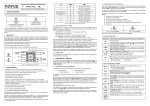
Operator Interface
AutomationDirect
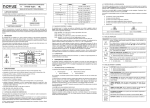
Main display
Alarm-1 LED
Setup Key
•
Thermocouples are connected to terminals 2(+) and 3(-), with positive on
terminal 2.
•
Voltage signals up to 50 mV should be connected to terminals 2(+) and 3(-).
•
Pt100 sensors are connected to terminals 1, 2 and 3, as indicated in this
manual. For full compensation of cable resistance only cables with equal wire
electrical resistance should be used.
•
Voltage signals up to 10 Vdc should be connected to terminals 5(+) and 3(-)
•
Current 4 to 20mA signals should be connected to terminals 4 (+) and 3 (-).
Alarm-2 LED
Decrease Key
Increase Key
(Figure 2)
Main display - PV: Displays the PV (Process Variable) value, and used when
configuring the parameters of the controller.
Alarm 1 - AL1 LED: status of the alarms, (LED On = alarm active).
Alarm 2 - AL2 LED: status of the alarms, (LED On = alarm active).
SETUP key: used to set up the menu cycles.
OUTPUT:
Two SPST Relays (without contact suppression):
Resistive: 3A @ 250VAC / 3A @ 125VAC / 3A @ 30VDC
Inductive: 2A @ 250VAC / 2A @ 30VDC
Dielectric Strenght: 750Vrms between open contacts (at sea level for 1 min.)
DECREASE key: used to change parameter values.
INCREASE key: used to change parameter values.
IMPORTANT:
2.1 MAIN DIMENSIONS AND CUTOUT:
6 mm
100 mm
When the controller is turned on, the firmware version is displayed for
approximately 4 seconds, after which the controller starts normal operation.
The value of PV is displayed and the outputs are enabled after 6 seconds.
45.2 mm to 45.8 mm
Panel Cutout
AL2
SET
UP
45.2 mm to 45.8 mm
AutomationDirect
AL1
AL2
SET
UP
Pt100 measurement: DIN 43760 standard (α=0.00385).
3-wire circuit, cable resistance compensation.
Excitation current: 170µA.
SENSOR WIRE INPUT:
•
AL1
Prior to first operation, the controller should be fully configured. The user
must set basic parameters such as input type (“TYPE”), alarm set points
(“A1SP” and “A2SP”), etc.
(not to scale)
(Figure 1)
4
5