1
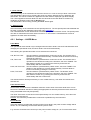
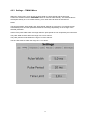
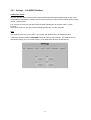
4.2.3 Settings – TIMING Menu
Within the Timing menu it can be set the pulse width, the pulse period and the time limit.
Confirm the selection with the UP/DOWN buttons or enter the value directly. The desired value is
stored permanently in a non-volatile memory, even when the instrument is switched off.
Notes:
The two parameters “pulse width” and “pulse period” depend on each other. The instrument will
automatically force the other parameter within the valid range depending on the change of the
selected parameter.
Values of the pulse width which are larger than the pulse period are not accepted by the instrument.
The pulse width must be within the range of 5.0 ms to 490 ms.
The pulse period must be within the range of 10 ms to 500 ms.
The time limit must be within the range of 0.1 s to 99.9 s.
13