1
2.5 Menu Settings
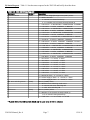
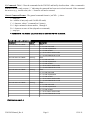
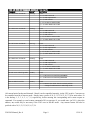
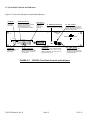
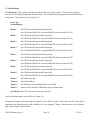
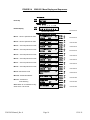
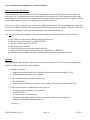
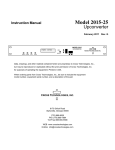
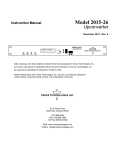
2.5.1 Functions - This section describes operation of the front panel controls. There are three operator
switches, the LCD display and alarm indicator LEDs. All functions for the equipment are controlled by these
components. The functions are (see Figure 2.4):
Power Up
Normal Display
Menu 1
Set CH1 Protected/Unprotected/Unused and
Set CH1 Mode (MANUAL overrides REMOTE which overrides AUTO)
Menu 2
Set CH2 Protected/Unprotected/Unused and
Set CH2 Mode (MANUAL overrides REMOTE which overrides AUTO)
Menu 3
Set CH3 Protected/Unprotected/Unused and
Set CH3 Mode (MANUAL overrides REMOTE which overrides AUTO)
Menu 4
Set CH4 Protected/Unprotected/Unused and
Set CH4 Mode (MANUAL overrides REMOTE which overrides AUTO)
Menu 5
Set CH5 Protected/Unprotected/Unused and
Set CH5 Mode (MANUAL overrides REMOTE which overrides AUTO)
Menu 6
Set CH6 Protected/Unprotected/Unused and
Set CH6 Mode (MANUAL overrides REMOTE which overrides AUTO)
Menu 7
Set CH7 Protected/Unprotected/Unused and
Set CH7 Mode (MANUAL overrides REMOTE which overrides AUTO)
Menu 8
Set CH8 Protected/Unprotected/Unused and
Set CH8 Mode (MANUAL overrides REMOTE which overrides AUTO)
Menu 9
Set Remote interface
Menu 10
Set RS-485 address
Menu 11
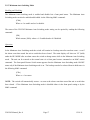
Set Minimum Auto Switching Mode ON and OFF
Menu 12
Restore Switch Position in Minimum Auto Switching mode
Save Menu When “R” is selected or when get to the end
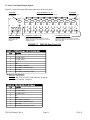
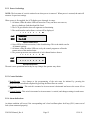
Alarm indications appear on the LEDs (see figure 2.2).
All program changes must start with the operation of the Menu/Execute switch and must also end with the
operation of the Menu/Execute switch verified by the “Save Settings?” Menu. If this sequence is not followed,
none of the changes will take effect.
2582-282 Manual_Rev.0
Page 14
12/19/11