1
HD FM / HD AM operation
To select
, press the
to select DISC 5, then press the
“CD 5-05” appears on the radio.
(After a few seconds it will show “SEL:HDFM”)
button until
To select
, press the
to select DISC 6, then press the
“CD 5-06” appears on the radio.
(After a few seconds it will show “SEL:HDAM”)
button until
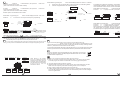
Select DISC 2 by pressing the
button and the display will show: “CD 2-01”. Press the
or
to tune to the next or previous station. If HD is acquired on a multicasting station
or
is used to navigate between the multicast channels.
91.5H2<KVSC
+
To expedite tuning between HD stations, the HD DICE remembers the frequency where
HD broadcast is detected. This list is blank at first, and filled as HD stations are detected.
List is refreshed from time to time to remove unavailable stations.
Select DISC 3 by pressing the
button and the display will show: “CD 3-01”.
Press the
or
to jump to the next or previous station on the list.
+
91.5H1>KVSC-
DISC 2
Several options are available to find a station:
Acquires HD in 4-6 seconds.
Automatic
tuning
+
89.5
91.5S KVSC-F
if
is pressed before
HD is acquired.
91.7S KHCS
DISC 3
Select DISC 1 by pressing the
button and the display will show: “CD1 1-01”.
Press the
or
to tune to the next or previous frequency respectively.
Recently heard
HD station tuning
950H KPRC
DISC 2
Acquires HD in 4-6 seconds.
Automatic
tuning
91.5HD KVSC-
DISC 1
103.5H1>KOST
630M
+
950M
+
91.5S KVSC-
+
Acquires HD in 4-6 seconds.
103.5S KOST-
+
106.7H1>KROQ
Acquires HD in 4-6 seconds.
106.7S KROQ-
1070M
Multicasting is not available in HD AM mode.
0.2 MHz
Acquires HD in 4-6 seconds.
Manual
tuning
+
91.3S
91.5S KVSC-F
+
Select DISC 3 by pressing the
button and the display will show: “CD 4-01”.
Press the
or
to jump to the next or previous station on the list.
Press the
or
to select between the presets.
When accessing an HD2 station, the text “Linking” is displayed and the audio muted until
the digital signal is acquired. AM and FM stations have separate presets banks
accessible only when appropriate HD AM or HD FM mode is selected.
91.7S KHCS
10 KHz
DISC 1
The
HD DICE is equipped with a 1/8” AUX jack connection to connect an auxiliary device, such as
Manual
940M
930Mplayer or+
+ AUX mode, select DISC 5 Track
antuning
MP3 player, DVD
other music source.
To access the
2 (After a few seconds it will show "SEL:AUX1").
Acquires HD in 4-6 seconds.
DISC 4
Preset
stations
Multicasting is not available in (HD) AM mode.
The auxiliary input has settings for
,
and
in order to optimize sound.
(Gain) should be adjusted if the audio level from the auxiliary device is too low or to high.
If you hear distorted audio while playing the auxiliary device, you need to reduce (-) the gain. If you
notice that the audio is too quiet then the gain setting should be increased (+). Default settings are
"50" ("68" for gain) and values may be adjusted in increments between 01-99.
and
should be adjusted to compensate for the acoustic presets of the radio.
iPod interface
UA X audio source
If you are using an AUX device that is using the vehicle’s power source and not its own
battery, you may have to use a GROUND-LOOP isolator to avoid grounding and engine noise.
Apple iPod music players with a dock connector may be attached using an
. Simply connect the 8 pin din connector to the HD DICE box, and
connect the dock connector to the iPod. Choose iPod interface mode by selecting DISC 5
TRACK 1. (After a few seconds it will show “SEL IPOD”)
The iPod will automatically start playing the last played song. For complete guide of the iPod
interface, please refer to the manual provided with the optional DICE iPod interface cable.
Supported iPod models
Currently, all DOCK connector equipped 4G, photo, 5G(video), mini and nano
iPods are supported. Please visit http://support.diceelectronics.com for details
on iPod firmware requirements.
MODE
91.5H1>KVSC
Acquires HD in 4-6 seconds.
+
In-dash CD
+
MODE
?
HD DICE
DISC 5
TRACK 2
DISC
SEL:AUX1
DISC
DISC 1
DISC 2
DISC 3
DISC 4
Volume
setting
Bass EQ
setting
Mid EQ
setting
Treble EQ
setting
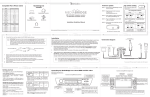
While listening to the auxiliary
device, the next/previous buttons
adjust the volume (gain), bass, mid
and treble. DISC 1-4 modes select
what adjustment the next/previous
buttons perform. See the
illustration for details.
FAQ and resolutions
Q: When I am on HD2, the audio goes away from time to time.
A: HD2 only transmits in digital. If the signal fades away, it will simply mute the audio.
The HD2 program will resume 4-6 seconds once a strong signal is acquired.
Q: The radio keeps switching between H and S.
A: Digital reception requires a strong, steady signal. If the signal fades away, the HD
DICE tuner will temporary switch back to analog stereo or mono reception.
Q: Why is there a delay before switching to an HD channel?
A: It takes approximately 4-6 seconds for the receiver to decode the HD digital signals.
Once the HD signals are decoded the unit will automatically switch from the analogue
station to digital station.
FM
M1 95.5
FM
FM
+
M2 103.5
+
M3 106.7