1
Overview - Sound Card Packet
Use "on air" baud rates of 300 (HF), 2400, and 9600, in addition to 1200. (See the
More About AGWPE page for additional info about 300 baud SSB operations and
9600 FSK operations.)
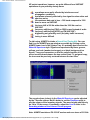
Use a Sound Card Tuning Aid feature for accurately tuning signals, particularly on
HF, and for setting the correct RX (receive) audio volume.
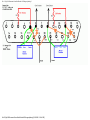
Getting AGWPE to work correctly can be tricky, since you'll need to construct a radio-tocomputer interface with 3 cables and configure three different programs correctly.
Hence, this web site. (Please note that the AGWPE Help file included with the program is
becoming out of date; in some cases it is wrong. We keep George so busy programming,
it's hard for him to find time to fix the Help file!)
There are 5 basic steps in getting AGWPE and your sound card to handle packet. These
steps are discussed in 5 different sections on this site.
1. Install and configure the AGWPE program.
2. Build a radio-to-computer interface -- one cable each for RX, TX, and PTT.
3. Configure Windows
4. Setup your application
5. Troubleshoot problems - but hopefully you won't need it.
If you get hung up, you can e-mail me. I'll try to answer your questions, but I won't
pretend to be the complete AGWPE sound card expert. In fact, if you find any errors or
omissions on these pages, please let me know. For the best troubleshooting help, I
suggest you subscribe to a special AGWPE email reflector/list server to ask for help from
other AGWPE users and even the author, George, SV2AGW.
The information on this web site is derived from my experience and those of several
participants in the APRS Special Interest Group (SIG) reflector, in particular Bill Kearns,
WB6JAR and Stephen Smith, WA8LMF.
Get this Sound Card Packet site in a PDF file
You can get all the pages of this Sound Card Packet web site in an Adobe Acrobat
PDF file, but the .zip file is large (approx. 900 KB). The zip file expands to a PDF
file that is 1.4 MB (!!) and over 130 pages (I'm working on a better way to do this).
The primary advantage of a PDF file is that it should print better than printing
directly from your browser. It is also in slightly larger print for easier paper
viewing. But you may want to be selective in what you print. For example, you
may not need to print out the setup pages for all the applications listed. And if you
don't need the larger image files for each of the thumbnail images, then don't print
the graphic pages at the end of the document.
The last PDF update was: Feb 18, 2002
Get Sound Card Packet PDF zip file
Alternate download site
The file will come as a self-extracting zip file. Run the soundcardpdf.exe file to
automatically expand it to a PDF file.
If you need to download a PDF file reader, go to the Adobe Acrobat Reader Site.
file:///C|/My%20Documents/SoundCardPacket/index.html (2 of 3) [3/5/2002 11:36:15 PM]