1
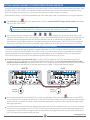
MAP OF YOUR PROP JAM’R
TRIGGER IN
AUDIO OUT
OUTPUTS 1-4
POWER IN
LOW POWER
SPEAKER OUT
OUTPUT LEDS
TRIGGER
JUMPER
EZSYNC PORT
2G - 32G
MASTER/ SLAVE
SELECT
MODE LED
EZMOUNT
BASE PLATE
RECORD
EDIT MODE
ENTER
CHANNEL 2
VOL. DOWN
10 SECOND
CHANNEL 1
VOL. UP
1 SECOND
CHANNEL 4
TRIGGER
10 MINUTES
CHANNEL 3
TIMER DELAY
1 MINUTE
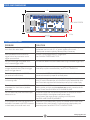
AUDIO OUT Stereo line level output. Connect to your amplified
CHANNEL 4 Multi-use. Pressing during idle mode will trigger unit.
TRIGGER Channel 4 ON during sequence record mode. Add
10 MINUTES 10 minute delay during delay timer mode.
sound system. Right, left and ground.
TRIGGER IN Trigger input from PIR sensor, dry contact, or
powered trigger source
LOW POWER Low power audio out (3 watt) can power a small
SPEAKER OUT speaker. Useful during stand alone programming or
POWER IN External power source connection. Power in must
for small self contained display.
be DC. AC power will NOT work. Voltage must be
between 6 and 24 volts. If power polarity is reversed,
the unit will not function.
TRIGGER Remove jumper if using powered trigger source.
JUMPER Allows for complete electrical isolation from trigger.
OUTPUTS 1-4 Solid state outputs to your LEDs, relays, solenoids or
MICRO SD Micro SD card from 2G to 32G for storage of
CARD SLOT ambient and trigger sound tracks.
any load that can be powered by DC. The output
voltage will match the POWER IN voltage.
MODE Red LED used to indicate the operational mode of
LED the unit. Pulses once per second during idle mode.
RECORD Multi-use. Pressing during idle mode will begin and
EDIT MODE end button sequence recording. Long press will
ENTER initiate single channel edit mode.
OUTPUT Blue LEDs used to indicate the state of each output.
LEDS Will be illuminated when output is on.
CHANNEL 1 Multi-use. Pressing during idle mode will increase
VOL. UP volume level. Channel 1 ON during sequence record
1 SECOND mode. Add 1 second delay during delay timer mode.
EZSYNC Connection for sequence transfer from a master
PORT unit to a slave unit. Uses included EZSync cable.
CHANNEL 2 Multi-use. Pressing during idle mode will decrease
VOL. DOWN volume level. Channel 2 ON during sequence record
10 SECOND mode. Add 10 seconds delay during delay timer mode.
MASTER/ Used during EZSync process to set each unit as
SLAVE SELECT a master or slave. Master sends data, slave receives.
EZMOUNT Plastic non-conductive base plate used to mount
BASE PLATE unit to display and protects unit from shorting.
CHANNEL 3 Multi-use. Pressing during idle mode will initiate delay
TIMER DELAY timer setting. Channel 3 ON during sequence record
1 MINUTE mode. Add 1 minute delay during delay timer mode.
2
www.propjamr.com