1
Software
Style
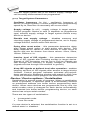
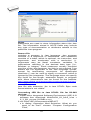
Style option defines serial number base. There are two
options:
• Decimal
• Hexadecimal.
Decimal numbers are entered and displayed using the
characters '0' through '9'.
Hexadecimal numbers also use characters 'A' through 'F'.
The special case is Binary Dec, which means BCD number
style. BCD means the decimal number is stored in
hexadecimal number, i.e. each nibble must have value
from 0 to 9. Values A to F are not allowed as nibbles of
BCD numbers.
Select the base in „Style“ options before entering numbers
of serial start value and step.
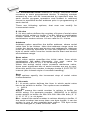
Save to buffer
Save to buffer option specifies the serial value byte order to
write to buffer. This option is used for Bin S / N mode (for
ASCII mode it has no effect).
Two options are available:
• LSByte first (used by Intel processors) will place the
Least Significant Byte of serial number to the lowest
address in buffer.
• MSByte first (used by Motorola processors) will place
the Most Significant Byte first to the lowest address in
buffer.
Split serial number at every N byte(s)
The option allows dividing serial number into individual
bytes and placing the bytes at each Nth address of buffer.
This feature is particularly useful for example for Microchip
PIC devices when the device serial number can be the part
of program memory as group of RETLW instructions. The
example of using serial number split is listed in section
Examples bellow as example number 2.
Examples:
1. Write serial numbers to AT29C040 devices at address
7FFFAH, size of serial number is 4 bytes, start value is
16000000H, incremental step is 1, the serial number form
is binary and least significant byte is placed at the lower
address of serial number in device.
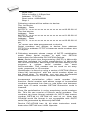
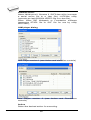
To make above described serialization following settings
have to be set in Serialization dialog:
Mode: Incremental mode
S/N size: 4 bytes
S/N mode:: Bin
57