1
Forms Printer 2500 Series
User's Guide
July 2007
www.lexmark.com
Lexmark and Lexmark with diamond design are trademarks of Lexmark International, Inc., registered in the United States and/or other countries.
All other trademarks are the property of their respective owners.
© 2007 Lexmark International, Inc.
All rights reserved.
740 West New Circle Road
Lexington, Kentucky 40550
Contents
Safety information.............................................................................7
Learning about the printer...............................................................8
Printer overview.....................................................................................................................................................................8
Applying control panel overlays......................................................................................................................................9
Understanding the printer features and functions.................................................................................................10
Printing a demonstration page......................................................................................................................................12
Printing a network setup page.......................................................................................................................................14
Printing from Windows or DOS......................................................................................................................................14
Using IBM emulation mode.............................................................................................................................................15
Using Epson emulation mode........................................................................................................................................15
Using Okidata MICROLINE emulation mode.............................................................................................................16
Using the control panel...................................................................17
Understanding the control panel buttons.................................................................................................................17
Understanding the control panel lights......................................................................................................................19
Setting the printer online or offline..............................................................................................................................20
Advancing paper.................................................................................................................................................................20
Using the Load/Unload function...................................................................................................................................20
Locking and unlocking the control panel...................................................................................................................20
Selecting a Tractor mode..................................................................................................................................................21
Selecting and locking a font............................................................................................................................................21
Disabling Font Lock............................................................................................................................................................21
Selecting and locking a pitch..........................................................................................................................................22
Disabling Pitch Lock...........................................................................................................................................................22
Loading paper...................................................................................23
Setting the forms thickness lever..................................................................................................................................23
Paper paths............................................................................................................................................................................25
Using the Tear Off function..............................................................................................................................................25
Loading continuous paper...............................................................................................................................................26
Loading continuous forms using the push tractor............................................................................................................. 26
Front loading continuous forms using the pull tractor .................................................................................................... 29
Bottom loading continuous forms using the pull tractor ................................................................................................ 32
Loading cut forms...............................................................................................................................................................37
Contents
2
Loading a cut form or envelope manually ............................................................................................................................ 37
Aligning the left margin ............................................................................................................................................................... 39
Setting Top-of-Form...........................................................................................................................................................40
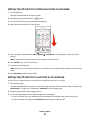
Setting Top-Of-Form for continuous forms in push mode.............................................................................................. 40
Setting Top-Of-Form for continuous forms in pull mode ................................................................................................ 41
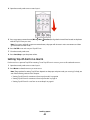
Setting Top-Of-Form for a cut form or an envelope .......................................................................................................... 41
Setting Top-Of-Form in a macro ............................................................................................................................................... 42
Paper and specialty media guide..................................................43
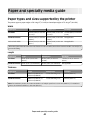
Paper types and sizes supported by the printer......................................................................................................43
Changing tractor positions............................................................44
Push tractor position..........................................................................................................................................................44
Pull tractor position............................................................................................................................................................44
Converting the push tractor to pull tractor position..............................................................................................45
Converting the pull tractor to push tractor position..............................................................................................46
Understanding Setup mode and menu options........................48
Using Setup mode...............................................................................................................................................................48
Changing menu settings (an example).......................................................................................................................49
Setup Mode - Main menu.................................................................................................................................................50
Main menu options........................................................................................................................................................................ 50
Forms Macro options..................................................................................................................................................................... 51
Data options ..................................................................................................................................................................................... 52
Control options................................................................................................................................................................................ 54
Emulation options .......................................................................................................................................................................... 55
Interface options............................................................................................................................................................................. 56
Maintaining the printer...................................................................57
Ordering supplies................................................................................................................................................................57
Removing the ribbon cartridge......................................................................................................................................57
Cleaning the printer............................................................................................................................................................57
Recycling Lexmark products...........................................................................................................................................58
Administrative support...................................................................59
Restoring the factory default settings..........................................................................................................................59
Supporting IPSec.................................................................................................................................................................60
Supporting SNMPv3...........................................................................................................................................................60
Using 802.1x authentication...........................................................................................................................................61
Contents
3
Troubleshooting...............................................................................62
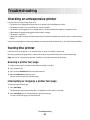
Checking an unresponsive printer................................................................................................................................62
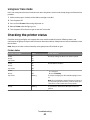
Testing the printer...............................................................................................................................................................62
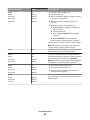
Checking the printer status..............................................................................................................................................63
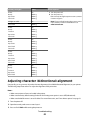
Adjusting character (bidirectional) alignment..........................................................................................................65
Solving printing problems...............................................................................................................................................66
Printer test works, but the printer does not print when attached to the computer .............................................. 66
Printer is noisy.................................................................................................................................................................................. 67
Printer sounds like it is printing, but does not print .......................................................................................................... 67
Printer alarm sounds...................................................................................................................................................................... 67
Printer goes to the Tear Off position before the print job finishes............................................................................... 67
Buttons do not work, except for Start/Stop, FormFeed, Tear Off and Load/Unload.............................................. 68
Printer power switch is on, but the power light is off........................................................................................................ 68
Left margin moves to the right during printing .................................................................................................................. 68
Incorrect line length; lines do not start at the left margin ............................................................................................... 68
Printer speed slows ........................................................................................................................................................................ 68
Incorrect characters print, left margin changes, or printing stops ............................................................................... 69
Printing continues beyond the edges of the continuous forms ................................................................................... 69
Selected font or pitch is not printing or is changing ......................................................................................................... 69
Solving paper feed problems..........................................................................................................................................69
Paper is jammed in the printer .................................................................................................................................................. 69
Paper is jammed in the Auto Sheet Feeder........................................................................................................................... 70
Paper fed in the Auto Sheet Feeder jams at the printer entrance ................................................................................ 70
Paper jam in the Tractor 2 Feeder............................................................................................................................................. 70
Printer does not feed paper ........................................................................................................................................................ 70
Printer does not feed from the optional Tractor 2 Feeder............................................................................................... 71
Printer does not feed from the Auto Sheet Feeder ............................................................................................................ 71
The optional Tractor 2 Feeder positions paper at incorrect Top-Of-Form position............................................... 71
The Auto Sheet Feeder feeds paper at an incorrect rate.................................................................................................. 71
The Auto Sheet Feeder places paper at the wrong Top-Of-Form position ............................................................... 72
Paper fed from the Auto Sheet Feeder is skewed............................................................................................................... 72
The Auto Sheet Feeder feeds multiple sheets ..................................................................................................................... 72
Solving print quality problems.......................................................................................................................................73
Print is too light ............................................................................................................................................................................... 73
Dots are missing or print quality is poor ................................................................................................................................ 73
Characters are wrong or missing .............................................................................................................................................. 74
Forms are smudged or print is too dark ................................................................................................................................. 74
Incorrect number of lines on a page........................................................................................................................................ 74
Graphics do not print .................................................................................................................................................................... 74
Incorrect line spacing or overprinting occurs ...................................................................................................................... 75
Contacting Customer Support..................................................................................................75
Contents
4
Notices................................................................................................76
Edition notice........................................................................................................................................................................76
Power consumption...........................................................................................................................................................79
Index...................................................................................................83
Contents
5
6
Safety information
Connect the power supply cord to a properly grounded electrical outlet that is near the product and easily accessible.
CAUTION—POTENTIAL INJURY: Do not twist, bind, crush, or place heavy objects on the power cord. Do not
subject the power cord to abrasion or stress. Do not pinch the power cord between objects such as furniture
and walls. If the power cord is misused, a risk of fire or electrical shock results. Inspect the power cord regularly
for signs of misuse. Remove the power cord from the electrical outlet before inspecting it.
Refer service or repairs, other than those described in the user documentation, to a professional service person.
This product is designed, tested, and approved to meet strict global safety standards with the use of specific Lexmark
components. The safety features of some parts may not always be obvious. Lexmark is not responsible for the use of
other replacement parts.
CAUTION—SHOCK HAZARD: Do not set up this product or make any electrical or cabling connections, such
as the power supply cord or telephone, during a lightning storm.
CAUTION—POTENTIAL INJURY: The printhead may be hot. If so, allow it to cool before touching.
CAUTION—SHOCK HAZARD: Make sure that all external connections (such as Ethernet and telephone system
connections) are properly installed in their marked plug-in ports.
Safety information
7
Learning about the printer
Printer overview
The LexmarkTM Forms Printer 2500 Series printers are available in 9- and 24-wire narrow- and wide-carriage models.
Depending on the model you have chosen, your printer may look slightly different from the printer illustrated.
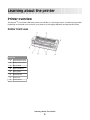
Printer front view
Part name
1
Forms thickness lever
2
Ribbon access cover
3
Power switch
4
Paper select lever
5
Paper guides
6
Manual feeder
7
Front cover
8
Control panel
Learning about the printer
8
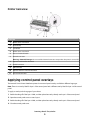
Printer back view
Part name
1
Ribbon access cover latch
2
Acoustic flap
3
Tear off bar
4
Ribbon access cover latch
5
Recessed network button
6
Network connector
Warning—Potential Damage: Do not touch the Network connector except when the printer is turned off.
7
Optional serial interface knockout
8
Parallel connector
9
USB connector
10
Optional Tractor 2 connector knockout
11
Power cord connector
Applying control panel overlays
The Lexmark Forms Printer 2500 Series printers have control panel overlays available in different languages.
Note: There is an overlay label for layer 1 of the control panel and a different overlay label for layer 2 of the control
panel.
To apply an overlay in the language of your choice:
1 Peel the backing off of the layer 1 label, and then place the overlay directly over layer 1 of the control panel.
2 Open the control panel cover to access layer 2.
3 Peel the backing off of the layer 2 label, and then place the overlay directly over layer 2 of the control panel.
4 Close the control panel cover.
Learning about the printer
9
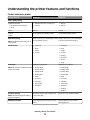
Understanding the printer features and functions
Printer features by model
Feature/function
2580/2581
2590/2591
Multi-speed printing
FastDft (Fast Draft)
• 10 characters per inch (cpi)
• 12 cpi
• 440 characters per second (cps)
• 520 cps
• 410 cps
• 520 cps
Draft
309 cps
274 cps
Courier
77 cps (Near-Letter-Quality mode)
91 cps (Letter-Quality mode)
Gothic
Character spacing
Note: Fast Draft supports only 10, 12,
and 15 pitch.
Resident fonts
Print styles
Note: This feature is available through
printer commands.
Graphics printing
Note: This feature supports existing
graphics programs.
Multiple-part forms
Prints in 10, 12, 15, 17, and 20 cpi, as well Prints in 10, 12, 15, 17, 20, and 24 cpi,
as proportional spacing
as well as proportional spacing
•
•
•
•
•
•
•
•
•
•
•
•
Fast Draft
Draft
Gothic
Courier
Highlighting capability:
•
•
•
•
•
•
•
•
•
Double-strike
Double-wide
Emphasized
Italics
Overscore
Subscript
Superscript
Underline
Draft
Gothic
Courier
Prestige
Presentor
Orator
Script
Highlighting capability:
•
•
•
•
•
•
•
•
•
•
•
Double-high
Fast Draft
Double-high
Double-strike
Double-wide
Emphasized
Italics
Overscore
Subscript
Superscript
Underline
Shading
Outline
Resolution of up to 144 x 240 dots per
square inch (dpi)
Resolution of up to 360 x 360 dpi
Prints original plus five copies (six-part
forms)
Prints original plus three copies
(four-part forms)
Learning about the printer
10
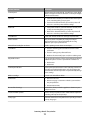
Feature/function
All models
Control panel
Button control for Load/Unload, Tear Off, Font, Setup, Pitch,
Macro, and paper movement functions. Control panel lights
indicate current status.
Font lock
• Locks the font selection you make from the control panel
so it is not changed by your program.
• Font lock is deactivated when you turn the printer off
unless it is set in the printer default settings.
Pitch lock
• Locks pitch selections you make from the control panel
so they are not changed by your program
• Pitch lock is deactivated when you turn the printer off
unless it is set in the printer default settings.
Load/Unload
Loads and unloads continuous form paper (tractor fed)
Macro function
The printer has the capability of storing four unique
document formats to enhance flexibility when using
different styles of pre-printed forms.
Manual front loading for cut sheets
Enables printing on cut sheets or envelopes
Tear Off bar
• Assists in removing printed continuous forms at the
perforation
• Assists in tearing non-perforated forms
• Reduces the amount of paper used, thus reducing costs
Adjustable tractor
Lets you handle continuous form paper without purchasing
additional options. It can be repositioned to function as:
• Push tractor
• Pull tractor
Control panel disable
Limits control panel functions to the Start/Stop, FormFeed,
Tear Off, and Load/Unload buttons only, thus limiting the
potential that untrained operators may accidentally change
forms settings
Ribbon cartridge
Contains the inked fabric ribbon
Printer tests
• Power-on Self Test
• Printer test page—Determines whether your machine
has print problems
• Demonstration Print
Box and line drawings
Prints tables, charts, and other graphics as shown on your
computer screen
Greek and math symbols
Prints a variety of symbols used in mathematical equations,
including subscript and superscript
Code pages
Selects the characters and symbols corresponding to various
country languages
Learning about the printer
11
Feature/function
All models
Bar code function
These bar codes are resident in the printer:
•
•
•
•
•
•
•
•
•
•
3 of 9
Codabar (NW-7)
Code 39
Code 128
Interleaved 2 of 5
UPC-A
UPC-E
EAN 8
EAN 13
PostNet
Note: For more information on the Bar code function, see the
Technical Reference available on the Lexmark Web site at
www.lexmark.com.
Software compatibility
• Compatible with all programs that support IBM
emulation or Epson emulation
• Compatible with Okidata MICROLINE emulation (with the
M320 turbo), which is standard on the 9-wire printer and
2580/2581 printer models.
Interface connection
Allows the printer to work with all computers with
Warning—Potential Damage: Do not touch the Network compatible interface connections
Both parallel and USB interfaces are standard. The internal
connector except when the printer is turned off.
serial interface (RS-232) is optional for the 2580/2581 and
2590/2591 models.
The Network option is standard on the 2580n/2581n and
2590n/2591n models.
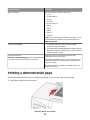
Printing a demonstration page
The following steps explain how to load a single sheet of paper so you can print a demonstration page.
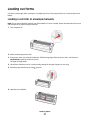
1 Set the forms thickness lever to position 1.
Learning about the printer
12
2 Turn the printer on.
The Power light comes on solid, the Paper Out light is blinking, and the current default font light is on solid.
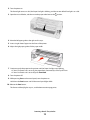
3 Open the manual feeder, and then move the paper select lever to the
position.
4 Move the left paper guide to the right until it stops.
5 Insert a single sheet of paper into the front of the printer.
6 Adjust the right paper guide to fit the paper width.
7 Continue to push the paper into the printer until the Paper Out light stops blinking.
• If Auto Cut Sheet Load is set to On, the paper feeds automatically to the Top-Of-Form.
• If Auto Cut Sheet Load is set to Off, press FormFeed.
8 Turn the printer off.
9 While pressing Font on the control panel, turn the printer on.
Hold down the Font button until all the control panel lights blink.
10 Release the Font button.
The Power and Ready lights stay on, and the demonstration page prints.
Learning about the printer
13
Printing a network setup page
If the printer is attached to a network, print a network setup page to verify the network connection and find the
printer address.
Note: This function is disabled if a USB cable is connected.
1 Make sure the printer is on and paper is loaded.
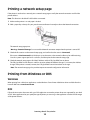
2 With a paper clip or the tip of a pen, press the recessed button located just above the Network connection.
The network setup page prints.
Warning—Potential Damage: Do not touch the Network connector except when the printer is turned off.
3 Check the first section on the network setup page, and confirm that the status is Connected.
If the status is Not Connected, the LAN drop may not be active, or the network cable may be malfunctioning.
Consult a system support person for a solution, and then print another network setup page.
4 Check the network setup page to find the IP Address and the Fully Qualified Domain Name.
The Fully Qualified Domain Name is useful in situations where the Address changes. For instance, the Address
changes if the printer is moved; however, the Fully Qualified Domain Name does not change.
Note: The network setup page also provides important network configuration information.
Printing from Windows or DOS
Windows
When printing from a Windows application, use the Windows Forms Printer 2500 Series driver available from the
Lexmark Web site at www.lexmark.com.
DOS
Follow the instructions that came with your DOS application to see what printer drivers are supported for your level
of DOS. Most applications let you specify the type of printer you are using so the application can take full advantage
of the printer features.
Learning about the printer
14
Using IBM emulation mode
If the printer is using IBM mode (the factory default setting), select a printer from your program in the following
preferred order.
For Lexmark Forms Printer 2580/2581 users:
1 Forms Printer 2580/2581
2 Forms Printer 2480/2481 plus
3 Forms Printer 2380/2381 plus
4 2380 plus/2381 plus
5 2380/2381 IBM Personal Printer SeriesTM II
6 4201/4202 IBM ProprinterTM III
7 4201/4202 IBM Proprinter II
8 IBM ExecJetTM Printer Model 4072
For Lexmark Forms Printer 2590/2591 users:
1 Forms Printer 2590/2591
2 Forms Printer 2490/2491
3 Forms Printer 2390 plus/2391 plus
4 2390 plus/2391 plus
5 2390/2391 IBM Personal Printer Series II
6 4212 IBM Proprinter 24P
7 2390 IBM PS/1 Printer
8 4207/4208 Proprinter X24/XL24
9 IBM ExecJet Printer Model 4072
10 2205 IBM PS/1 Printer
If your software does not allow you to select one of the printers in this list, you may need to customize your printer
for Epson emulation mode.
Note: The printer driver you select in your program must match the emulation model you select for your printer.
Printer drivers other than the 2500 series support most, but not all, of the printer capabilities.
Using Epson emulation mode
If the printer is using Epson mode, select a printer from your application in the following preferred order.
Note: The printer driver you select in your application must match the emulation mode you select for your printer.
Printer drivers other than the 2500 series support most, but not all, of the printer capabilities.
Learning about the printer
15
For Forms Printer 2580/2581 users:
1 Epson FX850
2 Epson FX 1050
For Forms Printer 2590/2591 users:
1 Epson LQ850
2 LQ 1050
Using Okidata MICROLINE emulation mode
If the printer has the Okidata MICROLINE emulation option installed, select a printer from your application in the
following preferred order.
1 Oki 320/321 Turbo
2 Oki 320/321
Learning about the printer
16
Using the control panel
Understanding the control panel buttons
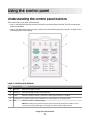
The control panel has two layers of functionality:
• Layer 1, with the control panel cover closed, contains basic functions like FormFeed, Tear Off, and taking the
printer online/offline.
• Layer 2, with the control panel cover open, contains more advanced functionality. Use layer 2 to select a macro
and change printer menu settings.
Layer 1 control panel buttons
Button
Function
1
LineFeed
Advances the paper one line
2
FormFeed
Advances the paper to the next Top-Of-Form
3
Tractor
Alternates between Tractor 1 and Tractor 2 if the optional Tractor 2 is installed
4
Load/Unload Loads paper to the current Top-Of-Form or unloads paper to a parked position
5
Font
Selects one of the resident font styles
Note: Repeatedly pressing the Font button cycles through the printer font selections. If you
continue pressing Font through a second pass, the font selections will be locked.
Using the control panel
17
Button
Function
6
Tear Off
Alternates the paper between Tear Off and Top-Of-Form
7
Start/Stop
Communicates the on/off status of the printer
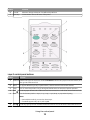
Layer 2 control panel buttons
Button
Function
1
LineFeed Advances the paper one line. Press and hold LineFeed to advance the paper 5 micro movements, and
then go into continuous feed.
2
Macro
To support different styles of pre-printed forms, selects between four document formats
3
Setup
Press to enter Setup mode. Lets you change the default values and modes of printer operation.
4
Micro
Feeds the paper downward in small incremental movements. Press and hold to select continuous feed.
5
Pitch
Sets the character pitch to: 10 cpi, 12 cpi, 15 cpi, 17 cpi, 20 cpi, or proportional spacing
Notes:
• On 2590/2591 models, you can also select 24 cpi.
• Fast Draft supports only 10, 12, and 15 pitch.
6
Micro
Feeds the paper upward in small incremental movements. Press and hold to select continuous feed.
Using the control panel
18
Button
7
Function
Set TOF
Sets the Top-Of-Form, which is the position of the first print line on the page
Understanding the control panel lights
The following tables describe the light patterns on the control panel.
Layer 1 control panel lights
Light
Light status What it means
Power
On
The printer is online.
Ready
On
The printer is online and ready to print.
Blinking
The printer is receiving data.
Off
The printer is offline.
On
Tractor 2 is activated.
Tractor 2
Note: The optional Tractor 2 Feeder must be installed.
Paper Out Off
Font
Paper is loaded in the printer.
Blinking
The printer is out of paper.
On
A printer error has occurred.
On
The control panel is locked, restricting the use of the following buttons: Start/Stop, FormFeed,
Tear Off, and Load/Unload.
On
One of the printer resident fonts is selected.
Off
A downloaded font is selected.
Font Lock On
Font Lock is active. Printer resident fonts are locked.
Layer 2 control panel lights
Light
Light status
What it means
Macro
On
The specified macro function is active.
Off
No macro is being used, or Macros are disabled in the Setup menu.
Pitch
On
One of the printer resident pitches is selected.
Pitch Lock
On
Pitch Lock is active. Printer resident fonts are locked.
Using the control panel
19
Setting the printer online or offline
The printer must be online to accept data.
• To set the printer online, press Start/Stop.
The Ready light comes on. If paper is not loaded, the Paper Out light blinks. When online, the printer is ready to
receive print jobs.
• To set the printer offline, press Start/Stop.
The Ready light turns off. The printer finishes printing the current line and then stops. To resume printing, press
Start/Stop until the Ready light comes on.
Advancing paper
Use these control panel buttons to advance the paper when the printer is not printing:
Note: When you are printing continuous forms, the first time you press LineFeed, it moves the paper from the Tear
Off position to the current print line before advancing the paper.
• Press LineFeed to advance the paper to the next line.
• Press FormFeed to advance the paper to the Top-Of-Form on the next page or to eject the cut form.
To change the Tear Off position on the current page:
• Press LineFeed to move the paper incrementally.
• Press Tear Off to move the paper to the Top-Of-Form.
Using the Load/Unload function
Use the Load/Unload button to unload continuous forms from the printer to allow printing on either a cut form or
an envelope.
The Load/Unload function works only when the tractor unit is in the push position.
You can also use the Load/Unload button to load continuous forms into the printer when the paper path is clear, or
to change one type of pre-printed form to another.
Locking and unlocking the control panel
To restrict the use of printer functions to the Start/Stop, FormFeed, Tear Off, and Load/Unload buttons, lock the
control panel. When the panel is locked, the light comes on.
To lock the control panel:
1 Turn the printer off.
2 Press and hold Load/Unload and Tractor while turning the printer on.
To unlock the control panel:
1 Turn the printer off.
2 Press and hold Load/Unload and Tractor while turning the printer on.
Using the control panel
20
Selecting a Tractor mode
Note: Because this function unloads continuous forms from the currently selected tractor, tear off excess paper prior
to initiating.
When the optional Tractor 2 Feeder is installed, you can press Tractor to unload the current continuous forms and
switch to the continuous forms loaded in the other tractor source.
The Tractor 2 light comes on when the optional Tractor 2 Feeder is selected.
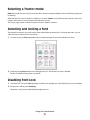
Selecting and locking a font
The printer data stream may contain control codes which select a particular font. To override the codes, you can
select and lock a particular font of your choice.
1 To select a font, press Font repeatedly until you see the font light on next to the selection you want.
2 Continue pressing Font until the Font Lock light comes on, and the font you want is selected.
The font is locked until the printer is turned off.
Disabling Font Lock
1 To disable Font Lock, press Font repeatedly until the Font Lock light turns off and the font you want is selected.
2 If the printer is offline, press Start/Stop.
The printer is ready to print when the Ready light comes on.
Using the control panel
21
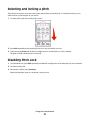
Selecting and locking a pitch
The printer data stream may contain control codes which select a particular pitch. To override the codes, you can
select and lock a particular pitch of your choice.
1 To select a pitch, open the control panel to layer 2.
2 Press Pitch repeatedly until the pitch light comes on next to the pitch you want.
3 Continue pressing Pitch until the Pitch Lock light comes on and the pitch you want is selected.
The pitch is locked until the printer is turned off.
Disabling Pitch Lock
1 To disable Pitch Lock, press Pitch repeatedly until the Pitch Lock light turns off and the pitch you want is selected.
2 Close the control panel.
3 If the printer is offline, press Start/Stop.
When the Ready light comes on, the printer is ready to print.
Using the control panel
22
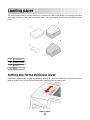
Loading paper
This section explains how to load continuous forms, cut sheet forms, labels and envelopes. It also includes information
about paper orientation, setting the forms thickness lever, and using the push and pull tractors for different paper
paths.
1
Cut sheet forms
2
Continuous forms
3
Envelopes
4
Labels
Setting the forms thickness lever
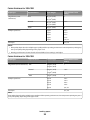
Use the forms thickness lever to make adjustments for printing on various forms depending on the paper thickness.
When setting this lever, see one of the following tables depending on your printer model:
Loading paper
23
Forms thickness for 2580/2581
Paper type
Paper thickness
Paper weight
Forms thickness lever
setting
Single forms (cut or
continuous)
Thin
56 g/m2 (15 lb)
1
65 g/m2
(16 lb)
68 g/m2 (18 lb)
Normal
1 or 2
75 g/m2 (20 lb)
Thick
Multiple-part forms
90 g/m2 (24 lb)
2
2-part
2 or 3
3-part
3 or 4
4-part
4 or 5
5-part
5 or 6
6-part
5, 6, or 7
Envelopes
4, 5, or 6
Notes:
• Print quality depends on the multiple-paper quality and the operating environment. Low-temperature printing may
cause poor print quality, depending on the paper used.
• Printing speed becomes slower when the forms thickness lever setting is 4 or higher.
Forms thickness for 2590/2591
Paper type
Paper thickness
Single forms (cut or continuous) Thin
Paper weight
Forms thickness lever
setting
56 g/m2 (15 lb)
1
65 g/m2 (16 lb)
68 g/m2 (18 lb)
Normal
1 or 2
75 g/m2 (20 lb)
Thick
Multiple-part forms
90 g/m2 (24 lb)
2
2-part
2 or 3
3-part
3 or 4
4-part
4 or 5
5-part
5 or 6
6-part
5, 6, or 7
Envelopes
4, 5, or 6
Note:
Print quality depends on the multiple-paper quality and the operating environment. Low-temperature printing may cause
poor print quality, depending on the paper used.
Loading paper
24
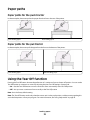
Paper paths
Paper paths for the push tractor
In these examples, the tractor pushes the paper from the front or the rear of the printer.
Front loading paper
Rear loading paper
Paper paths for the pull tractor
In these examples, the tractor pulls the paper from the front or the bottom of the printer.
Front loading paper
Bottom loading paper
Using the Tear Off function
Pressing the Tear Off button advances the perforation of a continuous form to the tear off position. You can set the
Tear Off function to automatic or manual by adjusting the Auto Tear Off Setting in Setup mode:
• On—Sets the Tear Off function to move a continuous form automatically to the Tear Off position
• Off—Lets you move a continuous form manually to the Tear Off position
Note: On is the factory default setting.
Note: The Tear Off function works only when the tractor unit is in the push position, and the correct page length is
set in the Setup menu or from your program. For more information, see “Using Setup mode” on page 48.
Loading paper
25
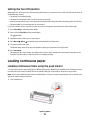
Setting the Tear Off position
When Auto Tear Off is set to On, it moves the top perforation of a continuous form to the Tear Off position when all
of the following are true:
•
•
•
•
The printer has finished printing.
The paper has advanced to the Top-Of-Form on the next page.
No data, printer control codes, or escape codes have been sent to the printer after advancing to the Top-Of-Form.
The print buffer has not received data for one second.
If you have already set your Top-Of-Form and now want to change the Tear Off position, follow these steps:
1 Press Start/Stop to take the printer offline.
2 Press and hold Tear Off until the printer beeps.
The
light blinks.
3 Open the control panel cover to access layer 2.
4 Press Micro or Micro to move the paper to the desired Tear Off position.
5 Close the control panel cover.
The printer beeps twice. The paper rolls backward, then goes to the new Tear Off position.
6 Press Start/Stop.
The paper remains at the current Tear Off position until you send another job to the printer. The paper moves
from the Tear Off position to the Top-Of-Form and begins printing.
Loading continuous paper
Loading continuous forms using the push tractor
You can load continuous paper utilizing four different paper paths, depending on whether you have the push tractor
installed or the pull tractor installed. The factory default setting for your printer is the push tractor position.
Note: If you have installed the optional Auto Sheet Feeder or Tractor 2, see the documentation that came with your
option for paper loading instructions.
1 Turn the printer on.
Loading paper
26
2 Make sure the paper path is clear.
Note: If a cut form or envelope is loaded in the printer, press FormFeed to remove it.
3 Set the forms thickness lever to a setting corresponding with the paper thickness you are using.
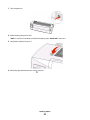
4 Pull the front cover up.
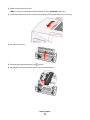
5 Move the paper select lever down to the
position.
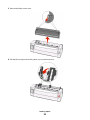
6 Pull the left and right tractor locking levers up to unlock the tractors.
Loading paper
27
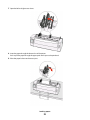
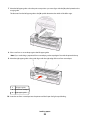
7 Open the left and right tractor doors, and then place the paper holes over the second or third pins of the tractor
unit.
If necessary, move the left or right tractor to adjust the tractors to the paper width.
Note: Keeping the left tractor positioned to the left of the rubber tractor stop keeps your paper within the paper
sensor area.
8 Close the left and right tractor doors.
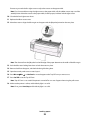
9 Move the tractor to align the left margin on your paper with the [A symbol printed on the rear plate.
Note: The distance from the [A symbol to the left edge of the paper determines the width of the left margin.
10 Push the left tractor locking lever down to lock the tractor in place.
11 Remove slack from the paper, and then lock the right locking lever.
Loading paper
28
12 Close the front cover.
13 Press Start/Stop to load the paper to Top-Of-Form and put the printer online.
If Auto Tear Off is set to On, the printer moves the paper to the Tear Off bar.
Note: When you use the push tractor to print continuous forms, line spacing within the first 1.5 inches of the first
form may not be uniform.
Front loading continuous forms using the pull tractor
Make sure the tractor is in the pull position.
Note: If you have installed the optional Auto Sheet Feeder or Tractor 2, see the documentation that came with your
option for paper loading instructions.
1 Turn the printer on.
2 Make sure the paper path is clear.
Note: If a cut form or envelope is loaded in the printer, press FormFeed to remove it.
3 Set the forms thickness lever to a setting corresponding with the paper thickness you are using.
4 Remove the ribbon access cover.
5 Move the paper select lever down to the
position.
Loading paper
29
6 Pull the left and right tractor locking levers up to unlock the tractors.
7 Open the left and right tractor doors.
8 Open the front cover.
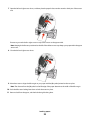
9 Insert paper into the front of the printer between the metal and plastic plates.
Loading paper
30
Push or pull the paper through the paper path until it passes the printhead.
10 Close the front cover.
11 Place the paper holes over the tractor pins.
If necessary, move the left or right tractor to adjust the tractors to the paper width.
Note: If you have trouble moving the right tractor to the paper width, roll the rubber tractor stop out of the
seated position. Move the tractor to the paper width, load the paper, and then lock the right tractor.
12 Close the left and right tractor doors.
13 Replace the ribbon access cover.
14 Move the tractor to align the left margin on the paper with the [A symbol printed on the rear plate.
Note: The distance from the [A symbol to the left edge of the paper determines the width of the left margin.
15 Push the left tractor locking lever down to lock the tractor in place.
Loading paper
31
16 Remove slack from the paper, and then lock the right locking lever.
17 Open the control panel cover to access layer 2.
18 Press Micro , Micro , or LineFeed to move the paper to the Top-Of-Form you want to use.
Notes:
• Use the second form to set Top-Of-Form alignment.
• To do this, align the horizontal lines (located on the platen) with the Top-Of-Form you want.
19 Press Set TOF to set the Top-Of-Form.
Note: Top-Of-Form is not saved if the printer is turned off or runs out of paper when using the pull tractor.
20 Make sure the printer is online, and the Ready light is on solid.
Note: If not, press Start/Stop until the Ready light is on solid.
Bottom loading continuous forms using the pull tractor
Notes:
• Make sure the tractor is in the pull position.
• Use a furniture type with a paper-feed opening in the middle of it.
• Because the printer uses a pull function for bottom loading, it is especially useful for paper that has a tendency
to curl, is very heavy, or is very light weight.
Note: If you have installed the optional Auto Sheet Feeder or Tractor 2 Feeder, see the documentation that came
with the option for paper loading instructions.
Loading paper
32
1 Turn the printer on.
2 Make sure the paper path is clear.
Note: If a cut form or envelope is loaded in the printer, press FormFeed to remove it.
3 Set the forms thickness lever to 7.
4 Move the paper select lever down to the
position.
Loading paper
33
5 Remove the ribbon access cover.
6 Pull the left and right tractor locking levers up to unlock the tractors.
Loading paper
34
7 Open the left and right tractor doors.
8 Insert the paper through the bottom slot of the printer.
Push or pull the paper through the paper path until it passes the printhead.
9 Place the paper holes over the tractor pins.
Loading paper
35
If necessary, move the left or right tractor to adjust the tractors to the paper width.
Note: If you have trouble moving the right tractor to the paper width, roll the rubber tractor stop out of the
seated position. Move the tractor to the paper width, load the paper, and then lock the right tractor.
10 Close the left and right tractor doors.
11 Replace the ribbon access cover.
12 Move the tractor to align the left margin on the paper with the [A symbol printed on the rear plate.
Note: The distance from the [A symbol to the left edge of the paper determines the width of the left margin.
13 Push the left tractor locking lever down to lock the tractor in place.
14 Remove slack from the paper, and then lock the right locking lever.
15 Open the control panel cover to access layer 2.
16 Press Micro , Micro , or LineFeed to move the paper to the Top-Of-Form you want to use.
17 Press Set TOF to set the Top-Of-Form.
Note: Top-Of-Form is not saved if the printer is turned off or runs out of paper when using the pull tractor.
18 Make sure the printer is online, and the Ready light is on solid.
Note: If not, press Start/Stop until the Ready light is on solid.
Loading paper
36
Loading cut forms
Cut forms can be single sheets, envelopes, or multiple-part forms. They are placed one at a time into the manual
feeder.
Loading a cut form or envelope manually
Note: If you have installed the optional Auto Sheet Feeder or Tractor 2 Feeder, see the documentation that came
with the option, for paper loading instructions.
1 Turn the printer on.
2 Make sure the paper path is clear.
3 If continuous forms are currently loaded, tear off the leading edge of the continuous form, and then press
Load/Unload to park the continuous forms.
The Paper Out light blinks.
4 Set the forms thickness lever to a corresponding setting for the type of paper you are using.
5 Move the paper select lever up to the
position.
6 Open the manual feeder.
Loading paper
37
7 Move the left paper guide so that the print start position you want aligns with the [A symbol printed on the
margin guide.
The distance from the left paper guide to the [A symbol determines the width of the left margin.
8 Place a cut form or an envelope against the left paper guide.
Note: If you are loading a preprinted form or envelope, put the top edge in first with the printed side up.
9 Move the right paper guide so the guide aligns with the right edge of the cut form or envelope.
1
Left paper guide
2
Cut form or envelope
3
Right paper guide
10 Insert the cut form or envelope into the printer until the Paper Out light stops blinking.
Loading paper
38
Notes:
• If Auto Cut Sheet Load is set to On, the paper feeds automatically to the Top-Of-Form.
• If Auto Cut Sheet Load is set to Off, press FormFeed.
11 Make sure the printer is online, and the Ready light is on solid.
Note: If not, press Start/Stop until the Ready light is on solid.
Aligning the left margin
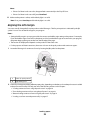
You can manually change the first print position at the left margin. The first print position is indicated by the [A
symbol. You can also set the left margin in your program.
Notes:
• Setting the left margin in your program adds that amount to the left margin setting on the printer. For example,
if you set the left margin at one inch on the printer, and also have the left margin set at one inch in your program,
the printer begins printing two inches from the left edge of the page.
• The location of the [A symbol depends on the position of the tractor unit.
• For the purposes of these instructions, the tractor is shown in the push position with continuous paper.
1 Locate the left margin for continuous forms by locating the [A symbol on the printer.
1
Tractor (in push position)
2
Right locking lever
2 Continue to load paper utilizing different paper paths, depending on whether you have the push tractor installed
or the pull tractor installed. For help, see one of the following sections in this chapter:
•
•
•
•
“Loading continuous forms using the push tractor” on page 26
“Front loading continuous forms using the pull tractor” on page 29
“Bottom loading continuous forms using the pull tractor” on page 32
“Loading a cut form or envelope manually” on page 37
Loading paper
39
Setting Top-of-Form
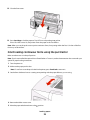
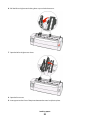
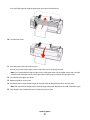
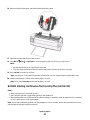
Top-of-Form sets the first line of print. Use the control panel to save your Top-of-Form settings for continuous forms,
cut forms, and for each macro enabled.
Setting Top-Of-Form for continuous forms in push mode
1 Clear the paper path.
The Paper Out light blinks if no paper is loaded. If the Paper Out light is off, tear off excess forms, and then press
Load/Unload. If a cut form is loaded, press FormFeed to clear the paper path.
2 Make sure the paper select lever is in the
position.
3 Load continuous form paper on the push tractor feed pins (or the Tractor 2 feed pins if you are using the optional
Tractor 2 Feeder).
4 Press FormFeed.
The paper moves to the current Top-Of-Form, and the Paper Out light goes off.
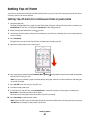
5 Open the control panel cover to access layer 2.
6 Press any paper movement button (LineFeed, Micro , Micro ) to align the horizontal lines located on the platen
with the Top-Of-Form you want.
Note: If you press and hold a paper movement button, the paper advances in micro movements and then goes
into continuous feed.
7 Press Set TOF to set and save your Top-Of-Form.
8 Close the control panel cover.
9 To verify the new Top-Of-Form, press Load/Unload to unload the continuous forms paper, and then press
FormFeed to reload the continuous forms paper.
The continuous forms paper loads to the current Top-Of-Form setting.
10 Press Start/Stop to set the printer online.
Note: If Auto Tear Off is set to On, the paper will advance to the Tear Off position. Sending a print job or pressing
Tear Off returns the paper to the current Top-Of-Form.
Loading paper
40
Setting Top-Of-Form for continuous forms in pull mode
1 Turn the printer on.
The Paper Out light blinks if no paper is loaded.
2 Move the paper select lever down to the
position.
3 Load continuous form paper on the pull tractor feed pins.
4 Open the control panel cover to access layer 2.
5 Press any paper movement button (Micro , Micro , or LineFeed) to move the paper to the Top-Of-Form
position.
Note: Use the second sheet of continuous forms paper to set Top-Of-Form.
6 Press Set TOF to set and save Top-Of-Form.
7 Close the control panel cover.
Note: Top-Of-Form is not saved if the printer is turned off or runs out of paper when the printer is in pull tractor
mode.
8 Press Start/Stop to set the printer online.
Setting Top-Of-Form for a cut form or an envelope
Top-Of-Form can range from minus one inch to plus 22 inches from the top of a cut form.
1 Clear the paper path.
The Paper Out light blinks if no paper is loaded. If the Paper Out light is off, tear off excess forms, and then press
Load/Unload. If a single form is loaded, press FormFeed to clear the paper path.
2 Move the paper select lever up to the
position.
3 Load a cut sheet of paper or an envelope through the manual feeder.
• If Auto Cut Sheet is set to On, the printer will move the paper or envelope to the current Top-Of-Form.
• If Auto Cut Sheet is set to Off, press FormFeed when the Paper Out light goes off.
Loading paper
41
4 Open the control panel cover to access layer 2.
5 Press any paper movement button (Micro , Micro , LineFeed) to align the horizontal lines located on the platen
with the Top-Of-Form you want.
Note: If you press and hold a paper movement button, the paper will advance in micro movements and then
go into continuous feed mode.
6 Press Set TOF to set and save your Top-Of-Form.
7 Close the control panel cover.
8 Press Start/Stop to put the printer online.
Setting Top-Of-Form in a macro
Each macro has a separate Top-Of-Form setting. To set Top-Of-Form in a macro, you must first select that macro.
1 Open the control panel cover to access layer 2.
2 Press Macro to select the macro you want to use.
Note: The procedure for setting Top-Of-Form depends on the paper and print mode you are using. For help, see
one of the following sections in this chapter:
• “Setting Top-Of-Form for continuous forms in push mode” on page 40
• “Setting Top-Of-Form for continuous forms in pull mode” on page 41
• “Setting Top-Of-Form for a cut form or an envelope” on page 41
Loading paper
42
Paper and specialty media guide
Paper types and sizes supported by the printer
The printer supports paper weights of 56–90 g/m2 (15-24 lb) and envelope weights of 75–90 g/m2 (20-24 lb).
Width
Paper types
Single
Multiple part
Envelopes
Cut Forms
76 mm (3.0 in.) to 297 mm
(11.7 in.)*
76 mm (3.0 in.) to 297 mm
(11.7 in.)*
152 mm (6.0 in.) to 241 mm
(9.5 in.)
Continuous Forms
76 mm (3.0 in.) to 254 mm
(10.0 in.)
76 mm (3.0 in.) to 254 mm
(10.0 in.)
Not applicable
Hole-to-hole widths
63 mm (2.5 in.) to 241 mm
(9.5 in.)
63 mm (2.5 in.) to 241 mm
(9.5 in.)
Not applicable
* When the optional Auto Sheet Feeder or the Tractor 2 Feeder is installed, the cut form maximum width is 215 mm (8.5 in.)
for manual loading.
Length
Paper types
Single
Multiple part
Envelopes
Cut Forms
76 mm (3.0 in.) to 559 mm
(22.0 in.)
76 mm (3.0 in.) to 559 mm
(22.0 in.)
110 mm (4.1 in.) to 152 mm
(6.0 in.)
76 mm (3.0 in.) (no maximum)
Not applicable
Continuous Forms 76 mm (3.0 in.) (no maximum)
Thickness
Paper types
Single
Multiple part
Envelopes
Cut Forms
0.058 mm (0.0023 in.) to
0.114 mm (0.0045 in.)
See the following note.
0.42 mm (0.017 in.)
Continuous Forms
0.058 mm (0.0023 in.) to
0.114 mm (0.0045 in.)
See the following note.
0.42 mm (0.017 in.)
Note: For 2580/2581 printers, the maximum thickness of multiple part forms is 0.512 mm (0.0202 in.). For 2590/2591
printers, the maximum thickness is 0.36 mm (0.015 in.).
Paper and specialty media guide
43
Changing tractor positions
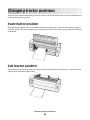
The tractor unit can be installed in the push tractor position or the pull tractor position. This section describes how
to change the tractor unit position.
Push tractor position
The printer comes with the tractor unit installed in the push tractor position, at the front of the printer. Using the
front push tractor is the most convenient way to load continuous forms, and allows you to use the Tear Off feature
of the printer.
Pull tractor position
The front tractor unit can be removed and installed at the top of the printer. It then functions as a pull tractor and
supports front and bottom paper loading.
Changing tractor positions
44
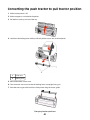
Converting the push tractor to pull tractor position
1 Make sure the printer is off.
2 Make sure paper is not loaded in the printer.
3 Pull the front cover up and out of the way.
4 Hold down the latching levers while you lift and pull the tractor unit out of the printer.
1
Tractor unit
2
Latching levers
5 Remove the ribbon access cover.
6 Turn the tractor unit around so that the latching levers are upright, facing you.
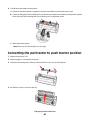
7 Place the tractor against the back slant of the printer along the tractor guides.
Changing tractor positions
45
8 To slide the tractor feeder into the printer:
a Hold down the latching levers and gently push the tractor feeder into the printer until it stops.
b Continue holding down the latching levers, and tilt the tractor feeder toward the front of the printer until the
hooks at the end of the latching levers fit around the posts on the printer frame.
c Release the latching levers.
Note: The tractor unit fits into place at a 40° angle.
Converting the pull tractor to push tractor position
1 Make sure the printer is off.
2 Make sure paper is not loaded in the printer.
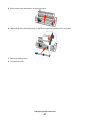
3 Hold down the latching levers while you lift and pull the tractor unit out of the printer.
4 Pull the front cover up and out of the way.
Changing tractor positions
46
5 Make sure the paper select lever is set to the
position.
6 While holding down the latching levers, fit the left and right locks onto the posts in the printer.
7 Release the latching levers.
8 Close the front cover.
Changing tractor positions
47
Understanding Setup mode and menu
options
The printer is preset at the factory for font, pitch, form length, and other settings. These are called factory default
settings. This chapter describes how to change the factory default settings, how to set up macros, and how to set
form length.
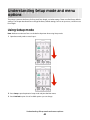
Using Setup mode
Note: Make sure continuous forms are loaded in the printer when using Setup mode.
1 Open the control panel to access layer 2.
2 Press Setup to put the printer in Setup mode and print the Main menu.
3 Press LineFeed to print a list of available options you can change.
Understanding Setup mode and menu options
48
Printer Setup mode—Main menu
To Select
Press
Exit and Save Setup
Set TOF
Print All
LineFeed
Forms Macro Options Macro
Data Options
Micro
Control Options
Micro
Emulation Options
Setup
Interface Options
Pitch
4 Select any option from the Main menu by pressing the corresponding button.
Note: A new menu will print each time you press a button, displaying the new selection.
5 After you make all your selections, the printer will print a page with your changes reflected.
6 Press Set TOF until the printer returns to the Main menu, or press Pitch from any menu containing a Return to
Main menu selection.
7 Press Set TOF again to exit Setup mode.
New settings are saved only when the printer exits Setup mode.
Note: If the printer runs out of paper while you are using Setup mode, load more paper into the Tractor pins,
and then press Setup to continue.
Changing menu settings (an example)
Note: Make sure continuous forms are loaded in the printer when using Setup mode.
The following is an example of how to change the Menu Language setting.
1 With the printer in Setup mode, press Micro to print the Control Options menu.
2 Press Pitch to print more Control Options.
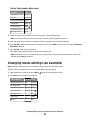
Control Options
Current Press
Return to Main menu Off
Set TOF
Uni-Dir Printing
LineFeed
On
Auto Ready Cut Sheet Enabled Macro
Paper Out Alarm
Enabled Micro
Bi-Di alignment
Micro
Demo Print
Setup
(More)
Pitch
Understanding Setup mode and menu options
49
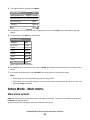
3 To change the Menu Language, press Macro.
Control Options
Current Press
Return to Main menu
English
Set TOF
Return to previous page Enabled LineFeed
Menu Language
Macro
TOF Read
Micro
Quiet
Micro
4 Press the button that corresponds to the language you want, or press Setup to print more Menu Language
options.
5 For this example, press Macro to select French.
Menu Language
To Select
Press
No Change
Set TOF
English
LineFeed
French
Macro
German
Micro
Italian
Micro
(More)
Setup
Return to Main menu Pitch
Printer menus now print in French.
6 Press Pitch to return to the Main menu or press Set TOF (No Change) to go back one menu and change another
setting.
7 If you return to the Main menu, press Set TOF to exit Setup mode and save the new setting.
Notes:
• New settings are saved only when the printer exits Setup mode.
• If the printer runs out of paper while you are using Setup mode, load more paper into the Tractor pins, and
then press Setup to continue.
Setup Mode - Main menu
Main menu options
Note: Use Setup mode to configure the printer according to your needs. To print a list of all default settings, press
LineFeed from the Main menu.
The following list items will appear at the top of the Main menu page:
Understanding Setup mode and menu options
50
Forms Macro Options
Forms Macro Options customizes macros to print a variety of forms.
Data Options
Data Options defines how information sent to the printer is processed.
Control Options
Control Options define how the printer performs many basic tasks.
Emulation Options
Emulation Options determine how the printer interacts with the program.
Interface Options
Interface Options define how information is transferred from the computer to the printer.
Forms Macro options
Note: Use Setup mode to configure the printer according to your needs. To print a list of all default settings, press
LineFeed from the Main menu.
The following list items outline and explain the Forms Macro functions and settings you can use with the printer:
Default Macro
Default Macro lets you select the macro default you want when the printer is powered on. Select Disabled if you do
not want to use a macro as the default.
Note: Enabled is the factory default setting.
Character options
Use the following options to select character option changes, as detailed:
• Default Font—Select the font you want from the available fonts listed.
• Font Lock—Select Yes to set Font Lock as the default even after the printer has been turned off and back on.
• Default Pitch—Select the pitch you want as the default from the available pitches listed.
Note: Not all pitches are available in all fonts.
• Pitch Lock—Select Yes to set Pitch Lock as the default even after the printer has been turned off and back on.
• Code Page—Select one of the following code pages for different language sets: 437, 850, 858, 860, 861, 863, 865,
437G, 813, 851, 853T, 857, 869, 920, 1004, or 1053.
Understanding Setup mode and menu options
51
Notes:
– Eastern European, Baltic, and Middle Eastern language code page configurations can be selected by holding
down specific key combinations when the printer is turned on. For more information, see the Technical
Reference available on the Lexmark Web site at www.lexmark.com.
– 437 is the factory default setting.
• Character Set—Select Character Set 1 or Character Set 2.
Note: Character Set 1 is the factory default setting for the US, and Character Set 2 is the factory default setting for
the European Union.
Paper Handling Options
Use the following options to select paper handling option changes, as detailed:
• Auto Tear Off
– On—Continuous forms automatically advance to the Tear Off bar position.
– Off—You can manually advance the perforation of a continuous form to the Tear Off bar position.
Note: On is the factory default setting.
• Auto Cut Sheet Load
– On—Cut sheet paper automatically loads to the current Top-Of-Form position.
– Off—You must press FormFeed to load paper.
Note: On is the factory default setting.
• Auto Sheet Feeder
On—Automatically loads paper if the optional Auto Sheet Feeder is installed.
Note: Off is the factory default setting.
• Form Length
This option lets you set the form length (in lines per page) from one line to a maximum of 22 inches.
• Left Margin
This option lets you set the left margin to any inch increment from 0” to 3”.
• Right Margin
This option lets you set the right margin to any inch increment from 4” to 8”. If you have a wide carriage model,
the maximum right margin is 13.6”.
• Lines Per Inch
Lets you specify the number of text lines in an inch from 3 to 6.
Note: 6 is the factory default setting.
• Eject by FF
– On—Lets you eject loaded cut sheet paper by pressing FormFeed.
Note: On is the factory default setting.
Data options
Note: Use Setup mode to configure the printer according to your needs. To print a list of all default settings, press
LineFeed from the Main menu.
The following list items outline and explain the Data options and settings you can use with the printer:
Understanding Setup mode and menu options
52
Buffer
• Minimum—Sets the receive buffer size to zero
• Maximum—For 2580/2581 models, sets the receive buffer size to 64KB or 480KB, depending on whether NLQ II
(Near Letter Quality) Download is enabled
• Maximum—For 2590/2591 models, sets the receive buffer size to 47.5KB or 480KB, depending on whether
Download is enabled
Note: Maximum is the factory default setting.
Auto LF
Requires a line feed to occur.
• On—A line feed is performed for each Carrier Return (CR) code received.
• Off—A line feed does not occur when a CR code is received.
Note: Off is the factory default setting.
Auto CR
Requires a CR to occur.
• On—A CR is performed for each line feed code received.
• Off—A CR does not occur when a line feed code is received.
Note: Off is the factory default setting.
Zero Slash
• On—The zero (0) prints with a slash down the middle.
• Off—The zero (0) prints without a slash down the middle.
Note: Off is the factory default setting.
Download to NLQ II (available for 2580/2581 models only)
• Enabled—Reserves a portion of the receive buffer for downloading fonts
• Disabled—Uses the entire buffer as a receive buffer
Note: Enabled is the factory default setting.
Download (available for 2590/2591 models only)
• Enabled—Reserves a portion of the receive buffer for downloading fonts
• Disabled—Uses the entire buffer as a receive buffer
Note: Enabled is the factory default setting.
Code Page Sub.
• Enabled—Substitutes code page 858 for 850 to allow older programs access to the European characters
• Disabled—No code page substitution
Note: Disabled is the factory default setting.
Understanding Setup mode and menu options
53
Control options
Note: Use Setup mode to configure the printer according to your needs. To print a list of all default settings, press
LineFeed from the Main menu.
The following list items outline and explain the Control options and settings you can use with the printer:
Uni-Dir Printing
• On—The printer prints unidirectionally by line (in NLQ mode).
• Off—The printer prints one line and a return line of print bidirectionally. Proportional Spacing is an exception;
when this pitch is selected, the printer still prints unidirectionally.
Note: Off is the factory default setting.
Auto Ready Cut Sheet
Customizes how the printer goes to the Ready state after a cut sheet is loaded.
• On—The printer automatically goes to the Ready state after a cut sheet is loaded.
• Off—The printer remains offline after a cut sheet is loaded. Press Start/Stop to return the printer to the Ready
state.
Note: On is the factory default setting.
Paper Out Alarm
• Enabled—An alarm sounds when the printer runs out of paper.
• Disabled—No alarm sounds when the printer runs out of paper.
Note: Enabled is the factory default setting.
Demo Print
• Enabled—Prints a Demo page
• Disabled—Does not print a Demo page
Note: Enabled is the factory default setting.
Menu Language
Select the language you want the menus to print in. Available languages are: English, French, German, Italian, Spanish,
and Brazilian Portuguese.
Note: English is the factory default setting.
TOF Read
• Enabled—Verifies the Top-Of-Form before printing begins on continuous forms
• Disabled—Does not verify the Top-Of-Form before printing on continuous forms
Note: Enabled is the factory default setting.
Understanding Setup mode and menu options
54
Quiet
• Enabled—The printer prints at a quieter noise level.
• Disabled—The printer prints at the normal noise level.
Note: Disabled is the factory default setting.
Note: Printing speed slows in Quiet mode.
Emulation options
Note: Enter Setup mode to configure the printer according to your needs. For more information, see “Using Setup
mode” on page 48. To print a list of all default settings, press LineFeed from the Main menu.
Make Emulation option selections from IBM (the factory default setting), Epson, or OKI mode. For more information
regarding data stream changes, see the Technical Reference available on the Lexmark Web site at
www.lexmark.com/publications.
IBM mode
Proprinter III, available only on 2580/2581 printers, enables compatibility with the Proprinter III.
• On—The printer emulates a Proprinter III.
• Off—The printer operates with added capabilities.
AGM, available only on 2590/2591 models, lets you use the high-resolution 24-wire graphics commands. These
commands are similar to those used with the Epson LQ570/LQ 1070.
• On—Graphics commands are available.
• Off—Graphics commands are not available.
Note: Off is the factory default setting.
Epson mode
• Table Select lets you select Italic Character Table or Epson Extended Graphic Character Table.
Note: Graphics is the factory default setting.
• Int'l Char Set lets you select the character set associated with the language you want to print in.
Supported international character sets for Epson mode are: USA, France, Germany, U.K., Denmark, Sweden, Italy,
and Spain I.
The following character sets are also supported, but only through host commands used by Epson FX850/FX 1050:
Japan, Norway, Denmark II, Korea (2580/2581 models only), Spain II, Latin America, and Legal.
Note: USA is the factory default setting.
OKI mode
OKI mode lets you select from the following functions:
•
•
•
•
•
7 or 8 Bit Graphics
Paper Out Override
Reset Inhibit
Print Suppress Effective
Print DEL Code
Understanding Setup mode and menu options
55
Interface options
Note: Use Setup mode to configure the printer according to your needs. To print a list of all default settings, press
LineFeed from the Main menu.
The following list items outline and explain the Interface options and settings you can use with the printer:
Interface Selection
Unless turned off, the Auto setting automatically selects the printer interface from the available connection cables.
The following connection cables are available: parallel cable, USB cable, serial cable (only available when an optional
serial interface is installed), and network cable (only available on network models).
Note: Auto is the factory default setting.
Honor Init.
• Enabled—Honors the initialization signal on the parallel port
• Disabled—Ignores the initialization signal on the parallel port
Note: Enabled is the factory default setting.
Understanding Setup mode and menu options
56
Maintaining the printer
Periodically, certain tasks are required to maintain optimum print quality.
Ordering supplies
Use the listed part numbers to order printer supply items you will need.
Supply item
Parallel cable
Part number
• 1329605 (10-foot cable)
• 1427498 (20-foot cable)
USB cable
12A2405
Serial adapter and cable
12T0154 (Serial Interface option)
1038693 (50-foot cable)
Printer ribbon
• 11A3540 (2400/2500 series standard re-inking ribbon)
• 11A3550 (2500 series high yield re-inking ribbon)
Note: Printer ribbons can be ordered from the Lexmark Web site at www.lexmark.com.
Removing the ribbon cartridge
1 Turn the printer off.
2 Lift the left and right release latches on the ribbon access cover to remove it.
3 Place the ribbon access cover on a flat surface.
4 Set the forms thickness lever to position 7.
5 Squeeze the left and right latches on the ribbon cartridge to lift it out of the printer.
Cleaning the printer
Preparing the printer for cleaning
1 Turn the printer off.
2 Unplug the power cord from the wall outlet.
CAUTION—HOT SURFACE: The printhead may be hot. If so, allow it to cool before touching.
3 Squeeze the left and right latches on the ribbon cartridge, and then lift it out of the printer.
Cleaning the inside of the printer
Every few months, use a soft brush and a vacuum to remove dust, ribbon lint, and pieces of paper from the printer.
Vacuum any dust from around the printhead and from inside the printer.
Maintaining the printer
57
Cleaning the outside of the printer
Clean the outside of the printer with a damp cloth and mild soap. Do not use spray or chemical cleaners anywhere
on your printer. Do not use liquids or spray near the air vents. For stubborn ink stains on the outside of the printer,
use a commercial mechanic's hand cleaner.
Recycling Lexmark products
To return Lexmark products to Lexmark for recycling:
1 Visit our Web site at www.lexmark.com/recycle.
2 Find the product type you want to recycle, and then select your country from the list.
3 Follow the instructions on the computer screen.
Maintaining the printer
58
Administrative support
Restoring the factory default settings
Restoring the US factory default settings
The factory default settings for the United States are:
• Code pages: 437
• Character Set: 1
• Form length: 11 inches
To restore the factory default settings:
1 Make sure the ribbon cartridge is installed and paper is loaded.
2 Turn the printer off.
3 Open the ribbon access cover.
4 Move the printhead over toward the control panel side of the printer until it stops.
5 Close the ribbon access cover.
6 Press and hold Tear Off and Load/Unload while turning the printer on.
7 Continue holding the buttons until the carrier moves.
Note: The control panel lights blink on and off several times.
The factory default settings have been restored once the carrier moves.
Restoring the EU factory default settings
The factory default settings for Europe are:
• Code pages: 858
• Character Set: 2
• Form length: 12 inches
To restore the factory default settings:
1 Make sure the ribbon cartridge is installed and paper is loaded.
2 Turn the printer off.
3 Open the ribbon access cover.
4 Move the printhead over toward the control panel side of the printer until it stops.
5 Close the ribbon access cover.
6 Press and hold Tear Off and Tractor while turning the printer on.
7 Continue holding the buttons until the carrier moves.
Note: The control panel lights blink on and off several times.
Administrative support
59
The factory default settings have been restored once the carrier moves.
Supporting IPSec
Internet Protocol Security (IPSec) provides authentication and encryption at the network layer allowing all application
and network connections over the IP protocol to be secure. IPSec can be set up between the printer and up to five
hosts, using both IPv4 and IPv6.
To configure IPSec using the Embedded Web Server:
1 Open a Web browser. In the address bar, type the IP address of the printer or print server to be protected using
the format: http://ip_address.
2 Click Configuration.
3 Under Other Settings, click Network/Ports.
4 Click IPSec.
IPSec supports two types of authentication:
• Shared Key Authentication—Authenticates any ASCII phrase shared among all participating host computers.
This is the easiest way to configure when only a few host computers on the network use IPSec.
• Certificate Authentication—Authenticates any host computer or subnet of hosts for IPSec. Each host computer
must have a public/private key pair. Validate Peer Certificate is enabled by default, requiring each host to have a
signed authority certificate that is installed. Each host must have its identifier in the Subject Alternate Name field
of the signed certificate.
Note: After a printer is configured for IPSec with a host, IPSec is required for any IP communications to take place.
Supporting SNMPv3
Simple Network Management Protocol version 3 (SNMPv3) allows for encrypted and authenticated network
connections. It also lets a system support person select the desired level of security. Prior to use, at least one user
name and password must be assigned from the settings page.
To configure SNMPv3 through the Embedded Web Server:
1 Open a Web browser. In the address bar, type the IP address of the printer or print server to be protected using
the format: http://ip_address/.
2 Click Configuration.
3 Under Other Settings, click Network/Ports.
4 Click SNMP.
SNMPv3 authentication and encryption has three levels of support:
• No authentication and no encryption
• Authentication with no encryption
• Authentication and encryption
Administrative support
60
Using 802.1x authentication
802.1x authentication allows the printer to join networks that require authentication before allowing access.
Support for 802.1x requires the establishment of credentials for the printer, such as certificates. Certificates provide
a way for the printer to be known to the Authentication Server (AS). The AS allows network access to print servers
presenting a valid set of credentials. You can manage the credentials by using the Embedded Web Server.
To install and use certificates as part of the credentials:
1 Open a Web browser. In the address bar, type the IP address of the printer or print server to be protected using
the format: http://ip_address/.
2 Click Configuration.
3 Under Other Settings, click Network/Ports.
4 Click Certificate Management.
To enable and configure 802.1x after installing the required certificates:
1 Open a Web browser. In the address bar, type the IP address of the printer or print server to be protected using
the format: http://ip_address/.
2 Click Configuration.
3 Under Other Settings, click Network/Ports.
4 Click 802.1x Authentication.
Administrative support
61
Troubleshooting
Checking an unresponsive printer
If your printer is not responding, make sure:
•
•
•
•
•
•
The power cord is plugged into the printer and a properly grounded electrical outlet.
The electrical outlet is not turned off by any switch or breaker.
The printer is not plugged into any surge protectors, uninterrupted power supplies, or extension cords.
Other electrical equipment plugged into the outlet is working.
The printer is turned on.
The printer cable is securely attached to the printer and the host computer, print server, option, or other network
device.
Once you have checked each of these possibilities, turn the printer off and then back on. This often fixes the problem.
Testing the printer
Each time you turn the printer on, an internal check, or power-on self test, is performed.
Running a printer test page produces a printout that shows any problem the printer may be experiencing.
Note: You can run a printer test page with or without a computer connected to the printer.
Running a printer test page
1 Make sure the paper is loaded, and the ribbon cartridge is installed.
2 Turn the printer off.
3 Press and hold LineFeed while turning the printer on.
4 Release LineFeed when printing starts.
Printing continues until you stop the printer.
Interrupting or stopping a printer test page
To interrupt a printer test page:
1 Press Start/Stop.
The printer test page stops printing after a complete line of characters has printed.
2 Press Start/Stop again to continue printing a printer test page.
To stop a printer test page, turn the printer off.
Troubleshooting
62
Using Hex Trace mode
Hex Trace mode prints the control codes that are sent to the printer. Use this mode to help diagnose software/driver
problems.
1 Make sure the paper is loaded, and the ribbon cartridge is installed.
2 Turn the printer off.
3 Press and hold Tractor while turning the printer on.
4 Release Tractor when the lights go out.
5 Turn the printer off and back on again to exit Hex Trace mode.
Checking the printer status
Check the control panel lights and compare their status with the table information. Different patterns and
combinations of lights provide you with information about the condition of the printer and actions needed to correct
the condition.
Note: Many error codes can be corrected by turning the printer off and back on again.
Printer status
Control panel lights
Status
Action required
Power
On
Normal operating conditions. No action required.
Ready
On
Paper Out
Off
Power
On
Ready
Off
Paper Out
Off
Power
On
Ready
Off
Paper Out
Blinking
Normal offline condition
1 Load paper.
2 Press Start/Stop.
The Paper Out light goes off and the Ready light comes
on.
Note: If you installed the optional Tractor 2 Feeder and
you are printing continuous forms, make sure the paper
select lever is in the continuous forms position.
Ready
Blinking
The printer has data in the buffer that needs to be
printed.
Troubleshooting
63
Control panel lights
Status
Power
On
Ready
Blinking
Paper Out
Blinking
Panel Lock
Blinking
Font Lock
Blinking
Action required
1 Check for a paper or ribbon jam.
2 Turn the printer off.
3 Remove the ribbon cartridge, and then check for
paper dust or bits of paper.
4 Make sure the carrier packing tape has been
removed.
5 With the printer on, run the printer test.
a Replace the ribbon cartridge, and make sure
paper is loaded.
b Turn the printer off.
c Press and hold LineFeed while turning the
printer on.
d Release LineFeed when printing starts.
Printing continues until the printer is stopped.
6 If the printer test fails, contact Customer Support.
Note: If the printer is not beeping, there is a power
supply problem. Contact Customer Support.
Power
Off
Check the power cord and power source. If the power
light remains off, contact Customer Support.
Power
On
Ready
Off
Paper Out
Blinking
The paper select lever has been changed while the
paper was loaded. Move the paper select lever back to
the correct position, and then press Start/Stop.
Panel Lock
Blinking
Power
On
Ready
Blinking
Paper Out
Blinking
Panel Lock
Blinking
Power
On
Ready
Blinking
Paper Out
Blinking
Tractor 2
Blinking
Note: Make sure the paper is parked or unloaded before
changing the position of the paper select lever.
1 Open and close the control panel.
2 Turn the printer off and back on.
3 If the control panel light sequence continues,
contact Customer Support.
Make sure the Tractor 2 option is installed correctly. For
more information, see the documentation that came
with the option.
Troubleshooting
64
Control panel lights
Status
Power
On
Ready
Blinking
Paper Out
Blinking
Font Lock
Blinking
All lights on solid
On
Panel Lock
Blinking
Power
On
Ready
Blinking
Tractor 2
Blinking
Paper Out
Blinking
Font Lock
Blinking
Power
On
Ready
Blinking
Paper Out
Blinking
Panel Lock
Blinking
Font Lock
Blinking
Power
On
Ready
Tractor 2
Blinking
Blinking
Paper Out
Blinking
Panel Lock
Blinking
Font Lock
Blinking
Power
On
Ready
Blinking
Tractor 2
Paper Out
Blinking
Blinking
Panel Lock
Blinking
Action required
1 Turn the printer off.
2 Turn the printer on.
If the control panel light sequence returns, contact
Customer Support.
Note: If you need help locating the nearest service
representative, visit the Lexmark Web site at
www.lexmark.com.
Adjusting character (bidirectional) alignment
Occasionally you may want to adjust the character alignment (also called bidirectional alignment) on your printer.
The following steps illustrate how to adjust the alignment of the print wires.
Notes:
• Make sure continuous forms are loaded in the printer.
• Make sure the factory default setting for the Uni-Dir Printing menu option is set to Off (bidirectional).
• Make sure the default macro is set to Disabled. For more information, see “Forms Macro options” on page 51.
1 Turn the printer off.
2 Open the control panel cover to access layer 2.
3 Press and hold Pitch while turning the printer on.
Troubleshooting
65
The draft alignment bars print.
Note: The current value is the number printed below the bars.
4 To set Draft, select the best row of alignment bars from the 01–07 printout.
a Press Micro or Micro to select the best alignment by number, or keep the current value.
b Press Set TOF to save your selection.
After you make your selection, the printer prints a single row showing the current alignment setting.
c The printer automatically starts printing the alignment bars for Near-Letter-Quality (NLQ).
The current value is the number printed below the bars.
Solving printing problems
Printer test works, but the printer does not print when attached to
the computer
These are possible solutions. Try one or more of the following:
• Turn the printer and the computer off.
• Make sure the printer cable is correctly connected at both ends.
Troubleshooting
66
• See the documentation that came with your program to make sure you have selected the correct printer driver.
• If you are using Windows, use the Windows Forms Printer 2500 Series driver available from the Lexmark Web site
at www.lexmark.com.
• If you are using DOS, follow the instructions that came with your DOS application.
Printer is noisy
These are possible solutions. Try one of more of the following:
• Move any objects that are touching the printer.
• Make sure the printer is on a level, sturdy surface.
• Close the ribbon access cover.
• Close the front cover.
Printer sounds like it is printing, but does not print
These are possible solutions. Try one or more of the following:
• Make sure the forms thickness lever is appropriately set for the paper thickness being used.
•
•
•
•
Make sure the ribbon cartridge is correctly installed and securely snapped onto the carrier.
Adjust the ribbon density control knob.
Replace the ribbon cartridge if it is out of ink.
Turn the printer off and then back on.
Printer alarm sounds
This might indicate an error or a normal operation. If an error condition is present, these are possible solutions. Try
one or more of the following:
• Check the status of the control panel lights.
• Turn the printer off and then back on.
Printer goes to the Tear Off position before the print job finishes
Set Auto Tear Off to On:
1 Press Start/Stop.
2 Press and hold Tear Off until the printer beeps and the
light blinks.
3 Open the control panel to access layer 2.
4 Press Micro or Micro to move the paper to the desired position.
5 Close the control panel.
The printer beeps twice and the paper rolls backward and then advances to the new Top-Of-Form position.
6 Press Start/Stop.
The paper remains at the new Top-Of-Form position until another job is initiated.
7 Send the print job again.
Troubleshooting
67
Buttons do not work, except for Start/Stop, FormFeed, Tear Off and
Load/Unload
1 Turn the printer off.
2 Press and hold Load/Unload and Tractor while turning the printer on.
When the
light goes off, the control panel is unlocked, and all buttons are active.
Printer power switch is on, but the power light is off
These are possible solutions. Try one of more of the following:
• Make sure the power cord is correctly connected at both ends.
• Verify that the power source works.
• Turn the printer off and then back on.
Left margin moves to the right during printing
These are possible solutions. Try one or more of the following:
•
•
•
•
•
Make sure the ribbon cartridge is properly installed, and the paper is correctly loaded.
Make sure the carrier packing tape has been removed.
Check to see if anything is blocking the carrier movement.
If a paper jam has recently occurred, turn the printer off and then back on.
Contact Customer Support.
Incorrect line length; lines do not start at the left margin
These are possible solutions. Try one or more of the following:
• See the documentation that came with the program.
• Make sure the correct printer driver is selected.
• Adjust the left margin by adjusting the tractor or paper guide.
Printer speed slows
These are possible solutions. Try one of more of the following:
• Make sure the forms thickness lever setting is appropriate for the thickness of the forms being used.
Printing speed is slower when the forms thickness lever is set at 4 or higher. This is normal.
• Select resident fonts.
Note: Automatic thermal slowdown protects the printhead from overheating. This operation is normal and is
affected by the print type being used (letter quality, etc.) and the amount and density of graphics being printed.
Troubleshooting
68
Incorrect characters print, left margin changes, or printing stops
These are possible solutions. Try one or more of the following:
• Make sure the printer cable is properly shielded and correctly connected at both ends.
• Select the correct driver.
– If you are using Windows, use the Windows Forms Printer 2500 Series driver available from the Lexmark Web
site at www.lexmark.com.
– If you are using DOS, follow the instructions that came with your DOS application.
Printing continues beyond the edges of the continuous forms
These are possible solutions. Try one or more of the following:
•
•
•
•
•
Change the program so that the selected paper size is the same as the actual paper size.
Adjust tractors or paper guides to align with the paper being used.
Make sure the ribbon cartridge is correctly installed.
Clear any paper jam.
Turn the printer off and then back on.
Selected font or pitch is not printing or is changing
If you encounter this problem, your software is overriding your control panel font and/or pitch selection, or using
graphic fonts. If possible, use resident fonts and/or pitches. Otherwise, try the following solution:
• Select another font from the Character Options selection of the Main menu.
• Select another pitch from the Character Options selection of the Main menu.
Solving paper feed problems
Paper is jammed in the printer
To clear a continuous forms paper jam:
1 Turn the printer off.
2 Detach any continuous forms that have already printed.
3 Set the forms thickness lever to position 7.
4 Tear the continuous forms off at the perforation line just below the bottom of the printer.
5 Open the front cover.
6 Open the left and right tractor doors, and then remove the paper.
7 Remove the ribbon access cover to clear any torn paper.
8 Remove torn perforation strips or bits of paper from the paper path.
Troubleshooting
69
To clear a cut form paper jam:
1 Turn the printer off.
2 Set the forms thickness lever to position 7.
3 Push the paper select lever down to the
position.
4 Gently pull the sheet of paper from the front of the printer.
5 Remove the ribbon access cover to clear any torn pieces of paper.
6 Push the paper select lever up to the
position.
7 Set the forms thickness lever to the proper setting for the type of paper you are using.
Paper is jammed in the Auto Sheet Feeder
These are possible solutions. Try one or more of the following:
• Remove the paper.
• Align the edges of the paper, and then reload the paper.
• Remove foreign objects from the Auto Sheet Feeder:
1 Remove the Auto Sheet Feeder.
2 Remove any foreign objects.
3 Reinstall the Auto Sheet Feeder.
Paper fed in the Auto Sheet Feeder jams at the printer entrance
These are possible solutions. Try one or more of the following:
• Remove the Auto Sheet Feeder, remove any bits of paper or foreign objects, and then reinstall the Auto Sheet
Feeder.
• Move the paper guide to the left.
• Remove the Auto Sheet Feeder, move the continuous forms to the park position using the Load/Unload button,
and then reinstall the Auto Sheet Feeder.
• Adjust the forms thickness lever to correspond with the paper thickness being used.
Paper jam in the Tractor 2 Feeder
The continuous form on one tractor feeder was not properly parked before switching to the other tractor feeder.
Make sure you tear off the leading edge of the continuous form on the currently selected tractor feeder before
switching tractor feeders. For help, see the documentation that came with the optional Tractor 2 Feeder.
Printer does not feed paper
These are possible solutions. Try one or more of the following:
• Remove all forms and pieces of paper.
Look for loose pinfeed hole strips that can sometimes tear from the continuous forms and remain in the printer.
• Readjust the right tractor position.
• Make sure the forms thickness lever is set correctly for the paper type being used.
• Press Load/Unload to release the continuous form paper from a parked status.
Troubleshooting
70
• Make sure the right paper guide is set correctly for the paper width being used.
• Make sure the Auto Cut Sheet Load option is set correctly. For more information, see “Main menu options” on
page 50.
• Make sure the paper select lever is in the correct position for the type of sheet you are trying to print.
Printer does not feed from the optional Tractor 2 Feeder
These are possible solutions. Try one or more of the following:
• Move the paper select lever down to the position.
• Press Tractor to select the other tractor feeder or load paper on the selected tractor feeder.
• Plug the optional Tractor 2 Feeder into the back of the printer.
Printer does not feed from the Auto Sheet Feeder
These are possible solutions. Try one or more of the following:
•
•
•
•
•
•
•
Set the Auto Sheet Feeder locking lever to the back position.
Set the paper select lever to the
position.
Enter Setup mode and set the option to On. For more information, see “Main menu options” on page 50.
Remove extra sheets of paper if more than 150 sheets are loaded.
Remove all paper, and then replace it with paper that has a lower weight.
Remove all paper, fan the top and bottom edges, and then place it back in the paper bin.
Clean the Auto Sheet Feeder rollers:
1 Remove all paper from the printer.
2 Turn the Auto Sheet Feeder upside down, and then place it on a flat surface.
3 Clean the two paper guide wheels located inside the bottom of the Auto Sheet Feeder using isopropyl alcohol
and a clean cloth.
Rotate one roller while applying the cleaning cloth to the other roller.
The optional Tractor 2 Feeder positions paper at incorrect
Top-Of-Form position
The Top-Of-Form is set incorrectly. For more information about correctly setting Top-Of-Form, see “Setting Top-ofForm” on page 40.
The Auto Sheet Feeder feeds paper at an incorrect rate
These are possible solutions. Try one or more of the following:
• Remove all paper from the Auto Sheet Feeder and replace it with paper that has a lighter weight.
• Remove the Auto Sheet Feeder, remove any bits of paper or foreign objects, and then reinstall the Auto Sheet
Feeder.
• Move the paper guide to the left.
• Remove the Auto Sheet Feeder, move the continuous forms to the park position using the Load/Unload button,
and then reinstall the Auto Sheet Feeder.
• Adjust the forms thickness lever to correspond with the paper thickness being used.
Troubleshooting
71
The Auto Sheet Feeder places paper at the wrong Top-Of-Form
position
These are possible solutions. Try one or more of the following:
• Make sure the Top-Of-Form is set correctly. For information about Top-Of-Form settings, see the documentation
that came with the Auto Sheet Feeder.
• Make sure the paper being used meets the paper specifications in the Auto Sheet Feeder documentation.
• Clean the Auto Sheet Feeder rollers:
1 Remove all paper from the printer.
2 Turn the Auto Sheet Feeder upside down, and then place it on a flat surface.
3 Clean the two paper guide rollers located inside the bottom of the Auto Sheet Feeder using isopropyl alcohol
and a clean cloth.
You can rotate one roller while applying the cleaning cloth to the other roller.
Paper fed from the Auto Sheet Feeder is skewed
These are possible solutions. Try one of more of the following:
• Adjust the left and right paper guides to fit the paper width being used.
• Remove paper from the paper bin.
• Fan the paper, and then reload it.
The Auto Sheet Feeder feeds multiple sheets
These are possible solutions. Try one of more of the following:
•
•
•
•
Remove paper from the paper bin.
Fan the paper, and then reload it.
Remove all paper from the paper bin, and replace it with paper that has a heavier weight.
Add more paper to the paper bin.
Troubleshooting
72
Solving print quality problems
The information in the following topics may help you solve print quality problems. If these suggestions do not correct
the problem, contact Customer Support. You may have a printer part that requires adjustment or replacement.
Print is too light
These are possible solutions. Try one or more of the following:
CHECK THE RIBBON DENSITY CONTROL KNOB
The ribbon density control knob located on the ribbon cartridge is preset to 1. When the print becomes too light,
turn the knob from 1 to 2 to increase print darkness.
CHECK THE FORMS THICKNESS LEVER
The forms thickness lever may be set to the wrong number. If so, move it to the correct number for the form
thickness you are using.
Dots are missing or print quality is poor
1 Make sure the ribbon is securely snapped down on the carrier.
2 Adjust the density control knob from 1 to 2 to increase darkness of print.
3 Replace the ribbon cartridge.
4 Run a printer test.
a Make sure the paper and the ribbon cartridge are installed.
b Turn the printer off.
c Press and hold LineFeed while you turn the printer on, and then release LineFeed when printing begins.
Troubleshooting
73
d Press Start/Stop to stop or interrupt the printer test.
e Press Start/Stop again if you want to resume the printer test.
Printing continues until you turn the printer off.
If the print quality does not improve, contact Customer Support.
Characters are wrong or missing
Run a printer test:
1 Make sure the forms thickness lever setting is in a position that corresponds with the forms you are using.
2 Make sure paper and the ribbon cartridge are installed.
3 Set the paper select lever to the position that corresponds with the forms you are using.
4 Turn the printer off.
5 Press and hold LineFeed while you turn the printer on.
6 Release LineFeed when printing starts.
Printing continues until you stop the printer.
7 Press Start/Stop to stop the printing, and then turn the printer off.
Forms are smudged or print is too dark
These are possible solutions. Try one or more of the following:
•
•
•
•
•
•
Make sure the forms thickness lever is in the appropriate position for the paper being used.
Make sure the ribbon is installed correctly.
Untwist or untangle the ribbon.
Remove the ribbon slack using the ribbon advance knob.
Set the density control knob to 1.
Remove and replace the ribbon cartridge.
Incorrect number of lines on a page
These are possible solutions. Try one or more of the following:
• Make sure the paper is free to feed from the carton and there is nothing obstructing paper movement.
• Readjust the Top-Of-Form. For more information, see “Setting Top-of-Form” on page 40.
• From the Setup menu, adjust the page length. For more information, see “Using Setup mode” on page 48.
Graphics do not print
These are possible solutions. Try one or more of the following:
• See the documentation that came with your software application.
• Make sure the correct printer driver is selected.
Troubleshooting
74
Incorrect line spacing or overprinting occurs
These are possible solutions. Try one or more of the following:
• Reset the forms thickness lever.
• For more information, see the documentation that came with your software application.
Contacting Customer Support
When you call Customer Support, describe the problem you are experiencing, the message on the display,
and the troubleshooting steps you have already taken to find a solution.
You need to know your printer model type and serial number. For more information, see the label on the inside
top front cover of the printer. The serial number is also listed on the menu settings page.
In the U.S. or Canada, call (1-800-539-6275). For other countries/regions, visit the Lexmark Web site at
www.lexmark.com.
Troubleshooting
75
Notices
Product name
Machine type
Model number
Lexmark 2580
2580
100
Lexmark 2580n
2580
110
Lexmark 2581
2581
100
Lexmark 2581n
2581
110
Lexmark 2590
2590
100
Lexmark 2590n
2590
110
Lexmark 2591
2591
100
Lexmark 2591n
2591
110
Edition notice
July 2007
The following paragraph does not apply to any country where such provisions are inconsistent with local
law: LEXMARK INTERNATIONAL, INC., PROVIDES THIS PUBLICATION “AS IS” WITHOUT WARRANTY OF ANY KIND,
EITHER EXPRESS OR IMPLIED, INCLUDING, BUT NOT LIMITED TO, THE IMPLIED WARRANTIES OF MERCHANTABILITY
OR FITNESS FOR A PARTICULAR PURPOSE. Some states do not allow disclaimer of express or implied warranties in
certain transactions; therefore, this statement may not apply to you.
This publication could include technical inaccuracies or typographical errors. Changes are periodically made to the
information herein; these changes will be incorporated in later editions. Improvements or changes in the products
or the programs described may be made at any time.
References in this publication to products, programs, or services do not imply that the manufacturer intends to make
these available in all countries in which it operates. Any reference to a product, program, or service is not intended
to state or imply that only that product, program, or service may be used. Any functionally equivalent product,
program, or service that does not infringe any existing intellectual property right may be used instead. Evaluation
and verification of operation in conjunction with other products, programs, or services, except those expressly
designated by the manufacturer, are the user’s responsibility.
For Lexmark technical support, visit support.lexmark.com.
For information on supplies and downloads, visit www.lexmark.com.
If you don't have access to the Internet, you can contact Lexmark by mail:
Lexmark International, Inc.
Bldg 004-2/CSC
740 New Circle Road NW
Lexington, KY 40550
© 2007 Lexmark International, Inc.
All rights reserved.
Notices
76
UNITED STATES GOVERNMENT RIGHTS
This software and any accompanying documentation provided under this agreement are commercial computer
software and documentation developed exclusively at private expense.
Trademarks
Lexmark and Lexmark with diamond design, ExecJet, and Proprinter are trademarks of Lexmark International, Inc.,
registered in the United States and/or other countries.
Personal Printer Series is a trademark of Lexmark International, Inc.
ITC Avant Garde Gothic is a trademark or registered trademark of International Typeface Corporation.
All other trademarks are the property of their respective owners.
Conventions
Note: A Note identifies something that could help you.
Warning—Potential Damage: A Warning identifies something that could damage your product hardware or
software.
CAUTION—POTENTIAL INJURY: A CAUTION identifies something that could cause you harm.
CAUTION—DO NOT TOUCH: This type of CAUTION indicates that you should not touch the marked area.
CAUTION—HOT SURFACE: This type of CAUTION indicates a hot surface.
CAUTION—SHOCK HAZARD: This type of CAUTION indicates a shock hazard.
CAUTION—TIPPING HAZARD: This type of CAUTION indicates a tipping hazard.
Federal Communications Commission (FCC) compliance
information statement
This product has been tested and found to comply with the limits for a Class B digital device, pursuant to Part 15 of
the FCC Rules. Operation is subject to the following two conditions: (1) this device may not cause harmful interference,
and (2) this device must accept any interference received, including interference that may cause undesired operation.
Notices
77
The FCC Class B limits are designed to provide reasonable protection against harmful interference when the
equipment is operated in a residential installation. This equipment generates, uses, and can radiate radio frequency
energy and, if not installed and used in accordance with the instructions, may cause harmful interference to radio
communications. However, there is no guarantee that interference will not occur in a particular installation. If this
equipment does cause harmful interference to radio or television reception, which can be determined by turning
the equipment off and on, the user is encouraged to try to correct the interference by one or more of the following
measures:
•
•
•
•
Reorient or relocate the receiving antenna.
Increase the separation between the equipment and receiver.
Connect the equipment into an outlet on a circuit different from that to which the receiver is connected.
Consult your point of purchase or service representative for additional suggestions.
The manufacturer is not responsible for radio or television interference caused by using other than recommended
cables or by unauthorized changes or modifications to this equipment. Unauthorized changes or modifications could
void the user's authority to operate this equipment.
Note: To assure compliance with FCC regulations on electromagnetic interference for a Class B computing device,
use a properly shielded and grounded cable such as Lexmark part number 1021294 for USB attach. Use of a substitute
cable not properly shielded and grounded may result in a violation of FCC regulations.
Any questions regarding this compliance information statement should be directed to:
Director of Lexmark Technology & Services
Lexmark International, Inc.
740 West New Circle Road
Lexington, KY 40550
(859) 232–3000
Industry Canada compliance statement
This Class B digital apparatus meets all requirements of the Canadian Interference-Causing Equipment Standard
ICES-003.
Avis de conformité aux normes de l’industrie du Canada
Cet appareil numérique de classe B est conforme aux exigences de la norme canadienne relative aux équipements
pouvant causer des interférences NMB-003.
European Community (EC) directives conformity
This product is in conformity with the protection requirements of EC Council directives 89/336/EEC and 2006/95/EC
on the approximation and harmonization of the laws of the Member States relating to electromagnetic compatibility
and safety of electrical equipment designed for use within certain voltage limits.
A declaration of conformity with the requirements of the directives has been signed by the Director of Manufacturing
and Technical Support, Lexmark International, Inc., S.A., Boigny, France.
This product satisfies the Class B limits of EN 55022 and safety requirements of EN 60950.
Notices
78
Noise emission levels
The following measurements were made in accordance with ISO 7779 and reported in conformance with ISO 9296.
Note: Some modes may not apply to your product.
1-meter average sound pressure, dBA
Printing
56 dBA
Ready
NA
Values are subject to change. See www.lexmark.com for current values.
Waste from Electrical and Electronic Equipment (WEEE) directive
The WEEE logo signifies specific recycling programs and procedures for electronic products in countries of the
European Union. We encourage the recycling of our products. If you have further questions about recycling options,
visit the Lexmark Web site at www.lexmark.com for your local sales office phone number.
ENERGY STAR
Power consumption
Product power consumption
The following table documents the power consumption characteristics of the product.
Note: Some modes may not apply to your product.
Mode
Description
Power consumption (Watts)
Printing
The product is generating hard-copy output from electronic inputs. 47 W
Copying
The product is generating hard-copy output from hard-copy original NA
documents.
Notices
79
Mode
Description
Power consumption (Watts)
Scanning
The product is scanning hard-copy documents.
NA
Ready
The product is waiting for a print job.
8W
Power Saver
The product is in energy-saving mode.
NA
High Off
The product is plugged into a wall outlet, but the power switch is
turned off.
NA
Low Off (<1 W Off) The product is plugged into a wall outlet, the power switch is turned NA
off, and the product is in the lowest possible power consumption
mode.
Off
The product is plugged into a wall outlet, but the power switch is
turned off.
0.055 W
The power consumption levels listed in the previous table represent time-averaged measurements. Instantaneous
power draws may be substantially higher than the average.
Values are subject to change. See www.lexmark.com for current values.
Power Saver
This product is designed with an energy-saving mode called Power Saver. The Power Saver Mode is equivalent to
the EPA Sleep Mode. The Power Saver Mode saves energy by lowering power consumption during extended periods
of inactivity. The Power Saver Mode is automatically engaged after this product is not used for a specified period of
time, called the Power Saver Timeout.
Off mode
If this product has an off mode which still consumes a small amount of power, then to completely stop product power
consumption, disconnect the power supply cord from the wall outlet.
Total energy usage
It is sometimes helpful to calculate the total product energy usage. Since power consumption claims are provided
in power units of Watts, the power consumption should be multiplied by the time the product spends in each mode
in order to calculate energy usage. The total product energy usage is the sum of each mode's energy usage.
Statement of Limited Warranty
Lexmark 2580
Lexmark 2590
Lexmark 2580n
Lexmark 2590n
Lexmark 2581
Lexmark 2591
Lexmark 2581n
Lexmark 2591n
Lexmark International, Inc., Lexington, KY
This limited warranty applies to the United States and Canada. For customers outside the U.S., refer to the countryspecific warranty information that came with your product.
Notices
80
This limited warranty applies to this product only if it was originally purchased for your use, and not for resale, from
Lexmark or a Lexmark Remarketer, referred to in this statement as “Remarketer.”
Limited warranty
Lexmark warrants that this product:
—Is manufactured from new parts, or new and serviceable used parts, which perform like new parts
—Is, during normal use, free from defects in material and workmanship
If this product does not function as warranted during the warranty period, contact a Remarketer or Lexmark for repair
or replacement (at Lexmark's option).
If this product is a feature or option, this statement applies only when that feature or option is used with the product
for which it was intended. To obtain warranty service, you may be required to present the feature or option with the
product.
If you transfer this product to another user, warranty service under the terms of this statement is available to that
user for the remainder of the warranty period. You should transfer proof of original purchase and this statement to
that user.
Limited warranty service
The warranty period starts on the date of original purchase as shown on the purchase receipt and ends 24 months
later provided that the warranty period for any supplies and for any maintenance items included with the printer
shall end earlier if it, or its original contents, are substantially used up, depleted, or consumed.
To obtain warranty service you may be required to present proof of original purchase. You may be required to deliver
your product to the Remarketer or Lexmark, or ship it prepaid and suitably packaged to a Lexmark designated location.
You are responsible for loss of, or damage to, a product in transit to the Remarketer or the Lexmark designated
location.
When warranty service involves the exchange of a product or part, the item replaced becomes the property of the
Remarketer or Lexmark. The replacement may be a new or repaired item.
The replacement item assumes the remaining warranty period of the original product.
Replacement is not available to you if the product you present for exchange is defaced, altered, in need of a repair
not included in warranty service, damaged beyond repair, or if the product is not free of all legal obligations,
restrictions, liens, and encumbrances.
Before you present this product for warranty service, remove all print cartridges, programs, data, and removable
storage media (unless directed otherwise by Lexmark).
For further explanation of your warranty alternatives and the nearest Lexmark authorized servicer in your area contact
Lexmark on the World Wide Web at www.lexmark.com/support.
Remote technical support is provided for this product throughout its warranty period. For products no longer covered
by a Lexmark warranty, technical support may not be available or only be available for a fee.
Extent of limited warranty
Lexmark does not warrant uninterrupted or error-free operation of any product or the durability or longevity of prints
produced by any product.
Warranty service does not include repair of failures caused by:
—Modification or unauthorized attachments
Notices
81
—Accidents, misuse, abuse or use inconsistent with Lexmark user’s guides, manuals, instructions or guidance
—Unsuitable physical or operating environment
—Maintenance by anyone other than Lexmark or a Lexmark authorized servicer
—Operation of a product beyond the limit of its duty cycle
—Use of printing media outside of Lexmark specifications
—Refurbishment, repair, refilling or remanufacture by a third party of products, supplies or parts
—Products, supplies, parts, materials (such as toners and inks), software, or interfaces not furnished by Lexmark
TO THE EXTENT PERMITTED BY APPLICABLE LAW, NEITHER LEXMARK NOR ITS THIRD PARTY SUPPLIERS OR
REMARKETERS MAKE ANY OTHER WARRANTY OR CONDITION OF ANY KIND, WHETHER EXPRESS OR IMPLIED,
WITH RESPECT TO THIS PRODUCT, AND SPECIFICALLY DISCLAIM THE IMPLIED WARRANTIES OR CONDITIONS
OF MERCHANTABILITY, FITNESS FOR A PARTICULAR PURPOSE, AND SATISFACTORY QUALITY. ANY
WARRANTIES THAT MAY NOT BE DISCLAIMED UNDER APPLICABLE LAW ARE LIMITED IN DURATION TO THE
WARRANTY PERIOD. NO WARRANTIES, EXPRESS OR IMPLIED, WILL APPLY AFTER THIS PERIOD. ALL
INFORMATION, SPECIFICATIONS, PRICES, AND SERVICES ARE SUBJECT TO CHANGE AT ANY TIME WITHOUT
NOTICE.
Limitation of liability
Your sole remedy under this limited warranty is set forth in this document. For any claim concerning performance
or nonperformance of Lexmark or a Remarketer for this product under this limited warranty, you may recover actual
damages up to the limit set forth in the following paragraph.
Lexmark's liability for actual damages from any cause whatsoever will be limited to the amount you paid for the
product that caused the damages. This limitation of liability will not apply to claims by you for bodily injury or damage
to real property or tangible personal property for which Lexmark is legally liable. IN NO EVENT WILL LEXMARK BE
LIABLE FOR ANY LOST PROFITS, LOST SAVINGS, INCIDENTAL DAMAGE, OR OTHER ECONOMIC OR
CONSEQUENTIAL DAMAGES. This is true even if you advise Lexmark or a Remarketer of the possibility of such
damages. Lexmark is not liable for any claim by you based on a third party claim.
This limitation of remedies also applies to claims against any Suppliers and Remarketers of Lexmark. Lexmark's and
its Suppliers' and Remarketers' limitations of remedies are not cumulative. Such Suppliers and Remarketers are
intended beneficiaries of this limitation.
Additional rights
Some states do not allow limitations on how long an implied warranty lasts, or do not allow the exclusion or limitation
of incidental or consequential damages, so the limitations or exclusions contained above may not apply to you.
This limited warranty gives you specific legal rights. You may also have other rights that vary from state to state.
Notices
82
Index
Numerics
802.1x authentication 61
DOS
printing from 14
A
E
aligning
left margin 39
B
bidirectional alignment
adjusting 65
buttons, control panel
printer status 17
C
calling Customer Support 75
character alignment
adjusting 65
checking an unresponsive
printer 62
cleaning
printer 57
contacting Customer Support 75
continuous forms
bottom loading 32
front loading 29
loading 26
Control options 54
control panel
button functions 17
lights 19
locking 20
unlocking 20
control panel overlays
applying 9
converting
pull tractor 46
push tractor 45
cut form
loading 37
D
Data options 52
demonstration page, printing 12
disabling
font lock 21
pitch lock 22
Embedded Web Server
supporting IPSec 60
supporting SNMPv3 60
using 802.1x authentication 61
emission notices 77, 78, 79
Emulation options 55
Epson emulation mode
using 15
European character support
Code page substitution 52
F
factory default settings
restoring 59
FCC notices 77
features and functions
printer 10
font
locking 21
selecting 21
font lock
disabling 21
Forms Macro options
Setup mode 51
forms thickness lever
setting 23
H
Hex Trace mode
using 62
I
IBM emulation mode
using 15
Interface options 56
IPSec 60
J
jams and misfeeds troubleshooting
paper is jammed in the printer 69
Index
83
L
left margin
aligning 39
lights
control panel 19
Load/Unload function
using 20
loading
continuous forms 26
cut form or envelope 37
locking
control panel 20
M
Main menu options 50
menu settings
changing 49
N
network setup page 14
noise emission levels 79
notices 77, 78, 79, 80
O
offline
setting printer 20
Okidata MICROLINE emulation
mode
using 16
online
setting printer 20
ordering supplies 57
P
paper
advancing 20
paper feed troubleshooting
Auto Sheet Feeder feeds multiple
sheets 72
Auto Sheet Feeder positions paper
incorrectly 72
incorrect Top-Of-Form
position 71, 72
jam in Tractor 2 Feeder 70
optional Tractor 2 Feeder does not
feed 71
optional Tractor 2 Feeder positions
paper incorrectly 71
paper fed from Auto Sheet Feeder
is skewed 72
paper fed in Auto Sheet Feeder
jams at printer entrance 70
paper jammed in Auto Sheet
Feeder 70
printer does not feed from Auto
Sheet Feeder 71
printer does not feed paper 70
paper feed, troubleshooting
Auto Sheet Feeder feeds at
incorrect rate 71
paper paths
pull tractor 25
push tractor 25
paper sizes
supported by the printer 43
paper types
supported by the printer 43
pitch
locking 22
selecting 22
pitch lock
disabling 22
print quality troubleshooting
characters are wrong or
missing 74
dots are missing or print quality is
poor 73
graphics do not print 74
incorrect line length 68
incorrect line spacing or
overprinting occurs 75
incorrect number of lines on a
page 74
lines do not start at left
margin 68
print is too light 73
printer goes to Tear Off position
before job finishes 67
smudged forms or print too
dark 74
specified font or pitch is not
printing or is changing 69
print troubleshooting
buttons do not work 68
incorrect characters print, left
margin changes, or printing
stops 69
left margin moves right during
printing 68
Print test works, but printer does
not print when attached to the
computer 66
printer alarm sounds 67
printer is noisy 67
printer power switch is on, but the
power light is off 68
printer sounds like it is printing,
but does not print 67
printer speed slows 68
printing continues beyond edges
of continuous forms 69
printer
cleaning 57
features and functions 10
overview 8
parts 8
test 62
printer status
checking 63
printer test page
interrupting or stopping 62
running 62
printing
demonstration page 12
from DOS 14
from Windows 14
network setup page 14
pull position
tractor 44
pull tractor
converting 46
paper paths 25
push position
tractor 44
push tractor
converting 45
paper paths 25
R
recycling
Lexmark products 58
WEEE statement 79
ribbon cartridge
removing 57
S
safety information 7
Index
84
security
supporting IPSec 60
supporting SNMPv3 60
using 802.1x authentication 61
setting
Top-Of-Form 40, 41, 42
Setup mode
Control options 54
Data options 52
Emulation options 55
Forms Macro options 51
Interface options 56
Main menu options 50
using 48
SNMPv3 60
supplies
ordering 57
T
Tear Off function
using 25
Tear Off position
setting 25
Top-Of-Form
setting 40, 41, 42
tractor
pull position 44
push position 44
Tractor mode
selecting 21
troubleshooting
checking an unresponsive
printer 62
contacting Customer Support 75
restoring factory default
settings 59
troubleshooting, jams and
misfeeds
paper is jammed in the printer 69
troubleshooting, paper feed
Auto Sheet Feeder feeds at
incorrect rate 71
Auto Sheet Feeder feeds multiple
sheets 72
Auto Sheet Feeder positions paper
incorrectly 72
incorrect Top-Of-Form
position 71, 72
jam in Tractor 2 Feeder 70
optional Tractor 2 Feeder does not
feed 71
optional Tractor 2 Feeder positions
paper incorrectly 71
paper fed from Auto Sheet Feeder
is skewed 72
paper fed in Auto Sheet Feeder
jams at printer entrance 70
paper jammed in Auto Sheet
Feeder 70
printer does not feed from Auto
Sheet Feeder 71
printer does not feed paper 70
troubleshooting, print
buttons do not work 68
incorrect characters print, left
margin changes, or printing
stops 69
left margin moves right during
printing 68
Print test works, but printer does
not print when attached to the
computer 66
printer alarm sounds 67
printer is noisy 67
printer power switch is on, but the
power light is off 68
printer sounds like it is printing,
but does not print 67
printer speed slows 68
printing continues beyond edges
of continuous forms 69
troubleshooting, print quality
characters are wrong or
missing 74
dots are missing or print quality is
poor 73
graphics do not print 74
incorrect line length 68
incorrect line spacing or
overprinting occurs 75
incorrect number of lines on a
page 74
lines do not start at left
margin 68
print is too light 73
printer goes to Tear Off position
before job finishes 67
smudged forms or print too
dark 74
specified font or pitch is not
printing or is changing 69
U
unlocking
control panel 20
W
Windows
printing from 14
Index
85