1
DM-08TS-uso-e
12-10-2011
13:09
Pagina 3
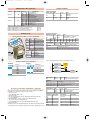
Module Identity Registers
Output Registers
121
122
123
124
125
126
127
Name
ManuCode
ProdCode-1
ProdCode-2
RelCode-1
RelCode-2
SpecialCode
ProdCode-3
Description of the added functions:
Input Registers Name
Access Notes
1
IN-1LW
R
Counter, Frequency, Period Input
Register #1 Low Word
2
IN-1HW R
Counter, Frequency, Period Input
Register #1 High Word
3
IN-2LW
R
Counter, Frequency, Period Input
Register #2 Low Word
4
IN-2HW R
Counter, Frequency, Period Input
Register #2 High Word
Access
R
R
R
R
R
R
R
Notes
Manufacturer Code
Product Code # 1
Product Code # 2
Hardware Release Code
Software Release Code
Special Product Code
Product Code # 3
Access
R/W
R/W
…
R/W
Notes
User Defined Register # 1 (retentive)
User Defined Register # 2 (retentive)
...
User Defined Register # 10 (retentive)
Frequency measurement
User defined Registers
Output Registers
189
190
…
198
Name
Usr#1
Usr#2
…
Usr#10
This function performs the counting of the rising edges of the input signals. The count
value is stored in Registers 1, 2 (Ch. 1) 3, 4 (Ch. 2).
Channels configuration
Each of the 8 channels of the module can be configured to be either an Input or
an Output channel. In the Register 811 each bit corresponds to a channel.
Write 0 for inputs and 1 for outputs.
Access
R/W
Ch 7
Ch 6
Notes
Module Configuration
Ch 5 Ch 4
Ch 3
Name
DIO-1
...
DIO-8
Access
R/W
R/W
R/W
Period measurement
With this function it is possibile to measure the period of a digital periodic input.
The Registers 1, 2 (Ch. 1) 3, 4 (Ch. 2) contain the value of the measure (from 1ms to 65s,
in 1ms increments).
StartStop
Ch 2
bit 0
Ch 1
Standard Inputs/Outputs
Digital outputs
1
...
8
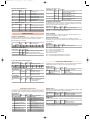
Output Registers Name
Access Notes
813
FreqRange R/W
Input Ch 1, 2 Frequency range
FreqRange = 0: range 0.015Hz... 2kHz (in 1mHz increments).
FreqRange = 1: range 1Hz... 20kHz (in 1Hz increments)
Pulse Counting
Module parameters
Output Registers Name
811
MConf
bit
bit 15...8 bit 7
Channel X...X
Ch 8
This function is able to measure the frequency of a periodic digital signal. The measure
is stored in Registers 1, 2 (Ch. 1) 3, 4 (Ch. 2). Two ranges of measure can be taken (the
ranges for the two interested channels are the same):
Notes
Reading: Physical Inputs and Outputs image
Writing: Physical Outputs activation.
Default = 0, if PO_Value register not programmed
Output Registers Name
Access Notes
302
StartStop R/W
Start/Stop Counters and Period
Start, stop or reset counters:
bit 0 counter 1 start (1)/stop (0)
bit 1 counter 1 reset state (1)/enabled (0)
bit 2 counter 2 start (1)/stop (0)
bit 3 counter 2 reset state (1)/enabled (0)
Start and stop the measure
bit 4 start (1)/stop (0) period measurement on channel 1
bit 5 start (1)/stop (0) period measurement on channel 2
Power On output status Registers
Output Registers Name
Access
401
PO_value
R/W
bit
bit 15...8 bit 7
Channel X...X
Ch 8 Ch 7 Ch 6
Configuring the Output Channels
Notes
Output states at Power On
Ch 5 Ch 4
Ch 3
bit 0
Ch 2 Ch 1
Power On PWM Registers
Output Registers Name
Access
402
PO_PWValue-3 R/W
403
PO_PWValue-4 R/W
Notes
PWM Value for channel 3 at
Power ON or in error mode
PWM Value for channel 4 at
Power ON or in error mode
In addition to the expected function (Discrete 1...8), the module provides the generation of
a PWM signal on channel 3 or channel 4 or both, according to the value of:
Output options
Output Registers Name
Access
814
OConf
R/W
Value Allowed option
Value
0
No options (Standard output) 4
1
PWM on ch. 3
3
Valid at next Power On
Notes
Special output configuration
Allowed option
PWM on ch. 4
PWM on ch. 3 and 4
Local values
Output Registers Name
Access
301
R/W
LocalV
Notes
While in Local state the 1...8 bits of
this register are transferred
to 1...8 digital inputs
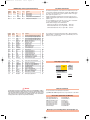
Configuring the input channels
In addition to the expected standard function, the module provides a number of
input function options. The functions are fixed and described in the table below:
Input options
Output Registers Name
Access
812
IConf
R/W
Value Allowed option
Value
0 No options (standard input)
8
1 Frequency measurement ch.1
9
2
Frequency measurement ch.2
10
3
Frequency measurement
ch. 1 and 2
11
4
Counter on ch.1
12
5
Counter on ch.2
13
6
7
Counter on ch. 1 and 2
Period measurement ch.1
14
15
Notes
Input Ch 1, 2 Configuration
Allowed option
Period measurement ch. 2
Period measurement ch. 1 and 2
Frequency measurement on ch. 1 and
Counter on ch. 2
Frequency measurement on ch. 1 and
and Period measurement on ch. 2
Frequency measurement on ch. 2 and
Counter on ch. 1
Frequency measurement on ch. 2 and
Period measurement on ch. 1
Counter on ch. 1 and Period on ch. 2
Counter on ch. 2 and Period on ch. 1
PWM Frequency
Assign the frequency value of the PWM pulse, ranging from 0.015Hz to 4kHz, in 1mHz
steps. Please note that the value is the same for both channels.
Output Registers Name
Access Notes
815
PWFreqLW RW
PWM Frequency Low Word
816
PWFreqHW RW
PWM Frequency High Word
Valid at next Power On
PWM Value
Assign pulse duty cycle value to channels 3 and 4, from 0.0 to 100.0 per cent, in 0.1% steps.
Output Registers Name
Access Notes
5
PWValue-3 RW
PWM Value for channel 3
6
PWValue-4 RW
PWM Value for channel 4
In this case outputs 3, 4 act as general enabler.
To enable the PWM function, write “1” to the output channel associated channel