1
Hardware Components
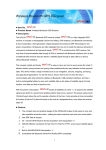
Front View
4
5
1
6
2
3
7
8
9
No.
Item
1.
Menu
2.
Backlight
3.
Zoom out
4.
LCD screen
5.
Four way
navigation
keys
Function
Press once to display the OSD menu.
Press twice to display the Main Features menu.
Press and hold to turn the backlight on/off.
Press to zoom out on a map page.
Hold for 2 seconds to display/clear roads, river,
lakes…etc. (GM-120C)
Displays the map page, satellite information, OSD
menus and so on.
Up arrow: Press to move the cursor up in OSD
menus or on the map page.
Down arrow: Press to move the cursor down in
OSD menus or on the map page.
Left arrow: Press to move the cursor left in the
OSD menus or on the map page.
Right arrow: Press to move the cursor right in the
OSD menus or on the map page.
2