1
Peripheral Devices and Firmware
B
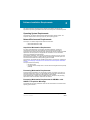
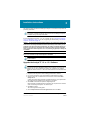
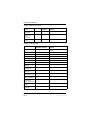
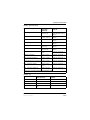
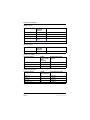
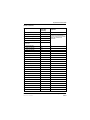
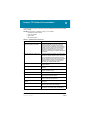
The Analyst® TF 1.6 software supports the devices listed in the following table. Firmware
versions that have been fully qualified with the Analyst TF 1.6 software are listed without
parentheses. Versions shown in parentheses have functioned acceptably in more limited
testing.
In most cases, more recent firmware versions from the device manufacturer will work with the
Analyst TF 1.6 software. If you encounter difficulties, change the device firmware to the version
listed in this table. For information on checking and upgrading firmware, refer to the
documentation provided by the device manufacturer. For information on installation and
configuration of devices, refer to the Peripheral Devices Setup Guide.
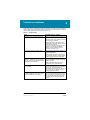
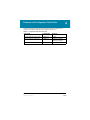
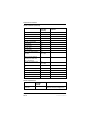
Table B-1 Eksigent
Peripheral device
Tested firmware
(and other
firmware)
ekspert™ ultraLC 100 Autosampler
Communication cable
required
1.29 or higher
WC024736 (RS-232 cable)
ekspert ultraLC 100-XL Autosampler 1.02 or higher
WC024736 (RS-232 cable)
ekspert ultraLC 100 Pump
1.12 or higher
—
ekspert ultraLC 100 Column Oven
2.04 or higher
—
Eksigent Ultra 2D+
2.45
—
Eksigent Ultra 2D
2.46
—
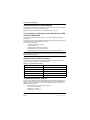
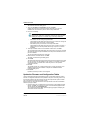
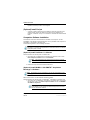
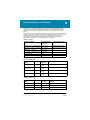
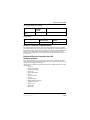
Table B-2 Agilent 1290
Peripheral
device
Model
Tested
firmware
Communication cable required
Binary
G4220A
B.06.32,
B.06.30
WC024736 (RS-232 cable) or Ethernet
Standard
Autosampler
G4226A
A.06.32,
A.06.30
WC024736 or Ethernet
Column Oven
G1316C
(A.06.32),
A.06.30
WC024736
DAD
G4212A
(B.06.32),
B.06.30
Ethernet
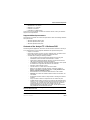
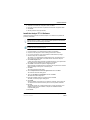
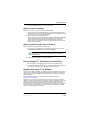
Table B-3 Agilent 1260
Peripheral
device
Model
Tested
firmware
Communication cable
required
WC024736 or Ethernet
Isocratic Pump
G1310B
A.06.32
Quaternary Pump
G1311B
A.06.32
WC024736 or Ethernet
Binary Pump
G1312B
A.06.32
WC024736 or Ethernet
Software Installation Guide
Part Number: 5020639 A
Analyst® TF 1.6 Software
21 of 34