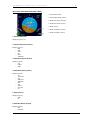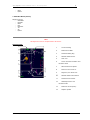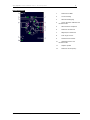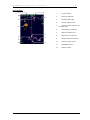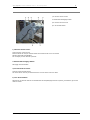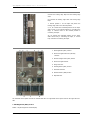
1
‘757 Captain’ FLIGHT MANUAL Part II – Aircraft Systems
DO NOT USE FOR FLIGHT
‘757 Captain’
FLIGHT MANUAL
PART II – Aircraft Systems
Captain Sim is not affiliated with any entity mentioned or pictured in this document.
All trademarks are the property of their respective owners.
© 2011 Captain Sim www.captainsim.com
1
‘757 Captain’ FLIGHT MANUAL Part II – Aircraft Systems
DO NOT USE FOR FLIGHT
2
ABOUT THIS MANUAL
VERSION: 11 OCTOBER, 2011
WARNING: THIS MANUAL IS DESIGNED FOR MICROSOFT® FS9 & FSX USE ONLY. DO NOT USE FOR FLIGHT.
The ‘757 Captain’ FLIGHT MANUAL is organized into five Parts:
Each Part is provided as a separate Acrobat® PDF document:
Click START > Programs > Captain Sim > 757 Captain >
•
Part I – User’s Manual
o The User’s Manual describes the ‘757 Captain’ Sim product as a software title.
•
Part II – Aircraft Systems - this document.
•
Part III – Normal Procedures
•
Part IV – Flight Characteristics and Performance Data
•
Part V - Flight Management System
Adobe Acrobat® Reader Required
FOR GENERAL INFORMATION ON THE ‘757 CAPTAIN’ PRODUCT PLEASE USE WWW.CAPTAINSIM.COM .
THIS MANUAL PROVIDES ADDITIONAL INFORMATION ONLY, WHICH IS NOT AVAILABLE ON THE WEB SITE.
© 2011 Captain Sim www.captainsim.com
‘757 Captain’ FLIGHT MANUAL Part II – Aircraft Systems
DO NOT USE FOR FLIGHT
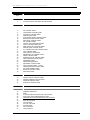
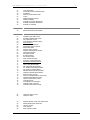
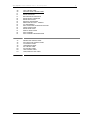
CONTENTS
3
Page
6
SYSTEMS DESCRIPTION
6
VC AND 2D PANEL CONTROLS AND INDICATORS
7
PANELS LAYOUT
8
OVERHEAD PANEL
9
11
12
13
14
15
16
18
18
19
19
20
21
22
23
23
24
24
25
25
26
27
27
28
29
31
32
IRS CONTROL PANEL
YAW DAMPER CONTROL PANEL
HYDRAULIC CONTROL PANEL
ANNUNCIATOR PANEL
EVACUATION SIGNAL CONTROL PANEL
BATTERY/STANDBY POWER PANEL
ELECTRICAL CONTROL PANEL
APU CONTROL PANEL
COCKPIT VOICE RECORDER PANEL
LIGHTS CONTROL PANEL LEFT
EMER LIGHTS/OXY CONTROL PANEL
WINDOW HEAT CONTROL PANEL
R.A.T./ENG START AND IGNITION PANEL
FUEL CONTROL PANEL
FUEL QUANTITY INDICATOR
ENGINE ANTI-ICE CONTROL PANEL
WIPER CONTROL PANEL
EXTERIOR LIGHTS CONTROL PANEL
CREW MESSAGES PLAYER PANEL
PASSENGER SIGNS
PRESSURIZATION PANEL
EQUIPMENT COOLING PANEL
LIGHT CONTROL PANEL – RIGHT
TEMPERATURE INDICATORS PANEL
AIR CONDITIONING PANEL
BLEED AIR CONTROL PANEL
OBS AUDIO PANEL
33
GLARESHIELD PANEL
33
33
34
35
COCKPIT LIGHTS CONTROL PANEL
MASTER WARNING/CAUTION LIGHT
VOR/DME CONTROL PANEL
AUTOPILOT CONTROL PANEL
39
FLIGHT INSTRUMENTS
39
LEFT FORWARD PANEL
40
41
42
44
45
45
46
47
48
49
49
50
AIRSPEED INDICATOR
RDMI
ATTITUDE DIRECTOR INDICATOR (ADI) DISPLAY
ADI FLIGHT MODE ANNINCIATIONS (FMA’S)
HORIZONTAL SITUATION INDICATOR (HSI) DISPLAY
HSI APP MODE
HSI CTR APP MODE
HSI VOR MODE
HSI CTR VOR MODE
HSI MAP MODE
HIS PLAN MODE
TCAS DISPLAYS
U
© 2011 Captain Sim www.captainsim.com
U
‘757 Captain’ FLIGHT MANUAL Part II – Aircraft Systems
DO NOT USE FOR FLIGHT
51
52
52
53
54
55
55
55
56
56
TCAS MESSAGES
AUTOLAND STATUS ANNUNCIATOR
ALTIMETER
VERTICAL SPEED INDICATOR
CLOCK
MARKER BEACON LIGHTS
RESERVE BRAKES
STANDBY ATTITUDE INDICATOR
STANDBY AIRSPEED INDICATOR
STANDBY ALTIMETER
58
RIGHT FORWARD PANEL
58
BRAKE PRESSURE INDICATIONS
59
CENTER FORWARD PANEL
60
62
62
63
64
64
64
65
66
66
67
68
69
69
70
70
70
71
71
72
72
73
73
74
74
74
75
75
76
77
78
79
WARNING/CAUTION LIGHTS
STANDBY ENGINE INDICATOR
OIL PRESSURE LIGHTS
AUTO BRAKES CONTROL PANEL
EICAS DISPLAY
PRIMARY EICAS DISPLAY
SECONDARY EICAS DISPLAY
EICAS MESSAGES
EICAS STATUS DISPLAY
PRIMARY ENGINE INDICATIONS
MODE INDICATIONS
EPR INDICATIONS
N1 INDICATIONS
EGT INDICATIONS
ANTI-ICE INDICATIONS
IN-FLIGHT START ENVELOPE
SECONDARY ENGINE DISPLAY
N2 INDICATIONS
FUEL FLOW INDICATIONS
OIL PRESSURE INDICATIONS
OIL TEMPERATURE INDICATIONS
OIL QUANTITY INDICATIONS
ENGINE VIBRATION INDICATIONS
COMPACT ENGINE INDICATIONS
EICAS STATUS DISPLAY
EICAS CAUTION/ADVISORY SWITCHES
HEADING PREFERENCE SWITCH
THRUST MODE SELECT PANEL
FLAP INDICATOR
ALTERNATE FLAP CONTROLS
LANDING GEAR CONTROL
LANDING GEAR INDICATIONS
80
AISLE STAND
81
FORWARD AISLE STAND
82
82
CONTROL DISPLAY UNIT
CONTROL PANEL
83
CONTROL STAND
83
84
85
86
86
PARKING BRAKE/ STAB TRIM INDICATOR
SPEED BRAKE/TRIM CONTROLS
THRUST LEVERS
FLAP HANDLE
EFIS CONTROL PANEL
U
U
U
U
© 2011 Captain Sim www.captainsim.com
4
‘757 Captain’ FLIGHT MANUAL Part II – Aircraft Systems
DO NOT USE FOR FLIGHT
88
89
91
91
91
92
92
92
93
93
93
93
93
93
94
94
FUEL CONTROL PANEL
WEATHER RADAR CONTROL PANEL
THEORY OF OPERATION
RADAR PRINCIPLES
WEATHER RADAR PRINCIPLES
RADAR BEAM ILLUMINATION
RADAR REFLECTIVITY
PREFLIGHT PROCEDURES
OPERATION IN-FLIGHT - GENERAL
TILT MANAGEMENT
EARLY DETECTION OF ENROUTE WEATHER
TARGET RESOLUTION
RANGE RESOLUTION
AZIMUTH RESOLUTION
PATH PLANNING
PATH PLANNING CONSIDERATIONS
95
AFT AISLE STAND
95
96
97
98
99
100
100
101
ENGINE FIRE CONTROL PANEL
APU/CARGO FIRE CONTROL PANEL
VHF CONTROL PANEL
TRANSPONDER PANEL
ILS CONTROL PANEL
ADF CONTROL PANEL
TRIM CONTROL PANEL
FIRE/OVERHEAT TEST PANEL
102
CUSTOMER CARE
© 2011 Captain Sim www.captainsim.com
5
‘757 Captain’ FLIGHT MANUAL Part II – Aircraft Systems
DO NOT USE FOR FLIGHT
6
SYSTEMS DESCRIPTION
The ‘757 Captain’ is one of the most advanced, complete and accurate airliner expansions for MSFS.
But the ‘757 Captain’ (same as MSFS itself and any MSFS expansion) is a flight simulation software game.
Therefore this product should not be used as flight training device (FTD) and/or simulator for flight training
purposes.
All items should work as described in this manual. If something is not described as functional (therefore it does
not work or does not exist in the model) it is not a system 'bug' but a reasonable simplification.
VC AND 2D PANEL CONTROLS AND INDICATORS
VC and 2D panel controls and indicators are almost identical but 2D and VC graphics quality may vary, and
some of the 2D controls and indicators are not present in VC and vise versa. Some controls and indicators are
available in VC only or in 2D only.
© 2011 Captain Sim www.captainsim.com
‘757 Captain’ FLIGHT MANUAL Part II – Aircraft Systems
DO NOT USE FOR FLIGHT
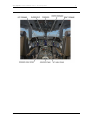
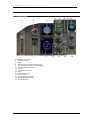
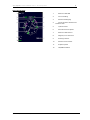
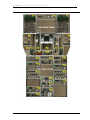
PANELS LAYOUT
© 2011 Captain Sim www.captainsim.com
7
‘757 Captain’ FLIGHT MANUAL Part II – Aircraft Systems
DO NOT USE FOR FLIGHT
8
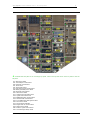
OVERHEAD PANEL
+
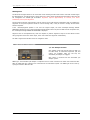
Indicates that the panel in VC has 2D pop-up panel. Click on the top-left corner of the VC panel to call the
2D panel.
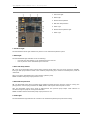
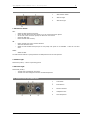
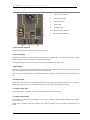
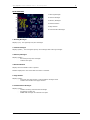
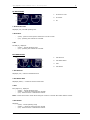
O1. IRS Control Panel
O2. Yaw Damper Control Panel
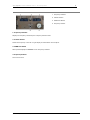
O4. Hydraulic Control Panel
O5. Timer Panel
O6. Annunciator Panel
O7. Evacuation Signal Control Panel
O8. Battery/Standby Power Panel
O9. Electrical Control Panel
O10. APU Control Panel
O11. Cockpit Voice Recorder Panel
O12. Lights Control Panel Left
O13. EMER Lights/Oxy Control Panel
O14. Window Heat Control Panel
O15. R.A.T./ENG Start and Ignition Panel
O16. Fuel Control Panel
O17. Fuel Quantity Indicator
O18. Engine Anti-Ice Control Panel
O19. Wiper Control Panel
O20. Exterior Lights Control Panel
O21. Crew Messages Player Panel
© 2011 Captain Sim www.captainsim.com
‘757 Captain’ FLIGHT MANUAL Part II – Aircraft Systems
DO NOT USE FOR FLIGHT
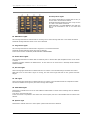
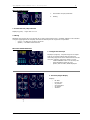
O22.
O23.
O24.
O25.
O27.
O28.
O29.
O30.
9
Passenger Signs
Pressurization Panel
Equipment Cooling Indications
Light Control Panel Right
Temperature Indicators Panel
Air Conditioning Panel
Bleed Air Control Panel
OBS Audio Panel
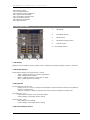
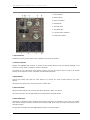
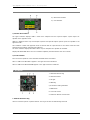
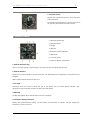
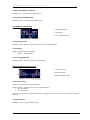
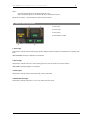
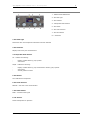
O1. IRS CONTROL PANEL
1.
IRS Display
2.
IRS Display Selector
3.
IRS Keyboard
4.
IRS System Display Selector
5.
Indicator Lights
6, 7, 8. IRS Mode Selector
1. IRS Display
Displays track, groundspeed, present position, wind or heading as controlled by display selectors or keyboard.
2. IRS Display Selector
Selects
-
data for display when keyboard not in control.
TK/GS - displays present true track and groundspeed
PPOS - displays present position
WEND — displays present true wind when in—flight
HDG - displays present true heading.
3. IRS Keyboard
Push an alpha key to begin entry.
pushing the N, S, E or W keys changes the IRS display to keyboard control and arms the keyboard for
latitude or longitude entry
pushing H changes the display to keyboard control and arms the keyboard for heading entry.
Enter (ENT) Key - push
enters data from display into all three IRS systems
restores display to the display selector setting
Clear (CLR) Key - push
clears data keyed into display
restores display to the display selector setting.
4. IRS System Display Selector
© 2011 Captain Sim www.captainsim.com
‘757 Captain’ FLIGHT MANUAL Part II – Aircraft Systems
DO NOT USE FOR FLIGHT
Selects system to display data when keyboard not in control.
© 2011 Captain Sim www.captainsim.com
10
‘757 Captain’ FLIGHT MANUAL Part II – Aircraft Systems
DO NOT USE FOR FLIGHT
11
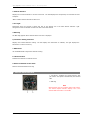
5. Indicator Lights
ALIGN Lights
U
Illuminated (white) steady - the related IRS is operating in the ALIGN mode, the initial ATT mode, or the shutdown cycle
flashing - alignment cannot be completed due to IRS detection of:
•
significant difference between previous and entered positions or an unreasonable
present position entry.
•
no present position entry.
Extinguished IRS not in ALIGN mode
with mode selector in NAV, alignment is complete, and all IRS information is available
with mode selector in ATT, attitude information is available. Heading information is available following
entry of initial magnetic heading.
ON DC Lights
U
Illuminated (amber) normal AC power for the related IRS has failed and the IRS is operating on DC backup power from the
hot battery bus (AC power not normal)
if on the ground, the ground-call horn in the nose wheel well sounds, providing an alert that a battery
drain condition exists
EICAS advisory message L, C or R IRS ON DC is displayed
momentary illumination is normal during alignment self—test.
DC FAIL Lights
U
Illuminated (amber) DC backup power for the related IRS has failed
if the other lights are extinguished, the IRS is operating normally on AC power.
EICAS advisory message L, C or R IRS DC FAIL is displayed
FAULT Lights
U
Illuminated (amber) - a system fault affecting the related IRS ATT and/or NAV modes has been detected. The
EICAS advisory message L, C or R IRS FAULT is also displayed.
6, 7, 8. IRS Mode Selectors
Rotate - controls mode of related IRS.
Must be pulled out to move from NAV position.
OFF-
alignment is lost
ALIGN light illuminates for 30 seconds as system goes through a shutdown sequence
realignment requires about 30 seconds while the airplane is parked and entry of present position
(latitude and longitude).
ALIGNinitiates alignment when parked
initiates a quick alignment if selected when the system is in the navigation mode.
NAVATT-
normal operational mode
permits system to enter NAV mode after completing alignment
initiates a 30 seconds alignment if selected from OFF.
provides only attitude and heading information
position and ground speed information lost until system realigned on ground
when selected airborne, ALIGN light illuminates for 30 seconds while system senses local level
(requires level flight)
magnetic heading input required to initialize heading output
the selector must be cycled through OFF to re-enter ALIGN or NAV mode.
© 2011 Captain Sim www.captainsim.com
‘757 Captain’ FLIGHT MANUAL Part II – Aircraft Systems
DO NOT USE FOR FLIGHT
12
IRS Alignment
An IRS must be aligned before it can enter NAV mode. Rotating the IRS mode selector from OFF to NAV begins
the IRS alignment. The IRS performs a short power test, during which the ON DC light illuminates. When the ON
DC extinguishes the ALIGN light illuminates. Alignment requires approximately 30 seconds, time frame
intentionally set for quick alignment.
Present position (latitude and longitude) must be entered on the CDU position initialization page to complete the
alignment. If the present position cannot be entered through CDU, it may be entered through the IRS mode
selector keyboard.
If the latitude/longitude position is not near the original airport, the CDU scratchpad message VERIFY
POSITION is displayed. If the entered latitude/longitude position does not pass the IRS internal comparison test,
the scratchpad message ENTER IRS POSITION is displayed.
Alignment can be accomplished only when the airplane is parked. Alignment stops if an IRU detects motion
during alignment. When the motion stops, some units restart the alignment automatically.
The IRS is aligned when all IRUs enter the navigation mode.
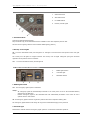
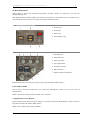
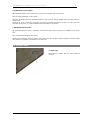
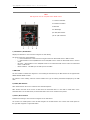
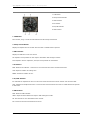
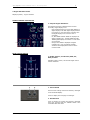
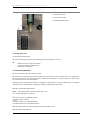
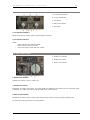
O2. YAW DAMPER CONTROL PANEL
1,2. Yaw Damper Switches
ON: Initiates a self test when at lease one IRS is in
the NAV Mode, an associated hydraulics (left and
center) are available. After the self test, the
associated yaw damper is engaged.
OFF: Power is removed from the associated yaw
damper system.
INOP Light: The associated yaw damper is inoperative due to a fault or because the switch was selected to OFF.
With the INOP light ON, hydraulics are removed from the associated system. The INOP light can be reset by
cycling the switch to OFF then ON.
© 2011 Captain Sim www.captainsim.com
‘757 Captain’ FLIGHT MANUAL Part II – Aircraft Systems
DO NOT USE FOR FLIGHT
13
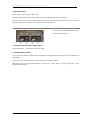
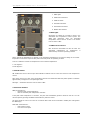
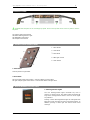
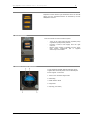
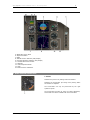
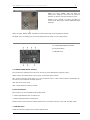
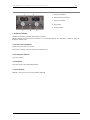
O4. HYDRAULIC CONTROL PANEL
1. SYS Press Light
2. RSVR Light
3. ELEC HYD Pump Switch
4. ENG HYD Pumps Switch
5. OVHT Light
6. ELEC HYD Pump Switch Light
7. OVHT Light
1. SYS Press Light
An illuminated SYS Press light indicates low pressure in the associated hydraulic system.
2. RSVR Light
An illuminated RSVR light indicates one of the following:
Less than 50% fluid quantity in the associated system reservoir.
Low air pressure in the associated system reservoir.
3. ELEC HYD Pump Switch
ON: Turns on the associated center system electric hydraulic pump. When only one source of power is available,
turning on both pump switches results in the number 2 pump turning off, to conserve electrical power, known as
“load shed”.
OFF: Turns off the associated center system electric hydraulic pump.
PRESS: Indicates that pump output pressure is low.
4. ENG HYD Pumps Switch
ON: The associated engine driven hydraulic pump supplies hydraulic pressure when the engine is running. The
pump pressure valve is spring-loaded to the OPEN position and requires electrical power to close.
OFF: The associated engine driven pump is depressurized. This prevents pump output. Fluid continues to
circulate through the pump for cooling and lubrication.
PRESS: Indicates that the associated pump output pressure is low.
5. OVHT Light
An illuminated OVHT light indicates an overheat in the associated hydraulic pump case drain cooling.
© 2011 Captain Sim www.captainsim.com
‘757 Captain’ FLIGHT MANUAL Part II – Aircraft Systems
DO NOT USE FOR FLIGHT
14
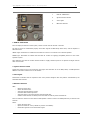
O6. ANNUNCIATOR PANEL
A1. Entry Doors Lights
This warning illuminates to indicate that an entry or
service door is not closed and locked.
An EICAS message identifies the door if only the one
on a side is not closed and locked.
EICAS indicates L or R ENT DOORS if more than one
door on the associated a side is not closed and
locked.
B1. EMER Doors Lights
This warning illuminates to indicate that an overwing exit or either off wing slide door is not closed and locked.
An EICAS message indicates which exit or door is affected.
C1. Cargo Doors Lights
This warning illuminates to indicate that a cargo door is not closed and locked.
An EICAS message indicates which cargo door is affected.
If more than one door is affected, EICAS indicates CARGO DOORS.
D1. Access Doors Lights
This warning illuminates to indicate that the radar bay door or forward door E/E compartment door is not closed
or locked.
An EICAS message indicates the affected door. If more than one of access door is affected, EICAS indicates
ACCESS DOORS.
C2, D2. AOA Lights
These warning lights illuminate to indicate that there is a failure in the associated angle of attack vane heater.
AOA heat turns on when either engine is running, and will receive high heat both on the ground and while
inflight.
С3. TAT Lights
These warning lights illuminate to indicate that there is a failure in the associated Total Air Temperature heater.
TAT heat is inhibited on the ground, and comes on high while inflight.
A4. STAB TRIM Lights
Illuminates to indicate that one of the two stabilizer brakes failed to release when trimming with the stabilizer
trim switches.
Trim rate is reduced to half rate.
In the event there is a problem in the electric trim consol system, full trim is still available with the manual trim
handles.
B4. Spoilers Light
Illuminates to indicate that one or more spoiler system faults have been detected.
© 2011 Captain Sim www.captainsim.com
‘757 Captain’ FLIGHT MANUAL Part II – Aircraft Systems
DO NOT USE FOR FLIGHT
15
C4. AUTO SPD BRK Light
Illuminates to indicate that there is a fault in the automatic speed brake system.
When this light is illuminated and the speed brake lever is down or armed, the speed brake may not
automatically extend during landing or rejected takeoff.
If the speed brake lever is in armed while in flight, additional faults may cause the speed brakes to extend to
the ground deployment angle.
D4. Mach SPD TRIM Light
Illuminates to indicate a fault in the Mach/Speed trim system.
A5. UNSCHED STAB TRIM Lights
Illuminates to indicate an un-commanded movement of the stabilizer trim.
This light can also illuminate to indicate that the stabilizer trim is moving in the direction opposite the one
commanded by the autopilot elevator trim signal, or trim movement by Mach/Speed Trim, or autopilot opposite
to elevator input.
B5. Rudder Ratio Light
Illuminates to indicate that there is a fault in the rudder ratio system, or there is no left hydraulic pressure to
the rudder ratio actuator.
C5. Antiskid Lights
Illuminate to indicate that there is a fault in the antiskid system which may affect antiskid operation.
This light is inhibited when the parking brake handle is set.
A2,B2,A3,B3. Probe Heat Lights
These warning lights illuminate to indicate that there is a failure in the associated pitot probe heater.
Pitot heat turns on when either engine is running, and will receive low heat on the ground, and high heat while
inflight.
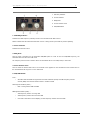
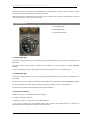
O7. EVACUATION SIGNAL CONTROL PANEL
1.
Command Switch
2.
EVAC Light
3.
Horn Shutoff Switch
4.
Evacuation Signal Horn
1. Command Switch
Activates the evacuation light and aural signal on all signal panels.
In the event more than one command switch is on, the last switch turned off will turn off all lights and silence
the aural signal.
2. EVAC Light
When the EVAC light is flashing, it indicates that the evacuation signal has been activated.
The EVAC light illuminates when the command switch on any evacuation signal panel is activated.
The EVAC light continues to flash until all command switches are off.
© 2011 Captain Sim www.captainsim.com
‘757 Captain’ FLIGHT MANUAL Part II – Aircraft Systems
DO NOT USE FOR FLIGHT
16
3. Horn Shutoff Switch
Pull this switch silence the evacuation audio signal at the individual panel.
4. Evacuation Signal Horn
The EVACUATION SIGNAL horn will emit an aural signal when the command switch on any evacuation signal
panel is actuated.
O8. BATTERY/STANDBY POWER PANEL
1. BAT Switch
2. DISCH Light
3. STBY Power Switch
4. STBY Power Off Light
1. BAT Switch
ON: Placing the BAT switch ON will enable the battery to provide backup power to the battery bus and the
standby buses.
The BAT switch must be ON for APU operation, including starting and continued operation on the ground.
OFF: The BAT OFF light indicates that the battery switch is OFF while the left DC bus is powered.
2. DISCH Light
An illuminated DISCH light indicates that the battery is discharging.
3. STBY Power Switch
OFF: Disconnects the standby buses from all power sources. This switch must be pushed in to move the switch
from the AUTO to the OFF position.
AUTO: The standby buses are powered from the left main AC and DC buses.
If the BAT switch is ON, the battery will act as a backup power source.
BAT:
-
The standby DC bus and the static inverter are powered from the battery if the BAT switch is in the ON
position.
The static inverter powers the standby AC bus.
The battery charger is disconnected from the battery, and the DISCH light will illuminate as the battery
is powering the Hot Bat Bus, the BATT Bus, and the Standby buses.
Isolates the standby AC and DC buses from the main AC and DC buses.
4. STBY Power Off Light
The STBY POWER OFF light illuminates to indicate that one or both standby buses are not powered.
© 2011 Captain Sim www.captainsim.com
‘757 Captain’ FLIGHT MANUAL Part II – Aircraft Systems
DO NOT USE FOR FLIGHT
17
O9. ELECTRICAL CONTROL PANEL
1.
APU GEN Switch
2.
EXT Power Switch
3.
BUS Tie Switch
4.
BUS OFF Light
5.
Utility BUS Switch
6.
GEN CONT Switch
7.
GEN Drive DISC Switch
1. APU GEN Switch
ON: Closes the APU generator field and Auxiliary Power Breaker (APB) to operate automatically.
The APB closes to power an AC bus if external power is not in use and the APU generator output is normal.
OFF: Opens the APU generator field and locks the APB in the open position.
2. EXT Power Switch
ON:
-
OFF:
-
Closes the external power contactor (EPC).
Trips off the APU or Engine generators.
Ext power powers the AC tie bus.
Opens the EPC.
External power no longer powers the AC tie bus.
AVAIL: External power is plugged* into the external power receptacle and is producing acceptable power.
When the AVAIL light is illuminated, external power is powering the ground handling bus.
* - MSFS menu: Captain Sim > 757 Captain > Ground Power Supply
3. BUS Tie Switch
AUTO: The AC BUS Tie Breakers (BTB) are armed to close in the event power is lost to the respective AC bus,
thus receiving power from the APU, if available, or the other AC bus.
With the associated BUS Tie switch in AUTO, loss of power to that AC bus will result in the respective Flight
Instrument Transfer Bus receiving power from the opposite AC bus.
If both switches are in, the automatic DC bus tie system is armed. In this case, the DC tie breaker will close any
time power is lost to a Main DC bus, so it can receive power from the opposite DC bus.
MANUAL ISLN: Manually opening the BUS Tie switch results in the AUTO portion of the switch disappearing, the
ISLN light illuminates, and associated BTB opens. The following also happens:
-
Resets the automatic trip circuitry.
The automatic DC bus tie transfer system is inhibited any time either switch is selected to ISLN.
The associated Flight Instrument Transfer Bus will not transfer to the opposite AC bus.
© 2011 Captain Sim www.captainsim.com
‘757 Captain’ FLIGHT MANUAL Part II – Aircraft Systems
DO NOT USE FOR FLIGHT
18
ISLN Light: An illuminated ISLN light indicates that the associated BTB is locked open. This could be due to
either a fault trip or turning the switch OFF.
4. BUS OFF Light
An illuminated BUS OFF light indicates that the associated MAIN AC bus is not powered.
5. Utility BUS Switches
ON: The associated utility bus and galley buses are connected to the respective MAIN AC bus in the event there
are no load shed signals present.
OFF:
-
Disconnects the associated utility bus and galley buses from the respective AC bus.
Resets the load shed circuitry.
OFF Light: The associated utility bus is un-powered. This could be due to either a load shed or the associated
utility bus switch is in the OFF position.
6. GEN CONT Switches
ON: Closes the associated generator field and arms the generator breaker for automatic operation. The OFF light
will remain on until the generator breaker is closed.
OFF:
-
Opens the associated generator field, which opens the generator breaker.
Resets the automatic trip circuitry.
OFF Light: the associated generator breaker is open. This could be due to either an automatic trip or the GEN
CONT switch is OFF. The generator field may or may not be open, depending on the fault or manual switch
operation.
7. GEN Drive DISC Switches
Disconnects the associated generator from the engine. The disconnect occurs mechanically through engine
rotation.
Reconnect can only occur through maintenance action.
DRIVE Light:
Drive oil pressure is low.
Oil temperature is high.
© 2011 Captain Sim www.captainsim.com
‘757 Captain’ FLIGHT MANUAL Part II – Aircraft Systems
DO NOT USE FOR FLIGHT
19
010. APU CONTROL PANEL
1.
APU Selector Switch
2.
APU Run Light
3.
APU Fault Light
1. APU Selector Switch
OFF:
-
-
ON:
-
START:
-
Starts the APU shutdown sequence.
Closes the APU bleed valve and starts a 0 to 120 second cool down period.
At the end of the cool down period, the APU fuel valve closes.
Closes the APU door.
Resets the APU fault circuitry.
Opens the APU fuel valve and the APU door.
Arms the APU bleed valve.
Starts the left forward boost pump or DC fuel pump if AC power is not available. + APU will run after
start.
Starts the APU.
The APU Selector Switch is spring loaded to the ON position from the start position.
2. APU Run Light
Illuminated (white) – APU is at operating speed.
3. APU Fault Light
Illuminated (amber):
The APU has automatically shut down.
The APU fuel valve disagrees with the commanded position.
O11. COCKPIT VOICE RECORDER PANEL
© 2011 Captain Sim www.captainsim.com
1.
Test Button
2.
Erase Button
3.
Monitor Indicator
4.
Headphone Jack
5.
Area Microphone
‘757 Captain’ FLIGHT MANUAL Part II – Aircraft Systems
DO NOT USE FOR FLIGHT
20
O12. LIGHTS CONTROL PANEL LEFT
1.
Glareshield Knob
2.
Aisle Stand Knob
3.
LT OVERD Switch
4.
Runway Turnoff Lights
1. Glareshield Knob
Controls the glareshield flood lights.
Fully functional copy of the Glareshield Knob is available on the main Captain’s panel as well.
All other interior lighting switches control default MSFS lighting (Shift+L)
4. Runway Turnoff Lights
ON: Turns the associated runway turn off light to on. This light is mounted on the fixed portion of the nose gear
strut.
The runway turn off lights are angled outward. The runway turn off lights extinguish upon gear retraction
regardless of the position of these switches.
OFF:
Turns the associated runway turnoff light off.
O13. EMER LIGHTS/OXY CONTROL PANEL
1.
EMER Lights Switch
2.
Unarmed Light
3.
PASS OXY Switch
1. EMER Lights Switch
OFF: The emergency lights system is disarmed.
ARMED:
All emergency lights will automatically illuminate in the event power is lost to the associated battery
charging bus (Rt Main DC).
Exterior emergency lights on the associated side will automatically illuminate in the event an exit is
opened with the slide armed.
ON: All emergency lights illuminate. Lights are powered from their respective battery pack.
The emergency lights batteries will charge as long as the associated charging bus is powered.
2. Unarmed Light
Illuminates to indicate that the emergency lights system is not armed for automatic operation.
© 2011 Captain Sim www.captainsim.com
‘757 Captain’ FLIGHT MANUAL Part II – Aircraft Systems
DO NOT USE FOR FLIGHT
21
3. PASS OXY Switch
Push to open all cabin oxygen module doors.
The cabin oxygen module doors automatically open if the cabin altitude reaches 14,000 feet.
ON Light: The circuit to open the cabin oxygen module doors has been activated. This can be due to either an
automatic deployment command, or the PASS OXY switch was pressed.
O14. WINDOW HEAT CONTROL PANEL
1,3. Window Heat Inoperative (INOP) Lights
2,4. Window Heat Switches
1,3. Window Heat Inoperative (INOP) Lights
Illuminated (amber) – the window is not being heated.
2,4. Window Heat Switches
Push to heat the associated cockpit window. The forward windshields are anti-iced while the side windshields are
anti-fogged.
In the event of an overheat, push the switch off then on to reset the system.
INOP Light: Heat to the associated windows is OFF due to a power failure, overheat, ground test, or the
associated switch is OFF.
© 2011 Captain Sim www.captainsim.com
‘757 Captain’ FLIGHT MANUAL Part II – Aircraft Systems
DO NOT USE FOR FLIGHT
22
O15. R.A.T./ENG START AND IGNITION PANEL
1.
RAM Air TURB Switch
2.
Ignition Selector Switch
3.
Valve Lights
4.
ENG Start Selector
1. RAM Air TURB Switch
Press to deploy the Ram Air Turbine (RAT). Switch must be held for at least 2 seconds.
The RAT is armed to automatically deploy when both engines N2 RPM drops below 50%, and the airplane is
above 80 knots.
UNLKD Light: Illuminates to indicate that the Ram Air Turbine is not locked in the retracted position.
PRESS Light: Illuminates to indicate that the Ram Air Turbine is supplying acceptable pressure to the center
hydraulic system.
Once deployed, the Ram Air Turbine should be able to supply sufficient pressure to operate the flight controls
down to 130 knots.
2. Ignition Selector Switch
Selects the ignition source to be used when the engine start selectors are in the GND, AUTO, or CONT positions
AND the fuel control switches are out of CUTOFF.
3. Valve Lights
Illuminates to indicate that the respective start valve position disagrees with the position commanded by the
associated start selector.
4. ENG Start Selectors
GND:
-
Opens the start valve.
Closes the bleed valve.
Arms the selected ignition system.
Increases APU bleed air pressure.
Arms the starter cutout through the 50% N2 speed card.
Initiates a load shed of the Utility buses if the APU is used for power and bleed air.
Push to rotate the switch from the AUTO to GND position. Switch is held in the GND position by a solenoid until
50% N2.
AUTO:
-
Closes the start valve.
Opens the bleed air valve (if bleed air pressure is available).
Deactivates ignition for the associated engine.
© 2011 Captain Sim www.captainsim.com
‘757 Captain’ FLIGHT MANUAL Part II – Aircraft Systems
DO NOT USE FOR FLIGHT
-
23
Selected ignition system for the associated engine will operate continuously when slats are extended
OR engine anti-ice is ON if the associated fuel control switch is in the RUN position.
OFF: Turns off the ignition, arms the bleed valve to open, and closes the start valve.
CONT: Allows continuous operation of the selected ignitor if the fuel control switch is in RUN.
Note:
Do not start two engines simultaneously.
O16. FUEL CONTROL PANEL
1.
Pump Switches
2.
Crossfeed Switch
3.
Fuel CONFIG Light
1. Pump Switches
Press to turn on the associated fuel pump.
The Center tank pumps are inhibited when their associated engine is below 50%.
The left forward pump operates automatically when the APU selector is in START or ON AND AC power is
available.
The pump operates regardless of the switch position.
PRESS Light: Illuminates to indicate that the pump output pressure is low. Light illuminates regardless of L and
R pump switch positions.
The Center tank pump low pressure lights illuminate only if the associated center tank pump switch is selected
ON.
2. Crossfeed Switch
Press to open or close the crossfeed valve.
VALVE Light: Valve position disagrees with switch position.
3. Fuel CONFIG Light
Illuminates for one of the following conditions:
Center tank pump contains more than 1200 pounds of usable fuel with the center pump switches OFF.
Imbalance in excess of 1800 pounds between the left and right tanks
Quantity in either main tank is below approximately 2200 pounds.
© 2011 Captain Sim www.captainsim.com
‘757 Captain’ FLIGHT MANUAL Part II – Aircraft Systems
DO NOT USE FOR FLIGHT
24
O17. FUEL QUANTITY INDICATOR
1.
Fuel Quantity Indicator
2.
Total Quantity Indicator
3.
TEMP Indicator
Displays in kilograms x 1000:
1 US gallon of jet fuel = 3.785 Litres = 2.952
kilograms
1. Fuel Quantity Indicator
Each readout indicates the fuel quantity in the respective tank down to the nearest 100 KGs.
A blank indication indicates an inoperative or failed fuel quantity indicator.
2. Total Quantity Indicator
Indicates the total fuel quantity in all tanks.
3. TEMP Indicator
Indicates the fuel temperature in the right main tank.
O18. ENGINE ANTI-ICE CONTROL PANEL
1. Wing Heat Switch
2. ENG Heat Switches
3. Valve Lights
1. Wing Heat Switch
Push to open both the left and right wing anti-ice valves while in flight. Hot pneumatic air flows to the three
leading edge slats outboard of each engine.
Wing anti-ice is inhibited from operating on the ground.
2-3. ENG Heat Switches
Push to open the cowl anti-ice valve of the associated engine. If the engine is running, engine bleed air will flow
to the inlet cowl.
3. Valve Light
Illuminates to indicate that the associated wing anti-ice valve disagrees with the position selected by the WING
switch.
© 2011 Captain Sim www.captainsim.com
‘757 Captain’ FLIGHT MANUAL Part II – Aircraft Systems
DO NOT USE FOR FLIGHT
25
O19. WIPER CONTROL PANEL
1. Wiper Selector
OFF: The wipers are stowed at the base of the
windows.
LOW: The wipers operate at low speed.
HIGH: The wipers operate at high speed.
O20. EXTERIOR LIGHTS CONTROL PANEL
1,2. Wing Landing Light Switches
3. Nose Gear Landing Light Switch
4. Position Lights Switch
5,6. Anti-Collision Lights Switches
7. Wing Lights Switch
1-2. Landing Light Switches
Landing Lights: Turns on the landing lights. These lights are located in the associated wing fairings.
The landing lights automatically dim when the landing gear lever is out of the DOWN position.
3. Nose Gear Light Switches
ON: Illuminates the nose gear landing lights. These lights are mounted on the nose gear strut.
The nose gear lights extinguish whenever the landing gear is retracted, regardless of switch position.
4. Position Lights Switch
Turns on the wingtip position lights. These lights are red, green, and white.
5. Anti-Collision Lights Switch
Red turns on the red strobe lights. One strobe light is on the top of the fuselage, the other is on the bottom.
White turns on the white wingtip strobe lights.
© 2011 Captain Sim www.captainsim.com
‘757 Captain’ FLIGHT MANUAL Part II – Aircraft Systems
DO NOT USE FOR FLIGHT
26
O21. CREW MESSAGES PLAYER PANEL
1-7. Stewardess Messages
8,9. Captain Messages
10. Selective Calling (SELCAL) Message
11. Blank
Stewardess Messages
1.
2.
3.
4.
5.
6.
7.
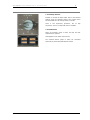
Welcome Message
Refueling Message
Safety briefing Message
Night takeoff Message
Departure Message
Turbulence Message
Descent Message
Captain Messages
8. Welcome Message
9. Arrival Message
O22. PASSENGER SIGNS
1. No Smoking Switch.
2. Seat Belts Switch.
1. No Smoking Switch
OFF: Turns off the cabin NO SMOKING signs.
AUTO: The cabin NO SMOKING signs illuminate when the landing gear is down and extinguishes when the
landing gear is up.
ON: Illuminates the cabin NO SMOKING signs.
2. Seat Belts Switch
OFF: Turns off the cabin SEAT BELTS signs.
AUTO: The cabin SEAT BELTS signs illuminate automatically when the landing gear is DOWN or flaps not UP.
Lights extinguish when the landing gear AND flaps are up.
ON: Illuminates the cabin SEAT BELTS signs.
© 2011 Captain Sim www.captainsim.com
‘757 Captain’ FLIGHT MANUAL Part II – Aircraft Systems
DO NOT USE FOR FLIGHT
27
O23. PRESSURIZATION CONTROL PANEL
1. Valve Indicator
2. LDG ALT Knob
3. LDG ALT Indicator
4. Manual Knob
5. Auto Rate Knob
6. Auto INOP Light
7-9. Pressurization Indicators
10. Mode Select Switch
1. Valve Indicator
Indicates the position of the outflow valve regardless of the mode of operation.
3. LDG ALT Indicator
Displays the LANDING field elevation as selected by the landing altitude knob. The altitude displayed in the
window is used by AUTO 1 and AUTO 2 modes of operation.
If a landing is to be made back to the departure airport, the LDG ALT selector must be reset to the takeoff
altitude, as the controller will not "remember" the takeoff field elevation.
4. Manual Knob
Controls the outflow valve when the mode selector is in manual. The knob is spring loaded to the center
position.
Climb opens the outflow valve, descend closes the outflow valve.
5. Auto Rate Knob
Adjusts the cabin altitude rate of change limit when operating in AUTO 1 or AUTO 2.
The index mark sets a limit of approximately 500 FPM climb and 300 FPM descent.
6. Auto INOP Light
Illuminates to indicate that both automatic pressurization controllers are inoperative. In this case, the outflow
valve freezes in position until the mode selector is placed in MAN. At this time, the outflow valve position can be
manually changed.
The light also illuminates when the MODE SELECT switch is in the MAN position.
© 2011 Captain Sim www.captainsim.com
‘757 Captain’ FLIGHT MANUAL Part II – Aircraft Systems
DO NOT USE FOR FLIGHT
28
10. Mode Select Switch
AUTO 1/AUTO 2: Selects the associated pressurization controller. Should one system fail, the other will
automatically take over.
MAN: Bypasses both automatic systems and arms the manual knob. In the manual mode, the outflow valve is
moved at half the normal rate by a DC motor that operates by battery power.
O24. EQUIPMENT COOLING PANEL
1. Smoke Light
2. ALTN Light
3. OVHT Light
4. Cabin Altitude Light
O25. LIGHT CONTROL PANEL – RIGHT
1. CKT BKR Knob
2. OVHD PNL Knob
3. Dome Light Knob
4. Logo Lights Switch
5. FLT DK Door Switch
6. IND LTS Switch
7.
Flight Deck Door Lock Selector
1-4. All knobs control the same (the only one) interior light available in MSFS. (Shift L)
5. FLT DK Door Switch
Press to lock or unlock the cockpit door. The cockpit door automatically unlocks in the event of a loss of
electrical power.
UNLKD: Illuminates to indicate that the cockpit door is unlocked.
7. Flight Deck Door Lock Selector
Spring loaded to AUTO. Selector must be pushed in to rotate from AUTO to UNLKD position. Selector must not
be pushed to rotate from AUTO to DENY position.
UNLKD: Door unlocked while selector is UNLKD.
© 2011 Captain Sim www.captainsim.com
‘757 Captain’ FLIGHT MANUAL Part II – Aircraft Systems
DO NOT USE FOR FLIGHT
29
AUTO: Door locked. Allows door to unlock after entry of emergency access code and expiration of timer, unless
crew takes action.
DENY: Rejects keypad entry request and prevents further emergency access code entry for a time period.
O27. TEMPERATURE INDICATORS PANEL
1-3. Compartment Temperature Indicators
Display actual temperature sensed in the
compartment.
© 2011 Captain Sim www.captainsim.com
‘757 Captain’ FLIGHT MANUAL Part II – Aircraft Systems
DO NOT USE FOR FLIGHT
30
O28. AIR CONDITIONING PANEL
1. INOP Lights
2. TEMP Control Selectors
3. TRIM Air Switch
4. Pack Reset Switches
5. Pack Selector Switches
6. RECIRC Fan Switches
1. INOP Lights
Illuminates to indicate an overheat or fault in the
associated zone temperature control system. The
INOP light illuminates when the associated
temperature control selector is OFF or the master
trim air switch is OFF.
2. TEMP Control Selectors
OFF: Closes the associated zone trim air valve. The
associated
compartment
air
temperature
is
determined by the zones operating in AUTO.
AUTO: Selects the temperature to maintain in the associated compartment. The selector calling for the coolest
temperature controls the output of both packs when both packs are operating in AUTO.
Trim air is added to increase the temperature in the selected compartment.
C - 65 degrees F.
W -85 degrees F.
3. TRIM Air Switch
ON: Enables the trim air valve to open and modulate to add hot trim air to the zone valves for zone temperature
control.
OFF: Closes the trim air valve. Zone temperature selectors are deactivated and both packs operate to maintain
approximately 75 degrees F in the passenger cabin.
OFF Light:
Illuminates when the trim air switch is OFF.
4. Pack Reset Switches
INOP: Illuminates for:
Excessive pack outlet temperature
Fault in automatic pack temperature controller.
If the pack outlet temperature is excessive, the pack will automatically produce maximum cold air. You can
reset the pack by pressing the RESET switch after the pack has cooled.
The pack cannot be reset in the event of a controller fault. Pack can be controlled in STDBY (also extinguishes
the INOP light).
PACK OFF: Illuminates for:
Pack selector in OFF.
Loss of air to the pack.
© 2011 Captain Sim www.captainsim.com
‘757 Captain’ FLIGHT MANUAL Part II – Aircraft Systems
DO NOT USE FOR FLIGHT
31
If the INOP and PACK OFF lights illuminate simultaneously, the pack has shutdown due to excessive compressor
outlet temperature.
You can attempt to reset the pack by pushing the RESET switch after the pack has cooled down.
The RESET switch is used to reset the associated pack after the pack has shutdown due to a temperature
related problem.
The RESET switch will have no effect in the event the fault is in the pack controller.
5. Pack Selector Switches
OFF: Closes the associated pack valve.
AUTO: Associated pack operates in the automatic mode.
STBY N: (Normal) Associated pack outputs a constant moderate temperature.
STBY C: (Cool) Associated pack outputs full cool temperature.
STBY W: (Warm) Associated pack outlet temperature varies depending on the amount and temperature of air
flowing across the pack heat exchangers.
6. RECIRC Fan Switches
ON: Turns on the associated re-circulating fan.
INOP Light: Illuminates when:
Respective RECIRC switch OFF
Respective RECIRC FAN has failed.
Respective RECIRC FAN has been turned off automatically due to a load shed, equipment smoke or
cargo fire ARM switch positioned to ARM.
Turning off Recirc fan will place associated pack in HIGH flow mode, unless the other engine is
inoperative.
© 2011 Captain Sim www.captainsim.com
‘757 Captain’ FLIGHT MANUAL Part II – Aircraft Systems
DO NOT USE FOR FLIGHT
32
O29. BLEED AIR CONTROL PANEL
1.
DUCT Pressure Indicator
2.
Isolation Valve Light
3.
DUCT Leak Lights
4.
Bleed Lights
5.
HI Stage Lights
6, 8. ENG Bleed Valve Switches
7.
APU Bleed Valve Switches
1. Duct Pressure Indicator
Indicates the pressure in the left and right pneumatic ducts
3. Duct Leak Lights
Illuminates when there is a leak detected in the associated pneumatic duct. The left DUCT leak light can also
indicate that there might be a leak in the center pneumatic duct.
The DUCT LEAK lights can also illuminate for a leak in the associated wing anti-ice duct.
4. Bleed Lights
Illuminates to indicate that the associated engine high stage and bleed air valves have closed due to the engine
bleed air temperature exceeding the maximum temperature limit.
You can reset the bleed valve after the temperatures have cooled by turning the bleed air switches OFF then
ON.
5. HI Stage Lights
Illuminates to indicate that the associated engine high stage bleed valve has closed due to an over pressure.
When this happens, the valve is locked closed and can only be reset by maintenance personnel.
2. Isolation Valve Light
Illuminated (amber) – isolation valve position disagrees with commanded position.
7. Isolation Valve Switch
Press to open or close the bleed air isolation valve. Valve is electrically controlled and operated by the Standby
AC and DC buses.
VALVE Light: Illuminates when the isolation valve position disagrees with the position commanded by the
switch.
© 2011 Captain Sim www.captainsim.com
‘757 Captain’ FLIGHT MANUAL Part II – Aircraft Systems
DO NOT USE FOR FLIGHT
33
6,8. ENG Bleed Valve Switches
ON: Associated bleed air valve opens when air pressure is available and no faults exist.
OFF: The associated bleed air valve closes.
OFF Light: Illuminates when the associated bleed air valve is closed. This can happen when the switch is OFF or
a fault exists.
The bleed air valve is electrically controlled, but requires pneumatic air pressure to open. The valve will close
with either air pressure, or is spring-loaded closed in the absence of pressure.
7. APU Bleed Valve Switches
ON: Associated bleed air valve is electrically controlled and opens when air pressure is available and no faults
exist.
OFF: The associated bleed air valve closes.
VALVE Light: Illuminates when the position of the APU bleed valve disagrees with the position of the APU bleed
valve switch or the position commanded by the APU logic.
O30. OBS AUDIO PANEL
1. Video Light
Illuminates to indicate that the video system is
powered.
© 2011 Captain Sim www.captainsim.com
‘757 Captain’ FLIGHT MANUAL Part II – Aircraft Systems
DO NOT USE FOR FLIGHT
34
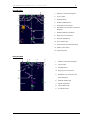
GLARESHIELD PANEL
+
Indicates that the panel in VC has 2D pop-up panel. Click on the top-left corner of the VC panel to call the
2D panel.
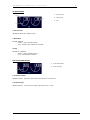
G1
G2
G3
G4
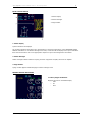
Cockpit Lights Control Panel
Master Warning/Caution Light
VOR/DME Control Panel
Autopilot Control Panel
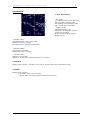
G1. COCKPIT LIGHTS CONTROL PANEL
1. Panel Knobs
2. Chart Knob
3.
Flood Knob
4. MAP Light Control
5. Clock Switch
1. Panel Knob
Controls panel’s fx light effect.
3. Flood Knob
On left Cockpit Lights Control Panel - controls Captain's fx light effect.
On right Cockpit Lights Control Panel - controls First Officer's fx light effect.
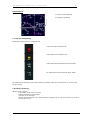
G2. MASTER WARNING/CAUTION LIGHT
1. Warning/Caution Lights
The two warning/caution lights illuminate any time a
warning or caution occurs. The lights remain illuminated as
long as the waning/caution exists or until one of the lights
are pushed in.
Pushing in either Warning/Caution light will extinguish both
lights and resets the lights for future warnings/cautions. In
addition, pushing in either light will silence certain aural
warnings.
© 2011 Captain Sim www.captainsim.com
‘757 Captain’ FLIGHT MANUAL Part II – Aircraft Systems
DO NOT USE FOR FLIGHT
35
G3. VOR/DME CONTROL PANEL
1. VOR Freq Indicator
2. Course Indicator
3. FREQ Knob
4. Course Selector Knob
5. VOR/DME Switch
1. VOR FREQ Indicator
Indicates the VOR frequency manually tuned on the associated VHF NAV receiver.
Dashes indicate that the associated VHF NAV receiver is being tuned by the FMS for position updating.
2. Course Indicator
Indicates the selected course
3. FREQ Knob
Twist to select a frequency for the associated VOR/DME panel. In order to tune the VOR/DME frequency, the
associated HSI must be in the VOR mode.
The frequency selector knob is inactive when the associated HSI is in the MAP, PLAN, or ILS mode.
4. Course Selector Knob
Twist to select the desired VOR course. The selected course appears on the associated course indicator and on
the associated HSI as long as it is in the VOR mode
5. VOR/DME Switch
Push-
-
alternates VOR and DME tuning between the FMC automatic (AUTO) and VOR frequency selector
manual (MAN) when the HSI mode selector is in MAP or PLAN.
AUTO light illuminated (white) -
FMC is tuning related VOR and DME
MAN light illuminated (white) —
-
-
VOR frequency selector is tuning VOR
VOR frequency selector also tunes the DME
if the HSI is selected to an ILS display, the ILS frequency selector tunes the DME.
© 2011 Captain Sim www.captainsim.com
‘757 Captain’ FLIGHT MANUAL Part II – Aircraft Systems
DO NOT USE FOR FLIGHT
36
G4. AUTOPILOT CONTROL PANEL
1.
F/D Switch
14. Heading Hold Switch
2.
A/T ARM Switch
15. Vertical Speed Selector
3.
EPR Switch
16. Vertical Speed Switch
4.
SPD Switch
17. Altitude Knob
5.
IAS/MACH Indicator
18. Altitude Hold Switch
6.
SEL Switch
19. Vertical Speed Indicator
7.
Speed Knob
20. Altitude Indicator
8.
LNAV Switch
21. APP Switch
9.
VNAV Switch
22. LOC Switch
10. FLCH Switch
24. A/P Engage Switch
11/12. Heading Select Knob/Bank Limit Selector
25. Disengage Bar
13. Heading Indicator
26. F/D Switch
1,26. F/D Switch
ON: Displays the flight director command bars on the associated ADI.
Turn on a F/D switch on the ground with no autopilots engaged and the opposite F/D switch off activates the
flight director Takeoff Mode.
In flight, the first F/D switch turned on engages the associated flight director in the current autopilot mode, if
one is engaged. If no autopilot is engaged, the flight director defaults to heading hold and vertical speed mode.
F/D Switch
OFF: The command bars are removed from the associated ADI.
2. A/T ARM Switch
A/T ARM: Arms the autothrottle for engagement.
Engagement requires you to push the EPR or SPD switch and activation of the VNAV, FLCH or GA modes.
OFF: Disarms the autothrottle.
3. EPR Switch
Pushing the EPR switch will cause the autothrottle to maintain the reference EPR displayed on EICAS, subject to
a maximum limit.
EPR is displayed on each ADI as the autothrottle mode.
© 2011 Captain Sim www.captainsim.com
‘757 Captain’ FLIGHT MANUAL Part II – Aircraft Systems
DO NOT USE FOR FLIGHT
37
4. SPD Switch
Pushing the SPD switch will cause the autothrottle to hold the speed/mach displayed on the airspeed indicator,
subject to the maximum speed limits.
SPD is displayed on each ADI.
Pushing the SPD switch in a climb or descent will engage the VERT SPD mode at the present vertical speed, and
will attempt to hold the present speed, if possible.
5. IAS/MACH Indicator
Indicates the current or selected speed if VNAV is not engaged.
The IAS/MACH indicator is blank when VNAV is engaged and the command airspeed bugs are under control of
the FMCs.
The IAS/MACH indicator automatically changes to MACH at 0.80 during the climb and to speed at 300 knots
during descent.
6. SEL Switch
Changes the IAS/MACH indicator between IAS and MACH when the speed is within the indicator range.
7. Speed Knob
Twist to change the value displayed in the IAS/MACH indicator.
When VNAV is engaged, pushing the speed knob transfers control of the aircraft speed to the FMS from the
speed knob. A subsequent push transfers the speed control from the speed knob to the FMS.
When the speed knob has control, the IAS/MACH indicator displays the selected speed. A blank display indicates
that the FMS has control of the speed.
Manual speed selection (speed intervene) does not disengage VNAV.
When FLCH or SPD is pushed, or altitude capture engages in VNAV, the speed window opens at the existing
speed. The speed knob can then be used to select a different speed.
8. LNAV Switch
Arms or engages the lateral navigation mode of the FMS.
When engaged, roll and heading are controlled by the FMS.
A white LNAV on the ADI indicates that the LNAV mode is armed. Green indicates that it is engaged.
LNAV can be disengaged by:
Selecting HDG HOLD or HDG SEL
Localizer capture
FMC related to the active autopilot fails.
9. VNAV Switch
Engages the vertical navigation mode of the FMS if above 400 feet RA.
When engaged, speed, pitch, and autothrottle are controlled by the FMS. VNAV PTH or VNAV SPD is displayed
on each ADI.
A white VNAV on the ADI indicates that the VNAV mode is armed. Green indicates that it is engaged.
© 2011 Captain Sim www.captainsim.com
‘757 Captain’ FLIGHT MANUAL Part II – Aircraft Systems
DO NOT USE FOR FLIGHT
38
VNAV can be disengaged by:
Selecting V/S or ALT HOLD.
Selecting SPD or EPR.
Selecting FLCH.
Glide slope capture.
Altitude capture if not the same as the FMC cruise altitude.
FMC failure.
Selecting GA mode.
10. FLCH Switch
Engages the flight level change mode to integrate pitch control and autothrottle functions for altitude change.
FL CH is displayed on each ADI.
When the FL CH mode is engaged, the command airspeed bug moves to the existing speed and the AFDS holds
that speed using pitch. The autothrottle holds selected thrust for climb, or idle, or throttle hold for descent.
11. Heading Select Knob
Twist to change the heading. The selected heading is displayed in the Heading indicator.
Push to engage the heading select mode. HDG SEL is displayed on the ADI.
12. Bank Limit Selector
The outer knob selects the bank angle limit.
AUTO: Limits the bank angle to 15 degrees at true airspeeds above 250 KIAS. This limit increases to 25 degrees
as true airspeed decreases below 250 KIAS to 200 KIAS.
5, 10, 15, 20, 25: Bank angle limits at all true airspeed.
The Bank Limit Selector does not limit the bank angle in L NAV or LOC
13. Heading Indicator
Displays the selected magnetic heading. The heading bugs on the HSI's are driven to indicated value.
The Heading Indicator automatically slews to the selected front course or back course at LOC or B/CRS capture.
14. Heading Hold Switch
Press to engage the heading hold mode. HDG HOLD is displayed on each ADI.
When pressed, the autopilot will automatically roll out of any turn to hold the magnetic heading value at wings
level.
15. Vertical Speed Selector
Changes the vertical speed which is displayed in the vertical speed indicator.
16. Vertical Speed Switch
Press to engage the vertical speed mode. V/S is displayed on each ADI. When pressed, the autopilot/FD will
maintain the vertical speed displayed in the vertical speed indicator.
17. Altitude Knob
Twist to change the value selected in the Altitude indicator.
© 2011 Captain Sim www.captainsim.com
‘757 Captain’ FLIGHT MANUAL Part II – Aircraft Systems
DO NOT USE FOR FLIGHT
39
18. Altitude Hold Switch
Push to engage the altitude hold mode. ALT HOLD is displayed on each ADI.
The AFDS will capture and hold the altitude existing when the switch was pushed.
19. Vertical Speed Indicator
Displays the Vertical Speed selected by the Vertical Speed Selector.
20. Altitude Indicator
Displays the altitude selected by the altitude knob.
The value displayed in the indicator is a target altitude for climbs and descents and provides altitude alert
functions. The Flight Directors, autopilots, and FMS cannot fly through the indicated altitude.
21. APP Switch
Arms the AFDS to capture and fly the localizer and glide slope. LOC and G/S are displayed in white on each ADI
prior to localizer and glide slope capture.
Glide slope will not capture if the intercept angle is greater than 80 degrees.
The APP mode allows multiple autopilots to be armed for autoland and rollout.
22. LOC Switch
When pushed, the LOC switch arms the AFDS to capture and fly the localizer front course. The switch must be
pushed prior to localizer capture.
LOC is displayed in white on each ADI prior to capture.
The localizer will not capture if the intercept angle is greater than 120 degrees or 2.5 NM.
The current lateral nav mode (LNAV, heading select, or heading hold) remains engaged until localizer capture.
24. A/P ENGAGE Switches
CMD: Engages the associated autopilot in the vertical speed and heading hold mode if neither flight director is
on.
CMD is displayed on each ADI.
If either flight director is on at the time the A/P ENGAGE switch is pressed, the autopilot will engage in the same
mode as the flight director.
Pushing the second autopilot CMD switch when in the APP mode arms the autoland system. The second
autopilot will engage below 1500 feet AGL. Arms the runway alignment, flare, and roll out modes.
Pushing the third A/P Engage switch while in the APP mode separates the three electrical systems. The second
and third autopilots engage when the aircraft is below 1500 feet.
25. Disengage Bar
Pull down to disconnect all three autopilots from the flight control servos, thereby preventing autopilot
engagement.
© 2011 Captain Sim www.captainsim.com
‘757 Captain’ FLIGHT MANUAL Part II – Aircraft Systems
DO NOT USE FOR FLIGHT
FLIGHT INSTRUMENTS
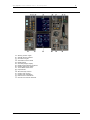
LEFT FORWARD PANEL
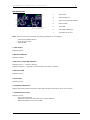
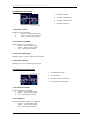
5. INSTR SEL Source Panel
6. Airspeed Indicator
7. RDMI
8.
9.
10.
11.
12.
13.
14.
15.
16.
17.
18.
Attitude Director Indicator (ADI) Display
Horizontal Situation Indicator (HSI) Display
Autoland Status Annunciator
Altimeter
Vertical Speed Indicator
Clock
Marker Beacon Lights
Reserve Brakes
Standby Attitude Indicator
Standby Airspeed Indicator
Standby Altimeter
© 2011 Captain Sim www.captainsim.com
40
‘757 Captain’ FLIGHT MANUAL Part II – Aircraft Systems
DO NOT USE FOR FLIGHT
41
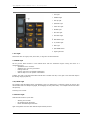
6. AIRSPEED INDICATOR
1. Airspeed Pointer
2. Mach Indicator
3. Vmo Pointer
4-5. INOP flags
6. Knots Indicator
7. Command Airspeed Bug
8-11. Airspeed Bugs
1. Airspeed Pointer
Points to the value corresponding to the airspeed computed by the selected Air Data Computer.
The needle points to 0 when input information is unreliable.
2. Mach Indicator
Indicates the mach number. The value displayed is computed by the selected Air Data Computer (ADC).
The display is blank when the airspeed is below M0.40.
A mach Flag indicates that the selected ADC has failed.
3. Vmo Pointer
Points to the maximum operating speed.
If the Vmo warning flag is displayed, the Vmo pointer points to 260 knots.
6. Knots Indicator
Displays the Indicated Airspeed (IAS) in knots.
The value displayed is computed by the selected Air Data Computer.
The presence of an AS flag indicates that the input to the indicator and the airspeed pointer is unreliable.
7. Command Airspeed Bug
Indicates the airspeed set in the IAS/MACH selector or the value selected by the FMC when VNAV is engaged.
The Command Airspeed bug automatically moves to the speed existing at the time FL CH mode is engaged, the
SPD switch is pushed, or altitude capture engages while in VNAV mode.
8-11. Airspeed Bugs
These bugs can slide on the outside of the airspeed indicator to mark certain speeds.
© 2011 Captain Sim www.captainsim.com
‘757 Captain’ FLIGHT MANUAL Part II – Aircraft Systems
DO NOT USE FOR FLIGHT
42
7. RDMI
Note
IRS alignment must be complete before RDMI checks.
1. L Distance Indicator
2. R Distance Indicator
3. RMI Card
4-5. INOP flags
6,9. NAV/ADF Selector
7,8. No 1/No 2 Pointers
1,2. Distance L/R Indicators
Displays the distance to the next active waypoint or radio facility.
The prefix can be one of the following:
F - Horizontal distance to the next active waypoint when the associated HSI is in MAP or PLAN.
L - Slant distance to the ILS/DME tuned on the ILS/DME receiver when the associated HSI is in the ILS
mode.
No prefix - Slant distance to the VOR/DME tuned on the associated VOR receiver when the associated
HSI is in VOR mode.
Blank indication - No DME input or DME input is unreliable.
3. RMI Card
The card rotates to indicate the magnetic or true heading as determined by the IRS selected on the opposite IRS
INSTR SOURCE SELECT switch.
The position of the heading reference switch indicates the type of heading information displayed by the RMI
card.
6,9. NAV/ADF Selector
ADF: Selects ADF as the source of data for the associated pointer.
NAV: Selects the FMC as the source of data when the associated HSI is in the MAP or PLAN mode. If the
associated HSI is in the VOR mode, the associated VOR is the source of data for the pointer.
7,8. No I/No 2 Pointers
Indicates the bearing to the next active waypoint or the VOR tuned.
The number one needle points to the left FMC waypoint or left VOR station. The number two needle points to
the right FMC waypoint or right VOR station.
© 2011 Captain Sim www.captainsim.com
‘757 Captain’ FLIGHT MANUAL Part II – Aircraft Systems
DO NOT USE FOR FLIGHT
43
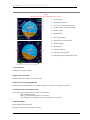
8. ATTITUDE DIRECTOR INDICATOR (ADI) DISPLAY
Note
IRS alignment must be complete before ADI checks.
1.
Ground Speed
2.
Bank Pointer and Scale
3.
Horizon Line and Pitch Angle Scale
4.
Localizer Pointer and Deviation Scale
5.
Decision Height
6.
Radio Altitude
7.
Pitch Limit Indicator
8.
Flight Director Command Bars
9.
Airplane Symbol
10. Slip Indicator
11. Fast/Slow Indicator
12. Flight Mode Annunciations
13. Glide Slope Pointer and Deviation Scale
1. Ground Speed
Indicates ground speed in knots.
2. Bank Pointer and Scale
Indicates IRS bank in reference to the bank scale.
3. Horizon Line and Pitch Angle Scale
Indicates the IRS horizon relative to the airplane symbol. Pitch scale is in 2.5 degree increments.
4. Localizer Pointer and Deviation Scale
The localizer
-
pointer indicates position relative to the airplane.
scale indicates deviation
pointer not displayed when localizer is unusable
scale and pointer not displayed when an ILS frequency is not selected
5. Decision Height
Displays selected decision height.
Blank when negative decision height is selected.
© 2011 Captain Sim www.captainsim.com
‘757 Captain’ FLIGHT MANUAL Part II – Aircraft Systems
DO NOT USE FOR FLIGHT
-
44
decision height alert is reset automatically - if airplane climbs 75 feet or more above the selected
decision height, or after the airplane lands
decision height alert is reset manually - if the RST switch is pushed.
6. Radio Altitude
Displays radio altitude below 2500 feet AGL.
blank above 2500 feet AGL
7. Pitch Limit Indicator
Indicates pitch limit (stick shaker activation point for the existing flight conditions).
displays when flaps are extended.
8. Flight Director Command Bars
Indicates flight director pitch and roll steering commands.
displays when the respective F/D switch is ON, valid command steering is available
blanks when the respective FD switch is OFF, or when command steering becomes invalid
9. Airplane Symbol
Indicates airplane attitude with reference to the IRS horizon.
10. Slip Indicator
Indicates coordinated flight.
11. Fast/Slow Indicator
Displays airspeed information.
indicates deviation from the airspeed selected by the FMC or the IAS/MACH selector, or limit speed
small diamonds indicate 10 knots fast (F), or slow (S).
13. Glide Slope Pointer and Deviation Scale
The glideslope pointer indicates glideslope position relative to the airplane.
scale indicates deviation
pointer not displayed when glide slope unusable
scale and pointer not displayed when an ILS frequency is not selected
© 2011 Captain Sim www.captainsim.com
‘757 Captain’ FLIGHT MANUAL Part II – Aircraft Systems
DO NOT USE FOR FLIGHT
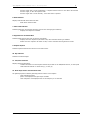
ADI FLIGHT MODE ANNINCIATIONS (FMA’S)
1. Autothrottle Status
2. Autothrottle Modes (Active)
3. AFDS Pitch Modes (Armed)
4. AFDS Pitch Modes (Active)
5. AFDS (Active)
6. AFDS Roll Modes (Armed)
7. AFDS Roll Modes (Active)
1. Autothrottle Status
Displayed (green) A/T
2. Autothrottle Modes (Active)
Displayed (green)
EPR
SPD
FLCH
GA
IDLE
THRHOLD
3. AFDS Pitch Modes (Armed)
Displayed (white)
G/S
FLARE
VNAV
4. AFDS Pitch Modes (Active)
Displayed (green)
TO
ALT HOLD
V/S
VNAVPTH
VNAVSPD
SPD
G/S
FLARE
ALT CAP
GA
5. AFDS (Active)
Displayed (green)
CMD
FD
6. AFDS Roll Modes (Armed)
Displayed (white)
LOC
ROLLOUT
© 2011 Captain Sim www.captainsim.com
45
‘757 Captain’ FLIGHT MANUAL Part II – Aircraft Systems
DO NOT USE FOR FLIGHT
-
46
LNAV
B/CRS
7. AFDS Roll Modes (Active)
Displayed (green)
HDGHOLD
HDGSEL
LNAV
LOC
ROLLOUT
TO
GA
B/CRS
9. HORIZONTAL SITUATION INDICATOR (HSI) DISPLAY
Note
IRS alignment must be complete before HSI checks.
HSI APP MODE
U
1.
Current Heading
2.
Reference ILS DME
3.
Selected Heading Bug
4.
Weather Radar Returns
5.
Track Line
6.
7.
Wind Direction and Speed
8.
Reference ILS Receiver
9.
Magnetic/True Reference
10.
Weather Radar Annunciations
11.
Selected Course Pointer
12.
© 2011 Captain Sim www.captainsim.com
Course Deviation Indicator and
Deviation Scale
Glideslope Pointer and
Deviation Scale
13.
Reference ILS Frequency
14.
Airplane Symbol
‘757 Captain’ FLIGHT MANUAL Part II – Aircraft Systems
DO NOT USE FOR FLIGHT
47
HSI CTR APP MODE
U
1.
Reference ILS DME
2.
Current Heading
3.
Selected Heading Bug
4.
Course Deviation Indicator and
Deviation Scale
5.
Wind Direction and Speed
6.
Reference ILS Receiver
7.
Magnetic/True Reference
8.
Drift Angle Pointer
9.
Selected Course Pointer
10.
© 2011 Captain Sim www.captainsim.com
Glideslope Pointer and
Deviation Scale
11.
Airplane Symbol
12.
Reference ILS Frequency
‘757 Captain’ FLIGHT MANUAL Part II – Aircraft Systems
DO NOT USE FOR FLIGHT
48
HSI VOR MODE
U
© 2011 Captain Sim www.captainsim.com
1.
Current Heading
2.
Reference VOR DME
3.
Selected Heading Bug
4.
Weather Radar Returns
5.
Course Deviation Indicator and
Deviation Scale
6.
Wind Direction and Speed
7.
Reference VOR Receiver
8.
Magnetic/True Reference
9.
Weather Radar Annunciations
10.
Selected Course Pointer
11.
TO/FROM Indication
12.
Airplane Symbol
‘757 Captain’ FLIGHT MANUAL Part II – Aircraft Systems
DO NOT USE FOR FLIGHT
49
HSI CTR VOR MODE
U
1.
Reference VOR DME
2.
Current Heading
3.
Selected Heading Bug
4.
© 2011 Captain Sim www.captainsim.com
Course Deviation Indicator and
Deviation Scale
5.
To/From Pointer
6.
Wind Direction and Speed
7.
Reference VOR Receiver
8.
Magnetic/True Reference
9.
Drift Angle Pointer
10.
Selected Course Pointer
11.
Airplane Symbol
12.
TO/FROM Indication
‘757 Captain’ FLIGHT MANUAL Part II – Aircraft Systems
DO NOT USE FOR FLIGHT
50
HSI MAP MODE
U
1.
Distance to the Active Waypoint
2.
Current Track
3.
Heading Pointer
4.
Weather Radar Returns
5.
Wind Direction and Speed
6.
Estimated Time of Arrival at the Active
Waypoint
7.
Weather Radar Annunciations
8.
Magnetic/True Reference
9.
Selected Heading Bug
10. Active LNAV Route
11. Vertical Pointer and Deviation Scale
12. Position Trend Vector
13. Airplane Symbol
HSI PLAN MODE
U
1.
Distance to the Active Waypoint
2.
Current Track
3.
Heading Pointer
4.
Magnetic/True Reference
5.
Estimated Time of Arrival at the
Active Waypoint
© 2011 Captain Sim www.captainsim.com
6.
Selected Heading Bug
7.
Airport and Runway
8.
Active LNAV Route
9.
True North Pointer
‘757 Captain’ FLIGHT MANUAL Part II – Aircraft Systems
DO NOT USE FOR FLIGHT
51
TCAS DISPLAYS
U
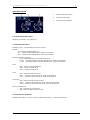
1. Traffic Aircraft Symbology
2. No-Bearing Symbology
1. Traffic Aircraft Symbology
Indicates the relative position of traffic aircraft.
A filled red square indicates a RA.
A filled amber circle indicates a TA.
A filled white diamond indicates Proximate Traffic.
An unfilled white diamond indicates Other Traffic.
The traffic aircraft data tag provides relative altitude (hundreds of feet) and vertical motion (in excess of 500
feet per minute).
2. No-Bearing Symbology
Displayed
-
(red or amber) a TA (amber) or RA (red) is occurring
bearing information is not available
maximum of two messages
data tag provides distance (nm), relative altitude (hundreds of feet), and vertical motion (in excess of
500 feet per minute)
© 2011 Captain Sim www.captainsim.com
‘757 Captain’ FLIGHT MANUAL Part II – Aircraft Systems
DO NOT USE FOR FLIGHT
52
TCAS MESSAGES
U
1. Mode Annunciations
- TFC (green)
TFC selected on EFIS control panel in the
VOR, APP, MAP or CTR MAP mode
Not displayed when TCAS TEST, TCAS
FAIL, or TCAS OFF is annunciated
- TA ONLY (green)
TCAS Mode Selector in TA
Displayed in all HSI modes regardless
whether TFC is selected
All TAs and RAs are processed and
displayed as TAs
- TCAS OFF (white)
TCAS Mode Selector is not in TA or TA/RA
Displayed when TFC is selected
Not displayed when TCAS FAIL is annunciated
- TCAS FAIL (amber)
TCAS system is inoperative
Displayed when TFC is selected
- TCAS TEST (white).
TCAS is in the test mode
Displayed in all HSI modes regardless whether TFC is selected
2. OFFSCALE
Displayed (red or amber) - TA (amber) or RA (red) is occurring outside the selected display range.
3. TRAFFIC
Displayed (red or amber) a TA (amber) or RA (red) is occurring
in all HSI modes and ranges regardless whether TFC is selected
© 2011 Captain Sim www.captainsim.com
‘757 Captain’ FLIGHT MANUAL Part II – Aircraft Systems
DO NOT USE FOR FLIGHT
53
10. AUTOLAND STATUS ANNUNCIATOR
2,4. Status Annunciators
3,5. Test Switches
2,4. Status Annunciators
The upper indication displays LAND 3 when three autopilots and the required airplane system inputs are
operable in the approach mode.
LAND 2 is displayed when only two autopilot systems and required airplane system inputs are operable in the
approach mode.
This indication is blank until approach mode is selected and the requirements are met below 1500 feet radio
altitude with the localizer and glide slope captured.
The lower indication displays NO LAND 3 when only two autopilots are operable for autoland.
Displays NO AUTOLAND when there is no autoland capability. Remains blank if there are no faults.
3,5. Test Switches
Press to test the operation of the associated autoland status annunciator.
TEST 1: LAND 3 and NO LAND 3 appear in the upper and lower indications.
TEST 2: LAND 2 and NO AUTOLAND appear in the upper and lower indications.
11. ALTIMETER
1. Altitude Reference Bug
2. Altitude Indicator
3. Alt Light
4. NEG Flag
5,6. Altimeter Setting Indicators
7. BARO Knob
8. 100x Foot Pointer
9. Reference Altitude Control Knob
1. Altitude Reference Bug
Used to remind the pilot of a specific altitude. The bug is set with the Altitude Bug Set Knob.
© 2011 Captain Sim www.captainsim.com
‘757 Captain’ FLIGHT MANUAL Part II – Aircraft Systems
DO NOT USE FOR FLIGHT
54
2. Altitude Indicator
Displays the corrected altitude in 20 foot increments. The data displayed is computed by the selected Air Data
Computer.
"NEG" indicates that the altitude is below zero
3. ALT Light
Illuminates when the aircraft is within 900 feet of the altitude set in the MCP altitude indicator. Light
extinguishes when the altitude is within 300 feet of the MCP altitude.
4. NEG Flag
The NEG Flag appears when altitudes below zero feet is displayed
5,6. Altimeter Setting Indicators
Displays the selected altimeter setting. The left displays the information in millibars; the right displays the
information in inches of mercury.
7. BARO Knob
Use the BARO Knob to adjust the altimeter setting.
8. 100 Foot Pointer
Indicates the altitude in hundreds of feet.
9. Reference Altitude Control Knob
Positions the Altitude Reference Bug
12. VERTICAL SPEED INDICATOR
1. VS pointer - displays the vertical speed in feet
per minute. The speed is calculated by the selected
IRS.
2. OFF flag
Note
IRS alignment must be complete before VSI checks.
The Vertical Speed indicator displays zero if the
selected IRS information is unreliable.
© 2011 Captain Sim www.captainsim.com
‘757 Captain’ FLIGHT MANUAL Part II – Aircraft Systems
DO NOT USE FOR FLIGHT
55
13. CLOCK
1. CHR Button
2. Sweep Second Needle
3. GMT Indicator
4. ET Selector
5. ET/CHR Indicator
6. GMT Selector
1. CHR Button
Press to start, stop, or reset the CHR indicator and the sweep second hand.
2. Sweep Second Needle
Displays the elapsed time in seconds when the CHR or CLOCK button is pushed.
3. GMT Indicator
Displays the GMT time in 24 hour format.
The Captain’s clock provides the time input to both FMC’s and the flight recorder.
If the Captain’s clock is inoperative, the F/O’s clock provides the information.
4. ET Selector
RUN: Starts the ET indicator. Continues to count from HLD time when reselected from HLD.
HLD: Stops ET indicator at existing time.
RESET: Resets ET indicator to zero.
5. ET/CHR Indicator
ET: Indicates the elapsed time from 0 to 99 hours and 59 minutes since the ET selector was moved to RUN.
CHR: Indicates the elapsed time from 0 to 99 minutes and 59 seconds since CHR or CLOCK button was pushed
to start time.
6. GMT Selector
RUN: Starts the GMT indicator.
HOLD: Stops the GMT indicator and input to FMC and flight recorder.
SS: Sets seconds to zero and advances the minutes.
FS: Freezes the minutes and advances the hours.
© 2011 Captain Sim www.captainsim.com
‘757 Captain’ FLIGHT MANUAL Part II – Aircraft Systems
DO NOT USE FOR FLIGHT
56
14. MARKER BEACON LIGHTS
Respective marker beacon light illuminates when the aircraft
passes over the associated beacon as detected by the left
VOR/Marker receiver.
15. RESERVE BRAKES
Press to activate the reserve brakes system.
-
Turns on the right system electric hydraulic pump
regardless of pump switch position.
Provides a reserve fluid supply from the right
reservoir.
Electric pump output is isolated from the other
right system components and is supplied
exclusively to the brakes.
16. STANDBY ATTITUDE INDICATOR
A self contained Standby Attitude Indicator will be
supplied with electrical power from the Standby DC
Bus for approx. 30 minutes.
1. Horizon Line and Pitch Angle Scale
2. GYRO flag
3. Mode Selector Knob
4. Cage Knob
5. G/S flag (not shown)
© 2011 Captain Sim www.captainsim.com
‘757 Captain’ FLIGHT MANUAL Part II – Aircraft Systems
DO NOT USE FOR FLIGHT
57
17. STANDBY AIRSPEED INDICATOR
1. Airspeed Pointer
Displays the airspeed derived from uncorrected pilotstatic information.
The standby airspeed indicator is directly connected to
the right aux pitot and alternate static sources.
18. STANDBY ALTIMETER
1. Altitude Reference Bug
2. Altitude Indicator
3. Alt Light
4. NEG Flag
5,6. Altimeter Setting Indicators
7. BARO Knob
8. 100x Foot Pointer
9. Reference Altitude Control Knob
1. Altitude Reference Bug
Used to remind the pilot of a specific altitude. The bug is set with the Altitude Bug Set Knob.
2. Altitude Indicator
Displays the corrected altitude in 20 foot increments. The data displayed is computed by the selected Air Data
Computer.
"NEG" indicates that the altitude is below zero
3. ALT Light
Illuminates when the aircraft is within 900 feet of the altitude set in the MCP altitude indicator. Light
extinguishes when the altitude is within 300 feet of the MCP altitude.
4. NEG Flag
The NEG Flag appears when altitudes below zero feet is displayed
5,6. Altimeter Setting Indicators
Displays the selected altimeter setting. The left displays the information in millibars; the right displays the
information in inches of mercury.
© 2011 Captain Sim www.captainsim.com
‘757 Captain’ FLIGHT MANUAL Part II – Aircraft Systems
DO NOT USE FOR FLIGHT
7. BARO Knob
Use the BARO Knob to adjust the altimeter setting.
8. 100 Foot Pointer
Indicates the altitude in hundreds of feet.
9. Reference Altitude Control Knob
Positions the Altitude Reference Bug
© 2011 Captain Sim www.captainsim.com
58
‘757 Captain’ FLIGHT MANUAL Part II – Aircraft Systems
DO NOT USE FOR FLIGHT
59
RIGHT FORWARD PANEL
5. INSTR SEL Source Panel
6. Airspeed Indicator
7. RDMI
8. Attitude Director Indicator (ADI) Display
9. Horizontal Situation Indicator (HSI) Display
10. Autoland Status Annunciator
11. Altimeter
12. Vertical Speed Indicator
13. Clock
32. Brake Pressure Indications
32. BRAKE PRESSURE INDICATIONS
1. Pointer
Indicates the pressure of parking brake accumulator.
Indicates the accumulator pre-charge if the parking brake
accumulator is depleted.
The accumulator can only be pressurized by the right
hydraulic system.
The accumulator provides at least one brake application,
and normal anti-skid is available with the accumulator.
© 2011 Captain Sim www.captainsim.com
‘757 Captain’ FLIGHT MANUAL Part II – Aircraft Systems
DO NOT USE FOR FLIGHT
CENTER FORWARD PANEL
19. Warning Caution Lights
20. Standby Engine Indicator
21. Oil Pressure Lights
22. Auto Brakes Control Panel
23.
24.
25.
26.
27.
28.
EICAS Display
Secondary Engine Display
EICAS Caution/Advisory Switches
Heading Preference Switch
Thrust Mode Select Panel
Flap Indicator
29. Alternate Flap Controls
30. Landing Gear Control
31. Landing Gear Indications
32. Brake Pressure Indications
33. Ground Prox Override Switches
© 2011 Captain Sim www.captainsim.com
60
‘757 Captain’ FLIGHT MANUAL Part II – Aircraft Systems
DO NOT USE FOR FLIGHT
61
19. WARNING/CAUTION LIGHTS
1. Fire Light
2. CONFIG Light
3. Pull Up Light
4. A/P DISC Light
5. Cabin ALT Light
6. OVSPD Light
7. ALT Alert light
8. Auto Pilot Light
9.
GND PROX Light
10. A/T DISC Light
11. FMC Light
12. G/S INHIB Switch
1. Fire Light
13. Lighting Sensors
Illuminates when an engine, APU, wheel well, or cargo fire has been detected.
2. CONFIG Light
On the ground: Either throttle is near takeoff thrust with the associated engine running and there is a
configuration error.
Speedbrake lever not down.
Stabilizer trim not in the green band.
Parking brake set.
Flaps or slats not in the takeoff configuration.
Slats or flaps not in the position commanded.
In flight: The gear is not down below 800 feet RA with a throttle near idle, or the gear is not down with flaps in
the landing range (beyond 20).
4. A/P DISC Light
Any autopilot has disengaged either automatically (due to a malfunction) or manually (either the electric trim
was activated with one autopilot engaged, the disengage bar was pulled down, or an autopilot disconnect button
was pushed).
A warning horn sounds.
5. Cabin ALT Light
Cabin altitude is above 10,000 feet.
-
Warning horn sounds.
No Smoking Signs illuminate.
Fasten Seat Belt Signs illuminate.
Light extinguishes when the cabin altitude drops below 8,500 feet.
© 2011 Captain Sim www.captainsim.com
‘757 Captain’ FLIGHT MANUAL Part II – Aircraft Systems
DO NOT USE FOR FLIGHT
62
6. OVSPD Light
Aircraft has exceeded Vmo or Mmo.
7. ALT Alert Light
Illuminates when the aircraft altitude deviates more than 300 feet from the altitude set in the MCP. The light
extinguishes when the deviation exceeds 900 feet.
8. Auto Pilot Light
At least one autopilot is operating in a degraded mode. The AUTO PILOT light can also indicate one of the
following: + Vertical speed mode is engaged without being selected on the MCP
-
Angle of attack exceeds 6 degrees in V/S, ALT HOLD, or ALT CAP modes.
Loss of G/S and/or LOC signals after a delay of several seconds.
9. GND PROX Light
At least one GPWS mode has been activated.
10. A/T Disc Light
The autothrottle is disconnected.
11. FMC Light
The FMC is displaying a message on the CDUs.
12. G/S INHIB Switch
Inhibits or cancels the below glide slope aural warning and turns off the GRND PROX light when pushed below
1000 feet or descends below 500 feet radio altitude.
© 2011 Captain Sim www.captainsim.com
‘757 Captain’ FLIGHT MANUAL Part II – Aircraft Systems
DO NOT USE FOR FLIGHT
63
20. STANDBY ENGINE INDICATOR
Provides backup indications for engine EPR, N1, EGT,
and N2.
1. Maximum Limit Indicator
2. EPR Indicator
3. N1 Indicator
4. EGT Indicator
5. N2 Indicator
21. OIL PRESSURE LIGHTS
Illuminates when the associated engine oil pressure
is below 70 PSI.
All oil related indications for both engines appear
automatically on EICAS.
© 2011 Captain Sim www.captainsim.com
‘757 Captain’ FLIGHT MANUAL Part II – Aircraft Systems
DO NOT USE FOR FLIGHT
64
22. AUTO BRAKES CONTROL PANEL
1. Auto Brakes Selector
2. Auto Brakes Light
1. Auto Brakes Selector
RTO: Arms the auto brake system to provide maximum braking for rejected takeoff when both throttles are
retarded to idle when the aircraft is above 80 knots.
The system disarms and the selector remains in the RTO position if brake pedals are pushed, either throttle is
advanced, speed brake lever is moved out of the UP position after speed brakes have deployed on the ground,
or a fault has been detected.
Selector moves to OFF after liftoff.
OFF: Removes power from the auto brake system.
DISARM:
Disarms the auto brake system.
Releases all auto brake pressure to the wheels.
1, 2, 3, 4, or AUTO: Selects the aircraft deceleration rate for automatic braking during landing.
Auto braking
-
occurs when:
Both main gear are on the ground.
Both throttles are at idle.
Wheel spinup occurs.
IRS pitch is 1 degree or less. If pitch is not met, up to 8 second delay in braking can occur.
2. Auto Brakes Light
Illuminates for one of the following:
-
Auto Brake system has disarmed.
Selector in the OFF position and the auto brake valve is not closed.
Selector is in the RTO position and auto brakes have disengaged.
Anti-skid failure.
© 2011 Captain Sim www.captainsim.com
‘757 Captain’ FLIGHT MANUAL Part II – Aircraft Systems
DO NOT USE FOR FLIGHT
65
23. EICAS DISPLAY
PRIMARY EICAS DISPLAY
U
1. EICAS Message Field
Eleven lines are available for system and
communications alerts. Additional pages are available.
2. Engine Secondary Data Cue
Displays (cyan) - secondary engine data should be
displayed on lower CRT.
3. Primary Engine Indications
Displays full time on the EICAS display.
SECONDARY EICAS DISPLAY
U
1. Status Cue
Displays when a new status message exists. Removed
when the status page is displayed.
© 2011 Captain Sim www.captainsim.com
‘757 Captain’ FLIGHT MANUAL Part II – Aircraft Systems
DO NOT USE FOR FLIGHT
EICAS MESSAGES
U
1. Warning Messages
2. Caution Messages
3. Advisory Messages
4. Recall Indication
5. Page Number
6. Communication Messages
1. Warning Messages
Displays (red) - the highest priority alert messages.
2. Caution Messages
Displays (amber) - the next highest priority alert messages after warning messages.
3. Advisory Messages
Displays (amber) the lowest priority alert messages
indented one space.
4. Recall Indication
Displays when the RECALL switch is pushed.
Remains displayed for one second after the switch is released.
5. Page Number
Displays (white) more than one page of alert or communication messages exists
indicates the number of the page selected.
6. Communication Messages
Displays (white) indicates incoming communication messages
preceded by a white dot
COMM LOW messages are indented one space.
© 2011 Captain Sim www.captainsim.com
66
‘757 Captain’ FLIGHT MANUAL Part II – Aircraft Systems
DO NOT USE FOR FLIGHT
67
EICAS STATUS DISPLAY
U
1. Status Display
2. Status Messages
3. Page Number
1. Status Display
System indications are displayed.
The systems indications shown above are representative of the fleet configuration. If the SECONDARY EICAS
DISPLAY indications are not standard throughout the fleet, certain aircraft will display fewer system indications
than those shown above. Refer to the appropriate chapter for system and configuration information.
2. Status Messages
Status messages indicate conditions requiring minimum equipment list (MEL) reference for dispatch.
3. Page Number
A page number appears if additional pages of status messages exist.
PRIMARY ENGINE INDICATIONS
U
1. Primary Engine Indications
Displayed full time on the EICAS display:
EPR
-
© 2011 Captain Sim www.captainsim.com
N1
EGT.
‘757 Captain’ FLIGHT MANUAL Part II – Aircraft Systems
DO NOT USE FOR FLIGHT
68
MODE INDICATIONS
U
1.
Total Air Temperature (TAT)
2.
Thrust Reference Mode
3.
Thrust Reverser Indication
1. Total Air Temperature (TAT)
Displayed (cyan/white) - TAT (degrees C).
2. Thrust Reference Mode
Displayed (green) - selected FMS thrust reference mode:
Takeoff:
- TO - maximum rated takeoff thrust
- TO 1 - maximum rated takeoff thrust, climb one preselected
- TO 2 - maximum rated takeoff thrust, climb two preselected
Assumed Temperature Takeoff:
D-TO - assumed temperature derated takeoff thrust
D-TO 1 - assumed temperature derated takeoff thrust, climb one preselected
D-TO 2 - assumed temperature derated takeoff thrust, climb two preselected
Climb:
Cruise:
-
CLB — maximum rated climb thrust
CLB 1 - derate one climb thrust
CLB 2 - derate two climb thrust
-
CRZ - maximum rated cruise thrust
CRZ 1 - maximum rated cruise thrust, climb one preselected
CRZ 2 - maximum rated cruise thrust, climb two preselected
Continuous:
CON - maximum rated continuous thrust
CON 1 - maximum rated continuous thrust, climb one preselected
CON 2 - maximum rated continuous thrust, climb two preselected
Go-around and Manual:
G/A - maximum go-around thrust
MAN - reference EPR manually selected.
3. Thrust Reverser Indication
Displayed REV (amber) - reverser in transit. Displayed REV (green) - reverser fully deployed.
© 2011 Captain Sim www.captainsim.com
‘757 Captain’ FLIGHT MANUAL Part II – Aircraft Systems
DO NOT USE FOR FLIGHT
69
EPR INDICATIONS
U
1.
EPR Pointer
2.
Maximum EPR Line
3.
Reference/Target EPR indication
4.
Reference EPR
5.
Actual EPR
6.
Commanded EPR Sector
7.
Command Thrust Level
Note: When reverse thrust is activated, the following indications are not displayed:
- reference/target EPR indication;
- thrust reference mode;
- reference EPR.
1. EPR Pointer
Displayed (white).
2. Maximum EPR Line
Displayed (amber).
3. Reference/Target EPR indication
Displayed (green) — reference EPR limit.
Displayed magenta — target FMC commanded EPR when VNAV is engaged.
4. Reference EPR
Displayed (green).
5. Actual EPR
Displayed (white).
6. Commanded EPR Sector
Displays momentary difference between engine EPR and EPR commanded by thrust lever position.
7. Command Thrust Level
Displayed (white):
end of command sector
appears as extension of EPR pointer when engine stabilized
EPR commanded by thrust lever position.
© 2011 Captain Sim www.captainsim.com
‘757 Captain’ FLIGHT MANUAL Part II – Aircraft Systems
DO NOT USE FOR FLIGHT
70
N1 INDICATIONS
U
1.
N1 Red Line Limit
2.
N1 Pointer
3.
N1
1. N1 Red Line Limit
Displayed (red) –N1 RPM operating limit.
2. N1 Pointer
-
(white) - points at value equal to that shown in the N1 counter
(red) - operating limit reached or exceeded.
3. N1
N1 RPM (%), displayed:
(white) — normal operating range
(red) - operating limit reached or exceeded.
EGT INDICATIONS
U
1.
EGT Red Line
2.
EGT Amber Band
3.
EGT
4.
EGT Pointer
1. EGT Red Line
Displayed (red) - maximum takeoff EGT limit.
2. EGT Amber Band
Displayed (amber) — maximum continuous EGT limit.
3. EGT
EGT (degrees C), displayed:
(white) — normal operating range
(amber) — maximum continuous limit reached*
(red) - maximum start or takeoff limit reached.
Note: * Pointer and counter remain white during TO or GA for 5 minutes after amber band is entered.
4. EGT Pointer
Displayed:
(white) - normal operating range
(amber) — maximum continuous limit reached
(red) - maximum start or takeoff limit reached.
© 2011 Captain Sim www.captainsim.com
‘757 Captain’ FLIGHT MANUAL Part II – Aircraft Systems
DO NOT USE FOR FLIGHT
71
ANTI-ICE INDICATIONS
U
1.
Thermal Anti-Ice (TAI) Indication
2.
TAI Bug
1. Thermal Anti-Ice (TAI) Indication
Displayed (green) - engine anti-ice is on.
2. TAI Bug
Displayed when engine anti-ice is ON and only a single engine bleed source is available. Appears on N1 indicator
of engine supplying bleed air. Displays minimum N1 RPM required for engine anti-ice operation.
(green) – N1 RPM is at or above minimum.
(amber) — N1 RPM is below minimum.
IN-FLIGHT START ENVELOPE
U
1. In-Flight Start Envelope
Displayed (magenta) - airspeed range for an inflight
start for the closest starting flight level and two
descending flight levels at two thousand foot intervals
when the respective engine fire switch is in and:
a FUEL CONTROL switch is in CUT OFF, and
engine N2 RPM is below idle, and
primary and secondary EICAS displayed.
24. SECONDARY ENGINE DISPLAY
1. Secondary Engine Display
Displays:
-
© 2011 Captain Sim www.captainsim.com
N2 RPM
fuel flow (FF)
oil pressure
oil temperature
oil quantity
vibration
‘757 Captain’ FLIGHT MANUAL Part II – Aircraft Systems
DO NOT USE FOR FLIGHT
72
N2 INDICATIONS
U
1.
N2 Red Line
2.
N2 Pointer
3.
N2
1. N2 Red Line
N2 RPM operating limit, displayed (red).
2. N2 Pointer
N2 RPM, displayed:
(white) - normal operating range.
(red) - operating limit reached or exceeded.
3. N2
N2 RPM (%), displayed:
(white) - normal operating range.
(red) - operating limit reached.
FUEL FLOW INDICATIONS
U
1.
Fuel Flow Pointer
2.
Fuel Flow (FF)
1. Fuel Flow Pointer
Displayed (white) - points at a value equal to that shown in the Fuel Flow.
2. Fuel Flow (FF)
Displayed (white) - fuel flow to the engine (pounds per hour x 1000).
© 2011 Captain Sim www.captainsim.com
‘757 Captain’ FLIGHT MANUAL Part II – Aircraft Systems
DO NOT USE FOR FLIGHT
73
OIL PRESSURE INDICATIONS
U
1.
Oil Pressure Pointer
2.
Oil Pressure (OIL PRESS)
3.
Oil Pressure Amber Band
4.
Oil Pressure Red Line
1. Oil Pressure Pointer
Engine oil pressure, displayed:
1.
(white) - normal operating range.
2.
(amber) - caution range reached.
3.
(red) - operating limit reached.
2. Oil Pressure (OIL PRESS)
Engine oil pressure (psi), displayed:
(white) - normal operating range.
(amber) - caution range reached.
(red) - operating limit reached.
3. Oil Pressure Amber Band
Displayed (amber) - caution range for low oil pressure.
4. Oil Pressure Red Line
Displayed (red) - low oil pressure operating limit.
OIL TEMPERATURE INDICATIONS
U
1. Oil Temperature Pointer
Engine oil temperature, displayed:
1. (white) - normal operating range
2. (amber) - caution range reached
3. (red) - operating limit reached.
2. Oil Temperature
Engine oil temperature (degrees C), displayed:
(white) — normal operating range
(amber) - caution range reached
(red) - operating limit reached.
© 2011 Captain Sim www.captainsim.com
1.
Oil Temperature Pointer
2.
Oil Temperature
3.
Upper Oil Temperature Red Line
4.
Oil Temperature Amber Band
‘757 Captain’ FLIGHT MANUAL Part II – Aircraft Systems
DO NOT USE FOR FLIGHT
74
3. Upper Oil Temperature Red Line
Displayed (red) - oil temperature operating limit.
4. Oil Temperature Amber Band
Displayed (amber) - oil temperature caution range.
OIL QUANTITY INDICATIONS
U
1. Oil Quantity Pointer
2. Oil Quantity
3. Low Oil Quantity Band
1. Oil Quantity Pointer
Displayed (white) - points at a value equal to that shown in the Oil Quantity.
2. Oil Quantity
Usable oil quantity (quarts), displayed:
(white) — normal quantity.
3. Low Oil Quantity Band
Displayed (white) - awareness range for low oil quantity.
ENGINE VIBRATION INDICATIONS
U
1. Vibration Source
2. Engine Vibration
3. Engine Vibration Pointer
1. Vibration Source
Identifies the vibration source being displayed.
Displayed (white) - vibration source with the highest vibration:
1. N1 rotor vibration.
2. N2 rotor vibration.
If the vibration source BB (broad band vibration) is displayed, the source is unknown and average vibration is
displayed.
2. Engine Vibration
Displayed (white) - normal operating range.
© 2011 Captain Sim www.captainsim.com
‘757 Captain’ FLIGHT MANUAL Part II – Aircraft Systems
DO NOT USE FOR FLIGHT
75
3. Engine Vibration Pointer
Displayed (white) - engine vibration.
COMPACT ENGINE INDICATIONS
U
1. Compact Engine Indications
The following changes to EICAS and the normal
secondary engine display occur:
- EGT and N2 change from round dial displays to
digital displays. The EGT digital display and box
turn amber or red if the limit is exceeded. The
N2 digital display turns red if the limit is
exceeded
- FF, OIL PRESS and OIL TEMP are displayed as
digital readouts only. The OIL PRESS and OIL
TEMP digital displays turn amber or red if limits
are exceeded
- OIL QTY and VIB are displayed as digital
readouts only. Low oil quantity and high
vibrations are displayed the same as in the
normal format.
EICAS STATUS DISPLAY
U
1. Rudder, Aileron, and Elevator (RUD, AIL,
ELEV) Position
Indicates rudder, aileron, and elevator flight control
surface deflection.
25. EICAS CAUTION/ADVISORY SWITCHES
1. Cancel Switch
Removes the existing caution and advisory messages
from the EICAS display.
Press to display the next page of messages.
2. Recall Switch
Press to display any caution and advisory messages
that were removed with the CANCEL switch if the
associated fault still exists.
© 2011 Captain Sim www.captainsim.com
‘757 Captain’ FLIGHT MANUAL Part II – Aircraft Systems
DO NOT USE FOR FLIGHT
76
26. HEADING PREFERENCE SWITCH
NORM: The HSI's, RDMIs, AFDs and FMCs are
referenced to magnetic north when the aircraft is
between 73 degrees north and 60 degrees south.
Outside of this envelope, the HSI's and FMCs are
referenced to TRUE north, and the RDMI HDG flag is
displayed.
TRUE: The HSI's, RDMIs, AFDS, and FMCs are referenced to TRUE north regardless of latitude.
The AFDS uses true heading only when the Heading Reference switch is in the TRUE position.
27. THRUST MODE SELECT PANEL
1-4. THRUST MODE SELECT Switches
5,6. Derate Switches
7. TEMP SEL Knob
1-4. THRUST MODE SELECT Switches
Press to select the desired thrust mode to be used by the Thrust Management Computer (TMC).
TO/GA: Selects the takeoff mode on the ground, or Go Around mode in flight.
CLB: Press to select the climb mode. If 1 or 2 is preselected, CLB 1 or CLB 2 will be selected. Deactivates the
TO mode for the autothrottle and flight directors.
CRZ: Selects the cruise mode.
CON: Selects maximum continuous mode
5,6. Derate Switches
Press to select one of two possible climb derated thrust.
1: Selects approximately 93% of climb thrust.
2: Selects approximately 85 of climb thrust.
Switches can be used to preselect reduced climb thrust in conjunction with TO, D-TO, CON, and CRZ modes.
7. TEMP SEL Knob
Selects the assumed temperature for reduced takeoff thrust.
© 2011 Captain Sim www.captainsim.com
‘757 Captain’ FLIGHT MANUAL Part II – Aircraft Systems
DO NOT USE FOR FLIGHT
77
The first click of the knob causes a flat temperature to be displayed on EICAS. Further clockwise rotation
increases the assumed temperature by 1 degree C per click.
Assumed temperature takeoff thrust is limited to a 25% reduction of the maximum takeoff thrust or selected
climb thrust, whichever is the greater thrust value.
28. FLAP INDICATOR
1. Leading Edge light
2. Trailing Edge Light
3. Flap Position Indicator
1. Leading Edge Light
Illuminates to indicate that one or more leading edge slats have failed to reach the position commanded by the
flap handle.
The precise nature of the problem is identified on the EICAS by a LE SLAT ASYM or LE SLAT DISAGREE
message.
The light extinguishes when the ALTN LE switch is pushed if the problem is due to a disagreement.
2. Trailing Edge Light
Illuminates to indicate that one or more trailing edge flaps have failed to reach the position commanded by the
flap handle.
The precise nature of the problem is identified on the EICAS by a TE FLAP ASYM or TE FLAP DISAGREE message.
The light extinguishes when the ALTN TE switch is pushed if the problem is due to a disagreement.
The light may also indicate that the flap load relief system has failed.
3. Flap Position Indicator
Indicates the position of the left and right flaps and slats.
UP: Flaps and slats are retracted.
1: Flaps are at position 1 and slats are in the takeoff position.
5, 15, 20, 25, 30: Flaps are in the indicated position. Slats extend to the landing position (or retract to the
takeoff position) when the flaps are between 20 and 25 degrees.
© 2011 Captain Sim www.captainsim.com
‘757 Captain’ FLIGHT MANUAL Part II – Aircraft Systems
DO NOT USE FOR FLIGHT
78
29. ALTERNATE FLAP CONTROLS
1. ALTN Flaps Selector
Extends or retracts the flaps and/or slats to the selected
position using the alternate electric drive system when
the associated LE or TE arming switch is in ALTN.
There is slat asymmetry protection, but no
asymmetry. There is no flap load relief or autoslats
flap
2. ALTN Switches
Shuts off hydraulic power to both the flap and slat
hydraulic drive systems.
ALTN appears in the switch when armed.
The selected devices (flaps or slats) are controlled
electrically by the ALTN FLAPS Selector switch.
© 2011 Captain Sim www.captainsim.com
‘757 Captain’ FLIGHT MANUAL Part II – Aircraft Systems
DO NOT USE FOR FLIGHT
79
30. LANDING GEAR CONTROL
1. Landing Gear Lever
2. Lock Override Button
3. ALTN Gear EXTEN Switch
1. Landing Gear Lever
UP: Retracts the landing gear.
OFF: Shuts off hydraulic pressure to the landing gear and ports pressure to return.
DN:
-
Releases the door and gear up latches.
Pressurizes the down hydraulic lines.
Extends the landing gear.
2. ALTN Gear EXTEN Switch
OFF: Resets the alternate gear extension system.
DN: Activates the alternate gear electric hydraulic pump powered from the Hot Battery Bus. This hydraulically
releases the gear door locks and gear up-locks, allowing the landing gear to free fall. Springs are used to help
the side brace move to the locked position.
Hydraulic fluid for alternate gear extension is supplied by existing fluid in the gear hydraulic lines, so complete
evacuation of reservoir fluid does not preclude lowering the landing gear alternately.
Alternate (ALTN FLAPS) Flaps Selector
NORM – normal flap operation, alternate system not in use.
UP – the slats and flaps are retravted.
1–
- the slats extend to the midrange position
- the flaps remain retracted
5 to 20 –
- the slats remain in the midrange position
- the flaps extand to the commanded position
Alternate flaps switches must be in ALTN for the slats and flaps to move.
Alternate (ALTN) Flaps Switches
© 2011 Captain Sim www.captainsim.com
‘757 Captain’ FLIGHT MANUAL Part II – Aircraft Systems
DO NOT USE FOR FLIGHT
80
ALTN –
arms the selected LE slat or TE flap alternate drive unit
shuts off hydraulic power to the selected LE slat or TE flap drive system.
Off (ALTN not visible) – alternate flaps and slats command inactive.
32. LANDING GEAR INDICATIONS
1. Gear Light
2. Doors Light
3. Gear Lights
4. Wheel Well Fire Light
1. Gear Light
Illuminates to indicate that the landing gear position disagrees with the position commanded by the landing gear
lever.
GEAR DISAGREE message is displayed on the EICAS.
2. Doors Light
Illuminates to indicate that one or more landing gear doors are not locked in the closed position.
GEAR DOORS message appears on the EICAS.
3. Gear Lights
Illuminates to indicate that the associated gear is down and locked.
4. Wheel Well Fire Light
Illuminates to indicate that there is a fire in the main wheel well areas.
© 2011 Captain Sim www.captainsim.com
‘757 Captain’ FLIGHT MANUAL Part II – Aircraft Systems
DO NOT USE FOR FLIGHT
AISLE STAND
© 2011 Captain Sim www.captainsim.com
81
‘757 Captain’ FLIGHT MANUAL Part II – Aircraft Systems
DO NOT USE FOR FLIGHT
Forward Aisle Stand
P1 Control Display Unit
P2 Control Panel
U
Control Stand
P3 Parking Brake
P4 Stab Trim Indicator
P5 Speed Brake/Trim Controls
P6 Throttles
P7 Flap Handle
P8 EFIS Control Panel
P9 Stab Trim Cut Out Switches
P10 Fuel Control Panel
U
Aft Aisle Stand
P11 Radar Control Panel
P12 Engine Fire Control Panel
P13 APU/Cargo Fire Control Panel
P14 VHF Control Panel
P15 Audio Control Panel
P16 Transponder Panel
P17 ILS Control Panel
P18 ADF Control Panel
P19 Trim Control Panel
P20 Fire/Overheat Test Panel
U
© 2011 Captain Sim www.captainsim.com
82
‘757 Captain’ FLIGHT MANUAL Part II – Aircraft Systems
DO NOT USE FOR FLIGHT
83
FORWARD AISLE STAND
P1. CONTROL DISPLAY UNIT
The Control Display Units (CDU) are used to enter
lateral and vertical flight plan and performance data
into the Flight Management Computers.
The CDUs are used by the FMCs to display data and
messages to the crew. CDU data is displayed in the
form of pages.
The various CDU keys are used to call up the various
pages as well as manipulate the information.
See Flight Manual Part V – Flight management
System for details.
P2. CONTROL PANEL
1. Engine Switch
2. Status Switch
5. Brightness Knobs
1. Engine Switch
Press to display secondary engine data on the lower CRT if it is blank.
If engine data is already displayed, pressing the ENGINE switch will blank the lower CRT.
2. Status Switch
Press to display status information if the lower CRT is blank or contains secondary engine data.
If the lower CRT is already displaying status information, pressing the status switch advances the message list
(if there are more messages) or blanks the lower CRT.
5. Brightness Knobs
Inner Knob: Sets the brightness of the upper EICAS CRT.
Outer Knob: Sets the brightness of the lower EICAS CRT.
© 2011 Captain Sim www.captainsim.com
‘757 Captain’ FLIGHT MANUAL Part II – Aircraft Systems
DO NOT USE FOR FLIGHT
84
CONTROL STAND
P3. PARKING BRAKE/P4. STAB TRIM INDICATOR
1. Park Brake Handle
Pull up to set the parking brake. You must push on
the brake pedals to set the brakes.
Push on either pair of brake pedals to release the
parking brake.
2. Stab Trim Indicator
Visually indicates the position of the stabilizer. The
green band indicates the normal takeoff trim range.
The indicator will be inoperative on battery power
only.
© 2011 Captain Sim www.captainsim.com
‘757 Captain’ FLIGHT MANUAL Part II – Aircraft Systems
DO NOT USE FOR FLIGHT
85
P5. SPEED BRAKE/TRIM CONTROLS
1.
STAB TRIM Levers
2.
Speed Brake Lever
1. STAB TRIM Levers
Mechanically controls the hydraulic trim control modules for stabilizer trimming
Overrides all other trim signals.
The left handle controls the trim direction.
The right handle controls the trim modules.
On newer airplanes, the handles are replaced by trim switches, which electrically overrides all other trim inputs,
and is available with battery power.
2. Speed Brake Lever
DOWN: Retracts all spoiler panels. The lever moves to UP, extending the ground spoilers if either reverser lever
is moved into reverse and all other conditions for automatic deployment exist.
ARMED:
-
Arms the speed brake lever to move UP, extending the ground spoilers when:
Both trucks detect no tilt conditions.
Both throttles are in idle.
Hydraulic pressure is available to the landing gear truck tilt actuators.
This ensures the trucks will not untilt inflight.
The lever moves to the DOWN position when either throttle is advanced.
UP: Extends all 12 spoiler panels on the ground to a high angle, and 10 panels in flight. Panels 4 and 9 only
deploy on the ground.
© 2011 Captain Sim www.captainsim.com
‘757 Captain’ FLIGHT MANUAL Part II – Aircraft Systems
DO NOT USE FOR FLIGHT
86
P6. THRUST LEVERS
1,2. Reverse Thrust Levers
3. Autothrottle Disengage Switch
4,5. Forward Thrust Levers
6,7. Go-Around Switch
1,2. Reverse Thrust Levers
Control engine reverse thrust.
Reverse thrust can only be selected when the forward thrust levers are closed.
Actuates automatic speedbrakes.
Do not deploy reverse without hydraulic.
3. Autothrottle Disengage Switch
Disengage the autothrottle.
4,5. Forward Thrust Levers
Controls engine forward thrust.
The thrust levers can only be advanced if the reverse thrust levers are down.
6,7. Go-Around Switch
Activate the go-around mode of the autothrottle and autopilot/flight director systems, provided the go-around
mode is armed.
© 2011 Captain Sim www.captainsim.com
‘757 Captain’ FLIGHT MANUAL Part II – Aircraft Systems
DO NOT USE FOR FLIGHT
87
P7. FLAP HANDLE
Controls the trailing edge flaps and the leading edge
slats.
UP: Retracts all leading edge slats and trailing edge
flaps.
1: Selects position 1 for the flaps and places the
leading edge slats in the takeoff position.
5, 15, 20: Selects the indicated position for the flaps.
Slats remain in the takeoff position if extending the
flaps, or retracts them to the takeoff position if
retracting the flaps.
25, 30: Selects the indicated position for the flaps.
Slats extend fully if extending the flaps, or remain
fully extended if retracting the flaps.
P8. EFIS CONTROL PANEL
1. ADI Brightness (BRT) Control
2. Decision Height Reference (DH REF)
Window
3. Decision Height Reset (RST) Switch
4. Decision Height Selector
5. Range Selector
6. HSI Brightness (BRT) Control
7. HSI Mode Selector
8. Weather Radar (WXR) Switch
9. Map Switches
The left EFIS control panel controls the left ADI and HSI. The right EFIS control panel controls the right ADI and
HSI.
1. ADI Brightness (BRT) Control
Rotate - adjusts brightness of ADI display.
© 2011 Captain Sim www.captainsim.com
‘757 Captain’ FLIGHT MANUAL Part II – Aircraft Systems
DO NOT USE FOR FLIGHT
88
2. Decision Height Reference (DH REF) Window
-
displays selected decision height.
displays on ADI (ADI blanks when a negative decision height is selected).
3. Decision Height Reset (RST) Switch
Pu s h -
resets DH alert on related ADI.
changes RA display from amber to white.
blanks height alert on related ADI.
4. Decision Height Selector
Rotate - selects decision height for DH alerting.
5. Range Selector
Selects the desired range for the associated HSI. Also selects the same range for the radar display. Pushing the
switch in the center of the selector toggles the TCAS traffic display on the HIS.
6. HSI Brightness (BRT) Control
Rotate outer control - adjusts overall brightness of HSI display.
inner control - adjusts brightness of weather radar or terrain display.
7. HSI Mode Selector
VOR, CTR VORdisplays VOR navigation information.
-
-
selects manual VOR and DME tuning on the VOR/DME panel (automatic tuning inhibited) APP, CTR
APPdisplays ILS navigation information.
selects manual VOR and DME tuning on the VOR/DME panel (automatic tuning inhibited).
MAP, CTR MAP displays a dynamic map.
PLAN-
-
allows selection of manual or automatic VOR and DME tuning on the VOR/DME panel.
allows remote manual VOR and DME tuning on the PROGRESS page.
displays static FMC map in true-north-up orientation
displays heading information in heading-up form
-
allows selection of manual or automatic VOR and DME tuning on the VOR/DME panel
allows remote manual VOR and DME tuning on the PROGRESS page.
-
activates the MAP CTR STEP prompt on the LEGS page for stepping through the displayed route.
8. Weather Radar (WXR) Switch
Push - displays weather radar information.
Note: Weather Radar must be ON before EFIS checks.
9. Map Switches
NAV AID -
-
displays only high altitude VHF navigation aids when HSI range is 80nm or greater.
displays all VHF navigation aids when HSI range is 40nm or less.
© 2011 Captain Sim www.captainsim.com
‘757 Captain’ FLIGHT MANUAL Part II – Aircraft Systems
DO NOT USE FOR FLIGHT
89
Airport (ARPT) Displays all airports in the display range.
DATADisplays estimated time of arrival and any altitude constraint for each waypoint in the displayed flight path.
Waypoint (WPT) displays all waypoints when HSI range is 40nm or less.
-
those waypoints associated with NDBs are displayed at any selected range as long as the NDBs
are within 80nm of the airplane.
P10. FUEL CONTROL PANEL
1.2.
Fuel Control Switches
Control the fuel and ignition to the associated
engine.
RUN:
-
Opens the engine and spar valve
Supplies normal fuel flow
Completes the ignition circuit CUTOFF:
Closes the engine and spar valve
Shuts off fuel
Deactivates the ignition
With both switches off, most cautions are inhibited
due to the engines being shut down.
© 2011 Captain Sim www.captainsim.com
‘757 Captain’ FLIGHT MANUAL Part II – Aircraft Systems
DO NOT USE FOR FLIGHT
90
P11. WEATHER RADAR CONTROL PANEL
1,2. Gain Control
3. Power Button
4. STBY Mode Button
5. TEST Mode Button
6. STAB Button
7,8. Tilt Control Knob
9. Wx Mode Button
10. WxA Mode Button
1, 2. GAIN Control
The gain control adjusts the radar gain from 0 to -20 dB (CCW rotation reduces gain).
3. Power Button
Provides power supply to radar. The radar system
initializes to the standby mode.
© 2011 Captain Sim www.captainsim.com
‘757 Captain’ FLIGHT MANUAL Part II – Aircraft Systems
DO NOT USE FOR FLIGHT
91
4. STBY Mode Button
Fully energizes the system circuitry but no radar
transmissions occur in the SBY mode of operation.
The antenna is parked at 0 degrees azimuth and 30
degrees tilt down with the antenna drive motors
locked. SBY will appear in the lower left of the display.
5. Test Mode Button
The multicolored arc display test pattern is displayed
in this mode of operation. Can be scaled with the
Range Selector on EFIS CONTROL PANEL. No radar
transmissions occur while TEST is selected. TEST will
appear in the lower left of the display.
6. STAB Button
The On position provides normal stabilization. The Off position disables and the stabilization antenna tilt angle is
controlled by the tilt control only.
7,8. TILT Control Knob
Permits manual adjustment of antenna tilt 15° up or down for best indicator presentation.
9. Wx Mode Button
Selects the Wx (weather) mode of operation. "Wx" will appear in the lower left of the display. Wx colors are:
Black for no returns, Green for weak returns, Yellow for moderate returns, Red for heavy returns and Magenta
for intense returns.
© 2011 Captain Sim www.captainsim.com
‘757 Captain’ FLIGHT MANUAL Part II – Aircraft Systems
DO NOT USE FOR FLIGHT
92
10. WxA Mode Button
Selects the WxA (weather-alert) mode of operation. "WxA" will appear in the lower left of the display. WxA col ors are: Black for no returns, Green for weak returns, Yellow for moderate returns, Red for heavy returns and
Magenta for intense returns. When the WxA mode is selected, magenta areas of storms flash between magenta
and black at a 1 HZ rate.
THEORY OF OPERATION
The primary use of this radar is to aid the pilot in avoiding thunderstorms and associated turbulence. Since each
operator normally develops specific operational procedures for use of weather avoidance radar, the following in formation is presented for use at the operator's discretion.
Operational techniques for the radar are similar to earlier generation weather avoidance radars. The proficient
operator manages antenna tilt control to achieve best knowledge of storm height, size, and relative direction of
movement.
RADAR PRINCIPLES
Radar is fundamentally a distance measuring system using the principle of radio echoing. The term RADAR is an
acronym for Radio Detecting and Ranging. It is a method for locating targets by using radio waves. The trans mitter generates microwave energy in the form of pulses. These pulses are then transferred to the antenna
where they are focused into a beam by the antenna. The radar beam is much like the beam of flashlight. The
energy is focused and radiated by the antenna in such a way that it is most intense in the center of the beam
with decreasing intensity near the edge. The same antenna is used for both transmitting and receiving. When a
pulse intercepts a target, the energy is reflected as an echo, or return signal, back to the antenna. From the antenna, the returned signal is transferred to the receiver and processing circuits located in the receiver transmit ter unit. The echoes, or returned signals, are displayed on an indicator.
Radio waves travel at the speed of 300 million meters per second and thus yield nearly instantaneous informa tion when echoing back. Radar ranging is a two-way process that requires 12.36 micro-seconds for the radio
wave to travel out and back for each nautical mile of target range. As shown in the distance illustration below, it
takes 123.6 micro-seconds for a transmitted pulse of radar energy to travel out and back from an area of pre cipitation 10 nautical miles away.
WEATHER RADAR PRINCIPLES
Airborne weather avoidance radar, as its name implies, is for avoiding severe weather, not for penetrating it.
Whether to fly into an area of radar echoes depends on echo-intensity, spacing between the echoes, aircraft
capabilities and pilot experience. Remember that weather radar detects only precipitation drops; it does not de tect minute cloud droplets, nor does it detect turbulence. Therefore, the radar provides no assurance of avoiding
instrument weather in clouds and fog. The indicator may be clear between intense echoes; this clear area does
not necessarily mean it is safe to fly between the storms and maintain visual sighting of them.
© 2011 Captain Sim www.captainsim.com
‘757 Captain’ FLIGHT MANUAL Part II – Aircraft Systems
DO NOT USE FOR FLIGHT
93
RADAR BEAM ILLUMINATION
Probably the most important aspect of a weather radar is the antenna beam illumination characteristic. To make
a proper interpretation of what you are seeing on the display, you must have an understanding of what the
radar beam "is seeing". The following figure is a side view of the radar beam characteristic with a storm depic ted at a distance that causes the size of the storm to just fill the 3 dB beamwidth. This would be the typical situation for a storm at approximately 40 nautical miles with a 12 inch diameter antenna. It's important to understand and visualize this situation, to enhance your understanding of the rest of this manual.
RADAR REFLECTIVITY
What target will reflect the radar's pulses and thus be displayed on the indicator? Only precipitation will be detected by an X-band weather radar. Therefore weather radar does not detect clouds, thunderstorms or turbulence directly. Instead, it detects precipitation which may be associated with dangerous thunderstorms and turbulence. The best radar reflectors are raindrops and wet snow or hail. The larger the raindrop the better it re flects. Because large drops in a small concentrated area are characteristic of a severe thunderstorm, the radar
displays the storm as a strong echo. Drop size is the most important factor in high radar reflectivity.
The radar display has been calibrated to show five levels of target intensity: Black (level 0), Green (level 1), Yellow (level 2), Red (level 3), and Magenta (level 4).
PREFLIGHT PROCEDURES
The system never transmits in the SBY or TST modes.
Accomplish the following procedures completely and exactly.
1) Place the radar controls in the following positions:
• PWR Button - ON
• TEST Button - ON
• Tilt to UP 7 (will be shown on the indicator display, upper right corner).
The test pattern will appear.
2) With the function switch in TST or SBY, taxi to a clear area where there are no people, aircraft, vehicles, or
metallic buildings within approximately 100 yards.
3) WX Button ON. Weather targets will be displayed in green, yellow, red, or magenta. (Note: A 60 second
warm up time period is required before the system will transmit).
4) Press the WxA button and observe that magenta areas (if any) flash.
5) Repeat the manual tilt adjustment, this time between the 0 and down 15 degrees positions.
6) Return to TST or SBY mode before taxiing!
7) When you are ready for weather detection (after takeoff or just before), select the Wx or WxA mode of
operation.
© 2011 Captain Sim www.captainsim.com
‘757 Captain’ FLIGHT MANUAL Part II – Aircraft Systems
DO NOT USE FOR FLIGHT
94
OPERATION IN-FLIGHT - GENERAL
It is the purpose of this section to help you become a proficient radar operator as soon as possible. However, it
is realized that proficiency can only improve with usage. It is, therefore, recommended that the operator
become familiar with the operation of the system during fair weather instead of while trying to penetrate a
storm front.
This section concerns itself with a more detailed discussion of some of these controls and how to make the most
efficient use of them.
Note
Your radar is a weather-avoidance device. It should never be used for weather-penetration. It
will help you see and plan avoidance maneuvers around significant weather encountered
during flight.
TILT MANAGEMENT
Effective antenna tilt management is the single, most important key to more informative weather radar displays.
The prime factors must be kept in mind for proper tilt management:
• The center of the radar beam is referenced to the horizon by the aircraft vertical reference system.
• Adjusting the antenna tilt control will cause the center of the radar beam to scan above or below the plane
of the attitude reference system.
When flying at high altitudes, the use of proper tilt management ensures observation of weather targets without
over scanning. For example, a low altitude storm detected on the long range setting may disappear from the
display as it is approached. While it may have dissipated during your approach toward the storm, don't count on
it. It may be that you are directing the radiated energy from the antenna above the storm as you get closer.
Judicious management of the antenna tilt control will avoid over-scanning a weather target.
EARLY DETECTION OF ENROUTE WEATHER
To set the antenna tilt to optimize the radar's ability to quickly identify significant weather, follow these steps:
1) Select the Wx (weather) mode of operation. Adjust Brightness control as desired.
2) Select the 50 or 80 nm range.
3) Adjust the antenna tilt to watch the strongest returns seen on the display.
TARGET RESOLUTION
The ability of a weather avoidance radar system to resolve and display two or more closely spaced targets is
limited in range by the transmitted pulse width and display range and in azimuth by the antenna beam width.
RANGE RESOLUTION
The transmitter pulse width in the radar is 4 micro-seconds, yielding a receiver range resolution of
approximately 1/3 nautical mile.
AZIMUTH RESOLUTION
The ability of the radar to resolve adjacent targets in azimuth is a function of the beam width of the antenna
and the range to the target. The diameter of this radiated beam increases as it gets further away from the
aircraft.
Targets separated by a distance less than the beam diameter (at the target distance) will merge and appear on
the indicator as "one."
© 2011 Captain Sim www.captainsim.com
‘757 Captain’ FLIGHT MANUAL Part II – Aircraft Systems
DO NOT USE FOR FLIGHT
95
PATH PLANNING
Remember to plan a deviation path early. Simply skirting the red or magenta portion of a cell is not enough.
Plan an avoidance path for all weather echoes which appear beyond 100 nautical miles since this indicates they
are quite intense.
The most intense echoes are severe thunderstorms. Remember that hail may fall several miles from the cloud,
and hazardous turbulence may extend as much as 20 nautical miles; therefore, echoes should be separated by
at least 40 nautical miles before you fly between them. As echoes diminish in intensity, you can reduce the
distance by which you avoid them.
PATH PLANNING CONSIDERATIONS
• Avoid cells containing magenta and red areas by at least 20 nautical miles.
• Do not deviate downwind unless absolute necessary. Your chances of encountering severe turbulence and
damaging hail are greatly reduced by selecting the upwind side of the storm
• If looking for a corridor, remember corridors between two cells containing magenta and/or red areas should be
at least 40 nautical miles wide from the outer fringes of the radar echo. The magenta displays areas of very
heavy rainfall and statistically indicates a high probability of hail.
Note:
Do not approach a storm cell containing magenta and red any closer than 20 nautical miles.
Echoes should be separated by at least 40 nautical miles before attempting to fly between
them.
Cells beyond 75 nautical miles are areas of substantial rainfall, do not wait for red or magenta to appear. Plan
and execute evasive action quickly to minimize "doglegging."
When a complete detour is impractical, penetration of weather patterns may be required. Avoid adjacent cells
by at least 20 nautical miles.
© 2011 Captain Sim www.captainsim.com
‘757 Captain’ FLIGHT MANUAL Part II – Aircraft Systems
DO NOT USE FOR FLIGHT
96
AFT AISLE STAND
P12 ENGINE FIRE CONTROL PANEL
1,4. Engine Overheat (L/R ENG OVHT) Lights
2,3. Engine Fire Bottle Discharged (ENG BTL DISCH)
Lights
5,8. Engine Fire Warning Lights
6,9. Engine Fire Switches
7,10. Engine and APU Fire Override Switches
1,4. Engine Overheat (L/R ENG OVHT) Lights
Illuminated (amber) - engine overheat is detected.
2,3. Engine Fire Bottle Discharged (ENG BTL DISCH) Lights
Illuminated (amber) - the extinguisher bottle is discharged or has low pressure.
5,8. Engine Fire Warning Lights
Illuminated (red) - an engine fire is detected.
6,9. Engine Fire Switches
In — normal position, mechanically locked; unlocks if fire warning activated.
Out - closes the associated engine and spar fuel valves, and
closes the associated engine bleed air valves
trips the associated engine generator off
shuts off hydraulic fluid to the associated engine-driven hydraulic pump
arms both engine fire extinguisher bottles
Rotate to position 1 or 2 - discharges the selected fire extinguisher into the engine.
7,10. Engine and APU Fire Override Switches
Push - unlocks the respective engine or APU fire switch.
© 2011 Captain Sim www.captainsim.com
‘757 Captain’ FLIGHT MANUAL Part II – Aircraft Systems
DO NOT USE FOR FLIGHT
97
P13. APU/CARGO FIRE CONTROL PANEL
1. APU Fire Shutoff Handle
2. APU BTL DISCH Lights
3. Cargo Fire EXT ARM Switches
4. BTL DISCH Switches/Lights
1. APU Fire Shutoff Handle
Illuminates to indicate that there is a fire in the APU or APU compartment.
The APU automatically shuts down.
Pulling the APU fire handle results in:
Initiates APU shutdown, bypassing the 90 second delay.
Arms the fire extinguisher bottle.
Silences the fire bell.
The APU fire handle is locked in position until it is released by the fire warning or manually by a button under
the handle.
2. APU BTL DISCH Light
Illuminates to indicate that the pressure in the APU fire extinguisher bottle is low.
3. Cargo Fire EXT ARM Switches
The red FWD or AFT light illuminates to indicate a fire in the associated cargo compartment.
Pushing the respective switch silences the bell, arms the fire extinguishing system to the associated
compartment, and:
FWD:
AFT:
-
Turns off the forward cargo heat fan.
Turns off both recirculation fans.
Opens the overboard exhaust valve.
Switches both air conditioning packs to high flow.
Turns off the aft cargo heat fan.
Turns off the aft cargo heater.
Turns off the right recirculation fan.
Switches the right air conditioning pack to high flow.
ARMED appears in the switch when pushed. If both switches are armed, the extinguishing agent will be
discharged in both compartments.
4. BTL DISCH Switches/Lights
Push to discharge the associated fire extinguisher to the compartment selected by the CARGO EXTINGUISHER
ARM Switch.
The DISCH light illuminates to indicate low pressure in the associated fire extinguisher bottle.
© 2011 Captain Sim www.captainsim.com
‘757 Captain’ FLIGHT MANUAL Part II – Aircraft Systems
DO NOT USE FOR FLIGHT
P14. VHF CONTROL PANEL
1. Frequency Indicator
2. Transfer Switch
3. COMM Test Button
4. Frequency Selector
1. Frequency Indicator
Displays the frequency selected by the Frequency Selector Knob.
2. Transfer Switch
Selects the frequency in the left or right display for transmission and reception.
3. COMM Test Button
When pressed displays all 8888888 on the Frequency Indicator
4. Frequency Selector
Tunes VHF receiver.
© 2011 Captain Sim www.captainsim.com
98
‘757 Captain’ FLIGHT MANUAL Part II – Aircraft Systems
DO NOT USE FOR FLIGHT
P16 TRANSPONDER PANEL
1. TRAFFIC AUTO-ON Selector
2. ATC FAIL Light
3. ATC Indicator
4. Transponder Mode Selector
5. ATC Switch
6. ATC Code Selectors
7. ATC Ident Switch
8. L-R Selector
2. ATC FAIL Light
Illuminates when the transponder malfunction has been detected
3. ATC Indicator
Displays Code set by ATC Code Selectors
4. Transponder Mode Selector
TA – enables the following:
-
Display of Traffic Advisory (TA) symbols.
Voice alerts.
TA/RA - enables the following:
-
Display of Traffic Advisory (TA) and Resolution Advisory (RA) symbols.
Voice alerts.
Vertical guidance for RAs.
5. ATC Switch
Turns ON-OFF the transponder
6. ATC Code Selectors
ROTATE – sets code in ATC Code indicator
7. ATC Ident Switch
PUSH – transmits ident signal
8. L-R Selector
Selects transponder for operation
© 2011 Captain Sim www.captainsim.com
99
‘757 Captain’ FLIGHT MANUAL Part II – Aircraft Systems
DO NOT USE FOR FLIGHT
100
P17. ILS CONTROL PANEL
1. Frequency Indicator
2. ILS Front Course Indicator
3. Frequency Selector
4.
Test Switch
5. Course Selector
1. Frequency Indicator
Displays the frequency tuned by ILS Frequency Selector.
Displays dashes when the frequency selector is in the standby position. The frequency is dialed in using the
frequency selector knob.
2. ILS Front Course Indicator
Displays the front course for the ILS.
The course is dialed in using the front course selector knob.
3. ILS Frequency Selector
Tunes ILS receiver
4. Test Switch
Tests ILS receivers and associated systems.
5. Course Selector
ROTATE – sets course in ILS Course Indicator and EFIS
© 2011 Captain Sim www.captainsim.com
‘757 Captain’ FLIGHT MANUAL Part II – Aircraft Systems
DO NOT USE FOR FLIGHT
101
P18. ADF CONTROL PANEL
1,2. Frequency Indicators
4,7. Frequency Selector
3. Tone Switch
5. Mode Control Switch
6. Test Switch
1,2. Frequency Indicators
Display the frequency selected with the related frequency selector.
4,7. Frequency Selectors
Rotate:
Outer knob sets the hundreds number.
Middle knob sets the tens number.
-
Inner knob sets the tenths and ones number.
P19. TRIM CONTROL PANEL
3. Rudder Trim Indicator
4. Rudder Trim Control
5. Aileron Trim Switches
1. Rudder Trim Indicator
Indicates the number of units of rudder trim.
2. Rudder Trim Control
Repositions the rudder neutral point. The rudder pedals are displaced in the direction of trim if hydraulic power
is available. The rudder trim control is spring loaded to the neutral position.
3. Aileron Trim Switches
Repositions the aileron control system neutral position. Both switches must be operated simultaneously.
The switches are spring loaded to the neutral position
© 2011 Captain Sim www.captainsim.com
‘757 Captain’ FLIGHT MANUAL Part II – Aircraft Systems
DO NOT USE FOR FLIGHT
102
P20. FIRE/OVERHEAT TEST PANEL
1. Wheel Well Test Switch
2. ENG/APU/Cargo Test Switch
3. SYS Fail Switch
1. Wheel Well Test Switch
Tests the wheel well fire detector system.
-
Fire bell sounds
Both master warning lights illuminate
FIRE Light Illuminates
WHL WELL FIRE Light illuminates
2. ENG/APU/Cargo Test Switch
Tests the engine fire, engine overheat, APU fire, and cargo fire/smoke fire detector systems.
-
-
Fire bell sounds in the cockpit and on the external APU fire protection panel
The caution aural sounds if either fuel control switch is out of cutoff.
Both master warning lights illuminate.
Both master caution lights illuminate if either fuel control switch is out of cutoff.
FIRE Light illuminates in the cockpit and on the external APU fire protection panel.
Both ENG OVHT lights illuminate.
Engine and APU fire handles illuminate.
Both fuel control switches illuminate.
FWD and AFT CARGO FIRE lights illuminate.
3. SYS Fail Switch
Push to reset the fault monitoring system and turn off the FAIL light.
The FAIL light illuminates to indicate that there is a failure or fault in both loops of the engine fire, engine
overheat, APU fire, or cargo fire detection system.
© 2011 Captain Sim www.captainsim.com
‘757 Captain’ FLIGHT MANUAL Part II – Aircraft Systems
DO NOT USE FOR FLIGHT
103
CUSTOMER CARE
FORUM
You are invited to join Captain Sim community forum
DAILY NEWS
For Captain Sim daily news please follow us at Twitter or Facebook.
VIDEO CHANNEL
For Captain Sim videos please watch our YouTube channel.
TECH SUPPORT
The '757 Captain' is the most advanced, complete and accurate digital replica of the B757 ever available for any
game platform.
Our product is not perfect (unfortunately nothing is). But we are working on improvements. If you have some
important issue to report, please check-in to Your Profile then click Product Name > Customer Support > and
use the Trouble Ticket System. We process all tickets and consider the most significant issues for the next ser vice packs.
© 2011 Captain Sim www.captainsim.com