1
Technical data • Entire device
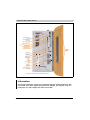
2.2 APC620, 2 PCI slot variant
2.2.1 Interfaces
Add-on UPS slot
2)
Add-on interface slot
1)
PCI slot 2 half-size
PCI slot 1 half-size
MIC, Line IN,
Line OUT
Chapter 2
Technical data
AP Link slot
Monitor / Panel
SDL (Smart Display Link) / DVI
Supply voltage
+24 VDC
USB 1, USB 2
LED for:
Power
HDD
Link1
Link2
Ethernet 2
Ethernet 1
COM 2
COM 1
Heat sink seal
Warning
VOID WARRANTY
IF SEAL BROKEN
Heat sink
060003861
1) Can only be used with system unit 5PC600.SX02-00
2) Slot is standard starting with 5PC600.SX02-00, Rev. G0 and 5PC600.SX02-01 Rev. H0
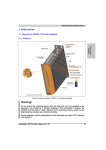
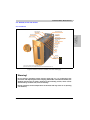
Figure 8: Interface overview - APC620, 2 PCI slot variant (top)
Warning!
Do not remove mounting screws from the heat sink, as it is connected to the
processor and chipset by a thermal coupling. Should this connection be broken, the
APC620 must be sent for repair. Removal of the mounting screws, which can be
determined by a broken seal, voids all warranty.
During operation, surface temperatures of the heat sink may reach 70 °C (warning
"hot surface").
Automation PC 620 User's Manual V 2.41
57
Technical data • Entire device
Slide-In
Slot 1
Bottom slide-in slot 1
eject drive 1)
LED for: Power, HDD
Link1, Link2
Slide-in slot 1 drive slot
Add-on drive slot
CompactFlash slot
Permanent
magnet
Power button
Reset button
PS/2 keyboard
or PS/2 mouse
Battery
Serial number
sticker
Hardware
security key
Bottom slide-in slot 1
eject drive 1)
1) The side cover of the PC 620 must be opened before ejecting a drive.
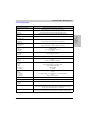
Figure 9: Interface overview - APC620, 2 PCI slot variant (front)
Information:
The orange front doors contain two permanent magnets. Contact between a data
carrier that saves data magnetically (hard disk, diskette, the magnetic strip of a
credit card, etc.) and a magnet can cause loss of data.
58
Automation PC 620 User's Manual V 2.41
Technical data • Entire device
2.2.2 Technical data
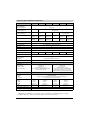
Features
APC620, 2 PCI slot variant
Boot loader / Operating system
Component-dependent, see technical data for the CPU board
Passive via heat sink and optionally supported with an active fan kit
Main memory
Max. 512 MB with 815E CPU board, max. 1 GB with 855GME CPU board
Graphics
Controller
Component-dependent, see technical data for the CPU board
Power failure logic
Controller
Buffer time
MTCX1) (see also page 739)
10 ms, dependent on the system unit revision (see page 525)
Real-time clock
Battery-buffered
Accuracy
Yes
Component-dependent, see technical data for the CPU board
Battery
Type
Removable
Lifespan
See also page 145
Renata 950 mAh
Yes, accessible behind the orange cover
4 years 2) 3)
Ethernet
Controller
Amount
See also page 118 or page 120
2
CAN bus
Optional with add-on interface (5AC600.CANI-00)
CompactFlash
Type
Amount
See also page 140 or page 141
Type I
2 (max. 4 using optional components)
Serial interface
Amount
Type
UART
Transfer rate
Connection
See also page 111 or page 112
2
RS232, modem-capable, not electrically isolated
16550 compatible, 16 byte FIFO
Max. 115 kBaud
9-pin DSUB
USB interface
Type
Amount
Transfer rate
Connection
Current load
See also section "USB port" on page 121
USB 2.0
2
Low speed (1.5 MBit/s), full speed (12 MBit/s), to high speed (480 Mbit/s)
Type A
Max. 500 mA per connection
Reset button
LEDs
Chapter 2
Technical data
Processor
Cooling
Method
BIOS / see the chapter 4 "Software" on page 337
Yes, accessible behind the orange cover
4 directed outwards via fiber optic lines, see also section "Status LEDs" on page 138
PCI slots
half-size
full-size
See also section "PCI slots" on page 135
2
-
Add-on UPS internal slot
Yes
5PC600.SX02-00 starting with revision G0, 5PC600.SX02-01 starting with revision H0 present
See also section "Add-on UPS module slot" on page 134
SRAM internal slot options
Yes
5PC600.SX02-00 starting with revision H0, 5PC600.SX02-01 starting with revision K0 present
Table 23: Technical data - APC620, 2 PCI slot variant
Automation PC 620 User's Manual V 2.41
59
Technical data • Entire device
Electrical characteristics
APC620, 2 PCI slot variant
Power supply
Rated voltage
Rated current
Starting current
Power consumption
24 VDC ±25%
3.8 A
Typ. 7 A, max. 40 A for < 300 µs
Component-dependent, see section 2.8 "Power management APC620 system unit with 1 PCI slot"
Mechanical characteristics
Housing4)
Material
Paint
Front cover
Galvanized plate, plastic
Light gray (similar to Pantone 427CV), dark gray (similar to Pantone 432CV)
Colored orange plastic (similar to Pantone 144CV)
Outer dimensions
See section "Dimensions" on page 61.
Weight
Approx. 4.5 kg (component-dependent)
Environmental characteristics
Ambient temperature
Operation
Storage
Transport
Component-dependent, see the section about ambient temperature on page 78 and page 82
-20°C .. +60°C
-20°C .. +60°C
Relative humidity
Operation
Storage
Transport
Component-dependent, see section "Humidity specifications" on page 108
Component-dependent, see section "Humidity specifications" on page 108
Component-dependent, see section "Humidity specifications" on page 108
Vibration5)
Operation (continuous)
Operation (occasional)
Storage
Transport
2 - 9 Hz: 1.75 mm amplitude / 9 - 200 Hz: 0.5 g
2 - 9 Hz: 3.5 mm amplitude / 9 - 200 Hz: 1 g
2 - 8 Hz: 7.5 mm amplitude / 8 - 200 Hz: 2 g / 200 - 500 Hz: 4 g
2 - 8 Hz: 7.5 mm amplitude / 8 - 200 Hz: 2 g / 200 - 500 Hz: 4 g
Shock5)
Operation
Storage
Transport
15 g, 11 ms
30 g, 15 ms
30 g, 15 ms
Protection type
IP20
Altitude
Operation
max. 3000 m6) (component-dependent)
Electromagnetic compatibility
Emissions
Network-related emissions
Emissions
EN 61000-6-4, EN 55022 A
EN 61000-6-4, EN 55011 class A, EN 55022 class A, EN 61131-2, 47 CFR Part 15
Immunity
Electrostatic discharge (ESD)
High-frequency electromagnetic fields
High-speed transient disturbances
(Burst)
Surges
Conducted values
Magnetic fields with electrical
frequencies
Voltage dips, interruptions
Damped vibration
EN 61000-6-2, EN 61131-2, EN 55024
EN 61000-6-2, EN 61131-2, EN 55024
EN 61000-6-2, EN 61131-2, EN 55024
EN 61000-6-2, EN 61131-2, EN 55024
EN 61000-6-2, EN 61131-2, EN 55024
EN 61000-6-2, EN 61131-2, EN 55024
EN 61000-6-2, EN 61131-2, EN 55024
EN 61000-6-2, EN 61131-2, EN 55024
Table 23: Technical data - APC620, 2 PCI slot variant (cont.)
1) Maintenance Controller Extended.
60
Automation PC 620 User's Manual V 2.41
Technical data • Entire device
2) at 50 °C, 8.5 µA of the supplied components and a self discharge of 40%.
3) If an SRAM module (Mod.Nr. 5AC600.SRAM-00) is installed, the buffer duration is 2 1/2 years.
4) Depending on the process or batch, there may be visible deviations in the color and surface structure.
5) Maximum values, as long as no other individual component specify any other.
6) Derating the maximum ambient temperature - typically 1°C per 1000 meters (from 500 meters above sea level).
2
260
24
14
18
19
222
244
184.6
ø11
.4
270
ø5
9
104.5
70
42.7
17.3
Chapter 2
Technical data
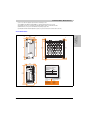
2.2.3 Dimensions
3
99.1
5
15
“A”
Information:
253
244
241
Measurement “A” depends on
APC620 heat sink used.
104.5
APC620 heat sink
model number
Dimension
in mm
5AC600.HS01-00
12.8
5AC600.HS01-01
12.8
5AC600.HS01-02
28
Nominal
General tolerance according
measurement area to DIN ISO 2768 medium
up to 6 mm
± 0.1 mm
over 6 to 30 mm
± 0.2 mm
over 30 to 120 mm
± 0.3 mm
over 120 to 400 mm
± 0.5 mm
over 400 to 1000 mm
± 0.8 mm
Figure 10: Dimensions - APC620, 2 PCI slot variant
Automation PC 620 User's Manual V 2.41
61
Technical data • Individual components
3. Individual components
3.1 System units
3.1.1 APC620 with 1, 2, 3 and 5 PCI slots
Features
5PC600.SX01-00
5PC600.SX02-00
5PC600.SX02-01
5PC600.SF03-00
5PC600.SX05-00
5PC600.SX05-01
Photo
Serial interfaces
Type
Amount
UART
Transfer rate
Connection
RS232, modem capable
2
16550 compatible, 16 byte FIFO
Max. 115 kBaud
9-pin DSUB, male
Ethernet
Controller
Transfer rate
Connection
See "Ethernet connection ETH1" on page 118 and "Ethernet connection ETH2" on page 120
10/100 Mbit/s
RJ45 twisted pair (10 BaseT / 100 BaseT)
USB interface
Type
Amount
Transfer rate
Connection
USB 2.0
2
Up to 480 Mbit (high speed)
Type A
Monitor / Panel
DVI-I, female
AC97 sound
Mic., line in, line out
IF optional slot
PCI slots
half-size
full-size
PCI standard
Bus speed
1
1
2.2
33 MHz
CompactFlash slot 1 (CF1)
Internal organization
2
2.2
33 MHz
3
2.2
33 MHz
5
2.2
33 MHz
integrated
Primary master
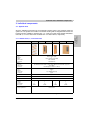
Table 73: Technical data - 1, 2, 3 and 5 PCI slot types
Automation PC 620 User's Manual V 2.41
161
Chapter 2
Technical data
All of the individual components of the Automation PC620 system come together inside the
system unit. The system unit consists of an APC620 housing with an integrated main board. The
housing units are available in variations with 1, 2, 3 and 5 PCI slots and in APC620 embedded.
Units with 2, 3 or 5 PCI slots have an additional 1 or 2 slide-in drives, respectively.
Technical data • Individual components
Features
5PC600.SX01-00
Combined CompactFlash slot 2 /
hard disk (HDD/CF2)
Internal organization
5PC600.SX02-00
5PC600.SX02-01
5PC600.SF03-00
5PC600.SX05-00
5PC600.SX05-01
Yes, optional add-on CompactFlash slot or add-on hard disk
Primary slave
Insert for slide-in drive 1
Internal organization
-
Yes
Secondary slave
Insert for slide-in drive 2
Internal organization
-
-
-
-
APC620 UPS module optional
Yes, starting
with Rev. H0
Yes, starting
with Rev. G0
Yes, starting
with Rev. H0
Yes
Yes, starting
with Rev. F0
Yes, starting
with Rev. H0
SRAM module optional
Yes, starting
with Rev. I0
Yes, starting
with Rev. H0
Yes, starting
with Rev. K0
Yes
Yes, starting
with Rev. H0
Yes, starting
with Rev. H0
Reset button
Yes
Secondary master
Yes
Power button
Yes
PS/2 keyboard/mouse
Yes, combined, will be automatically detected
Battery slot
Yes
Hardware security key slot
Yes (DS1425 from MAXIM/Dallas)
Fan slot
Yes
Automation Panel link slot
-
1
-
Status LEDs
1
1
-
Power, HDD, Link1, Link2
Real-time clock (RTC)
Battery-buffered
Accuracy
Yes
See the technical data for CPU boards
MTCX1)
Yes
Electrical characteristics
Power supply
Rated voltage
Starting current
24 VDC ± 25%
Typically 7A
Maximum 40 A for < 300 µs
See section 2.8 "Power management APC620
system unit with 1 PCI slot".
Power consumption
24 VDC ± 25%
Typically 10 A
Maximum 40 A for < 300 µs
see section 2.10 "Power management APC620
system unit with 3 PCI slots" or 2.11 "Power
management APC620 system units with 5 PCI slots"
Mechanical characteristics
Housing2)
Material
Paint
Front cover
Galvanized steel plate
Light gray (similar to Pantone 427CV), dark gray (similar to Pantone 432CV)
Colored plastic (similar to Pantone 144CV)
Outer dimensions
Width
Length
Height
Weight
Mounting plates (for M4 screws)
Drilling templates for mounting
65 mm
251 mm
270 mm
104.5 mm
253 mm
270 mm
125 mm
253 mm
410 mm
185.4 mm
253 mm
270 mm
Approx. 1.5 kg
Approx. 2.6 kg
Approx. 4.5 kg
Approx. 3.8 kg
4
6
4
(see chapter 3 "Commissioning", section 1.2 "Drilling templates")
Table 73: Technical data - 1, 2, 3 and 5 PCI slot types (cont.)
1) Maintenance Controller Extended, for more information, see the section "Maintenance Controller Extended (MTCX)" on page 739.
2) Depending on the process or batch, there may be visible deviations in the color and surface structure.
162
Automation PC 620 User's Manual V 2.41