1
BIOS SETUP
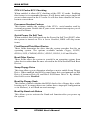
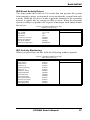
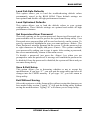
IRQ/Event Activity Detect
The items under this field are I/O events that can prevent the system
from entering a power saving mode or can awaken the system from such
a mode. When an I/O device wants to gain the attention of the operating
system, it signals this by causing an IRQ to occur. When the operating
system is ready to respond to the request, it interrupts itself and performs
the service.
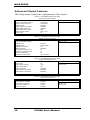
Phoenix - AwardBIOS CMOS Setup Utility
IRQ/Event Activity Detect
VGA
OFF
LPT & COM
HDD & FDD
PCI Master
PowerOn by PCI Card
Modem Ring Resume
RTC Alarm Resume
IRQs Activity Monitoring
LPT / COM
ON
OFF
Disabled
Disabled
Disabled
Press Enter
ITEM HELP
IRQ Activity Monitoring
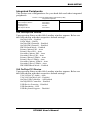
When you press Enter on this field, the following window appears.
Phoenix - AwardBIOS CMOS Setup Utility
IRQs Activity Monitoring
Primary INTR
ON
IRQ3 (COM2)
IRQ4 (COM1)
IRQ5 (LPT 2)
IRQ6 (Floppy Disk)
IRQ7 (LPT 1)
IRQ8 (RTC Alarm)
IRQ9 (IRQ2 Redir)
IRQ10 (Rserved)
IRQ11 (Reserved)
IRQ12 (PS/2 Mouse)
IRQ13 (Coprocessor)
IRQ14 (Hard Disk)
IRQ15 (Reserved)
Enabled
Enabled
Enabled
Enabled
Enabled
Disabled
Disabled
Disabled
Disabled
Enabled
Enabled
Enabled
ITEM HELP
Menu Level
Disabled
ST268G User’s Manual
37