1
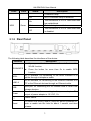
HN-DR4PN2U User Manual LEDs Color Status Description Protected Setup. Off On USB Green Blink Off Wi-Fi Protected Setup is disabled. The connection of 3G or USB flash disk has established. Data is being transmitted. The connection of 3G or USB flash disk is disabled. 2.1.2 Rear Panel The following table describes the interfaces of the device: Interface Description If you press the button between 1s and 5s to enable WLAN/WPS WLAN function. Press the button for more than 5s to enable WPS function. ADSL LAN1-4 USB Power RJ-11 interface, for connecting to the ADSL interface or a splitter through a telephone cable. RJ-45 interface, for connecting to the Ethernet interface of a PC or the Ethernet devices through an Ethernet cable. USB port, for connecting the 3G network card or other USB storage devices. Power interface, for connecting to the power adapter. The output of power adapter is 12 V DC, 1A. Power switch. To restore the factory default, keep the device powered on, Reset push a needle into the hole for about 1 second, and then release. 3