1
What is Required to Use SiteScan Web?
4.0
WHAT IS REQUIRED TO USE SITESCAN WEB?
Visit the Liebert Web site at http://sitescan.liebert.com for the latest product information. The Web site
always has the most detailed and up-to-date information on system requirements and SiteScan Web’s
capabilities.
4.1
SiteScan Web Server Requirements
SiteScan Web is based on server/thin-client architecture, designed around the open standards of Web
technology. The SiteScan Web Server communicates using ASHRAE’s BACnet/IP protocol and is
accessed using a Web browser over the owner’s intranet or external through the Internet. The intent
of the thin-client architecture is to provide operators complete access to the system via a standard
Web browser. The thin-client Web browser Graphical User Interface (GUI) supports Microsoft® Internet Explorer (version 5.5 or later). The SiteScan Web server software supports Windows 2000 and XP
platforms and support for Windows 2003 Server.
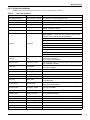
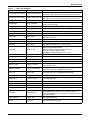
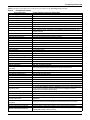
System configuration requirements differ slightly for the SiteScan Web server and any associated
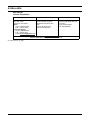
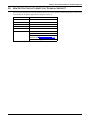
client workstations. Table 1 shows the recommended requirements for the server and client
workstations running on a Microsoft Windows Platform.
Table 1
Feature
Operating
system
Browser
Computer
system
(CPU)
speed
Minimum requirements - SiteScan Web server* and client workstations
Minimum Server Requirements*
Client Workstation Requirements
Windows 2000, 2003 or XP
Windows 95, 98, NT 4.0, 2000, XP
Microsoft Internet Explorer v5.5 or later with
Sun Systems Java (www.java.com)
The more simultaneous users on a system, the faster the
CPU speed required to maintain good user response time.
For a system with:
• One or two active users, a 2 GHz CPU should provide
adequate performance.
• Three or more active users, select a 3 GHz or faster CPU.
• 10 or more active users, consider multiple CPUs. Moving
the database to another computer is more economical
than running both SiteScan Web and the database on a
multiple CPU system.
Microsoft Internet Explorer v5.5 or later with Sun
Systems Java (www.java.com)
For adequate performance under Windows 95,
98 or NT 4.0:
• 700 MHz Pentium® III processor with
512Mb RAM.
For adequate performance under Windows 2000
or XP:
• A processor of 1.5Ghz or better is
recommended.
Hard
disk
space
1024Mb system memory recommended to eliminate
excessive swap file usage. The responsiveness of larger
systems will benefit directly from more memory.
2Gig free hard disk space available for SiteScan Web
Note: A SCSI hard disk interface is recommended for users
making extensive use of alarms or historical trends.
USB
ports
USB ports available for system backups, preferably frontmounted to avoid disturbing computer room cabling.
—
CD
drives
CD-ROM drive (CD-RW drive recommended for alternate
backup purposes)
—
System
memory
Mouse/
keyboard
2-button mouse / 104-key keyboard
Remote
control
software
For large systems with remote sites, Liebert strongly
recommends using remote control software—for example,
Windows Remote Desktop, VNC or PC Anywhere—to allow
Liebert service engineers to access the server remotely.
Display
SVGA display card and monitor that support a
resolution of 1024x768 pixels with True Color
(32-bit) or better
Network
10/100 Mbps Ethernet network card
—
10Mb of free hard disk space available for
caching images
2-button mouse / 104-key keyboard
—
SVGA display card and monitor that support a
resolution of 1024x768 pixels with High Color
(16-bit) or better
Network connection capable of reaching the
server—for example, an Ethernet network card
or a dial-up modem connection.
* SiteScan Web should have its own dedicated server. Having other web server applications—such as Apache or IIS—running on the
same machine will cause conflicts.
Running the client-side browser on the server will add to the the server’s load; to compensate, increase CPU and memory headroom.
5