1
10. Error elimination
10. Error elimination
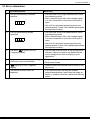
Error description
Measures
1.
The unit permanently indicates
overflow.
• The input has a very high measurement, check
the measuring circuit.
• With a selected input with a low voltage signal,
it is only connected on one side or the input is
open.
• Not all of the activated supporting points are
parameterised. Check if the relevant parameters
are adjusted correctly.
2.
The unit permanently shows
underflow.
• The input has a very low measurement, check
the measuring circuit .
• With a selected input with a low voltage signal,
it is only connected on one side or the input is
open.
• Not all of the activated supporting points are
parameterised. Check if the relevant parameters
are adjusted correctly.
3.
The word "HELP " lights up in the
7-segment display.
• The unit has found an error in the configuration
memory. Perform a reset to the default values
and re-configure the unit according to your
application.
4.
Program numbers for parameterising
of the input are not accessible.
• Programming lock is activated
• Enter correct code
5.
"Err1" lights up in the 7-segment
display
• Please contact the manufacturer if errors of this
kind occur.
6.
The device does not react as
expected.
• If you are not sure if the device has been
parameterised before, then follow the steps as
written in chapter 6 and set it back to its delivery
status.
M1_71GB.pdf
14
update: 16.09.2014