1
Product Review: Mobile Security 2015
AV-Comparatives
Mobile Security Review
Language: English
August 2015
Last revision: 17th September 2015
www.av-comparatives.org
www.av-comparatives.org
Product Review: Mobile Security 2015
Contents
Overview ............................................................... 6
Products tested ...................................................... 8
Battery usage ......................................................... 9
Protection against Android malware ......................... 11
AVC UnDroid Analyser ............................................. 11
Test Set & Test Results ........................................... 12
Android Security .................................................... 14
AVG AntiVirus ........................................................ 16
AhnLab V3 Mobile Security ...................................... 19
Antiy AVL for Android ............................................. 22
Avast Mobile Security ............................................. 24
Avira Antivirus Security .......................................... 28
Baidu Mobile Guard ................................................ 31
Bitdefender Mobile Security and Antivirus ................. 34
CheetahMobile Clean Master .................................... 37
CheetahMobile CM Security Antivirus ........................ 40
ESET Mobile Security .............................................. 44
G Data Internet Security ......................................... 47
Kaspersky Internet Security ..................................... 51
McAfee Mobile Security ........................................... 54
Sophos Mobile Security ........................................... 58
Tencent Mobile Manager ......................................... 62
Trend Micro Mobile Security..................................... 65
Appendix – Permissions .......................................... 69
Appendix – Feature list ........................................... 70
Copyright and Disclaimer ........................................ 71
www.av-comparatives.org
Product Review: Mobile Security 2015
www.av-comparatives.org
Introduction
Smartphones are the future of modern communications. According to a survey carried out by IDC 1,
there are over 1.6 billion smartphones running Android in current use. Classic telephone functions
are becoming less relevant. For example, the inclusion of high-quality cameras means that
smartphones are being used more and more to take photos. Additionally, users are employing
services like Facebook, WhatsApp and email to run their lives from their smartphones. This means
that smartphones are being targeted by criminals, who try to infect devices and/or steal sensitive
data, e.g. by phishing attacks.
These days, the use of security software on a PC or laptop is seen as essential. However, many
smartphone users do not yet have the same sense of responsibility, even though their devices store
personal data, private photos, Internet banking information or even company data.
As modern smartphones are often expensive to buy, they are also an attractive target for thieves.
Top-quality smartphones cost several hundred Euros. As it is not possible to physically prevent them
from being stolen, they must be made less attractive to thieves. Consequently, many of today's
security products contain not only malware protection, but also highly developed theft-protection
functions, which make the device less attractive to thieves (e.g. by locking the device), and help
the owner to find it again.
This year, we have once again tested security products for mobile phones running Google's Android
OS. This report contains details of products by leading manufacturers that agreed to have their
products tested. The test was carried out in July and August 2015 on an LG Nexus 5 smartphone
running Android 5.1.1.
In general, we found that the current Android version, 5.1, clearly has problems with text-message
blocking features in security products. None of the products we tested was able to make this work.
Many manufacturers warn the user of this. Text messages cannot be blocked or hidden under
Android 5.1. This is particularly problematic for products that use text-message commands to
control their features. Thieves are able to see text messages in plain text, meaning that they can
see the password. We thus strongly recommend manufacturers to implement a password or PIN for
the lock screen which has to be different from the password/PIN used for text-message commands
for the anti-theft features. Where this has already been implemented in a product, we recommend
users to send a “lock” command first, to prevent a thief reading any text messages in Hangouts.
This is the only way the user can ensure that a thief does not have access to his or her texts.
Security software for Android usually requires a wide range of operating-system permissions to
ensure that the program will work properly. We noticed a high degree of variation between products,
however. We decided to publish a table in this year's report that displays all the permissions
required by each product. This can be seen in the appendix on page 68.
Theft protection
Along with malware protection, theft protection is one of the most important security features for
an Android security product. It allows the user to run commands remotely on a lost or stolen phone.
These principally concern protection of the user's private data and the recovery of the device. The
commands are sent via web interface or text message. The former has the advantage that the user is
1
http://www.statista.com/chart/2512/smartphone-market-share-q2-2014/
-3-
Product Review: Mobile Security 2015
www.av-comparatives.org
guided through an interactive process; the latter that the commands will arrive more reliably. This is
particularly true if the user has deactivated data roaming when abroad. However, to use the web
interface, the user only has to know the login credentials, whereas with text-message control, the
various individual commands need to be remembered/found. Text-message controls always require a
password, which is defined in advance. Some manufacturers only allow command texts to be sent
from pre-defined trusted telephone numbers.
The core functions of theft-protection software serve primarily to protect personal data. Even if the
device is stolen, nobody but the owner should have access to confidential information such as
personal emails. The first step is usually to lock the device. This is equivalent to using the Android
lockscreen. Only when the correct PIN has been entered can the device be used again. Next, the
device can be located. Most manufacturers show the position of the device using an online map
from one of the main providers. The alarm function can be useful when searching for a mislaid
device. This emits a sound that can be used to find a phone that has been e.g. misplaced at home.
If deactivating an alarm function requires a PIN to be entered, the feature can be used to encourage
a thief to abandon the device in order to avoid attracting attention. If the user has abandoned all
hope of retrieving the device, the last resort is to wipe all personal data from it.
Lock
The lock function prevents unauthorised access by locking the device. There should be no means of
bypassing the lockscreen. Some manufacturers use the same PIN for the lockscreen as for the textmessage commands. This can be a problem, if text messages are displayed on the lockscreen (which
is the default Android setting). A thief could thus easily see the PIN and so unlock the device. We
feel that manufacturers who use such a mechanism should urgently find and offer an alternative.
Another problem noted with some products is the ability to open the Android notification bar. This
enables a thief not only to activate aeroplane mode, thus rendering commands from the product's
web interface useless, but also to switch to the guest account. Even if functions such as making
phone calls are disabled in this mode, it is still possible to use the phone for some other functions.
Google's own recommendation to allow only trusted people to use the phone in guest mode makes
this point clear 2 . In our evaluation, we also considered the opportunity to use a customisable
lockscreen. This could be employed e.g. to display the user's contact details when the device is
locked, which might be used by an honest finder to contact the owner and arrange to return the
phone. We also feel it is important that it should always be possible to use the phone to make
emergency calls (e.g. fire brigade, police, ambulance). Just a few products provide the option to
take pictures with the front-facing camera when the phone is locked. This makes it possible to
photograph and thus identify a thief.
In our tests, we discovered that not all features of all products work in a satisfactory fashion. In
some cases, we were able to unlock the device by reading the text message with the PIN on the lock
screen. Other products allowed the notification bar to be opened, thus giving access to the guest
account. In some apps, it was not possible to make an emergency call. On the other hand, we have
to praise all manufacturers for their respective products' behaviour when the device is restarted.
Every product locked the phone immediately when the smartphone operating system started.
With non-rooted devices, security apps cannot prevent the phone's operating system from being
reset to factory defaults, e.g. by hard reset. However well security features such as a lockscreen or
2
https://support.google.com/nexus/answer/2865944?hl=en
-4-
Product Review: Mobile Security 2015
www.av-comparatives.org
SIM protection are implemented, they cannot prevent a thief from carrying out a reset and thus
using the device without restriction. Theft protection features should thus be seen as protecting
personal data rather than the device itself.
Locate
A Locate function allows the position of the phone to be determined when it has been lost or
stolen. This could be valuable if the owner has simply forgotten where he/she left the phone. Some
manufacturers of mobile security software warn explicitly against trying to track down a thief
oneself, and recommend contacting the police instead. Differences between the locate functions of
different products are usually quite small. All allow a single location to be determined. Some
additionally allow the phone to be tracked, i.e. the movements of the device to be recorded. Most
manufacturers use an online map to display the location of the phone when it has been successfully
located. Just a few send only the co-ordinates of the device, which then have to be manually
entered into a mapping service; we find this rather impractical.
Wipe
A Wipe function deletes personal data from the user's phone. There are two possible variants. Some
manufacturers reset the device to factory settings, which automatically deletes all personal data on
the phone. This method has the disadvantage that the theft-protection software will also be
deleted, and so functions such as Locate will no longer be operative. In this case, the user cannot
expect to recover the device. Other versions of the Wipe function do not carry out a factory reset.
The corresponding advantage is that the theft-protection feature will remain active. All commands
can still be carried out after the data has been deleted. It is important in such a case that the
security product is thorough in its deletion and does not leave any personal data behind. In our
test, none of the products was able to delete text messages; this can be put down to the current
Android version and its text-message app Hangouts. Browser history and bookmarks were not
removed by some products. We have stressed the importance of deleting the Google Account details,
so that access to mails, calendar, call history and contacts is prevented. It is also important to
remove the user's files.
SIM Protection
A SIM Protection feature saves metadata to the user's SIM card. This makes it possible to recognise
if a thief has swapped the SIM card, in order to use the phone to make calls. Most products will lock
the device as soon as the SIM-card change is registered. The user does not need to send a
command; the function works automatically. Some security apps inform a trusted person, whose
details were entered during product setup, that the SIM card has been changed. This might help the
owner to identify or contact the thief.
Malware protection
This component scans the mobile phone for malicious software, which it deletes or quarantines. For
this function to work effectively, it has to be kept up-to-date. When travelling abroad, users need to
be careful that automatic updates and cloud scans do not incur high roaming costs from the mobile
service provider.
The results of our Android file detection test can be seen on page 12.
-5-
Product Review: Mobile Security 2015
www.av-comparatives.org
Overview
The perfect mobile-security product does not yet exist. As with Windows products, we recommend
drawing up a short list after reading about the advantages and disadvantages of each product in our
review. A free trial version of each candidate product can then be installed and tested for a few
days; this should make the decision easier. Especially with Android security products, new versions
with improvements and new functions are constantly being released.
By participating in this test, the manufacturers have
shown their commitment to providing customers with
quality security software. As this report shows, we have
found some degree of malfunction in many of the tested
products. The manufacturers of the affected products have
taken these problems very seriously and are already
working on solutions. As the core functions of all the
products we tested reached a very good level, we are happy
to present our "Approved Award" to all participating manufacturers. We have noticed a significant
improvement in the overall standard of the products since last year's test.
AhnLab V3 Mobile is a security product for Android that contains the most important security
features. It is completed by premium features such as app-lock and URL scan.
Antiy AVL for Android provides malware protection with a variety of configuration options. A callblocking function is also included.
Avast Mobile Security is a very comprehensive and highly configurable security product. The Shields
components protect the user against various different threats.
AVG AntiVirus provides comprehensive functionality, including performance and privacy features in
addition to malware/theft protection.
Avira Antivirus Security is a very sophisticated app that provides all the important features of a
security product for Android smartphones. The theft-protection component is controlled via a web
interface. The functionality has been extended in this year's version.
Baidu Mobile Guard is a very easy-to-use security program for Android phones. It has many
features, including optimisation, app manager and antispam.
Bitdefender Mobile Security & Antivirus provides additional features such as app lock and privacy
advisor, in addition to the standard antimalware and theft-protection components.
Cheetah Mobile Clean Master concentrates on digital cleaning. Functions for cleaning the memory
and storage are provided, as well as antivirus.
Cheetah Mobile CM Security Antivirus is a well-implemented security product for Android
Smartphones and includes antimalware and theft-protection features.
-6-
Product Review: Mobile Security 2015
www.av-comparatives.org
ESET Mobile Security & Antivirus is a well-thought-out and cleanly designed app for Android
Smartphones. We were impressed with its reliable functionality.
G Data Internet Security provides polished parental controls in addition to standard features. These
include the Kid's Browser and Children's corner.
Kaspersky Internet Security’s functionality is extensive, and includes call and text filters, browser
protection, theft protection and more, in addition to a malware scanner.
McAfee Security & Antivirus is a well-engineered product that includes innovative features such as
CaptureCam and profile management in addition to standard functions.
Sophos Antivirus & Security provides useful functions that actively increase the user's security.
Worthy of mention are the Security Advisor, which points out insecure settings, and the spam
protection component.
Tencent Mobile Manager is a security product for Android that provides a wide range of
antimalware and data-protection features. The usability has been further improved.
Trend Micro Mobile Security & Antivirus includes useful extensions such as safe surfing and
parental control, as well as antimalware and theft-protection features.
-7-
Product Review: Mobile Security 2015
www.av-comparatives.org
Products tested
The products that participated in this year's test and review are listed below. The latest products
were taken from major app stores like Google Play Store at the time of the test (July 2015). After
the test and product review, manufacturers had the opportunity to fix any flaws we found. Any
problems that have already been solved are noted in the report.
•
•
•
•
•
•
•
•
•
•
•
•
•
•
•
•
AhnLab V3 Mobile Security 3.0.3.4
Antiy AVL for Android 2.3.12
Avast Mobile Security & Antivirus 4.0.7886
AVG AntiVirus 4.4
Avira Antivirus Security 4.1
Baidu Mobile Guard 6.6.0
Bitdefender Mobile Security & Antivirus 3.0.135
Cheetah Mobile Clean Master 2.6.8
Cheetah Mobile CM Security Antivirus 5.10.3
ESET Mobile Security & Antivirus 3.0.1318
G Data Internet Security 25.8.3
Kaspersky Internet Security 11.8.4.625
McAfee Security & Antivirus 4.4.0.467
Sophos Free Antivirus and Security 5.0.1515
Tencent Mobile Manager 5.6.0
Trend Micro Mobile Security & Antivirus 6.0
The mobile products of Baidu and Tencent are currently only available as Chinese-language versions.
A comprehensive overview of the mobile security products available on the market can be seen on
our website: http://www.av-comparatives.org/list-mobile/
-8-
Product Review: Mobile Security 2015
www.av-comparatives.org
Battery usage
Testing the battery usage of a device might appear at first glance to be very straightforward. If one
goes into more detail, the difficulties become apparent. Particularly with mobile phones, the usage
patterns of different users are very varied. Some use the multimedia functions extensively, others
view a lot of documents, while some use only the telephone functions. We need to differentiate
between power users, who take advantage of all of the possible functions in the device, and
traditional users who merely make and receive phone calls.
In April 2012, AV-Comparatives conducted a survey of smartphone use, in order to optimise the
testing procedure. Over a thousand smartphone users from around the world were asked to
anonymously answer questions about their smartphone use. It was apparent that the respondents
made good use of their smartphones' features. 95% of users surveyed said that they use their
phones to surf the Internet and communicate by email, whilst over two thirds listen to music or
watch videos on their mobiles. It was notable that 70% of the users never switch their phones off.
Smartphones are becoming more and more important to their users, who scarcely leave any
functions of their devices unused. The mobile phone is a ubiquitous means of communication that is
supplementing or even replacing the personal computer.
Telephony is becoming a less important use of the smartphone, with 41% of survey respondents
saying they only used the device for 1-10 minutes each day. Most users spend longer than this on
the Internet; over 29% for over an hour a day.
We used the 2012 survey as the basis for our usage statistics in the battery drain test. The data was
used to define average daily use of a smartphone. The test then determined the effect of the
security software on battery use for the average user.
Based on the survey data, the following daily usage scenario was simulated:
•
•
•
•
•
•
•
30 minutes telephony
82 minutes looking at photos
45 minutes surfing the Internet with the Android browser
17 minutes watching YouTube videos with the YouTube app
13 minute watching videos saved on the phone itself
2 minutes sending and receiving mails with the Google
Mail Client
1 minute opening locally saved documents
-9-
Product Review: Mobile Security 2015
www.av-comparatives.org
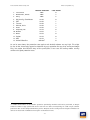
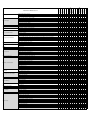
In our test, we found that most mobile security products have only a minor influence on battery life.
Manufacturer
AhnLab
Antiy
Avast
AVG
Avira
Baidu
Bitdefender
CleanMaster
Battery usage
Manufacturer
Battery usage
CM Security
ESET
G Data
Kaspersky Lab
McAfee
Sophos
Tencent
Trend Micro
In general, we were able to give the tested security suites high marks. However, one product in this
year's test was shown to cause increased battery drain: McAfee. When surfing the Internet,
increased battery drain was observed. McAfee has investigated this and confirmed this only happens
when using multiple tabs in the webbrowser.
-10-
Product Review: Mobile Security 2015
www.av-comparatives.org
Protection against Android malware
Methods of attacking mobile devices are getting more and more sophisticated. Fraudulent
applications attempt to steal users’ data or money. To reduce the risk of this happening, follow the
advice given here. Only download apps from Google Play or reputable app makers‘ own stores. Avoid
third-party stores and sideloading 3. Another indication of untrustworthy apps is irrelevant access
rights. For example, an app that measures the speed at which you are travelling has no need to
access your phone book or call log. Of course, even if an app does this, it is not a clear-cut
indication that it is malicious, but it makes sense to consider whether it is genuine and should be
used. A look at the reviews in the app store is also a guide; avoid apps with bad or dubious reviews.
If you Root your smartphone, you will have more functionality on the phone, but equally the
opportunity for malicious apps to take control will also increase. Another point to consider is the
warranty. It is not legally clear-cut whether the warranty is still valid if the phone is rooted. In
many cases, the warranty will be considered null and void.
How high is the risk of malware infection with an Android mobile phone?
This question is difficult to answer, as it depends on many different factors. In western countries, if
using only official stores such as Google Play, the risk is lower than in many Asian countries,
especially China. Many rooted phones and unofficial app stores can be found there, increasing the
chance of installing a dangerous app. In many parts of Asia, the smartphone is used as a
replacement for the PC, and is frequently employed for online banking. Banking apps are also
becoming more popular in Europe and the USA. There is a high risk involved in receiving the TAN
code on the same phone that is used to carry out the subsequent money transfer. In western
countries, assuming you stick to official app stores and don’t root your phone, the risk is currently
relatively low, in our opinion. However, we must point out that “low risk”is not the same as “no
risk”. In addition, the threat situation can change quickly and dramatically. It is better to be ready
for this, and to install security software on your smartphone. Currently, we would say that
protection against data loss in the event of the phone being lost or stolen is more important than
malware protection.
AVC UnDroid Analyser
At this point, we would like to introduce AVC UnDroid, our new
malware analysis tool, which is available free to users. It is a static
analysis system for detecting suspected Android malware and adware
and providing statistics about it. Users can upload .apk files and see
the results in various analysis mechanisms.
We invite readers to try it out: http://www.av-comparatives.org/avc-analyzer
3
http://en.wikipedia.org/wiki/Sideloading
-11-
Product Review: Mobile Security 2015
www.av-comparatives.org
Test Set & Test Results
The malware used in the test was collected by us in the last few weeks before the test. We used
2,365 malicious applications, to create a representative test set. So-called "potentially unwanted
applications” were not included.
The security products were updated and tested on the 13th July 2015. The test was conducted with
an active Internet connection on genuine Android smartphones (no emulators were used). The test
set consisted exclusively of .APK files. An on-demand scan was conducted first. After this, every
undetected app was installed manually. We did this to allow the products to detect the malware
using real-time protection.
A false-positives test was also carried out, using apps from the Google Play Store and third-party
app stores. The categorization of apps from (mainly Asian) third-party stores into “clean apps never
to be detected” and “clean/grey apps which are OK to detect” was arguably acceptable and therefore
those cases were not used (so far there is no clear distinction used across the industry, although
e.g. AMTSO are working on this). We only counted the false-positives with apps that were available
on the Google Play Store. The results can be seen below (sorted by Malware Protection and number
of False Alarms).
-12-
Product Review: Mobile Security 2015
1.
2.
3.
4.
5.
6.
7.
8.
9.
10.
11.
12.
13.
14.
Trend Micro
Bitdefender, G Data
Antiy
CM Security, CleanMaster
ESET
Tencent
AhnLab, Avira
Avast
Kaspersky Lab
McAfee
Baidu
Sophos
AVG
Android Baseline
www.av-comparatives.org
Malware Protection
100%
100%
100%
99.9%
99.9%
99.9%
99.9%
99.9%
99.7%
99.6%
99.4%
99.2%
98.4%
unknown 4
False Alarms
0
3
5
0
1
2
3
4
0
2
0
0
4
0
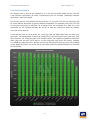
As can be seen above, the protection rates against real Android malware are very high. This might
be due to the increasingly aggressive detection by app reputation for apps that are not on Google
Play, but maybe also because many of the participants in our test are leading mobile security
vendors with good protection rates.
A reliable measurement of the baseline protection provided by Android could not be performed, as Google
limits the number of app queries that can be sent from one device. Consequently, we could not get coherent
protection rates for the Google Safebrowsing service. Requests to the security team of Google to whitelist our
devices for those kind of limitations were again not answered in time.
4
-13-
Product Review: Mobile Security 2015
www.av-comparatives.org
Android Security
Android Security is the range of security
features built into the Android operating
system, and thus preinstalled on every
Android device. It includes theft-protection
functionality, and the ability to verify apps
online.
Locate
This function locates a lost or stolen device
and displays its position using Google Maps.
This is done automatically when the user logs
on to the web interface. Only a single
location is provided each time, continuous
tracking is not possible.
Ring
This function plays a melody at full volume for
5 minutes. It can be used to locate a mislaid
mobile phone at home, for instance. The
command does not lock the device. The
on/off button on the phone can be used to
stop the phone ringing.
Installation
Installation is not necessary, as the features
are already built into the operating system.
On our test device, the functions were
activated by default. Users can see the status
of the Android security features and
enable/disable them by going to Google
Settings\Security.
Lock
The Lock function uses the Android lock
screen to lock the phone. This makes it
inaccessible to unauthorised persons. The
unlock password for the lock screen can be set
in the web interface. We liked the fact that it
is possible to define a message in the web
interface, which will be displayed on the lock
screen. This would allow the owner to provide
an honest finder with contact details.
Additionally, a phone number can be entered
Theft Protection
Android includes theft protection with the
most important functions. They are controlled
by web interface:
https://www.google.com/android/devicemana
ger. This requires a Google Account, which is
of course a requirement for many Android
features. Text-message commands are not
provided.
-14-
Product Review: Mobile Security 2015
www.av-comparatives.org
Updates
We could not find any information relating to
updates for malware signatures.
that can be used to contact the owner. This
number (only this number and official
emergency numbers) can be called directly
from the lock screen.
Help
No significant help functions are provided.
This worked very robustly in our test. We were
unable to bypass the lock screen, but always
had the opportunity to make an emergency
call. There was one drawback: it was possible
to activate Flight Mode, meaning that
functions such as Locate could no longer be
activated remotely.
Deinstallation
The Android Device Manager, which includes
Android Security, cannot be uninstalled, only
disabled.
Licence
The protection features are already installed
with the operating system and can be used
free of charge without restriction.
Wipe
This function deletes the user's personal data
from the smartphone. When the command has
been received, the phone is reset to factory
settings.
Summary
Android Security provides the user with basic
theft-protection
and
malware-protection
functionality. In our test, these features
impressed us as stable and well thought-out,
and they represent a usable, simple
alternative to external security products.
Verify Apps
Android includes several settings to prevent
malicious attacks. Prior to installing an
application downloaded outside of the Play
store, Google's SafeBrowsing feature will scan
the app and warn of any potential threats.
Android Security allows the user to check
installed apps regularly, whereby it will warn
of any potentially malicious ones found. Aside
from activation and deactivation, there are no
settings for this feature. As mentioned in the
introduction to this document, we were
unable to find the detection rate due to
technical limitations.
-15-
Product Review: Mobile Security 2015
www.av-comparatives.org
AVG AntiVirus
This alerted us to the fact that USB
Debugging was enabled on our device.
AVG AntiVirus is a comprehensive security
product, which includes performance and
privacy components in addition to malware
protection and theft protection.
Buried in the settings, there is also a
checkbox which activates or deactivates safe
surfing. In our quick test, this correctly
identified harmful websites.
Performance
This groups together a number of components
relating to device resource usage.
Task Killer
The Task Killer allows an individual app, or all
running apps, to be closed. The "Optimize"
button closes all running applications.
Battery Consumption
This component allows the device's battery
life to be extended. In Power Saving Mode,
functions such as WiFi, Bluetooth and GPS can
be deactivated. This can be set to activate at
a battery charge level of 50%, 30% or 10%.
Installation
We installed AVG AntiVirus Free from the
Google Play Store. After accepting the licence
agreement, the user can choose to use the
free version, or upgrade to the PRO version.
Protection
The
Protection
feature
includes
all
components related to the protection of the
user. This includes a malware scanner, which
can find and remove malicious programs. The
user can run a full system scan, or, using the
"File Scanner" button, select a specific folder
to scan. The sensitivity of the scanner can
also be configured. Automated scans can be
carried out daily or weekly. We liked the fact
that the full system scan detects not only
malware, but also insecure system settings.
In an additional view, the estimated available
time remaining for specific activities such as
making phone calls, playing music or Internet
surfing, is displayed.
-16-
Product Review: Mobile Security 2015
www.av-comparatives.org
Storage Usage
The Storage Usage component calculates the
storage space used by individual installed
apps, and displays this in a list. An app can
be uninstalled simply by tapping the rubbishbin icon.
the text-message command is used to activate
the function, the sender will receive a text
message in return, with a link to the phone's
current position in Google Maps. Tracking the
phone's movements is not possible.
Lock
SMS command: AVGLock <Password>
This command locks the phone, and requires a
password to be entered to unlock it. If the
web interface is used, text to be displayed on
the lockscreen can be entered.
Data Plan
Data Plan monitors the data volume used over
a specified time period. The user can enter
the amount of data included in his/her mobile
phone contract. AVG can then show a warning
if the amount of data used approaches this
limit.
In our test, the lock functioned perfectly and
could not be bypassed. There is however one
point of criticism, in that it was not possible
to make an emergency call. This could be
dangerous in an emergency situation.
On the Performance tab, AVG advertises an
additional app, AVG Cleaner, which is
intended to improve the performance of the
device.
Wipe
SMS command: AVGWipe <Password>
This function wipes data from the
smartphone, preventing it from being
accessed by a thief/finder. If the app has
been made a device administrator, the phone
will be reset to factory settings. This has the
result that the AVG software will also be
removed. If the app is not a device
administrator, the data will be deleted
without the device being reset. In our test,
this worked as intended, and even without
administrator rights all data (text-messages
excluded) was deleted.
Anti-Theft
The theft-protection component is not
activated by default. It is controlled via a web
interface (https://www.avgmobilation.com/)
or text-message (SMS) commands.
Camera Trap (PRO)
If an incorrect password is entered three
times in a row, Camera Trap takes a photo
with the front-facing camera of the device.
This photo will then be emailed to the user,
along with the device's location.
Shout
SMS command: AVGShout <Password>
The Shout function plays a melody on the
smartphone, which can be used to locate a
mislaid device. The device is not locked. The
melody can be switched off with a simple tap.
SIM Lock (PRO)
The SIM Lock function locks the device if the
SIM card is changed, e.g. by a thief. The user
will be informed of this by email, with the
device location included.
Locate
SMS command: AVGLocate <Password>
This feature can be used to remotely locate
the device. The web interface shows the
position of the phone using Google Maps. If
-17-
Product Review: Mobile Security 2015
www.av-comparatives.org
Privacy
The Privacy tab bundles together the
following functions, which relate to the user's
private sphere.
ring. The device then remained in this state;
this means that legitimate calls could be
missed.
Updates
Updates are loaded automatically every 24 to
48 hours. A manual update can also be run.
App Lock (PRO)
App Lock allows specific apps to be password
protected. Unless the correct password is
entered, the app cannot be used.
Help
No offline help is available. An online FAQ is
provided, along with the opportunity to
contact technical support.
Deinstallation
If the "App Lock" feature has been activated,
the password has to be entered in order to
uninstall the product.
Licence
AVG AntiVirus Free is a comprehensive
program, available free of charge. The
features Camera Trap, App Lock, Device (SIM)
Lock and App Backup require an upgrade to
the PRO version. This is available for €2.59 a
month or €10.49 a year.
App Backup (PRO)
The App Backup feature creates backup copies
of installed apps. It should be noted that no
data relating to the app is stored, only the
installation file (APK). The app backups are
stored locally on the device itself.
Summary
AVG provide a comprehensive security
product, which even in the free version
impressed us with well-produced everyday
features.
Call Blocker
This feature enables the user to block
nuisance calls. It is possible to block or reject
the call or set it to silent. A message can be
sent to the caller as well. This can be freely
composed by the user. Overall, the feature
worked well in our test.
The behaviour of the "suppress ring tone"
option was curious, however. In our test,
Android's notification mode was changed from
"All" to "Priority", meaning only calls from
specified contacts would cause the phone to
-18-
Product Review: Mobile Security 2015
www.av-comparatives.org
URL Scan
The URL scan protects the user while surfing
the Internet. It has to be activated before it
can be used. In a well-designed dialog box,
the user is taken through the configuration.
AhnLab has to be made the default program
for surfing the Internet (although it is not
itself a browser).
AhnLab V3 Mobile Security
AhnLab V3 Mobile Security is a comprehensive
security product. Even the Free version
provides the most important functions. The
Premium version includes additional functions
such as app lock and URL scan.
Any browser of the user's choice can be used.
Privacy Advisor
Privacy Advisor alerts the user to apps that
demand specific permissions. The apps are
shown in pre-defined categories, such as
"Access to Contacts". All apps with this
permission will be listed.
Installation
We installed AhnLab V3 Mobile Security from
the Google Play Store. Once the licence
agreement has been accepted, the scope of
malware scans can be configured. As well as
installed apps, the user can also scan all files.
Detection of PUAs (potentially unwanted
programs) can additionally be enabled at this
stage. After this, updates can be set to run
only via Wi-Fi, or additionally via a mobile
data connection. A scan is then started, and
the installation is complete.
Tapping an app in the list will display all its
current permissions.
Privacy Cleaner
Privacy Cleaner deletes files that potentially
contain personal data. Browser logs and the
cache can be removed by the feature.
Malware Scan
This function allows the device to be checked
for malicious software. In addition to realtime protection, on-demand scans can be run.
The malware signatures are updated before
each scan.
Application Lock
Application Lock allows installed apps to be
protected with a PIN, which has to be entered
before an app can be run. This might be
useful e.g. if a child is going to use the
phone.
-19-
Product Review: Mobile Security 2015
www.av-comparatives.org
Lock Device
Text-message command: #lock <PIN>
This function locks the device by sending a
text message with the PIN. AhnLab have
overlooked an important point here. In the
Android version used for the test, text
messages are shown on the lockscreen by
default, meaning that a thief would be able to
see the PIN and so unlock the phone. This
would not be a major problem if it were
possible to use a different PIN or lock pattern
for the lockscreen.
Hidden Gallery
The Hidden Gallery can be used to hide
specific photos and videos on the device.
These are moved into a hidden folder, and can
then only be viewed if the PIN is entered.
Call Block
This component can reject calls from
unwanted callers. This involves creating a
blacklist of unwanted numbers. We liked the
fact that it is possible to block numbers
according to a pattern (e.g. a particular
dialling code).
However, AhnLab have overwritten existing
security measures, making access to the
phone child's play. The user can only get
around this by stopping all notifications on
the lockscreen. AhnLab does not inform users
of this, however. We did like the fact that if
the PIN is entered wrongly five times, a photo
will be taken with the device's front-facing
camera, although this is only saved locally on
the device.
Track Location
Text-message command: #locate <PIN>
This command determines the smartphone's
location. The sender's phone will receive in
reply the device's current co-ordinates and a
direct link to Google Maps. These two pieces
of information are sent as two separate text
messages. This may be more expensive for the
sender, and is not necessary from a technical
point of view, as both texts together are well
within the maximum length permitted for
individual text messages.
It is also possible to block international
numbers and/or hidden numbers.
Anti-Theft
A wizard is again provided to configure the
feature. AhnLab needs to be registered as a
device administrator. Next, a trusted phone
number has to be entered, which will be used
to contact the owner in the event that the
SIM card is exchanged. In the final step, a
personalised message can be entered, which
will be displayed on the lockscreen. The
component is controlled by text message; a
web interface is not provided.
-20-
Product Review: Mobile Security 2015
www.av-comparatives.org
Deinstallation
The product can be uninstalled without
entering a password, unless the settings have
been protected with the app lock function.
The software has to be removed from the list
of device administrators first.
Delete Data
Text-message command: #remove <PIN>
This command deletes personal data from the
device; this will only work if the command is
sent from a trusted number. The device is not
reset to factory settings; this can be done,
however, by sending the command #wipe
<PIN>. In our test, we were unable to make
either of these commands work. In all cases,
we received an answer by text message
stating that the respective command had not
been sent from the trusted number. This
happened regardless of the format used to
enter the number (e.g. with or without
international dialling code).
Licence
AhnLab V3 Mobile Security can be installed
without charge from the Google Play Store.
For 10 days afterwards, the Premium features
can be tested. After this, the free version can
be used (this does not include the Auto-Block
Malware, Hidden Gallery, URL Scan or
Application Lock features), or the user can
pay €1.99 a month or €14.44 a year to
continue with the Premium version.
Send Alert
Text-message command: #ring <PIN>
This command emits an alarm tone for 20
seconds.
Summary
The product is very simple and convenient to
use, but includes some problems related to
the current Android version. In our tests, we
had reliability problems with the text-message
commands, and found that the screen lock
could easily be bypassed due to the textmessage containing the PIN being shown on
the lockscreen.
SIM Card Replacement
This sends a text message to the registered
trusted numbers if the SIM card is replaced.
We feel that the description provided by the
help function, "Sets alert when SIM card is
replaced", is somewhat confusing, and that
"Send alert..." would be clearer.
Updates
Malware definitions can be run automatically.
However, this is not set by default. Options
for the update interval are daily or weekly,
whereby the day of the week can be specified.
Help
Each component has its own section in the
help file. The help texts are concise but
informative.
-21-
Product Review: Mobile Security 2015
www.av-comparatives.org
Antiy AVL for Android
AVL for Android is a relatively basic app that
concentrates largely on the detection of
malware. In addition to malware protection,
there is just a call-blocking function.
Custom Scan
The Custom Scan allows the device's storage
to be checked for malware. The folders to be
scanned can be selected using checkboxes.
Safe Browsing
AVL provides a "Safe Browsing" component,
which aims to protect the user from harmful
websites. We could not find any further
information about this feature. In a quick test
with Google Chrome, no detection was
produced.
Installation
We installed AVL for Android from the Google
Play Store. The installation does not require
any interaction from the user, and is
completed in a few seconds.
App-Only Scan
The App-Only Scan checks installed
applications for malicious behaviour. In the
settings there are various options for experts,
which allow the scans to be tailored to the
individual user's requirements. Thus, it is
possible to choose whether the operating
code of the DEX file should be scanned, or
whether heuristics should be used.
Call Blocking
In order to protect against unwanted calls,
AVL provides a call-blocking feature. This
rejects calls from numbers on a blacklist.
Numbers to be blocked can be entered from a
very simply designed screen. It is not possible
to import numbers from the contacts list, but
have to be entered manually. We found this
inconvenient.
In our test, the feature did not work.
Although we tried calling using all possible
variants of the dialling code, we could not
make the software block the call.
-22-
Product Review: Mobile Security 2015
www.av-comparatives.org
Updates
Updates can be carried out manually, or
automatically every day.
Licence
AVL for Android is available free in the Google
Play Store.
Help
There is a help file, which provides the reader
with a basic knowledge of mobile operating
systems and software, e.g. what root
privileges are. There is also an explanation of
the program's functions. However, this does
not cover all of the included functionality. For
example, we could not find any information
on the Safe Browsing and Call Blocking
features.
Summary
The focus of the program is very much on
malware detection. In our test, its
performance in this area was amongst the
best. Anyone looking for additional security
functions, such as theft protection, would be
better served by a more comprehensive
product. In contrast to the malware
detection, the program's other features
worked poorly in our test.
Deinstallation
AVL for Android can be uninstalled using the
system's own App Manager.
-23-
Product Review: Mobile Security 2015
www.av-comparatives.org
Avast Mobile Security
Avast Mobile Security is a well thought-out,
comprehensive security app. Amongst other
things, Avast provides a firewall; this can only
be used on a rooted device.
The Web Shield protects the user against
phishing/malware sites when surfing the web.
As well as the standard Android browser,
Google Chrome, Amazon Silk and the Boat
Browser are supported. The feature worked
well in our test. Avast also provides a spelling
checker, which checks for typos in URLs and
corrects where necessary. In our test, we were
not able to create a situation where this
feature worked. However, Avast tell us that
they have resolved the problem in the latest
version, which is now being distributed to
users.
Installation
We installed Avast Mobile Security from the
Google Play Store. When the licence
agreement has been accepted, the program
announces that the Shields have been
activated. An optional scan can then be
carried out.
The Message Shield scans all incoming
messages for phishing/malware URLs. This
worked as intended in our test. The feature
can also be used to block messages from an
unknown sender.
Shields
The various real-time protection components
are described as "Shields" by Avast. The
following Shields are available. The App
Shield scans apps when they are installed
and/or executed.
The File Shield scans files when they are read
or written, to check for malicious behaviour.
This also worked perfectly when we tested it.
-24-
Product Review: Mobile Security 2015
www.av-comparatives.org
Virus Scanner
The Virus Scanner component checks the
device for malicious software. The user can
choose to scan apps and/or files. We liked the
fact that it is possible to set up automatic
scheduled scans. A clearly laid-out menu
allows scans to be run at freely defined
intervals.
of text messages, Avast allows messages to be
sent in binary format, meaning that they are
effectively incomprehensible to a thief.
Activating
the
Anti-Theft
component
automatically enables Stealth Mode, which
completely
hides
the
theft-protection
features. These can easily be reactivated by
entering a PIN.
Wi-Fi Security
This component checks the currently
connected wireless network for vulnerabilities.
Weak
encryption,
exploitable
rom-0
vulnerabilities and weak passwords are
highlighted if found.
The theft-protection can be controlled using a
modern web interface, or via text message. In
addition to common features such as lock,
locate and wipe, Avast provides additional
features such as forwarding calls, call logs and
text messages. An overview of the commands
can be seen here:
https://www.avast.com/free-mobilesecurity#premium (click "Control via SMS").
Cleaner
The Cleaner component allows the removal of
cache and junk files; the feature is not
integrated into the suite, but can be installed
as a separate app using a provided link to the
Google Play Store.
Locate
Text-message command:
<PIN>LOCATE<INTERVAL>
This command locates the device. The sender's
phone will receive a text message in reply,
with a link to an online map including coordinates, cell information and provider. The
optional parameter "Interval", expressed in
number of minutes, allows continuous
tracking of the device by registering the
location at regular intervals. Naturally, this
feature can also be used via the web
interface, which shows the device's
movements on a map. This is of course much
more convenient than a stream of text
messages. The latter can be stopped by
sending the command "<PIN> LOCATE STOP".
App Locking
App Locking allows individual apps to be
locked; a PIN has to be entered before a
locked app can be used. This could be useful
e.g. for parents who wish to restrict the use
of certain apps by their children.
Anti Theft
The Anti Theft component is a standalone
application that has to be installed
separately. This has the advantage that it can
be hidden.
Lock
Text-message command: <PIN> LOCK
When this command has been received, the
device is locked and a lock screen is
displayed. There is a request to honest finders
to notify Avast of the find. This can be done
by sending the IMEI - which is displayed on
the lockscreen - to [email protected]. The
lock-screen text can be edited by the user.
When the command is deployed, the audio
The app is fairly quick to install. The user just
has to enter the name and telephone number
of a trusted person. As the current Android
version no longer supports the hidden sending
-25-
Product Review: Mobile Security 2015
www.av-comparatives.org
SIM Change Lock
If the SIM card is changed by a thief or
dishonest finder, this feature can be used to
lock the device. The user can set additional
actions to take in such a case, e.g. sounding
an alarm. The user will be informed via an
email, which contains details of the phone's
location. The email does not specifically state
that the SIM card has been changed, however.
message "This phone has been lost or stolen"
is played. This feature is only available in
English. The lock can be undone by entering
the PIN.
While the screen was locked, we found it was
possible to draw down the notification bar.
This enabled us to change to a guest account
and use the phone in this mode. It also
means that the password for the text-message
command can be seen, and thus used to
unlock the device. Avast is aware of this and
warns the user appropriately. The situation
can be avoided by sending a binary message
from another device running the Avast
software, or by using the web interface. We
note that it is not possible to make an
emergency call when the phone is locked,
which could be dangerous in some situations.
Privacy Advisor
The Privacy Advisor feature checks installed
apps for possible violations of data
protection. Apps are assigned to different
categories, according to the data (e.g.
address book or messages) they are able to
access. We liked the short description
provided by Avast of the possible privacy
implications of the permissions granted.
Similar functionality is provided by the App
Management feature, which provides useful
information on running and installed apps,
such as memory and CPU usage.
Siren
Text-message command: <PIN> SIREN ON
This plays the same sound as for the Lock
function, but in this case the phone is not
locked. Thus the function is not intended as a
security measure, but to find the phone if it
has been mislaid.
Wipe
Text-message command: <PIN> WIPE
This feature wipes personal data from the
user's smartphone. Avast provides multiple
options here. The standard method does not
reset the device to factory settings. In our
test, we found that personal data such as
contacts, bookmarks and calendar entries
were deleted, but not text messages or the
Google Account. It was thus still possible to
receive and read emails.
Avast also provides the Ad-Detector function,
which displays information about the
advertising networks integrated into apps.
Examples of these are Google Analytics and
Mixpanel. Permissions granted to advertising
networks are also shown. For example, the
feature will inform the user if network
information or user behaviour can be
recorded.
If Avast has been given device administrator
privileges, a reset to factory settings can be
carried out. In this case, texts and the Google
Account are deleted, but the Avast software,
including the theft protection, is also
removed. Avast provides an additional option
to overwrite the SD card, to prevent data on it
from being recovered.
-26-
Product Review: Mobile Security 2015
www.av-comparatives.org
Text-message and call filter
To protect the user from unwanted calls and
text messages, Avast provides a text-message
and call filter. Groups of numbers can be
created, from which calls and text messages
can be blocked (completely or at particular
times).
Help
Help is provided only for the anti-theft
component. A manual is available on the
manufacturer's website, although this is
evidently somewhat outdated. Recently added
features, such as the Wi-Fi Security
component, are not mentioned. Avast inform
us that they are working on improving this.
Numbers can be selected from the address
book or call log, or the groups "anonymous"
or "unknown callers" can also be used.
Wildcards can be deployed, to block e.g. all
numbers with a specific dialling code. Avast
uses the blacklisting principle. This means
that all numbers are allowed, unless they have
been specifically blocked. Avast points out
that text messages cannot be blocked with
the current Android version.
Deinstallation
Avast Mobile Security can be uninstalled
without entering a password. However, the
theft-protection feature remains active, as it
is a separate app.
Licence
The standard components are available in the
Free Version. By upgrading to the Premium
version, the user can get a number of
additional useful functions. The full scope of
the functionality can be seen in the next
picture.
Firewall
As in last year's version, Avast include a
firewall in the current product. Due to the
security measures in Android, this can only be
used if the device has been rooted. Because
we used unrooted devices in our test, as do
the majority of everyday users, we did not
test this function.
Network Meter
This component lists the data volume used by
installed apps. This can be itemised according
to use by Wi-Fi, 3G, roaming, and overall.
Tapping the entry for an app will additionally
show use by date (today, month, year).
Updates
Updates are carried out automatically. It is
possible to select which network(s) should be
used (Wi-Fi, 3G, roaming). An update can also
be run manually.
Summary
Avast provides an app with a wide range of
functions, which can be extended if the
device is rooted. The features that we tested
worked reliably, although the typical
limitations caused by the current Android
version apply.
-27-
Product Review: Mobile Security 2015
www.av-comparatives.org
Avira Antivirus Security
Avira Antivirus Security is a comprehensive
security app, which provides functions such as
App Lock and Blacklisting in addition to
antivirus and theft protection. New in this
version is the Privacy Advisor function, which
checks apps for the access rights they
demand; this is still at the beta stage. For
users of the Pro version, there is also the
Secure Browsing component, which aims to
protect users against phishing and malware
sites whilst surfing the Internet.
just apps, or both. The threat categories to
scan for can also be configured. Scanning for
adware and potentially unwanted apps can be
activated or deactivated here. We liked the
fact that automated scans can also be run.
The day of the week and time of day can be
selected.
Anti-Theft
The Anti-Theft menu provides access to all the
theft-protection features. Avira Antivirus
Security has to be made a device
administrator in order to use all the
functionality. The features are controlled
using a web interface (http://my.avira.com).
Text-message commands (SMS) are not
supported.
Installation
We downloaded and installed Avira Antivirus
Security from the Google Play Store. After a
short tour, the user is prompted to create an
account, in order to be able to use all the
program's functionality. After this, the
program's start screen is shown, and an initial
malware scan is carried out.
Locate
The Locate function finds a lost or stolen
device (single location) and displays its
position on a Google Maps map. Continuous
location is not possible.
Yell
The Yell function emits a shrill siren, which
can be used to find a mislaid device. The
screen is not locked when this feature is used.
Antivirus
The antivirus component checks the device for
malicious software. It can be specified in the
settings whether to scan just data files,
-28-
Product Review: Mobile Security 2015
www.av-comparatives.org
Wipe
Using the web interface, it is possible to
delete personal data from the device. There
are three options, which respectively wipe the
storage, wipe the SIM card, and reset the
device to factory settings. These can be used
in any combination. In our test, the SIM card
wipe did not work.
Lock
As the name suggests, the Lock function locks
the device to prevent unauthorised access. We
found this component to be very well
engineered. It was not possible to bypass the
lock. A message can be displayed on the lock
screen if desired. The user is given 3 attempts
to enter the PIN correctly. If the wrong PIN is
entered 3 times, the device is permanently
locked and can only be unlocked using the
web interface. Unfortunately, it is not
possible to make an emergency call when the
screen is locked.
This could be useful e.g. if the device is to be
used by a child, who should not have access
to certain apps. By default, the Google Play
Store, Package Installer and Settings are
protected. This prevents the installation and
removal of apps.
Identity Safeguard
The Identity Safeguard warns the user if
his/her email address has been affected by
data leaks. In the past, such leaks have
affected Adobe, amongst others, with many
records being revealed. Avira checks whether
the user's email address, or an address in the
Contacts list, has been leaked.
Blacklist
The Blacklist feature allows calls from specific
numbers to be blocked. The user can blacklist
numbers from the address book or contacts
list, or enter numbers manually. Additionally,
calls from unknown or hidden numbers can be
blocked. Although a warning was shown,
stating that the feature can have problems
with some Nexus devices, the Blacklist feature
worked perfectly in our test.
Secure Browsing
Avira protects the user against phishing sites
and other dangerous websites whilst surfing
the web. If a dangerous site is recognised, a
pop-up appears, warning of the risk. In our
quick test with current phishing sites, the
component worked correctly.
App Lock
This feature allows individual apps to be
locked. When locked, apps can only be started
by entering a PIN.
-29-
Product Review: Mobile Security 2015
www.av-comparatives.org
Help
There is no offline help feature. The user is
redirected to the manufacturer's website,
where an FAQ page and other help facilities
are available.
Privacy Advisor
Privacy Advisor is currently in its beta stage.
Installed apps are assigned to the categories
High, Medium and Low Risk.
Deinstallation
If the App Lock feature has been activated,
the PIN has to be entered to uninstall the
program. This prevents thieves from simply
disabling the app. The program has to be
removed from the list of device administrators
before it can be uninstalled.
Licence
Avira Antivirus Security can be used for free,
with some restrictions on functionality. Users
of the PRO version have access to the Secure
Browsing feature, more frequent updates, and
technical support.
Classification is based on the permissions
requested by each app. If the user taps an
app, all permissions granted are shown, along
with a brief explanation. We found this to be
very well executed.
Summary
Avira Mobile Security is a mature product
which impressed us even in the free version,
which contains all the essential features of a
mobile security app.
Avira Optimizer
Avira Optimizer is an optimisation tool for
Android. It is not included in the suite, but
there is a link to its page in the Google Play
Store.
Updates
Automatic updates are carried out every day.
Users of the PRO version receive updates more
frequently.
-30-
Product Review: Mobile Security 2015
www.av-comparatives.org
Smartphone speedup
After the initial checkup, the smartphone
speedup component provides additional
means of optimising the device's performance.
The user can terminate running processes. An
additional app is recommended, which
prevents other apps from running when the
device "wakes up", thus ensuring optimal
running.
Baidu Mobile Guard
Baidu Mobile Guard is a free security product
that offers a wide range of functions, such as
mobile tuning, app management, nuisance
SMS and call blocking, antivirus and mobile
payment protection.
Junk-file cleaner
The junk-file cleaner function clears app
caches, leftover files, and any installer files
that have become redundant. Unneeded
system files are also removed.
In the upper right-hand corner the user can
start the "mobile phone cache cleaner", a
feature that empties the cache and can delete
pictures, music and video, so as to free up
storage space on the device.
App management
This feature can be used to update or remove
installed apps. It also allows installed apps to
be moved from the internal storage to the
external SD card. Installer files can also be
managed, and pre-installed apps removed.
Security
This tab lets the user access the malware
scanner and block nuisance texts and calls.
The "Super Mode" requires root privileges, and
allows the deinstallation of apps that were
pre-installed on the device and cannot
otherwise be removed.
Installation
We installed Baidu Mobile Guard from the
Chinese HIAPK app store without any
difficulty.
Frequently used functions
This tab displays the most commonly used
features. The user can access the speed-up
function, removal of trash files, app
management, call blocker, traffic manager and
safe payment.
Initial check-up
A circular graphic shows the user the current
protection status of the device. Tapping the
middle of the screen starts a tune-up, which
clears the RAM, stops unnecessary processes
and removes trash files.
-31-
Product Review: Mobile Security 2015
www.av-comparatives.org
transaction and an annual limit of CNY
100,000.
AV scanner
This menu can be used to start a malware
scan. It is the only means of running a full
system scan. Malware definitions are updated
automatically. Cloud support is activated by
default, as is the checking of apps during
installation.
Find out more
This provides "Wi-Fi Radar", a tool for
connecting to available Wi-Fi networks; an
additional tune-up function for removing
unneeded files, and access to Baidu's search
engine.
Fraud protection
This feature allows the user to protect up to 3
family members against telephone fraud. The
phone numbers of the phones to be protected
have to be entered. These devices then
receive a text with a link to download Baidu
Mobile Guard.
Disturbance blocker
Spam-texts and advertising calls remain a
serious problem in China. The disturbance
blocker aims to prevent such irritations. In
our test, landline numbers used for
unsolicited sales calls were identified as
intended.
Payment Protection
This feature provides a safe payment
environment by e.g. scanning for fake
payment apps and checking the security of
Wi-Fi, and protecting texts related to payment
transactions
Baidu Astronaut
After the installation of this Baidu app, an
icon is shown on the desktop. If this is
dragged to the middle of the screen, a little
astronaut is shown. This is intended to
visualise the quick-cleanup process. A report
is shown at the end of the process.
Within the app, the user can apply for a
payment insurance of CNY 6,000 per single
-32-
Product Review: Mobile Security 2015
www.av-comparatives.org
Summary
Baidu Mobile Guard is an easy-to-use security
product that includes a wide range of
functions. Whilst every manufacturer naturally
has the right to recommend its own
additional standalone apps, we feel this is
only appropriate for apps with genuine value.
We feel all vendors should be careful not to
overdo such recommendations. We also regard
the recommendation to root the device very
critically. This year, as in previous years, no
theft-protection feature is provided.
Deinstallation
An uninstall wizard is not provided. As with
the version we tested last year, it is not
necessary to enter a password before
uninstalling the product.
Licence
Baidu Mobile Manager is available free of
charge.
Help
An in-app help function is provided.
-33-
Product Review: Mobile Security 2015
Bitdefender
Antivirus
Mobile
www.av-comparatives.org
Security
and
Bitdefender
provides
comprehensive
functionality, such as App Lock and Privacy
Advisor, in addition to the protection against
theft and malware.
Privacy Advisor
The Privacy Advisor feature scans installed
apps to check for possible breaches of the
user's private sphere. In order to avoid
overloading the user with details, Bitdefender
gives a score ranging from 0 to 100 to
summarise the current security situation. The
lower the score, the greater the number of
apps with questionable permissions have been
found. All installed apps are listed; tapping
on an app's entry shows all its permissions in
detail.
Installation
We installed Bitdefender Mobile Security and
Antivirus from the Google Play Store. After
accepting the licence agreement, the user has
to sign in with an existing Bitdefender
Account, or create a new one. Alternatively, a
Google Account can be used. The product
then has to be licensed. There are options to
use a 14-day trial version, purchase a licence,
or enter an existing licence key.
Malware Scanner
The virus scanner let the user check the
storage and installed apps for malware. Apps
are always scanned, the storage can also be
scanned as an option. An app scan is also
carried out during installation of the product.
The malware scanner can only be run when
the device is connected to the Internet, as
the Cloud is used for detection.
We feel this has been done very well. A
traffic-light system is used to rate each app's
permissions. Bitdefender also provides a brief
explanation of each of the granted
permissions.
-34-
Product Review: Mobile Security 2015
www.av-comparatives.org
Web Security
This protects the user against common threats
whilst surfing the Internet. Bitdefender states
that the component defends against malware,
fraud and phishing attacks.
will be notified in the event that the SIM card
is changed; the phone number is the only one
that can be used to send a Wipe command.
We were pleased to see that an explanatory
help text is shown for every individual
component.
Locate
Text-message command: BD-<PIN> LOCATE
The locate function determines the device's
position. In the web interface, this is shown
on on Google Maps. Tracking the device by
continuously running the locate command is
not possible.
If the feature is operated by text message,
the sender will receive a reply containing a
link to the current location in Google Maps.
Scream
Text-message command: BD-<PIN> SCREAM
The Scream function sounds a shrill alarm
sound; the device is not locked.
Lock
Text-message command: BD-<PIN> LOCK
This command locks the device, preventing
unauthorised access. Bitdefender uses
Android's own integrated lock screen. This
does not allow the display of messages or
logos, but provides optimal security. It
cannot be bypassed, but always allows an
emergency call to be made. If the command is
sent by text message, the previously entered
anti-theft PIN can be used to unlock the
device. The web interface can be used to
define a 4-digit PIN.
Anti-Theft
Bitdefender's theft-protection feature can be
controlled
using
a
web
interface
(http://my.bitdefender.com) or text-message
commands. The application has to be made a
device administrator, in order to obtain the
necessary permissions to carry out delete and
lock commands. Bitdefender informs the user
that the app has to be removed from the list
of device administrators before it can be
uninstalled. To complete setup of the theft
protection, a PIN of between 4 and 8
characters must be defined.
We noted an obvious defect that crops up if
the lock function is operated by text message:
With the Android version used in our test,
text messages are displayed by default on the
lock screen, meaning that a thief or dishonest
finder could easily find the PIN. This would
not be a problem if a different PIN or unlock
pattern could be set. However, Bitdefender
overwrites existing security features, meaning
that accessing the device becomes child's
play. The only solution for the user is to
The number of a trusted friend or family
member must be also be entered; this person
-35-
Product Review: Mobile Security 2015
www.av-comparatives.org
deactivate all notifications on the lock screen.
Bitdefender does not inform the user of this,
however. We also note that it is possible to
switch to the guest account.
Help
Bitdefender does not provide a help function
as such. Each individual function has a brief
but useful explanation, however.
Wipe
Text-message command: BD-<PIN> WIPE
The Wipe function deletes the user's personal
data from the device. The device is reset to
factory settings in the process. If the
command is sent by text message, only the
trusted phone number registered during app
configuration can be used.
Deinstallation
The previously created password has to be
entered to uninstall Bitdefender. This is
sensible, as it prevents a thief simply
uninstalling the software.
In our test, we found that the input box for
the PIN was shown, and this initially
appeared to be secure. However, after about
30 seconds of trying, we were able to bypass
the PIN prompt and uninstall the product
without entering the PIN. This is something
that needs to be improved.
Call me
Text-message command: BD-<PIN> CALLME
This command can only be sent by text
message. The sender's phone will be called
silently and will answer the call automatically.
This allows the phone's owner to eavesdrop on
the thief/finder. The device's loudspeaker is
also activated, enabling the owner to talk to
the finder if desired.
Licence
Bitdefender Mobile Security and Antivirus can
be tested free for 14 days. A licence then has
to be purchased. This costs €0.99 per month,
or €9.95 per year.
SIM Change
The SIM Change feature is intended to contact
the trusted phone number if the SIM card in
the protected device is changed.
This did not work in our test, however.
Summary
Bitdefender provides a comprehensive security
product which made a good impression
overall. However, not all the features worked
properly in our test. Despite testing multiple
times, we were not able to provoke a response
(warning message) when the SIM card was
changed.
App Lock
App Lock makes it possible to password
protect installed apps. The user can decide
which individual apps to protect. Thus it is
possible to require a password to open, say,
the Photo Gallery. This could be useful to
prevent children using particular functions,
for example.
Updates
As Bitdefender does not provide an offline
scanner, but always uses the Cloud for
malware detection, an update function is not
required.
-36-
Product Review: Mobile Security 2015
www.av-comparatives.org
CheetahMobile Clean Master
handful of tests. The files to be deleted
included obsolete APK files, unnecessary call
data, and cache files. When the process has
run, the result is displayed, along with
recommendations for other CM products.
CheetahMobile
Clean
Master
is
a
comprehensive antivirus and performance app;
unlike many similar products, however, it does
not include an anti-theft component. What it
does include is a multitude of tools for
improving the device's performance, by e.g.
deleting unneeded files and clearing the
memory. The photo backup function is also
worthy of mention, and it includes 2 GB of
cloud storage.
Phone Boost
The Phone Boost feature clears the working
memory of unnecessary application data. In
our test, apps such as the clock and media
storage were flagged. Additionally, other apps
(e.g. Google Drive) were shown, but with the
recommendation that the data would be best
left in the RAM. In our test, we were able to
remove 23 MB of data from the memory. We
were also informed that the device's CPU
temperature was too high, and that this could
be reduced using the CPU Cooler component
(please see section of the same name below).
Antivirus
The Antivirus component checks the device
for security-related problems. CheetahMobile
does not limit this to checking the file system
and installed apps for malware. It also looks
for apps that have inappropriate access to the
user's contacts. The installation of CM Security
is recommended as the solution. Also
recommended is the activation of CM
AppLock, which can block access to apps.
Installation
We installed CheetahMobile Clean Master from
the Google Play Store. The installation process
does not require any configuration to be
made. At the end of the process, the user is
taken to the start screen.
Tapping the context-menu entry "Privacy"
allows the resolution of problems relating to
the user's private sphere. This clears the
Clipboard, and takes the user to a screen from
which private data such as text messages can
be cleared.
Junk Files
This feature finds unnecessary files, such as
cache files, in the local file system. It then
offers to delete them, thus clearing space on
the system. Clean Master claimed to have
found 528 MB of unneeded files on our
device, although this had only been used for a
-37-
Product Review: Mobile Security 2015
www.av-comparatives.org
App Manager
The App Manager sorts installed applications
according to various different criteria. Apps
can be uninstalled directly, or backed up
locally. We found Clean Master to be much
less aggressive than in last year's test.
Whereas last year's version recommended
uninstalling all existing browsers and
replacing them with the CM browser, in this
year's test we were simply provided with a list
of redundant apps.
At the end of the list of installed apps,
dozens of other recommended apps are
displayed. By swiping to the right, the user
can change to "Picks", an app store which
lists particularly popular applications.
Battery Saver
This function can put running apps into
hibernate mode, in order to prolong battery
life. In our test, it found two apps that it
claimed would reduce battery life by 20
minutes.
An additional tab lists the APK files to be
found in the file system. The emphasis is on
removing these files, although it is also
possible to run a file from the Details view,
thus installing the app.
An additional function of the App Manager is
the moving of apps from the internal storage
to the external SD card. This could be useful if
the available internal storage were limited,
but a high-capacity SD card were available.
CPU Cooler
The CPU Cooler is supposed to check the
processor for excessive temperature and, when
necessary, to cool it down by closing running
apps. In our test, the program claimed to
have reduced the processor temperature by 1
°C. We suggest that users decide for
themselves how useful this feature is.
AppLock
The AppLock feature allows installed apps to
be protected with a lock pattern; this then
has to be entered before the app can be
started. We were impressed to see that if the
pattern is entered wrongly a number of times,
a photo will be taken with the device's front
camera.
Photo Manager
This searches the device for picture files;
these are then shown as thumbnails, which
the user can select and delete as desired.
Check Network Traffic
The Network Traffic Checker lists apps along
with their respective data usage. An
additional CM app, Data Manager, is
recommended; this contains further networkmonitoring components.
Space Manager
The Space Manager searches for different file
types and lists them according to category.
Thus it is possible to show very large files,
and to remove these as desired.
-38-
Product Review: Mobile Security 2015
www.av-comparatives.org
Updates
Updates can be run manually. The app itself is
updated from the Google Play Store.
Download Manager
The Download Manager displays files that
have been downloaded (e.g. by Google
Chrome) in a clear overview. The files can be
sorted by date, and any unwanted ones
deleted if desired.
Help
A comprehensive list of FAQs is available
within the app.
Safe Browsing
Safe Browsing protects the user while surfing
the Internet and is activated by default. In
our quick test using current phishing sites, we
were not able to trigger a detection by the
feature.
Deinstallation
Clean Master can be uninstalled using
Android's own App Manager. As the program
does not include theft protection, we see no
disadvantage to this.
Licence
Clean Master is available free in the Google
Play Store. It is financed by the advertising
shown in the app.
Back Up Photos
After registering a CM account, the user
receives 2 GB of cloud storage for free, which
can be used to back up photos. This
component worked reliably in our test.
Summary
Clean Master is a comprehensive app, which in
addition to malware protection provides
numerous tools ranging from memory clean-up
to photo backup.
When the process has completed, Clean Master
recommends compressing or even deleting the
photos on the device, in order to save storage
space.
-39-
Product Review: Mobile Security 2015
www.av-comparatives.org
CheetahMobile CM Security Antivirus
vulnerabilities, such as installed apps with
high privilege levels, are also included in the
results. CM Security also recommends deleting
the browser history.
CM Security Antivirus AppLock is a
comprehensive product made by Cheetah
Mobile. In contrast to its stable-mate Clean
Master, the app has an anti-theft component;
this is somewhat hidden, but can be found
under the menu entry "Find Phone". Most of
Cheetah Mobile's performance enhancements
are not included, although the app points out
that these can be obtained by installing Clean
Master.
As well as security and privacy, the app also
investigates system performance. 927 MB of
junk files were found in our test, which the
program was able to remove automatically.
Cloud Vault
Cloud Vault backs up personal data to Cheetah
Mobile's cloud service. 2 GB of cloud storage
are provided free of charge for each user.
Contacts, pictures, text messages and call logs
can be backed up. In order to use the
function, the user has to log in with an
existing account or create a new one. It is
also necessary to activate the "Find Phone"
option.
Installation
We installed CM Security Antivirus AppLock
from the Google Play Store The only decision
to be made during installation is whether to
participate in the "User Experience Program".
The installation is then complete, and the
user is taken to the app's start screen.
We found Cloud Vault to have a clear, easily
accessible design. Backing up the selected
files worked perfectly. In the event that any
data is inadvertently deleted by the user, it
can then be recovered using the "Restore"
function. In our test, this worked well with
text messages. To make this possible, it is
necessary to temporarily make CM Security the
default text-message app. When the recovery
has been completed successfully, Hangouts
can be restored as the standard app for texts.
Scan Apps & System
CM Security's scanner checks the system for
malicious software. By default, only installed
apps are scanned. An additional menu item
allows the scanning of the SD card and
internal
storage
in
addition.
Other
-40-
Product Review: Mobile Security 2015
www.av-comparatives.org
AppLock
AppLock allows the user to assign a lock
pattern to apps, which has to be entered
before an app can be used. CM recommends
using this to protect Facebook, Google+ and
YouTube, though not the email app or
settings. The user can nonetheless secure the
latter manually.
(http://findphone.cmcm.com). Text-message
commands are not available.
If an unauthorised user attempts to start a
protected app and enters the wrong pattern, a
photo can be taken with the device's frontfacing camera. As part of the functionality of
AppLock, "Uninstall Protection" is included.
This protects not only the app itself, but also
all other apps installed on the device. It is
also possible to configure the program so that
the pattern has to be entered in order to
activate Bluetooth and Wi-Fi.
Locate
This function determines the phone's location
and shows it in Google Maps. This happens
automatically when the web interface is
opened.
Yell
This command causes the phone to emit a
shrill siren for 60 seconds. The device is not
locked; this makes the feature useful for
finding a mislaid phone.
Wi-Fi Security
Wi-Fi Security investigates the current
wireless network connection. It looks to see if
a Captive Portal (initial login page commonly
used for e.g. hotel WLAN) is being used, and
whether SSL and other technical security
measures are operating correctly. The
download speed is also measured.
Lock
The Lock command locks the device, and
requires a previously defined unlock pattern
to be entered in order to unlock it. This
worked well in our test and could not be
bypassed. We also liked the ability to enter a
phone number and email address that could
be used by an honest finder to contact the
owner.
Find Phone
This menu entry contains the theft-protection
features. When the device is first configured,
it has to be assigned to a user account. This
allows it to be controlled from a web interface
The lock screen is not perfect, however. It
does not allow an emergency call to be made,
-41-
Product Review: Mobile Security 2015
www.av-comparatives.org
which could obviously be dangerous in some
situations. Multiple failed attempts to unlock
the phone lead to the screen being locked for
a minute. This makes brute-force attacks more
difficult.
Wipe
Although it is possible to enter a tick
(checkmark) in the device software which
should enable data deletion via the web
interface, and this is referred to in the online
help, we were not able to find this in the web
interface itself. Cheetah Mobile have informed
us that the feature is still in development,
and that most users will not see it in the
interface.
However, in our quick test with phishing
URLs, the product worked perfectly.
Call Blocking
This component can suppress calls from
particular numbers. The user has to create a
blacklist, i.e. select the numbers to be
blocked. These can be imported from the
contacts or call logs, or entered manually.
SIM Alert
If the device's SIM card is changed, this
feature informs the owner by email. It does
not provide the option to automatically lock
the device, however. In our test, we did not
receive an email after changing the SIM card,
despite multiple attempts. Cheetah Mobile tell
us that this will be fixed in the next version.
The component worked well in our test.
However, we advise paying attention to the
format of the number when entering it. Calls
will only be blocked if the country code is
entered, but without the leading zeros (e.g.
43699123, whereby 43 is the code for
Austria).
Clean Up Junk
Attempting to start this component produces
a message that it has to be installed first. The
user is then taken to the appropriate page of
the Google Play Store for Cheetah Mobile's
Clean Master. Please see the relevant section
of this report for our separate review of this
product.
Updates
Malware definitions can be updated manually;
automatic updates are also possible, although
no information is provided as to the interval
used.
Safe Browsing
CM Security includes the Safe Browsing
feature, which is almost invisible (just a
button in the settings). We were not able to
find out exactly which dangers CM Security
protects against.
Help
Only very limited help is provided. A few FAQs
are provided for the theft-protection feature,
but that is the full extent of the help.
Deinstallation
The app can be uninstalled using Android's
own App Manager. A password is not required.
This would enable a thief to simply uninstall
the theft-protection software.
-42-
Product Review: Mobile Security 2015
www.av-comparatives.org
Licence
CM Security can be installed free of charge
from the Google Play Store.
Summary
CM Security Antivirus AppLock provides the
user with a well-engineered security app,
which in addition to antimalware and antitheft components also includes App Lock,
Backup and Call Blocking. The Safe Browsing
feature additionally provides protection when
surfing the Internet. In comparison with
other apps, only the Wipe function (which is
still in development) is missing.
-43-
Product Review: Mobile Security 2015
www.av-comparatives.org
Antivirus
The antivirus function allows the system to be
scanned for malware. The depth of the scan
can be configured. In addition to manual
scans, automated scans can also be run. There
is also an "On-Charger Scan", which scans the
device whenever it is plugged into the
charger. This strikes us as useful. Settings for
real-time protection, ESET Live Grid, and
default action on malware detection can also
be defined. For the latter, the options
"Remove" and "Quarantine" are available.
ESET Mobile Security
ESET Mobile Security is a complete mobile
security product. In addition to antimalware
and antitheft, the Pro version includes a textmessage and call filter, and phishing
protection. Also included in the Pro version is
a feature that checks the system for insecure
settings.
Anti-Theft
This component has to be activated when
started the first time. ESET provides a
convenient wizard for this task. Once a
password has been defined, the app is
registered as a device administrator. The
current SIM card is then defined as "Trusted".
The phone number of a friend or family
member then has to be entered. We liked the
fact that it is possible to edit the text to be
displayed when the device is locked. A
password has to be entered if the theft
protection is to be controlled by text message
(SMS). It is recommended to use a unique
password for this. Next, an account has to be
created for the web interface.
Installation
We installed ESET Mobile Security from the
Google Play Store. The setup wizard allows the
language and region to be selected. The user
can also decide whether to participate in
ESET's Smart Grid, an early-warning system
that aims to improve protection by collecting
data from participants. Finally, the user can
decide whether PUAs (potentially unwanted
applications) should be blocked. The app's
start screen is then displayed, which displays
a tick (checkmark) symbol, and the status text
"Maximum protection". This might be
misleading, as the only components that are
already active are antivirus and antiphishing.
When this has been completed, the Anti-Theft
menu is shown. The "Optimization" stands
out, as it is highlighted in Orange and
displays an exclamation mark, and so
demands attention. When we tested this, the
app noted that the lock screen had not been
set up.
-44-
Product Review: Mobile Security 2015
www.av-comparatives.org
All the commands for Anti-Theft can be sent
by text message (SMS) or via the web
interface (http://my.eset.com). In the web
interface, the device has to be registered as
"missing" before the theft-protection features
can be activated. This then takes all the
important steps needed when the device has
been lost or stolen: The device is locked, and
the app locates the device, and takes a photo
with the front-facing camera, at regular
intervals.
was however a problem with making
emergency calls. There is an "Emergency"
button displayed, but it does not work. If the
device is unlocked, the "Emergency Dialer"
screen appears. It appears that the lock
screen is overlaid over the keypad for
emergency calls. We discussed this with ESET,
who said that the problem is due to a recent
Android security update, and that they are
currently working on the feature to make it
compatible with the latest Android version.
Siren
Text-message command: eset siren
<password>
This command emits a shrill siren and locks
the device simultaneously. This could be used
to locate a mislaid device, or persuade a thief
to abandon the stolen device.
Find
Text-message command: eset find
<password>
If the command is sent by text message, the
sender will receive a reply with a link to the
device's co-ordinates on Google Maps. If the
web interface is used, the device will be
continuously tracked. Thus multiple locations
are shown, and the phone's movements can be
followed.
SIM Guard
This feature aims to prevent a different SIM
card from being used by a thief or dishonest
finder. If an unregistered SIM card is inserted,
the device is locked. This worked perfectly in
our test. It was always possible to make an
emergency call, or to unlock the device by
entering the security password. Additionally,
a message was sent to the trusted phone
number.
Wipe
Text-message command: eset wipe
<password>
The Wipe function deletes the user's personal
data from the smartphone. This does not reset
the phone to factory settings, but deletes just
the data itself. ESET have evidently thought
this out very well, and considered details such
as the browser history. Only text messages
were not deleted.
Lock
Text-message command: eset lock
<password>
This command locks the device and thus
prevents unauthorised usage. If the lock
command is sent by text message, the sender
will receive a reply with the IMEI number of
the device and the IMSI number of the SIM
card. The lock is very robust, and we were not
able to bypass it. The SMS password also has
to be different from the lock password. There
Other functions
If the device is registered as lost or stolen,
ESET automatically takes pictures with the
phone's front-facing camera. These can be
seen in the web interface; this allows a thief
to be identified.
-45-
Product Review: Mobile Security 2015
www.av-comparatives.org
A record is also made of the networks the
device has connected to. This assists the user
in working out which area the phone is in. It
is also possible to export all the data
collected by the theft-protection feature to a
downloadable ZIP file. This could be passed
on to the police to assist with their enquiries.
phishing page is accessed, a warning is shown
by ESET, advising the user to leave the site
immediately.
Security Audit
The Security Audit feature provides
information about any system settings and
program permissions that might represent a
security risk. In our test, it informed us that
both USB Debugging Mode and Installation
from Unknown Sources were enabled. The
Application Audit assigns installed apps to
five groups, based on the risk to the user's
private sphere. The groups are Payment
Services, Location Services, Access to
Identity, Access to Messages, and Access to
Contacts. No additional information on
permissions is provided.
Text-message and call filter
This function allows comprehensive rules for
blacklisting and whitelisting calls and texts to
be set up. It is possible to define what should
be blocked or allowed from specific numbers
at specific times. Rules can be created for
concrete numbers, unknown callers, and
hidden numbers.
Updates
Malware definitions can be updated manually.
In addition, they can be updated
automatically, at intervals ranging from six
hours to two weeks.
Help
Every page of the user interface displays a
question mark; tapping this shows detailed
help information for that page.
Deinstallation
An uninstall wizard is provided, which takes
all necessary steps to remove the software.
The theft-protection password has to be
entered before the app can be uninstalled;
this prevents a thief from simply uninstalling
the software.
In our test, ESET displayed a message to the
effect that it is not possible to block text
messages on the device. However, calls were
rejected as intended.
Anti-Phishing
This feature protects the
phishing sites whilst surfing
ESET checks all the installed
compatibility; the app warns
browsers support this function.
Licence
ESET Mobile Security can be obtained free
from the Google Play Store. To use all the
available functions, a premium licence for the
Pro version has to be purchased. This can be
bought in-app for €9.99.
user against
the Internet.
browsers for
that not all
Summary
ESET provides a comprehensive security
product, which impressed us with its wellimplemented features.
In our test, ESET's phishing protection feature
worked perfectly with Google Chrome. When a
-46-
Product Review: Mobile Security 2015
www.av-comparatives.org
Virus Scan
The Virus Scan component allows the user to
check the device for malicious software. There
is a choice of scanning the entire system, or
only installed apps. The results are displayed
in the Security Center.
G Data Internet Security
G Data Internet Security is a very
comprehensive security product, which as well
as the standard protection against theft and
malware, also includes functions such as
parental controls and the locking of individual
apps.
An automatic scheduled scan can be
configured in the settings. The interval can be
set to 1, 3, 7, 14 or 30 days. We liked the
option to run the scan only when the device
has sufficient battery life remaining. There is
another option to scan the phone when it is
being charged.
Lost/Stolen
This component can be used with textmessage commands after the initial
configuration carried out as part of the
installation. The user just has to allow the
various
text-message
commands.
A
connection to the web interface can also be
made. The app has to be linked to an account
for web management. After this, the AntiTheft component can be controlled by the
web interface. It is also possible to send text
messages from the web interface, meaning
that the lost device can still be reached if it
has no Internet connection.
Installation
We installed G Data Internet Security from the
Google Play Store. The user has to create a G
Data account or log in with an existing one.
If the account has just been created, a 30-day
trial of the premium version will be started.
The user then has to configure the theftprotection features. A PIN of at least four
characters has to be defined. The telephone
number of a trusted person is also requested,
which can be used to reset a forgotten
password or inform the user that the device's
SIM card has been changed. Finally, G Data
Internet Security can optionally be made a
device administrator, to prevent unauthorised
deinstallation. This completes the setup
process.
Lock
Text-message command: <password> lock
This command locks the device using the
Android lockscreen. If this has not been
configured with a password, the PIN defined
in the setup process will be used to unlock
the device. As the password is sent by text
message, and text messages are displayed as
standard on the lockscreen, it would be easy
for a thief or dishonest finder to gain access
to the password. G Data does not warn of this
problem in the app. It is also possible to use
the Guest account when the device is locked.
G Data have told us that the next version of
the software will include a warning about the
password being displayed on the lockscreen
unless lockscreen alerts are either set to “Hide
sensitive notification content" or disabled
-47-
Product Review: Mobile Security 2015
www.av-comparatives.org
Web protection
The Web Protection component protects the
user whilst surfing the Internet with the
Android or Chrome browsers. It is possible to
define in the settings whether Web Protection
should only be used when there is an active
wireless network connection.
completely. They also advise users to disable
unused user accounts, although we were not
able to do this in the current Android version.
Wipe
Text-message command: <password> wipe
This command resets the device to factory
settings and deletes all data in the process.
The anti-theft component itself is removed in
the process and cannot be used afterwards.
Ring
Text-message command: <password> ring
This command sounds an alarm tone. The
device is not locked.
Mute
Text-message command: <password> mute
This command mutes the ring tone. The
device is put into "Priority" mode.
The feature worked well in our quick test.
Set Device Password
Text-message command: <password> set
device password <device password>
This sets the password to be used for the
lockscreen. As previously mentioned, the
standard Android configuration makes it easy
to see the content of text messages, including
this one.
Permissions
The permissions feature displays all installed
apps that require special permissions. They
are put into categories such as "Internet
access" or "access to location".
Tapping one of the categories in the list
displays the apps with the relevant
permissions. Equally, tapping an app shows
the permissions it has. We found this to be
very clearly laid out. An app can be either
uninstalled or assigned to App Protection
from this view.
Remote Password Reset
Remote Password Reset: <new password>
This command changes the password to be
used for text-message commands. This can
only be sent from the registered trusted
number.
SIM Change
This feature allows the phone to be located
and/or locked if the SIM card is changed. The
user will be informed by email and a text
message to the trusted number.
Locate on low battery
When the battery charge level has dropped to
a pre-defined level, the user can be informed
of the device’s location via email/text to the
trusted number of the current location of the
device.
-48-
Product Review: Mobile Security 2015
www.av-comparatives.org
Protected Apps
The App Protection component prevents
unauthorised access to specific apps. A PIN
can be defined, which then has to be entered
to use the selected apps. G Data has not
responded to our criticism of last year's
version. Now as then, the PIN can be sent to
the user's email address using the "Forgot
password" function. As this very likely to be
accessible using the email app on the
smartphone, the unauthorised person could
gain access to the PIN just by checking the
email app. G Data could easily resolve this by
adding the email app to the list of apps
recommended to be covered by the app
protection feature, and have told us they
intend to do precisely that in the next
version. Apart from this, the component
worked very well.
The "Teenager Corner" is oriented towards the
needs of adolescents. The time spent using
the device can be limited. Rules can also be
bound to a specific geographic location. For
example, the use of the phone during
weekday mornings in the vicinity of the
school could be prevented. The feature worked
very well in our test.
Parental Controls
This component is intended to protect
children from unsuitable content. When
setting the feature up, the original Android
launcher has to be replaced by G Data's own
version. This hides all apps, except those that
have been specifically approved by the parent.
It is also possible to specify how long each
day the child may use a particular app. To exit
this mode, a PIN has to be entered.
Both the children's and teenager's functions
had one problem in common. In both cases, it
is possible to drag the Notification Bar down
and so change to the user administration. It
is then possible to change to the Guest
account, whereby the device can be used with
almost no restrictions. G Data have informed
us that they have developed a solution to this
problem, and this will be integrated into the
next version of the product.
Kid's Browser
This is a separate app, which allows children
to use the Internet safely. Parents can set the
device to use the child-friendly search engine
http://fragfinn.de 5. Additionally, websites can
be selected from a list and either explicitly
allowed or explicitly blocked.
Panic Button
The Panic Button allows a widget to be placed
on the start screen. The user can tap this
button in an emergency, whereby a predefined action (emergency call, location of
The component worked well in our test. The
only minor flaw was that it was possible to
display the list of recently opened
applications and scroll through this. However,
we were not able to open any blocked apps
this way, and this cannot be seen as a serious
problem.
The site itself is in German, but the search
engine finds English-language content.
5
-49-
Product Review: Mobile Security 2015
www.av-comparatives.org
device, sending an email or text message) will
be carried out.
the role of sending and receiving text
messages. The function did not work in our
test. Both incoming and outgoing messages
were displayed. We put this down to
compatibility with the Android version used
for testing. G Data do not inform the user of
this, but again have promised to integrate a
warning into the next version. They also tell
us that they have developed their own
chat/text app, which can block text messages
on any Android version if set as the default
text app. The call history was blocked as
intended.
Call Filter
This feature allows unwanted calls and text
messages to be blocked. Rules can be set for
incoming calls and texts, and for outgoing
calls. Either blacklisting or whitelisting can be
used. With blacklisting, the user defines
numbers to be blocked. All others are allowed.
It is also possible to state that all contacts in
the address book should always be allowed.
By means of a checkbox, the user can decide
whether to allow unknown numbers. This
worked well in our tests. Only the blocking of
text messages did not work; this can most
probably be put down to the Android version.
However, G Data does not point out that the
feature is not compatible with the current
version of the OS.
Updates
Updates are downloaded automatically; the
user can set the interval to 1, 3, 7, 14 or 30
days. It can be specified whether to obtain
updates only via WLAN or using the mobiledata connection as well.
Help
Simple components include basic instructions
for use within themselves; for more complex
components, a question-mark symbol is shown
in the top right-hand corner of the screen,
which takes the user to a comprehensive help
page.
Deinstallation
If the uninstall protection has been activated,
the app's device administrator status has to
be deactivated before it can be uninstalled.
This requires the password to be entered.
Licence
A licence can be obtained from the Google
Play Store for €1.99 a month or €18.99 a year.
Alternatively, a year's licence is available from
the G Data website for €15.95 a year. In the
"Lite" version, functionality is limited to
malware protection.
Summary
G Data Internet Security is a comprehensive
security product, which has a few security
problems relating to usage by text-message
commands.
Hide Contacts
The Hide Contacts component of the suite can
hide both contacts themselves and the
communication with the people concerned. A
messenger app is provided, which takes on
-50-
Product Review: Mobile Security 2015
www.av-comparatives.org
Kaspersky Internet Security
Kaspersky
Internet
Security
is
comprehensive security app, which
available in both Free and Pro versions.
Three different modes are provided: Quick
Scan checks installed apps, Full Scan checks
the entire device, and Folder Scan lets the
user decide which specific folders to scan.
Cloud detection can be enabled or disabled in
the settings. It is also possible to set
automatic scans to run every day or every
week.
a
is
Browser
KIS provides browser protection to safeguard
the user when surfing the Internet. This is
intended to prevent malware and phishing
attacks. By default, when using a mobile data
connection, it only works with the standard
browser. In our quick test, this worked
perfectly.
An additional element protects the user
against phishing links sent by text message.
Installation
We installed KIS from the Google Play Store.
The first step is to specify the country the
user lives in. The licence agreement then has
to be accepted.
Privacy Protection
When the user switches this feature on,
Kaspersky Lab warns that there may be
problems sending and receiving messages
with Android version 4.4 or higher.
Scan
This component of KIS allows the user to
check the device for malicious software.
In the next step, the user has to accept a
licence agreement, which principally concerns
data usage. After this, KIS has to be made a
device administrator. The app informs the
user that ideally it should be the only app
with device administrator privileges. This
would involve removing Google Play Services
from the device administrators list. This step
can be skipped, however. The user must also
log in with a Kaspersky Account. Next, the
user is asked to define a security code.
Kaspersky Lab advise the user to make a note
of any such security-related information and
store this securely.
-51-
Product Review: Mobile Security 2015
www.av-comparatives.org
Once the component has been activated, the
configuration menu for Privacy Protection is
displayed. The module allows specific addressbook contacts, text messages and call-log
entries to be hidden. The contacts can be
defined using a simple menu.
Android version applied, as Kaspersky Lab had
already warned.
Anti-Theft
The theft-protection component of Kaspersky
Internet Security is controlled via a web
interface (http://anti-theft.kaspersky.com).
Text-message commands can also be used.
In our test, the component was largely very
effective. The specified contacts and call logs
were hidden. Text messages could still be
found in the Inbox, however. The PIN has to
be entered before the Privacy Protection
component can be disabled.
Call & Text Filter
When this component is first started, a popup message appears, warning that due to
technical restrictions in Android version 4.4
and higher, there may be problems sending
and receiving messages. A simply designed
dialog box is then shown. This allows specific
numbers to be blocked or explicitly allowed.
Lock and Locate
Text-message command: Find: <PIN>
This function makes it possible to lock the
device and find its location. When it has been
located, the device's position is shown in
Google Maps. The device is locked, using
Android's own lock screen, at the same time.
This is very robust, and we were not able to
bypass it. In the event that the user forgets
the PIN needed to unlock the device, a
recovery code can be obtained using the web
interface. This has 16 digits, and allows the
original PIN to be displayed in plain text. We
liked the fact that it is possible to display a
personalised message on the device's lock
screen. This could be used to provide contact
information. If a text-message command is
used to lock the device, the sender will
receive a text by return with the co-ordinates
of the current location. We found this to be
inconvenient; we feel it would be better to
provide a link to a mapping service showing
the device's whereabouts. We also found that
it was possible to display incoming text
messages on the lock screen (affects Android
4.4 and above). This means that a thief could
easily find the PIN needed to unlock the
device. This would not be a significant
KIS offers different blocking modes, as
follows. Blocked Contacts blocks all the
numbers on the blacklist. Allowed Contacts
allows calls and texts from numbers on the
whitelist, with all others being rejected. In
Standard Mode, blacklisted numbers are
blocked, whitelisted numbers are allowed, and
with any numbers not on either list, a dialog
box is shown, asking the user how to proceed.
The blacklist can be configured so that only
calls, only texts, or both will be blocked. Callblocking worked very well in our test. With
text messages, the restrictions related to the
-52-
Product Review: Mobile Security 2015
www.av-comparatives.org
problem, if it were possible to use a different
PIN or unlock pattern. However, KIS
overwrites existing security features, making
access to the device child's play. The only
protection measure the user can take is to
disable all notifications on the lock screen.
Kaspersky Lab do not inform the user of this,
however.
phone number, which can be used to inform
him/her in the event that the SIM card is
swapped. This function worked very well in
our test. The device was locked, and
notifications sent by email and text message.
Updates
Updates can be carried out automatically,
with the option of daily or weekly updates.
Manual updates are also possible.
Alarm
Text-message command: Alarm: <PIN>
This feature locks the device and sounds an
alarm. This could be used to relocate a mislaid
device.
Help
Kaspersky Lab provide very comprehensive
help facilities. These should be sufficient to
assist the user with any problems or queries.
In most dialog boxes in the product, a
question-mark symbol is displayed in the top
right-hand corner, which takes the user
directly to the relevant help information.
Mugshot
This takes a photo of a thief/finder with the
device's front-facing camera. The pictures
taken can seen in the web interface, and can
be used to identify a thief. There is no textmessage equivalent, the function can only be
used with the web interface.
Deinstallation
If the app has been made a device
administrator, this has to be reversed before
the app can be uninstalled. The app can then
be uninstalled without requiring a password.
The latest version (11.9) provides now the
option of password-protecting deinstallation.
Wipe
Text-message command: Wipe: <PIN>
The Wipe function deletes the user's personal
data from the device. This prevents
confidential information being accessed by
unauthorised persons.
Licence
Kaspersky Internet Security is available as a
free version with reduced functionality. A
licence for the Pro version can be obtained for
a yearly subscription of about €10.95 (in
Europe). This provides the additional features
real-time protection, web and privacy
protection, and phishing protection for textmessages.
Kaspersky Lab offer two variants of the
feature. The first of these deletes just the
personal data; this includes contacts,
messages, calendar and Google Account. In
this case, the theft-protection software
remains active. In our test, almost all the
data was deleted, the exceptions being the
browser history and the bookmarks. The
second variant resets the device to factory
settings (text-message command: fullrest:
<PIN>). In this case, all the data is deleted,
but the theft-protection software is
deactivated.
Summary
Kaspersky Lab provide a comprehensive
security product, which has the most
important features even in the free version.
The Premium version includes extra features
such as privacy protection and text-message
phishing protection, which worked well in our
test. As with other competing products, there
are some limitations to the functionality due
to Android version.
SIM Watch
The SIM Watch feature checks to see if the
SIM card has been changed (e.g. by a thief).
If this happens, the device is locked. The user
can register an email address and trusted
-53-
Product Review: Mobile Security 2015
www.av-comparatives.org
App Privacy
The App Privacy function allows users to
check installed apps for possible violations of
the user's private sphere. All apps are listed
and sorted into different risk categories. In
our test, our apps were assigned to the
categories Medium and Low. Serious threats
to privacy are shown in their own list, called
Privacy Alerts.
McAfee Mobile Security
McAfee Mobile Security provides antimalware,
anti-theft, and a privacy control component,
which includes a call filter and the ability to
set up different profiles for users to log in
with. A backup function is also provided,
which can be run from the web interface.
Tapping an app in the list displays its details
and reasons for its inclusion in the group,
e.g. that it is allowed to locate the device.
Privacy scans can be scheduled to run on a
daily or weekly basis.
Installation
We installed McAfee Mobile Security from the
Google Play Store. There is a licence
agreement that has to be accepted. Setup is
then completed.
Privacy control
This feature allows the user to protect private
data and block nuisance calls. The following
components are provided.
Lock Apps
Lock Apps enables the user to lock installed
programs with a PIN, which has to be entered
before an app can be started. The user can
choose from a list which apps should be
protected. In our test, the feature worked as
intended. We were not allowed to start a
locked app without entering the PIN.
Security Scan
This component allows users to check their
smartphones for malicious software. The scan
can also be scheduled to run automatically.
Daily or weekly intervals can be set. The scope
of the scan can be defined in the settings.
Thus the user can decide whether installed
apps should be scanned. It is also possible to
choose whether to include Potentially
Unwanted Programs (PUA) and data files in
the scan.
Set Profile
McAfee Mobile Security provides the user with
four different profiles (unrestricted, office,
kids, guest). For each profile, the user can
decide which apps should be available. In
order to prevent blocked apps being started,
-54-
Product Review: Mobile Security 2015
www.av-comparatives.org
McAfee has implemented its own launcher,
which allows only the permitted apps to be
run.
as dimming the display. The Memory Cleaner
clears the RAM of active applications.
To access the original Android start screen,
and thus gain access to all apps, the PIN has
to be entered. In our test, we were able to
change to the Android Guest profile. This only
provides access to pre-installed apps, such as
Google Chrome. However, these can all be
started, even if they have been blocked in the
current McAfee profile. McAfee have told us
that this problem only affects smartphones
using Vanilla Google stock images [e.g. Nexus
and Moto G], and that the feature works as
intended with other devices.
Find Device
The Find Device menu entry provides access to
the theft-protection features. These can be
controlled
using
a
web
interface
(https://www.mcafeemobilesecurity.com) or
via text message. In our test, we found that
the text-message commands used in last
year's tests were recognised; however, with
the exception of the Locate function, we were
unable to find these in any menu or help
page.
Block Calls
To prevent unwanted calls, McAfee has
provided the Block Calls feature. This uses
both blacklist and whitelist. In the settings,
the user can decide how to filter incoming,
outgoing and roaming calls. For each
category, the user can decide whether to
allow all calls, allow only whitelisted calls,
block blacklisted calls, or block all calls. It is
also possible to define whether calls from
hidden or anonymous numbers should be
blocked. The Block Calls component worked
reliably in our test.
Locate
Text-message command: Secure locate <PIN>
This function establishes the location of a lost
or stolen device. This is then shown in Google
Maps. If the command is sent by text
message, the sending device will receive a
message with a link to a page of the McAfee
website in which a Google Maps map is
embedded. We liked the fact that it is
possible to track the movements of the
phone. However, McAfee warns that this will
Battery Optimizer
The Battery Optimizer is intended to prolong
battery life and improve the device's
performance. Tapping the Extend Battery
button automatically makes changes to the
settings that should extend battery life, such
-55-
Product Review: Mobile Security 2015
www.av-comparatives.org
quickly drain the battery due to constant use
of GPS on device.
However, we do not understand why the
pictures taken this way cannot be shown in
the web interface along with other relevant
content. We were pleased to see that a photo
will also be taken if the PIN is incorrectly
entered a number of times.
Lock
Text-message command: Secure lock <PIN>
This function locks the device remotely and so
prevents unauthorised access. The lock
features can be combined with the alarm
function, as described below.
Alarm
Text-message command: Secure alarm <PIN>
This command sounds a siren. This can be
used to find a misplace smartphone. In
combination with the lock function, it can be
used to encourage a thief to leave the phone
where it is.
Wipe
Text-message command: Secure wipe <PIN>
This command deletes the user's personal data
from the phone. The device is not reset to
factory settings, with the advantage that the
theft-protection software remains active. In
our test, we found that only the contacts, call
log and internal storage were deleted. The
Google account credentials were not deleted,
providing access to the email and calendar
data. Bookmarks and browser history were not
deleted either. However, as the lock command
can only be issued after the device has been
locked, it is not possible to access this data
anyway.
In our test, this functioned extremely well.
We were not able to access the home screen,
notification bar or any other view. It was also
possible to make an emergency call at any
time. A custom message can be displayed on
the lock screen.
Reset to factory settings
Text-message command: Secure reset <PIN>
The device is reset to factory defaults with
this command. The theft-protection features
are no longer operational afterwards due to
factory reset. This is last resort to reset a lost
or stolen device to completely wipe user data.
Capture Cam
Text-message command: Secure message
<PIN>
The Capture Cam function takes a photo with
the smartphone's front-facing camera, which
is then sent to the user by email. This enables
the owner to see who is currently using the
device. McAfee has developed a very refined
method for ensuring that the device takes a
photo of the thief's or finder's face rather
than the inside of his or her trouser pocket.
This worked effectively in our test.
Monitor SIM card
This feature locks the device when a different
SIM card is put in. The user will also be
notified by email of the change.
Backup
McAfee has implemented a backup feature to
recover data in the event that the smartphone
is lost or defective. This enables a backup
copy of text message, call logs, contacts and
-56-
Product Review: Mobile Security 2015
www.av-comparatives.org
Updates
Updates are run automatically every day or
week. It is also possible to update the
signatures manually.
media files such as videos and photos to be
copied to McAfee's servers. These can be
viewed and downloaded in the web interface.
Backups can be run manually or scheduled to
run automatically. It is not possible to specify
the interval to be used, but there is the
option of running the backup only over a WiFi connection. A backup of contacts, text
messages and call logs can also be started
from the web interface. The backup feature
can be useful if the device has been lost. If
this happens, the user can at least save his or
her data.
Help
The app provides tutorials and a help page.
Deinstallation
The PIN has to be entered in order to
uninstall the product.
Licence
McAfee Mobile Security can be obtained free
of charge from the Google Play Store. It is
possible to upgrade to an ad-free premium
version. Amongst other things, this includes 2
GB of online storage for backing up media
files.
An additional function of the backup
component is the secure deletion of data on
the smartphone. Contacts, call logs, the SD
card, photos and videos can be deleted this
way. This could be useful if e.g. the user
wanted to sell the smartphone and clean off
all personal data beforehand.
Summary
McAfee Mobile Security provides the user with
a well-thought-out security app with
numerous useful functions. In our test, the
app functioned robustly, and the theftprotection components worked reliably.
Web Security
The Web Security component protects the user
against malicious websites when surfing the
Internet. It worked well in our quick test.
McAfee also provides a feature called Wi-Fi
Security; this warns the user if the device is
connected to an insecure wireless network.
-57-
Product Review: Mobile Security 2015
www.av-comparatives.org
Sophos Mobile Security
SD card can be monitored. Scans can
additionally be set to run regularly at predefined intervals. The available options are
every 6 hours, every 12 hours, every day,
every two days or every three days.
Sophos Mobile Security is a comprehensive
app, which in addition to standard malware
scans, provides additional protection against
e.g. phishing sites with its Web Filtering
component. As well as the text-messagecontrolled Loss and Theft feature, Sophos
provides the filtering of calls and text
messages, app locking, and privacy and
security advisors.
Loss & Theft
This component can sound an alarm, lock the
device, locate it, or delete personal data from
it. The commands are sent by text message; a
web interface is not provided. The commands
have to be sent from one a group of trusted
numbers, which are defined in the settings. A
password also has to be defined and sent with
the commands. Commands sent from numbers
not on the pre-defined list are ignored, even
if the correct password is used. We liked the
overview that is displayed when the theftprotection feature is opened, as it shows
which sub-components are active, and which
still need to be configured.
Due to restrictions in Android 4.4 or later,
text messages can no longer be hidden. This
means that text messages used for commands,
including the password, will be displayed on
the lock screen. Although this is not directly
relevant to security, as the previously defined
Android security (PIN, unlock pattern etc.)
remains active, users should be aware of the
situation and not use the same password for
other services.
Alarm
Text-message command: alarm <password>
This command sounds an alarm for one
minute. The device is simultaneously locked.
Installation
We installed Sophos Mobile Security from the
Google Play Store. After accepting the licence
agreement, the user can decide whether to
send anonymous statistics to Sophos. Setup is
then completed.
Lock
Text-message command: lock
<password>[<message>]
The device is locked using the Android
lockscreen, which is very secure (but please
see note about guest account below). A
message can be displayed on the screen which
would enable an honest finder to contact the
owner. The message can be freely defined by
the user, simply by typing it at the end of the
lock command.
Scanner
The Scanner component allows the user to
check the smartphone for malware. A number
of options are provided here; For example, the
activation of cloud scans or the scanning of
system apps and the SD card. The Live
Protection can also be configured to check for
Potentially Unwanted Apps (PUAs), and the
-58-
Product Review: Mobile Security 2015
www.av-comparatives.org
file types. Whether or not the secure wipe is
used, the device will be reset to factory
settings after the wipe.
We note that the Notification Bar can still be
used to log in with the guest account (this is
down to Android, and is not affected either
way by Sophos). It is thus possible for a thief
to use some features of the phone, even
without knowing the password.
Spam Protection
The Spam Protection feature protects the user
against unwanted calls and texts. Call
blocking and text blocking can be applied
separately on a global level, but it is not
possible to specify this for individual
numbers. Sophos uses a rule set, in which the
rules are applied one after another. It is
possible to explicitly allow specific numbers,
explicitly block them, and to reject all hidden
numbers
and/or
unknown
numbers.
Additionally, text messages can be checked
for malicious URLs.
Locate
Text-message command: locate <password>
When this command has been received, the
smartphone will attempt to determine its
position using GPS and Wi-Fi. When this has
been accomplished, the sender's phone will
receive a reply with the device's co-ordinates
and a link to its position on Google Maps. The
user will receive an initial message with the
phone's approximate position, followed by a
second with a more precise location some
time later. The user can configure the phone
so that when its battery is running low, it will
always send its position to the trusted phone
number.
SIM Change
As Sophos requires the user to activate the
lockscreen (which will then automatically be
deployed if the phone is restarted), a SIMcard change automatically leads to the phone
being locked. A trusted phone number will be
notified by text message when this happens.
Wipe
The Wipe function deletes the user's personal
data from the smartphone. Sophos provide an
optional secure wipe mechanism for the SD
card, whereby the data is not just deleted but
also overwritten, to prevent recovery.
Different settings can be used for individual
Due to the known limits of Android 4.4 and
higher, the text-message blocking feature did
not work at all on our Nexus 5 test device.
Sophos notifies the user appropriately of this
situation. Phone calls were blocked as
intended.
-59-
Product Review: Mobile Security 2015
www.av-comparatives.org
Privacy Advisor
The Privacy Advisor lists all installed apps
that could represent a threat to the user's
personal sphere. Sophos categorises apps
according to their threat risk (high, medium
or low) and marks them accordingly with a
colour (red, yellow and white respectively).
entered again. As a form of self-protection,
Sophos Mobile Security protects itself and the
Android settings with a password.
This cannot be deactivated. Other installed
apps can be selected from a list, which are
then protected by the same password. In our
tests, this function worked reliably and could
not be bypassed.
The user can filter the threat types as follows:
costs
incurred,
access
to
personal
information, Internet access. Tapping an app
in the list displays the assigned permissions
in detail.
Web Filtering
This component protects the user against
malicious websites while surfing the Internet.
It is also possible to filter websites by
category, e.g. alcohol, drugs or weapons. By
default, all of these categories are set to
"Allow". The component can be used as
parental control, to restrict a child's access to
inappropriate websites.
Security Advisor
The Security Advisor component notifies the
user of settings on the smartphone which
could affect his or her security. Sophos checks
whether seven different settings, such as lock
screen and device encryption, are activated.
Tapping one of the entries in the list displays
an explanation of the setting, and a button
which will open the relevant page of the
Android settings.
App Protection
This component allows individual apps to be
protected by a password, which must have at
least 4 characters. Sophos Mobile Security has
to be made a device administrator to allow
this. A warning is then displayed that the
feature can be bypassed using Task Manager
programs. An additional App, Sophos Security
and Antivirus Guard, can be deployed to
ensure that the security suite cannot be
deactivated. The configurable parameter Grace
Period defines how long the app can be used
after unlocking before the password has to be
In our test, the feature worked very reliably
and effectively. We were however surprised to
see that amongst the categories that can be
blocked are "Phishing & Fraud" and
"Spyware”, but these are also set to "Allow"
by default. We feel that these categories
should be regarded as "Malicious Websites"
and have the default setting "Block" or at
least "Warn".
-60-
Product Review: Mobile Security 2015
www.av-comparatives.org
Licence
Sophos Mobile Security is available free of
charge from the Google Play Store.
Updates
Updates are carried out automatically, and
can also be run manually. In the settings, the
user can define whether updates should be
run over the mobile phone network, when
roaming, or only via Wi-Fi.
Summary
Sophos Mobile Security is a comprehensive
and well-engineered security app, which
performed convincingly in our review. The
design of the app is intuitive and the
functions are easy to use, especially the Spam
Protection feature. As with other products,
Sophos was unable to block text messages or
provide total security via the lock screen,
both of which are due to the current Android
version.
Help
A help file is provided, which has
comprehensive help information for all the
included features.
Deinstallation
If the App Protection has been activated, a
password has to be entered in order to
uninstall the product. When this has been
done, the app can be uninstalled using the
Android App Manager.
-61-
Product Review: Mobile Security 2015
www.av-comparatives.org
Tencent Mobile Manager
The main menu shows the options "Clean up
and Speed up", "Security", "App Management"
and "Expert Tools".
Tencent Mobile Manager is a free app with a
variety of security and data-protection
features. Tencent has updated the product
once again, and improved the usability of the
product.
Clean up and Speed up
Tencent provides four cleaning functions here.
These are mobile speed-up, junk removal,
space manager, and control over the
launching of apps at system start-up.
Security
As well as the malware scan, this menu entry
also includes the functions Data Guard, Spam
SMS and Call Blocker, Ad Blocker, and a
payment protection feature.
Installation
We downloaded and installed the app from
the Chinese HIAPK app store. When the app
first starts, the licence agreement is already
marked as accepted. A system check is then
carried out. At the end of this, the security of
the device is evaluated. The app offers to
optimise the device using "One-Click Tuning".
When this is run, the user is informed that
the "payment environment" and QQ Instant
Messenger" are not protected. The Tuning
feature closes unnecessary processes, frees up
memory, empties the App Cache, checks for
malware, and looks to see if the Web Blocker
is activated. The app also suggests using the
"Secure SMS" component as the standard
application for text messages.
-62-
Product Review: Mobile Security 2015
www.av-comparatives.org
from which Chinese online-banking apps can
be downloaded and run.
Data Traffic Monitor
This feature can show the daily or monthly
volume of data used. The results obtained can
be synchronised with the records of the
mobile-phone service provider, to provide
better monitoring of the monthly data
package purchased from the mobile network
operator.
AV Scan
In this year's version apps containing
advertising are also listed in the AV scan tab.
The user can switch to the ad-blocker
component or report potential malware. In
the AV scan settings, the user can choose a
Quick Scan, Smart Scan or Full Scan. An
additional component, Trojan Remover, can
be installed; this checks for seven different
types of Trojan.
Spam Blocker
In our test, the Spam Blocker was able to
block Chinese spam texts and calls from
unwanted numbers.
App Management
This
component
lists
various
apps
recommended by Tencent, and allows the
administration of already installed apps,
uninstallation, and management of privileges.
The latter requires the device to be rooted.
Ad blocker
The ad blocker prevents advertisements being
displayed within apps; we note that it will
only work if the smartphone has been rooted.
Payment Protection
This component provides a safe environment
for apps such as Alipay Wallet and WeChat.
The user can start such apps directly from the
Payment Protection component. Before an
app is started, Payment Protection checks for
fake QR Codes, phishing sites, fake WLAN
access, and fake payment apps. All text
messages relevant to payment apps can be
viewed directly within the component.
Additionally, a "protected area" is provided,
Expert Tools
This component provides additional tools such
as Privacy Space, App Lock, Anti-Theft, a tool
for recognising and connecting to usable WiFi
signals, and a secure QR-code scanner. It also
allows recommended games and other Tencent
tools, such as "WeSync", "QQ Browser" and
"QQ App Store", to be installed.
An additional page includes a battery
manager and a means of loading mobile
phone credit. There is also a tool for
-63-
Product Review: Mobile Security 2015
www.av-comparatives.org
Deinstallation
A password is not required for deinstallation.
determining which mobile operator from
which part of China a particular phone number
belongs to.
Summary
The Anti-Theft feature only works in
combination with a Tencent QQ Messenger
account. We liked the fact that the WeChat
Protection is integrated into the Anti-Theft
Menu. On our test device, all the Anti-Theft
features worked as intended, although the
Wipe function did not log out the Google, QQ
and WeChat accounts.
Privacy Space
A password has to be defined before this tool
can be used. It can then be used to hide
photos, videos, other files and text messages
from specified phone numbers. Photos added
to Privacy Space will only appear here, not in
the standard Gallery.
Anti-Theft
The Anti-Theft component only works in
combination with Tencent Instant Messenger
QQ, After activation, the QQ number is the
standard password for accessing the AntiTheft component. This can be managed using
a web interface (m.qq.com). The "Help others
to locate their mobile phone" function can be
used to locate any phone on which QQ Mobile
Manager has been installed. It is possible to
locate the device, lock it, delete personal
data, and sound an alarm. The App has to be
made a device administrator in order to
activate deinstallation protection. Via Freeze
QQ/WeChat the user receives information
regarding attempts to access his/her QQ or
WeChat account.
Whilst every manufacturer naturally has the
right to recommend its own additional
standalone apps, we feel this is only
appropriate for apps with real added value.
We feel any vendor should be careful not to
overdo such recommendations. We also regard
the recommendation to root the device very
critically.
Updates
Definitions are updated automatically. From
within the settings of the AV tab the user can
check manually for new updates.
Licence
Tencent Mobile Manager is available free of
charge.
Help
The features are explained within the app or
on the Tencent website.
-64-
Product Review: Mobile Security 2015
www.av-comparatives.org
Privacy Scanner
The Privacy Scanner checks the apps installed
on the device for any risks relating to theft of
private data, or aggressive advertising. Trend
Micro provides a real-time function for this
component, which checks apps as they are
being installed for privacy risks. Any threats
found are assigned to risk categories. In our
test, apps with "Low" and "Medium" risks
were found. Tapping an app in the list shows
details of the app's permissions, along with a
short explanation. The app can then be either
uninstalled or added to a list of trusted apps.
Trend Micro Mobile Security
Trend
Micro
Mobile Security
is
a
comprehensive paid-for security app. In
addition to the standard malware scanner and
theft-protection components, it provides Safe
Surfing and Parental Control features for
added security when surfing the Internet. The
latest version includes a new feature, System
Tuner, which aims to prolong battery life.
Safe Surfing & Parental Control
This component groups together protection
features for surfing the Internet. Safe Surfing
protects the user against malicious websites.
The security level can be set to High, Medium
or Low. The High security level blocks
websites with even the smallest risk, whilst
the Low setting ignores less-serious risks.
To use the Parental Control feature, the user
has to enter the password for the Trend Micro
account. Protection for children while surfing
the Internet can then be configured. It can be
tuned according to the child's age group
(Child, Pre-Teen, Teen). Individual websites
can also be blacklisted or whitelisted.
Installation
We installed Trend Micro Mobile Security from
the Google Play Store. When the licence
agreement has been accepted, a short
introduction to the program is displayed, and
then the user is taken to the program's start
screen.
Virus Scanner
Clicking the Virus Scanner button takes the
user to the relevant feature. There is a button
for scanning the device, along with a
multitude of configuration options, including
whether to scan the SD card or activate realtime protection.
-65-
Product Review: Mobile Security 2015
www.av-comparatives.org
The Uninstall-Protection ensures that the
software cannot be removed by the child. We
feel that this sub-component - whilst
obviously useful and sensible - should not be
included in the Parental Control feature, but
rather made part of the theft protection.
Global protection against deinstallation
strikes us as being more sensible. However,
the Uninstall Protection worked well in our
test and could not be bypassed. The Safe
Surfing and Parental Control feature displays a
history of websites blocked, including both
malicious sites and sites inappropriate for
children. In our test, we were able to log in
with the Guest Account, and view all the
websites that had been previously blocked.
We feel that Trend Micro should make clear to
the user that this is the case.
web interface. Text-message commands are
not provided. The feature's settings are all
password protected, to ensure that a thief
cannot simply uninstall the software.
Locate
This function determines the device's position
and shows it in Google Maps. The action is
carried out automatically when the web
interface is opened. It is possible to share the
device's location on Facebook.
SIM Card Lock
If the device's SIM card is removed or
replaced, SIM Card Lock will lock the device.
In our test, we found that the device was
slow to activate when the device had been
restarted. A thief would thus be able to use
the device for about 10 seconds without
restrictions. In our test, we were able to use
this vulnerability to uninstall the app (after a
number of attempts). To resolve this problem,
Trend Micro recommend activating the
“Uninstall Protection” in the “Safe Surfing
and Parental Control” component.
Call Blocking
This feature blocks unwanted calls. This can
operate using either a whitelist or a blacklist.
If whitelisting is chosen, there is the option
of allowing callers with hidden numbers.
Lock
This command locks the device and so makes
it inaccessible to unauthorised persons. It can
only be unlocked by entering a valid
password. It is possible to request a new
password by email. An emergency-call button
is provided, but when we tapped this in our
test, the emergency dialler was immediately
blocked by the lockscreen. However, we were
not able to open the notification bar or get
around the lockscreen using any standard
methods. The delayed activation of the lock
screen, as described for the SIM Card Lock
above, is also applicable here. Thus, it would
be possible to access the device for long
enough each time that one could with
perseverance uninstall the software.
It is also possible to choose the action to be
taken when an unwanted call is received. The
options are to reject the call, set it to silent,
or reject and send a text message. If the
latter option is chosen, the user can use one
of three pre-defined messages, or create
his/her own.
Siren
This command sounds an alarm. It does not
lock the device, meaning that it is suitable for
e.g. finding a mislaid smartphone at home.
Lost Device Protection
This is Trend Micro's theft-protection feature.
Standard features such as locate, lock and
wipe are provided. These are controlled from a
-66-
Product Review: Mobile Security 2015
www.av-comparatives.org
Wipe
Trend Micro provides two variants of the Wipe
function. Partial Remove Wipe deletes
personal data from the device, while Full
Remote Wipe deletes the data and then resets
the phone to factory settings.
shown, for example, whether other users can
find the account by using the phone number
as a search term. Next, the user can change
any settings directly from the app menu, if
desired.
Trend Micro then makes the changes in the
Facebook settings.
System Tuner
This feature is new in this year's version. It
provides optimisation of the battery life and
memory usage. As regards the first of these, it
is possible to put the device into "Just a
Phone" mode, which deactivates all other
forms of communication, such as Wi-Fi,
Bluetooth, and 3G/4G.
By and large, the wipe feature functioned well
in our test, although the Partial Wipe did not
delete the browser history or bookmarks. As is
to be expected with the current Android
version, text messages could not be deleted
either.
Backup & Restore
This function is available as a separate app,
and allows the backup of contacts, calendar
entries, call history, text-message history,
photos, music and videos. Trend Micro
provides 50 MB of storage space.
The backup can be set to run automatically,
whereby specific days of the week can be
selected. The user can configure the service
not to run when a mobile data connection or
roaming connection is being used. The restore
process is also convenient. Trend Micro checks
changes on the server and suggests entries to
restore.
We liked the fact that this can be activated
automatically at particular times or after
specified events. The System Tuner can also
delete browsing history, Google Play Store
searches, and clipboard contents.
Updates
Updates are downloaded automatically, with
the options daily, weekly and monthly. They
can be configured to run only when a Wi-Fi
connection is available. It is also possible to
set the software to run a scan automatically
after each update.
Scan Facebook
This component checks the user's profile for
settings that could affect the user's privacy.
This requires the user to enter the username
and password for his or her Facebook account.
A list of any "Privacy Concerns" is then
-67-
Product Review: Mobile Security 2015
www.av-comparatives.org
Licence
Trend Micro Mobile Security can be installed
from the Google Play Store and tested free for
30 days. After this, the user has to purchase a
subscription, with the options of €19.95 for
one year or €29.95 for two.
Help
Trend Micro provides a comprehensive online
help facility.
Deinstallation
The app can be uninstalled without a
password being required, unless the user has
activated the Parental Control component. In
this case, we found that it is not possible to
bypass the password requirement. Trend Micro
inform us that they have accepted our
suggestion to make uninstallation protection
a global feature in a future release.
Summary
Trend Micro Security is a well-thought-out
product, which nonetheless has some
problems with the current Android version. In
one case, we were able to bypass the lock
screen completely.
-68-
Phone calls
Your messages
Camera
Microphone
Your location
Your social information
Your personal information
Bookmarks and History
Storage
Alarm
Lock screen
Your accounts
Read user dictionary
Network communication
Bluetooth
Your application information
Other Application UI
Affects Battery
Wallpaper
Write user dictionary
Audio Settings
Sync Settings
Status Bar
System tools
directly call phone numbers
read phone status and identity
reroute outgoing calls
edit your text messages (SMS or MMS)
read your text messages (SMS or MMS)
receive text messages (SMS)
receive text messages (MMS)
receive text messages (WAP)
send SMS messages
take pictures and videos
record audio
approximate location (network-based)
precise location (GPS and network-based)
modify your contacts
read call log
read your contacts
write call log
activity recognition
add or modify calendar events and send email to guests without owners´ knowledge
read calendar events plus confidential information
modify your own contact card
read your own contact card
write web bookmarks and history
read your Web bookmarks and history
modify or delete the contents of your USB storage
read the contents of your USB storage
set an alarm
disable your screen lock
add or remove accounts
find accounts on the device
read Google service configuration
use accounts on the device
create accounts and set passwords
read terms you added to the dictionary
change network connectivity
connect and disconnect from Wi-Fi
download files without notification
control Near Field Communication
Google Play billing service
Google Play license check
receive data from Internet
full network access
view network connections
view Wi-Fi connections
access Bluetooth settings
pair with Bluetooth devices
close other apps
reorder running apps
retrieve running apps
run at startup
draw over other apps
allow Wi-Fi Multicast reception
control flashlight
control vibration
prevent phone from sleeping
adjust your wallpaper size
set wallpaper
add words to user-defined dictionary
change your audio settings
read sync settings
read sync statistics
toggle sync on and off
expand/collapse status bar
access extra location provider commands
delete all app cache data
install shortcuts
measure app storage space
mock location provider commands
mock location sources for testing
modify system settings
read Home settings and shortcuts
read subscribed feeds
send sticky broadcast
uninstall shortcuts
write Home settings and shortcuts
•
•
•
•
•
•
•
•
•
•
•
•
•
•
•
•
•
•
•
•
•
•
•
•
•
•
•
•
•
•
•
•
•
•
•
•
•
•
•
•
•
•
•
•
•
•
•
•
•
•
•
•
•
•
•
•
•
•
•
•
•
•
•
•
•
•
•
•
•
•
•
•
•
•
•
•
•
•
•
•
•
•
•
•
•
•
•
•
•
•
•
•
•
•
•
•
•
•
•
•
•
•
•
•
•
•
•
•
•
•
•
•
•
•
•
•
•
•
•
•
•
•
•
•
•
•
•
•
•
•
•
•
•
•
•
•
•
•
•
•
•
•
•
•
•
•
•
•
•
•
•
•
•
•
•
•
•
•
•
•
•
•
•
•
•
•
•
•
•
•
•
•
•
•
•
•
•
•
•
•
•
•
•
•
•
•
•
•
•
•
•
•
•
•
•
•
•
•
•
•
•
•
•
•
•
•
•
•
•
•
•
•
•
•
•
•
•
•
•
•
•
•
•
•
•
•
•
•
•
•
•
•
•
•
•
•
•
•
•
•
•
•
•
•
•
•
•
•
•
•
•
•
•
•
•
•
•
•
•
•
•
•
•
•
•
•
•
•
•
•
•
•
•
•
•
•
•
•
•
•
•
•
•
•
•
•
•
•
•
•
•
•
•
•
•
•
•
•
•
•
•
•
•
•
•
Tencent
Trend Micro
Sophos
•
•
•
•
•
•
•
•
•
•
•
•
•
•
•
•
•
•
•
•
•
•
•
•
•
•
•
•
•
•
•
•
•
•
•
•
•
•
•
•
•
•
•
•
•
•
•
•
•
•
•
•
•
•
•
•
•
•
•
•
•
•
•
•
•
•
•
•
•
•
•
•
•
•
•
•
•
•
•
•
•
•
•
•
•
•
•
•
•
•
•
•
•
•
•
•
•
•
•
•
•
•
•
•
•
•
•
•
•
•
•
•
•
•
•
•
•
•
•
•
•
•
•
•
•
•
•
•
•
•
•
•
•
•
•
•
•
•
•
•
•
•
•
•
•
•
•
McAfee
GData
Kaspersky Lab
•
•
•
•
•
•
•
•
•
•
•
•
•
•
•
•
•
•
•
•
•
•
•
•
•
•
•
•
•
•
•
•
•
•
•
•
•
•
•
•
•
•
•
•
•
•
•
•
•
•
•
•
•
•
•
•
•
•
•
•
ESET
Baidu
Bitdefender
•
•
•
•
•
•
•
•
•
•
•
•
•
•
•
•
•
•
•
•
•
•
•
•
•
•
•
•
•
•
•
•
•
•
•
•
•
•
•
•
•
•
•
•
•
•
•
•
•
•
•
•
•
•
•
•
•
•
Cheetah CM S.
Cheetah C.M.
Avira
AVG
Avast
Antiy
AhnLab
Permissions in Android OS 5.1.1
•
•
•
•
•
•
•
•
•
•
•
•
•
•
•
•
•
•
•
•
•
•
•
•
•
•
•
•
•
•
•
•
•
•
•
•
•
•
•
•
•
•
•
•
•
•
•
•
•
•
•
•
•
•
•
•
•
•
•
•
•
•
•
•
•
•
•
•
•
•
•
•
•
•
•
•
•
Feature List Android Mobile Security (as of August 2015)
Product Name
Version Number
Supported Android versions
Supported Program languages
FREE
Android OS
5.1.1
built-in
All
FREE
AhnLab V3 Mobile
Security
3.0.3.4
2.2 and higher
English, Korean
FREE
Antiy AVL for Android
2.3.12
2.1 and higher
English
COMMERCIAL
Avast Mobile Security &
Antivirus
4.0.7886
2.2 and higher
FREE
COMMERCIAL
FREE
Avira Antivirus Security
AVG AntiVirus
Baidu Mobile Guard
4.1
2.2 and higher
4.4
2.2 and higher
6.6.0
2.2 and higher
English, Czech, French,
Italian, Spanish, German,
Russian, Portuguese,
English, German, French,
Catalan, Hungarian,
Italian, Spanish, Korean,
Dutch, Polish, Turkish,
Japanese, Portuguese
Vietnamese, Chinese,
Japanese, Bulgarian
English
COMMERCIAL
Bitdefender Mobile
Security & Antivirus
3.0.135
2.3.3 and higher
Chinese
English, Portuguese,
French, German, Italian,
Polish, Romanian,
Spanish, Turkish,
Vietnamese
Chinese
English, French, Italian,
Spanish, Portuguese,
Romanian, German,
Turkish
FREE
Cheetah Mobile Clean
Master
2.6.8
2.2 and higher
Chinese
FREE
Cheetah Mobile CM
Security Antivirus
5.10.3
2.2 and higher
COMMERCIAL
ESET Mobile Security &
Antivirus
3.0.1318
2.3 and higher
COMMERCIAL
G Data Internet Security
25.8.3
2.1 and higher
COMMERCIAL
Kaspersky Internet
Security
11.8.4.625
2.3 and higher
English, Russian, Spanish, English, Polish, Danish,
Italian, Indonesian,
Finnish, Norwegian,
Turkish, German,
Japanese, Russian,
Portuguese, French,
Hungarian, Spanish,
German, English, French,
Vietnamese, Arabic, Thai, German, Portuguese,
Spanish, Portuguese, English, Russian, German,
Dutch, French, Romanian, Italian, Dutch, Polish,
Japanese, Korean,
French, Spanish, Italian,
Hungary, Croatian,
Portuguese
Turkish, Swedish,
Russian, Turkish,
Greek, Malay, Dutch,
Chinese, Italian, French,
Japanese, Chinese
Slovak, Bulgarian,
Korean, Czech, Hebrew,
Ukrainian, Polish,
Slovak, Vietnamese,
Serbian, Chinese
Arabic, Bulgarian, Thai
FREE
McAfee Security &
Antivirus
4.4.0.467
2.3 and higher
FREE
FREE
Sophos Free Antivirus and
Tencent Mobile Manager
Security
5.0.1515
5.6.0
2.3.3 and higher
2.1 and higher
COMMERCIAL
Trend Micro Mobile
Security & Antivirus
6.0
2.3 and higher
English, Danish, German,
Greek, Spanish, Finnish,
French, Indonesian,
English, German, French,
Italian, Japanese, Korean,
Italian, Japanese, Chinese
Norwegian, Dutch,
Portuguese, Russian,
Swedish, Turkish, Chinese
Chinese
English, German, Spanish,
French, Italian, Korean,
Dutch, Portuguese,
Chinese, Turkish,
Vietnamese
Spanish, English,
Portuguese, Czech,
German, English, Spanish,
Danish, German, French,
English, Russian, German,
Italian, French,
Chinese, Italian,
English, German, French,
French, Spanish, Italian,
Japanese, Dutch,
Italian, Japanese, Chinese
Portugese, Chinese,
Portuguese
Japanese
Norwegian, Polish,
Russian, Suomi, Swedish,
Turkish, Korean
Chinese
English
Anti-Malware
On-Install scan of Installed apps
On-Demand scan
On-Access scan for files
Scan works offline
Scan is assisted by cloud
Automatic (scheduled) Scan
Safe Browsing (Anti-Phishing & Anti-Malware)
Scan installed apps for (possible) privacy violations
Quarantine
Recommendations for android settings
USSD Blocking
Anti-Theft
Remote Lock & Remote Wipe
Remote Locate
Remote Alarm
SMS commands for controlling Anti-Theft features
Webinterface for controlling Anti-Theft features
Notify on SIM Change (Email / SMS)
Lock on SIM Change
Remote Unlock
Anti Spam
Whitelist / Blacklist Phonecalls
Whitelist / Blacklist SMS
Whitelist / Blacklist with wildcards
Blocking of SMS containing keywords
Parental Control
Safe Webbrowsing
Lock Apps
App launcher especially for kids (Parents can choose apps)
Authentication
Uninstallation protection (password required for uninstallation)
Settings protected with password
User Account needed to use product
Additional features
Backup
Network monitor
Local Wipe
Task Killer
Battery Monitor
Support
Online Help
FAQ
Email support
User Forum
User Manual
Phone Support
Online Chat
Supported languages of support
All
English, Korean
English, Chinese
English, Czech, French,
Spanish, Portuguese,
Turkish, Polish, Russian,
German, Chinese, Italian
German, English, French,
English, German, Czech,
Italian, Dutch, Russian,
French, Italian, Dutch,
Spanish, Portuguese,
Polish, Spanish,
Chinese, Japanese,
Portuguese
Malaysian, Korean
Chinese
Chinese
All
Product Review: Mobile Security 2015
www.av-comparatives.org
Copyright and Disclaimer
This publication is Copyright © 2015 by AV-Comparatives ®. Any use of the results, etc. in whole or
in part, is ONLY permitted after the explicit written agreement of the management board of AVComparatives, prior to any publication. AV-Comparatives and its testers cannot be held liable for any
damage or loss which might occur as result of, or in connection with, the use of the information
provided in this paper. We take every possible care to ensure the correctness of the basic data, but a
liability for the correctness of the test results cannot be taken by any representative of AVComparatives. We do not give any guarantee of the correctness, completeness, or suitability for a
specific purpose of any of the information/content provided at any given time. No one else involved
in creating, producing or delivering test results shall be liable for any indirect, special or
consequential damage, or loss of profits, arising out of, or related to, the use or inability to use, the
services provided by the website, test documents or any related data.
For more information about AV-Comparatives and the testing methodologies please visit our website.
AV-Comparatives (September 2015)
-71-