1
User’s Manual—SNAP™ 500 2/1 Printer
11
2.0 Installation
2.1 Preparing for the installation
2.1.1 AC Power Line
NOTE: AVERY DENNISON requires that the minimum
electrical service be 10 Amps @ 115VAC or 6 Amps @
230VAC. This will allow the SNAP 500 printer, PC, and any
additional support or service equipment to be plugged
into the same service. It is highly recommended that the
printer and its accessories be on a dedicated circuit.
The electrical service supplying power to the SNAP 500 printer or to peripheral
equipment connected to the SNAP 500 printer should meet standard electrical
code practices, including proper grounding and neutrals.
2.1.2 Location Considerations
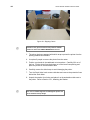
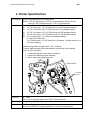
The SNAP 500 printer weighs 55 pounds (25 kg) and requires a table of sufficient
quality and strength to handle this load. The printer requires an area of
approximately 72" wide x 30" deep x 32" high (1.8 m x 76 cm x 81 cm). The host
PC (if used) and any printer options will increase the required area. AVERY
DENNISON recommends using an industrial type worktable. Refer to Figure 1
below.
The SNAP 500 printer is designed for easy operator accessibility to the printer
controls and components. Select your SNAP 500 printer’s location that optimizes
product flow and operator comfort:
1. Physical demands on the operator will dictate proper height of the table
supporting the printer. Ensure the operator has comfortable access to the
printer. Refer to Figure 1.
2. Allow enough space for smooth flow of materials that the operator will load
on the printer as well as space for processing the finished product from the
printer.
3. While AVERY DENNISON has designed the printer to be reasonably quiet,
select an area where repetitious noise from printing and cutting processes is
acceptable.
CAUTION: Each customer must take responsibility to
ensure the workstation created for the SNAP 500 printer
meets the recommended requirements to ensure optimal
operation of the printer.