1
51
User’s Manual—SNAP™ 500 2/1 Printer
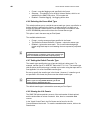
5.3 Lubrication
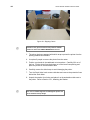
The SNAP 500 printer has ball bearings that do not require lubrication. However,
there are two (2) oil-impregnated bronze bushings in the auxiliary rollers of the
feed assembly that do require lubrication.
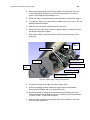
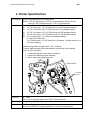
Figure 18a: Lubrication Locations
Caution: AVERY DENNISON recommends lubricating the
bronze bushings with one drop of multi-use oil once every
month during normal operation.
5.4 Rotary Knife Assembly
The rotary knife assembly for the SNAP 500 printer sets into a groove in the
mounting bracket and is locked in place with a single screw. You can expect an
average of two million cuts if you are cutting with woven tapes and four million
cuts if you are cutting coated tapes. Knife life decreases when foreign objects are
inserted into the assembly.
There are no field replacement components. When the blades become dull,
replace the rotary knife assembly. Replacement knife assemblies are sold ready
to install with no adjustments required.
5.4.1 Removing and Replacing the Knife Assembly
WARNING: When adjusting, removing, or replacing the
knife assembly, you must turn off the power to the printer
to avoid personal injury.
1. Turn off the power to the printer.
2. Using the Feed Roller knob, back the tape out of the knife.
3. Using a Phillip’s head screwdriver, loosen but do not completely remove, the
retaining screw on the outboard end of the knife (see Fig. 18a). Leave the