1
8. Adding Paper and Toner
Recommended Paper Sizes and Types
This section describes recommended paper sizes and types.
• If you use paper that curls, either because it is too dry or too damp, a paper jam may occur.
• Do not use paper designed for inkjet printers, as these may stick to the fusing unit and cause a
misfeed.
• When you load OHP transparencies, check the front and back of the sheets, and place them
correctly, or a misfeed might occur.
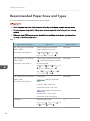
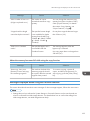
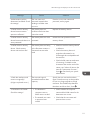
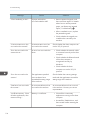
Tray 1
Paper type and weight
Paper size
52–162 g/m2 (14 lb. Bond–
90 lb. Index)
Select the paper size using the
paper size dial on the tray*1:
Thin Paper–Thick Paper 2
A4 , A5 , A6 , 81/2 × 14 ,
81/2 × 11 , 51/2 × 81/2
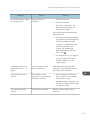
52–162 g/m2 (14 lb. Bond–
90 lb. Index)
Set the paper size dial on the tray to
" ", and select the paper size with
the control panel:
Thin Paper–Thick Paper 2
Paper capacity
250 sheets
250 sheets
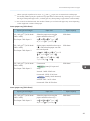
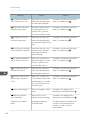
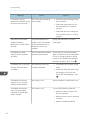
A5 , B5 JIS , B6 JIS , 81/2 × 13
, 81/4 × 14 , 81/4 × 13 ,
8 × 13 , 8 × 101/2 , 8 × 10 ,
71/4 × 101/2 , 16K
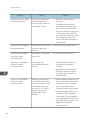
52–162 g/m2 (14 lb. Bond–
90 lb. Index)
Custom size:
Thin Paper–Thick Paper 2
Asia)
250 sheets
(mainly Europe and
Vertical: 148.0–356.0 mm
Horizontal: 100.0–216.0 mm
(mainly North America)
Vertical: 5.83–14.01 inches
Horizontal: 3.94–8.50 inches
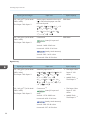
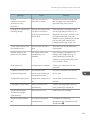
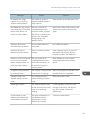
Envelopes
Select the paper size:
41/8 × 91/2 , 37/8 × 71/2 , C5
Env , C6 Env , DL Env
88
*2