1
Installation
A DISK PARTITIONED, FORMATTED, AND LOADED AS ONE TYPE WILL
PROBABLY NOT BE RECOGNIZED BY A CPU SET TO A DIFFERENT DRIVE
TYPE. CHANGING THE DRIVE TYPE OF THE DISK LATER USUALLY REQUIRES
COMPLETE RE-PARTITIONING AND RE-FORMATTING WITH LOSS OF ALL
DATA ON THE DRIVE.
Adding an External Floppy Drive
An external floppy drive can be used with the EXP-MX via cable attachment to the
34-pin connector. Most standard 5.25" and 3.5" drives can be used. The EXP-MX
does not support drives that take their 5V power from the ribbon cable.
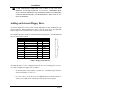
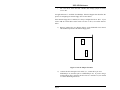
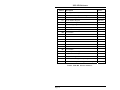
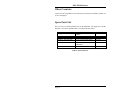
The 34-pin front-panel connector is defined in the following table. All odd-numbered
pins are connected to Ground.
Pin
2
4
6
8
10
12
14
16
Signal
-DENS
not used
not used
-IDX
-MO1
-DS2
-DS1
-MO2
Pin
18
20
22
24
26
28
30
32
34
Signal
-DIRC
-STEP
-WD
-WE
-TRQ0
-WP
-RDD
-HS
-DCH
34
2
1
Table 3. Floppy Cable Pin-Out.
Assuming the drive is to be configured as the B: drive on a straight (pin-1 to pin-1,
etc.) cable, configure the floppy drive as follows:
•
Set the DS (drive-select) jumper or switch to 2. (If numbering on the drive
starts at 0 instead of 1, set it to 1.)
•
For 5.25" drives, if the drive has an MM/MS (motor-control) jumper or
switch, set it to MS (motor control derived from drive-select signal).
Page 7