1
1
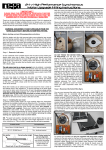
Turn the power dial to turn on.
1
Mount the counterweight on the shaft at the back of the tone arm.
The speed button and the strobe-illuminator light up.
2
Turn on the amplifier's power. Then, select the function switch.
3
Set a record on the platter.
* To play 45 rpm records, use the included adaptor.
4
Set the speed button's according to the record's playing speed.
5
Press the START/STOP button.
6
Hold the head shell's finger support, and move the tone arm to the
desired position over the record.
7
Lower the tone arm gently until the stylus is on the record and playback
begins.
8
Adjust the speed of rotation.
Mounting the cartridge
1
Insert the headshell on which the cartridge has been mounted into the
tone arm and fasten it in place using the lock nut.
Instructions on how to setup the tonearm from the website should be added on this page.
When QUARTZ LOCK Is off, the speed of the platter can be adjusted in a range
of +/-8% / +/-12% by the pitch slider.
The speed is lower than the displayed speed when the strobe is flowing to the
right, higher than the displayed speed when the strobe is flowing to the left.
When the strobe is stopped, the platter is turning at the displayed speed.
When the key adjust button is pressed during the pitch control mode, the button
lights on, and musical key tone can be kept constant even the platter speed is
changed with the slider.
Stopping or interruption playback
1
Stopping or interruption playback.
Raise the tone arm off the record.
2
Hold the head shell's finger support and move the tone arm back onto the
arm rest.
3
Secure the tone arm on the arm rest.
4
Press the START/STOP button.
The platter stops turning.
6
3
ASSEMBLY
OPERATION
Mounting the counterweight
Starting playback