1
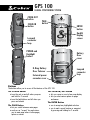
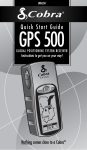
GPS
100
GLOBAL POSITIONING SYSTEM
ZOOM OUT
button
ZOOM IN
button
PAGE
button
ENTER
button
Backlit
display
screen
Lanyard
connector
loop
POWER and
Backlight
button
Battery
Door
cover
D-Ring Battery
Door fastener
Lanyard
connector
loop
External power
connector cover
Buttons
The buttons allow you to access all the features of the GPS 100:
The POWER Button
• turns the unit on and off when you press
and hold for 2 seconds
• turns the backlight on and off when you
press and release
The PAGE Button
• lets you switch between main pages
• works as an “escape” key and returns
you to main page when in other pages,
options or menus
The ZOOM IN/OUT Button
• lets you zoom in or out of any map display
• lets you select various options on pages
and menus
The ENTER Button
• use to accept any highlighted selection
• use to mark current location as waypoint
by pressing and holding for 2 seconds