1
2
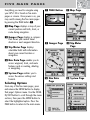
F I V E M A I N PA G E S
Everything you need to navigate using
your GPS 100 is found on five main
pages or screens. Once power is on, you
may switch among the five main pages
by pressing the PAGE button .
PAGE Button
Map Page
Gauges Page
Trip Meter
Page
Nav Data
Page
System Page
Map Page displays a map of your
current position and GoTo, track, or
route during navigation.
Gauges Page displays a compass
that shows your current travel
direction or next waypoint direction.
Trip Meter Page displays
selectable fields with information
about your current location or
navigation.
Nav Data Page enables you to
access waypoint, track, and route
features such as creating, deleting
or navigating.
System Page enables you to
access the various settings and
formats.
Selecting Options
From any of the five main pages, press
and release the ENTER button to display
that page’s Options menu. Use the ZOOM
IN/OUT button to scroll through the menu
sections, then press the ENTER button to
select the highlighted option. Press the
PAGE button to return to the main menu.