1
My Library
Viewing Image Cards
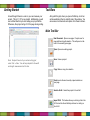
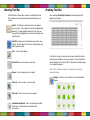
The Library is where you can select a design from the Image Card
Library to use in your project. Images purchased from eCraftcentral.com will appear under the Purchased Images tab once you select ‘Sync’ and enter your username and password for eCraftcentral.
On the Image Card tab, you will be able to browse through all available eCraft Image Card content. This will allow you to preview whatever you like, but you can cut only the content you have purchased.
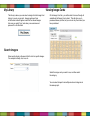
Select the image card you want to use, and then select
the category.
You can select shapes from multiple cards and categories in
the same project.
Search Images
Enter search criteria in the search field to look for specific images.
For example: butterfly, star, love, etc.
15
16