1
OASIS User Manual
All existing PBO Lab Global
Parameters are available for
use as Global Parameters in
the creation of an OASIS
Module. Global Parameters
may be utilized throughout the
OASIS Module Builder.
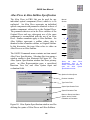
Click on a Special Parameter Setting (“S”) button to
open a new window that is used to assign attributes to
that parameter. The parameter can then be used by
other parts of OASIS and by the OModule itself.
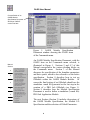
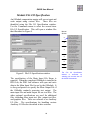
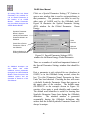
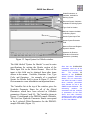
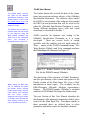
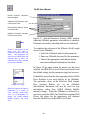
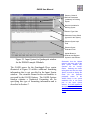
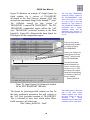
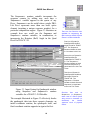
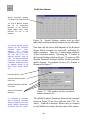
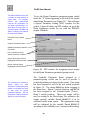
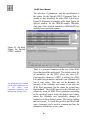
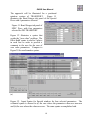
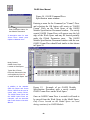
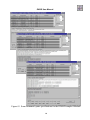
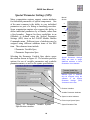
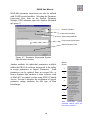
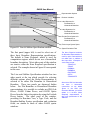
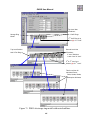
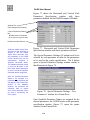
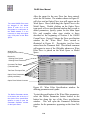
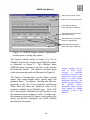
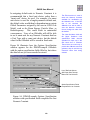
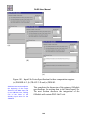
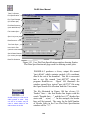
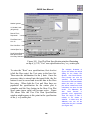
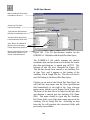
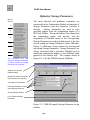
Figure 10 illustrates the Special Parameter Setting
(SPS) window for the Global Parameter: Beam
Energy.
Symbolic Parameter
Name is Used to
Identify All Parameters
Selected Utilized in an
OModule
Units
Choices
Check Box to Select
Parameter of Use in
the OModule
Optional
Key Word
Different Options for
Utilizing the Parameter
Figure 10. Special Parameter Settings (SPS)
window for the Beam Energy Global Parameter.
An OModule developer can
also
define
and
utilize
additional custom parameters
throughout the OASIS Module
Builder. These form part of the
OModule Options and are
described in Section 4 of this
User Manual.
There are a number of useful and important features of
the Special Parameter Settings window that should be
noted.
First, a parameter is only selected for use elsewhere in
OASIS, or in the OModule being created, when the
box “Use this [Parameter Name] Parameter in these
Units” has been checked. Checking the box will create
a (default) Symbolic Parameter Name that appears in
the upper pane of the window. The default name
(GLOBALS1 in the example shown in Figure 10)
consists of two parts: a word identifier and a number.
The default word identifier is useful for locating that
Symbolic Parameter Name later during the OModule
definition.
The attached number is generated
sequentially during the OModule definition; this
assures that the default Symbolic Parameter Name will
always be unique.
16